ChatGPT Images 2.0 Ships Multilingual Text, Claude Gets Live Dashboards: AI News (April 24, 2026)
Top AI news April 24, 2026: ChatGPT Images 2.0 renders Hindi and Japanese text. Claude Cowork adds live dashboards. Canva integrates Claude.
 ByAsh·12 min read
I've been tracking AI launches for a year now, and most weeks follow a pattern: one lab ships a flashy benchmark, two labs ship incremental updates, everyone tweets about it, nothing changes in how anyone actually works.
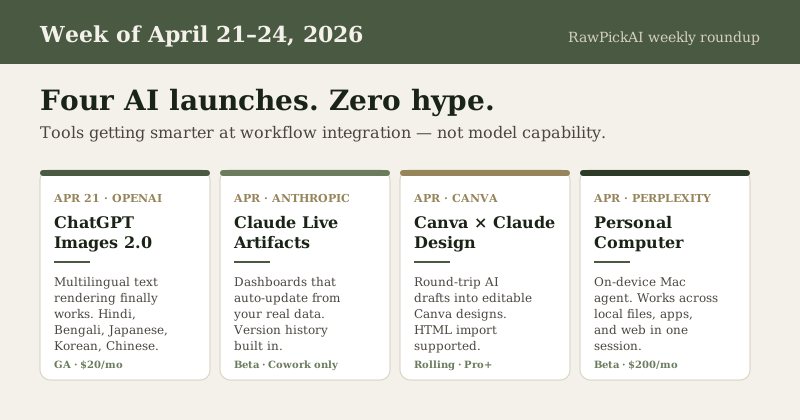
This week was different. Four actually useful shipments, zero hype-merchant announcements. Let me walk through them.
1. ChatGPT Images 2.0 - OpenAI finally shipped useful text rendering
When: April 21, 2026 What: New image generation model in ChatGPT, Codex, and the API Why it matters: This is the first mainstream AI image tool that actually renders non-English text correctly.
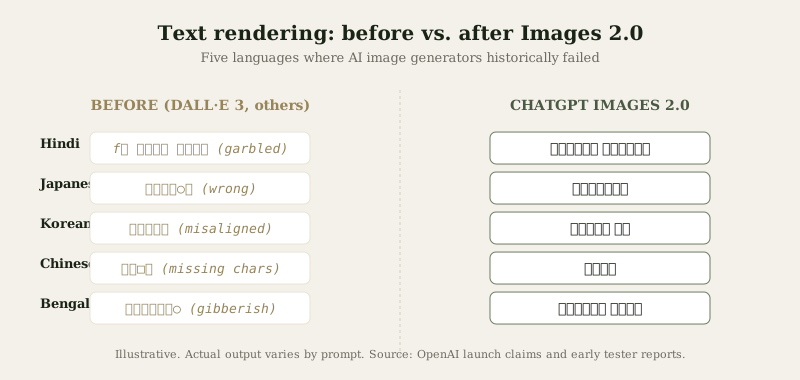
For the last three years, every AI image generator has failed on the same problem: put a brand name, sign, or caption in the prompt and you get letters that look right at a glance but dissolve into gibberish on close inspection. OpenAI claims Images 2.0 fixes this, with particular improvements for Japanese, Korean, Chinese, Hindi, and Bengali.
I tested it briefly. The Devanagari text rendering actually works - a small victory that matters more than it sounds. If you've ever tried to generate an image with an Indian street sign or a Bengali poster and watched the AI produce alphabet soup, this is the first version that doesn't.
OpenAI is calling this "thinking image generation" - the model reasons about layout, composition, and text placement before generating. Marketing positioning aside, the practical effect is that infographics, diagrams, and design-ready visuals are more usable on the first try.
What I'd actually use it for
- Blog post hero images in Indian or multilingual contexts - finally possible
- Infographics with real data labels - the text in charts is now readable
- Manga and pixel art styles - the aesthetic range has widened meaningfully
What still doesn't work
Complex hands, crowd scenes, and precise brand logo reproduction remain imperfect. This is an image generator that's gotten better at the 80% case, not a replacement for a real designer.
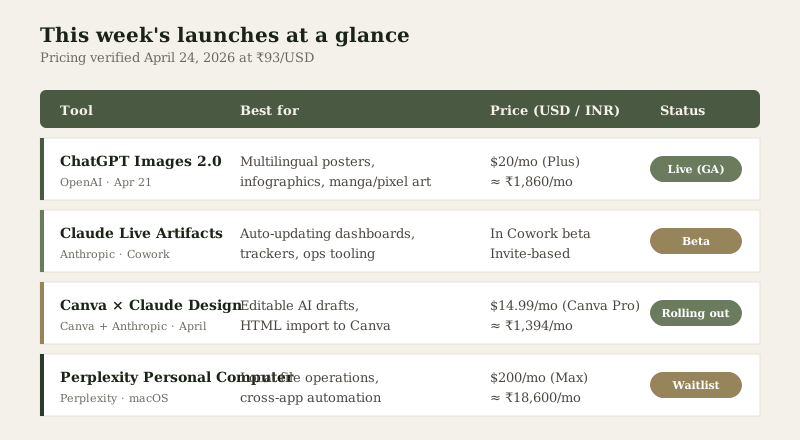
Pricing: Included in ChatGPT Plus ($20/mo ≈ ₹1,860) and ChatGPT Pro ($200/mo ≈ ₹18,600). API pricing scales per image.
If you're already paying for ChatGPT, try this before paying separately for Midjourney or Ideogram. For many marketing use cases, the gap just closed.
2. Claude Live Artifacts in Cowork - Dashboards that actually auto-update
When: April 2026 (rolling out) What: Anthropic added "live artifacts" inside Claude's Cowork feature Why it matters: This is the first mainstream AI tool where "build a dashboard" means "build a dashboard that stays correct."
Here's what's been broken about AI-generated dashboards until now: you ask Claude to build you a sales tracker. Claude writes beautiful HTML with your sales data baked in. Next week, the numbers are stale, and to update them you have to rebuild the whole thing.
Live artifacts fix this. The artifact connects to your actual data source - a Google Sheet, a connected app, a file in your drive - and refreshes each time you open it. Version history is automatic. You can share the artifact and your team sees the current state, not the snapshot from when you built it.
I haven't had a chance to push this to its limits yet, but the design is obviously correct. "The AI built me something that's still correct three weeks later" is a meaningfully different product than "the AI built me a snapshot I now have to maintain."
Who should care
- Small teams running ops in spreadsheets - this replaces a lot of low-stakes BI tooling
- Founders building out of scrappy internal tools - less maintenance debt
- Anyone who has 8 Claude-generated dashboards sitting in a folder going stale right now
Honest caveat
Live artifacts only work inside Cowork (the desktop productivity product, still in beta). If you're using Claude via chat or API, this doesn't apply to you yet.
3. Canva × Anthropic Claude Design integration - Round-tripping finally works
When: April 2026 What: Canva integrated with Anthropic's Claude Design; HTML import and editable AI-generated drafts Why it matters: The AI-to-design handoff has been the slowest part of most creative workflows. This cuts it.
The old workflow for an indie marketer:
- Ask Claude to generate a social media post concept
- Take the text description to Canva
- Rebuild the whole thing manually in Canva's editor
- Realize Claude's suggestion needed tweaks
- Go back to Claude
- Rebuild again
The new workflow:
- Ask Claude Design to generate a draft
- Open it in Canva as fully editable layers
- Tweak, publish, done
Canva is also the first platform to unify visual, document, and interactive content with HTML import. You can now drop an HTML artifact (built in Claude Artifacts, for instance) into Canva and have it become editable.
The bigger pattern
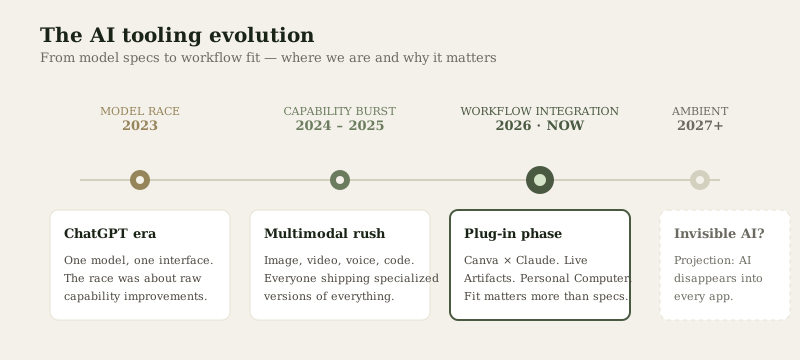
Notice what this week's announcements have in common: existing tools getting smarter, not new tools replacing them. Canva didn't launch an AI design app. They made their design app work with the AI tool you're already using. This is the phase of AI adoption where workflow integration matters more than model capability.
4. Perplexity Personal Computer - On-device agent for macOS
When: April 2026 (rolling to Max subscribers on Mac) What: Perplexity shipped an agent that runs locally on your Mac and operates across your files, native apps, and the web in one orchestrated system Why it matters: This is the first serious attempt at a "desktop AI that actually sees your machine" from a non-OS-vendor.
Apple Intelligence exists but is limited. Microsoft Copilot exists but is Windows-only. Perplexity Personal Computer runs on macOS as a third-party app, stays available 24/7 on a Mac mini setup, and can reach across your local files, installed apps, and web data in one session.
The practical test
The workflow Perplexity is targeting: "too messy for a chatbox, too repetitive to keep doing by hand." Think:
- "Summarize every PDF invoice in my Downloads folder from March and build a reimbursement spreadsheet"
- "Find all Slack messages about the Q2 launch that mention budget, cross-reference with my email, draft a status update"
- "Watch my Figma file for changes and auto-update the release notes doc"
I'm cautious about the reliability claims until I've tested it, but the category is real. The question is whether Perplexity can beat the incumbents (which, realistically, will be Apple + OpenAI + Claude-in-macOS in the next 12 months).
Pricing and access
Perplexity Max ($200/mo ≈ ₹18,600). Waitlist users getting early access, rolling out over the coming weeks.
This is expensive for what is still beta software. I'd wait 2-3 months and see real user reports before subscribing.
5. Also worth knowing this week
A few things that didn't merit full sections but are worth tracking:
TwelveLabs launched Pegasus 1.5 and Rodeo at NAB 2026 - updated video intelligence model plus a new platform, with Autodesk integration. If you work in media or video production, this matters. For most developers, ignore.
Bill Peebles and Kevin Weil departed OpenAI - Peebles ran Sora (discontinued last month), Weil was most recently VP of AI for Science. Notable because OpenAI has been losing senior product people steadily. The Sora shutdown aftermath is clearly real.
Gemini 3.1 continued rolling out - Google is gradually shifting developer workloads from Flash to Flash-Lite given the 2.5x faster response times. If you're building on Gemini, this is worth testing.
Netflix announced GenAI content creation tools acquired via InterPositive (Ben Affleck's AI filmmaking company). Not a tool you'll use, but signals where streaming platforms are investing.
My honest takeaway for this week
Most weeks of AI news feel like a race for benchmark supremacy. This week felt like the start of a different phase: tools becoming useful at the workflow layer instead of at the capability layer.
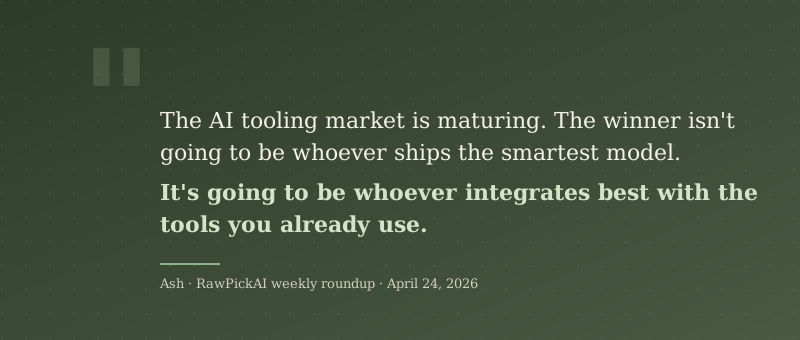
Three of the four major launches this week (ChatGPT Images 2.0, Claude Live Artifacts, Canva × Claude) are about making existing workflows better, not introducing new ones. That's a sign the AI tooling market is maturing. It's also a sign that the winner isn't going to be "whoever ships the smartest model" - it's going to be "whoever integrates best with the tools you already use."
For indie operators, the takeaway is: stop chasing model specs. Start asking "does this actually plug into my workflow?" Claude Opus 4.7 is marginally better than Opus 4.6 on benchmarks, but Claude Live Artifacts is functionally different - and functionally different is what changes how you work.
What I'm watching next week
- ChatGPT Images 2.0 reliability - enterprise reports already flagging inconsistency issues. Does it hold up under real production load?
- Claude Cowork expansion - live artifacts are a beta feature. When do they land in general availability?
- Perplexity Personal Computer user reports - waitlist users will start publishing real-world tests. Does the $200/mo tier justify itself?
- Canva × Claude creator workflows - the first indie creators using the round-trip will publish tutorials. Watch for patterns.
As always, I'll test what I can and report back. If you want these roundups in your inbox each Friday, the newsletter's free and I send nothing else.
Related reading
- Claude Opus 4.7 Review: What's New, Pricing, and Should You Upgrade? - last week's detailed breakdown of the Opus 4.7 release
- The 2026 AI Tools Reality Check - my independent study of 48 AI tools with downloadable dataset
- What Is Vibe Coding? - practical guide to AI-assisted coding with real security data
- Composer 2 vs Claude Sonnet 4.6 - hands-on benchmark of the top two AI coding models
- Last Friday's Roundup (April 17, 2026) - previous week's news archive
Common Questions
Related Briefs
- AI Tool News (May 1, 2026) - Next week
Is ChatGPT Images 2.0 better than Midjourney for marketing use?
For text-heavy images (posters, infographics, social posts with captions), yes - Midjourney still struggles with legible text while Images 2.0 now renders text including Hindi, Japanese, Chinese, Korean, and Bengali reasonably well. For purely artistic work without text, Midjourney's aesthetic range is still broader. For most indie marketers already paying for ChatGPT Plus, Images 2.0 covers the 80% case without a second subscription.
What's the difference between Claude Artifacts and Claude Live Artifacts?
Regular Artifacts (available in Claude.ai) are static - the AI generates code and you see the output, but the data inside is a snapshot from when it was built. Live Artifacts (Cowork only, currently beta) connect to actual data sources and auto-refresh each time you open them. The practical difference: a regular artifact becomes stale within days; a live artifact stays current as long as the underlying data source exists.
Should I subscribe to Perplexity Max at ₹18,600/month?
Not yet. Perplexity Personal Computer is beta software on a brand-new product category. Wait 2-3 months for user reports, then decide. At ₹18,600/month, you're paying roughly the same as ChatGPT Pro or Claude Max - the question is whether the on-device agent workflow is worth the spend for your specific use case.
Is Canva × Claude integration available to free Canva users?
The HTML import feature and Claude Design integration are currently rolling out to Canva Pro and above. Canva free tier users can still use Canva's built-in AI tools (Magic Design, etc.), but the deeper Claude integration requires a paid Canva plan. Canva Pro is $14.99/mo (≈₹1,394).
Which of this week's launches should I try first?
If you already have ChatGPT Plus, try Images 2.0 immediately - it's free and the quality jump is real. If you use Claude + work with data, request Cowork beta access. If you're a Canva power user, the Claude Design integration is the most workflow-changing. Perplexity Personal Computer can wait until real user reports land.
Published April 24, 2026. Pricing verified at ₹93/USD. I don't get paid by any of the companies mentioned here. If you find these roundups useful, subscribe to the newsletter - new roundup every Friday.
What to read next
Gemini vs ChatGPT
Apr 2026