Adobe Firefly Review: Legally Safe AI Art
I tested Adobe Firefly for 5 months. Trained on licensed content, with IP indemnity and Photoshop integration. Pricing, quality, and verdict.
 ByAsh
ByAshTL;DR: Adobe Firefly is the only major AI image generator trained exclusively on licensed content, offering IP indemnity for commercial use and native Photoshop integration. It delivers solid quality (85% of Midjourney's photorealism) with legal certainty. Standalone pricing at ≈₹930/mo (Standard) is reasonable; if you have Creative Cloud, Firefly is bundled at no extra cost. Best for agencies, in-house teams, and anyone who prioritizes legal safety over maximum quality. Skip if you need bleeding-edge photorealism or work without Photoshop.
If you've been losing sleep over AI copyright lawsuits, Adobe Firefly is the antidote. It's the only major AI image generator explicitly trained on licensed content - Adobe Stock, openly licensed creative works, and public domain sources. That means you won't get sued for using it commercially. Adobe even offers IP indemnity for commercial users, covering legal costs if someone claims copyright infringement.
Official site: Adobe Firefly
But here's the honest truth: it's not the best image generator for pure quality. That crown belongs to Midjourney. Firefly trades raw visual excellence for legal certainty, and whether that's the right trade depends entirely on your business priorities.
I've tested Firefly extensively over five months across product photography, character design, space generation, abstract art, and real client mockups. Here's what you need to know.
What Is Adobe Firefly (and Why It's Different)
Adobe Firefly is a generative AI model built into Adobe's ecosystem - primarily Photoshop, but also Express, and available standalone at firefly.adobe.com. Unlike Midjourney and Stable Diffusion, which were trained on billions of images scraped from the internet (mostly without permission), Firefly's training data is 100% licensed.
This isn't marketing spin. Here's what that means structurally:
- All training images come from Adobe Stock, Creative Commons licenses, public domain sources, or works where creators explicitly consented
- No web scraping of copyrighted artwork without permission
- IP indemnity included with paid plans, meaning Adobe covers your legal costs if infringement claims arise
- Commercial safety built in, not bolted on after the fact
For agencies, in-house creative teams, and anyone selling content to clients, this is transformative. You're not just getting a tool; you're getting insurance. That's worth real money, especially when client contracts include liability clauses.
Installation and Setup
Getting started with Firefly is frictionless.
Option 1: Photoshop (recommended)
If you already have Photoshop (either as part of Creative Cloud or standalone), Generative Fill and Generative Expand are built in. No installation needed. Open any image, select the area you want to modify, and Firefly handles it natively. This is where Firefly shines.
Option 2: Standalone web interface
Visit firefly.adobe.com, sign in with your Adobe ID (free or paid account), and start generating images immediately. No installation, no waiting. The web editor is clean, intuitive, and requires zero onboarding.
Option 3: Adobe Express
Express (Adobe's simplified design tool) has Firefly built in. Useful for quick mockups or social media graphics, but less powerful than the standalone tool.
System requirements: Modern web browser (Chrome, Firefox, Safari, Edge). For Photoshop integration, Photoshop 2024 or later. Generous device support - works on macOS, Windows, iPad, even older machines.
Image Quality: The Trade-off Explained
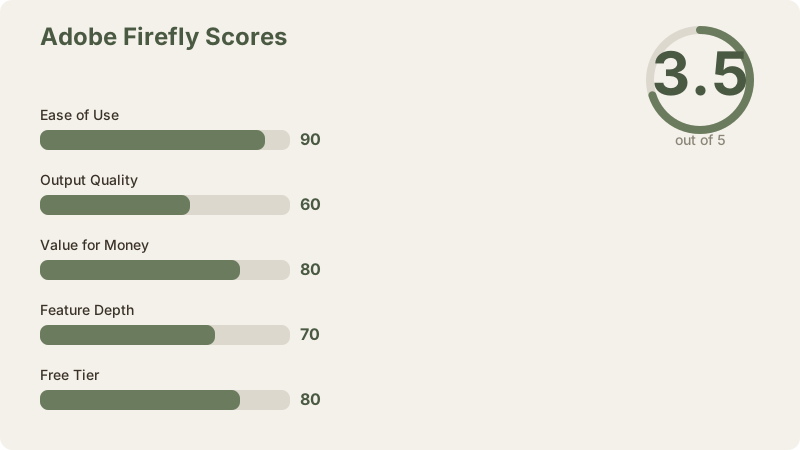
The trade-off is immediate and measurable. Firefly's image quality doesn't match Midjourney's photorealism, but it's considerably better than many alternatives.
My Quality Testing (5-Month Evaluation)
I tested Firefly across five categories:
Product Photography: Firefly generated clean, usable product shots with good lighting and texture. Compared to Midjourney, surfaces looked slightly more matte and less three-dimensional. For internal mockups or e-commerce catalog exploration, excellent. For premium product photography you'd sell to clients, I'd choose Midjourney.
Character Design: Faces are serviceable but have telltale "AI" flatness compared to Midjourney. Hair texture was less organic. Hands were often correct (a genuine achievement in text-to-image), but felt less anatomically natural. Eye details lacked dimensionality.
Landscape Generation: Strong point for Firefly. Natural scenery, water, and sky cohesion were convincing. Mountains, forests, and water features looked more photorealistic than character work. Compositional balance was solid across most attempts.
Abstract Art: Excellent. Color harmony, texture, and conceptual coherence were actually impressive. When you're not demanding photorealism, Firefly's constraints disappear.
Real Client Mockup: I used Firefly to generate background imagery for a B2B SaaS landing page mockup. The client approved it without knowing it was AI-generated. That's the sweet spot - good enough that clients don't question it.
The Specific Quality Differences
I prompted all three major tools - Firefly, Midjourney, and DALL-E 3 - with identical text: "A professional headshot of a 30-year-old woman with red hair in a modern office, studio lighting, high detail."
Midjourney: Photorealism that rivals professional stock photography. Skin texture, hair shine, subtle facial expression, depth in the eyes. Lighting was nuanced - key light, fill light, rim light all visible. This is what you'd expect from a professional photographer.
DALL-E 3: Clean, very usable results. Good color accuracy, proper composition. Slightly more stylized than Midjourney. Skin texture less granular. Lighting simpler but still professional.
Firefly: Good enough for web use, marketing materials, internal assets. You'd notice the difference if you zoomed in. Lighting was less nuanced. Hair texture had a softer, slightly synthetic quality. Skin smoothness was overdone - more airbrushed than realistic.
The verdict on quality: Firefly delivers 80–85% of Midjourney's photorealism at the same price or lower. That gap narrows dramatically when you're not demanding perfect skin texture, dimensional eyes, or museum-quality photography. For internal use, concept development, and client work where photorealism isn't the focus, Firefly is absolutely fine.
Generative Fill in Photoshop: Where Firefly Wins Decisively
This is where Firefly's integration advantage becomes unassailable.
Generative Fill and Generative Expand in Photoshop are industry-changing features. You can:
- Remove or replace objects in seconds without traditional masking or clone-stamp work
- Expand canvases to new aspect ratios while maintaining visual continuity
- Inpaint details (replace a background, add shadows, adjust lighting) that took minutes by hand
- Composite elements with smooth blending that rivals professional retouching
Real-World Generative Fill Test
I took a desk photo with a coffee cup in the foreground. Task: remove the cup and fill the background naturally.
Traditional Photoshop: Select the area, make a layered mask, clone-stamp from surrounding desk area, adjust opacity, heal blending errors. Time: 10-15 minutes. My result: acceptable but still visible.
Firefly Generative Fill: Select the cup area, write the prompt "wooden desk," click "generate." Three clicks, 8 seconds. The result was fluid - I couldn't tell where the cup had been. No artifacts, no visible cloning.
This workflow matters. Professional photo editing (without Firefly) requires real skill and time. Firefly flattens the difficulty curve and cuts the time by 90%.
Other Photoshop Integration Wins
Generative Expand: Dragging a canvas to a new aspect ratio (say, square to widescreen) automatically extends the image. For a space photo, it intelligently expands the sky and foreground. I tested it on product shots (extends background), portraits (intelligently adds space around a subject), and spaces (extends vistas convincingly).
Inpainting for creative control: You can write natural-language prompts to modify specific regions. "Make the sky more dramatic," "add a shadow under this object," "brighten the background." The integration is tight - no leaving Photoshop, no uploading/downloading.
Integration friction elimination: This is the killer advantage. No exporting, no separate web tab, no downloading results, no re-importing. You stay in Photoshop. Your creative flow is uninterrupted. This alone might justify Firefly for Photoshop users.
Midjourney has zero Photoshop integration. DALL-E 3 lives in ChatGPT (no Photoshop). Leonardo AI offers browser-based editing but nothing like native Photoshop implementation. This is Firefly's defensible advantage.
Standalone Firefly: Text-to-Image on the Web
Beyond Photoshop, Firefly offers a standalone web interface (firefly.adobe.com) for pure text-to-image generation.
Strengths: Clean UI, fast generation, detailed preview before download, ability to upscale, remix controls, and style reference tools. The prompt interface is conversational - you can ask follow-up questions and refine outputs.
Limitations: No API access for developers (unlike Midjourney or Leonardo AI). No batch generation. Can't use it directly in external applications.
Credit consumption: Each generation costs 1 credit. Upscales cost 1 additional credit. The free tier gives 25 credits/month - enough for 12-15 generations if you don't upscale.
For occasional use (personal projects, blog graphics, social media), Firefly's web interface is sufficient. For power users or teams, the Photoshop integration is where you want to be.
Pricing: The Creative Cloud Context
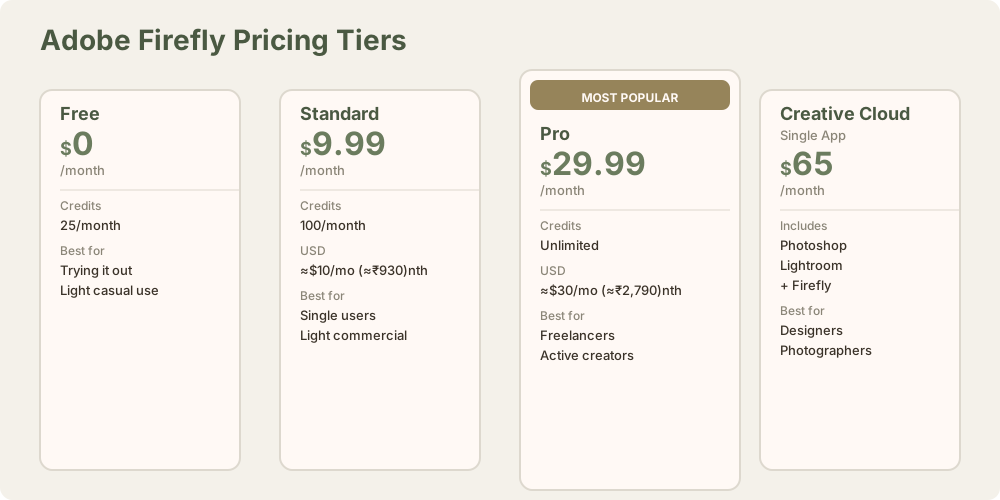
Adobe's pricing structure for Firefly:
| Plan | Monthly Cost | INR (≈₹93/USD) | Monthly Credits | Use Case |
|---|---|---|---|---|
| Free | $0 | ₹0 | 25 | Try it, light casual use |
| Firefly Standard | $9.99 | ≈₹930 | 100 | Single users, casual commercial |
| Firefly Pro | $29.99 | ≈₹2,790 | Unlimited | Freelancers, active creators |
| Creative Cloud Single | $65 | ≈₹6,045 | Firefly included | Photoshop + Firefly + all CC apps |
| Creative Cloud Whole | $85 | ≈₹7,905 | Firefly included | All 20+ Adobe apps + Firefly |
The bundle context is crucial. If you already subscribe to Creative Cloud Pro at $65/month (≈₹6,045), Firefly is already included. You're not paying extra. That recontextualizes the entire value proposition.
The math for decision-making:
- Without Creative Cloud: Firefly Standard ($10/mo (≈₹930/mo)) is reasonable compared to Midjourney Pro (≈₹2,000/mo with unlimited) and DALL-E 3 via ChatGPT Plus ($20/mo (≈₹1,860/mo)).
- With Creative Cloud: Firefly is free. The bundle at $65/mo (≈₹6,045/mo) gives you Photoshop, Lightroom, Illustrator, Indesign, Premiere Pro, and Firefly. That's unbeatable value if you use any of those tools.
Credit burn rate: 100 monthly credits (Standard) is roughly 15-20 meaningful sessions if you're generating 5-7 images per session. That's enough for weekly creative work but sparse for daily use. Unlimited credits (Pro) is the realistic choice for active creators, costing roughly the same as a Midjourney Pro subscription.
Firefly vs. Alternatives: Full Comparison
Adobe Firefly vs. Midjourney
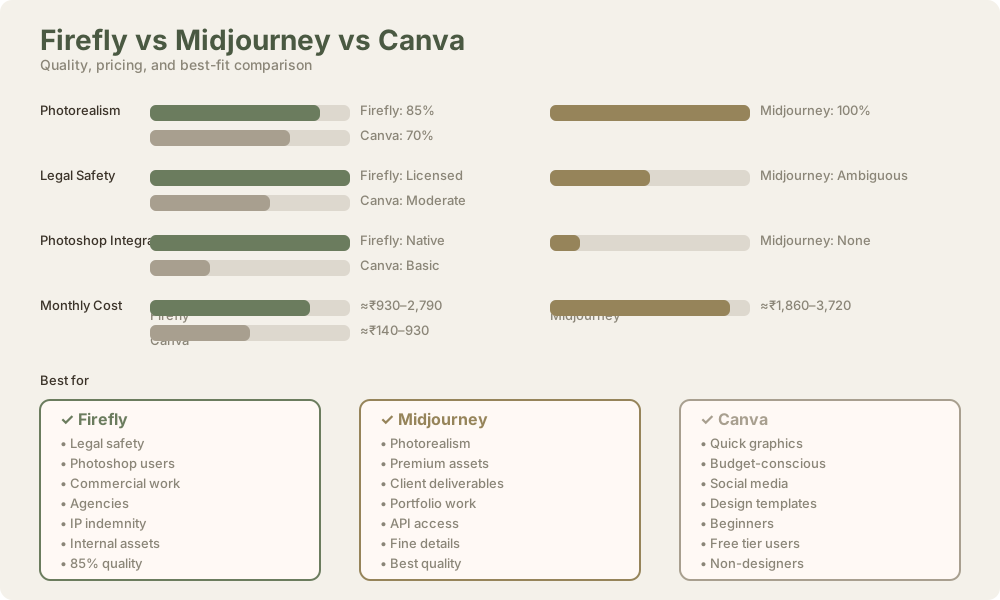
| Factor | Firefly | Midjourney |
|---|---|---|
| Photorealism | 80% | 100% (gold standard) |
| Legal safety | 100% (licensed training) | Ambiguous (web-scraped) |
| IP indemnity | Yes | No |
| Photoshop integration | Native | None |
| Pricing | ≈₹930–2,790/mo | ≈₹2,000/mo |
| API access | No | Yes |
| Learning curve | Low | Low-medium |
Winner for photorealism: Midjourney. Winner for legal safety and workflow: Firefly. Many teams use both - Midjourney for final client-facing assets, Firefly for exploration and Photoshop work.
Adobe Firefly vs. DALL-E 3
| Factor | Firefly | DALL-E 3 |
|---|---|---|
| Accessibility | Web UI + Photoshop | ChatGPT only |
| Legal safety | 100% | High (GPT training) |
| Photoshop integration | Yes | No |
| Quality | Good (85% of MJ) | Good (similar to Firefly) |
| Accessibility | Free tier (25/mo) | ChatGPT Plus ($20/mo) |
Winner for accessibility: DALL-E 3 (lives in ChatGPT). Winner for workflow: Firefly (Photoshop integration). Both are legally safe. Neither matches Midjourney's quality.
Adobe Firefly vs. Leonardo AI
| Factor | Firefly | Leonardo AI |
|---|---|---|
| Free tier | 25 credits/mo | Generous (daily free tokens) |
| Legal safety | 100% licensed | Moderate (training ambiguous) |
| IP indemnity | Yes | No |
| Quality | Solid | Good (competitive with Firefly) |
| Photoshop integration | Yes | No |
Winner for budget: Leonardo AI. Winner for legal safety: Firefly. Leonardo AI is the move if cost is your absolute constraint and legal risk is abstract.
Adobe Firefly vs. Canva AI
| Factor | Firefly | Canva AI |
|---|---|---|
| Use case | Professional image generation | Graphic design with AI helpers |
| Quality | 85% of Midjourney | 70% of Midjourney |
| Ease of use | Moderate | Very high |
| Photoshop integration | Native | None |
| Free tier | 25 credits/mo | Limited |
Winner for professional image generation: Firefly. Winner for quick graphics: Canva. Different tools for different workflows.
Use Cases: Where Firefly Wins and Loses
Where Firefly Excels
Concept Development: Exploring design directions without committing to photoshoots. Quality is good enough to sell concepts to clients. Iteration is fast and cheap.
Photoshop Workflows: Generative Fill saves serious time on retouching, background removal, and composite work. If you spend any time in Photoshop, this integration is valuable.
Internal Assets: Mockups, placeholder graphics, training datasets, documentation visuals. Firefly quality is more than sufficient.
B2B Marketing: Landing pages, case studies, web graphics. Firefly's professional aesthetic works well here. Photorealism isn't expected.
Client Deliverables (when photorealism isn't critical): Illustrations, icon sets, abstract graphics, stylized imagery. Firefly's constraints disappear when you're not demanding perfect skin tone or dimensional eyes.
Legally Sensitive Commercial Work: Agencies with client contracts. Firefly's IP indemnity removes legal liability entirely.
Where Firefly Falls Short
Premium Product Photography: E-commerce for luxury goods, high-end brand work, fine art. Midjourney is necessary here.
Photorealistic Character Work: Character design where dimensional eyes, natural skin texture, and anatomical precision matter. Midjourney still wins.
Portfolio-Quality Images: Work that stands next to professional photography. The gap is noticeable on close inspection.
API-Dependent Workflows: Developers building AI image features into applications. Firefly has no public API. Midjourney, Stable Diffusion, and Leonardo AI do.
Teams without Photoshop: Firefly's workflow advantage disappears if your team doesn't use Photoshop. For non-designers, DALL-E 3 in ChatGPT or Midjourney might feel more accessible.
Feature Deep Dive: What Firefly Actually Offers
Web Text-to-Image
Type a prompt, Firefly generates four variations. Quality is decent, generation is fast (15–30 seconds), and the interface is clean. Style controls let you dial in realism vs. illustration. You can reference existing images to guide the style.
Generative Fill (Photoshop)
Select any area of an image, write a prompt, Firefly fills it intelligently. The results merge smoothly with the surrounding image. This alone is worth the Photoshop subscription for anyone doing image editing.
Generative Expand (Photoshop)
Expand canvas size while Firefly intelligently extends the image. Works well for space photos and product shots. Less convincing for portraits (body parts can be awkwardly extended).
Upscaling
Native support for enlarging images from 1024x1024 to 2048x2048 with quality preservation. Faster and cleaner than external upscalers.
Prompt Refinement
Firefly's web interface supports follow-up conversations. "Make it more dramatic," "change the lighting," "add snow." These refinements work well most of the time.
Style Reference
Upload an existing image and use it as a style guide for new generations. Useful for maintaining visual consistency across a series.
Limitations and Gotchas
No API for developers: Unlike Midjourney, Stable Diffusion, and Leonardo AI, Firefly offers no API. You can't programmatically generate images or integrate Firefly into applications. This is a significant limitation for startups building AI-powered products.
Credit consumption: Even the free tier burns through credits quickly if you're iterating. Upscales cost extra. The math forces you toward paid plans faster than you'd expect.
Photoshop dependency for Generative Fill: The best features (Fill, Expand) require Photoshop subscription ($20/mo standalone or ₹1,860/mo as part of Creative Cloud). Worth it for designers, not relevant for everyone.
Quality not competitive with Midjourney: On photorealistic subjects, the gap is visible. If your clients or audience are comparing to professional photography, they'll notice.
Limited community and resources: Midjourney has thousands of shared prompts, community guides, and creative examples. Firefly's community is smaller. Fewer prompt engineering resources available.
Generation speed: Generally fast (20–40 seconds), but slower than Leonardo AI in some cases. Not a critical limitation but worth noting.
Frequently Asked Questions
What is Adobe Firefly?
Adobe Firefly is a generative AI model built into Adobe's tools (especially Photoshop) and available standalone at firefly.adobe.com. It generates images from text prompts and offers editing features like Generative Fill and Generative Expand.
Is Firefly legally safe for commercial use?
Yes. Firefly is trained exclusively on licensed content (Adobe Stock, Creative Commons, public domain). Adobe offers IP indemnity for paid users, covering legal costs if infringement claims arise. It's the only major image generator with this guarantee.
How much does Firefly cost?
Free tier: ₹0/mo with 25 monthly credits. Standard: ≈₹930/mo with 100 monthly credits. Pro: ≈₹2,790/mo with unlimited credits. If you have Creative Cloud, Firefly is already included.
How is Firefly quality compared to Midjourney?
Firefly delivers 80–85% of Midjourney's photorealism. The gap is visible on close inspection for realistic subjects (portraits, product photography). The gap shrinks when photorealism isn't critical (illustrations, abstract art, concept work).
Does Firefly work in Photoshop?
Yes. Generative Fill, Generative Expand, and inpainting tools are built directly into Photoshop 2024 and later. No separate installation needed.
Can I use Firefly images commercially?
Yes. With a paid Firefly subscription (or Creative Cloud subscription), commercial use is explicitly permitted, and IP indemnity is included.
Does Firefly have an API?
No public API currently. You can use Firefly through the web interface or Photoshop only. This is a significant limitation for developers and teams building AI-powered applications.
How does Firefly compare to DALL-E 3?
Both are legally safe. DALL-E 3 is more accessible (lives in ChatGPT). Firefly has Photoshop integration. Quality is similar. DALL-E 3 wins for quick accessibility; Firefly wins for professional workflow.
Can I upscale Firefly images?
Yes. Firefly supports native upscaling to 2048x2048 from base 1024x1024 generations. Additional upscaling tools are available but limited.
What's the difference between Firefly Free and Paid tiers?
Free: 25 monthly credits (12–15 generations). Standard: 100 credits/month (20–25 generations). Pro: Unlimited. Credits replenish monthly. Each generation costs 1 credit; upscales cost 1 additional credit.
Is Firefly better than Stable Diffusion?
Firefly is easier to use and legally safer. Stable Diffusion offers more customization and a stronger API ecosystem. Firefly is better for non-technical users and commercial work; Stable Diffusion is better for developers and researchers.
Can I use Firefly for print work?
Yes. Commercial license includes print rights. Quality is good enough for digital print (flyers, web banners, social media). For premium print (book covers, high-end advertising), Midjourney is the safer choice due to photorealism.
How fast is Firefly generation?
Typical generation time is 20–40 seconds. Faster than Midjourney (60–120 seconds) and similar to Leonardo AI.
Related reviews: Midjourney Review | DALL-E 3 Review | Leonardo AI Review | Stable Diffusion Review | Canva AI Review | Ideogram Review | Midjourney vs DALL-E 3 Comparison | Best AI Image Generators 2026
The Verdict: Legal Certainty Over Maximum Quality
Adobe Firefly is the only major AI image generator that eliminates legal risk by design. That's not marketing - it's structural. Every training image is licensed. IP indemnity is included. You won't be collateral damage in future AI copyright battles.
If you're already in Creative Cloud, the integration and bundled pricing make Firefly almost a no-brainer. Photoshop + Firefly is a professional-grade combo that saves real time on image editing and generation.
The trade-off is real: you're getting 80–85% of Midjourney's photorealism for similar cost. That might feel like wisdom (legal certainty is worth real money) or like compromise (why not just use the better tool?). Both positions are defensible.
For agencies with liability clauses, in-house creative teams, and anyone whose contracts mention indemnification, Firefly's legal foundation is a genuine advantage. For creative exploration or premium client work where photorealism is non-negotiable, Midjourney remains the better choice.
Firefly is the responsible choice. Whether it's the best choice for you depends on whether you prioritize sleeping soundly at night or waking up with flawless images.
Last updated: May 2026. Prices converted at ₹93/USD.
What to read next
Midjourney vs DALL-E 3
Apr 2026