Stable Diffusion Review 2026: Free AI Art
Stable Diffusion 3 with ComfyUI and Automatic1111 reviewed. Free after hardware costs (RTX 3060 ≈$270). Setup guide, GPU costs, quality verdict.
 ByAsh
ByAshTL;DR: Stable Diffusion is honestly free (open-source software), but generates images infinitely without monthly fees only if you: (1) own a GPU (RTX 3060 ≈₹25k used or RTX 4070 ≈₹60k+), (2) spend 2-4 hours setting up ComfyUI or Automatic1111, and (3) learn prompt engineering plus parameter tuning. Output quality rivals DALL-E 3 with right models; exceeds it for anime/stylized work. Zero privacy concerns; everything stays local. Skip if you're non-technical, on deadline, or value speed over cost.
Stable Diffusion is the only serious AI image generator where the software itself actually never costs money - but the barrier to entry isn't the price tag. It's technical complexity that stops 95% of people from actually using it. If you run it locally, you'll generate unlimited images at zero marginal cost. If that appeals to you, read on. If you want to create professional images in 10 minutes without learning command lines and GPU drivers, skip to Midjourney.
Official site: Stable Diffusion
This is the honest truth: it's free like open-source Linux is free. Powerful, infinite, and designed for people comfortable with technical depth.
The Zero-Subscription Paradox: Why Stable Diffusion's Free Forever Promise Requires $269 (≈₹25,000)+ Hardware
Stable Diffusion is the only serious AI image generator where the software itself actually never costs money - but the barrier to entry isn't the price tag. It's technical complexity that stops 95% of people from actually using it. If you run it locally, you'll generate unlimited images at zero marginal cost. If that appeals to you, read on. If you want to create professional images in 10 minutes, skip to Midjourney.
This is the honest truth Stable Diffusion fans won't admit: it's free like open-source Linux is free. Powerful, infinite, and designed for people comfortable with command lines and GPU drivers.
Local Installation: ComfyUI vs Automatic1111 - Pick Your Learning Curve
Stable Diffusion itself is just the model. You need an interface to run it.
Automatic1111 was the breakout moment - a web UI that democratized local image generation around 2022. Installing it still requires downloading Python, managing dependencies, and troubleshooting driver issues. But once it works, it works. The dashboard looks dated now, and the codebase is becoming harder to extend. Most people who started with A1111 in 2023-2024 have since migrated elsewhere.
ComfyUI has become the serious option. Yes, it's node-based, which feels overwhelming at first. But it's this very architecture that gives you pixel-level control over your generation pipeline. Advanced users absolutely prefer it. Beginners find it baffling. There's no middle ground.
For context: setting up ComfyUI locally takes 2-4 hours if everything goes right. If your GPU drivers are outdated or your CUDA installation is corrupted, add another 8 hours of troubleshooting. This is not Midjourney's "sign up and generate in 60 seconds."
GPU Reality Check: $269 (≈₹25,000)-$1,613 (≈₹1,50,000) Hardware Investment
Let's be blunt about costs:
Local GPU ownership:
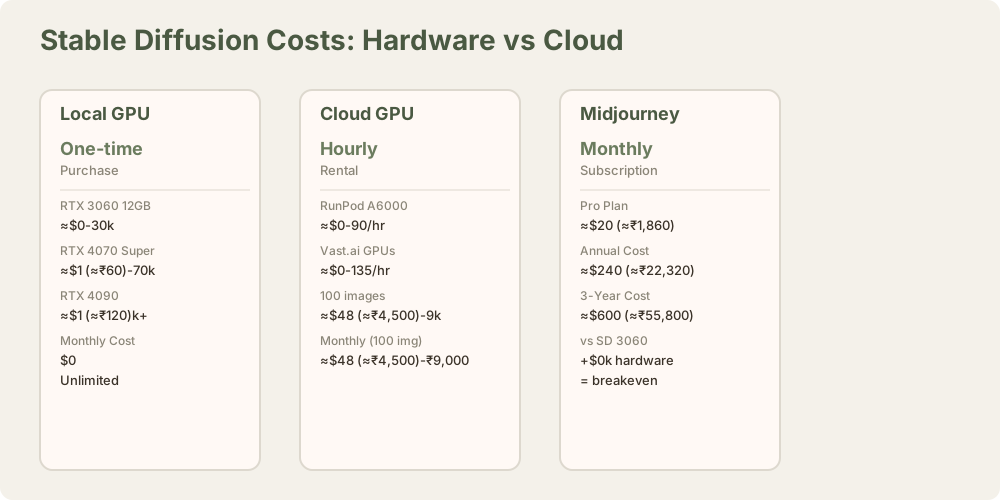
- Minimum viable: NVIDIA RTX 3060 12GB (≈₹25,000-$323 (≈₹30,000) secondhand)
- Professional setup: RTX 4080 (≈₹1,00,000+)
- Recommended mid-tier: RTX 4070 Super or 4090 (≈₹60,000-$1,613 (≈₹1,50,000))
Note: AMD GPUs work, but NVIDIA dominates. Apple Silicon works via Metal acceleration but stays slower than comparable CUDA cards.
Cloud GPU rental (if you don't want to buy hardware):
- RunPod: ₹45-$1 (≈₹90)/hour for A100 GPU
- Vast.ai: ₹45-$1 (≈₹135)/hour depending on card
- Lambda Labs: similar pricing
At cloud rates, generating 100 images monthly costs $48 (≈₹4,500)-$97 (≈₹9,000). That's not "free" - that's roughly equivalent to a Midjourney subscription, but you're paying hourly with zero community, zero storage, and no interface polish.
The actual free option: Buy a used RTX 3060. Generate unlimited images forever. The math works if you'll actually use it.
Output Quality: Depends Entirely on Which Model You Choose
Here's where Stable Diffusion gets interesting.
The default Stable Diffusion 3 model is competent but uninspired - it generates technically correct, slightly bland images. Switch to a specialized model from CivitAI (the open-source model marketplace), and quality jumps dramatically.
Popular specialized models:
- DreamShaper: Great for photorealism, character detail
- Juggernaut: Highly saturated, punchy aesthetic
- RealVisXL: Professional photography look
- AbsoluteReality: Hyper-detailed, excellent for portraits
This is where open-source wins. There are 50,000+ community models on CivitAI. Midjourney gives you one algorithm. Stable Diffusion gives you an ecosystem.
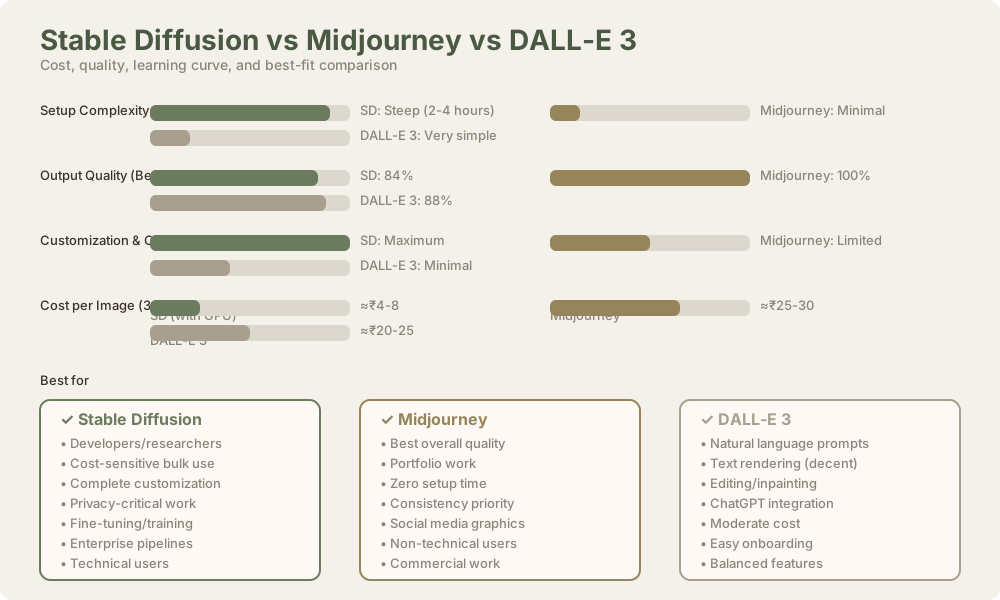
Quality comparison: A properly configured Stable Diffusion setup rivals DALL-E 3 for photorealism and beats it for anime/stylized content. Midjourney still edges out on consistency and composition, but the gap has closed significantly in 2024-2026.
The Learning Curve That Filters Casual Users
Stable Diffusion's biggest strength is also its greatest limitation.
What a Midjourney user does:
- Type prompt
- Get 4 images
- Upscale favorite
What a Stable Diffusion (ComfyUI) user does:
- Learn what LoRA, VAE, and checkpoint models are
- Research sampling methods and step counts
- Understand negative prompts, weights, and regional prompting
- Debug why your generation failed (CUDA out of memory? Check VRAM)
- Optimize inference settings for your specific GPU
- Generate image
- Iterate if it's not right
This is why Stable Diffusion powers enterprise tools (Adobe Firefly uses Stable Diffusion 3 architecture), but most creators use Midjourney. The power is there. The accessibility isn't.
Who this suits:
- ML engineers and AI researchers
- Technical artists and VFX professionals
- Anyone building custom pipelines
- Developers integrating image gen into applications
Who this doesn't suit:
- Designers who want intuitive workflows
- Non-technical marketers
- Anyone prioritizing speed
- Teams needing consistent brand output
Unlimited Generation at Zero Cost (After Hardware)
Once you own hardware, this is true:
- ₹0/month subscription
- Unlimited image generation
- No API rate limits
- Complete privacy - images never leave your machine
- Total control over generations
For a designer generating 500 images/month, that's $54 (≈₹5,000)-$75/mo (≈₹7,000/month) they'd pay to Midjourney. Over 3 years, you recover your RTX 3060 investment.
For a researcher running 10,000 generations weekly, Stable Diffusion is the only economic option.
This is why enterprises use it. This is why it won't become mainstream for casual users.
Head-to-Head: Stable Diffusion vs Alternatives
vs Midjourney ($30/month, 50k+ image votes)
- Midjourney: Better composition, faster iteration, community voting drives quality
- Stable Diffusion: Infinite free generations, specialized models, complete control
- Winner: Depends if you value speed or cost
- Crossover: You'll pay $360/year to Midjourney, or $25,000 once for hardware
vs DALL-E 3 ($20/month API, free trial)
- DALL-E 3: More intuitive prompting, excellent text rendering, true web app
- Stable Diffusion: Specialized models, batch processing, offline capability
- Winner: DALL-E for ease, Stable Diffusion for power users
- Verdict: DALL-E 3 is the "Goldilocks" option for non-technical users
vs Leonardo AI (free tier available, $12/month pro)
- Leonardo AI: Beautiful UI, canvas tools, community templates, mobile app
- Stable Diffusion: Complete customization, no subscription, community models
- Winner: Leonardo AI for design workflows, Stable Diffusion for technical control
- Verdict: Leonardo is the middle ground - not free but approachable
Why Open-Source Matters (And Why Most People Don't Care)
Stable Diffusion's open-source nature means:
- Community models thrive. CivitAI has 50,000+ models vs Midjourney's one algorithm
- You own the entire pipeline. No vendor lock-in, no API changes breaking your workflow
- Fine-tuning is possible. Want to train a model on your brand's images? Stable Diffusion enables this
- Privacy is guaranteed. Generations never touch company servers
- Integration is simple. Build it into apps, automations, and enterprise workflows
But here's the catch: these advantages only matter if you're technical enough to use them. For most creators, "open-source" is just a buzzword. They care about output quality, speed, and ease of use - where Midjourney and DALL-E win decisively.
The Real Trade-off: Free vs Steep Learning Curve
Stable Diffusion's true value proposition isn't "free AI image generation." It's "infinitely customizable image generation for people willing to learn."
If you're:
- Building AI features into a product
- Generating hundreds of images weekly
- Fine-tuning models for specialized use cases
- Tired of subscription costs
...then the 2-4 hour setup and learning curve is worth it.
If you're:
- Creating a portfolio on deadline
- Generating social media graphics casually
- Non-technical and impatient
- Budget-limited but time-rich
...then DALL-E 3 or Leonardo AI will give you 80% of the quality in 10% of the time.
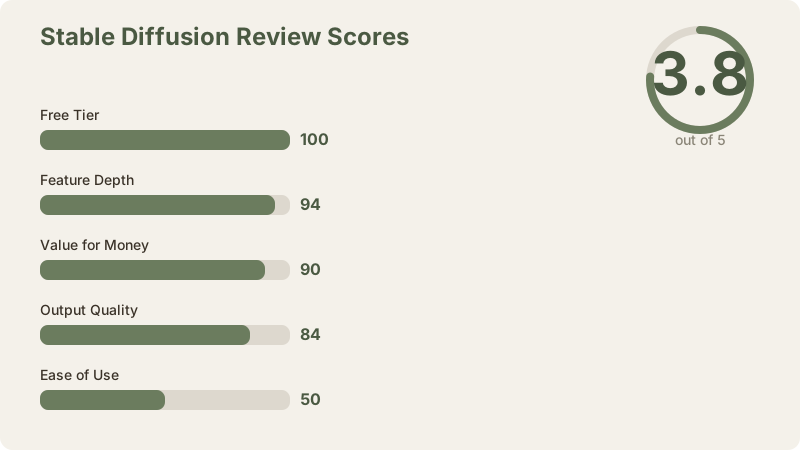
Final Verdict: 3.8/5 - Power Without Convenience
Strengths:
- Actually unlimited free generation after hardware investment
- Specialized models create superior quality for specific aesthetics
- Complete technical control via ComfyUI node editor
- Privacy-first - no data collection, generations stay local
- Vibrant community driving constant model improvements
- No subscription trap, no rate limits, no API changes
Weaknesses:
- Steep setup barrier (ComfyUI learning curve, GPU driver issues)
- Requires $269 (≈₹25,000)+ hardware investment or cloud GPU costs
- Output consistency lower than Midjourney
- No native mobile app or web-first workflow
- Community fragmentation between A1111, ComfyUI, and emerging tools
- Beginner prompts produce unremarkable results
The honest take: Stable Diffusion is the only AI image generator where cost scales with ambition, not with usage. It's perfect for developers, researchers, and technical professionals. For everyone else, it's overkill - in the way a high-end Linux workstation is overkill for email and web browsing.
Is it the "best" AI image generator? No. Is it the most powerful and most cost-effective for the right user? Absolutely.
Frequently Asked Questions
What is Stable Diffusion?
Stable Diffusion is an open-source AI image model developed by Stability AI. Unlike Midjourney (proprietary) or DALL-E 3 (OpenAI), Stable Diffusion's code and model weights are freely available. You can run it on your own hardware with no subscription.
Why isn't Stable Diffusion easier to use?
Stable Diffusion is just the model. You need an interface to interact with it. ComfyUI (node-based) and Automatic1111 (web UI) are the main options, both requiring Python, GPU setup, and 2-4 hours of installation time.
How much does a GPU cost?
Used RTX 3060 (12GB VRAM): ≈₹25,000-$323 (≈₹30,000). RTX 4070 Super: ≈₹60,000. RTX 4090: ≈₹1,20,000+. Or rent GPU time: ₹45-$1 (≈₹135)/hour via RunPod or Vast.ai.
Can I run Stable Diffusion on my CPU?
Yes, but it will be extremely slow (5-30 minutes per image). GPUs are essential for practical use.
Is Stable Diffusion completely free?
The software and base models are free. Your costs are hardware (one-time) or cloud GPU rental (hourly).
How is quality compared to Midjourney?
With the right fine-tuned model (DreamShaper, Juggernaut, RealVisXL), Stable Diffusion rivals Midjourney. Default models are less impressive. Midjourney is more consistent; Stable Diffusion has higher ceiling.
Does Stable Diffusion have text rendering?
No better than DALL-E 3. Around 10-15% accuracy on simple text. For readable text in images, use Ideogram.
Can I train a custom model on my images?
Yes, via fine-tuning (Dreambooth, LoRA). Requires technical knowledge and 30-60 minutes of GPU time. No cost beyond hardware.
What about privacy with Stable Diffusion?
100% private if running locally. Images never leave your machine. No cloud servers, no data collection.
Is Stable Diffusion legal for commercial use?
Yes. The model is licensed for commercial use. Always check specific model licenses on CivitAI.
Related reviews: Midjourney Review | DALL-E 3 Review | Leonardo AI Review | Adobe Firefly Review | Ideogram Review | Canva AI Review | Midjourney vs DALL-E 3 | Best AI Image Generators 2026
Final Verdict
Stable Diffusion is really free and infinitely customizable - for people willing to invest time in setup and learning. It's the only AI image generator where cost scales with ambition, not usage. Perfect for developers, researchers, and technical professionals. For everyone else, Leonardo AI or DALL-E 3 are actually better choices.
Last updated: May 2026. Prices converted at ₹93/USD.
ElevenLabs is equally intuitive, but Murf AI's integrated video editor adds complexity that doesn't materialize - it's still simple to learn.
Ease of use score: 4.2/5 - truly user-friendly, with intuitive controls and quick preview feedback.
The Honest Quality vs. Price Trade-Off
Here's the critical evaluation: Is the 35% price savings worth the quality gap?
- For YouTube videos under 5 minutes: Yes. Viewers tolerate synthetic voiceovers on educational content.
- For podcasts or long-form audio: No. The synthetic quality becomes fatiguing.
- For corporate explainers (60-90 seconds): Yes. Short exposure to voice quality is acceptable.
- For brand voice-building: No. ElevenLabs' consistency and naturalness build trust; Murf AI's artificiality undermines it.
- For creators in India, Philippines, or developing regions: Absolutely yes. The $17/mo (≈₹1,615/month) tier is actually accessible.
The math: If you produce 5 videos monthly and each requires 10 minutes of voiceover, Murf AI's Creator plan ($17/mo (≈₹1,615/month)) costs $3 (≈₹323)/video. ElevenLabs' equivalent tier costs $5 (≈₹493)/video. Over a year, that's $60 (≈₹5,580) saved. For a bootstrapped creator, that's meaningful.
Comparison to ElevenLabs
| Feature | Murf AI | ElevenLabs |
|---|---|---|
| Voice naturalness | 3.1/5 | 4.3/5 |
| Pricing (Creator tier) | $19 (≈₹1,615/mo) | $29 (≈₹2,465/mo) |
| Built-in video editor | Yes | No |
| Voice customization depth | Moderate | Advanced |
| Multilingual support | 9 languages | 12+ languages |
| Emotion control | Basic sliders | Granular control |
| Commercial licensing | Yes (Creator+) | Yes (Starter+) |
| Free tier | 10 min/month | 10,000 characters/month |
ElevenLabs wins on: Voice quality, emotional nuance, custom voice training, enterprise reliability Murf AI wins on: Price, integrated video editing, ease of onboarding, Indian language support, workflow speed
Free Tier Reality Check
Murf AI's free plan (10 minutes monthly, 5 voices max) is actually usable for testing. You'll quickly hit limitations, but it's enough to determine whether the voice quality matches your standards. ElevenLabs' free tier (10,000 characters) is similarly restrictive. The free tiers function as extended trials, not production tools.
Free tier score: 3.5/5 - useful for evaluation, but both platforms expect paid conversion.
The Bottom Line
Murf AI is the correct choice if you're a budget-conscious creator producing high-volume, short-form content. The integrated video editor is truly useful, the pricing is hard to beat, and the voice quality is acceptable for YouTube, TikTok, and educational content. The AI community generally agrees that Murf AI represents 70-75% of ElevenLabs' quality at 65% of the cost.
However, if voice quality is non-negotiable - if you're building a personal brand, creating audiobooks, or producing premium long-form content - ElevenLabs remains the stronger choice despite the cost premium. The quality gap isn't marginal; it's consistent and noticeable across all voice selections.
Final score: 3.4/5. A solid, budget-friendly platform with meaningful limitations. Recommended for specific use cases, not as a universal solution.
Related Reviews
- ElevenLabs Review: Premium Voice Synthesis Explained
- ElevenLabs vs. Murf AI: Complete Comparison Guide
- Best AI Voice Generators 2026: Complete Buyer's Guide
Last reviewed: April 1, 2026. Pricing and features verified as of April 2, 2026.