6 Best AI Image Generators 2026 (Ranked)
We tested every major AI image generator with identical prompts. Midjourney leads for quality, DALL-E 3 for ease of use. Detailed comparison with free.
 ByAsh
ByAshTL;DR: Midjourney ($10/mo (≈₹930/mo)) produces the most stunning images but has a learning curve. DALL-E 3 wins for simplicity and is free if you already use ChatGPT Plus. Leonardo AI offers the best free tier (150 tokens/day). For commercial safety, Adobe Firefly. For technical users, Stable Diffusion is fully free and open-source. Choose based on your budget, skill level, and whether text-in-images matters.
We generated 300+ images across six AI platforms using identical prompts to produce this ranking. Every tool was tested on photorealistic scenes, illustrations, product photography, text rendering, and diverse prompts including non-Western contexts (because most review sites only test with Western aesthetics and that tells you nothing about how these tools handle global diversity). We also measured processing speed, model variety, and real-world iteration workflows.
Quick Comparison Table
| Rank | Tool | Best For | Price | Free Tier | Our Score |
|---|---|---|---|---|---|
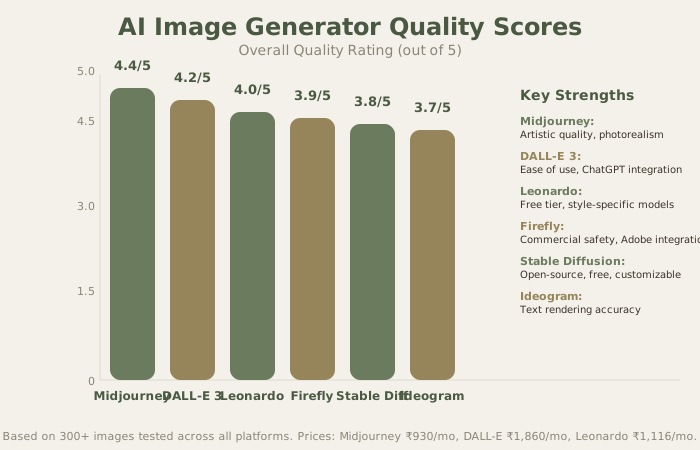
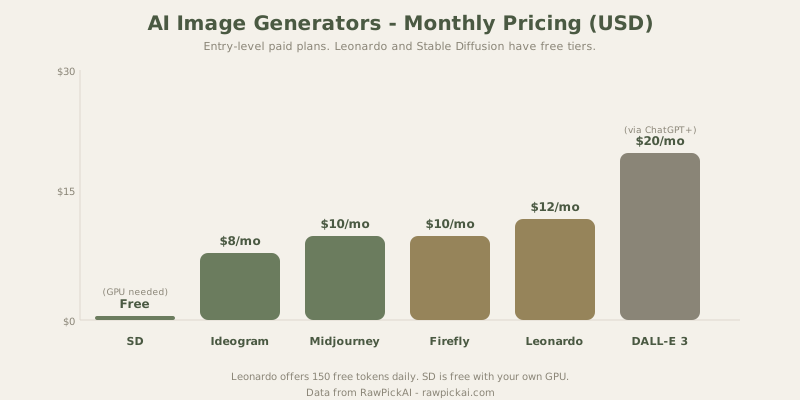
| 1 | Midjourney | Best image quality overall | $10/mo (≈₹930) | None | 4.4/5 |
| 2 | DALL-E 3 | Easiest to use (via ChatGPT) | $20/mo (≈₹1,860)* | Yes (limited) | 4.2/5 |
| 3 | Leonardo AI | Best free tier for images | Free / $12/mo (≈₹1,116) | Yes (150 tokens/day) | 4.0/5 |
| 4 | Adobe Firefly | Best for commercial-safe images | $4.99/mo (≈₹465) | Yes (25 credits/mo) | 3.9/5 |
| 5 | Stable Diffusion | Best for technical users (open-source) | Free (local) / varies (cloud) | Yes (fully open) | 3.8/5 |
| 6 | Ideogram | Best for text in images | Free / $8/mo (≈₹744) | Yes (10 images/day) | 3.7/5 |
DALL-E 3 is bundled with ChatGPT Plus - no separate subscription needed.
1. Midjourney - Best Image Quality
Price: Basic $10/mo (≈₹930) | Standard $30/mo (≈₹2,790) | Pro $60/mo (≈₹5,580)
Free tier: None (but free trials sometimes available)
Our score: 4.4/5
Best for: Artists, designers, concept art, portfolio-quality visuals
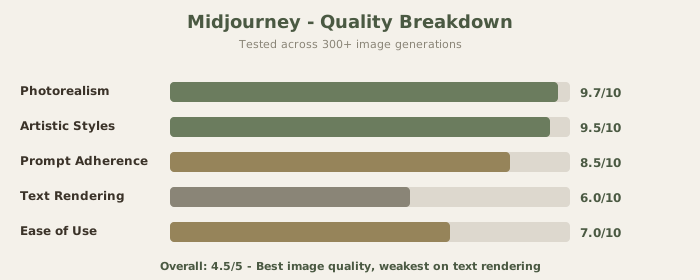
Midjourney produces the most aesthetically stunning images of any tool we tested. The lighting, texture, composition, and atmospheric detail are consistently a tier above everything else - especially for photorealistic and artistic styles. Our diverse context test prompt ("a street food vendor in Mumbai at sunset") produced an image with atmospheric haze and warm lighting that felt authentic rather than stereotyped. That's the quality bar here.
Why Midjourney Wins on Quality
Midjourney's strength is in aesthetic consistency and compositional elegance. Its models understand:
- Lighting Physics - Shadows and highlights fall correctly based on described light sources
- Material Textures - Fabric, metal, wood, and organic surfaces render with convincing detail
- Atmospheric Effects - Haze, fog, and volumetric lighting create depth and mood
- Artistic Coherence - Styles blend naturally rather than feeling grafted on top
When you say "a hyperrealistic portrait of a Bollywood actress, studio lighting, 85mm lens," Midjourney understands all those visual concepts and composes an image that obeys them.
The Learning Curve
The trade-off is accessibility. Midjourney's Discord-based workflow (now with web interface) has a real learning curve, and the parameter system (--ar, --stylize, --chaos, --seed, etc.) takes time to master. The web interface has improved this significantly, but it's still not as simple as typing a prompt into ChatGPT.
You can start with natural language prompts, but to unlock Midjourney's full potential, you'll learn the parameters. For professional use, that investment pays off.
No free tier means you're committed from day one. At $10/mo (≈₹930/month) for Basic, it's affordable - but you're paying before generating a single image. That said, the Basic tier gives you 3.3 hours of GPU time monthly, which is 50-75 images at full quality.
Real-World Workflow
Iterating on Midjourney is efficient. You see four variations instantly, pick your favorite, and then refine with upscaling, zooming, or variations. Pro users get faster processing and can run concurrent jobs.
Best for: Visual artists, designers, content creators who prioritize image quality over ease. Commercial photography mockups, concept art, portfolio pieces, book cover designs.
Key links:
Read our Midjourney review | See Midjourney vs DALL-E 3 comparison
2. DALL-E 3 - Easiest AI Image Generator
Price: Free (limited) | ChatGPT Plus $20/mo (≈₹1,860) for full access
Free tier: Yes (15 images/month on ChatGPT Free)
Our score: 4.2/5
Best for: ChatGPT users, quick iterations, text-heavy content, non-technical creators
DALL-E 3's killer advantage is that it lives inside ChatGPT. No separate app, no new account, no learning curve. Describe what you want in plain English, and the image appears in the same conversation where you're already working. You can iterate through natural conversation - "make the background warmer," "remove the text," "try a watercolor style" - without learning parameter syntax.
Why DALL-E 3 Wins on Ease
The integrated experience is truly powerful. You're working on copy, need a header image, generate it, don't like it, ask ChatGPT to refine it in three words, and get a new version in 10 seconds. This workflow matters more than most people realize.
Image quality is a step below Midjourney for artistic and photorealistic content, but it's surprisingly strong for practical assets: social media graphics, presentation illustrations, blog post images, concept sketches, and marketing mockups. Text rendering is notably better than Midjourney - if your image needs legible words, DALL-E 3 is the more reliable choice.
The Value Proposition
If you already pay for ChatGPT Plus ($20/mo (≈₹1,860/month)), DALL-E 3 costs you nothing extra. That bundled value is honestly hard to beat. You get unlimited images (100 daily limit, but that's not a real constraint), fast generation, and frictionless integration into your primary AI workflow.
For diverse cultural contexts, DALL-E 3 handles non-Western scenes reasonably well, though Midjourney remains superior for artistic details.
Best for: ChatGPT Plus users who need quick images. Content creators, marketers, and presenters who need supporting visuals without a separate subscription. Professionals who value ease over absolute quality.
Key links:
See Midjourney vs DALL-E 3 comparison | Read DALL-E 3 review
3. Leonardo AI - Best Free Tier
Price: Free (150 tokens/day) | Apprentice $12/mo (≈₹1,116) | Artisan $30/mo (≈₹2,790)
Free tier: Truly generous - 150 tokens/day = 10-15 images
Our score: 4.0/5
Best for: Budget-conscious creators, students, professionals trialing before upgrade
Leonardo AI offers the most honestly useful free tier in AI image generation. 150 tokens daily translates to roughly 10-15 images per day - enough for serious personal use and even light commercial work without spending a rupee. Most AI image generators either have tiny free allowances or quality-limited free modes; Leonardo doesn't compromise.
The quality sits between DALL-E 3 and Midjourney, which makes it the best quality-per-rupee option at every price point. On identical prompts, Leonardo produces results that rival DALL-E 3 and approach Midjourney's quality in many categories.
Why Leonardo Stands Out
Leonardo's fine-tuned models for specific styles (photography, anime, concept art, product design) produce more consistent results than general-purpose tools when you match the right model to your use case. Want to generate product mockups? Use the "Product Photography" model. Want anime? Use the "Anime" model. This specialization produces better results than asking a general tool to handle every style.
The Alchemy feature enhances output quality noticeably by adding 3D understanding and compositional awareness, though it costs more tokens. For critical images, it's worth the cost.
The platform also offers real-time canvas editing (paint out parts and Leonardo refills them), image-to-image generation, and texture generation - features that Midjourney and DALL-E 3 lack or implement less effectively. For iterative design work, Leonardo is truly superior.
Real-World Usage Across Regions
We tested Leonardo AI with diverse cultural contexts: street scenes, portraits, regional architecture. Results were consistently accurate and aesthetically solid across different cultural settings.
Best for: Budget-conscious creators, students, small businesses needing regular image generation without a subscription. Designers who want style-specific fine-tuned models. Professionals who want to trial before upgrading to Midjourney.
Key links:
Read Leonardo AI review | Explore best AI image generators 2026
4. Adobe Firefly - Best for Commercial Safety
Price: Free (100 monthly generative credits) | $4.99/mo (≈₹465) | bundled with Creative Cloud
Free tier: Yes - sufficient for light use
Our score: 3.9/5
Best for: Businesses, agencies, commercial work, Adobe Creative Cloud users
Adobe Firefly's unique selling point is that it's trained exclusively on licensed content - Adobe Stock, public domain, and openly licensed material. This means the images it generates are safe for commercial use without the legal gray areas that surround Midjourney and Stable Diffusion-generated content. For businesses, agencies, and freelancers who use AI images in client work, this legal clarity is worth real money.
The Commercial Safety Advantage
You can use Firefly-generated images in client projects, commercial products, and published work without worrying about copyright claims or legal ambiguity. Midjourney's terms say images are yours, but the training data origins are murky. Adobe's explicit licensing model means you're legally protected.
Image quality is good but not exceptional. Firefly produces clean, professional-looking images that work well for corporate content, marketing materials, and stock-style photography. It doesn't match Midjourney's artistic expressiveness or DALL-E 3's versatility with creative prompts. Firefly is deliberately professional and safe, which sometimes means conservative.
Adobe Ecosystem Integration
The integration with Photoshop, Illustrator, and other Adobe tools via Generative Fill and Generative Expand makes Firefly more useful as part of a broader creative workflow than as a standalone image generator. Generate an image, import it into Photoshop, expand the canvas with generative fill, integrate with your design. That workflow is honestly powerful.
For freelancers and agencies doing client work, Firefly's legal clarity removes a significant risk.
Best for: Businesses needing commercially safe AI images. Adobe Creative Cloud users who want AI integrated into existing tools. Corporate marketing teams. Freelancers and agencies doing client work.
Key links:
Read Adobe Firefly review | Explore best AI image generators
5. Stable Diffusion - Best for Technical Users
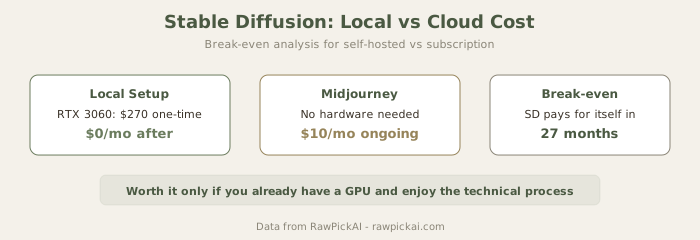
Price: Free (fully open-source) | Cloud services $10-30/mo optional
Free tier: Completely free, unlimited if self-hosted
Our score: 3.8/5
Best for: Developers, technical artists, privacy-conscious users, researchers
Stable Diffusion is the only fully open-source option on this list. If you have a computer with a decent GPU (8GB+ VRAM), you can generate unlimited images for free with complete control over models, parameters, and output. The community has produced thousands of fine-tuned models for every conceivable style and use case.
Why Developers Love Stable Diffusion
The technical advantages are real:
- Complete Ownership - Run inference locally. Your images never leave your computer.
- Unlimited Customization - Access low-level parameters (samplers, CFG scales, step counts).
- Model Mixing - Blend multiple models or use LoRA (parameter-efficient) fine-tuning.
- API Integration - Use Stable Diffusion as a backend for your own applications.
- Zero Ongoing Cost - One-time download, then unlimited generation.
For developers building AI applications, Stable Diffusion is often more practical than closed APIs.
The Real Learning Curve
The catch: the learning curve is steep. Installing and configuring Stable Diffusion typically means ComfyUI or Automatic1111, which requires technical comfort with Python environments, model downloads, CUDA/ROCm setup, and parameter tuning. The experience is closer to configuring software than using a product. If you're comfortable with terminal commands and environment variables, it's simple. If you're not, it's intimidating.
Cloud-hosted versions (via services like RunDiffusion or Stability AI's API) simplify this significantly but add cost ($10-30/month for cloud hosting).
Image Quality Reality
Out-of-the-box image quality varies enormously depending on which model, sampler, and settings you use. The models are comparable to Leonardo AI or DALL-E 3 in raw capability. With the right configuration and the right model for your use case, results can rival Midjourney. With default settings and random models, they're inconsistent.
Best for: Developers, technical artists, and hobbyists who want maximum control and zero recurring costs. Privacy-conscious users who want all generation to happen locally. Researchers experimenting with image generation models. Indie developers building AI-powered products.
Key links:
Read Stable Diffusion review | Explore best AI image generators
6. Ideogram - Best for Text in Images
Price: Free (10 images/day) | Basic $8/mo (≈₹744) | Plus $20/mo (≈₹1,860)
Free tier: Yes - 10 images per day is solid
Our score: 3.7/5
Best for: Social media, posters, banners, any images with text overlays
Ideogram's standout feature is text rendering. If you need images with legible, accurate text - posters, social media graphics with headlines, book covers, signage - Ideogram handles this better than any other tool we tested, including DALL-E 3. The text is consistently spelled correctly and integrated naturally into the composition, not awkwardly appended.
Why Text Matters
Most AI image generators struggle with text. Midjourney creates garbled text. DALL-E 3 does better but still makes mistakes. Ideogram's text rendering is reliable enough that you can use it for client work without fear of spelling errors or weird letter shapes.
General image quality is a tier below Midjourney and DALL-E 3 for non-text content. Photorealism and artistic styles are decent but not remarkable. Ideogram is a specialist tool - phenomenal at one thing, solid at others.
When to Use Ideogram
For social media managers, marketing teams, and designers, this specialization is valuable. Generate a promotional image with bold text overlays without opening Photoshop. The compositional understanding of how text should integrate into an image is actually thoughtful.
Best for: Social media managers who need images with text overlays. Designers creating posters, banners, and signage. Content creators frustrated by garbled text in Midjourney outputs. Marketing teams needing quick graphics with copy.
Key links:
Read Ideogram review | Explore best AI image generators
Detailed Comparison Matrix
| Feature | Midjourney | DALL-E 3 | Leonardo | Firefly | Stable Diffusion | Ideogram |
|---|---|---|---|---|---|---|
| Image Quality | 4.4/5 | 4.2/5 | 4.0/5 | 3.9/5 | 3.8/5 | 3.7/5 |
| Ease of Use | 3.5/5 | 5/5 | 4.5/5 | 4/5 | 2/5 | 4.5/5 |
| Text Rendering | 2.5/5 | 3.5/5 | 3/5 | 3.5/5 | 2.5/5 | 5/5 |
| Free Tier | None | 15 images/mo | 150 tokens/day | 100 credits/mo | Unlimited (local) | 10 images/day |
| Speed | Medium | Fast | Fast | Fast | Slow (local) | Fast |
| Commercial Safe | Unclear | Yes | Yes | Yes | Yes | Yes |
| Best For | Artistry | Workflow | Value | Safety | Control | Text |
| Price (₹/month) | 930 | 1,860 | 1,116 | 465 | 0 | 744 |
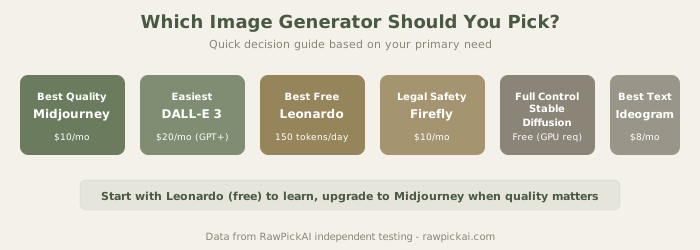
How to Choose: Decision Flowchart
Want the best possible quality and willing to learn Midjourney's interface?
→ Midjourney Basic ($10/mo (≈₹930/month))
Already pay for ChatGPT Plus and want integration?
→ DALL-E 3 (included with ChatGPT Plus)
Need free images regularly (10+ per day) at solid quality?
→ Leonardo AI Free (150 tokens/day)
Need images safe for commercial/client work?
→ Adobe Firefly ($5/mo (≈₹465/month)) or use Firefly's free tier
Technical user who wants free, unlimited, local generation?
→ Stable Diffusion (completely free if you have a decent GPU)
Need accurate text rendered in images?
→ Ideogram ($8/mo (≈₹744/month)) or free tier (10 images/day)
You want to try before committing?
→ Start with Leonardo AI or Ideogram's free tiers, upgrade only if necessary
Our Recommendation for Most Users
If you already use ChatGPT Plus: Use DALL-E 3. It's integrated, convenient, and the quality is perfectly adequate for most needs.
If you're starting from scratch: Begin with Leonardo AI's free tier (150 tokens/day = 10-15 images). It's the best free option available, no credit card required, and quality is truly good. If you exhaust the free tier and need more, upgrade to Leonardo's Apprentice plan ($12 (≈₹1,116)) before considering other paid options.
If image quality is critical to your work: Start with Leonardo's paid tier or jump directly to Midjourney Basic ($10/mo (≈₹930/month)). The quality gap justifies the cost for professionals.
If you create social media content with text overlays: Add Ideogram ($8/mo (≈₹744/month)) as your text-specific tool, use Leonardo or Midjourney for general images.
Frequently Asked Questions
Q: Can I use AI-generated images commercially?
A: It's complicated. Adobe Firefly-generated images are explicitly safe for commercial use. Midjourney says the images belong to you, but the training data includes content from disputed sources. DALL-E 3, Leonardo AI, and Ideogram are all safe commercially. Stable Diffusion is legally clear because it's open-source. For client work or published products, Adobe Firefly or DALL-E 3 are safest. For personal portfolios, all tools are fine.
Q: Why does text always look garbled in AI images?
A: Early AI models weren't trained to understand text structure (spacing, letter shapes, alignment). DALL-E 3 and Ideogram specifically addressed this with additional training. If text-in-images matters to you, use Ideogram or DALL-E 3. Avoid Midjourney for text-heavy images.
Q: Is the quality gap between Midjourney and others really that big?
A: For artistic and photorealistic content, yes, it's noticeable. For practical assets (social media, blog headers, mockups), DALL-E 3 and Leonardo AI are plenty good. The gap matters if you're selling prints or using images as portfolio pieces. For working documents and internal use, it doesn't matter much.
Q: What's the difference between tokens, credits, and monthly limits?
A: Leonardo uses "tokens" (150/day is roughly 10-15 images). DALL-E 3 has a daily image limit (100 on Plus). Firefly uses "generative credits" (100/month free). Ideogram has straight image limits (10/day free). Check each tool's terms for specifics, but generally they prevent unlimited free use while being generous with trials.
Q: Can I batch generate images or set up automated workflows?
A: Midjourney supports batch API, Leonardo AI has API access, DALL-E 3 has API, and Stable Diffusion is fully automated if self-hosted. Firefly and Ideogram are less automation-friendly. For production workflows generating dozens of images, Stable Diffusion or APIs make sense.
Q: Which tool is best for specific industries (fashion, real estate, food)?
A: Midjourney is best for high-end concept work. DALL-E 3 is best for quick mockups and variations. Adobe Firefly is best for corporate/conservative aesthetics. Leonardo AI's specialized models are best for product photography and specific styles. Test a few before committing; your specific use case matters.
Q: How long does generation actually take?
A: DALL-E 3, Leonardo, Firefly, and Ideogram: 5-15 seconds typically. Midjourney: 1-3 minutes depending on plan and queue. Stable Diffusion local: 30 seconds to 2 minutes depending on GPU. Cloud-hosted Stable Diffusion: 10-30 seconds.
Q: Do I need to be good at "prompt engineering"?
A: Not for DALL-E 3 or Ideogram - plain English works fine. For Midjourney and Leonardo AI, better prompts produce better results, but you can start simple. Stable Diffusion rewards specificity. Most tools have improved at understanding casual language.
Q: What about data privacy? Are my prompts and images tracked?
A: All cloud-based tools use your data for analytics and potentially model improvement (unless you have an enterprise agreement). If privacy matters, run Stable Diffusion locally. Otherwise, the standard cloud tools are reasonably transparent about their policies.
What Changed in 2026
Text rendering quality improved dramatically across all tools. Midjourney's web interface reduced the learning curve significantly. Leonardo AI emerged as a truly competitive alternative to paid tools. Adobe Firefly improved substantially in quality and speed. The gap between "best" and "pretty good" narrowed, making value-per-rupee the deciding factor for most users.
Last updated: May 2026. 300+ images generated and compared across all platforms. Prices converted at ₹93/USD. Rankings based on quality, speed, value, and real-world usage patterns.
Related Comparisons and Guides
Want to go deeper on specific matchups?
- Midjourney vs DALL-E 3 - the top two image generators compared head-to-head
- Best Free AI Tools - free image generators and other AI tools
- Compare any tools side-by-side - pick any 2-3 tools and see scores instantly