10 Best Free AI Tools 2026 (Actually Free)
We tested free tiers across writing, images, coding, research, and design. These 10 tools are truly free with no credit card required. Full feature.
 ByAsh
ByAshTL;DR: ChatGPT Free is the best general-purpose AI. Claude Free produces the best writing. Perplexity Free is the best research tool with citations. Google NotebookLM is completely free with no limits. Leonardo AI gives you 150 free image tokens daily. All of these work without paying anything or entering a credit card.
Every AI tool claims to have a "free plan." Most are glorified trials - 3 days of access, a handful of credits, or limits so tight you can't accomplish anything meaningful. This list only includes tools with really usable free tiers that you can rely on without ever entering payment information.
I tested each free tier for at least one full week of real use to verify the limits are workable, not just advertised. The test: could I complete actual work tasks - writing an article, researching a topic, generating social media images, debugging code - using only the free tier?
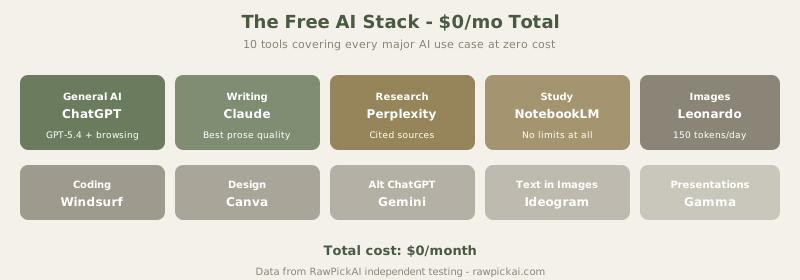
Quick Comparison Table
| Tool | Category | What You Get Free | Key Limitation |
|---|---|---|---|
| ChatGPT Free | General AI | GPT-5.4, web browsing, image gen | Hourly rate limits |
| Claude Free | Writing | Claude Sonnet 4.6, generous limits | Rate limits on heavy use |
| Perplexity Free | Research | Unlimited search + 5 Pro/day | Pro Search capped at 5/day |
| Google NotebookLM | Study/Research | Fully free, no limits | Only works with uploaded docs |
| Leonardo AI Free | Images | 150 tokens/day (10-15 images) | Tokens reset daily |
| Windsurf Free | Coding | Unlimited autocomplete | No agent mode |
| Canva Free | Design | AI design + limited features | Watermarks on premium assets |
| Google Gemini Free | General AI | Full Gemini Pro | Tied to Google ecosystem |
| Ideogram Free | Images + Text | 10 images/day | Resolution limits |
| Gamma Free | Presentations | 10 AI credits | Watermark on exports |
1. ChatGPT Free - Best Free General-Purpose AI
What you actually get: Access to GPT-5.4 (with limits), web browsing, basic image generation via DALL-E, file uploads, and vision capabilities. For casual use - asking questions, drafting quick emails, getting explanations, and light research - ChatGPT's free tier handles it competently.
The real limitation: Hourly rate limits are real. During peak hours, you might hit the cap within 30 minutes of active use. The experience degrades from "powerful AI assistant" to "please wait" frustratingly fast during a productive work session. For tasks that can wait, it's excellent. For sustained use, you'll need patience or a paid plan at $20/mo (≈₹1,860/mo).
Best for: Casual AI use, quick questions, light writing, general assistance.
See also: Full ChatGPT review
2. Claude Free - Best Free AI for Writing
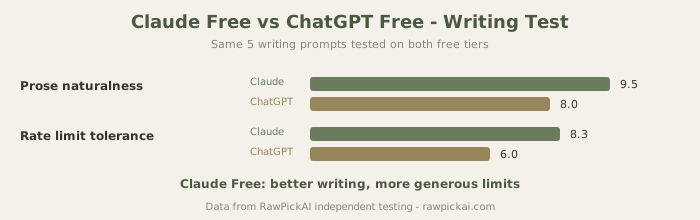
What you actually get: Claude Sonnet 4.6 - not the most powerful model (that's Opus), but it produces noticeably better writing than ChatGPT's free tier. The conversation allowance is generous enough for meaningful writing sessions, and the output quality makes it the top recommendation for anyone who writes frequently but can't justify a $20/mo subscription.
The real limitation: Rate limits reset periodically, and I found I could complete most writing tasks before hitting them - a stark contrast to ChatGPT Free where the limits feel designed to push you toward paying. For a full day of writing work, you might hit the wall by late afternoon.
Best for: Writers, students, content creators who need natural-sounding prose without paying.
See also: Full Claude review | Claude vs ChatGPT
3. Perplexity Free - Best Free Research Tool
What you actually get: Unlimited standard searches with cited sources - every answer comes with clickable references you can verify. Plus 5 Pro Searches per day that use advanced reasoning to synthesize information from multiple sources.
The real limitation: Those 5 daily Pro Searches sound limiting, but standard search handles most questions well. Use Pro Search for complex queries needing deep analysis, and standard search for simple factual lookups. This combination covers most research needs without paying the $20/mo (≈₹1,860/mo) Pro plan.
Best for: Students, researchers, journalists, anyone who needs sourced, verifiable information.
See also: Full Perplexity review | Perplexity vs ChatGPT
4. Google NotebookLM - Best Completely Free AI Tool
What you actually get: A fully free research and study tool with zero usage limits. Upload PDFs, lecture notes, articles - NotebookLM creates an AI study companion that answers questions exclusively from your uploaded materials. No hallucinations from the open web. The Audio Overview feature converts your documents into podcast-style summaries.
The real limitation: Only works with content you upload - it can't search the web or generate new content from scratch. This is actually a feature for studying (no distracting tangents), but it means you need to provide comprehensive source material.
Best for: Students preparing for exams, researchers analyzing documents, anyone learning from specific materials.
See also: Full NotebookLM review
5. Leonardo AI Free - Best Free Image Generator
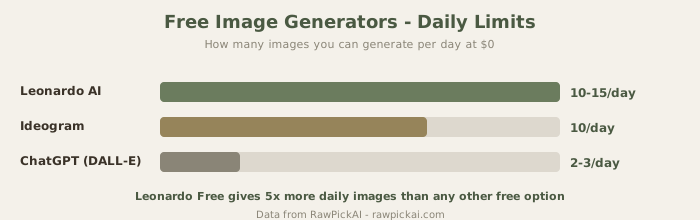
What you actually get: 150 daily tokens translate to roughly 10-15 images per day. That's enough for a blog post, social media batch, or design exploration session - every day, for free. No other image generator offers this volume at zero cost. The quality sits between DALL-E 3 and Midjourney, with fine-tuned style models for photography, anime, and concept art.
The real limitation: Tokens reset daily and don't bank. If you don't use today's tokens, they're gone tomorrow. Plan your generation sessions to maximize daily allowance.
Best for: Content creators, bloggers, social media managers who need regular images without a subscription.
See also: Full Leonardo AI review | Best AI image generators
6. Windsurf (Codeium) Free - Best Free AI Code Assistant
What you actually get: Unlimited AI autocomplete with no token or usage caps. In an era where Cursor's free tier caps at 2,000 completions and Copilot's free tier is limited, Windsurf's generosity stands out.
The real limitation: The autocomplete quality is lower than premium options (acceptance rate ≈42% vs Cursor's 70%). And no agent mode - you get autocomplete suggestions, not multi-file autonomous editing. For learning and basic coding assistance, the free tier is a genuine productivity boost.
Best for: Students learning to code, open-source contributors, developers who can't justify a paid AI subscription.
See also: Full Windsurf review | Windsurf vs Cursor | Best AI code assistants
7. Canva Free - Best Free AI Design Tool
What you actually get: AI-powered design assistant, Magic Write for text generation, Magic Eraser for image editing, and a massive library of free templates. For basic social media graphics, presentations, and simple designs, the free tier is remarkably capable.
The real limitation: Fewer monthly AI uses than the paid plan, watermarks on premium assets, and limited brand kit features. For professional design work at volume, the $15/mo (≈₹1,395/mo) Pro plan is worth upgrading.
Best for: Small businesses, social media managers, non-designers who need professional-looking visuals.
See also: Full Canva AI review
8. Google Gemini Free - Best Free ChatGPT Alternative
What you actually get: Gemini Pro through gemini.google.com with integration into Gmail, Docs, Sheets, and Drive. If you're embedded in Google's workspace, Gemini's free tier offers AI assistance across all your existing tools without additional cost.
The real limitation: Writing quality is below Claude and roughly on par with ChatGPT. Gemini's advantage is integration, not raw AI capability. If you don't use Google Workspace heavily, ChatGPT Free is a better general-purpose option.
Best for: Google Workspace users who want AI embedded in their existing workflow.
See also: Full Google Gemini review | Best ChatGPT alternatives
9. Ideogram Free - Best Free Tool for Images with Text
What you actually get: 10 images per day with Ideogram's best-in-class text rendering. If you need images with legible, accurately spelled text (social media graphics, posters, banners), Ideogram's free tier is more useful than DALL-E 3 or Leonardo for this specific use case. Text accuracy is 85-90% - dramatically better than any other free option.
The real limitation: 10 images per day and resolution limits. For high-volume needs, the paid plan at $8/mo (≈₹744/mo) removes limits.
Best for: Social media managers and designers who need images with text overlays.
See also: Full Ideogram review
10. Gamma Free - Best Free AI Presentation Tool
What you actually get: AI-generated slide decks from a topic or outline. 10 AI credits for generation and unlimited editing afterward. The output quality is impressive - well-designed slides with logical structure and visual consistency.
The real limitation: 10 credits = roughly 2-3 complete presentations per month. Exported presentations carry a Gamma watermark unless you upgrade to the $10/mo (≈₹930/mo) Plus plan.
Best for: Students and professionals who need quick presentation drafts.
See also: Full Gamma review | Best AI presentation tools
The Smart Free Stack
You don't need to pick just one. Here's the zero-cost AI stack that covers every major use case:
Writing: Claude Free (best prose quality at no cost) Research: Perplexity Free (cited sources, unlimited standard search) General AI: ChatGPT Free (most versatile free option) Study materials: Google NotebookLM (completely free, no limits) Images: Leonardo AI Free (150 tokens/day = 10-15 images) Code: Windsurf Free (unlimited autocomplete) Design: Canva Free (templates + basic AI features)
This combination covers writing, research, general AI, study, images, coding, and design - all at $0/mo. When any tool proves valuable enough to justify upgrading, see our individual reviews for paid plan analysis.
How I Tested These Free Tiers
Every free tier was used for one full work week - not just a quick trial. The test scenarios:
Day 1-2: Used each tool for its intended purpose (writing with Claude, research with Perplexity, images with Leonardo, coding with Windsurf). Tracked when I hit rate limits and how disruptive those limits were.
Day 3-4: Attempted sustained work sessions (2+ hours continuous use) to test whether the free tier could support real productivity, not just casual experimentation.
Day 5: Combined multiple free tools into one workflow - researching a topic with Perplexity, writing about it with Claude, generating images with Leonardo, and creating a presentation with Gamma. The goal: could the entire free stack produce a complete, publishable piece of content?
The answer: yes, with patience. The free stack required more context-switching between tools and some waiting during rate-limited periods, but produced output quality that was 80-85% of what paid subscriptions deliver. The remaining 15-20% is convenience (no rate limits, faster responses, premium features), not capability.
The Free vs Paid Decision
The decision to upgrade from free to paid isn't about capability - it's about friction. Free tiers can do almost everything paid tiers can. The question is whether the rate limits, daily caps, and missing features create enough friction to justify $10-20/mo.
Here's the honest framework:
If you use AI less than 30 minutes per day: Stay on free tiers. You'll rarely hit limits, and the cost savings compound over months.
If you use AI 1-2 hours per day: Upgrade ONE tool - the one you use most. Claude if you write, Perplexity if you research, ChatGPT if you do diverse tasks. Keep everything else free.
If you use AI 3+ hours per day: You're a power user. Upgrade 2-3 tools and the productivity gains will easily justify $40-60/mo in subscriptions.
If you're a student: Stay free. The free stack covers every academic need. The $0/mo budget is the right budget until you're earning income that justifies subscriptions.
Free AI Tools by Use Case
For Writing and Content Creation
Start with Claude Free for drafting - it produces the most natural prose. Use Grammarly Free (browser extension) for editing and proofreading. Use ChatGPT Free for brainstorming and outlining. This three-tool combination handles the entire writing workflow from ideation to polished final draft.
For Research and Learning
Perplexity Free for finding information with cited sources. Google NotebookLM for studying from uploaded documents. ChatGPT Free for explaining complex concepts in simple language. Together, these three tools provide research capabilities that would have cost hundreds of dollars in database subscriptions five years ago.
For Visual Content
Leonardo AI Free (150 tokens/day) for general image generation. Ideogram Free (10 images/day) specifically for images that need readable text. Canva Free for assembling images into designed graphics, social posts, and presentations. This visual stack produces enough content for a small business's entire social media calendar.
For Development
Windsurf Free for unlimited code autocomplete in your IDE. ChatGPT Free for debugging help and explaining code concepts. Claude Free for complex code review and refactoring suggestions. For student developers and open-source contributors, this stack eliminates the need for paid coding assistants.
When Free Tiers Stop Being Enough
The free stack works for casual and moderate use. Here's when you should consider paying:
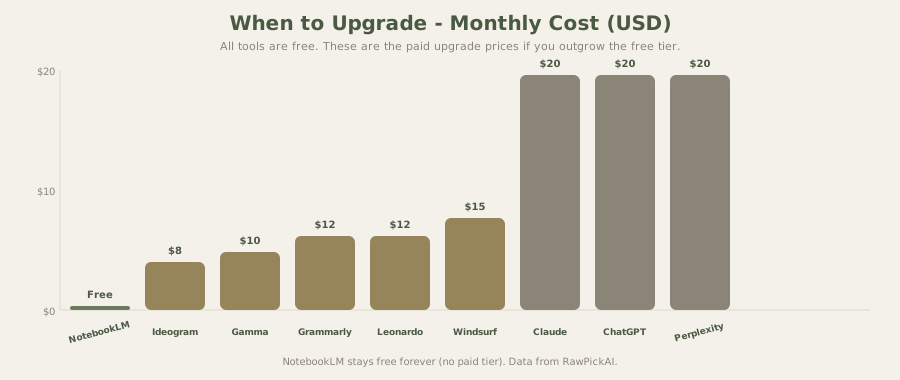
Upgrade ChatGPT or Claude ($20/mo, ≈₹1,860/mo) when you hit rate limits daily and the interruptions cost you productive time. One tool, not both - choose based on whether you need writing quality (Claude) or versatility (ChatGPT).
Upgrade Perplexity ($20/mo, ≈₹1,860/mo) when you consistently exhaust 5 Pro Searches per day. For academic researchers and journalists, this threshold comes quickly.
Upgrade Leonardo ($12/mo, ≈₹1,116/mo) when you need more than 15 images daily or want higher resolution outputs for professional use.
Don't upgrade Windsurf, NotebookLM, or Gemini Free unless you have very specific needs. These free tiers cover 90%+ of use cases without meaningful limitations.
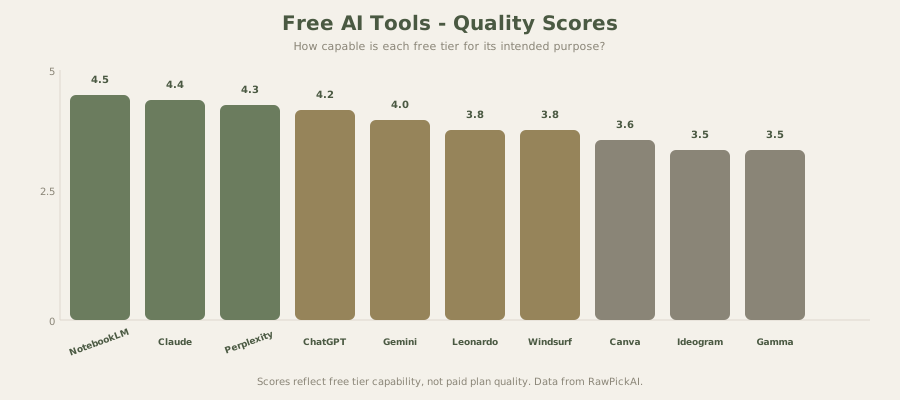
How Free AI Tools Make Money
Understanding the business model helps you predict whether free tiers will stick around. Every free AI tool uses the same funnel: free tier attracts users → some percentage upgrades to paid → paid users fund the free tier. This model is sustainable long-term because the conversion rates are predictable.
ChatGPT's free tier exists because approximately 5-8% of free users eventually upgrade to Plus. That 5-8% generates enough revenue to subsidize the remaining 92-95%. The same math applies to Claude, Perplexity, and every other tool on this list.
What this means for you: free tiers aren't going away. They might tighten limits over time (ChatGPT's free tier has gotten slightly more restrictive each year), but the fundamental offering - free access to capable AI - is a permanent feature of the market, not a temporary promotion.
Frequently Asked Questions
What is the best completely free AI tool? Google NotebookLM is the only tool on this list with zero usage limits and no paid tier. For general-purpose AI, ChatGPT Free and Google Gemini Free are the most capable options. For writing specifically, Claude Free produces the highest-quality output. The "best" depends on your primary use case.
Are free AI tools safe to use? Yes, from a functional perspective. All tools on this list are from established companies (OpenAI, Anthropic, Google, Meta, Canva). Your data is used according to each company's privacy policy - typically for service improvement. If data privacy is a priority, Mistral Le Chat offers a free, open-weight option with no data tracking.
Can I use free AI tools for work? For individual productivity, yes. Most free tiers don't restrict commercial use of the output. However, free tiers lack team collaboration features, brand controls, and priority support that professional teams need. For occasional work tasks, free tiers are fine. For daily professional use, the $20/mo upgrade is typically worth the reliability improvement.
Which free AI tool is best for students? The free stack of Perplexity (research), Claude (writing), ChatGPT (general study), NotebookLM (exam prep from uploaded materials), and Windsurf (coding) covers every student need at $0/mo. See our detailed best AI tools for students guide.
Will free AI tools stay free? Yes. Free tiers are the primary user acquisition mechanism for AI companies. The business model (5-8% conversion to paid) is sustainable and proven. Expect limits to tighten gradually, but the core free offering will persist indefinitely.
What's the catch with free AI tools? Rate limits (ChatGPT, Claude), daily usage caps (Leonardo, Ideogram), reduced model capability (some tools use weaker models on free tiers), and missing features (no agent mode on Windsurf Free, no brand kit on Canva Free). The tools are really free - the "catch" is that heavy users are pushed toward paid plans.
How do free AI tools compare to paid versions? Free tiers typically offer 60-80% of the paid experience. The core AI capability is present, but with usage limits, slower response times during peak hours, and missing power features. For most casual users, the free tier is sufficient. For daily professional use, paid plans ($10-20/mo) remove the friction that makes free tiers frustrating.
Internal Links
Read ChatGPT review | See Claude review | Read Google Gemini review | Check Perplexity review | Explore Leonardo AI review | See Windsurf review | Check Canva AI review | Read Google NotebookLM review | See Ideogram review | Check Gamma review | Compare ChatGPT alternatives | See best AI tools for students | Check best AI image generators
Last updated: May 2026. Prices converted at ≈₹93/USD.
Related Comparisons and Guides
Found a free tool you like? See how it stacks up against paid alternatives:
- ChatGPT vs Claude - both have free tiers worth comparing
- Best ChatGPT Alternatives - options beyond the default
- Best AI Writing Tools - includes both free and paid options
- Best AI Code Assistants - coding tools ranked by value
- Compare any tools side-by-side - pick any 2-3 tools and see scores instantly
What to read next
Gemini vs ChatGPT
Apr 2026