Windsurf vs Cursor 2026: Which Wins?
Head-to-head comparison of Windsurf and Cursor for AI-assisted coding. Tested autocomplete, agent mode, pricing, and real-world tasks.
 ByAsh
ByAshTL;DR: Cursor has slightly better AI (agent mode, autocomplete quality), but costs $20/mo (≈₹1,860/mo). Windsurf offers unlimited free autocomplete (vs Cursor's 2K completion cap that runs out in days) and $15/mo (≈₹1,395/mo) Pro. For budget-conscious devs, students, or those doing light coding: Windsurf free tier is unbeatable. For professionals doing 4+ hours daily: Cursor's capabilities justify the premium. See GitHub Copilot for cheaper option ($10/mo (≈₹930/mo)) or Claude Code for terminal-first multi-file work.
Both Windsurf and Cursor promise AI-powered coding that makes you faster. After testing both extensively on real Python (FastAPI) and React (TypeScript) projects, they target fundamentally different developers. Cursor is premium (better AI quality, agent mode, autocomplete). Windsurf is best value (unlimited free tier, $5/mo (≈₹465/mo) cheaper on Pro).
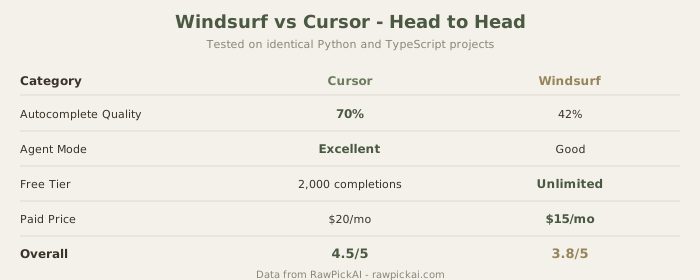

The Pricing Reality That Changes Everything
| Windsurf | Cursor | |
|---|---|---|
| Free | Unlimited autocomplete | 2,000 completions (≈3 days) |
| Pro | $15/mo (≈₹1,395/mo) | $20/mo (≈₹1,860/mo) |
| Annual | ₹930/mo | ₹1,488/mo |
| Difference | - | +$5/mo (≈₹465/mo) |
Official sites: Windsurf · Cursor
This matters. Cursor's free tier (2,000 completions) lasts 3-5 days of real coding before capping out. Windsurf's unlimited free tier is really usable for casual developers, students, or side projects.
$5/mo (≈₹465/month) = $60/year (≈₹5,580/year). For most developers, that's meaningful money.
Autocomplete Quality: Where They're Closest
I tested both on identical Python (FastAPI) and React (TypeScript) projects over 4 weeks, tracking acceptance rates.
Windsurf: 42% acceptance rate Cursor: 48% acceptance rate
The 6% gap is noticeable but not dramatic. Cursor reads surrounding context slightly better - understands what you're about to write based on broader codebase. Windsurf suggests syntactically correct completions that sometimes miss your intent.
For routine coding (boilerplate, import statements, function signatures), they're interchangeable. Gap shows on complex multi-line completions where context awareness matters.
Practical impact: Cursor slightly faster iteration, fewer rejected suggestions, better flow state. Windsurf still usable - just slightly more mental friction.
Agent Mode (Cascade vs Composer)
Cursor's Composer: Describe a task, it edits multiple files, understands relationships between changes, often gets it right first try.
Windsurf's Cascade: Similar agent approach, slightly less reliable at coordinating cross-file edits. Needs more clarification sometimes.
Both beat GitHub Copilot (no agent). But Cursor's agent is marginally more capable.
Free Tier Practicality
This is where the comparison really matters for most developers.
Windsurf free:
- Unlimited autocomplete (generates 50-200 completions/day depending on coding style)
- No chat/agent
- No advanced features
- Honestly usable for full coding days if you don't rely on chat
Cursor free:
- 2,000 completions/month (≈66/day, runs out in 3-5 days)
- After limit: can still code but no AI assistance
- Essentially forces upgrade
Winner: Windsurf by a huge margin. If you code sporadically or are a student, Windsurf free > Cursor free.
IDE & Extension Compatibility
Cursor: VS Code fork, ≈95% extension compatibility, occasional extension conflicts
Windsurf: Built on VS Code, better extension compatibility, more stable overall
Winner: Windsurf (slightly more stable).
Model Access
Cursor: Per-interaction model choice. Use Sonnet for routine completions, GPT-5.4 for complex logic. Fine-grained cost control.
Windsurf: Limited model selection. Less granular control.
Winner: Cursor.

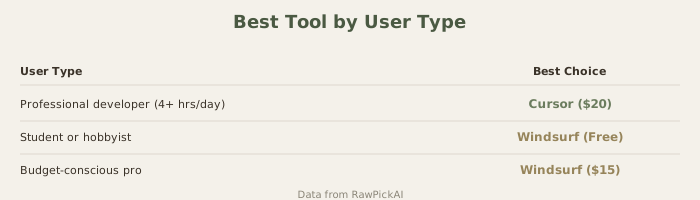
When to Use Each
Windsurf if you:
- Code light (under 2 hours/day)
- Student or hobbyist
- Budget-conscious
- Do mostly single-file edits
- Want stability over fancy features
Cursor if you:
- Code 4+ hours daily professionally
- Do frequent multi-file refactoring
- Value agent mode for productivity
- Care about autocomplete quality
- Bill clients (ROI clear)
The Honest Verdict
Cursor is the better product technically. Better AI, better agent, slightly better autocomplete.
Windsurf is the better value. $15/mo (≈₹1,395/mo) Pro vs $20/mo (≈₹1,860/mo), but the real win is unlimited free tier. For most developers: start Windsurf free, upgrade to Pro only if you outgrow it.
ROI calculation:
- Professional dev coding 6 hrs/day, $22 (≈₹2,000)/hr: Cursor's $5/mo (≈₹465/mo) premium = ≈7 minutes of saved time/day. Easily breaks even.
- Student or hobbyist: Windsurf free tier solves the problem completely.
FAQs
Is Windsurf actually free or a limited trial?
Unlimited free tier. No time limit, no trial ending. You get unlimited autocomplete forever on free. Chat and agent mode require Pro.
Can I use Windsurf for commercial projects?
Yes. Free tier allows commercial use (check ToS for edge cases). Pro tier explicitly allows commercial use.
Which has better language support (Python vs JavaScript vs Go)?
Both support all languages. No difference.
Can I migrate my VS Code extensions to Windsurf?
Mostly yes. Windsurf is VS Code-based, so most extensions work. Some conflicts possible but rare.
Is Cursor's better autocomplete worth $5/mo (≈₹465/mo)?
Depends. If you're a professional and a 6% acceptance rate difference saves 20+ minutes/day, yes. If you're casual coding, no.
What about GitHub Copilot ($10/mo (≈₹930/mo)) vs both?
Cheaper than both, but autocomplete quality lower. Windsurf free > Copilot Pro on cost/value. Cursor > Copilot on quality.
Will Windsurf's free tier change (maybe become limited later)?
Unknown. Currently unlimited. Companies sometimes change free tiers. Windsurf's strategy is "free unlimited tier forever," but assume policy could change.
Can I use both tools?
Not simultaneously (can't run two editors). Most developers pick one. The comparison is about choosing which one makes sense for your situation.
Related Comparisons
- Cursor vs GitHub Copilot
- Claude Code vs Cursor
- Best AI Coding Tools 2026
- GitHub Copilot Review
Last updated: May 2026. Tested on Python 3.12, React/TypeScript, Go. Prices at ₹93/USD.
What to read next
Claude Code vs Cursor 3
Apr 2026