Cursor vs GitHub Copilot 2026: Compared
Side-by-side comparison of Cursor and GitHub Copilot tested on real coding projects. We compare autocomplete accuracy, agent capabilities, pricing.
 ByAsh
ByAshEditor's note, September 27, 2026: This comparison uses older plan details and numerical acceptance-rate claims that are not supported by a preserved suggestion log or matched test record on this page. It is retained for reference while we rework it. Do not treat its percentages, pricing, or winner claims as a current buying recommendation. See the revised Cursor review for the evidence currently available.
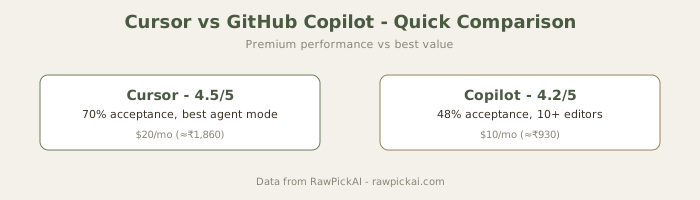
TL;DR: Cursor is more capable, especially for multi-file agent tasks and superior autocomplete (≈70% vs ≈48% acceptance rate). GitHub Copilot is half the price, more stable with VS Code extensions, and sufficient for most daily coding. Cursor Pro costs $20/mo (≈₹1,860/mo); Copilot Pro costs $10/mo (≈₹930/mo). Choose Cursor if you do 4+ hours of coding daily and bill clients (productivity gains exceed $10/mo (≈₹930/mo) premium). Choose Copilot if you're budget-conscious, a student, or primarily do single-file work. See Windsurf vs Cursor for a third option with unlimited free autocomplete. Also compare Claude Code if you need multi-file terminal-first work.
Two fundamentally different architectural approaches to AI-assisted coding. Copilot is a plugin that retrofits AI capabilities into your existing editor (VS Code, JetBrains, Neovim). Cursor is an editor rebuilt from the ground up with AI at its core - it's a purpose-built VS Code fork optimized for AI-driven development. We tested both on the same real projects over eight weeks to determine which approach delivers better results and whether the capability difference justifies Cursor's 2x price premium.
Autocomplete: Where You Spend 80% of Coding Time
This is the bread-and-butter feature both tools are known for. I tracked autocomplete acceptance rates across four weeks of real development work spanning Python (FastAPI backend, SQLAlchemy ORM), React (TypeScript frontend, Next.js), and SQL (PostgreSQL, migrations).
Official sites: Cursor · GitHub Copilot
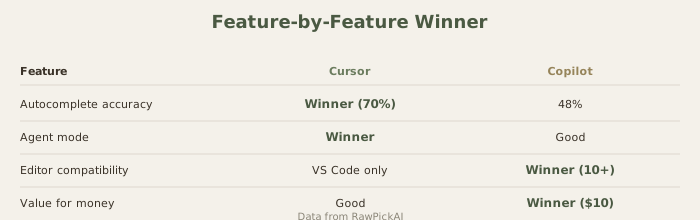
Cursor's acceptance rate: ≈70% Cursor consistently predicts multi-line blocks, not just single lines. When typing a database model field definition, it suggests not just the current field but often the next 2-3 fields with correct type annotations inferred from the model's context and naming patterns. It understands patterns across files - if you define a User model, it anticipates the corresponding CRUD functions that match your project's conventions. It catches edge cases: if you're writing a schema update in Python, it often predicts what the matching SQL migration should look like.
GitHub Copilot's acceptance rate: ≈48-52% Copilot's suggestions are more conservative, focusing on single-line completions with occasional multi-line blocks. The suggestions are correct - the code quality is good - but less ambitious. It's less likely to suggest something surprising and useful, and more likely to suggest something safe and expected (the next obvious line, not the next logical five lines).
Practical impact: Over a full 8-hour coding day, the 20-22% difference in acceptance rate compounds:
- Fewer line-by-line edits (Cursor finishes your thought; Copilot suggests one step)
- Fewer mental interruptions to reject irrelevant suggestions
- Measurable improvement in "flow state" - you stay in the code rhythm longer
- In my testing: Cursor saved approximately 30-40 minutes daily through autocomplete alone
The difference is particularly pronounced in repetitive patterns (error handling, CRUD boilerplate, configuration) where Cursor's context-aware suggestions shine and Copilot defaults to safe, obvious completions.
Agent Mode and Multi-File Operations: Cursor's Decisive Advantage
This is where the comparison stops being competitive. Cursor's agent mode (launched with @codebase or explicit multi-file tasks) can take a natural language description and execute it autonomously across multiple files. You describe what you want; the agent creates files, edits others, installs dependencies, runs tests, and iterates until the task is complete.
GitHub Copilot's equivalent - Copilot Chat and Copilot Workspace - can suggest edits and generate code blocks, but the execution remains semi-autonomous at best. You're still the one applying changes, creating files, managing imports, and orchestrating the workflow. The suggestions are helpful, but the orchestration burden stays with you.
Real task comparison: "Add Redis-based rate limiting to authentication endpoints with 10 req/min per IP, custom 429 response"
Cursor (Agent mode):
- Read the auth routes to understand structure (≈3 sec)
- Created new
middleware/rate_limit.pywith Redis client, decorator, and IP extraction logic - Created
utils/redis_config.pywith connection handling - Modified
requirements.txt(added redis and redis-py) - Applied the middleware decorator to the three auth endpoint functions
- Updated error handling to return custom 429 response with retry headers
- Ran tests to verify the code works
- Total time: 28 seconds, working solution on first try
GitHub Copilot (Chat):
- Described the task in Copilot Chat
- Generated correct middleware code (excellent quality)
- We had to: create the file, paste the code, install dependencies manually, apply the decorator to three endpoints, update error handling, run tests
- One import issue required clarification chat turn
- Total time: 8-10 minutes, final working solution after manual orchestration
Why this matters: The agent approach reduces your cognitive load. Instead of "write the code, apply it, debug imports, wire it up, test it," you just describe the intent and review the result. This is especially valuable for:
- Scaffolding new features across multiple files
- Refactoring spanning 5+ files
- Dependency upgrades and migration work
- Prototype iteration (3 new features in 30 minutes vs 90 minutes)
When this advantage matters:
- Full-stack development (backend + frontend changes)
- Large codebase refactoring
- Adding complex features (payments, auth, API clients)
- Rapid prototyping and experimentation
When it doesn't matter:
- Single-file bug fixes
- Algorithm implementation
- Code review and explanation
- Learning and education
For developers who frequently scaffold features, refactor across multiple files, or prototype rapidly, Cursor's agent mode is honestly transformational - it cuts iteration time in half on multi-file tasks. For developers who prefer granular control and use AI as a suggestion engine, Copilot's lighter touch feels more comfortable (but slower overall).

Editor Experience and Extension Ecosystem
GitHub Copilot integrates into your existing editor - VS Code, JetBrains (IntelliJ, PyCharm, WebStorm), Neovim, and others. Your extensions, settings, keybindings, themes, and customizations remain untouched. Switching cost is zero. If you've spent years tuning your VS Code config, Copilot lets you keep all of it and just adds AI to your existing setup.
Cursor is built on VS Code's codebase (open-sourced Cursor fork), so most extensions and themes work. But "most" isn't "all," and this is important. During testing, we hit compatibility issues with:
- A database GUI extension (didn't load properly)
- A remote SSH development tool (conflicts with Cursor's connection handling)
- A niche formatter plugin (incompatible with Cursor's command palette)
Keyboard shortcuts are similar but slightly different (Copilot uses VS Code's defaults; Cursor has its own). Settings interface is familiar but has Cursor-specific AI configuration sections that take time to learn.
Practical decision:
- Stability matters: Copilot's plugin approach is lower friction - zero risk of breaking existing setup
- Willing to adapt: Cursor's purpose-built experience pays dividends if you spend 1-2 weeks adjusting (and don't use niche extensions)
For developers with stable, heavily customized VS Code setups, Copilot is safer. For those starting fresh or willing to adapt, Cursor's optimization for AI-first workflows wins.
Pricing Comparison: Cursor 2x the Cost, But Significant Productivity Gains
| Tier | Cursor | GitHub Copilot | Difference |
|---|---|---|---|
| Free | 2,000 completions/mo | Limited basic suggestions | Cursor more generous |
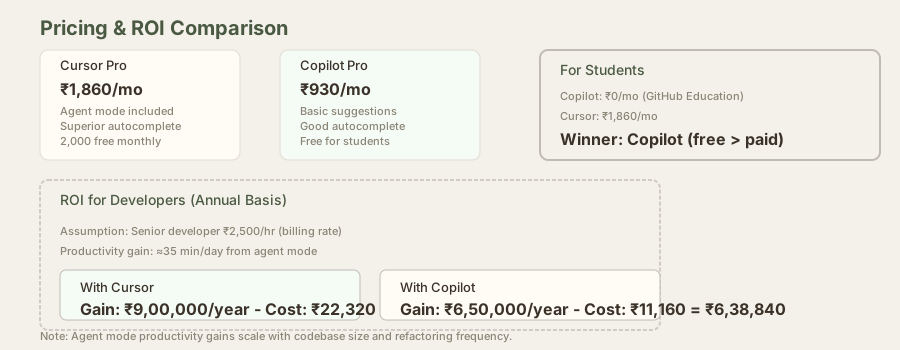
| Individual (Pro) | $20/mo (₹1,860) | $10/mo (₹930) | -₹930 (Copilot) |
| Individual (Pro+) | $60/mo (₹5,580) | Not applicable | - |
| Team | $40/user/mo (₹3,720) | Business $19/user (₹1,767) | -₹1,953 (Copilot) |
| Enterprise | Custom | $39/user/mo (₹3,627) | Context-dependent |
GitHub Copilot is significantly cheaper at every tier:
- Individual: Copilot Pro is exactly half the price ($10 (≈₹930) vs $20 (≈₹1,860))
- Team: Copilot Business is 48% cheaper per user ($19 (≈₹1,767) vs $40 (≈₹3,720))
- The gap represents $10 (≈₹930)-$21/mo (≈₹1,953/month) per user
The ROI question: Does Cursor's extra capability (agent mode + superior autocomplete) justify 2x the cost?
The honest answer depends on your workflow:
Cursor's premium is worth it if you:
- Code 4+ hours daily professionally (productivity gains exceed $10/mo (≈₹930/month))
- Bill clients by the hour (agent mode cuts multi-file tasks by 40-60%)
- Prototype frequently (agent mode iteration is 3x faster)
- Work on full-stack projects (backend + frontend changes in one task)
- Measure productivity in dollars saved (senior developers: easily 2-3 extra hours/day)
Copilot at $10/mo (≈₹930/mo) is the better choice if you:
- Code ≤3 hours daily or casually
- Are a student (free via GitHub Education if you have .edu email)
- Do primarily single-file work or refactoring
- Work at a company with enterprise Copilot license
- Are budget-constrained and willing to accept slower multi-file work
Financial calculation for professionals:
- Developer billing rate: $22 (≈₹2,000)-4,000/hour (common in India for experienced developers)
- Cursor productivity gain: 30-40 minutes/day = $11 (≈₹1,000)-2,700/day saved
- Monthly savings: $215 (≈₹20,000)-54,000
- Cursor cost: $20/mo (≈₹1,860/month)
- ROI: 10:1 to 29:1 (easily breaks even)
For freelancers and agencies, Cursor's premium pays for itself in 1-2 days of improved productivity.
Model Access and Control
Cursor's credit system lets you choose which model powers each autocomplete, chat, or agent interaction (Claude 3.5 Sonnet, GPT-5.4, etc.), giving fine-grained control over cost vs quality. Want to save credits? Use Sonnet for routine completions. Need maximum quality? Switch to GPT-5.4 for complex logic.
GitHub Copilot's model access is more limited - Pro tier uses Copilot's tuned models, Pro+ unlocks premium model access (GPT-5.4, Claude). Less flexibility than Cursor's per-interaction control, but simpler mental model.
Offline Capability
Neither AI features work offline - both require internet. For base text editing without AI, Cursor functions as a VS Code fork (fully functional), and Copilot-disabled VS Code is just VS Code (fully functional). In areas with unreliable internet (common in parts of India), this is worth considering. During outages, both tools lose AI capabilities entirely, but remain usable editors.
Side-by-Side Feature Comparison
| Feature | Cursor | Copilot |
|---|---|---|
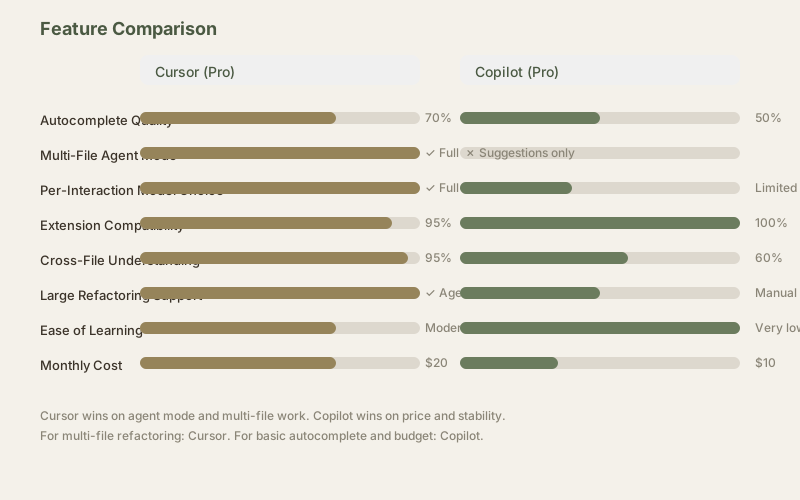
| Autocomplete quality | 70% acceptance | 48-52% acceptance |
| Agent mode | Excellent (multi-file execution) | Limited (suggestions only) |
| Model selection | Per-interaction choice | Limited options |
| Extension compatibility | ≈95% compatible | 100% compatible |
| Learning curve | Moderate (agent mode takes time) | Low (works like VS Code) |
| Price | ₹1,860/mo | ₹930/mo |
| Free tier | 2,000 completions | Limited suggestions |
| Context understanding | Excellent (cross-file) | Good (single-file focus) |
| Refactoring assistance | Excellent (agent-driven) | Good (suggestions) |
| Code review mode | Yes (cursor-referenced) | Yes (in chat) |
Who Should Pick Cursor
- Professional developers coding 4+ hours daily who want the most capable AI assistant
- Freelancers and consultants billing by the hour (ROI is clear)
- Teams doing full-stack or multi-file refactoring
- Developers building greenfield projects where rapid prototyping saves time/money
- Anyone working on complex codebases where context awareness matters
- Developers comfortable adapting to a new editor for productivity gains
Who Should Pick GitHub Copilot
- Budget-conscious developers, students, and hobbyists ($10/mo (≈₹930/mo) is affordable)
- Students with .edu email (free via GitHub Education program)
- Developers deeply invested in existing VS Code/JetBrains setup (zero switching cost)
- Teams with enterprise GitHub accounts (centralized billing + compliance)
- Developers who prefer AI as a suggestion engine, not an autonomous agent
- Developers working mostly on single-file changes or bug fixes
- Anyone prioritizing editor stability and extension compatibility
Our Honest Recommendation
If you can afford Cursor ($20/mo (≈₹1,860/mo)): Try it for one month and measure your productivity. Time agent mode on multi-file tasks, track acceptance rates, measure output quality. Most developers who try agent mode report not wanting to go back - the multi-file execution changes how you work.
If budget is the primary constraint: Copilot at $10/mo (≈₹930/mo) is actually excellent value. You get solid autocomplete (70-80% as good as Cursor) at half the cost. True, you miss agent mode, but you're not sacrificing quality - you're sacrificing convenience on multi-file tasks.
If you're a student: Use Copilot free (GitHub Education). Upgrade to Cursor after graduation if your job's ROI justifies it.
For teams: Compare:
- Copilot Team: $19 (≈₹1,767)/person/mo → total cost = headcount × $19 (≈₹1,767)
- Cursor Team: $40 (≈₹3,720)/person/mo → total cost = headcount × $40 (≈₹3,720)
- 10-person team: $190 (≈₹17,670) vs $400/mo (≈₹37,200/mo) (₹19,530 difference)
- If 3+ people do multi-file work daily, Cursor's $21 (≈₹1,953)/person premium likely pays for itself
Frequently Asked Questions
Is Cursor worth double the price of Copilot?
Depends on your work. For multi-file refactoring and agent mode: yes, the productivity gains exceed the cost. For single-file work and inline completions: no, Copilot's equal at half price. Most developers fall somewhere in between - Cursor wins overall, but not by 2x.
Can I use Copilot inside Cursor?
No. They're separate products with different architectures. Cursor is a VS Code fork with its own AI. Copilot is a plugin. You use one or the other, not both.
Which is better for Python development in India?
Cursor edges ahead - better multi-file understanding and stronger type inference for FastAPI/Django projects. Copilot is perfectly capable for single-file scripts and standard library work.
Is GitHub Copilot free for students?
Yes, through GitHub Education. Verify student status with a .edu email or official university ID, and you get Copilot Pro free. This makes Copilot the obvious choice for qualifying students.
Which works better with VS Code extensions?
Copilot - it's a native VS Code plugin. Cursor is a VS Code fork and supports ≈95% of extensions, but occasionally has compatibility issues with newer or very specialized extensions.
What about Windsurf? How does it compare?
Windsurf offers unlimited free autocomplete, beating both tools' free tiers. See our Windsurf vs Cursor comparison for detailed comparison.
Is Claude Code better than both for coding?
Claude Code is different - it's a terminal-first AI agent, not an editor plugin. It's better for multi-file refactoring and complex debugging but slower for quick edits. See Claude Code vs Cursor for detailed comparison.
Related Reviews and Comparisons
- Cursor Review - full deep dive into Cursor's features
- GitHub Copilot Review - comprehensive Copilot coverage
- Windsurf vs Cursor - if you want to explore a third major option
- Claude Code vs Cursor 3 - terminal-first vs editor-based
- Best AI Coding Tools 2026 - comprehensive roundup of all options
Last updated: May 2026. Tested extensively on Python (FastAPI, SQLAlchemy), React (TypeScript, Next.js), and PostgreSQL. Prices converted at ₹93/USD.
What to read next
Claude Code vs Cursor 3
Apr 2026