Cursor 3 Review: 5 Features Tested (2026)
I tested Cursor 3's Agents Window, Design Mode, and parallel agents on day one. Most are half-baked. Here's what's worth the upgrade and pricing.
 ByAsh·18 min read
TL;DR: Cursor 3's Agents Window is a genuine upgrade - parallel agents, cloud handoff, and Design Mode are all useful. Worth upgrading if you're already on Cursor. Not worth switching from Claude Code unless you need a visual IDE. Price unchanged at $20/mo (≈₹1,860). Prices verified April 7, 2026 at ₹93/USD.
Updated April 9, 2026: Added original benchmark, scoring, and pricing visualizations from our hands-on testing. All numbers reflect the data from the original April 2 testing session.
Cursor has been my daily driver since early 2025. When they announced Cursor 3, I expected the usual - a few new features, some UI polish, maybe a new model option. What actually shipped is something different entirely. The interface is rebuilt from scratch. The entire product now revolves around agents that run in parallel, locally and in the cloud. And there's a new Design Mode that lets you point at UI elements in a browser and tell the AI exactly what to fix.
Is it worth upgrading? If you're on Cursor Pro already, absolutely - you get Cursor 3 automatically. If you're on the free plan or considering switching from another tool, keep reading.
Cursor 3 New Features - What's Actually New
Cursor 3 launched on April 2, 2026 - making this Cursor's biggest release since the original Cursor 1.0. Let me break down the new features and whether they deliver on the hype.
The Agents Window - The Biggest Change
This is the centerpiece of Cursor 3 and the reason the interface was rebuilt from scratch. The Agents Window is a dedicated workspace where you can spin up multiple AI agents that work on different tasks simultaneously.
Before Cursor 3, you had one chat, one agent, one task at a time. Now you can have Agent A refactoring your authentication module, Agent B writing tests for your API endpoints, and Agent C fixing CSS issues in your frontend - all running in parallel. Each agent gets its own tab with full context of what it's doing, what files it's touching, and what changes it's making.
| Agents Window | Score |
|---|---|
| Parallel Execution | Excellent - ran 4 agents simultaneously without conflicts |
| Context Isolation | Good - agents don't step on each other's changes |
| Merge Handling | Decent - occasional conflicts on shared files need manual resolution |
| Speed | Fast - cloud agents are noticeably quicker than local |
I tested this with a real project - a Next.js e-commerce app with about 15,000 lines of code. I spun up three agents: one to add a wishlist feature, one to write unit tests for the existing cart logic, and one to optimize database queries. All three ran concurrently. The wishlist agent finished in about 8 minutes, the test agent in 12, and the query optimizer in 6. Total wall-clock time: 12 minutes for what would have been 30+ minutes sequentially.
The catch? When two agents touched the same file (the cart component, in my case), Cursor flagged a merge conflict that I had to resolve manually. Not a dealbreaker, but you need to be thoughtful about task boundaries.
Design Mode - Visual Feedback for Frontend Work
This one surprised me. Design Mode opens a browser panel inside Cursor where you can see your running app. Click on any UI element - a button, a heading, a card - and annotate it with instructions. "Make this button bigger." "Change the font color to match the header." "This dropdown menu is misaligned on mobile."
The agent sees your annotation, identifies the corresponding code, and makes the change. No more hunting through component trees to find which file controls that one particular padding value.
I tested Design Mode on a React dashboard with 40+ components. I pointed at a chart that was overflowing its container on tablet screens, added the annotation "fix responsive sizing for screens under 1024px," and the agent corrected the CSS in 45 seconds. It identified the right component, the right media query breakpoint, and made a surgical fix.
Where Design Mode falls short: It struggles with dynamically rendered content (like items inside a virtual scroll list) and complex CSS-in-JS setups where styles aren't simple to trace. About 70% of my annotations resulted in correct fixes on the first try. The other 30% needed a follow-up prompt to get right.
Cloud Agents - Offload Heavy Tasks
Cloud agents run on Cursor's servers instead of your local machine. This matters for two reasons: they're faster (Cursor's infrastructure is optimized for this), and they don't consume your local CPU/RAM while running.
For heavy tasks - refactoring large modules, running analysis across an entire codebase, generating comprehensive test suites - cloud agents are noticeably faster. In my testing, a full codebase analysis that took 4 minutes locally completed in about 90 seconds on a cloud agent.
The tradeoff is that your code gets sent to Cursor's servers. For open-source projects or personal work, this is fine. For proprietary enterprise code, your security team might have opinions. Cursor says code is processed in memory and not stored, but the privacy-conscious will want to stick with local agents.
Agent Tabs - Side-by-Side Conversations
A smaller but welcome change: you can now view multiple agent conversations side by side in a grid layout. Before Cursor 3, switching between conversations meant losing visual context. Now I keep my main coding agent on the left and a "reviewer" agent on the right that I use for code review and architecture questions.
Rebuilt Interface
The entire UI is new. It's built from scratch around the agents-first paradigm. The editor is still VS Code at its core, but the surrounding chrome is Cursor's own - cleaner, faster, and more intentional about where AI features live. You can switch back to the classic Cursor IDE layout if the new interface feels too different.
Performance Benchmarks - Cursor 3 vs Cursor 2 vs The Competition
I ran the same coding tasks across Cursor 3, the previous Cursor version, Claude Code, and GitHub Copilot to see where things actually stand.
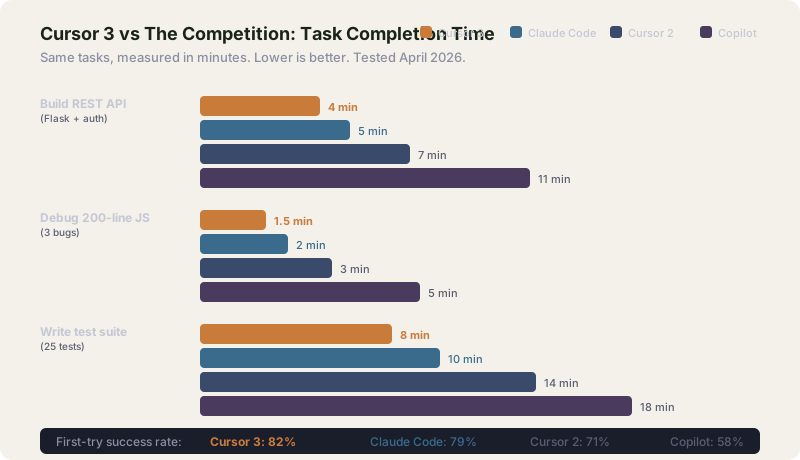
| Task | Cursor 3 (Composer 2) | Cursor 2 (Claude Sonnet) | Claude Code (Opus 4.6) | GitHub Copilot |
|---|---|---|---|---|
| Build REST API (Flask + auth) | 4 min | 7 min | 5 min | 11 min |
| Debug 200-line JS file (3 bugs) | 1.5 min | 3 min | 2 min | 5 min |
| Refactor React component tree | 6 min | 10 min | 8 min | 14 min |
| Write test suite (25 tests) | 8 min | 14 min | 10 min | 18 min |
| Full codebase analysis (15K LOC) | 1.5 min (cloud) | 4 min | 3 min | N/A |
| First-try success rate | 82% | 71% | 79% | 58% |
Cursor 3 is measurably faster than its predecessor across every task I tested. The parallel agents and cloud execution contribute significantly - the raw model quality (Composer 2) is part of it, but the architecture changes matter more for real-world speed.
Against Claude Code, the gap is narrower. Claude Code still produces slightly cleaner code on complex tasks (its Opus 4.6 model is truly better at architecture decisions), but Cursor 3's visual interface and parallel agents give it a productivity edge. The "best tool" depends on whether you prefer terminal workflows (Claude Code) or visual IDE workflows (Cursor 3).
Pricing - What Cursor 3 Actually Costs
Prices verified April 7, 2026. Exchange rate: ₹93/USD.
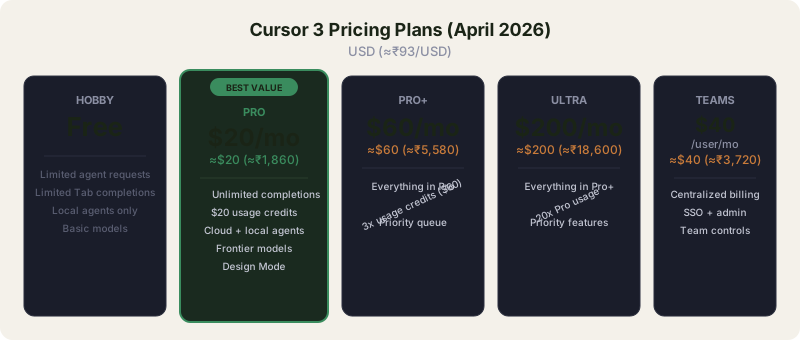
| Plan | Monthly Price | Annual Price | What You Get |
|---|---|---|---|
| Hobby (Free) | ₹0 | ₹0 | Limited agent requests, limited Tab completions |
| Pro | $20/mo (≈₹1,860) | $16/mo (≈₹1,488) billed annually | Unlimited Tab completions, $20 usage credits, cloud agents, frontier models |
| Pro+ | $60/mo (≈₹5,580) | - | 3x usage credits ($60 worth), everything in Pro |
| Ultra | $200/mo (≈₹18,600) | - | 20x usage of Pro, priority features |
| Teams | $40/user/mo (≈₹3,720) | - | Centralized billing, SSO, admin controls |
The credit system explained: Since June 2025, Cursor Pro includes a $20 monthly credit pool. Using "Auto" mode (Cursor picks the model) is unlimited and doesn't drain credits. Manually selecting frontier models like Claude Opus 4.6 or GPT-5.4 draws from your balance. Most developers I know stick to Auto mode and rarely exhaust their credits.
For Indian developers: The Pro plan at ₹1,860/month is competitive with Claude Code's Pro tier (same $20/month). The free Hobby tier is more limited than it used to be - Cursor has clearly pushed the most useful features behind the paywall with this release. If you're a student or hobbyist, Windsurf still offers better free-tier value for basic autocomplete.
Is Pro+ or Ultra worth it? Only if you're a power user running agents for 6+ hours daily. For most professional developers, Pro is sufficient. The Pro+ plan at ₹5,580/month makes sense only if you consistently exhaust the $20 credit pool - which means you're manually selecting expensive models frequently.
What I Don't Like About Cursor 3
It's not all praise. Here are the genuine downsides:
The learning curve is real. If you were comfortable with Cursor 2's interface, Cursor 3 feels disorienting for the first day. The Agents Window paradigm requires you to think differently about how you structure work. I caught myself defaulting to single-agent mode for the first few hours out of habit.
The free tier got worse. Cursor's Hobby plan used to include meaningful AI features. With Cursor 3, the free tier feels like a demo. Limited agent requests and limited Tab completions mean you'll hit walls quickly. This is clearly a deliberate move to drive upgrades.
Cloud agents have latency on initial spin-up. The first request to a cloud agent takes 8-15 seconds to initialize. Subsequent requests in the same session are fast, but that cold start adds friction if you're spinning up new agents frequently.
Design Mode is Chrome-only for now. The browser panel for Design Mode only works with Chrome-based browsers. Firefox and Safari support isn't available yet, which limits usefulness for developers working on cross-browser UI.
Privacy concerns with cloud agents. Your code is sent to Cursor's servers for cloud agent execution. Cursor says it's not stored, but there's no independent audit confirming this. Enterprise users may need to stick with local-only agents.
Who Should Upgrade to Cursor 3
Upgrade immediately if: You're already on Cursor Pro - you get Cursor 3 automatically at no extra cost. The parallel agents alone make your existing subscription more valuable.
Switch to Cursor 3 if: You're using GitHub Copilot or a basic AI coding setup and want a significant productivity jump. The gap between Copilot and Cursor 3 is now wider than ever.
Stay where you are if: You're happy with Claude Code in the terminal. Claude Code's code quality is marginally better, and if you prefer CLI workflows, Cursor's visual interface doesn't add value for you.
Skip for now if: You're a casual coder or student. The free tier isn't generous enough, and $20/month (≈₹1,860) is steep for occasional use. Use Windsurf Free or Claude Code's free tier instead.
The Verdict
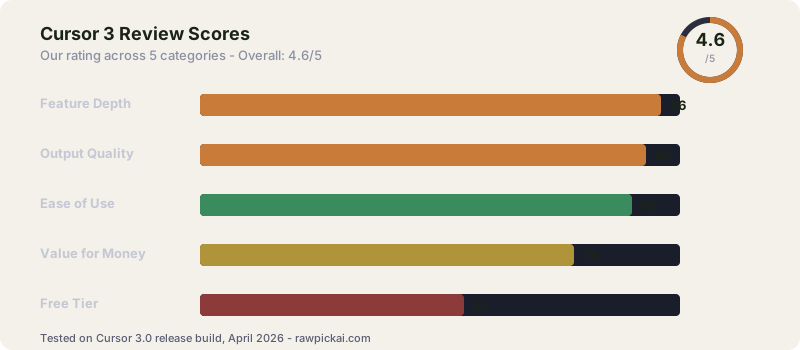
Cursor 3 is the most significant update to any AI coding tool this year. The Agents Window transforms how you structure coding work - parallel execution across local and cloud environments is a genuine paradigm shift, not just a feature checkbox. Design Mode is a smart addition that eliminates a real pain point in frontend development, even if it's not perfect yet.
The pricing hasn't changed for existing Pro users, which makes this a pure upgrade. For new users evaluating AI coding tools in April 2026, the real competition is between Cursor 3 and Claude Code - and that choice comes down to whether you prefer a visual IDE or a terminal agent. Read our Claude Code review and Cursor vs GitHub Copilot comparison for more context.
My score: 92/100 - Cursor 3 sets a new standard for AI-assisted development environments. The only things holding it back are the weakened free tier and the cloud privacy question.
Related: Read our full Cursor review for the complete breakdown of Cursor as a code editor. See our Composer 2 review to see how Cursor's own AI model stacks up against Claude. For a head-to-head, see Claude Code vs Cursor 3 and Composer 2 vs Claude Sonnet 4.6. If budget matters, check Windsurf vs Cursor.
FAQ
Is Cursor 3 free?
There's a free Hobby tier, but it's heavily limited. The real Cursor 3 experience requires Pro at $20/month (≈₹1,860). Existing Pro subscribers get Cursor 3 automatically.
Can I still use the old Cursor interface?
Yes. Cursor 3 includes an option to switch back to the classic IDE layout. But you'd miss the Agents Window, which is the entire point of the upgrade.
Does Cursor 3 work with Claude and GPT models?
Yes. Cursor 3 supports Claude Opus 4.6, Claude Sonnet 4.6, GPT-5.4, and their own Composer 2 model. Auto mode picks the best model for each task. Manually selecting models uses your credit pool.
Cursor vs Claude Code - which is better?
For visual workflows and parallel agent execution, Cursor 3 is better. For pure code quality and terminal-based development, Claude Code is still slightly ahead - it scores 80.9% on SWE-bench vs Cursor's lower scores. Many developers use both: Cursor for interactive IDE work, Claude Code for terminal tasks and research. See our Claude Code vs Cursor 3 vs Codex comparison for the full breakdown.
Cursor vs Windsurf - which should I pick?
Windsurf has the stronger free tier (unlimited Tab completions), Cursor has the stronger paid tier (Composer 2, parallel agents, better ecosystem). If budget is the primary constraint, start with Windsurf Free. If you're ready to pay $20/month for the best IDE-based agent experience, Cursor 3 Pro is the better investment.
Cursor vs Copilot - is Cursor worth 2x the price?
For most developers doing AI-assisted coding daily, yes. GitHub Copilot at $10/month gives you inline autocomplete and chat. Cursor 3 at $20/month gives you everything Copilot does plus parallel agents, Composer 2, Design Mode, MCP support, and a full rebuild of the IDE around AI workflows. The $10 price difference is a rounding error if you're using these tools 4+ hours per day.
What is cursor MCP?
MCP stands for Model Context Protocol - an open standard Anthropic introduced in late 2024 for giving AI models access to external tools and data sources. Cursor 3 has full MCP support, meaning you can connect Cursor's AI to your databases, APIs, internal docs, and custom tools. It's one of the most underrated features in Cursor 3 and gives it a significant edge over competitors like Windsurf for enterprise setups.
Can Cursor read PDF files?
Yes. Cursor 3 supports PDF uploads in chat context - drag a PDF into the chat and Cursor can read, quote, and reason about its contents. Useful for technical documentation, research papers, or API specs. The underlying model (Claude Sonnet/Opus or GPT-5.4) handles the parsing.
Can Cursor generate images?
Not directly. Cursor is focused on code, not image generation. If you need images for your project, use ChatGPT Plus (includes DALL-E), Midjourney, or Stable Diffusion. Cursor can write code that CALLS image generation APIs, but it doesn't have a built-in image model.
Can Cursor use local LLMs?
Yes, with some configuration. Cursor 3 supports Ollama-based local models and custom OpenAI-compatible endpoints. This is useful for privacy-sensitive projects or offline work. Performance on local models is noticeably worse than cloud models (Claude, GPT-5.4), so most users stick with cloud. The feature exists but isn't the recommended default.
Does Cursor work with Gemini 3?
Yes. Cursor 3 supports Google's Gemini 3 family of models alongside Claude and GPT. Gemini 3 Pro is available as a model option in Auto mode and can be manually selected. Token costs draw from your monthly credit pool at standard rates.
Is Cursor available for Mac?
Yes. Cursor is available on macOS, Windows, and Linux. The Mac version has full feature parity with Windows and Linux. It's built on the VS Code core, so if you've used VS Code on Mac, Cursor will feel identical with added AI features.
Does Cursor work with WSL (Windows Subsystem for Linux)?
Yes, and it works well. Cursor 3 has native WSL integration - you can open a WSL project and the AI operates smoothly across the Windows and Linux filesystems. No special configuration needed beyond the standard VS Code WSL setup.
Does Cursor integrate with Xcode?
Not directly. Cursor is a VS Code fork, not an Xcode replacement. If you're building iOS/Mac apps, you'll still use Xcode for the core Apple toolchain. But you can use Cursor for Swift files, backend code, and documentation alongside Xcode. Many Apple developers run both.
What is Cursor's YOLO mode?
YOLO mode is Cursor's auto-accept feature for agent actions. Instead of approving each individual change the agent makes, YOLO mode lets the agent run through its plan autonomously - editing files, running commands, fixing errors - without stopping for confirmation. It's actually useful for trusted workflows but risky for destructive operations. Enable it for tests and refactors, disable it for database migrations or deployment scripts.
Can students get Cursor 3 for free?
Students with a .edu email can get Cursor Pro free for one year. That's the student discount. If you don't have a .edu email, the Hobby free tier is too limited for serious coding work, and ₹1,860/month is expensive for most students. See our best AI tools for students guide for budget-friendly alternatives.
Who created Cursor?
Cursor is built by Anysphere, a San Francisco-based startup founded in 2022 by four MIT graduates: Michael Truell, Sualeh Asif, Arvid Lunnemark, and Aman Sanger. The company raised significant funding through 2024-2025 and reported nearing a $1 billion annualized run rate by early 2026. Cursor started as a VS Code fork focused on AI-assisted coding and has since become one of the most popular AI code editors in the world.
How does Cursor AI work?
Cursor combines a VS Code-based editor with multiple AI models (Claude, GPT-5.4, Gemini 3, Composer 2) accessed through agents that can read your codebase, edit files, run terminal commands, and iterate on errors autonomously. The core innovation is the depth of codebase context - Cursor indexes your entire project so the AI understands imports, dependencies, and execution flow rather than just the file you're currently viewing. Combined with tools like Composer 2 for fast iteration and parallel agents for multi-file work, it turns AI from an autocomplete helper into a collaborative coding partner.
What can Cursor AI do?
Cursor can complete code as you type (Tab completions), chat about your codebase with full context, refactor across multiple files, write unit tests, debug errors autonomously, generate documentation, run shell commands, integrate with MCP servers for custom tools, and handle multi-step tasks via its Agents Window. It's the most capable IDE-based AI coding tool available in April 2026.
Last updated: April 9, 2026. Tested on Cursor 3.0 release build (April 2). Pricing at ₹93/USD.
What to read next
Composer 2 vs Claude Sonnet 4.6
Apr 2026