8 Best AI Tools for Students 2026
We tested 8 AI tools for student workflows: research, writing, coding, and presentations. Most have free tiers. Full pricing in USD and INR.
 ByAsh
ByAshTL;DR: Perplexity is the best AI research tool with built-in citations. Claude produces the most natural writing. ChatGPT is the most versatile study companion. Google NotebookLM is completely free and built for learning from your own materials. Most tools on this list have free tiers that cover real student needs without spending anything.
AI tools can transform how you study, research, and write - if you pick the right ones. The wrong choice wastes money on features designed for marketers and enterprises, while the right free tools can help with research, writing, coding, and presentations without touching your budget.
I tested all eight tools on actual student tasks: writing a 2,000-word research essay on climate policy, preparing for a midterm exam in macroeconomics, debugging a Python data structures assignment, and building a 15-slide presentation on renewable energy. Each tool was evaluated on how well it handled these real academic scenarios, not just marketing demos.
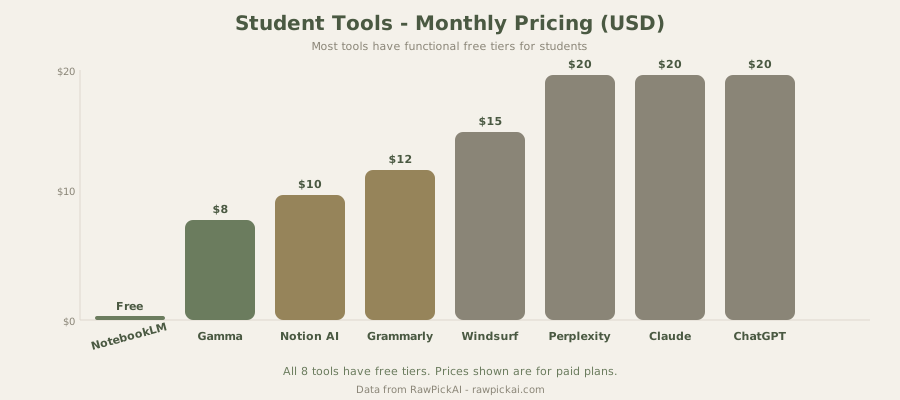
This list prioritizes tools with truly useful free tiers or pricing under $11/mo (≈₹1,000/mo). If a tool's free tier is too limited to be functional, I say so.
Quick Comparison Table
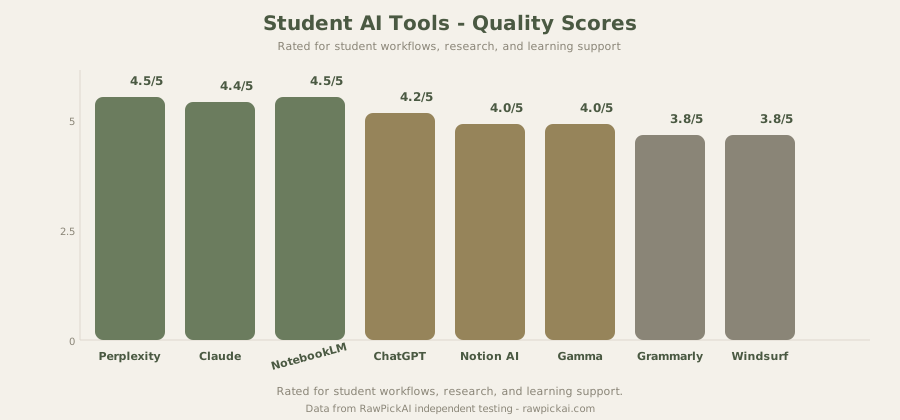
| Tool | Best For | Free Tier | Paid Price | Our Score |
|---|---|---|---|---|
| Perplexity | Research with citations | Yes (excellent) | $20/mo (≈₹1,860/mo) | 4.5/5 |
| Claude | Essay and assignment writing | Yes (good) | $20/mo (≈₹1,860/mo) | 4.4/5 |
| ChatGPT | General study assistant | Yes (decent) | $20/mo (≈₹1,860/mo) | 4.2/5 |
| Notion AI | Note-taking and organization | Yes (limited) | $10/mo (≈₹930/mo) | 4.0/5 |
| Gamma | Presentations | Yes (10 credits) | $8/mo (≈₹744/mo) | 4.0/5 |
| Grammarly | Proofreading and grammar | Yes (basic) | $12/mo (≈₹1,116/mo) | 3.8/5 |
| Windsurf | Coding assignments (CS students) | Yes (unlimited) | $15/mo (≈₹1,395/mo) | 3.8/5 |
| Google NotebookLM | Study material analysis | Yes (fully free) | Free | 4.5/5 |
1. Perplexity - Best for Academic Research
Best for: Finding sources, verifying claims, synthesizing information from multiple papers, literature reviews
Every factual claim Perplexity makes comes with a numbered citation you can click to verify. For students writing research papers, this is transformative - instead of spending hours finding and organizing sources through Google Scholar, Perplexity delivers sourced answers that you can trace back to the original publication, study, or report.
Why Perplexity Beats Google for Academic Research
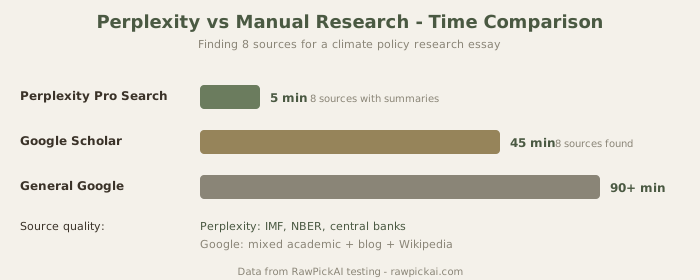
The difference between Perplexity and a Google search is the difference between getting an answer and getting a starting point. Google gives you ten blue links and expects you to read, synthesize, and connect the dots yourself. Perplexity reads those sources for you, synthesizes the key findings, and presents them with citations. For a research essay on climate policy, a single Perplexity Pro Search returned eight relevant sources, summarized the key arguments from each, and identified the points of disagreement between researchers - work that would take 90+ minutes of manual research.
The Academic focus mode filters results to scholarly sources, which makes it particularly useful for university-level papers where citing Wikipedia or blog posts gets your grade docked. When I tested it on "effects of quantitative easing on inflation in emerging markets," it pulled from IMF working papers, NBER studies, and central bank publications - exactly the sources a professor would want to see in a bibliography.
Perplexity Free vs Pro for Students
The free tier includes unlimited standard search and 5 Pro Searches daily. Standard search works for quick fact-finding ("when was the Treaty of Versailles signed" or "what's the formula for compound interest"). Pro Search is what you need for deep research - multi-step reasoning, multiple source synthesis, and follow-up questions. Five Pro Searches per day is enough for most students on most days. During finals week or when writing a major paper, you might hit the limit.
The Pro plan at $20/mo (≈₹1,860/mo) removes the daily limit. Whether that's worth it depends on your research volume. For a graduate student writing a thesis, probably yes. For an undergraduate who writes 3-4 research papers per semester, the free tier is sufficient.
Student tip: Use Perplexity to find primary sources, then read and cite those sources directly in your assignments. Never cite "Perplexity told me" - use it as a research assistant that points you to real sources faster than manual searching.
See also: Full Perplexity review | Perplexity vs ChatGPT comparison
2. Claude - Best for Essay and Assignment Writing
Best for: Structuring essays, developing arguments, improving prose, getting feedback on drafts, understanding complex texts
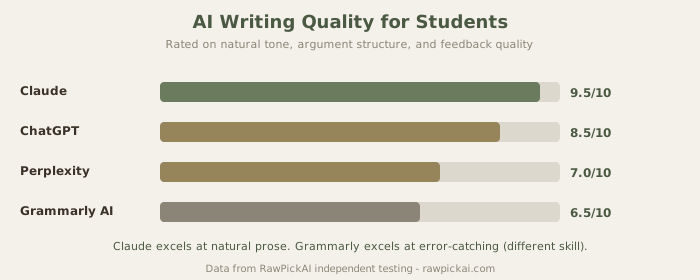
Claude produces the most natural, human-sounding writing of any AI tool I've tested. For students who need help structuring essays, developing arguments, or improving their prose, Claude's output serves as an excellent starting framework that you can build on with your own knowledge and perspective. The writing doesn't sound robotic or formulaic - it reads like a competent human wrote it, which means the transition from AI-assisted draft to your own voice requires less rewriting.
How I Tested Claude for Student Writing
I gave Claude the same assignment I'd give a student: "Write a 500-word analysis of how social media algorithms affect political polarization, citing at least three perspectives." The result was well-structured with a clear thesis, balanced argumentation, and natural transitions. More importantly, when I asked Claude to explain its reasoning for each claim, it could articulate why it structured the argument that way - making it useful as a teaching tool, not just a writing tool.
Where Claude particularly excels is in feedback. Paste your draft and ask "what are the weakest arguments in this essay?" or "how could I strengthen my thesis statement?" Claude's analytical capability produces specific, actionable feedback that's often better than what you'd get from a peer review session. It identifies logical gaps, suggests stronger evidence, and recommends structural changes.
Claude Free Tier for Students
The free tier is generous enough for most student writing needs - draft outlines, get feedback on essay structure, brainstorm thesis statements, and generate first drafts of sections you're struggling with. You'll hit rate limits during intensive writing sessions (the free tier throttles after sustained use), but for typical academic workflows - working on an essay over several days - it's functional.
The Pro plan at $20/mo (≈₹1,860/mo) removes rate limits and gives access to the most capable model. For students who use AI daily for coursework, the upgrade is worthwhile. For occasional use, the free tier covers it.
A Note on Academic Integrity
Using AI to generate entire assignments and submitting them as your own work violates most university policies. Use Claude to learn, outline, and improve your writing - not to replace your thinking. The students who benefit most from AI are the ones who use it as a thinking partner, not a ghostwriter. Most universities now have clear policies on AI use - read yours before submitting AI-assisted work.
See also: Full Claude review | Claude vs ChatGPT comparison
3. ChatGPT - Best General Study Assistant
Best for: Explaining concepts in simple language, exam preparation, math problem-solving, language learning, general homework help
ChatGPT's versatility makes it the best all-purpose study tool. Use it to explain complex concepts in simple language, generate practice questions for exam prep, solve math problems step-by-step, translate passages, and analyze literature. No other tool on this list matches ChatGPT for the sheer range of student tasks it handles competently.
What ChatGPT Does Best for Students
For STEM students, ChatGPT's ability to explain mathematical concepts, work through physics problems, and write code examples is particularly valuable. I tested it on a second-year calculus problem (triple integrals in cylindrical coordinates) and it produced a correct, step-by-step solution with explanations at each stage. For humanities students, it's strong at providing historical context, analyzing literary themes, and helping structure arguments.
The exam prep use case is underrated. Ask ChatGPT to "generate 20 practice questions for a macroeconomics midterm covering chapters 4-7 of Mankiw" and it produces relevant, well-calibrated questions that test the right concepts. Follow up with "I got question 7 wrong, explain the concept behind it" and you get a targeted explanation. This is essentially free tutoring.
ChatGPT Free vs Plus for Students
The free tier covers casual study use, though you'll hit rate limits during intensive study sessions. The Plus plan at $20/mo (≈₹1,860/mo) provides higher usage limits, faster responses, and access to the latest model. ChatGPT also offers a student rate of $13/mo (≈₹1,209/mo) in some regions - worth checking if it's available at your institution.
Student tip: Create a "study session" conversation where you teach a concept back to ChatGPT and ask it to identify gaps in your understanding. Active recall through teaching is one of the most effective study techniques, and ChatGPT is a patient listener that actually catches your errors.
See also: Full ChatGPT review | ChatGPT vs Claude comparison
4. Notion AI - Best for Note-Taking and Organization
Best for: Organizing course notes, tracking assignments and deadlines, creating study databases, summarizing lecture content
Notion is already popular among students for organizing notes, tracking assignments, and managing group projects. The AI layer adds capabilities that make it significantly more useful: summarize long lecture notes into key points, generate flashcards from your notes, extract action items from meeting notes, and search across your entire knowledge base with natural language queries.
Why Organization Matters More Than Most Students Think
The students who struggle academically often struggle with organization first. They have notes scattered across five apps, assignments tracked in their head, and no system for connecting concepts across courses. Notion solves this by providing a single workspace where everything lives - and the AI features make that workspace smarter.
I tested Notion AI by uploading a 3,000-word lecture transcript on monetary policy. It produced a summary with the five key concepts highlighted, generated 12 flashcard-style Q&A pairs, and created a glossary of technical terms. For exam review, this compressed 45 minutes of re-reading into 5 minutes of structured review material.
Notion Pricing for Students
The free plan has limitations on AI uses (a small monthly allowance), but the core Notion functionality - notes, databases, wikis, task management - is free and powerful enough to serve as a student's entire organizational system. The Plus plan at $10/mo (≈₹930/mo) adds unlimited AI uses and extended features. Notion offers free Plus plans for students at many universities - check if yours qualifies at notion.so/students.
See also: Full Notion AI review | Notion AI vs Coda AI comparison
5. Gamma - Best for Student Presentations
Best for: Creating slide decks quickly, group project presentations, classroom presentations, thesis defenses
When you need a slide deck in 30 minutes, Gamma is remarkable. Describe your topic or paste an outline, and Gamma generates a complete, well-designed presentation with logical flow, visual consistency, and speaker notes. For a 15-slide presentation on renewable energy, Gamma produced a deck that required only two manual edits - a misplaced chart and one slide where the content order needed swapping.
Gamma's Free Tier for Students
The 10 free credits let you generate several presentations - roughly 3-4 full decks depending on length. For a semester with four major presentations across different courses, the free tier is tight but workable if you plan ahead. The Plus plan at $8/mo (≈₹744/mo) removes the limit - one of the most affordable AI subscriptions available, and especially reasonable when split across a study group.
The free tier adds a Gamma watermark to exports. For classroom presentations displayed on screen, this is barely noticeable. For formal submissions or thesis defense slides, the paid plan removes it.
See also: Full Gamma review | Gamma vs Beautiful.ai comparison | Best AI presentation tools
6. Grammarly - Best for Proofreading and Grammar
Best for: Catching grammar errors, improving clarity, non-native English speakers, last-minute proofreading before submission
Before submitting any written assignment, run it through Grammarly. The free tier catches grammar mistakes, spelling errors, and basic clarity issues. The browser extension works inside Google Docs, email, and virtually every text field, making it a passive quality-check that catches errors you'd otherwise miss.
Why Grammarly Matters for Non-Native Speakers
For students studying in English-medium institutions whose first language isn't English, Grammarly is especially valuable. It catches subtle grammatical patterns - article usage, preposition choices, subject-verb agreement in complex sentences - that are common in Indian English, Chinese English, or Spanish-influenced English but marked as errors in academic writing. This isn't about "fixing" how you speak; it's about matching the conventions that professors expect in formal papers.
Grammarly Pricing
The free tier is sufficient for basic proofreading. Grammarly Premium at $12/mo (≈₹1,116/mo) adds advanced style suggestions, tone detection, and plagiarism checking. The plagiarism checker alone might justify the upgrade for students who want to verify their work before submitting through Turnitin. Grammarly also offers student discounts periodically - check their education page.
See also: Full Grammarly review
7. Windsurf (Codeium) - Best Free AI for CS Students
Best for: Code completion, debugging assignments, learning new programming languages, building projects
Unlimited free AI autocomplete in your code editor. For computer science students working through assignments, building projects, and learning new languages, Windsurf provides intelligent code suggestions without the cost of Cursor ($20/mo) or GitHub Copilot ($10/mo). The unlimited free tier means you can use it throughout the semester without worrying about credits or rate limits.
How CS Students Should Use AI Coding Tools
The temptation is to let the AI write your entire assignment. Don't. You're in school to learn, and understanding data structures, algorithms, and design patterns requires working through problems yourself. Use Windsurf for: boilerplate code (import statements, class scaffolding), syntax you can't remember (regex patterns, API calls), debugging hints when you're stuck, and exploring alternative approaches after you've solved a problem yourself.
The Cascade agent mode in the paid tier ($15/mo, ≈₹1,395/mo) provides multi-file editing and deeper code understanding. For most coursework, the free autocomplete tier is more than sufficient. Save the paid tier for personal projects or internship work.
See also: Full Windsurf review | Windsurf vs Cursor comparison | Best AI code assistants
8. Google NotebookLM - Best for Study Material Analysis
Best for: Exam preparation, learning from uploaded documents, creating study guides from textbooks, connecting concepts across materials
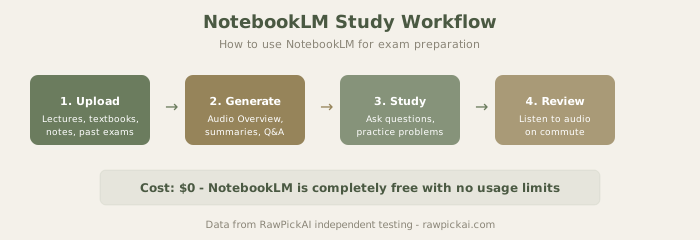
NotebookLM is entirely free and purpose-built for learning from your own documents. Upload your textbook PDFs, lecture slides, research papers, and notes, and NotebookLM creates an AI-powered study companion that answers questions specifically from your source material - no hallucinated information from the open web. Everything it tells you can be traced back to a specific passage in your uploaded documents.
Why NotebookLM Is the Best Free Study Tool
The Audio Overview feature converts your notes into podcast-style summaries that are surprisingly effective for review sessions. Upload your lecture notes for an entire course, generate an Audio Overview, and listen during your commute or workout. It's not a replacement for active studying, but it's excellent for reinforcement and review.
For exam preparation, upload all materials for a course - textbook chapters, lecture slides, lab notes, past exams - and use NotebookLM as a study companion. Ask it practice questions, request summaries of specific chapters, identify connections between topics, and generate concept maps. Because it only draws from your uploaded materials, the answers are always relevant to your specific course content.
NotebookLM's Limitations
The main limitation is that it only works with uploaded documents - it can't search the web for additional information. This is actually a feature for studying (no distracting tangents, no hallucinated facts), but it means you need to upload comprehensive materials. If your professor's slides are sparse, NotebookLM won't be able to fill in gaps that aren't in the uploaded content.
Student tip: Upload all materials for a course at the start of the semester. As the course progresses, your NotebookLM notebook becomes an increasingly comprehensive study resource that connects concepts across lectures.
See also: Full Google NotebookLM review
Budget Strategy for Students
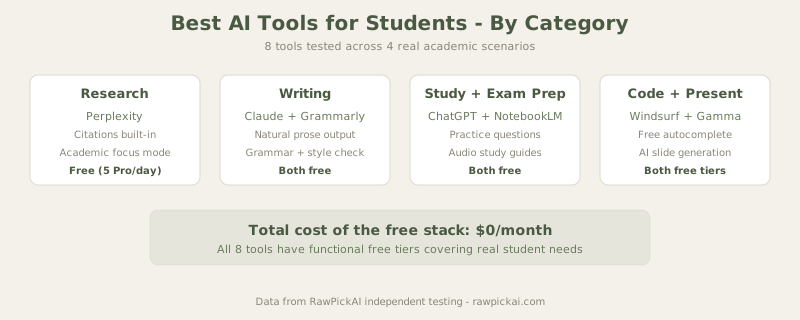
The reality for most students: you don't need to spend anything. The free stack covers 90% of academic needs.
$0/mo - The Free Stack:
- Perplexity Free for research (5 Pro searches/day, unlimited standard)
- Claude Free for writing and essay feedback
- ChatGPT Free for general study help and exam prep
- Windsurf Free for coding (unlimited autocomplete)
- Google NotebookLM for study materials (completely free, no limits)
- Grammarly Free for proofreading (browser extension)
Under $11/mo (≈₹1,000/mo): Add Gamma at $8/mo (≈₹744/mo) for presentations. Everything else stays on free tiers. Best upgrade if you give frequent presentations.
Under $22/mo (≈₹2,000/mo): Upgrade either Claude or ChatGPT to the Pro/Plus plan at $20/mo (≈₹1,860/mo) depending on whether writing quality or versatility matters more to you. Keep everything else free.
The honest recommendation: Start with the free stack. Use it for a month. If you hit limitations that affect your work, upgrade the specific tool where you feel the bottleneck - not all of them.
How These Tools Handle Real Academic Scenarios
Research Essay (Humanities)
For a 2,000-word research essay on climate policy, the optimal workflow: Start with Perplexity to find and synthesize sources (15 minutes). Use Claude to develop your thesis and outline the argument structure (10 minutes). Write the essay yourself using the outline and sources. Run the finished draft through Grammarly for proofreading. Paste the draft into Claude for feedback on argument strength. Revise based on the feedback. Total AI-assisted time: about 40 minutes on top of your own writing time. The essay quality is meaningfully better than working without AI support.
Exam Preparation (STEM)
For a macroeconomics midterm: Upload all lecture slides and textbook chapters to NotebookLM. Generate an Audio Overview for commute listening. Use ChatGPT to generate practice questions by topic. Work through problems yourself, using ChatGPT only when actually stuck. The combination of NotebookLM's source-grounded answers and ChatGPT's explanation ability creates a study system that adapts to your weak areas.
Coding Assignment (CS)
For a Python data structures assignment: Use Windsurf's autocomplete for syntax assistance while writing code yourself. When stuck on a bug, paste the error message into ChatGPT or Claude for debugging help. After completing the assignment, ask Claude to review your code for efficiency and style improvements. The key: write the logic yourself, use AI for syntax and debugging support.
Group Presentation
For a group project presentation: One team member generates the initial deck in Gamma from the group's outline. Export to Google Slides for collaborative editing (Gamma's collaboration features are limited on the free tier). Run the speaker notes through Grammarly. Each member reviews their slides and adds personal context. Total time from outline to presentable deck: under 2 hours for a 15-slide presentation.
The Academic Integrity Question
Every university is developing policies on AI use. The spectrum ranges from "AI is banned on all assignments" to "AI use is encouraged with disclosure." Most institutions fall somewhere in between: AI is permitted as a research and drafting tool but not as a substitute for original thinking.
The practical guideline that works across most policies: use AI to find sources, understand concepts, get feedback, and improve your writing. Don't use AI to generate content that you submit as entirely your own. And when in doubt, disclose. Telling your professor "I used Claude to help structure my argument and Perplexity to find sources" is almost always fine. Submitting a Claude-generated essay without disclosure is almost always a violation.
The students who get the most value from AI aren't the ones trying to avoid work - they're the ones who use AI to learn more deeply and produce better work than they could alone.
Frequently Asked Questions
What is the best free AI tool for students? Google NotebookLM is the best completely free AI tool for students. It has no usage limits, no paid tier, and is purpose-built for learning from uploaded documents. For research specifically, Perplexity's free tier with 5 daily Pro searches and unlimited standard searches is excellent. For writing, Claude's free tier produces the highest-quality output.
Can I use AI tools for university assignments? This depends entirely on your university's policy. Most institutions now permit AI as a research and drafting aid with proper disclosure, but prohibit submitting AI-generated content as your own work. Check your specific course syllabus and university academic integrity policy before using AI on graded assignments.
Which AI tool is best for writing essays? Claude produces the most natural, human-sounding writing and gives the best structural feedback on drafts. Use it for outlining, getting feedback on arguments, and improving your prose. ChatGPT is a close second and more versatile for other study tasks. For proofreading specifically, Grammarly catches more grammar and style issues than either chatbot.
Is ChatGPT or Claude better for students? ChatGPT is more versatile - it handles math, coding, languages, and general knowledge questions well. Claude is better for writing quality and analytical feedback on essays. Most students benefit from using both: ChatGPT as a general study assistant and Claude when writing quality matters. Both have functional free tiers.
How much do AI tools cost for students in India? Most tools on this list have free tiers that cover typical student needs. Paid plans range from $8/mo (≈₹744/mo) for Gamma to $20/mo (≈₹1,860/mo) for ChatGPT Plus or Claude Pro. Google NotebookLM and Windsurf's free tier are completely free with no limits. The recommended free stack costs $0/mo and covers research, writing, coding, presentations, and proofreading.
What AI tools help with exam preparation? Google NotebookLM for studying from your own course materials (upload lectures, textbooks, notes). ChatGPT for generating practice questions and explaining concepts. Perplexity for quick fact-checking and finding additional explanations. The combination of these three free tools creates an effective exam prep system.
Are AI coding tools allowed in CS courses? Policies vary by institution and professor. Many CS departments permit AI autocomplete tools like Windsurf and Copilot for syntax assistance but prohibit using AI to generate entire solutions. The general expectation is that you understand and can explain every line of code you submit. Use AI for syntax help and debugging, not for solving algorithmic problems you haven't attempted yourself.
Internal Links
Read ChatGPT review | See Claude review | Explore Perplexity review | Check Google NotebookLM review | Read Grammarly review | See Notion AI review | Explore Windsurf review | Check Gamma review | Compare ChatGPT vs Claude | Compare Perplexity vs ChatGPT | Explore best free AI tools | Read best AI code assistants | See best AI presentation tools
Last updated: May 2026. Prices converted at ≈₹93/USD.
Related Comparisons and Guides
Want to go deeper on the tools we recommend?
- ChatGPT vs Claude - the two best general AI assistants compared
- Claude vs Perplexity - writing assistant vs research tool
- Best Free AI Tools - every free AI tool worth using
- Compare any tools side-by-side - pick any 2-3 tools and see scores instantly