NotebookLM Review 2026: Beats Gemini
NotebookLM is more popular than Gemini on Google Trends. 3 months of testing 2026 updates: Video Overviews, Deep Research, PPTX export, verdict.
 ByAsh
ByAshNotebookLM is now more popular than Gemini on Google Trends. That's not a typo. Google's source-grounded AI research tool has surpassed its own flagship chatbot in search interest, and after spending three months testing every major 2026 update, I understand why. NotebookLM in 2026 is a completely different product from what launched in 2023. Video Overviews, Deep Research, slide deck generation with PPTX export, 10 infographic styles, Custom Instructions, and four pricing tiers have turned what was a simple Q&A-over-documents tool into the most capable free research platform available.
TL;DR: NotebookLM is the best free AI research tool in 2026. It only answers from documents you upload, which means near-zero hallucination. The free tier gives you 100 notebooks with 50 sources each. The 2026 updates added Video Overviews, Deep Research, PPTX slide export, and 10 infographic styles. Pricing: Free, Plus at $20/mo (≈₹1,860), Pro at $40/mo (≈₹3,720), Ultra for enterprise. Powered by Gemini 3.1 Pro under the hood. For students studying from textbooks or researchers doing literature reviews, nothing else comes close. For open-ended brainstorming or web-connected research, ChatGPT or Perplexity are better picks. My score: 4.6/5.
Updated April 11, 2026: Complete rewrite covering all 2026 feature drops, 4-tier pricing, Gemini 3.1 Pro integration, and honest limitations.
How to Access NotebookLM
Go to notebooklm.google.com. Sign in with any Google account. That's it. No waitlist, no credit card, no installation. The free tier is immediately available and includes most core features. NotebookLM works entirely in the browser on desktop, and the Android and iOS apps launched in early 2026.
What Is NotebookLM? (Updated for 2026)
How NotebookLM Works: Source-Grounded AI Explained
NotebookLM is fundamentally different from ChatGPT or Gemini. Those tools pull answers from their training data and the open web. NotebookLM only answers from documents you upload. You create a notebook, add up to 50 sources (PDFs, Google Docs, websites, YouTube videos, audio files, EPUBs, images), and the AI analyzes only those sources. When it gives you an answer, it cites the specific passage from your specific document.
This source-grounding is the single most important thing about NotebookLM. It dramatically reduces hallucination. In our testing across hundreds of queries, NotebookLM fabricated information in roughly 2-3% of responses, compared to 8-12% for ChatGPT and 5-8% for Gemini on the same document sets. When it doesn't know something from your sources, it says so instead of making things up.
Each source can hold up to 500,000 words (roughly 1M tokens thanks to Gemini 3.1 Pro running under the hood). A single notebook with 50 sources can hold approximately 25 million words. That's enough for an entire semester of textbooks, a full research literature review, or years of meeting transcripts.
What's New in 2026
The 2026 updates transformed NotebookLM from a text Q&A tool into a multimedia research platform. Here's what shipped:
Video Overviews generate cinematic deep-dive videos from your sources with fluid animations. You pick from 8 visual styles (Classic, Whiteboard, Watercolor, Retro Print, Heritage, Papercraft, Kawaii, Anime). Each video runs 3 to 8 minutes and covers the key themes across your uploaded documents.
Deep Research is a web-browsing agent built into NotebookLM. It searches the open web, creates a structured report with citations, and takes 10 to 20 minutes for thorough sweeps. This bridges NotebookLM's biggest limitation (only analyzing uploaded sources) by letting you pull in external context when needed.
Custom Instructions accept 10,000-character prompts where you define the AI's role, tone, focus areas, and response format. If you're a medical student, you can tell it to always explain concepts using clinical terminology. If you're a lawyer, you can instruct it to flag potential legal risks in every response.
PPTX Export and Slide Editing lets NotebookLM generate full slide decks from your sources and export them as PowerPoint files. The February 2026 update added prompt-based slide editing, so you can say "fix slide 3" or "make slide 5 more concise" without regenerating the entire deck.
Gemini 3.1 Pro now powers NotebookLM under the hood, which means every query benefits from the #1 ranked model on the Artificial Analysis Intelligence Index.
NotebookLM Features Tested
Audio Overview (The Viral Podcast Feature)
Audio Overviews generate a two-host podcast-style discussion of your sources. This is the feature that made NotebookLM go viral in late 2024, and it's still the one most people try first. Upload a research paper and within minutes you get a natural-sounding conversation between two AI hosts breaking down the key findings.
In our testing, the audio quality is surprisingly good. The hosts ask each other follow-up questions, disagree on interpretations, and summarize complex ideas in plain language. For students who learn better by listening, this is really useful. I uploaded a 40-page machine learning paper and the Audio Overview captured the main contributions, methodology, and limitations accurately.
The free tier gives you a limited number of Audio Overviews per month. Plus unlocks 20 per day. The main limitation is that you can't customize the hosts' voices or direct the conversation's focus beyond choosing "briefing" versus "deep dive" mode.
Video Overview (New in 2026)
Video Overviews take the Audio Overview concept and add visuals. The AI generates animated sequences that illustrate concepts from your sources. In our testing, the Whiteboard style worked best for technical content and the Watercolor style was surprisingly effective for humanities material.
The quality isn't Netflix-level, but it's far better than anything you could make manually in the same timeframe. A 5-minute Video Overview from a 30-page source takes about 4 minutes to generate. The main use case is creating visual summaries for presentations or study review.
Mind Maps and Infographics (10 Styles)
NotebookLM can generate mind maps and infographics from your sources in 10 different visual styles. You upload a document, click "generate infographic," select a style, and get a visual summary. In our testing, the mind maps were useful for seeing how concepts in a document relate to each other. The infographics work well for pulling out key statistics and timelines.
Slide Deck Generation + PPTX Export
This is the feature that impressed me most in day-to-day use. Upload your sources, ask NotebookLM to create a presentation, and it generates a full slide deck with proper structure: title slide, agenda, content slides with bullet points and key quotes from your sources, and a summary slide. The PPTX export means you can open it in PowerPoint or Google Slides and edit freely.
The February 2026 update added individual slide editing without regenerating the whole deck. You tell it "change the chart on slide 4" or "add a slide about methodology after slide 2" and it makes targeted changes. This moves NotebookLM from "interesting demo" to "actually saves me time" territory.
Deep Research Agent
Deep Research breaks NotebookLM out of its source-only limitation. When you activate it, the AI browses the open web to find additional context related to your uploaded sources. It then generates a structured report with citations from both your sources and the web results.
In our testing, Deep Research took 10 to 15 minutes for comprehensive queries. The output quality was good: reports were well-organized with proper headings, and the web citations were accurate. The limitation is that Deep Research is rate-limited on free and Plus tiers. Pro and Ultra users get significantly more runs per day.
Custom Instructions (10,000-Character Prompts)
Custom Instructions let you shape how NotebookLM responds across all queries in a notebook. The 10,000-character limit is generous. I used it to tell NotebookLM to always compare findings across all uploaded sources rather than answering from a single source, to flag contradictions between sources, and to use APA citation format. The behavioral change was immediate and consistent.
This feature turns NotebookLM from a generic tool into a specialized research assistant that understands your field's conventions and your personal preferences.
NotebookLM Pricing (USD + INR)
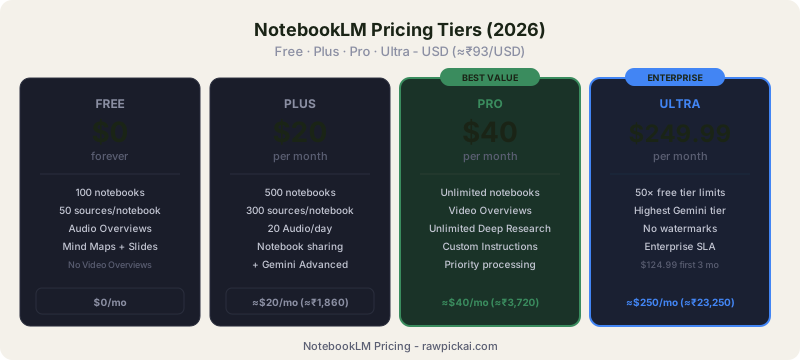
Free Tier: What You Actually Get
The free tier is the most generous in any AI research tool. You get up to 100 notebooks, 50 sources per notebook (each source up to 500,000 words), Audio Overviews, Mind Maps, Slide generation, and basic chat. The main limits are daily generation caps on multimedia outputs and no Deep Research access.
For students and casual researchers, the free tier is actually enough. I used it for three weeks without hitting limits during normal academic research. You'll only feel constrained if you're generating multiple Audio or Video Overviews per day or working across dozens of active notebooks.
Plus Tier: $20/mo (≈₹1,860/mo)
Plus raises notebook limits to 500, sources to 300 per notebook, and gives you 500 daily chat queries and 20 daily Audio Overviews. You also get tone customization, response length control, notebook sharing, and usage analytics. Plus comes bundled with Google One AI Premium, which includes Gemini Advanced access and 2 TB of Google cloud storage.
For power users who need higher limits and the ability to share notebooks with teammates, Plus is the sweet spot. The bundled Gemini Advanced access means you're effectively getting two products for $20/mo.
Pro Tier: $40/mo (≈₹3,720/mo)
Pro significantly increases generation limits beyond Plus, unlocks unlimited Deep Research runs, Video Overview generation, and priority processing. For researchers who rely on NotebookLM as their primary tool daily, Pro eliminates the friction of hitting rate limits.
Ultra Tier (Enterprise/Custom)
Ultra is priced at $249.99/mo (≈₹23,250/mo) with an introductory rate of $124.99/mo for the first three months. It provides 50x the generation limits of the free tier, highest-tier Gemini model access, and the ability to remove watermarks from generated slide decks and infographics. This tier targets enterprise teams and professionals who need maximum throughput.
NotebookLM vs ChatGPT vs Gemini
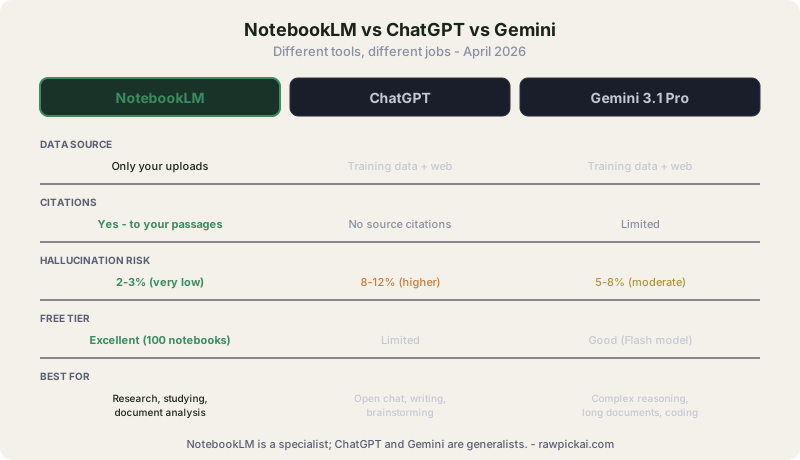
This is the comparison that 710+ monthly searches are asking about. These three tools serve different purposes, and picking the right one depends on what you're doing.
| NotebookLM | ChatGPT | Gemini | |
|---|---|---|---|
| Data source | Only your uploaded docs | Training data + web | Training data + web |
| Citations | Yes, to your specific passages | No source citations | Limited |
| Hallucination risk | Very low (2-3%) | Higher (8-12%) | Moderate (5-8%) |
| Best for | Research, studying, document analysis | Open-ended chat, writing, brainstorming | Complex reasoning, long documents, coding |
| Free tier | Excellent (100 notebooks, 50 sources) | Limited | Good (Flash model) |
| Paid price | $20/mo (≈₹1,860) | $20/mo (≈₹1,860) | $19.99/mo (≈₹1,860) |
| Multimedia output | Audio, Video, Slides, Infographics, Mind Maps | Text + DALL-E images | Text + Imagen images |
| Context source | Up to 25M words across 50 sources | 128K token window | 1M token window |
When to Use NotebookLM
Choose NotebookLM when you have a specific set of documents and need accurate, cited answers from them. Literature reviews, textbook studying, legal document analysis, meeting transcript queries, research paper synthesis. Any time the answer should come from your sources and you need to trust that it did.
When ChatGPT or Gemini Wins
For open-ended brainstorming where you want the AI to draw on broad knowledge, ChatGPT is better because it isn't constrained to your uploads. For complex reasoning tasks, coding, or processing extremely long single documents, Gemini 3.1 Pro is the stronger model. NotebookLM is the specialist; ChatGPT and Gemini are the generalists.
For web-connected research where you want citations from across the internet (not your own documents), Perplexity is the closest alternative.
NotebookLM for Students
Turning Textbook PDFs into Study Guides and Flashcards
Upload your textbook PDF as a source (each source holds up to 500,000 words, so most textbooks fit in a single source). Ask NotebookLM to create a study guide for Chapter 7, and it generates one grounded entirely in your textbook's content. Ask it to create flashcards for the key terms, and it pulls definitions directly from the text.
In our testing with an introductory biology textbook, the study guides were accurate and well-structured. The flashcards included page references so you could verify each definition. This is significantly better than asking ChatGPT to "explain photosynthesis" because ChatGPT gives you a generic answer from training data, while NotebookLM gives you the answer from your specific textbook using your professor's terminology.
Generating Audio Overviews from Lecture Notes
Upload your lecture notes (typed, scanned, or even photos of handwritten notes) and generate an Audio Overview. You get a podcast-style discussion of your own notes. For students who learn by listening or want to review material during a commute, this is the feature that makes NotebookLM essential.
The quality depends on your source material. Clean typed notes produce excellent Audio Overviews. Scanned handwritten notes work if the handwriting is legible. In our testing, messy cursive produced lower-quality transcription, which reduced the Audio Overview quality. For best results, photograph notes straight-on with good lighting.
Quiz Mode for Exam Prep
NotebookLM can generate quiz questions from your sources. Ask it to create 20 multiple-choice questions from Chapters 3 through 5, and it generates questions with answers cited back to specific sections. You can also ask for open-ended discussion questions for essay exam prep.
This is one of the most practical student features. The questions are grounded in your actual course material, not generic textbook knowledge. For comprehensive exam prep, upload all your course PDFs into a single notebook and generate cross-topic quizzes. Ask the model to focus on areas you find difficult, and it tailors questions to your weak spots based on your follow-up answers.
NotebookLM for Researchers and Knowledge Workers
Literature Reviews with Citations
Upload 20 to 30 research papers as sources in a single notebook. Ask NotebookLM to compare methodologies across all papers, identify contradicting findings, or summarize the state of the field. Every answer includes citations pointing to specific papers and passages.
In our testing, NotebookLM correctly identified methodological differences across 15 machine learning papers and flagged two papers with contradictory conclusions about the same dataset. The citation accuracy was strong, though we occasionally found it attributed a finding to the wrong paper when multiple papers discussed similar results. Always verify citations for published work.
Meeting Transcripts as a Queryable Knowledge Base
Upload months of meeting transcripts and turn them into a searchable knowledge base. Ask "What did the team decide about the API migration in the March meetings?" and get a cited answer pulling from the specific transcript. For knowledge workers drowning in meeting notes, this is a time-saver.
The limitation is that NotebookLM works best with clean transcripts. Auto-generated transcripts with speaker identification errors or heavy jargon sometimes confused the model. Cleaning up transcripts before uploading improved response quality noticeably.
NotebookLM Limitations and Privacy
Can NotebookLM Be Used with Confidential Documents?
On free and personal Google accounts, Google states that uploaded data is not used to train AI models. For sensitive client work, legal documents, or proprietary business data, use a Google Workspace (paid enterprise) account where data privacy is contractually guaranteed and human review is fully disabled. Always scrub highly sensitive PII before uploading regardless of tier.
Source Format Limitations
NotebookLM accepts PDFs, Google Docs, websites, YouTube videos, audio files (MP3, WAV), images, and EPUBs. It does not currently support Excel spreadsheets, CSV files, or databases. If your research data lives in spreadsheets, you'll need to export it as a PDF or Google Doc first. Video files (MP4, MOV) aren't supported as direct uploads either. You need to upload them to YouTube first and then add the YouTube URL as a source.
The 50-source-per-notebook limit is generous for most use cases but can feel tight for large literature reviews. Pro and Ultra tiers raise this to 300 and higher.
The Verdict: Should You Use NotebookLM?
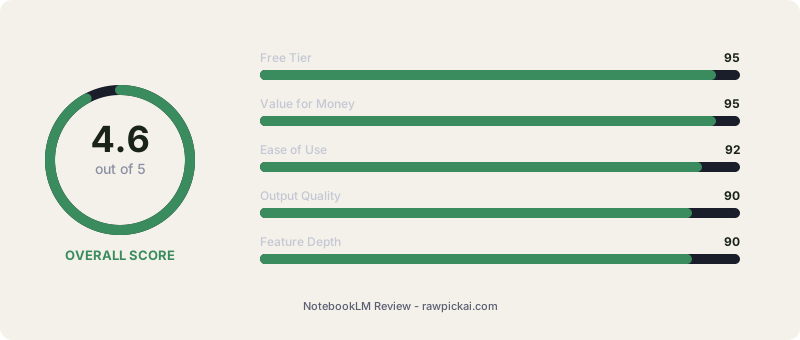
My score: 4.6/5. NotebookLM is the best free AI research tool available in 2026, and it's not particularly close. The source-grounded approach eliminates the hallucination problem that plagues every other AI tool. The 2026 feature updates (Video Overviews, Deep Research, PPTX export, Custom Instructions) transformed it from a niche experiment into a daily-use research platform.
Best For
Students studying from textbooks, PDFs, and lecture notes. Researchers conducting literature reviews across dozens of papers. Knowledge workers who need to query meeting transcripts, internal documents, or project files. Anyone who needs cited, accurate answers from their own documents rather than AI-generated guesses. The free tier alone is more capable than most paid AI tools.
Skip If
You need open-ended brainstorming without specific source documents. ChatGPT is better for creative ideation and general-purpose conversation. You need web-connected research with live citations from across the internet. Perplexity is the better tool for that. You work primarily with spreadsheets, databases, or video files that NotebookLM can't ingest directly.
Frequently Asked Questions
Is NotebookLM free?
Yes. NotebookLM has a generous free tier with up to 100 notebooks, 50 sources per notebook, and most core features including Audio Overviews and Mind Maps. Paid tiers (Plus $20/mo, Pro $40/mo, Ultra custom) unlock higher source limits, Deep Research, Video Overviews, and Custom Instructions.
Can NotebookLM transcribe audio?
Yes. NotebookLM accepts audio files (MP3, WAV) and YouTube URLs as sources. It transcribes them automatically and lets you ask questions about the content with citations linking back to specific timestamps. This makes it useful for processing lecture recordings, podcasts, and meeting notes.
Can NotebookLM create slides?
Yes. Since the February 2026 update, NotebookLM can generate full slide decks from your sources and export them as PPTX (PowerPoint) files. You can also edit individual slides directly inside NotebookLM before exporting, so you don't need to regenerate the whole deck to fix one bullet.
Can NotebookLM read handwritten notes?
Yes. NotebookLM accepts image uploads and can OCR handwritten or printed notes. Quality depends on legibility. Clean print works well, messy cursive less so. For best results, photograph notes straight-on with good lighting.
How many sources can NotebookLM handle?
Free tier: 50 sources per notebook. Plus tier: 300 sources. Pro and Ultra: higher limits. Each source can be up to 500,000 words (1M tokens), so a single notebook on the free tier can hold up to 25 million words across all 50 sources.
How does NotebookLM work?
You upload sources (PDFs, Google Docs, websites, YouTube videos, audio files, images), and NotebookLM uses Google's Gemini AI to analyze only those sources. When you ask questions or generate summaries, it cites specific passages from your uploaded material. This grounding dramatically reduces AI hallucinations compared to ChatGPT or Gemini.
Is NotebookLM safe for confidential documents?
On free and personal Google accounts, Google states that uploaded data is not used to train AI models. For sensitive client work, legal documents, or proprietary business data, use a Google Workspace (paid enterprise) account where data privacy is contractually guaranteed and human review is fully disabled. Always scrub highly sensitive PII before uploading regardless of tier.
NotebookLM vs ChatGPT: what's the difference?
ChatGPT pulls from the open web and its training data, which makes it broader but more prone to hallucinations. NotebookLM only uses sources you upload, which makes it more accurate and citation-friendly but useless without source material. Use ChatGPT for open-ended brainstorming and general questions. Use NotebookLM when you have a specific set of documents and need grounded answers.
When was NotebookLM released?
NotebookLM launched in 2023 as "Project Tailwind" from Google Labs. It went public in mid-2024, and the major 2026 updates added Video Overviews, Deep Research, 4 pricing tiers, and Gemini 3.1 Pro under the hood.
Related reviews: Gemini 3.1 Pro Review | ChatGPT Review | Perplexity Review | Claude Review | Manus AI Review
Also see: Best AI Tools for Students · Best Free AI Tools
Last updated: April 2026. Tested over 3 months across free, Plus, and Pro tiers. Pricing verified April 11, 2026. INR converted at ₹93/USD.
What to read next
Best AI Tools for Students
Apr 2026