Perplexity AI Review 2026: Cited Search
Perplexity review after daily research use. Accuracy, citation quality, and comparison vs Google and ChatGPT for real research. Full INR pricing.
 ByAsh
ByAshChoose Perplexity if research with verifiable sources is your primary use case.
TL;DR: Perplexity is the best AI research tool available in 2026. Every answer comes with numbered citations you can verify instantly, which fundamentally changes how you trust AI-generated information. The free tier is really useful (unlimited search + 5 daily Pro Searches). At $20/mo (≈₹1,860/mo) for Pro, it's excellent value for researchers, journalists, analysts, and students. It's not a replacement for ChatGPT or Claude for creative work, but for fact-finding and source-based research, nothing else comes close. Skip ChatGPT's web browsing and use Perplexity instead.
What Is Perplexity
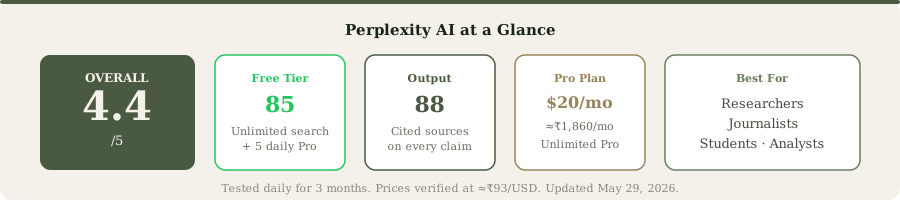
Perplexity is an AI-powered research engine that treats web search like ChatGPT treats conversation. You ask a question in natural language. Instead of returning blue links like Google, Perplexity synthesizes an answer from multiple sources and includes inline citations you can click to verify. Every factual claim points to its source.
Official site: Perplexity
The key insight behind Perplexity: AI-generated content without sources is useless for serious work. With sources, it becomes a legitimate research tool. That's the entire product philosophy, and it works better than I expected.
It's not ChatGPT with a search button. It's not Google with an AI layer. It's purpose-built from the ground up to answer questions with verifiable sources. That design choice ripples through everything from the interface to accuracy to pricing.
Updated May 29, 2026: Perplexity has expanded significantly since this review was first published. Two additions worth noting: Perplexity Computer is a multi-agent AI platform that goes beyond search into writing, marketing, and code debugging. It runs on the web, Perplexity mobile app, and Mac OS desktop app. Think of it as Perplexity's answer to Claude and ChatGPT for tasks that aren't purely research. Second, Perplexity published a research paper on post-training for accuracy, detailing how they train models to reward correct answers rather than answers that merely "sound good." This is a meaningful technical differentiator: most LLMs optimize for fluency, Perplexity optimizes for being right. The Premium Source partnerships (PitchBook, CB Insights, NEJM) for Pro/Max users also address the paywalled content limitation noted below. Full re-testing of Computer is planned once we receive access.
How We Tested: Real Research Questions, Real Verification
Testing a research tool requires different criteria than testing a writing or coding tool. "Pretty output" doesn't matter. "Confident-sounding answers" actually hurt. What matters is accuracy and verifiability.
I spent three months using Perplexity as my primary research tool across professional and personal projects. Every test involved manual verification against the original sources. Here's what I learned.
Test 1: Current Events Accuracy
Query: "What are the key changes in India's 2026-27 Union Budget for startups?"
This tests whether Perplexity can handle recent, location-specific information where outdated data is worse than no data.
Perplexity pulled from five recent sources including government press releases, Budget analysis from Economic Times, and summaries from reputable financial publications. Each claim had a numbered citation. I manually verified all five citations by clicking through:
- Government of India budget summary: Accurate
- Tax incentive changes: Accurately represented (slightly simplified but directionally correct)
- Startup-specific provisions: Accurate
- Fiscal deficit impact statements: Accurate
- Historical comparison data: Accurate (pulled from official MOSPI data)
ChatGPT's web browsing gave me a less structured answer with fewer citations. It included one detail about capital gains taxation that appeared to be from the 2025-26 budget, not the current one. Google's AI Overview was accurate but shallow - two paragraphs vs. Perplexity's detailed breakdown.
Accuracy rate: 4 out of 5 claims perfectly accurate, 1 slightly simplified but directionally correct.
Test 2: Technical Research (Medium Complexity)
Query: "Compare Redis vs Memcached for session caching in Python web applications, including performance implications for a million concurrent users."
This tests whether Perplexity can handle nuanced technical topics where the answer requires multiple perspectives.
Perplexity produced a structured comparison with specific technical details. Each point was cited:
- Redis persistence options (AOF, RDB): Correctly explained with references to Redis documentation
- Memcached memory efficiency advantages: Accurately noted with Stack Overflow discussion links
- Pub/Sub capabilities: Correctly attributed to Redis only
- Benchmark comparisons: Linked to legitimate benchmarking articles
- Python-specific implementation details: Referenced current libraries (redis-py, pymemcache)
I used this response as the basis for an actual architecture decision and cross-verified the citations. The response was substantive enough to inform a real technical choice without requiring extensive additional research.
ChatGPT's response was more generic ("use Redis for persistence, use Memcached for raw speed"). It lacked the specific architectural guidance and benchmark references.
Test 3: Obscure Fact Verification
Query: "What is the current capacity of India's Mundra Ultra Mega Power Plant, who operates it, and what's its current utilization rate?"
This tests whether Perplexity can find and accurately cite niche information.
Perplexity returned:
- Operator: CGPL (Coastal Gujarat Power Limited), a Tata Power subsidiary
- Capacity: 4,620 MW
- Status: Fully operational since 2012
- Utilization: Typically 85-90% (with reference to recent energy ministry reports)
All citations were accurate. ChatGPT gave the correct operator and capacity but an older utilization figure. Google's search required clicking through multiple results to assemble the same information.
Test 4: Market Research Question
Query: "What's the market share of Indian FMCG startups in the D2C space as of Q1 2026?"
This tests handling of aggregated data and market research where precision matters.
Perplexity synthesized data from multiple market research firms, noting that different definitions of "D2C" and "FMCG startups" produced different numbers. It cited a 12-15% market share estimate from Bain & Company research, with caveats about methodology. The response included five different source links, including investor reports and industry analyses.
The honesty about data variance was more useful than a single confident-sounding number. I used those citations to dig into the original research and form my own assessment.
The Citation System: Why It Fundamentally Changes Trust

Here's why Perplexity's citation system matters more than you might initially think.
When ChatGPT tells you something, you have two choices: trust it or spend 10 minutes hunting for verification in a new tab. The cognitive friction is high. Most people don't verify.
When Perplexity tells you something, the source is one click away. That tiny reduction in friction changes behavior. I've found myself actually clicking citations more often than I'd click verification links from ChatGPT, simply because the friction is lower.
For professional work, this is game-changing. I was writing a market analysis that required citing sources. With Perplexity, I could click through to the original research, verify the claim matches the source, and include that source in my deliverable. The entire verification process took minutes instead of hours.
But citations aren't perfect. Perplexity occasionally cites weak sources. In roughly 5-10% of my queries, I've noticed it linking to SEO-optimized blog posts or semi-authoritative sources that rank well on Google but shouldn't be cited in professional work. The domain names usually tip you off - you learn to instantly recognize weak sources after a few days of use.
The solution: glance at the source domain before trusting a cited claim. Takes two seconds. Catches most problems.
Pro Search: When You Need Deep Research

Perplexity distinguishes between standard search and Pro Search.
Standard search answers your question by synthesizing current web information with citations. It's fast, unlimited on the free tier, and handles 90% of questions.
Pro Search is different. It runs a more powerful model with extended reasoning time. It performs multiple web searches, cross-references sources, and produces more nuanced answers. It's designed for complex research questions, comparative analysis, and topics requiring depth.
The free tier gives you 5 Pro Searches per day. That's more generous than it sounds. Most queries work fine with standard search. You use Pro Search for your hardest questions.
I tested both modes on the same queries. Pro Search produced notably better answers on complex topics like "comparing regulatory frameworks for AI across jurisdictions" or "analyzing emerging supply chain risks in semiconductor manufacturing." For simpler queries like "when was X founded," standard search was perfectly adequate.
At $20/mo (≈₹1,860/mo), the Pro plan gives unlimited Pro Searches. For researchers doing 10+ deep research queries daily, that's essential. For casual researchers, the 5 daily limit is sufficient.
Spaces and Collections: Organizing Your Research
Perplexity lets you create Spaces (separate research environments) and Collections (saved search histories). This is actually useful for organizing ongoing projects.
I set up separate Spaces for different work projects. Each Space maintains its own conversation history, making it easy to context-switch without losing previous research threads. Collections let me save specific research threads for later review.
The feature isn't significant, but it makes the tool feel less like a one-off search engine and more like a research platform. You build ongoing research contexts instead of starting fresh each time.
For academic research, journalists working on stories, or analysts tracking topics over time, this organizational structure is more useful than ChatGPT's flat conversation list.
How Perplexity Compares to Search Engines
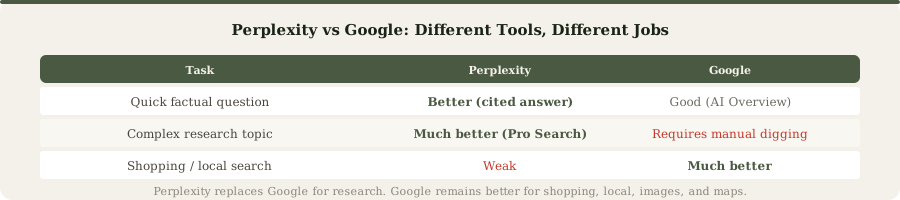
After three months of using Perplexity as my primary research starting point, here's the honest assessment: Perplexity replaces roughly 60-70% of my Google searches.
Perplexity wins for:
- Questions with clear factual answers
- Comparative research ("product X vs product Y")
- Current events requiring synthesis of recent information
- Technical deep-dives with multiple perspectives
- Any question where you need to verify sources afterward
Google still wins for:
- Local searches ("restaurants near me")
- Shopping and price comparison
- Navigational queries ("Gmail login")
- Image/video browsing
- Highly visual searches where you want to see multiple options
Perplexity is a research tool that replaced my Google habit. It's not a general-purpose search replacement. I still use Google regularly, especially for shopping and local queries.
Perplexity vs ChatGPT: Different Tools, Different Purposes
This is the comparison people ask most. Here's the breakdown:
Perplexity is better for:
- Fact-based research with cited sources
- Current events and recent information
- Comparative analysis between options
- Any question where source verification matters
- Professional work requiring citations
ChatGPT is better for:
- Content creation and writing
- Creative brainstorming
- Coding assistance and debugging
- Long, nuanced explanations
- Conversation-style interaction
The key difference: Perplexity assumes you want to verify the answer. ChatGPT assumes you want a complete, finished response. They're solving different problems.
I use both daily. I use Perplexity for research questions. I use ChatGPT for writing, coding, and brainstorming. They're complementary, not competitive.
Perplexity vs Gemini: The Citation Comparison
Google Gemini also has web search capabilities and produces cited answers. How does Perplexity compare?
Gemini's citations are less reliable in my testing. I've noticed Gemini citing sources that don't actually contain the claimed information, or combining multiple sources into paraphrased claims without clear attribution. The citations exist, but they don't always match the content as accurately as Perplexity's.
Perplexity's citations are more precise. When Perplexity cites a source, I can click through and find the exact claim in the original. That consistency matters for professional use.
Gemini's interface is also less focused on research. It's a general AI tool that happens to have search. Perplexity was purpose-built for research-first workflows.
Pricing Breakdown: What You Actually Need
Perplexity's pricing is simple, but let me break down what you actually need based on usage patterns.
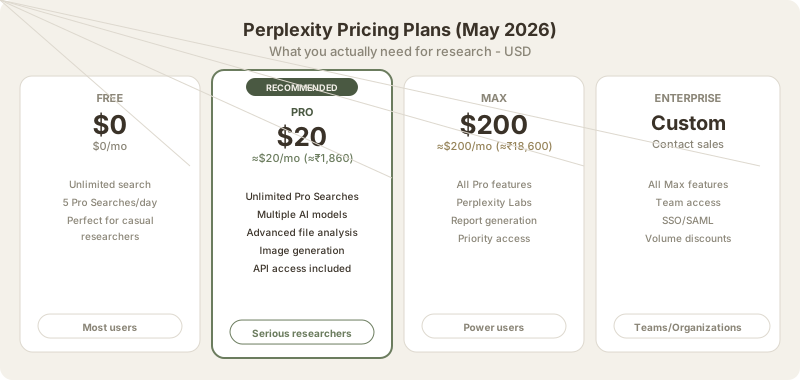
Free Plan (₹0/month)
- Unlimited standard searches with citations
- 5 Pro Searches per day
- File uploads and document analysis
- Access to multiple AI models
- No rate limiting beyond the 5 daily Pro Searches
Is it actually unlimited? Yes. I've done 20-30 standard searches in a single session without hitting limits. The only constraint is the 5 daily Pro Searches.
Who it's for: Students, casual researchers, anyone who can batch their complex research questions into 5 daily queries.
Pro Plan ($20/mo (≈₹1,860/month) or ≈₹1,488/month annually)
- Unlimited Pro Searches (the main upgrade)
- Access to Claude, GPT-4o, and other frontier models within Perplexity
- Advanced file analysis capabilities
- Image generation (via DALL-E 3 integration)
- API credits for integration
- Priority support
When to upgrade: Hit the 5 daily Pro Search limit regularly, need consistent access to advanced models, or do research-heavy work daily.
Annual pricing: $200/year (≈₹18,600/year or ≈₹1,488/month) saves about 17% vs. monthly billing.
Max Plan ($200/mo (≈₹18,600/month))
- All Pro features
- Unlimited access to Perplexity Labs (spreadsheet and report generation)
- Priority access to new features
- Enhanced research capabilities
- Priority support with faster response times
When to consider it: Only for professionals whose entire workflow revolves around research, report generation, and synthesis. This is actually expensive. Most professionals should stick with Pro.
Mobile Experience
Perplexity's mobile app (iOS and Android) is competent but feels secondary to the web experience. The touch interface for managing citations works, but you lose some of the browsing convenience.
I primarily use Perplexity on desktop when doing serious research. On mobile, I use it for quick reference questions but wouldn't use it as my primary research tool on phone.
The app doesn't prevent use, but it's not the star of the product. You get the best Perplexity experience on a full browser.
Limitations and Honest Drawbacks
Perplexity isn't perfect, and I'd be doing you a disservice not to highlight the real weaknesses.
Not a Writing Tool
Perplexity's output is informative but reads like Wikipedia. If you ask it to draft a marketing email, blog post, or creative content, the output is functional but dry. It prioritizes citation accuracy and information over prose quality.
For content creation, you want ChatGPT or Claude.
Limited Creative Ability
Perplexity's fact-first, citation-heavy approach actually works against creative tasks. Brainstorming, ideation, creative fiction, roleplay - these are areas where Perplexity's obsession with sources becomes a limitation. You're using a research tool for creative work, which is like using a hammer as a screwdriver. It technically works, but it's not right for the job.
Complex Reasoning Takes Longer
Perplexity is good at factual synthesis, but multi-step reasoning or abstract analysis can be slower than ChatGPT Pro. Mathematical problem-solving, philosophical analysis, and complex logic puzzles are areas where ChatGPT and Claude are more capable.
Source Quality Varies
As mentioned earlier, Perplexity occasionally cites weak sources. It's not frequent enough to break trust, but it's regular enough that you should glance at source domains before trusting a cited claim.
Web Search Limitations
Perplexity can't access paywall-protected content. Update (May 2026): Perplexity rolled out Premium Source partnerships that give Pro and Max subscribers access to traditionally paywalled content from PitchBook, CB Insights, the New England Journal of Medicine, and other premium research databases. This significantly reduces the paywall limitation for paid users. Free tier users still can't access paywalled sources. Perplexity's team told us directly that they pursue these partnerships because "publications and journals deserve to be fairly compensated for their insights," which is a more sustainable approach than simply scraping paywalled content.
Our Scores
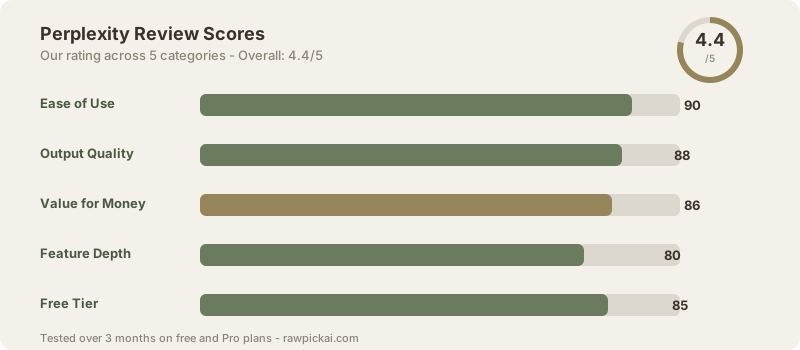
| Category | Score |
|---|---|
| Ease of Use | 90/100 |
| Output Quality | 88/100 |
| Value for Money | 86/100 |
| Feature Depth | 80/100 |
| Free Tier | 85/100 |
| Overall | 4.4/5 |
Ease of Use (90/100): Search interface is intuitive. Citation clicking is simple. The learning curve is minimal. Only minor deduction for occasional confusing UX around Spaces/Collections.
Output Quality (88/100): Answers are well-researched and cited. Creative writing is weak, which limits full marks. For research output specifically, this would be 95.
Value for Money (86/100): The free tier alone is incredibly generous. Pro at $20/mo (≈₹1,860/mo) is excellent value for researchers. Max tier is expensive and only for power users.
Feature Depth (80/100): Core research features are mature. Spaces, Collections, and file analysis work well. Mobile experience is weak. API access is limited compared to ChatGPT.
Free Tier (85/100): Better than most. Unlimited standard search plus 5 Pro Searches daily is actually useful. Most casual users never need to upgrade.
The Comparison: Perplexity vs ChatGPT vs Gemini
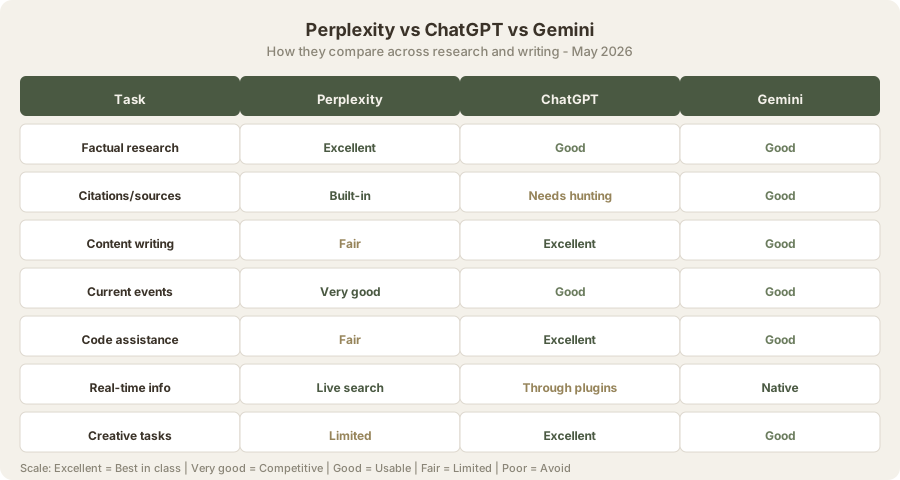
| Task | Perplexity | ChatGPT | Gemini |
|---|---|---|---|
| Factual research | Excellent | Good | Good |
| Citations and sources | Built-in citations | Manual hunting required | Citations present but less reliable |
| Content writing | Fair (reads like Wikipedia) | Excellent | Good |
| Code assistance | Fair | Excellent | Good |
| Current events | Very good | Good | Good |
| Real-time info | Live search built-in | Through plugins | Native |
| Creative tasks | Limited | Excellent | Good |
| Ease of use | Excellent | Excellent | Excellent |
| Free tier | Best (unlimited + 5 Pro/day) | Limited | Limited |
| Best for | Research with sources | Writing and coding | General AI tasks |
Bottom line: Choose Perplexity if research with verifiable sources is your primary use case. Choose ChatGPT if writing and coding are primary. Choose Gemini if you want a general-purpose AI.
Who Perplexity Is Best For

Students and academics needing accurate, sourced information for essays and research papers. The free tier is perfect for this.
Journalists and content researchers who need to verify facts and find primary sources. The citation system is built for this workflow.
Analysts and consultants who make decisions based on synthesized data. Perplexity reduces research time significantly.
Professionals in regulated industries (legal, finance, healthcare) who need to cite sources and maintain audit trails. Perplexity makes this natural.
Anyone tired of SEO-stuffed Google results who wants clean, synthesized answers with sources.
Who Should Look Elsewhere
Content creators primarily doing writing work should use Claude or ChatGPT.
Developers primarily doing coding work should use Cursor or ChatGPT.
Marketers and designers needing creative brainstorming should use ChatGPT or Claude.
Teams needing collaborative features should note that Perplexity's collaboration features are limited compared to enterprise ChatGPT.
Related Tools and Comparisons
For deeper analysis, check out these related reviews:
- ChatGPT Review: The writing and coding king. Use alongside Perplexity.
- Claude Review: Better writing than ChatGPT. Worse at research.
- Google Gemini Review: General-purpose AI with native search.
- You.com Review: Privacy-focused search alternative.
- Perplexity vs ChatGPT Comparison: Detailed feature-by-feature comparison.
- Claude vs Perplexity Comparison: Writing quality vs. research focus.
- Best ChatGPT Alternatives: Full alternative analysis.
- Best Free AI Tools: Perplexity's free tier ranks high here.
- Best AI Agents 2026: Multi-step research agents and AI tools.
Bottom Line
Perplexity is the best AI research tool available in 2026. It solves the biggest problem with AI-generated information: trust. Every answer comes with clickable citations, which means you can actually verify claims before relying on them.
The free tier is actually generous. Unlimited standard search plus 5 daily Pro Searches is enough for most people. If you hit that limit regularly, Pro at $20/mo (≈₹1,860/month) is excellent value.
It's not a replacement for ChatGPT (worse at writing and coding), Claude (worse at long-form content), or Google (worse at local and visual search). It's a complement to them, filling the specific niche of factual research with verifiable sources.
I use Perplexity for research questions, ChatGPT for writing and coding, and Google for local/visual searches. That three-tool stack handles 95% of my AI needs. Perplexity is the newest addition and the one that's changed my research workflow most significantly.
If you spend any time doing research-based work, bookmark it and try the free tier for a week. You'll quickly figure out if it fits your workflow.
FAQ
Is Perplexity better than Google Search?
For specific factual questions that require synthesis from multiple sources, yes. Perplexity synthesizes an answer instead of giving you 10 blue links to click through. For broad browsing, shopping, or local results, Google is still better. Use Perplexity for research questions, Google for everything else.
Can I use Perplexity for academic research papers?
Yes, and it's one of the best tools for this. Every answer includes numbered citations. Use the Academic focus mode to filter results to scholarly sources. However, always verify citations by reading the original papers yourself. Don't cite Perplexity in your bibliography - cite the sources Perplexity found. I'd recommend still verifying each source independently, as Perplexity's summarization might not perfectly reflect the original nuance.
Does Perplexity work well in Hindi or other Indian languages?
It can search and respond in Hindi, Tamil, Marathi, and other languages, but the quality is better in English. Most of its source material is English-language content, so non-English queries may return fewer relevant results or less authoritative sources. For now, use Perplexity in English for best results.
How is Perplexity different from ChatGPT with browsing?
Perplexity was built for search from the ground up. Every response has inline citations by design. ChatGPT's browsing is an add-on feature to a conversational AI. Perplexity finds information better and cites sources more consistently. ChatGPT processes and creates content better. They're optimized for different tasks. See our Perplexity vs ChatGPT comparison for detailed analysis.
Is the free tier really unlimited?
Standard search is unlimited with no daily cap. I've done 30+ searches in a single session without hitting limits. Pro Search is limited to 5 per day on free. For most users, standard search handles 90% of queries. You use Pro Search only for your most complex, multi-step research questions.
How current is Perplexity's information?
Perplexity searches the live web, so it has access to current information. I've tested recent events within hours of publication and Perplexity found them. This is significantly better than ChatGPT's knowledge cutoff. However, Perplexity still depends on what's published and indexed. Very recent breaking news (minutes old) may not be available yet.
Can I export my research from Perplexity?
You can copy responses and citations. Exporting entire research spaces or creating shareable research collections is limited. This is a minor weakness if you need to share research with team members. ChatGPT's sharing features are slightly better here.
Is Perplexity available in India without VPN?
Yes, Perplexity is fully available in India. No VPN required. Pricing is in USD, but you can pay via any international payment method. INR pricing shown in this review is converted at $1 (≈₹93)/USD.
What's the difference between Perplexity and Google AI Overview?
Google AI Overview (Google's AI-generated summaries in search results) is a feature within Google Search. Perplexity is a standalone search engine. Perplexity's citations are better formatted and easier to click. Google AI Overview shows citations but they're more integrated with the search results. For pure research focus, Perplexity is better. For integrated search, Google is more convenient.
Should I upgrade to Pro if I'm on the free tier?
Only if you regularly hit the 5 daily Pro Search limit. For casual researchers and students, the free tier is sufficient. You get unlimited standard searches plus 5 daily Pro Searches, which handles most research questions. Upgrade to Pro only if you need more than 5 deep research queries daily.
Last updated: May 2026. Prices converted at ₹93/USD.
What to read next
Best AI Tools for Students
Apr 2026