ChatGPT Review 2026: Still the Best AI?
Hands-on ChatGPT review after months of daily use. We test GPT-5.4, compare Free to Pro plans ($200/mo), and assess whether it's worth it in India.
 ByAsh
ByAshStart with ChatGPT Plus if you need one tool that does everything reasonably.
TL;DR: ChatGPT remains the most versatile all-purpose AI tool available. GPT-5.4 (on Plus and Pro) delivers impressive reasoning that handles complex tasks Claude sometimes fumbles. But it's no longer the obvious default. Claude writes better long-form content, Perplexity is sharper for research, and Cursor beats it for coding. The Plus plan at $20/mo (≈₹1,860/month) offers solid value for generalists. Pro ($200/mo, ≈₹18,600/mo) is overkill for most people. If you need one AI tool that handles writing, coding, research, and creative work equally well, ChatGPT Plus is still the safest bet. If you know your primary task, you'll likely get better results from a specialized tool.
ChatGPT is the AI tool that needs no introduction. It's what most people think of when they hear "AI," and for good reason - it's been the default general-purpose AI assistant since late 2022. But in 2026, the competitive market has shifted dramatically. Claude has become the standard for long-form writing. Perplexity dominates research with real-time citations. Gemini is deeply woven into Google's ecosystem. Cursor has replaced ChatGPT for developers. So where does ChatGPT actually stand now?
Official site: ChatGPT
After testing ChatGPT daily for over four months across writing, coding, research, and creative tasks, here's our honest take on whether it still deserves your subscription.
What Is ChatGPT
ChatGPT is OpenAI's conversational AI assistant available through a web interface, mobile app, and API. The core product lets you chat with AI models (GPT-4o, GPT-5.4, or older GPT-3.5 on free tier) for tasks like writing, analysis, coding, research, and creative projects. You can upload images and documents, generate images with DALL-E, run data analysis, create custom GPTs, and integrate ChatGPT into third-party apps. It's a generalist tool designed to do many things reasonably well.
Since its public launch in November 2022, ChatGPT has become the reference point for what "AI" means to most people. It currently has over 100 million weekly active users.
What ChatGPT Actually Does Well
The single biggest advantage ChatGPT still holds is versatility. There isn't another AI tool on the market that handles as many different tasks competently in one interface. In a typical work day, I've used it to draft emails, debug Python scripts, brainstorm marketing angles, summarize 30-page PDFs, and generate social media images, all without switching tools.
GPT-5.4 is a genuine leap forward. Available on Plus ($20/mo) and Pro ($200/mo) plans, GPT-5.4 represents a meaningful step up from GPT-4o. I tested a complex financial modeling question that GPT-4o consistently fumbled across multiple attempts, occasionally giving mathematically incorrect formulas. GPT-5.4 nailed it first try with accurate calculations, clear explanations, and even flagged an assumption I hadn't considered. For reasoning-heavy work, the difference is noticeable.
The multimodal capabilities have matured. You can upload images, documents, spreadsheets, code repositories, and PDFs. The image understanding is strong. I uploaded a screenshot of a complex dashboard and asked ChatGPT to extract data and suggest improvements, and it parsed every element correctly. Voice mode feels natural enough that I've caught myself talking to ChatGPT while cooking, which says something about how frictionless the experience has become.
Ecosystem integration. The custom GPTs feature has matured. You can build specialized versions of ChatGPT for specific tasks and share them. The ability to upload entire code repositories and ask ChatGPT to understand your codebase architecture is useful, even if it doesn't execute changes like Claude Code does. The rate of third-party integrations keeps growing.
Consistency across tasks. While specialized tools beat ChatGPT at single functions, ChatGPT's willingness to jump between five different types of work without degrading quality is actually valuable for consultants, freelancers, and people with diverse responsibilities.
GPT-5.4 vs GPT-4o: What Actually Changed
The jump from GPT-4o to GPT-5.4 is smaller than 4o was over 4, but still material. Here's what I've observed in testing:
Reasoning and complex planning: GPT-5.4 handles multi-step logical problems with fewer errors. I've run the same prompt on both models across data structure design questions, and GPT-5.4 produces correct solutions more often on the first try.
Math and symbolic reasoning: GPT-5.4 is more reliable with calculations. It makes fewer arithmetic errors and handles symbolic algebra better.
Long-form coherence: On lengthy writing tasks (2,000+ words), GPT-5.4 maintains consistency better. GPT-4o sometimes drifts or contradicts earlier points in the same generation.
Code quality: The code GPT-5.4 writes is marginally better structured. Not night-and-day different, but noticeably cleaner. For TypeScript and Python, the type safety is stronger.
Context retention: In conversation, GPT-5.4 remembers details from much earlier in the thread better than GPT-4o.
The trade-off: GPT-5.4 is slower. The generation time is 20-40% longer than GPT-4o. For quick questions, you might prefer the speed of GPT-4o. For complex work, GPT-5.4 is worth the wait.
Where It Falls Short
I'll be direct here: for any single specialized task, there's probably a better tool. On my standard writing test (a 500-word blog intro about sustainable fashion), I ran the same prompt through ChatGPT, Claude, and Jasper. ChatGPT's output was competent and well-structured, but it read like AI wrote it. Claude's version had noticeably more personality and flow. Jasper's was more marketing-savvy. ChatGPT's prose is safe and correct, not memorable.
The free tier has gotten worse. The rate limits are now so aggressive that casual users hit daily caps quickly. I tested the free plan for a week and hit the limit by 11 AM on most days. You get limited GPT-5.4 access, and during peak hours, even GPT-4o gets rate-limited. If you're evaluating ChatGPT without paying, you're testing a significantly degraded version of the product.
Memory and context handling still has awkward moments. In a long conversation about a coding project, ChatGPT sometimes forgets constraints specified earlier and contradicts its own suggestions. Claude handles extended context more gracefully in my testing. This is less of an issue if you start fresh conversations, but it's a real friction point for long-form projects.
The cost-to-capability ratio isn't always favorable. For developers, Cursor at $20/mo does 80% of ChatGPT's coding work with better IDE integration. For writers, Claude or specialized writing tools deliver higher quality. For research, Perplexity is objectively better. ChatGPT's strength is being adequate at everything, not best at something.
No autonomous execution. ChatGPT suggests changes but doesn't apply them to your files the way Claude Code does. You copy-paste code changes, manually apply suggestions, and manage the iterations yourself. For solo coding tasks, this is fine. For large refactors, it's slower than an agent.
Pricing Breakdown with INR Conversion
ChatGPT's pricing has gotten more complex. Here's what each tier actually gets you:
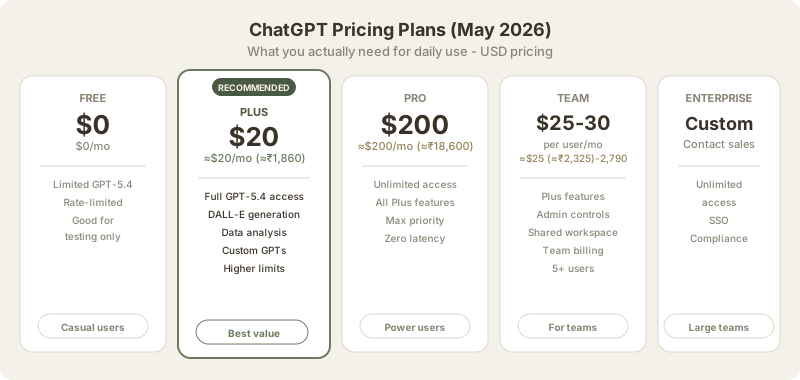
Free Plan - ₹0/month Limited GPT-5.4 access, standard GPT-4o, basic image generation, file uploads with restrictions, DALL-E access. Good enough for casual questions and light testing. Not enough for serious work due to aggressive rate limits. Practical usage: 5-15 meaningful interactions per day before hitting caps.
Plus Plan - $20/month (≈₹1,860/month) This is the sweet spot for most users. You get solid GPT-5.4 access (not unlimited, but generous), DALL-E image generation, Advanced Data Analysis for spreadsheets and code, custom GPTs, higher rate limits, and priority access during peak hours. If you're using ChatGPT for work 3-4 times a week across diverse tasks, Plus makes economic sense. Monthly cost is negligible for most professionals.
Pro Plan - $200/month (≈₹18,600/month) Unlimited access to all features, including the most compute-intensive reasoning modes, maximum priority, and higher context windows. During my two-week trial, I found that Plus covered 90% of my actual needs. Pro is for power users running hundreds of queries daily, organizations running internal analyses, or people who prioritize zero-latency response. For most people, it's overkill.
Team Plan - $25-30/user/month (≈₹2,325-2,790/user/month) Plus-equivalent features with admin controls, shared workspace, team billing, and higher rate limits. Makes sense for teams of 5+ who are already paying for individual Plus plans. Workspace sharing means you're not managing multiple accounts, and audit logs help with compliance.
Conversions at $1 (≈₹93)/USD (accurate as of May 2026).
ChatGPT vs Claude vs Gemini
I've tested all three extensively. Here's how they compare in the work I do most often:
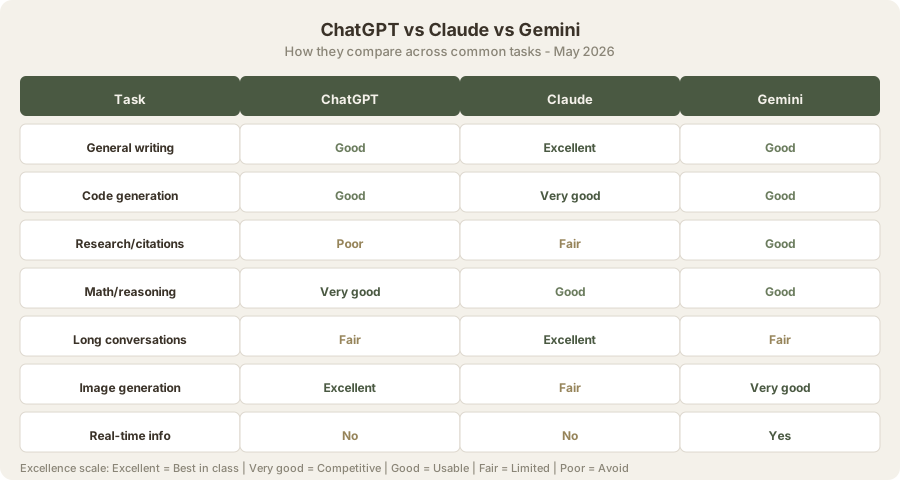
| Task | ChatGPT | Claude | Gemini |
|---|---|---|---|
| General writing | Good | Excellent | Good |
| Code generation | Good | Very good | Good |
| Research/citations | Poor | Fair | Good |
| Math/reasoning | Very good (5.4) | Good | Good |
| Long conversation | Fair | Excellent | Fair |
| Image generation | Excellent (DALL-E) | Fair | Very good |
| Real-time info | No | No | Yes (integrated) |
| Free tier | Limited | More generous | Very generous |
| Cost | $20/mo (Plus) | $20/mo (Pro) | Free or $20/mo (Gemini Advanced) |
My honest take: Start with ChatGPT Plus if you need one tool that does everything reasonably. But if your work is specialized (primarily writing, primarily coding, primarily research), test Claude or Gemini first. You'll likely get better results for the same cost.
For detailed comparisons, read our ChatGPT vs Claude, Gemini vs ChatGPT, and Claude vs ChatGPT vs Gemini reviews.
Who ChatGPT Is Best For
Generalists and freelancers who juggle diverse tasks daily (writing, analysis, coding, creative work) and need one tool that's competent at all of them. ChatGPT's versatility is its strongest point.
Teams looking for a shared AI workspace with admin controls, billing management, and audit trails. The Team plan is truly useful for coordination.
People heavy in creative work like image generation. DALL-E is integrated and of high quality. If you're generating images regularly, ChatGPT stays cheaper than buying separate tools.
Students and non-professionals who want an all-in-one tool without learning specialized interfaces. The ease of use is really great.
Power users who value reasoning. GPT-5.4 is excellent for complex problem-solving. If you do a lot of mathematical modeling, financial analysis, or logic-heavy work, it's worth trying Pro.
Who Should Look Elsewhere
Writers prioritizing prose quality should test Claude first. In blind side-by-side tests, Claude's output consistently feels more natural and less "written by AI."
Researchers and journalists need Perplexity. ChatGPT has no real-time data access. Perplexity's citation-first approach is objectively better for research-heavy work.
Developers spending most of their time in a code editor should look at Cursor (for daily feature work) or Claude Code (for complex refactoring). The IDE integration changes the entire workflow. ChatGPT's chat interface means context-switching between your editor and the browser.
People on tight budgets should start with Perplexity or Gemini's free tiers, which are more generous than ChatGPT's.
Coding agents who need autonomous file execution should use Claude Code despite the higher cost.
The Free Tier Verdict
ChatGPT's free plan is functional but frustrating. The rate limits are tight enough that productive work sessions get interrupted. I consistently hit daily caps by late morning. For casual users asking a few questions a day, it's fine. For anyone trying to evaluate ChatGPT for actual work, you must upgrade to Plus for at least one month to see the real product.
Compared to Claude's free tier (more generous conversation allowance) and Perplexity's free tier (includes 5 Pro Searches daily, real-time data), ChatGPT's free offering sits in the middle. It's not the worst, but not the most welcoming either.
Score reflects both quality and generosity. A score of 72/100 means the free tier works, but has real constraints.
Our Scores
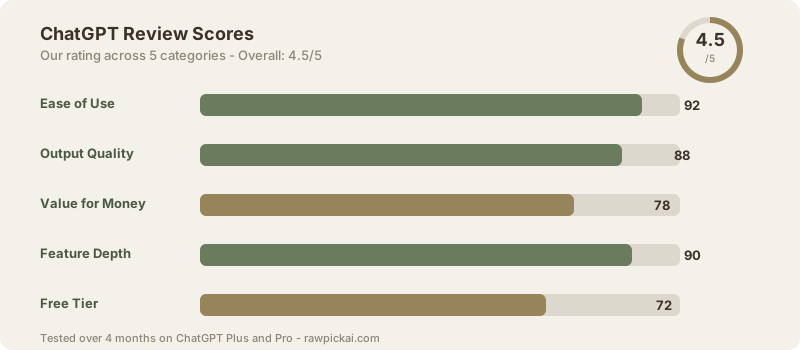
| Category | Score |
|---|---|
| Ease of Use | 92/100 |
| Output Quality | 88/100 |
| Value for Money | 78/100 |
| Feature Depth | 90/100 |
| Free Tier | 72/100 |
| Overall | 4.5/5 |
Ease of Use (92/100): ChatGPT's interface is intuitive. The learning curve is near-zero. Even non-technical people figure it out immediately. The iOS and web apps are both smooth.
Output Quality (88/100): GPT-5.4 produces high-quality output across diverse tasks. It's not the best at any one function, but it's competent everywhere. Deducted points because specialized tools consistently out-perform on their domain.
Value for Money (78/100): Plus at $20/mo is reasonable for a tool you use 3-4 times weekly. Pro at $200/mo is expensive unless you have high token burn. The pricing is fair but not exceptional.
Feature Depth (90/100): ChatGPT has enormous feature breadth. Custom GPTs, image generation, code execution, data analysis, vision, voice input, and API access. It's one of the most full-featured tools available.
Free Tier (72/100): The free plan lets you try the product, but severe rate limits hobble the experience. It's not welcoming to new users evaluating whether to pay.
Bottom Line
ChatGPT in 2026 is still the most well-rounded AI assistant available. For most people who want a single AI subscription, it remains a smart choice. The Plus plan at $20/mo (≈₹1,860/month) offers strong value across writing, coding, analysis, and creative tasks. But the era where ChatGPT was the obvious default is over. Specialized tools now honestly outperform it in their domains.
My recommendation: Start with ChatGPT Plus if you need a do-everything AI tool and you're willing to pay $20/month. It will serve you well for most tasks. But if you know your primary use case, test alternatives first. If you write a lot, try Claude. If you research a lot, try Perplexity. If you code a lot, try Cursor. You might save money and get better results.
In other words: ChatGPT isn't the best choice anymore. It's the safest choice. For generalists, that's still worth something.
Frequently Asked Questions
Is ChatGPT actually free?
ChatGPT has a free tier, but it's heavily rate-limited. You can use it, but you'll hit daily caps within hours of active use. It's free in the technical sense, not the practical sense. For real work, budget for Plus.
What's the difference between ChatGPT-4 and ChatGPT-5.4?
GPT-5.4 was released in late 2025. It's better at reasoning, math, code generation, and maintaining coherence in long conversations. It's slower to respond than GPT-4o. For most users, the difference is noticeable but not breakthrough. For math-heavy work, the improvement is more dramatic.
Can ChatGPT replace Google for research?
No. ChatGPT can't access the internet. It's limited to training data with a cutoff date. For current events, breaking news, or recent research, you need Perplexity or Google. ChatGPT is good for analysis, not discovery.
Is ChatGPT better than Claude?
Depends on the task. ChatGPT is better at reasoning and math. Claude is better at writing and long conversations. For a single all-rounder, it's close. For specific work, one will beat the other. See our Claude vs ChatGPT comparison for details.
Does ChatGPT work offline?
No. ChatGPT requires an internet connection and an active account. There's no offline mode.
Can I use ChatGPT for commercial work?
Yes. OpenAI's terms allow commercial use. You own the outputs (with some restrictions on training models). For business use, consider the Team or Enterprise plans for admin controls.
Which ChatGPT subscription should I buy?
Start with Plus ($20/mo). It covers 90% of use cases. Only upgrade to Pro if you hit rate limits consistently or need maximum model quality for professional work. For teams, the Team plan is worth it if you have 5+ people.
Does ChatGPT have a character limit?
For prompts, there's no practical limit. For responses, ChatGPT generates up to 4,000 tokens of text by default, though you can request longer outputs on Plus and Pro. The API has higher limits.
Can I delete my chat history?
Yes. You can delete individual conversations or turn off chat history entirely in settings. Be aware that disabling history means ChatGPT can't reference previous conversations.
How does ChatGPT compare to Cursor for coding?
Cursor is purpose-built for coding and integrates directly into VS Code. ChatGPT is a chat interface. For single-file edits and quick coding questions, both work. For large refactors and multi-file changes, Cursor is faster and more integrated. For coding, most developers prefer Cursor. For everything else, ChatGPT.
Should I buy ChatGPT Plus or Pro?
Start with Plus. Most people never need Pro. Monitor your usage with the stats feature. If you consistently hit rate limits or feel like the model's reasoning is too slow for your work, then consider Pro. For casual users, Plus is the right choice.
Related Reviews & Comparisons
- Claude Review - Better for writing and long-form content
- Cursor Review - Better for developers
- Perplexity Review - Better for research
- Google Gemini Review - Better for Google ecosystem users
- Midjourney Review - Better for image generation
- GitHub Copilot Review - Better for inline code suggestions
- ChatGPT vs Claude - Detailed head-to-head
- Gemini vs ChatGPT - When Gemini wins
- Claude vs ChatGPT vs Gemini - Full three-way comparison
- Best AI Coding Tools 2026 - How ChatGPT ranks
- Best AI Agents 2026 - ChatGPT's agent ecosystem
- Best ChatGPT Alternatives - When to look elsewhere
- Best Free AI Tools - Free alternatives
- Claude Opus 4.8 vs GPT-5.5: Which AI Wins - Related reading
- How to Cancel ChatGPT Subscription - Related reading
- How to Use ChatGPT Effectively - Related reading
Last updated: May 2026. Prices converted at ₹93/USD.
What to read next
Gemini vs ChatGPT
Apr 2026