Claude Code Review 2026: Terminal AI Agent
Hands-on Claude Code review: Anthropic's terminal AI agent tested on real codebases. Pricing, autonomy, and verdict vs Cursor for serious refactors.
 ByAsh
ByAshGet Claude Code if you regularly work on codebases with 10,000+ lines and need an agent that understands the full picture.
Claude Code is Anthropic's terminal-based AI coding agent. You give it a task in plain English, and it reads your codebase, plans the approach, writes code across multiple files, runs tests, and iterates until the job is done. No IDE required. No copy-pasting between chat windows. It works directly in your terminal, in your repo, with full access to your project.
Official site: Claude Code
TL;DR: Claude Code is the best terminal-first AI coding agent available in 2026. It handles multi-file refactoring, architecture decisions, and complex debugging better than anything else I've tested. The output quality on Opus 4.6 is truly impressive. But it's expensive: you realistically need Claude Max at $100/mo (≈₹9,300) for serious daily use, and the learning curve is steeper than visual tools like Cursor. If you work on large codebases, do migrations, or need an agent that understands your entire project, Claude Code is worth the cost. If you mostly write new features in a single file, Cursor 3 or GitHub Copilot will serve you better for less money.
I've been using Claude Code daily for about four months now, across a Next.js app (≈40K lines), a Python data pipeline, and several smaller projects. This review covers everything: what it is, how to install it, what it costs, what it does well, where it falls short, and whether you should pay for it.
What Is Claude Code (and How It Differs from Claude.ai)
This confuses a lot of people, so let me be clear. Claude (the chatbot at claude.ai) is a conversation interface. You type, it responds. Claude Code is a separate product: a CLI tool you install on your machine that acts as an autonomous coding agent inside your terminal.
The key differences:
- Claude.ai lives in your browser. Claude Code lives in your terminal.
- Claude.ai sees what you paste into the chat. Claude Code sees your entire project: every file, your git history, your directory structure.
- Claude.ai suggests code. Claude Code writes code directly into your files, creates new files, runs shell commands, and executes tests.
- Claude.ai works in isolated conversations. Claude Code maintains context across a session as it edits dozens of files toward a goal.
Think of Claude.ai as a consultant you email. Claude Code is a contractor who shows up, reads the blueprints, and starts building.
Both products are powered by the same underlying models (Opus 4.6, Sonnet 4.6, Haiku 4.5), but Claude Code wraps them in an agentic framework with tool use, file system access, and autonomous execution.
How to Install Claude Code
Installation takes about two minutes. There are four methods, and the native installer is now the recommended approach across all platforms.
Method 1: Native installer (recommended)
Works on macOS, Linux, and Windows. No Node.js required. Auto-updates in the background.
For macOS, Linux, and WSL:
curl -fsSL https://claude.ai/install.sh | bash
For Windows PowerShell (native, no WSL needed):
irm https://claude.ai/install.ps1 | iex
Method 2: Homebrew (macOS/Linux)
brew install --cask claude-code
Method 3: WinGet (Windows)
winget install Anthropic.ClaudeCode
Method 4: npm (legacy, deprecated but still works)
Requires Node.js 18.0+:
npm install -g @anthropic-ai/claude-code
After installation, verify with claude --version, then run claude in any project directory. It'll prompt you to authenticate with your Anthropic account on first launch.
System requirements: macOS 13.0+, Windows 10 1809+, Ubuntu 20.04+, Debian 10+, or Alpine 3.19+. Minimum 4 GB RAM. x64 or ARM64 processor.
Platform notes: Native Windows support is fully production-ready as of early 2026 - the PowerShell installer is the recommended path for Windows developers. WSL still works and may give a smoother experience for developers already running Linux toolchains, but is no longer required.
Pricing: What Claude Code Actually Costs
This is the part most reviews gloss over. Claude Code's pricing is tied to your Claude subscription, and the tiers matter a lot for daily usability.
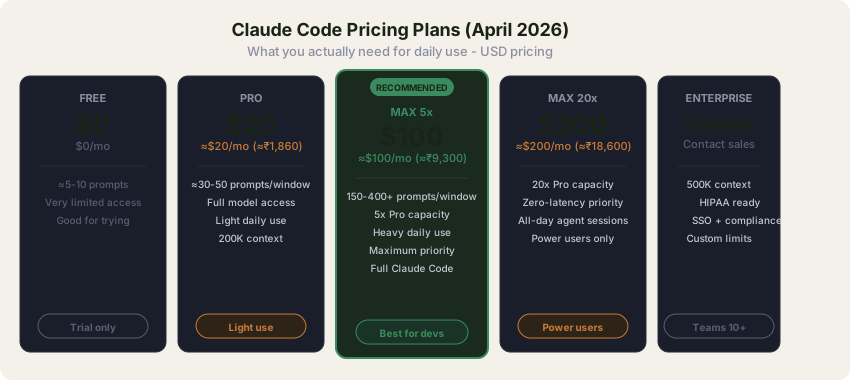
| Plan | Monthly Cost | INR (≈₹93/USD) | Claude Code Access | Practical Daily Usage |
|---|---|---|---|---|
| Free | $0 | ₹0 | Yes (very limited) | ≈5-10 prompts before hitting limits |
| Pro | $20/mo | ≈₹1,860 | Yes | ≈30-50 prompts/day, enough for light use |
| Max 5x | $100/mo | ≈₹9,300 | Full access | Heavy daily use, 5x Pro capacity |
| Max 20x | $200/mo | ≈₹18,600 | Full access + priority | All-day agent sessions, 20x Pro capacity |
| Team Standard | $25/user/mo | ≈₹2,325 | Chat only | No Claude Code on standard seats |
| Team Premium | ≈$100/user/mo | ≈₹9,300 | Full Claude Code | Equivalent to Max 5x per seat |
| Enterprise | Custom | Custom | Full + 500K context | HIPAA, SSO, compliance, custom limits |
Verify exact Team and Enterprise pricing on Anthropic's site - these tiers update most frequently.
If you use the API directly (via your own API key instead of a subscription), the token costs are:
| Model | Input (per 1M tokens) | Output (per 1M tokens) | INR Input | INR Output |
|---|---|---|---|---|
| Opus 4.6 | $5 | $25 | ≈₹465 | ≈₹2,325 |
| Sonnet 4.6 | $3 | $15 | ≈₹279 | ≈₹1,395 |
| Haiku 4.5 | $1 | $5 | ≈₹93 | ≈₹465 |
Note that Opus 4.6 is now 67% cheaper than Opus 4.1's old rate ($15/$75) - Anthropic cut Opus pricing significantly with the 4.5 release in late 2025. Cache reads cost just 10% of base input price, which materially changes the API math for repeat-context workflows like Claude Code.
My honest pricing take: Claude Pro at $20/mo (≈₹1,860) works for trying Claude Code and light use. But in my experience, you'll hit rate limits within 1-2 hours of active coding on Pro. For daily professional use, Claude Max 5x at $100/mo (≈₹9,300) is realistically the minimum. That's expensive, especially for Indian developers. For comparison, Cursor Pro costs $20/mo (≈₹1,860) and GitHub Copilot Pro is $10/mo (≈₹930). The Value for Money score in our breakdown reflects subscription cost (which is the path most developers take), not API pricing - if you're a token-by-token API user, Claude Code is meaningfully cheaper than the score suggests.
The value argument only works if you're using Claude Code for the tasks it's best at: multi-file refactoring, migrations, architecture work. If you're burning Max credits on simple one-file edits, you're wasting money.
The rate limit reality: Claude Code uses a 5-hour rolling window for burst limits plus a 7-day weekly ceiling. On Pro, expect roughly 30-50 meaningful prompts per window. On Max 5x, that jumps to 150-400+. Since late March 2026, Anthropic has been tightening limits during US business hours (8am-2pm ET), so users in IST working afternoons may hit caps faster than expected.
Key Features: What Makes Claude Code Different
Skills
Skills are reusable knowledge bundles you drop into .claude/skills/ in your project. Each skill is a markdown file with instructions that Claude Code follows when relevant. For example, you can create a skill that tells Claude Code how your team formats PRs, how to run your test suite, or how to deploy to staging.
Skills replaced the older "custom slash commands" system. Every skill also gets a /slash-command interface, so you can invoke it explicitly with /skill-name or let Claude Code pick it up automatically based on context.
This is one of Claude Code's genuine differentiators. No other coding agent has this level of project-specific customization.
Hooks
Hooks fire at specific lifecycle events: before/after tool execution, at session start/end, on permission requests, and during context compaction. They run as external scripts (shell, Python, whatever) and cost zero tokens because they execute outside the conversation.
Practical examples: a pre-commit hook that runs your linter before Claude Code commits, a session-start hook that loads environment variables, or a permission hook that auto-approves file reads but blocks shell commands in production directories.
Subagents
Claude Code can spawn multiple simultaneous subagents (typically up to ten), each running in isolated context. Subagents don't inherit your conversation history, which keeps your main session clean. Use them for parallel tasks: one subagent writes tests while another refactors the implementation.
This is how Claude Code handles large tasks efficiently. Instead of one agent doing everything sequentially, it delegates to specialized subagents and merges the results.
MCP (Model Context Protocol)
MCP is the integration protocol that connects Claude Code to external tools and services. Claude Code functions as both an MCP client (connecting to external servers) and an MCP server (exposing its capabilities to other tools).
In practice, MCP lets Claude Code connect to databases, APIs, documentation services, and other tools during a session. You can set up MCP servers for your Postgres database, your Jira board, or your internal documentation, and Claude Code can query them mid-task.
Plan Mode
Start any complex task with /plan or the --plan flag. Plan mode halves token consumption by having Claude Code map out the entire approach before executing. It produces a step-by-step plan, you approve or adjust, then it executes. For multi-file tasks, this saves significant tokens and prevents the agent from going down wrong paths.
CLAUDE.md
The CLAUDE.md file in your project root is Claude Code's "constitution." It tells the agent about your project conventions, build commands, testing setup, and any rules it should follow. Every session starts by reading this file. Write it once, and Claude Code behaves consistently across all sessions without you re-explaining your project.
Other Notable Commands
- /compact compresses conversation history to free up context window space
- /clear resets the session
- /stats shows token usage for the current session
- --dangerously-skip-permissions ("YOLO mode") auto-approves all file writes and command execution. Useful for trusted projects where approval prompts slow you down.
- --headless runs Claude Code non-interactively for CI/CD pipelines and automation scripts
How to Use Claude Code: Practical Examples
Example 1: Refactoring across a codebase
claude "Convert all JavaScript files in src/utils/ to TypeScript.
Update all imports across the project. Run the existing tests to verify nothing broke."
Claude Code reads the directory, identifies JS files, converts them with proper type annotations, traces and updates every import across your project, and runs your test suite. In my testing on a 15-file conversion, it completed in about 6 minutes with 2 test failures it then fixed automatically.
Example 2: Debugging from error logs
claude "Here's the production error: [paste stack trace].
Find the root cause in our codebase and fix it."
It searches your code for the relevant functions, traces the execution path, identifies the bug, and applies a fix. For simple bugs, it works first try about 80% of the time in my experience.
Example 3: Architecture review
claude /plan "Review the authentication flow in this project.
Identify security issues and suggest improvements. Don't make changes yet."
Using Plan mode, Claude Code reads your auth-related files, maps the flow, and produces a structured assessment without touching any code. I use this weekly on client projects.
Claude Code in Your IDE
Claude Code is terminal-first, but it integrates with major IDEs:
VS Code: Official extension available. Provides inline diff viewing, selection sharing (highlight code and send it to Claude Code), and a side panel for the conversation. The most mature integration. Launch from the command palette or via a keyboard shortcut you configure in VS Code settings.
JetBrains IDEs: Official plugin for IntelliJ, WebStorm, PyCharm, and others. Similar features to the VS Code extension: diff viewing, context sharing, quick launch. Works well but the VS Code integration is more polished.
Neovim: Community-built extension (claudecode.nvim) that reverse-engineers the official VS Code protocol. Creates a WebSocket server that Claude Code connects to. Impressive but not officially supported.
Other editors: No official support for Sublime Text, Emacs, or web-based IDEs. Claude Code's terminal nature means it works alongside any editor, but the deep integrations are VS Code and JetBrains only.
Limits and Costs in Practice
The biggest complaint about Claude Code is token burn rate. Claude Code consumes tokens at 10-100x the rate of regular Claude.ai chat because every interaction involves assembling your full project context, tool-use round trips, and multi-turn reasoning.
A seemingly simple "edit this file" command can consume 50,000-150,000 tokens once the full context is assembled. On a heavy coding day, I've burned through 2-3 million tokens easily.
Context window: Claude Code supports up to 200K tokens of context on most plans, with newer models (Opus 4.6, Sonnet 4.6) technically supporting 1M tokens. In practice, Claude Code uses /compact to manage context, compressing older conversation history when approaching the limit.
The 5-hour window: Usage resets on a rolling 5-hour window. On Pro, this means you might get a productive morning session, hit the limit, and wait until afternoon to continue. On Max 5x, the ceiling is high enough that most developers won't hit it unless they're running continuous agent sessions.
Cost tracking: Use /stats during any session to see your current token consumption. I recommend checking this regularly until you have a feel for how quickly your specific workflows burn tokens.
Claude Code vs Alternatives
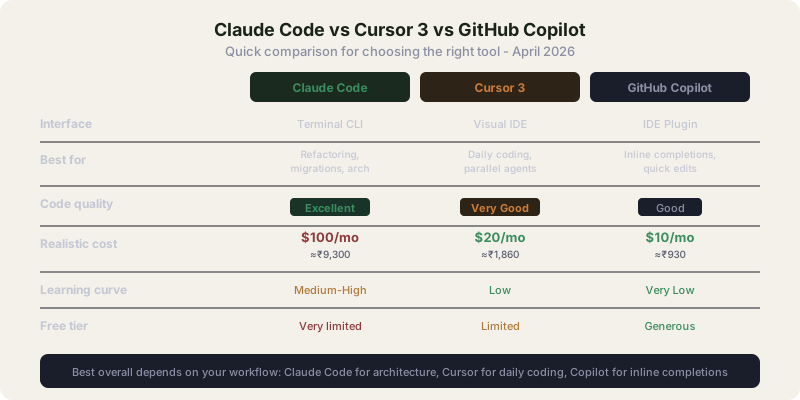
I won't duplicate the full comparisons here because I've written dedicated posts for those. But here's the quick summary:
| Claude Code | Cursor 3 | GitHub Copilot | |
|---|---|---|---|
| Interface | Terminal CLI | Visual IDE | IDE plugin |
| Best for | Multi-file refactoring, migrations, architecture | Daily coding, parallel agents, frontend | Inline completions, quick edits |
| Output quality | Excellent (Opus 4.6) | Very good (Composer 2) | Good |
| Monthly cost | $100/mo (≈₹9,300) realistic | $20/mo (≈₹1,860) | $10/mo (≈₹930) |
| Learning curve | Medium-high | Low | Very low |
| Free tier | Very limited | Limited | Generous |
For the detailed head-to-head, read Claude Code vs Cursor 3 vs Codex.
My take on when to use what: I use Claude Code for anything touching 5+ files or requiring architectural understanding. I use Cursor 3 for daily feature work, UI tweaks, and quick iterations. I don't use Copilot anymore because Cursor's completions are better, but Copilot is still the right choice if you want to keep your existing VS Code setup untouched.
What I Don't Like About Claude Code
The cost. There's no way around it. $100/mo for Max is steep, especially when Cursor delivers 80% of the value for $20/mo on most daily tasks. The value proposition only holds if you regularly do the kind of large-scale work Claude Code excels at.
Rate limit unpredictability. Since March 2026, limits have been tighter and less transparent. Some days I get 3 hours of productive work on Max before hitting caps. Other days I go all day. Anthropic acknowledged the issue publicly but hasn't fully resolved it.
No visual preview. You can't see changes before they're applied to your files (unless you use the VS Code extension's diff view). In the raw terminal, Claude Code writes to your files and you review after. Git makes this manageable, but it's a workflow difference from Cursor where you approve each change visually.
Token burn on simple tasks. Asking Claude Code to make a one-line fix still assembles your full project context. The overhead means simple tasks cost disproportionately more tokens than they should. Use Cursor or Copilot for small edits.
Windows experience used to be second-class. This has improved considerably since the native PowerShell installer landed in early 2026 - Windows is now a first-class platform. WSL remains a smoother experience for developers already on Linux toolchains, but is no longer required.
The Verdict
Claude Code is the most capable AI coding agent available for complex, multi-file work. The output quality on Opus 4.6 is the best I've seen from any coding tool. Skills, hooks, subagents, and MCP give it a customization depth that nothing else matches. For migrations, refactoring, and architecture-level tasks, it saves me hours every week.
But it's not for everyone. The pricing pushes out casual users and students. The terminal-first design has a real learning curve. And for 70% of daily coding tasks (writing a new component, fixing a bug in one file, adding a feature to an existing module), Cursor 3 does the job faster and cheaper.
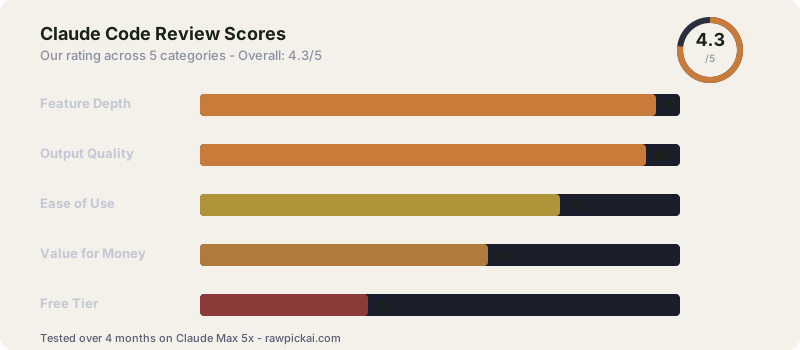
My score: 4.3/5. If the pricing were more accessible, it would be a 4.7. The product is excellent. The price decides who actually gets to use it.
Bottom line: Get Claude Code if you regularly work on codebases with 10,000+ lines and need an agent that understands the full picture. Skip it if most of your work is single-file or you're budget-conscious. And if you do get it, budget for Max, not Pro.
Frequently Asked Questions
Is Claude Code free?
Claude Code works on the free Claude plan, but with severe limits: roughly 5-10 prompts before you're rate-limited. It's enough to try it, not enough to use it. Realistic professional use requires Claude Pro ($20/mo, ≈₹1,860) at minimum, and Claude Max ($100/mo, ≈₹9,300) for heavy daily use.
What is Claude Code used for?
Multi-file refactoring, codebase migrations, architecture analysis, complex debugging, test generation, and any coding task that spans multiple files. It reads your entire project and makes coordinated changes across it.
Can Claude Code search the web?
Not by default. Claude Code operates on your local file system. However, you can connect it to web-capable tools via MCP servers, and it can run shell commands (like curl) if you grant permission.
Does Claude Code work with VS Code?
Yes. There's an official VS Code extension that provides inline diffs, context sharing, and a conversation panel. You can also use Claude Code purely in the terminal alongside any editor.
What is YOLO mode in Claude Code?
Running Claude Code with --dangerously-skip-permissions auto-approves all file writes and command execution. It removes the confirmation prompts that normally appear before each action. Useful for trusted projects, risky for anything else.
Can Claude Code read PDFs and images?
Claude Code can read images (screenshots, diagrams) since the underlying models are multimodal. PDF reading depends on the file: text-based PDFs work, scanned image PDFs need OCR preprocessing.
What is the Claude Code context window?
200K tokens on most plans. The underlying Opus 4.6 and Sonnet 4.6 models support up to 1M tokens, but Claude Code manages context with automatic compaction (/compact) to stay within practical limits.
How does Claude Code compare to Cursor?
Claude Code is better for multi-file architectural work. Cursor 3 is better for daily coding, visual workflows, and parallel agent execution within an IDE. Most serious developers benefit from having both. See our Claude Code vs Cursor 3 comparison.
Related reviews: Cursor 3 Review | Best AI Coding Tools 2026 | Claude Code vs Cursor vs Codex | Best AI Agents 2026
Last updated: April 2026. Tested over 4 months on Claude Max 5x. Pricing converted at ₹93/USD.
What to read next
Claude Code vs Cursor 3
Apr 2026