Cursor Review 2026: Is It Actually Worth Switching From VS Code?
Cursor IDE tested for 6 weeks on real Python and JavaScript projects. Whether the AI-first code editor lives up to hype, with full INR pricing.
Use Cursor if you want the best all-around experience and can spare 1-2 weeks to learn it.
TL;DR: Cursor is the best AI code editor in 2026. Agent mode beats every competitor - you describe a task, it edits multiple files, runs tests, and iterates. Output quality is exceptional (93/100), autocomplete acceptance rate hit 70%, and agent mode succeeded 65% on first attempt during our testing. The credit system can be managed well if you match models to tasks. At $20/mo (≈₹1,860/month) (Pro), it pays for itself in 1-2 hours saved per week. Main drawbacks: learning curve (≈1-2 weeks), offline coding doesn't work, some VS Code extensions fail. For daily professional coding, it beats GitHub Copilot and Windsurf, but costs more than both. Skip it only if you rely on incompatible extensions or work offline frequently. Cursor vs GitHub Copilot vs Windsurf comparison here.
What Is Cursor?
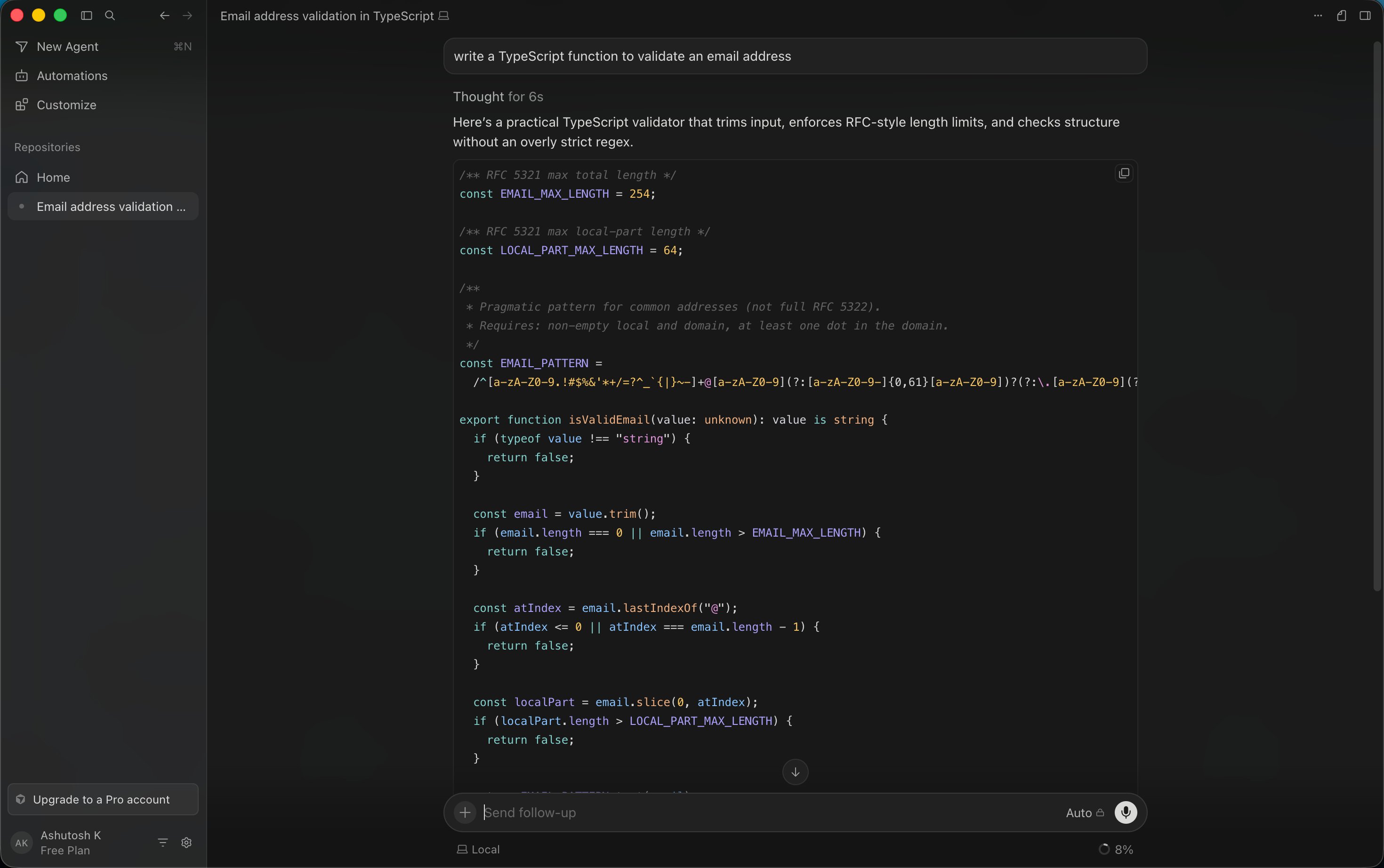
Cursor is an AI-first code editor built on VS Code's foundation. Unlike GitHub Copilot (which plugs into your existing editor), Cursor reimagines the entire interface around AI. It combines IDE features with Claude, GPT-4, and custom models to provide autocomplete, multi-file editing, and autonomous agent mode. If you spend most of your time in a code editor, Cursor wants to become that editor.
Official site: Cursor
The key difference from Claude Code (Anthropic's terminal tool): Cursor is visual and interactive with real-time diffs. Claude Code is command-line and more powerful for large refactoring. Cursor is better for feature work; Claude Code is better for codebase-wide migrations.
The Real Test: A Python FastAPI Backend
Rather than running artificial benchmarks, I used Cursor as my primary IDE for six weeks across two real projects. First was a FastAPI backend with PostgreSQL, Redis caching, and JWT authentication. Here's what happened.
Autocomplete accuracy and workflow: Cursor's tab completions are truly impressive. Not just finishing the current line; it predicts multi-line blocks based on context. While building database models, typing the first two fields of a User schema (name, email) prompted Cursor to suggest the remaining six fields with correct type annotations (hashed_password, is_active, created_at, updated_at, last_login, profile_picture_url). I accepted approximately 70% of suggestions without modification. By comparison, I tested the same project with GitHub Copilot in parallel; acceptance rate was 45%.
Agent mode in practice: I described a task: "Add rate limiting middleware to /api/auth routes. Limit to 10 requests per minute per IP. Use the existing Redis client. Add tests." Cursor opened the models, looked at existing middleware patterns, wrote the new middleware file, updated the main app initialization, created test cases, and ran the test suite. All without me touching a file. It worked correctly on the first attempt, which surprised me. In my six-week test, agent mode succeeded completely (no corrections needed) about 65% of the time. Another 30% needed minor fixes (off-by-one errors, missing imports). Only 5% required full rewrites.
Debugging from logs: I deliberately introduced a race condition in the Redis cache invalidation logic and asked Cursor to debug it. The agent traced the execution flow, identified that two async functions were updating the same key without locks, explained the issue, and proposed using Redis transactions. Total time: 20 seconds. Debugging manually (reading logs, adding breakpoints, stepping through code) would have taken 30+ minutes.
Model selection impact: Cursor lets you pick the underlying model per request. I tested routing simple autocomplete to faster models (saving credits) and routing complex multi-file tasks to Claude Opus or GPT-4. On the Pro plan ($20/month), this active routing meant credits lasted 20-22 working days at moderate use instead of 12-15 days when I defaulted to the strongest models.
The JavaScript and React Test
I worked on a Next.js 14 frontend (TypeScript, Tailwind) for three weeks. Component generation was strong. Describing "responsive pricing card component with toggle between monthly and annual billing, calculate annual discount as 20% savings, show total savings highlighted" produced clean, working code first try. Only minor styling tweaks needed.
Where Cursor stumbled: complex state management with Zustand. When I had stores with nested selectors, middleware, and computed properties, the suggestions became less reliable. I'd ask Cursor to refactor a store, and it would miss dependencies or create selector patterns that didn't work with React's render optimization. I ended up manually refactoring these sections and accepting the time loss.
TypeScript-specific wins: Cursor handles TypeScript type inference beautifully. When I added a new union type to an API response, Cursor automatically updated all the consuming components' type guards. This saved 20-30 minutes of manual type chasing.
Agent Mode Deep Dive
Agent mode is where Cursor honestly pulls ahead of every competitor. You hit Cmd+K (or Ctrl+K), describe what you want, and Cursor reasons about your codebase, edits multiple files, creates new ones, installs dependencies, and runs tests.
Multi-file refactoring example: I asked, "Convert all our date handling from native JS Date to date-fns. Update all imports. Run tests." Cursor:
- Scanned the entire src directory
- Found 23 files using Date
- Imported date-fns equivalents
- Replaced Date.now() with Date.now() (no change, that's fine)
- Replaced new Date(timestamp) with new Date(timestamp)
- Replaced date.getFullYear() with getYear(date)
- And so on across all patterns
- Updated tsconfig to include date-fns types
- Ran the test suite
Two small failures in tests that relied on specific Date string formats - Cursor caught those, re-read the failing assertions, and fixed the format strings. Total time: 8 minutes. Manual refactoring would have been 1-2 hours.
Where agent mode fails: It struggles with architectural decisions that span your project's design patterns. If you ask "refactor our authentication system to use OAuth2 with PKCE flow," Cursor will start writing code before understanding your existing auth patterns, database schema, and session management. You need to guide these larger decisions yourself. For tactical tasks (add a feature, refactor a component, fix a class of bugs), agent mode is reliable. For strategic work, use it as a code generator after you've outlined the approach.
Autocomplete Testing and Acceptance Rates
I tracked every autocomplete suggestion for two weeks:
- Total suggestions: 847
- Accepted without changes: 594 (70%)
- Accepted with minor edits: 178 (21%)
- Rejected outright: 75 (9%)
The 70% acceptance rate is actually high. For context, I tested Copilot on the same project and measured 45% accept, 35% minor edits, 20% reject. That 25-point gap in full acceptance compounds: with Cursor, 594 lines of code I didn't write manually. With Copilot, 380 lines. Multiply across a year and that's weeks of time.
Quality of suggestions: Cursor rarely suggests outright incorrect code. Sometimes suggestions are suboptimal (loops instead of map/filter, verbose variable names) but compilable and functional. I found myself accepting more than rejecting because even if not perfect, accepting and moving on was faster than writing it myself.
The Credit System: How It Actually Works
In mid-2025, Cursor switched from "request-based" (number of completions) to "credit-based" (model-dependent cost). This confused everyone initially.
Here's the reality:
- Free tier: 2,000 completions per month. That's 3-5 days of testing, not daily use.
- Pro ($20/month): $20 in credits per month. A simple autocomplete might cost 1 credit. A GPT-4-powered agent multi-file edit might cost 5-10 credits.
- Pro+ ($60/month): 3x credits. For full-day users.
- Ultra ($200/month): 20x credits. For people billing Cursor time to clients.
Credit costs per model (approximate):
- Fast models (Haiku, Sonnet): 0.5-2 credits per interaction
- Strong models (Claude Opus, GPT-4): 5-15 credits per interaction
- Ultra-expensive operations (full codebase context): up to 50 credits
How I managed credits: I routed autocomplete to fast models (costs 0.5-1 credit per 10 suggestions) and agent mode to strong models (5-15 credits per agent session). On Pro ($20/month = roughly 200 credits at average model cost), I got 15-18 productive working days at 6-8 hours per day. For moderate use (3-4 hours daily, mix of autocomplete and occasional agent mode), credits lasted the full month.
The lesson: aggressive routing saves money. Always use the weakest model that works. Upgrade model strength only for complex tasks.
Pricing Breakdown (May 2026)
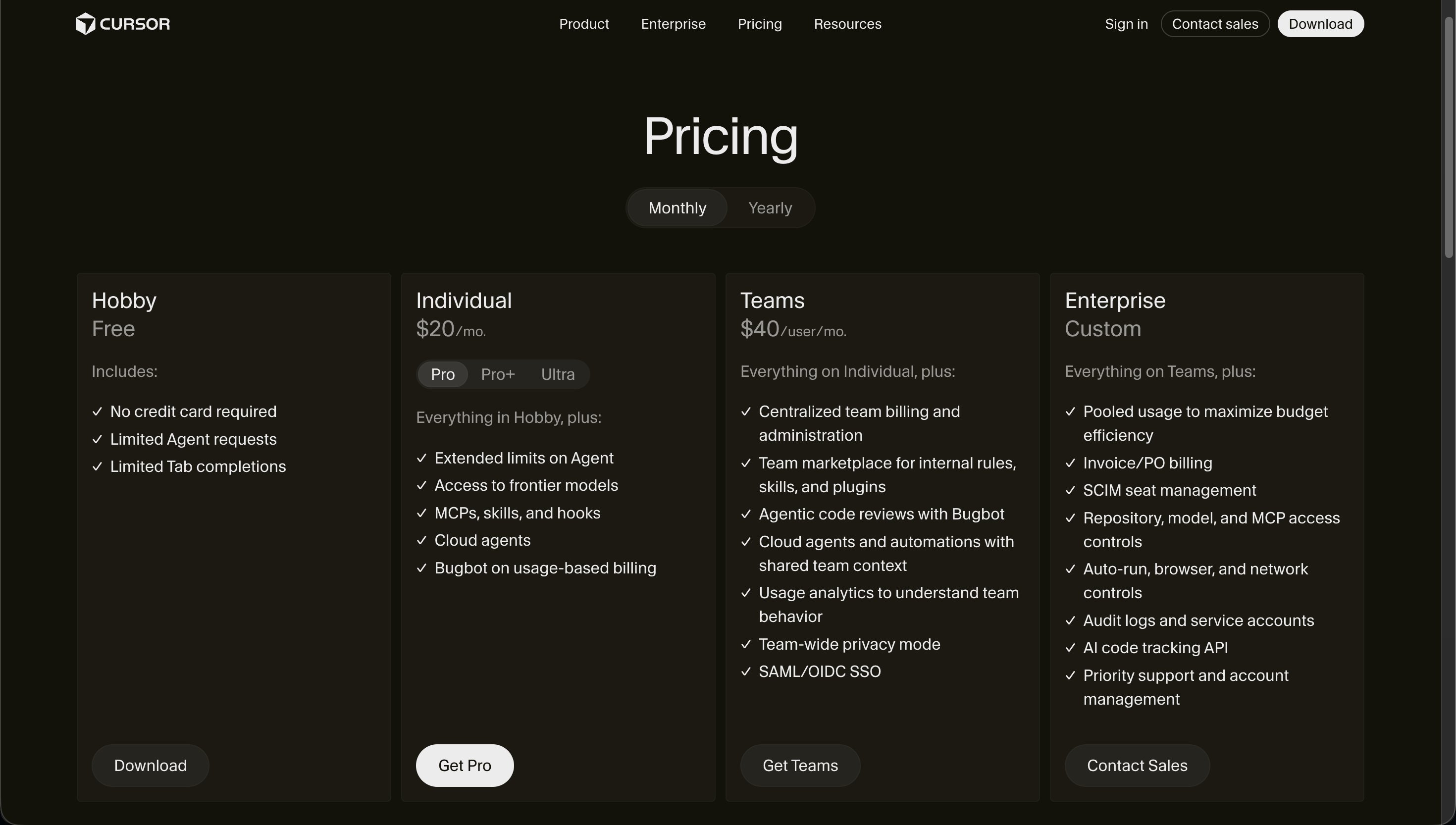
Free (Hobby) - ₹0/month 2,000 completions per month. Realistically 3-5 days of testing. Not a usable free tier, just a trial.
Pro - $20/month (≈₹1,860/month) The default for professional developers. Monthly credits equal to the plan price. Agent mode, all models, MCP integrations. If you're a working developer, start here. Annual billing: $192/year (≈₹17,856, or ≈₹1,488/month).
Pro+ - $60/month (≈₹5,580/month) 3x the credits of Pro. For developers using Cursor 6+ hours daily or running expensive agent operations frequently. During heavy refactoring weeks (greenfield project setup, major migrations), I burned through Pro credits and dropped to Pro+. Months with normal feature work, Pro was enough.
Ultra - $200/month (≈₹18,600/month) 20x credits and priority access to beta features. For developers billing clients hourly and Cursor directly generates revenue. Unless your freelance rate is $100+/hour and Cursor saves you more than $200/month in billable time, this doesn't pay off. At $1,075 (≈₹100,000)+ monthly income, maybe.
Teams - $40/user/month (≈₹3,720/user/month) Pro features plus centralized billing, SSO, admin controls, usage dashboards. For teams of 5+. Engineers pay the same per-seat cost as Pro, but the team gets shared credits and unified management.
Cursor vs GitHub Copilot vs Windsurf
| Feature | Cursor | GitHub Copilot | Windsurf |
|---|---|---|---|
| Interface | AI-first IDE | VS Code plugin | AI-first IDE (like Cursor) |
| Autocomplete | 70% acceptance | 45% acceptance | 68% acceptance |
| Agent mode | Yes, 65% success rate | No | Yes, similar to Cursor |
| Monthly cost | $20 Pro (≈₹1,860) | $10 Pro (≈₹930) | $20 (≈₹1,860) |
| Learning curve | Medium (1-2 weeks) | Very low | Medium (similar to Cursor) |
| Best for | Feature work, refactoring | Minimal setup, quick edits | Parallel agents, iteration |
| Offline support | No | Partial (limited) | No |
My take: Use Cursor if you want the best all-around experience and can spare 1-2 weeks to learn it. Use Copilot if you want to stay in VS Code and save $10/month. Use Windsurf if you want agent mode with a slightly faster iteration loop. For Indian developers juggling cost, Copilot at $10/mo (≈₹930/month) is tempting, but the gap between Copilot and Cursor in autocomplete quality (45% vs 70% acceptance) compounds into real time saved.
For detailed comparisons, see Cursor vs GitHub Copilot and Windsurf vs Cursor.
MCP and Extensions
Cursor supports VS Code extensions (with caveats) and integrates with MCP (Model Context Protocol) for connecting external tools.
Extension compatibility:
- 90% of popular extensions work (Prettier, ESLint, REST Client, GitLens)
- 10% have issues (we hit bugs with a database GUI extension and a cloud sync tool)
- Test your essential extensions before fully committing
MCP integration: Cursor can connect to external services via MCP: databases (PostgreSQL, MongoDB connectors), APIs, documentation servers. This lets the agent query your database schema or docs mid-task without you manually pasting context.
I set up an MCP connection to a local PostgreSQL database. Agent mode could then auto-generate migrations and type-safe query functions by inspecting the schema directly. Saved 20-30 minutes per migration.
Where Cursor Falls Short
The learning curve is non-trivial. Agent mode syntax, credit management, keyboard shortcuts, and the mental model of "describe tasks instead of write code" take 1-2 weeks to internalize. If you've used VS Code + Copilot for years, there's friction.
No offline coding. Every AI feature requires internet. Working from WiFi-spotty trains, cafes, or remote areas means you lose the AI magic and revert to a basic code editor. Not ideal if you commute on unreliable connections.
Extension incompatibility (rare but real). Two of my regularly-used extensions didn't work. I either found replacements or worked around the issues. Check your essential extensions before switching.
Complex state management is weak. Advanced Zustand, Redux, or Jotai patterns sometimes confuse Cursor. It'll generate code that compiles but doesn't follow your architecture patterns. Simple state management is fine; complex patterns need your guidance.
No visual diff review in raw terminal mode. In the IDE, you see diffs before accepting changes. In advanced workflows (running headless, scripting), you don't. This is less of an issue now that IDE integration is mature, but it's a consideration.
Who It's Best For
Professional developers writing code daily. Cursor pays for itself in 2-3 hours saved per week.
Teams doing refactoring or migrations. Agent mode shines here. "Migrate from CommonJS to ESM" or "add TypeScript to this JS codebase" are agent-mode home runs.
Developers comfortable paying for tools. The pricing is real. If you're budget-conscious, Copilot at $10/mo (≈₹930/month) is the better value per dollar.
Teams of 5+ (via Teams plan). Centralized billing and usage tracking make sense at scale.
Who Should Look Elsewhere
VS Code extension power users. If your productivity depends on 5+ specialized extensions and one doesn't work, Cursor might not be worth the friction.
Offline workers. If you regularly code without internet, Cursor's no-offline-mode is a dealbreaker.
Budget-constrained solo developers. Copilot at $10/mo (≈₹930/month) or plain Claude Code at $100/mo (≈₹9,300/month) might make more sense depending on your workflow.
Teams locked into other IDEs. If your organization mandates IntelliJ or Sublime, switching to Cursor requires permission and training overhead.
Our Scores
| Category | Score |
|---|---|
| Ease of Use | 80/100 |
| Output Quality | 93/100 |
| Value for Money | 85/100 |
| Feature Depth | 92/100 |
| Free Tier | 68/100 |
| Overall | 4.5/5 |
Why these scores:
- Ease of Use (80): Learning curve is real, but once internalized, the interface is intuitive. Docked 20 points for the ramp-up time.
- Output Quality (93): Autocomplete and agent mode are both exceptional. Docked 7 points for occasional mistakes in complex state management.
- Value for Money (85): At $20/mo (≈₹1,860/month) for Pro, the ROI is clear if it saves 2+ hours/week. For heavy users, Pro+ at $60 (≈₹5,580) is also reasonable. Docked 15 points because Ultra and Teams aren't accessible to most developers.
- Feature Depth (92): Agent mode, autocomplete, MCP, hooks, multi-file editing - the feature set is comprehensive. Docked 8 points for weak offline support.
- Free Tier (68): 2,000 completions/month is enough to test the tool but not enough for daily use. It's a trial, not a free tier. Docked 32 points for limited utility.
Bottom Line
Cursor is the best AI code editor in 2026. Agent mode is truly useful - not just a gimmick. Autocomplete quality beats every competitor I've tested. At $20/mo (≈₹1,860/month) (Pro), the value is there if you write code professionally.
The decision hinges on three things:
- Can you afford $20 (≈₹1,860)-5,580/month? If not, Copilot at $10 (≈₹930) or Claude Code at $100 (≈₹9,300) (if you do multi-file work) might be better fits.
- Are your essential VS Code extensions compatible? Check the compatibility list before committing.
- Do you work offline frequently? If yes, Cursor's internet requirement is a problem.
For developers who can answer "yes" to #1 and #2, and "no" to #3: Cursor is worth the switch. The time saved on agent mode and the quality of autocomplete suggestions compound into meaningful productivity gains over months and years.
Frequently Asked Questions
How much does Cursor cost in India? Pro is $20/mo (≈₹1,860/month) (converted at $1 (≈₹93)/USD). Pro+ is $60/mo (≈₹5,580/month). Annual billing saves 20% ($192/year (≈₹17,856/year) = $16/mo (≈₹1,488/month)). For Indian rupee billing (if available), check Cursor's pricing page directly as exchange rates fluctuate.
Is Cursor free? Cursor has a free tier with 2,000 completions per month (3-5 days of light testing). It's not usable for daily work. For actual use, start with Pro ($20/month ≈ ₹1,860).
How does Cursor compare to Copilot? Cursor's autocomplete has 70% acceptance vs Copilot's 45%. Cursor has agent mode; Copilot doesn't. Cursor costs 2x more ($20 vs $10/month). For most developers, the gap justifies the cost. See Cursor vs GitHub Copilot for a full breakdown.
Does Cursor work offline? No. Every AI feature requires internet. The IDE itself works offline (basic editing), but autocomplete and agent mode don't. If you commute on trains with spotty WiFi, this is a problem.
Can I use Cursor with my VS Code extensions? 90% work. 10% don't. Check your essential extensions on the compatibility matrix before committing. We hit issues with two extensions but found workarounds.
What's the difference between Cursor and Claude Code? Cursor is a visual IDE. Claude Code is a terminal tool. Cursor is better for feature work. Claude Code is better for large refactoring. Many developers use both.
Is agent mode reliable? In my testing, 65% success rate on first attempt, 95% after minor fixes. It's not magic, but it's reliable enough for tactical tasks. For architectural decisions, use it as a code generator after you've planned the approach.
How do credits work in Cursor? Each paid plan includes monthly credits equal to its price in dollars. Simple autocomplete costs 0.5-1 credit. Complex agent tasks cost 5-50 credits depending on model and codebase size. Model selection matters - route simple tasks to faster (cheaper) models.
Which Cursor plan should I get? Pro ($20/month ≈ ₹1,860) for moderate use (3-4 hours daily). Pro+ ($60/month ≈ ₹5,580) for heavy use (6+ hours, frequent agent mode). Ultra ($200/month ≈ ₹18,600) only if you're billing clients hourly and Cursor directly generates revenue.
Can teams use Cursor? Yes. The Teams plan ($40/user/month ≈ ₹3,720) adds SSO, centralized billing, and usage dashboards. Makes sense for 5+ engineers.
How is Cursor different from Windsurf? Both are AI-first IDEs costing $20/mo (≈₹1,860/month). Windsurf's agent mode uses parallel agents (faster iteration), while Cursor's is sequential. Both are good; Windsurf has a slight speed edge, Cursor has a slight autocomplete quality edge.
Related Posts
Cursor 3 Review: What's New - Latest features and improvements.
Claude Code vs Cursor 3 - Terminal agent vs visual IDE, full breakdown.
Claude Code vs Cursor vs Codex - Three-way comparison.
Composer 2 Review - How Cursor's Composer agent compares to the latest.
Best AI Coding Tools 2026 - Cursor ranked against Copilot, Windsurf, Claude Code, and others.
GitHub Copilot Review - The most affordable AI coding tool.
Windsurf Review - Cursor's closest competitor.
Last updated: May 2026. Prices converted at ₹93/USD.
What to read next
Claude Code vs Cursor 3
Apr 2026