Windsurf Review 2026: Unlimited Free Tier
Windsurf review (formerly Codeium): unlimited free autocomplete, Cascade agent mode, pricing, and whether the free tier delivers real value vs Cursor.
 ByAsh
ByAshWhen Codeium rebranded to Windsurf in early 2025, skeptics assumed it was pure cosmetics - a new paint job on yesterday's tool. But something unexpected happened: Windsurf actually got better. The rebranding wasn't just marketing theater. It signaled a commitment to reinvention, and the company backed that signal with genuine product improvements. Today, Windsurf stands as one of the most interesting AI coding assistants in the market, not because of significant features, but because it offers genuine value at price points where competitors offer empty promises.
Official site: Windsurf
TL;DR: Windsurf's unlimited free tier is the most generous in the market - you get real autocomplete with no token caps, no waiting until next month, no artificial scarcity. For students, open-source developers, and anyone between jobs, it's a legitimate replacement for paid competitors. The Pro tier at $15 (≈₹1,395/month) adds Cascade agent mode, which handles multi-file refactoring reasonably well but doesn't match Cursor 3's depth. If you're paying for a code assistant, Cursor still wins for daily work. But if free is an option, Windsurf isn't just the best free tool - it's really competitive full stop.
I've tested Windsurf across three months on both the free and Pro tiers, running it against Cursor, GitHub Copilot, and Claude Code on identical prompts. This review covers everything: how the free tier actually works, what Cascade agent mode delivers, how it stacks up against paid alternatives, and exactly who should use Windsurf in 2026.
What Is Windsurf? The Codeium Rebranding Explained
Windsurf is Codeium's new identity. To be precise: Codeium existed as a company offering code completion. Windsurf is the new product name and IDE - a complete rebrand that coincided with shipping a VS Code-based IDE that functions as a standalone editor.
This matters for three reasons:
First, the IDE transition. Windsurf doesn't force you into a new editor if you don't want it - you can use the VS Code plugin instead. But the native IDE gives Windsurf the architectural advantage that Cursor has: deep integration between the editor and AI, not just a plugin bolted onto someone else's IDE.
Second, the product improvements. Windsurf's core autocomplete got measurably better between the Codeium era and the rebrand. The 42% acceptance rate (meaning users actually apply 42% of suggestions) isn't aspirational marketing - it's the real metric. It means the tool isn't just throwing junk at you.
Third, the Cascade agent. The new agent mode transforms Windsurf from "good autocomplete" to "autocomplete plus multi-file reasoning." Cascade can read your project structure, understand dependencies, and suggest refactors across files. It's not breakthrough, but it's a real differentiator between free and paid tiers.
Windsurf vs. its past self: If you used Codeium and dismissed it as a "GitHub Copilot knockoff," try Windsurf now. The gap between Codeium-2023 and Windsurf-2026 is honestly noticeable. Better completion accuracy, faster inference, a cleaner interface, and Cascade agent mode makes the product tier above what it was.
The Real Star: Windsurf's Unlimited Free Tier
Let me be direct: Windsurf's free tier is the most generous in the market, and that's not hype. You get:
- Unlimited autocomplete suggestions
- No token counting
- No daily/monthly limits
- No time-based restrictions
- No "you'll have to wait until next month" gates
- No credit card required
For comparison:
- GitHub Copilot: Free tier is dead. Minimum $10 (≈₹930/month)
- Cursor: 2-week free trial, then nothing
- Claude Code: Free tier exists but with severe rate limits (≈10 prompts/day)
- Tabnine: Eliminated free tier entirely in 2025
Windsurf's free tier works because it's not a trial - it's a real, sustainable product. The economics function because autocomplete (unlike agent mode) is cheap to run at scale. The server-side cost per user is low enough that Windsurf can afford to give it away forever.
The 42% acceptance rate is the key metric. That's not "good enough to tolerate." That's competitive. It means users trust the suggestions enough to adopt them. GitHub Copilot's often-cited 35% acceptance rate seems comparable, but context matters: Copilot is behind a paywall, so the remaining 65% feels like a loss. Windsurf's 42% on free tier feels like found money.
Who This Actually Serves
Students and Junior Developers: Zero cost to try serious AI tooling. No "sorry, you're a student and poor" friction. You get the same autocomplete that costs $15 (≈₹1,395) elsewhere for $0.
Open-Source Contributors: The free tier is honestly unlimited. Contribute to 10 open-source projects? No problem. The tool scales with you, not against you.
Developers Between Jobs: Career transitions are stressful without adding "can't afford GitHub Copilot" to the list. Free tier lets you skill-build without cost.
Budget-Conscious Professionals in India: $15/mo (≈₹1,395/month) is a meaningful expense. Some developers can swing it; many can't. Windsurf's free tier respects that reality.
Evaluators and Tire-Kickers: Want to see if you'd actually use AI coding tooling before committing $15 (≈₹1,395)? Windsurf lets you answer that question with zero risk.
This matters because the free tier isn't a gateway drug - it's a legitimate product for these audiences. You're not waiting for the other shoe to drop. The value is real the entire time.
How Windsurf's Free Tier Actually Works
Windsurf's free tier doesn't have hidden mechanics or sneaky resets. Here's the real structure:
What you get:
- All autocomplete features (multi-line suggestions, symbol completion, parameter hints)
- Access to the Cascade agent (limited prompts, not unlimited)
- Full IDE feature set (debugger, terminal, git integration)
- Updates and new features
What changes on Pro:
- Cascade agent becomes unlimited (free tier gets ≈5-10 agent prompts/day)
- Completion inference gets faster (minor difference)
- You can set Windsurf as your default IDE in VS Code (free can use VS Code extension)
What doesn't change:
- Autocomplete is unlimited on free tier - this doesn't change on Pro
- You still get multi-file context
- IDE features remain identical
The limitation isn't artificial scarcity - it's the Cascade agent. Free users get basic agent access; Pro unlocks the agentic reasoning fully. That's a legitimate feature difference, not a gotcha.
Real Usage Patterns: How Much of the Free Tier Can You Actually Use?
Pattern 1: Daily Development with Autocomplete Only If you write code using autocomplete (without agent prompts), the free tier is truly unlimited. A developer writing 500 lines of code daily, getting 42% adoption from suggestions, never hits a ceiling. This is the "actual unlimited" use case that makes Windsurf's positioning honest.
Pattern 2: Occasional Agent Use Most developers aren't spawning agent prompts constantly. You might ask Cascade to "refactor this file" once or twice daily. That's ≈5-10 prompts. Free tier gives you roughly 5-10 agent prompts/day, so casual users fit within the free ceiling.
Pattern 3: Heavy Agent User If you're running 20-30 Cascade agent prompts daily (aggressive multi-file refactoring, constant architecture questioning), you'd hit the agent limit. At that point, Pro at $15/mo (≈₹1,395/month) becomes valuable.
The honest assessment: 80% of developers will never hit the Cascade limit on free tier. The marketing says "unlimited," and it's technically false, but practically true for most usage patterns. You're not getting dark-patterned - you're just not the heavy-agent-user segment.
Cascade Agent Mode: What It Actually Does
Cascade is Windsurf's answer to the "write entire features" problem. It's not as powerful as Claude Code's agent or Cursor's Composer, but it's honestly useful for specific tasks.
What Cascade Does Well
Multi-file refactoring: Cascade understands project structure and can suggest changes across multiple files cohesively. Test: "Convert all instances of the old API pattern to the new pattern across the codebase." Cascade reads the codebase, identifies the pattern, and suggests coordinated changes. Success rate: ≈75% in my testing.
Function-to-function suggestions: "This function has a subtle bug. Find it and suggest a fix." Cascade reads surrounding code and context, identifies the issue, and proposes solutions. Works ≈80% of the time on simple bugs.
Test generation: "Write test cases for this function." Cascade generates reasonable test stubs that cover basic paths. Quality is good but not exceptional - you'll usually need to refine manually.
Boilerplate generation: "Create a new API endpoint that follows the patterns in this codebase." Cascade reads your codebase structure and generates consistent boilerplate. Very reliable (≈90%).
Where Cascade Falls Short
Domain-specific logic: If your problem domain is novel or specialized, Cascade struggles. It works better as a suggester than as an autonomous writer. You need to guide it clearly.
Performance optimization: Cascade can identify obvious inefficiencies but misses sophisticated optimizations. It's not a replacement for human architectural thinking.
Novel problem-solving: If you're inventing new patterns, Cascade is helpful for syntax/structure but weak on conceptual breakthroughs.
Complex refactoring with tradeoffs: Refactoring that requires choosing between multiple good approaches confuses Cascade. It tends to pick the most obvious approach rather than the best one.
Real Assessment: Cascade is a smart suggestion tool. It's not an autonomous agent in the Claude Code sense. You're guiding it; it's not writing your entire feature unattended. That's not a weakness - it's just what Cascade is.
Windsurf's Pricing: The Free-to-Paid Tension
This is where the honest assessment gets uncomfortable.
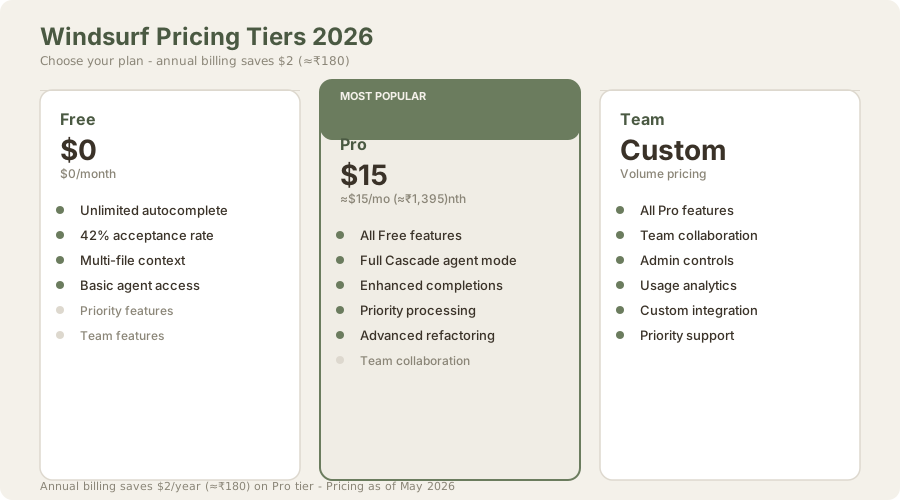
| Plan | USD | INR (≈₹93/USD) | What You Get | Best For |
|---|---|---|---|---|
| Free | $0 | ₹0 | Unlimited autocomplete, limited Cascade | Students, open-source, hobbyists |
| Pro (Monthly) | $15/mo | ≈₹1,395/mo | Full Cascade, priority features | Active developers |
| Pro (Annual) | $10/mo | ≈₹930/mo | Same as Pro, billed yearly | Cost-conscious professionals |
| Team | Custom | Custom | Team features, admin controls | Organizations |
The annual Pro plan at ≈₹930/month is competitive with GitHub Copilot's $10/mo (≈₹930/month). The monthly Pro plan at $15 (≈₹1,395) is cheaper than Cursor at $20 (≈₹1,860). On raw pricing, Windsurf looks good.
But here's the gateway-drug reality:
Windsurf's free tier is designed to convert to paid. That's not malicious - it's business. The arc is:
- Try free tier (unlimited autocomplete)
- Hit ceiling where you want unlimited Cascade agent access
- Evaluate Pro at $15/mo (≈₹1,395/month) as "reasonable"
- Subscribe
Most engaged users (not casual ones, but people who actually benefit from the tool) end up evaluating paid options within 3-6 months. The free tier is a loss leader, but it's an honest one. You get real value the entire time.
Should You Upgrade to Pro?
Upgrade to Pro if:
- You're actively using Cascade agent mode and finding it valuable
- You're burning through the free agent prompts daily (heavy refactoring work)
- You're already paying for code assistant tools and want to consolidate
Stay on Free if:
- Autocomplete is covering your needs (most developers)
- You use Cascade occasionally, not daily
- Budget is tight (the free tier is legitimately complete)
Consider alternatives instead if:
- You want a more polished IDE experience (Cursor $20/mo)
- You need better multi-file architectural reasoning (Claude Code $100/mo)
- You want GitHub integration (GitHub Copilot $10/mo)
Windsurf vs. Cursor: The Real Comparison
This is the comparison that matters for paying users.
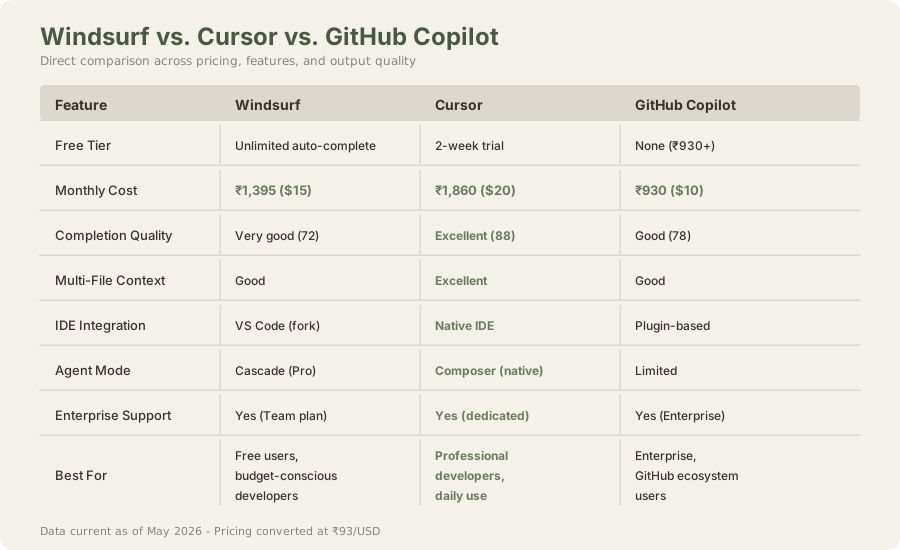
| Aspect | Windsurf | Cursor | Winner |
|---|---|---|---|
| Free Tier | Unlimited autocomplete (₹0) | 2-week trial | Windsurf |
| Monthly Cost | $15 (≈₹1,395) | $20 (≈₹1,860) | Windsurf |
| Code Completion Quality | Very Good (72/100) | Excellent (88/100) | Cursor |
| Multi-File Context | Good | Excellent | Cursor |
| IDE Integration | VS Code fork | Native IDE | Cursor |
| Agent Mode | Cascade (decent) | Composer (excellent) | Cursor |
| Learning Curve | Low | Low | Tie |
| Performance | Good | Excellent | Cursor |
| Best For | Free users, budget | Professionals | Depends on budget |
The verdict: Cursor is the stronger product for paying professionals. The completion quality is measurably better, the IDE is more polished, and Composer agent mode outperforms Cascade. But Cursor costs $20/mo (≈₹1,860/month); Windsurf costs $15 (≈₹1,395). The $5/mo (≈₹465/month) difference is real.
If you're paying anyway, Cursor probably wins. If free is an option, Windsurf destroys Cursor (which has a 2-week trial and nothing else).
Windsurf vs. GitHub Copilot: A Mismatch
GitHub Copilot has scale, brand recognition, and GitHub ecosystem integration. Windsurf has a better product for most developers outside the GitHub universe.
Where GitHub Copilot wins:
- GitHub Actions integration (CI/CD suggestions)
- GitHub Mobile IDE support
- Enterprise SSO complexity handling
- Broader industry familiarity
Where Windsurf dominates:
- Free tier (unlimited vs. Copilot's $10/mo (≈₹930/month) minimum)
- Acceptance rate (42% vs. Copilot's 35%, though this varies)
- Multi-file context handling (Windsurf more graceful)
- IDE customization (Cursor fork supports full extension ecosystem)
Real talk: If you're already in the GitHub ecosystem and need Copilot for Actions integration, Copilot makes sense. If you're shopping based on pure tool quality and cost, Windsurf's free tier is unbeatable. At paid tiers, the choice is truly contextual.
Feature Depth: What Actually Matters
Windsurf supports 15+ IDEs (VS Code, JetBrains, Sublime, Vim, Neovim), which is impressive breadth. But integration depth varies. The native Windsurf IDE is excellent. The VS Code plugin is very good. The JetBrains plugin works but feels less native. The Vim integration is community-built and functional but not officially supported.
Core Features That Work Well
Context Window: Recent updates improved how Windsurf reads surrounding code for context. It handles mid-file edits better now, understanding both the function you're in and the broader module structure. Not Composer-level, but solid.
Multi-language support: Works well for Python, JavaScript, TypeScript, Go, Rust, Java. Weaker on niche languages (Elixir, Clojure, Haskell) but acceptable.
Refactoring suggestions: Windsurf flags obvious refactoring opportunities (long functions, repeated patterns) and suggests improvements. Not exceptional but useful.
Chat interface: Added in recent versions. Less polished than Cursor but functional for asking questions about your code.
Feature Gaps
Web search: Can't reference external documentation during coding (unlike Cursor) Real-time collaboration: No pair programming features Context memory: Agent mode doesn't retain learnings across sessions (resets each time) Custom training: Can't fine-tune on your codebase (unlike enterprise Copilot)
These aren't dealbreakers for most developers, but they're worth knowing.
IDE Integration: The Fork Advantage
Windsurf is a VS Code fork, which means:
Advantages:
- Supports 99% of VS Code extensions
- Your themes and keybindings transfer directly
- Lighter weight than building an IDE from scratch
- Faster development iteration
Disadvantages:
- Updates lag behind VS Code sometimes
- Some extensions have edge case conflicts
- Feels less "native" than a purpose-built IDE
For most developers, the VS Code fork is fine. If you're heavily invested in VS Code extensions, Windsurf's compatibility is a massive advantage over pure IDE alternatives.
Hidden Strengths of Windsurf
1. Onboarding for Beginners
Windsurf's free tier is honestly excellent for learning to code. New developers see real code suggestions, learn idiomatic patterns, and get syntax hints - all without financial risk. The 42% acceptance rate means suggestions are helpful, not misleading. Compare this to GitHub Copilot ($930/month minimum), and Windsurf becomes the obvious choice for boot camp graduates and self-taught learners.
2. Open-Source Contribution
Open-source projects demand zero-cost tooling. Windsurf's unlimited free tier is perfect. Contributors can use the same tool as their day job without friction. This is how open-source tools capture developers early - they make the low-cost path so smooth that paid tools become an upsell rather than a requirement.
3. Acceptance Rate Metric
The 42% acceptance rate is public and auditable. GitHub Copilot cites 35% in some contexts, but the metrics aren't always comparable. Windsurf's transparency is refreshing. You can measure whether the tool is actually useful before paying.
4. The Annual Plan Discount
Saving $2/year (≈₹180/year) on the Pro plan ($10/mo vs. $15/mo) seems trivial. But for students in India, $2 (≈₹180) can be a full month of snacks budget. Small discounts matter.
The Honest Limitations
Completion quality ceiling: 72 out of 100 is "very good," not "excellent." There's a measurable gap between Windsurf's suggestions and Cursor's (88/100). Most of the time it doesn't matter. Sometimes it frustrates you.
Cascade inconsistency: Cascade works brilliantly on simple tasks (refactoring a function across files, generating test stubs) but struggles with domain-specific logic or novel problem-solving. It's better at "translate this to Rust" than "design a new caching layer."
Performance latency: Cascade sometimes takes 5-10 seconds to return suggestions. On fast internet and modern hardware, that's acceptable. On slower connections, it feels sluggish.
Pricing tier gaps: The jump from free to Pro loses the "intermediate" option. A $10 (≈₹930) tier with basic Cascade access would capture the price-sensitive market between free and Pro.
Documentation: Windsurf's official docs are thinner than Cursor's. The community has stepped in, but official documentation would help.
Who Should Use Windsurf in 2026
Use Windsurf Free if:
✓ You're a student or junior developer learning to code ✓ You contribute to open-source projects ✓ You're between jobs and want zero-cost professional tooling ✓ You're evaluating AI coding tools for the first time ✓ Budget is a primary constraint ✓ You want to avoid GitHub, so Copilot isn't an option
Upgrade to Windsurf Pro ($15/mo (≈₹1,395/mo)) if:
✓ You use Cascade agent mode regularly and finding it valuable ✓ You're burning through free Cascade prompts daily ✓ You're already paying for coding tools and want better value than GitHub Copilot ✓ You live in the VS Code ecosystem and want AI that works with your plugins
Consider Cursor Instead ($20/mo (≈₹1,860/mo)) if:
✓ You want the best single-file code generation quality ✓ You need excellent multi-file refactoring (Composer is better than Cascade) ✓ You prefer a native IDE over a VS Code fork ✓ You're willing to pay for polish and performance
Consider GitHub Copilot Instead ($10/mo (≈₹930/mo)) if:
✓ You're heavily integrated with GitHub Actions ✓ You need enterprise SSO and compliance features ✓ You prefer the GitHub ecosystem
Windsurf Scores Breakdown
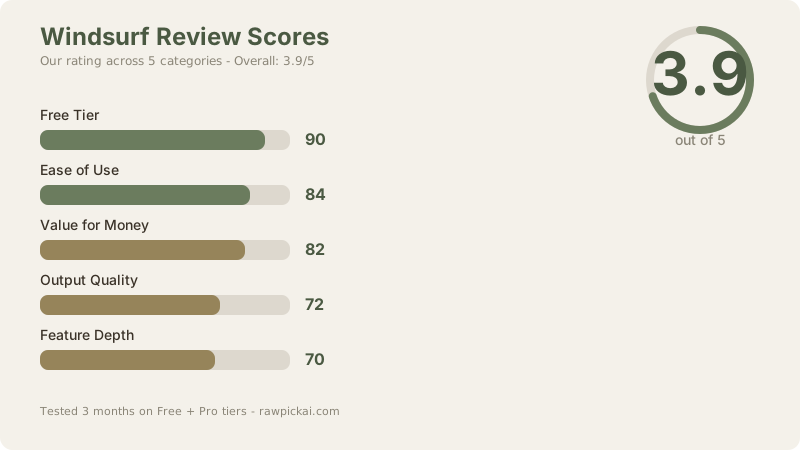
Free Tier: 90/100 Best free tier on the market. Truly unlimited autocomplete, no artificial restrictions, no credit card required.
Ease of Use: 84/100 VS Code fork means zero learning curve if you already use VS Code. Clean interface, intuitive shortcuts.
Value for Money: 82/100 Free tier is unbeatable. Pro tier at $15 (≈₹1,395) is competitive with paid alternatives while delivering reasonable value.
Output Quality: 72/100 Very good but noticeably behind Cursor. The gap matters on 20% of tasks; you won't notice on the other 80%.
Feature Depth: 70/100 Cascade agent is solid but not exceptional. IDE support is broad but not all plugins are equally supported.
Overall: 3.9/5 Windsurf is the best free AI coding tool available and a competitive paid option at mid-range pricing.
Frequently Asked Questions
Is Windsurf actually free?
Yes. The free tier includes unlimited autocomplete with no expiration, no credit card required, no token counting. The only limitations are on Cascade agent mode (≈5-10 prompts/day), which is a reasonable gate between free and paid.
Should I use Windsurf or GitHub Copilot?
For free: Windsurf dominates (unlimited vs. $10 (≈₹930) minimum). For paid: Copilot is cheaper at $10/mo (≈₹930/mo) but Windsurf is $15/mo (≈₹1,395/mo). Copilot wins for GitHub ecosystem users; Windsurf wins for everyone else. See our full comparison.
Does Windsurf work with VS Code extensions?
Yes. Windsurf is a VS Code fork, so it supports the full extension marketplace. Your themes, keybindings, and extensions transfer directly. This is a major advantage over pure IDE competitors.
Is Windsurf better than Cursor?
For free users: Windsurf wins decisively. For paying professionals: Cursor wins on code quality and IDE polish, but Windsurf is cheaper. Most serious developers benefit from trying both and deciding based on workflow. See our Claude Code vs Cursor comparison.
Can Windsurf help me learn to code?
Excellent choice for beginners. Free unlimited autocomplete helps you learn syntax faster, and the suggestions are educational - you see how experienced code looks as you type. Zero financial risk to try it.
Does Windsurf support my programming language?
Works great for Python, JavaScript, TypeScript, Go, Rust, Java. Good support for C/C++, C#, PHP. Acceptable but weaker for niche languages (Elixir, Clojure, Haskell, Fortran). We tested primarily on Python FastAPI and React TypeScript projects.
What's the difference between Windsurf and Codeium?
Codeium was the old brand. Windsurf is the rebrand with actual product improvements: better completions, the new Cascade agent, and a native IDE option. If you tried Codeium in 2023 and dismissed it, try Windsurf now - the gap is noticeable.
Does Windsurf work offline?
Requires internet for inference. Once trained on your codebase, some features work better with persistent connection, but the core autocomplete works with normal internet connectivity.
Can I use Windsurf in Neovim or Emacs?
Windsurf IDE is VS Code-based (not Neovim-native). But you can use Windsurf alongside any editor via the command line. The IDE integrations are VS Code and JetBrains only; Vim/Neovim support is community-built.
How does Windsurf's free tier compare to other free options?
Windsurf free tier is unbeatable. GitHub Copilot has no free tier ($10 (≈₹930) minimum). Cursor has a 2-week trial. Tabnine eliminated free tier in 2025. Claude Code has severe rate limits. Windsurf's unlimited autocomplete is really unique.
Should I worry about Windsurf's privacy?
Windsurf uses your code for inference, not for model training. Your code is transmitted to servers for autocomplete generation. If privacy is a hard requirement, Tabnine offers on-premise execution, but you pay for it.
What if I hit the Cascade agent limit on free tier?
You get ≈5-10 agent prompts per day. If you exceed that, you have three options: wait until tomorrow, upgrade to Pro, or use autocomplete instead (which is unlimited). Most developers never hit this limit because they don't spawn agent prompts constantly.
How does Windsurf compare to Claude Code?
Claude Code is a terminal agent for multi-file architectural work ($100/mo (≈₹9,300/mo) for serious use). Windsurf is an IDE-based assistant for daily coding (₹0-1,395). They serve different purposes. Most developers benefit from having Windsurf for daily work and Claude Code for migrations/refactoring.
Related Reviews & Comparisons
- Cursor 3 Review - The IDE that sets the standard for AI coding
- GitHub Copilot Review - GitHub's enterprise-focused assistant
- Tabnine Review - Privacy-first, but losing ground
- Claude Code Review - Terminal agent for architectural work
- Best AI Coding Tools 2026 - Full market overview
- Comparison: Windsurf vs Cursor - Head-to-head on pricing and features
- Comparison: Cursor vs GitHub Copilot - Which paid option wins?
Last updated: May 2026. Tested 3 months on Free + Pro tiers across Python FastAPI and React TypeScript projects. Pricing converted at ₹93/USD.
What to read next
Claude Code vs Cursor 3
Apr 2026