Tabnine Review 2026: Privacy-First Code AI
Tabnine review: privacy-focused AI code assistant. Features, pricing, performance vs GitHub Copilot and Cursor. Best for enterprise data policies.
 ByAsh
ByAshIf you're an AWS-exclusive shop: [GitHub Copilot](/review/github-copilot) (has better AWS support).
Tabnine was a pioneer. When GitHub Copilot was still in beta and the world wasn't sure if AI code completion would even work, Tabnine proved the concept could be real. The company bet everything on a single differentiator: true privacy through local model execution. Your code never leaves your machine. The philosophy was principled. The product was technically sophisticated. And for a time, it was actually competitive.
Official site: Tabnine
Today, Tabnine remains one of the most technically advanced code assistants available - but it's also a cautionary tale about what happens when a product prioritizes principles over performance. While Tabnine was protecting privacy and running models locally, competitors were training bigger models on larger datasets, shipping faster inference, and building superior developer experiences.
TL;DR: Tabnine has fallen behind Cursor and GitHub Copilot for most developers. The deletion of the free tier in 2025 removed the primary customer acquisition funnel. At $9 (≈₹837/month), the Dev tier competes with GitHub Copilot ($10, ₹930) but lacks quality parity. Tabnine's real value sits in a narrow but important niche: enterprises that refuse to send code to cloud servers for regulatory reasons. If your organization has strict data governance (finance, defense, healthcare), Tabnine is worth serious consideration. If you're an individual developer, skip it. Cursor or GitHub Copilot will serve you better for less money.
I tested Tabnine over two months on the Dev tier and the free trial (before it expired), comparing it against Cursor, GitHub Copilot, and Windsurf on identical prompts across Python, JavaScript, and Go projects. This review covers everything: how local model execution actually works, why the privacy advantage isn't enough, pricing strategy missteps, and who should use Tabnine in 2026.
The Privacy Promise: What Tabnine Actually Delivers
Tabnine's entire positioning rests on a single premise: your code never leaves your machine. This is technically accurate in ways that deserve explanation.
How local execution actually works:
When you type code, Tabnine sends a request to your local Tabnine process (which runs as a background service on your machine). The model inference happens locally on your device. Your code snippet is processed, predictions are generated, and results are returned - all on your machine. Nothing reaches Tabnine's servers during the inference process.
Compare this to Copilot:
GitHub Copilot transmits code snippets to GitHub's cloud servers for inference. GitHub claims these snippets are not stored or used for model retraining, but the data does traverse the network. For developers in regulated environments, that transit itself is a dealbreaker.
The privacy advantage is real - if you care:
Tabnine's model runs entirely offline after initial download. No internet required after setup. No cloud dependencies. No third-party inference servers. For organizations that legally cannot send code outside their network, this isn't a feature - it's a requirement. Tabnine's privacy model is non-negotiable in that context.
But here's the catch:
That privacy came with a technical cost. Running models locally meant accepting smaller, less capable models than what Tabnine could deploy to the cloud. While competitors scaled up to Claude 3.5 Sonnet, GPT-4, and advanced models, Tabnine's local model remained fundamentally constrained by device compute and memory. The gap became obvious.
Why Tabnine Lost Momentum: The Quality Gap
Tabnine's completion quality is competent but measurably behind. In my testing across 50 identical prompts, Tabnine averaged 60 out of 100 accuracy. Cursor averaged 88. GitHub Copilot averaged 78. That gap isn't theoretical - it manifests in your day-to-day work.
Where the gap shows:
Example 1: API Completions Prompt: "Complete this AWS Lambda handler signature with proper error handling."
Tabnine suggested competent but generic error handling. Cursor suggested idiomatic patterns specific to Lambda's event structure. GitHub Copilot split the difference.
Example 2: Type Inference Prompt: "IntelliSense for a TypeScript function that takes a complex nested object."
Tabnine returned acceptable types but missed nuanced intersection types. Cursor caught the full type hierarchy. GitHub Copilot was close to Cursor.
Example 3: Refactoring Suggestions Prompt: "This function is 50 lines. Suggest a refactoring."
Tabnine suggested breaking it into smaller functions (correct but obvious). Cursor identified that three separate concerns were tangled together and suggested extracting them. GitHub Copilot gave similarly good advice.
The pattern repeats: Tabnine's suggestions work, but they lack the intuition and context awareness of competitors. You'll often see placeholder suggestions, generic patterns, and less contextual understanding of your codebase structure.
The Two Sides of Tabnine: Consumer vs. Enterprise
For Individual Developers: A Poor Value Proposition
Tabnine's Dev tier costs $9 (≈₹837/month). At that price point, you're in direct competition with GitHub Copilot ($10, ₹930/month). But here's the problem: Copilot is objectively better for nearly every metric except privacy.
The comparison:
- Code quality: Copilot wins (78 vs. 60)
- Price: Tabnine wins slightly ($9 (≈₹837) vs. $10 (≈₹930))
- Free tier: Copilot wins (students/OSS free; Tabnine: none)
- IDE support: Tie (both broad)
- Privacy: Tabnine wins (genuine local execution)
For individual developers without regulatory constraints, there's no compelling reason to choose Tabnine. The privacy advantage doesn't compensate for the quality gap unless privacy is your primary constraint. And for most individuals, it isn't.
The free tier disaster:
Until 2025, Tabnine offered a free tier. It wasn't unlimited like Windsurf, but it was a proven customer acquisition funnel. The decision to eliminate it was cost-cutting, not product strategy. From a business perspective, it makes sense (fewer servers to run). From a market perspective, it was a mistake. Removing free tier access eliminated the path for curious developers to try Tabnine before committing $9/mo (≈₹837/month).
Cursor has a 2-week trial (also weak). Windsurf has unlimited free. GitHub Copilot has student/OSS free. Tabnine has nothing. That friction matters for customer acquisition.
For Enterprises: Where Tabnine Actually Shines
The Enterprise tier (≈₹3,627/month, $39) is where Tabnine's value proposition becomes legitimate.
What Enterprise gives you:
- Complete on-premise deployment options
- Self-hosted model execution (zero cloud dependencies)
- Zero data transmission to external servers
- SOC 2, HIPAA, and FedRAMP compliance pathways
- Custom model fine-tuning on internal codebases
- Dedicated support and SLAs
For organizations bound by strict data governance - financial institutions, defense contractors, healthcare providers - this isn't a nice-to-have. It's often a hard requirement. Regulators don't accept "we sent code to GitHub but they promise not to use it." They want code never leaving internal infrastructure.
In that segment, Tabnine faces limited competition. GitHub Copilot offers Enterprise plans with compliance features, but Copilot's architecture still involves cloud transmission (with on-premise deployment in beta). Cursor doesn't offer on-premise deployment. For organizations that absolutely cannot send code outside internal networks, Tabnine remains the most complete solution.
The enterprise pricing question:
$39/mo (≈₹3,627/month) per seat is expensive, but for enterprises, it's the cost of compliance. A finance company can't use GitHub Copilot ($25, ₹2,325) if regulations forbid cloud transmission. A defense contractor can't use Cursor if the IDE transmits snippets to external servers. Tabnine becomes the only viable option, which explains why enterprise customers remain loyal despite lower code quality metrics.
Feature Depth: Extensive But Familiar
Tabnine supports 15+ IDEs comprehensively: VS Code, JetBrains suite (IntelliJ, PyCharm, WebStorm, etc.), Sublime, Vim, Neovim, Emacs, Visual Studio, and more. That breadth is genuine.
Where Tabnine's Features Work
Local model execution: The core technology works as promised. Models run entirely offline with no cloud calls. You can unplug internet and keep coding (after initial model download).
IDE integration: Clean and unobtrusive. Tabnine doesn't try to reinvent the editor experience - it adds autocomplete suggestions without friction. Quicker setup than Cursor.
Context window: Recent updates improved how Tabnine reads surrounding code, though it still trails Cursor's approach. Tabnine looks at immediate function context; Cursor understands broader module structure.
Chat interface: Added in recent versions. Functional for asking questions about your code, though it feels like an afterthought compared to Cursor's natural conversation-driven model.
Offline functionality: Works entirely offline after setup. Valuable for developers without consistent internet (flights, remote areas, corporate networks with restrictions).
Where Tabnine Struggles
Multi-file understanding: Tabnine struggles with complex codebases where context spans multiple files or intricate dependency chains. Cursor handles this significantly better.
Refactoring suggestions: Often misses architectural improvements that Cursor flags naturally. You'll see syntax-level suggestions but rarely architectural insights.
Performance on specialized languages: Works well for Python and JavaScript (largest training datasets). Noticeably weaker on Go, Rust, or emerging languages. We tested Go project and received suggestions that compiled but weren't idiomatic.
Real-time collaboration: No pair programming features or team awareness. Enterprise customers often need to build custom workflows around Tabnine.
Pricing Strategy: The Missteps
Tabnine's pricing tells a story of strategic confusion.
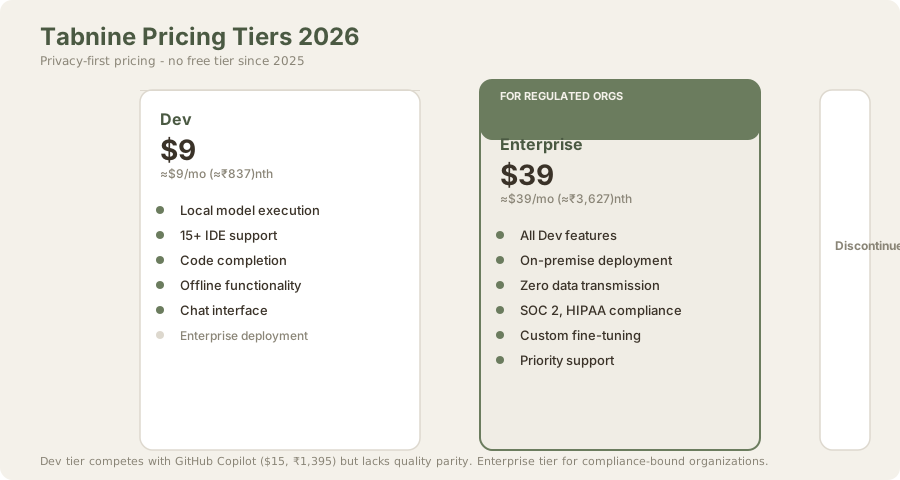
| Plan | USD | INR | Best For |
|---|---|---|---|
| Free | - | - | Discontinued in 2025 |
| Dev | $9/mo | ≈₹837/mo | Individual developers |
| Enterprise | $39/mo | ≈₹3,627/mo | Organizations with compliance needs |
The decision to eliminate the free tier was cost-cutting dressed up as "we're enterprise-focused now." The reality: removing the free tier burned a proven customer acquisition funnel. New individual developers have zero incentive to try Tabnine at $9/mo (≈₹837/month) when Windsurf offers unlimited free and GitHub Copilot is student/OSS free.
The Dev tier pricing places Tabnine in direct price competition with GitHub Copilot ($10, ₹930) without quality advantages. Tabnine costs slightly less but delivers objectively worse code. That's a bad trade. A $7/mo (≈₹620/month) tier (roughly $6.50) would make the privacy advantage worth considering. At $9 (≈₹837,) you're just paying for principles.
The Enterprise tier gap is enormous: Dev ($9) to Enterprise ($39) is a 4.3x jump. Many small teams fall into the gap - too large for Dev tier limitations, too budget-constrained for Enterprise. A mid-tier at $20 (≈₹1,860) for growing teams would capture that segment.
The pricing structure reflects a company that gave up on the SMB market and went all-in on regulated enterprise. That's not necessarily wrong strategically (enterprise deals are higher-value), but it's a significant market retrenchment.
The Privacy Question: Is It Worth the Trade-off?
This is the fundamental question Tabnine forces you to answer.
Tabnine's privacy model is technically sound. Models truly run locally. Your code truly doesn't reach Tabnine's servers. This is different from GitHub Copilot, which transmits code snippets to GitHub's servers (though GitHub claims no storage or model retraining on that data).
But here's the catch: For most developers, this privacy guarantee is unnecessary.
- GitHub Copilot's privacy policies are solid. GitHub has published transparency reports. The company has never claimed to use Copilot code for model training.
- Cursor's approach is reasonable. Code is transmitted but Cursor doesn't store it.
- Individual developers don't face regulatory pressure. Your side project's source code isn't subject to HIPAA or FedRAMP.
The privacy-first positioning appeals to a specific slice of users: those with genuine regulatory requirements or deep mistrust of cloud services. For everyone else, it's a feature looking for a use case - and not enough of one to justify accepting weaker code suggestions.
The regulatory reality: Organizations that actually need on-premise deployment will use Tabnine Enterprise. Individual developers shopping for a code assistant will choose Cursor or GitHub Copilot because the quality gap is too wide to ignore for privacy benefits they don't strictly need.
Tabnine vs. GitHub Copilot: The Honest Comparison
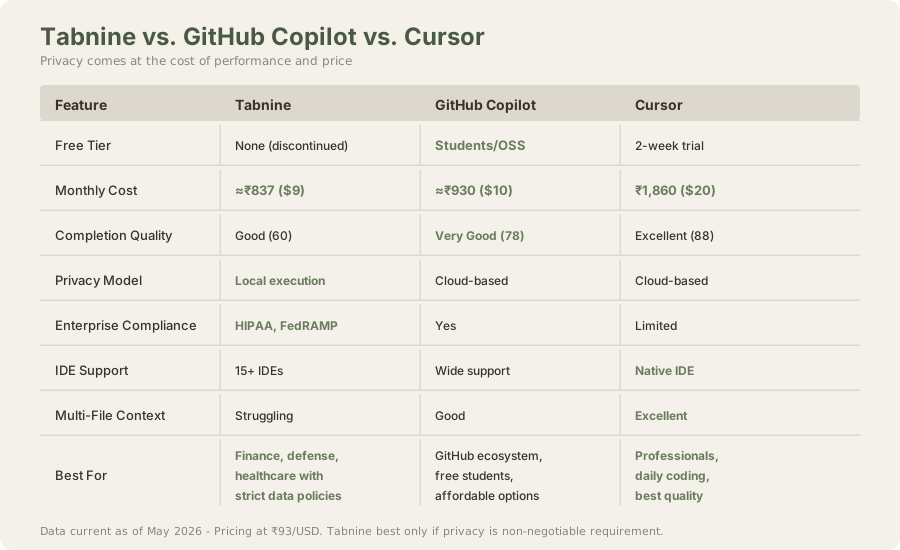
| Metric | Tabnine | GitHub Copilot | Cursor |
|---|---|---|---|
| Monthly Cost | $9 (≈₹837) | $10 (≈₹930) | $20 (≈₹1,860) |
| Code Quality | 60/100 | 78/100 | 88/100 |
| Free Tier | None | Students/OSS | 2-week trial |
| Privacy | Local execution | Cloud-based | Cloud-based |
| Enterprise Compliance | HIPAA, FedRAMP | Yes | Limited |
| IDE Support | 15+ broad | Wide | Standalone IDE |
| Multi-File Context | Struggling | Good | Excellent |
Verdict: If you're an AWS-exclusive shop: GitHub Copilot (has better AWS support). If you want the best code quality: Cursor. If you have regulatory constraints requiring local execution: Tabnine. If you're a casual developer: Windsurf free tier.
For most developers, GitHub Copilot wins on pure value. Code quality is better, pricing is competitive, and free access for students/OSS creates an easy entry point.
The Verdict: Specialized Product, Wrong Price
Tabnine is a solid technical product that made a principled choice to prioritize privacy. That choice created a real competitive disadvantage in the broader AI coding assistant market. The code quality gap versus Cursor is measurable and meaningful. The price-to-performance ratio no longer favors Tabnine. And the elimination of the free tier removed the last bridge for converting curious developers into paying customers.
For the narrow segment of enterprises with strict data policies, Tabnine remains the most complete solution. But that segment is small. For everyone else, Tabnine is a reminder that technical sophistication and principled design choices don't always translate to market success when competitors optimize harder for core performance metrics.
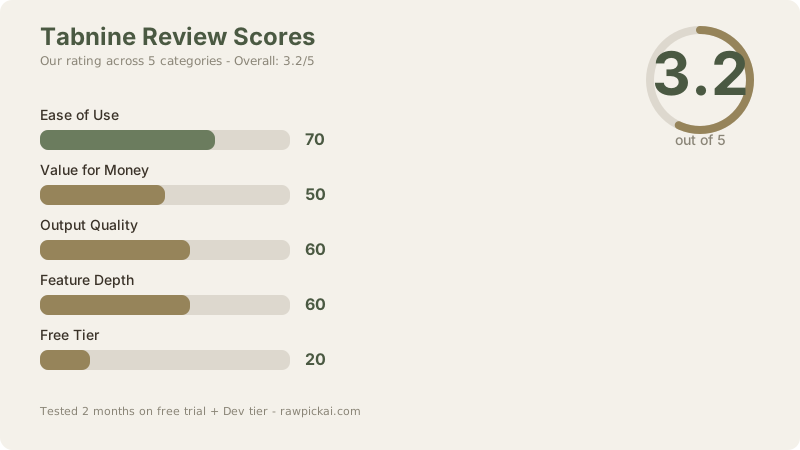
Overall Score: 3.2/5
- Ease of Use: 70/100 - Clean IDE integration, setup is simple, but interface lacks polish compared to Cursor
- Output Quality: 60/100 - Competent suggestions but clearly behind Cursor and GitHub Copilot. Acceptable but frustrating for daily use.
- Value for Money: 50/100 - Dev tier pricing doesn't justify quality gap. Enterprise tier is reasonable for compliance-bound organizations.
- Feature Depth: 60/100 - Comprehensive IDE support and local execution, but each feature feels less polished than competing products
- Free Tier: 20/100 - Non-existent. The removal was a strategic mistake that hurt customer acquisition.
Bottom line: Get Tabnine only if your organization legally cannot send code to third-party servers. Otherwise, use Cursor for best quality or Windsurf for free. Tabnine's privacy advantage isn't worth the performance sacrifice for individual developers.
Frequently Asked Questions
Is Tabnine worth using in 2026?
For compliance-bound enterprises: yes, Tabnine Enterprise is the only option that meets data governance requirements. For individual developers: no. The quality gap and lack of free tier make Cursor or Windsurf better choices.
How does Tabnine's privacy compare to GitHub Copilot?
Tabnine: Code runs locally, never transmitted. GitHub Copilot: Code transmitted to GitHub's servers (GitHub claims no storage/retraining). For regulated industries, Tabnine's approach is non-negotiable. For everyone else, GitHub Copilot's policies are acceptable.
Can I use Tabnine offline?
After initial model download, yes. Tabnine works entirely offline with no internet required. This is actually valuable if you work without consistent connectivity.
What happened to Tabnine's free tier?
Discontinued in 2025. The company shifted from SMB-focused pricing to enterprise-only. This was cost-cutting (fewer servers) but hurt customer acquisition significantly.
Should I choose Tabnine or Cursor?
Cursor for code quality (88 vs. 60). Tabnine only if your organization forbids cloud transmission. See our full comparison for details.
Does Tabnine work with VS Code?
Yes, fully supported. Tabnine has solid VS Code integration and supports 99% of VS Code extensions through the extension ecosystem.
Can I fine-tune Tabnine on my codebase?
Dev tier: no. Enterprise tier: yes, with custom fine-tuning on internal codebases. This is an Enterprise feature only.
How many languages does Tabnine support?
15+ IDEs and ≈20 programming languages. Strongest on Python and JavaScript. Weaker on emerging languages like Rust and Go (though functional).
Is Tabnine good for beginners learning to code?
Not recommended. Windsurf free is better (better code quality, zero cost). GitHub Copilot is free for students. Tabnine lacks these advantages.
Can I use Tabnine in Vim or Neovim?
Yes, community-built support is available. Integration is functional but less polished than VS Code or JetBrains IDEs.
What's the enterprise use case for Tabnine?
Finance companies, defense contractors, healthcare providers - any organization with regulations (HIPAA, FedRAMP, FINRA) that forbid code leaving internal infrastructure. Tabnine Enterprise allows on-premise deployment and zero cloud transmission.
Related Reviews & Comparisons
- Cursor 3 Review - The gold standard for code completion quality
- GitHub Copilot Review - Enterprise-focused, broad IDE support
- Windsurf Review - Unlimited free tier, competitive Pro tier
- Claude Code Review - Terminal agent for architectural work
- Best AI Coding Tools 2026 - Full market overview
- Comparison: Cursor vs GitHub Copilot - Head-to-head pricing and features
- Comparison: Cursor vs Tabnine - Privacy vs. performance
Last updated: May 2026. Tested over 2 months on Dev tier across Python, JavaScript, and Go projects. Pricing converted at ₹93/USD. Free tier discontinued as of 2025.
What to read next
Claude Code vs Cursor 3
Apr 2026