Claude Review: Writing, Research, Coding and Current Plans
A hands-on Claude review with a dated writing comparison, a real code-generation screenshot, current plan details, and a clear account of what was not tested.
 ByAsh
ByAshClaude is Anthropic's general-purpose AI assistant for conversation, writing, document analysis, coding help, and research. My strongest personal use has been writing and working with long documents. That is an experience report, not a claim that Claude is the best writer for everyone or every task.
Testing note: My writing comparisons were informal sessions from 2026 using Claude Opus 4.6 and ChatGPT 5.4. They were not a controlled benchmark, and I did not preserve a complete set of prompts, outputs, model settings, or editing measurements. I have not rerun those comparisons on today's models. The screenshots below document a Claude model menu and one Sonnet 4.6 code response; the code was not compiled or tested.
What I found in writing tasks
In my earlier sessions, I gave Claude and ChatGPT similar writing requests, including a short introduction about work-life balance for remote workers in India, a longer piece about asynchronous work, and beginner-facing technical documentation.
My notes favored Claude's drafts for natural phrasing and continuity over longer passages. ChatGPT's drafts were often more structured and concise. That is a subjective impression from a small number of prompts, not evidence of a general model ranking. Prompt wording, model versions, settings, and revisions all affect the result.
I did not preserve the complete prompts and outputs, so the examples are best read as my impressions, not as a blind comparison or a measured editing-time result.
If writing quality matters for your work, run the same real brief through the models you can currently access. Compare the factual accuracy, voice, revision time, and how well each follows your constraints. A fluent first draft is not a substitute for checking sources and editing it yourself.
A small code-generation example
One saved screenshot shows Claude Sonnet 4.6 responding to the prompt “write a TypeScript function to validate an email address.” The response begins with a typed function and checks for empty input, length, and a local part and domain. It is useful as an example of the assistant generating a code draft, but the screenshot does not show tests, compilation, or a complete validation review. Email validation has edge cases, so I would not use this result as production code without reviewing and testing it.
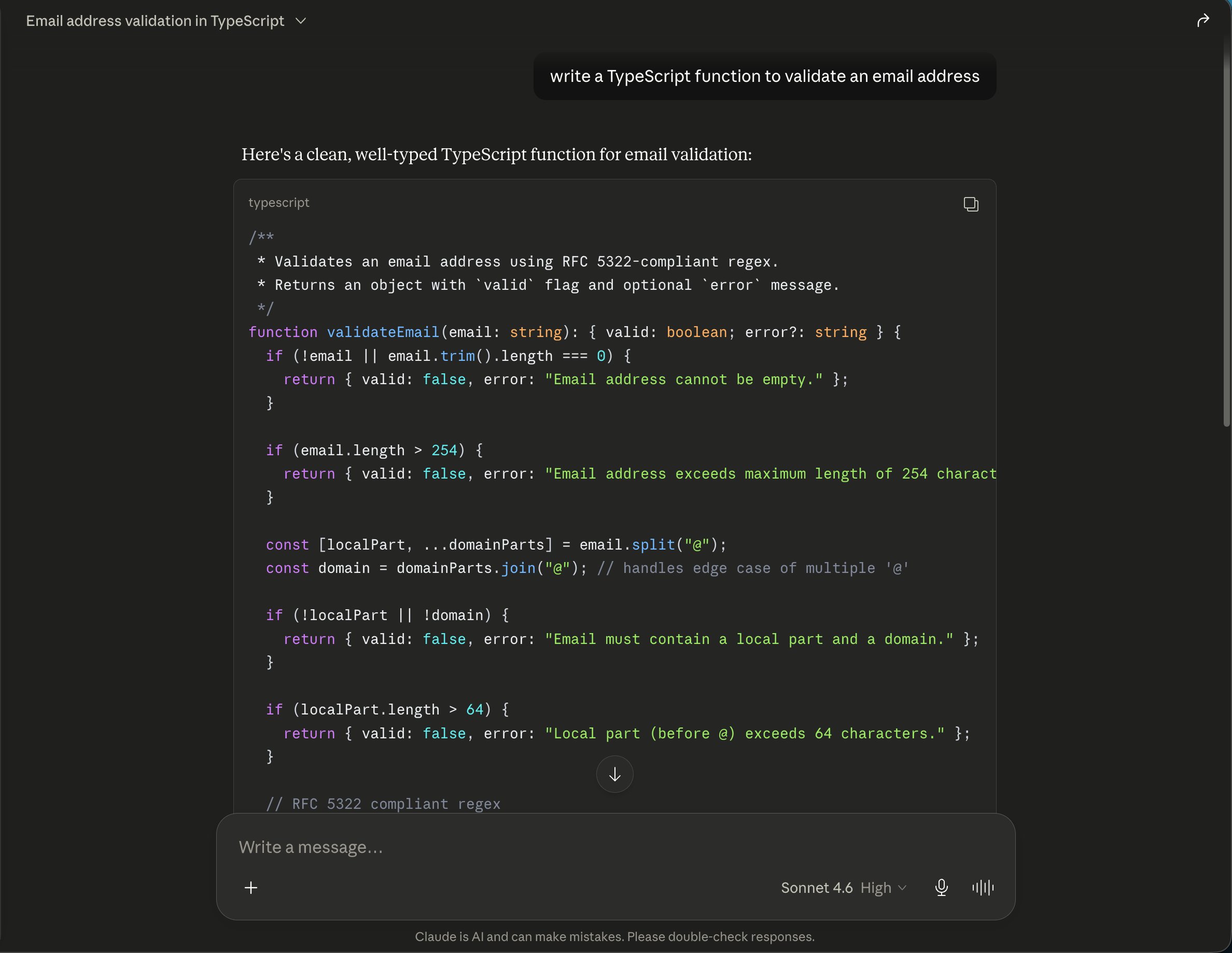
Claude can help explain, draft, and revise code in chat. That is different from an IDE-integrated coding workflow. If the task involves a real repository, multiple files, or running tests, compare the Claude chat experience with Claude Code or an IDE assistant rather than assuming they are interchangeable.
Model selection changes over time
The screenshot below shows the model picker available in my account on May 28, 2026: it listed Opus 4.8, Sonnet 4.6, and Haiku 4.5, and showed an effort control. It is a dated product capture, not a current model recommendation.
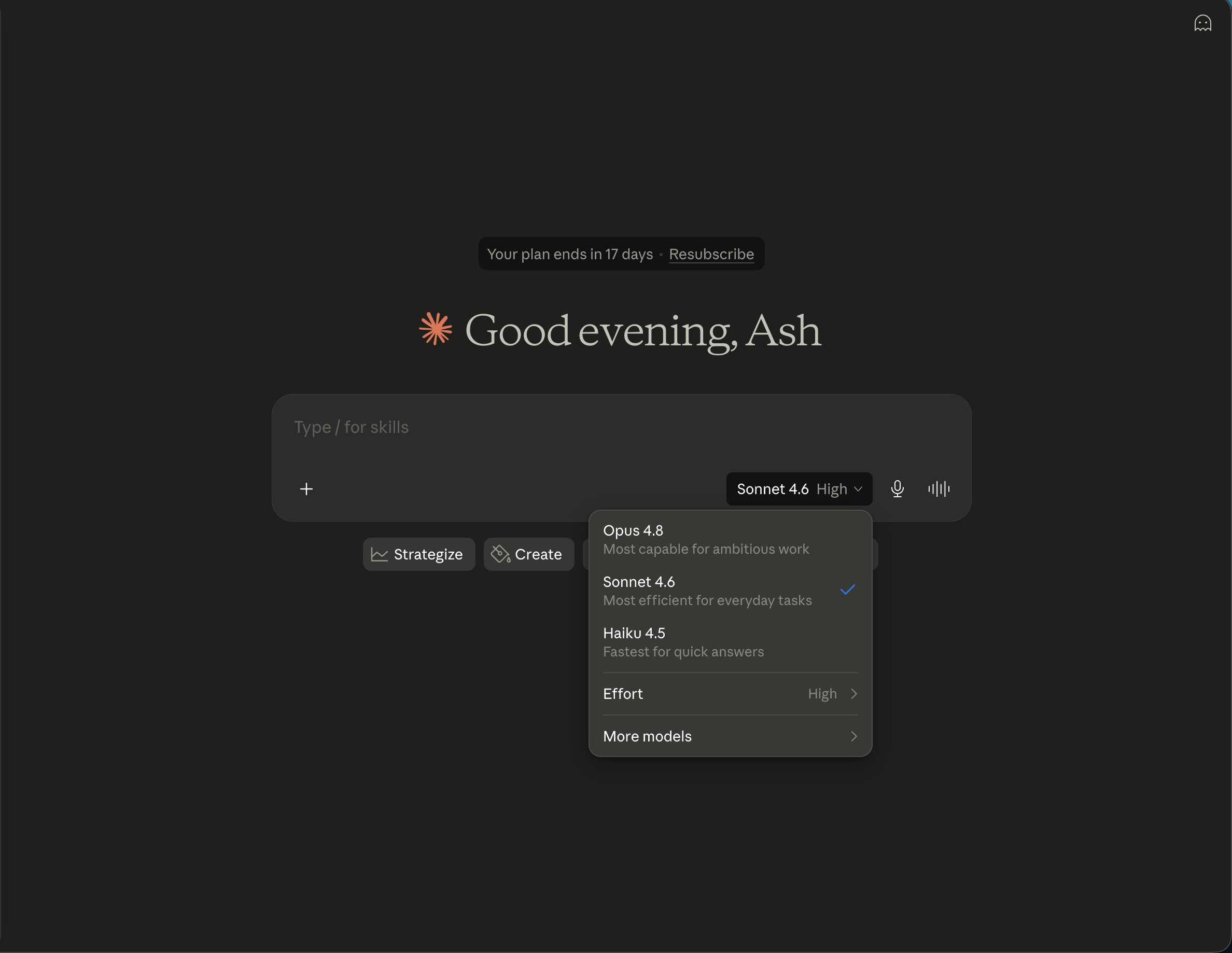
Anthropic's Sonnet 5 announcement, checked September 27, 2026, says Sonnet 5 is now the default model on Free and Pro, with Opus 4.8 available on other plans. This release happened after my saved Sonnet 4.6 screenshot and informal writing sessions. I have not tested Sonnet 5 for this review, so the older results cannot tell you whether the current default is better for your work. Access can depend on plan, region, and product surface; check the model picker in your own account.
Where Claude may be useful
- Drafting and editing: It can help develop an outline, rewrite a passage, or adapt tone. I personally liked its voice in the writing sessions described above, but you should judge against your own work.
- Long documents: Claude can analyze uploaded files and answer questions about them. Verify important figures and quotations against the original document, especially before making business or financial decisions.
- Coding support: It can explain code, suggest a small function, and help reason about errors. The screenshot here is only a generated example; test code in the environment where you intend to use it.
- Research: Claude has web search and other research features, but feature availability and usage limits depend on the plan. Follow the citations back to primary sources for claims that matter.
- Artifacts: Claude can create shareable documents, code, diagrams, and interactive content. Treat generated artifacts as drafts that may need fact-checking, accessibility checks, or security review before sharing.
These are product capabilities and plausible workflows, not features I tested equally deeply. My direct evidence on this page is strongest for a past writing comparison and the single code response shown above.
Limitations and trade-offs
Usage is not a fixed message count. Anthropic says limits can vary with conversation length, attachments, model choice, and tools. Long contexts and research tasks can use more of the available allowance. Check your account's Usage page rather than relying on a message count from an older review.
Fluent output still needs review. Claude can make mistakes, miss instructions, or provide incorrect facts. Check calculations, source material, code, and claims before relying on them.
Model names and strengths move quickly. My comparisons used older model versions. They cannot establish how Claude Sonnet 5 compares with the current versions of ChatGPT, Gemini, or other assistants.
The chat app is not a substitute for every specialist tool. A chat can help with code and analysis, but an IDE, spreadsheet, image editor, or automation tool may be better for a workflow that depends on those environments and their integrations.
Privacy and business use need plan-specific review. Do not assume personal, Team, and Enterprise plans have identical data controls. Read the current privacy terms and admin settings before uploading confidential work.
Claude pricing
On Anthropic's official pricing page, checked September 27, 2026, Claude Pro was listed at $20 per month billed monthly or $17 per month with annual billing, charged as $200 upfront. Max started at $100 per month. Team was listed at $25 per seat per month annually or $30 monthly, with a five-seat minimum. Free access is also available. Prices, local-currency billing, taxes, and included features can vary; check the checkout page for your region.
I have left out rupee conversions from the old review because a fixed exchange rate becomes stale and does not reflect the amount your bank or card issuer will charge.
Plan choice should depend on your real usage, not a blanket claim that one model is essential for professional work. Try your usual tasks on the plan you can access, check the usage meter, and upgrade only if you repeatedly hit a limit or need a paid-only feature.
My verdict
Claude has been a useful writing and document assistant in my own work, and one older set of writing exercises left me preferring its drafts for voice and continuity. That preference is personal and based on older models, not a current head-to-head result. The code screenshot shows another useful role - getting a starting point for a small function - but also why generated code needs tests.
Try Claude with your own writing, documents, or code before subscribing. Compare the edited result and actual time saved, check your current model access and usage limits, and choose the plan based on the features you will use. I would not subscribe solely because this review once ranked an older Claude model above another assistant.
Frequently asked questions
Is Claude free?
Anthropic offers a Free plan. Usage limits apply and can vary based on the task, model, and conversation. Check the current plan page and account usage meter.
How much does Claude Pro cost?
The official page checked September 27, 2026 listed Pro at $20 per month billed monthly or $17 per month with annual billing, charged as $200 upfront. Confirm regional pricing and tax at checkout.
Can Claude generate images?
Claude can analyze images you upload and create some visual or interactive artifacts, but this review did not test an image-generation workflow. Check current product features for what is available in your account.
Is Claude good for coding?
It can explain code and generate drafts. The TypeScript example in this review was not compiled or tested, so it does not establish production reliability. Test code and check its edge cases before use.
Is Claude better than ChatGPT?
This review does not establish a current overall winner. My informal writing comparison used older models and was not a controlled benchmark. Compare both on the tasks and plans you actually use.
How much can I use Claude?
There is no universal message count that applies to every conversation. Usage depends on factors such as message and attachment size, model choice, and tools. See the current limit and usage meter in your account.
Writing comparisons: 2026, using models available at that time. Screenshots: May 2026. Pricing and product details checked: September 27, 2026. Product features and plan limits may change.
Related reading: ChatGPT review | Claude Code review | Cursor review | Perplexity review
What to read next
Gemini vs ChatGPT
Apr 2026