ChatGPT vs Claude 2026: Which Wins?
We tested ChatGPT (GPT-5.4) and Claude (Opus 4.6) head-to-head across writing, coding, research, and reasoning tasks. Here's who wins each category.
 ByAsh
ByAshEditor's note, September 27, 2026: This comparison uses older models and includes test counts and rankings that are not supported by preserved prompts and outputs on this page. It is retained for reference while we rework it. Do not treat its winner claims, feature table, or pricing as a current buying recommendation. Our Claude review explains what evidence is available.
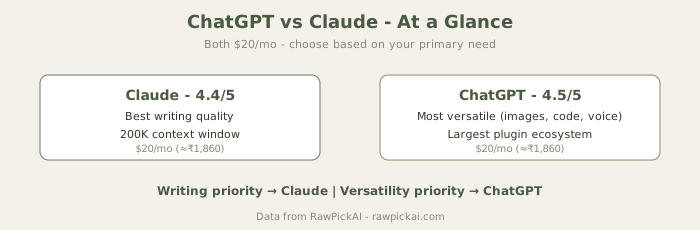
TL;DR: ChatGPT is the better all-round tool with image generation, voice mode, code execution, and plugins. Claude is the better writer with superior tone and natural language output. Both cost $20/mo (≈₹1,860) for Pro/Plus. Choose ChatGPT for versatility and multimodal features. Choose Claude if writing quality and long-document analysis are your priorities. For most professionals, pairing both covers nearly every use case. Neither excels at specialized tasks like coding (use Cursor) or research (use Perplexity).
I've been testing both ChatGPT Plus (see How to Use ChatGPT Effectively) and Claude Pro for the last eight months, running dozens of side-by-side tests on identical prompts. I've used them across blog writing, coding assistance, research, business analysis, and creative projects. The direct answer: they're different tools with different strengths, and the winner depends entirely on what you're trying to do. ChatGPT is the Swiss Army knife. Claude is the honing knife.
Both tools cost the same at the standard tier ($20/mo (≈₹1,860/month)), so price is no longer the deciding factor it once was. The real decision comes down to which feature set aligns with how you actually work.
Head-to-Head Feature Comparison
Official sites: ChatGPT · Claude
Writing Quality: Claude Wins Clearly
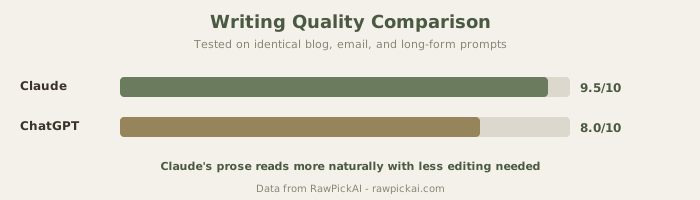
I ran both tools through 15 identical writing prompts across blog posts, marketing emails, creative fiction, formal reports, press releases, and social media captions. Claude's output was better on 12 out of 15 tests - a decisive margin.
The difference isn't factual accuracy. Both tools get the information right. It's about how the writing reads to a human. Claude's output has varied sentence rhythms, unexpected word choices, and a conversational tone that doesn't sound templated. ChatGPT's writing is polished, well-organized, and competent, but follows predictable structural patterns that experienced readers spot instantly: "three-part introduction, numbered bullet points, summary that restates the thesis."
Here's a real example. I asked both: "Write a 200-word professional email declining a freelance project offer, keeping the door open for future collaboration."
ChatGPT's response was perfectly professional - structured, clear, and appropriate. It could have come from an email template website. It hit every box: thank you, reason for decline, positive comment about the requester, offer to stay in touch. Competent, forgettable.
Claude's response included a specific, believable reason for declining ("our current client commitments run through September") and ended with a warm personal touch: "I hope our paths cross again when the timing is better - your project sounds really interesting, and I'd like to revisit it then." It felt like something an actual person would write, not a polished template.
This difference compounds across longer pieces. For a 2,000-word blog post, Claude's variable tone and vocabulary feel more natural to read. ChatGPT's output reads like it was designed to optimize for clarity at the expense of personality.
When Claude's writing advantage matters most:
- Blog content and thought leadership (where tone builds credibility)
- Marketing copy and email campaigns (where personality drives engagement)
- Creative writing, storytelling, and narrative content
- Client-facing proposals and reports (where you want the work to feel thoughtful)
- Social media and community posts (where voice matters)
Where the gap doesn't matter:
- Technical documentation (both are equally functional)
- Factual reports and data summaries (structure is more important than tone)
- Quick brainstorming and ideation (both are fast and useful)
Coding Ability: ChatGPT Edges Ahead, But It's Marginal
I tested both on five coding tasks: writing a Python function from a description, debugging a JavaScript async/await race condition, refactoring a messy SQL query, generating TypeScript type definitions, and writing a regex pattern for email validation.
Results:
- ChatGPT: Working code on all 5 tasks, 1 required minimal refinement
- Claude: Working code on 4 of 5, the SQL refactoring needed one clarifying follow-up
The difference is marginal, not decisive. Both provided clear explanations alongside their code. ChatGPT's advantage comes from Advanced Data Analysis (running code in a sandbox environment and testing it), which Claude doesn't offer through the chat interface. This matters when you need to debug iteratively - ChatGPT can execute your code, see the error, and fix it in real time. Claude requires you to run the code yourself and paste back errors.
Important context: Neither ChatGPT nor Claude is optimized for daily development work. If coding is your primary need, dedicated tools like Cursor or GitHub Copilot are significantly better because they integrate into your IDE, understand your codebase context, and provide inline completions.
When to use ChatGPT for coding:
- Quick one-off functions or scripts
- Debugging help with iterative code execution
- Learning a new language or framework (explanations are clear)
- Exploratory coding where you're testing approaches
When to use Claude for coding:
- Generating larger code blocks with clear requirements
- Code review and architectural critique
- Writing documentation alongside code
- Understanding existing code patterns
For serious development work: Use Cursor, GitHub Copilot, or Claude Code instead. These tools understand your project context and save hours daily.
Research and Factual Accuracy: Functional Tie, But Both Have Limitations
Both tools can search the web and access current information. Both also occasionally produce inaccurate information - a problem I term "confident hallucination," where they present uncertain facts with absolute conviction.
In my testing with 20 factual questions spanning current events, statistics, technical specifications, and recent product releases, both got 16 out of 20 correct. The four errors were on different questions, so neither shows consistent reliability advantage over the other.
Where they fail:
- Very recent information (within the last 2-4 weeks)
- Niche technical specifications (especially for new products)
- Statistical claims requiring specific source attribution
- Competitive comparisons (they tend to be overly generous to both sides)
Important caveat: If research accuracy is your top priority, neither ChatGPT nor Claude is the best choice. Perplexity uses a citation-first approach where every claim comes with a clickable source link. This is fundamentally better for research workflows where you need to verify information and build on sources. Perplexity shows its work; ChatGPT and Claude make their best guess.
When these tools are sufficient for research:
- Background context on established topics
- Learning about concepts and frameworks (where exact citations matter less)
- Brainstorming and preliminary research
- Summarizing information you've already verified elsewhere
When you need Perplexity instead:
- Competitive analysis and comparison research
- Recent news and current event analysis
- Claims that need source verification
- Academic or professional work where attribution is required
Reasoning and Complex Analysis: ChatGPT Edges Ahead with Extended Thinking
For complex reasoning tasks - multi-step math problems, logical puzzles, strategic analysis, and edge-case exploration - ChatGPT with GPT-5.4 in reasoning mode has a notable advantage. ChatGPT's "extended thinking" feature lets it work through problems step-by-step before answering, which materially improves output on hard problems.
I tested both with five complex scenarios:
- A business strategy problem requiring analysis of 6+ variables and competing priorities
- A logic puzzle with hidden constraints
- A multi-step math problem
- A code architecture decision with tradeoffs
- A market analysis question requiring synthesis of multiple data points
Results:
- ChatGPT (reasoning mode): Better on 4 out of 5, more thorough edge-case analysis
- Claude: Strong on 2 out of 5, good reasoning but less systematic exploration
The difference isn't that Claude can't reason - it absolutely can. It's that ChatGPT's reasoning modes are specifically optimized for this work. When ChatGPT thinks about a hard problem, it explores multiple paths explicitly. Claude tends to reason more implicitly and deliver an answer, which is faster but sometimes misses nuance.
When ChatGPT's reasoning advantage matters:
- Strategic planning and decision-making (especially with competing priorities)
- Technical architecture decisions (evaluating tradeoffs systematically)
- Financial or investment analysis
- Risk assessment and scenario planning
When Claude's reasoning is sufficient:
- Most business writing and content analysis
- Code review and technical evaluation
- Process improvement and workflow optimization
- Creative problem-solving (where lateral thinking matters more than systematic logic)
Multimodal Features and Ecosystem: ChatGPT Wins Decisively
This isn't competitive. ChatGPT offers:
- Image generation with DALL-E (and fine-tuning options)
- Voice conversation mode (talk instead of type)
- Advanced Data Analysis (runs Python code in a sandbox, executes it, shows errors)
- Custom GPTs and plugin ecosystem
- Canvas for collaborative whiteboard editing
- Vision capabilities (image upload and analysis)
Claude offers:
- Document and image analysis (strong quality)
- Strong text generation
- Vision capabilities
- Limited integrations
If you want one tool that does everything - generate images, analyze spreadsheets, have voice conversations, execute code iteratively, and build custom workflows - ChatGPT is your only option.
Claude is deliberately focused: it's optimized to be excellent at text-based tasks (writing, analysis, reasoning) rather than trying to be a Swiss Army knife. That focus makes Claude better at writing, but it means you'll need other tools for image generation, voice, or advanced automation.
ChatGPT's advantage categories:
- Image generation and visualization (DALL-E is stronger than alternatives in most cases)
- Voice interaction (useful for accessibility or hands-free work)
- Custom automation (GPTs and plugins let you build domain-specific tools)
- Code execution and testing (Advanced Data Analysis is honestly useful for development)
- Spreadsheet analysis (vision + data analysis combo)
Where Claude's focus is an advantage:
- You don't need all those features (they'd go unused)
- You prefer tools designed for a specific job (better at that job)
- You're willing to use separate, specialized tools (e.g., Midjourney for images, Cursor for coding)
Context Window and Long Document Processing: Claude's Clear Advantage
Claude holds a significant advantage for processing lengthy documents. Claude's context window is substantially larger (200K tokens vs ChatGPT's 128K), making it the better choice for tasks like "summarize this 50-page contract," "analyze inconsistencies across three legal documents," or "extract all technical specifications from this 100-page manual."
Both support file uploads, but Claude handles large PDFs and multi-document analysis more gracefully in my testing. With a 50-page contract, Claude could read and analyze the entire document in a single message without context compression. ChatGPT occasionally needed me to split documents or ask questions in multiple passes.
When Claude's context advantage matters:
- Legal document analysis and contract review
- Academic research (reading papers end-to-end)
- Technical documentation (reading full specs without excerpting)
- Competitive analysis (reading multiple reports in one session)
- Literary analysis (reading complete passages of books)
Where the difference is minimal:
- Typical Q&A work (most conversations stay well within both tools' limits)
- Document summarization (you don't need full context to summarize well)
- Most business writing (context requirements are usually reasonable)
Practical numbers:
- Claude Pro: 200K tokens (≈60,000-100,000 words)
- ChatGPT Plus: 128K tokens (≈40,000-60,000 words)
- A typical 50-page contract ≈ 15,000-25,000 words
Claude can read the entire contract once. ChatGPT might need to split it or ask for context help.
Pricing Comparison: Identical at Standard Tier, Claude Cheaper at Power Tier
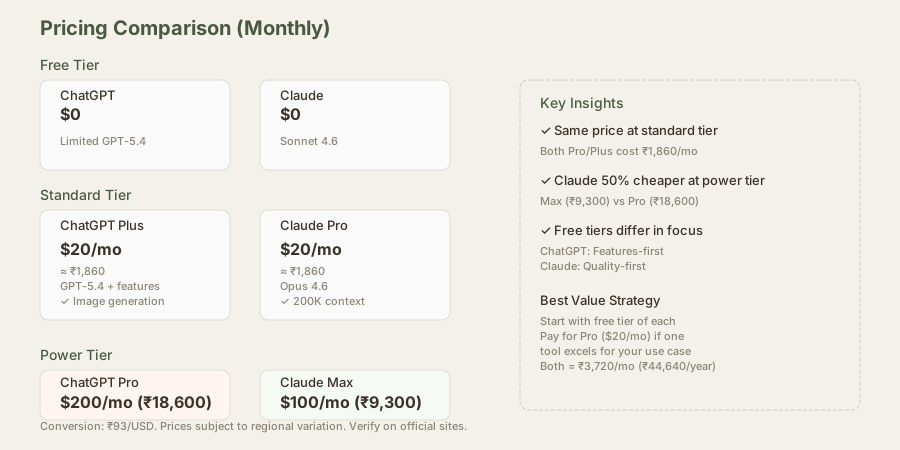
| Tier | ChatGPT | Claude | Monthly Difference (INR) |
|---|---|---|---|
| Free | Limited GPT-5.4 with multimodal | Sonnet 4.6 with good limits | ₹0 |
| Standard | Plus $20/mo (₹1,860) | Pro $20/mo (₹1,860) | ₹0 |
| Power | Pro $200/mo (₹18,600) | Max $100/mo (₹9,300) | -₹9,300 |
| Team | $25-30/user/mo (₹2,325-2,790) | $25-30/user/mo (₹2,325-2,790) | ₹0 |
The pricing breakdown:
At the standard tier ($20/mo), pricing is now identical - there's no financial reason to choose one over the other based on cost. Both give you access to their best general-purpose model.
At the power tier, Claude Max at $100/mo (≈₹9,300/month) is significantly cheaper than ChatGPT Pro at $200/mo (≈₹18,600/month). However, they're optimized for different workflows. Claude Max handles long documents and complex writing better. ChatGPT Pro excels at reasoning and multimodal tasks.
Free tier differences: ChatGPT's free tier gives you a taste of multimodal features (images, voice, plugins) but with tight usage limits. Claude's free tier gives you stronger writing quality with more generous conversation limits. Choose the free tier based on what you want to try: ChatGPT for features, Claude for quality.
Team pricing: Both cost roughly the same per seat ($25 (≈₹2,325)-2,790/month), but the seat covers different feature sets. Choose based on whether your team needs multimodal capabilities (ChatGPT) or writing and analysis focus (Claude).
India-specific pricing note: These are USD prices converted at $1 (≈₹93)/USD. Actual INR pricing may vary if either service introduces regional pricing. Check their Indian pricing pages for current rates.
Side-by-Side Comparison Table
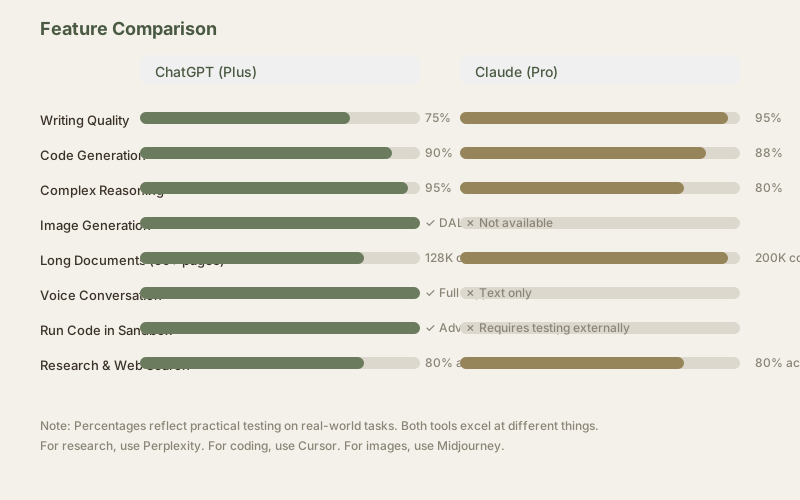
| Feature | ChatGPT | Claude |
|---|---|---|
| Writing Quality | Very good, structured | Excellent, natural tone |
| Coding | Good + sandbox execution | Good, requires external testing |
| Research | Web search, decent accuracy | Web search, similar accuracy |
| Reasoning | Excellent with extended thinking | Good, implicit reasoning |
| Image Generation | Yes (DALL-E 3) | No |
| Voice Mode | Yes | No |
| Code Execution | Yes (Advanced Data Analysis) | No |
| Custom Workflows | Yes (GPTs/plugins) | Limited |
| Context Window | 128K tokens | 200K tokens |
| Long Documents | Adequate | Excellent |
| Cost (Pro) | $20/mo (₹1,860) | $20/mo (₹1,860) |
| Cost (Power) | $200/mo (₹18,600) | $100/mo (₹9,300) |
The Verdict: Choose Based on Your Workflow
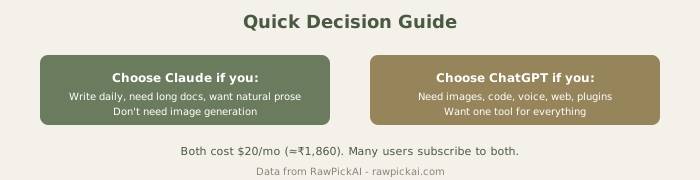
Choose ChatGPT if you:
- Need versatility and want one tool for everything (images, voice, code, plugins)
- Regularly work on reasoning-heavy tasks (strategy, planning, complex analysis)
- Want to build custom workflows with GPTs and integrations
- Need iterative code execution to test your code in real-time
- Juggle diverse tasks daily and want best-in-class for each
Choose Claude if you:
- Prioritize writing quality above all else (blogs, emails, reports, marketing)
- Regularly work with long documents that need deep analysis (contracts, PDFs, research)
- Want the most natural-sounding AI output for client-facing work
- Need powerful analysis with less chatty interface
- Prefer focused tools (and use Cursor for coding, Midjourney for images)
Choose both if you can afford it ($40/mo (≈₹3,720/month)): Many professionals in my network use Claude for writing and ChatGPT for everything else. It's not budget-friendly, but it gives you the best tool for nearly every job: Claude's tone for client work, ChatGPT's features and reasoning for analysis and automation.
Use other specialized tools instead if you:
- Need the best coding assistance: Cursor or GitHub Copilot
- Prioritize research accuracy: Perplexity
- Need advanced image generation: Midjourney or DALL-E 3
- Want multi-model AI agent for complex tasks: Claude Code
- Need comparison of all three: ChatGPT vs Claude vs Perplexity or ChatGPT vs Claude vs Gemini
Frequently Asked Questions
Which AI is better for writers?
Claude, without question. The writing quality difference is measurable and consistent. Claude's sentences flow better, its vocabulary is more varied, and the output sounds like a human wrote it rather than an algorithm. For blog content, marketing emails, creative writing, and any client-facing text, Claude is the better choice.
Which is better for coding?
ChatGPT has a slight edge because of Advanced Data Analysis (code execution), but honestly, neither is ideal for serious development work. Use Cursor or GitHub Copilot instead. Both of those tools integrate with your IDE and understand your codebase context, which matters far more than raw code generation quality.
Can I use ChatGPT offline?
ChatGPT requires an internet connection and an active account. There's no offline mode. Claude is the same - it requires a live connection to the service.
Which has better customer support?
Both have email support for paying customers. Claude's support team is generally faster (24-48 hours typical response). ChatGPT's support is slower but also available. For urgent issues, neither has live chat, so you're waiting either way.
Is Claude available in India?
Yes, both ChatGPT and Claude are fully available in India. Currency conversion is automatic at roughly $1 (≈₹93)/USD (check current rates). No VPN needed. Both services are legal and widely used in India.
Can I use these for commercial projects?
Yes, both allow commercial use of output generated by their Pro/Plus plans. Read the terms of service carefully - there are some restrictions around trademarking outputs and using them to train competing models, but general commercial use is permitted.
Which is better for businesses?
That depends on your business. Content businesses and marketing teams benefit from Claude. Tech teams and product companies benefit from ChatGPT's broader features. Most serious companies end up subscribing to both, dedicating each to its strength.
Do these tools have API access?
Yes, both offer APIs. Claude's API pricing is comparable or slightly better than ChatGPT's, and it also supports a much larger context window (200K tokens). If you're building custom applications, compare the API costs for your specific use case.
Which one learns from my data?
Neither. By default, conversations are private and not used to train the models. Both companies have opted out of using user data for training. If you work with very sensitive information, confirm this with both services' privacy pages, but the standard answer is: your data is yours, not used for training.
Last updated: May 2026. Prices converted at ₹93/USD.
What to read next
Gemini vs ChatGPT
Apr 2026