Gamma vs Beautiful.ai: AI vs Templates
Comprehensive comparison between Gamma's AI-powered slide generation and Beautiful.ai's intelligent template system. Pricing, features, and which tool.
 ByAsh
ByAshTwo radically different philosophies clash in the presentation software space: Gamma believes AI should write your slides for you, while Beautiful.ai believes smart templates should guide your content into beautiful layouts. This fundamental difference creates distinct user experiences, pricing models, and ideal use cases.
The clear winner: Gamma. It delivers better value with a legitimate free tier, more innovative AI generation capabilities, and a more accessible entry point for creators who don't want to pay before they try.
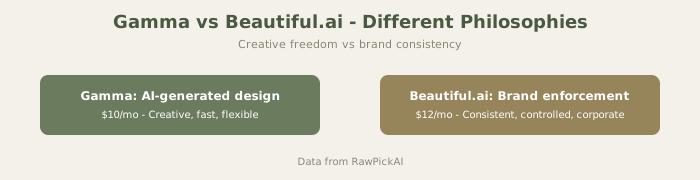
TL;DR: Quick Decision Guide
Choose Gamma if: You need decks fast, you don't have design experience, you want to try before paying, you need investor slides quickly. Choose Beautiful.ai if: You have a team, you need pixel-perfect brand compliance, you're data-heavy (charts/tables), you value design control.
Official sites: Gamma · Beautiful.ai
For individuals and startups: Gamma ($10/mo (≈₹930/mo)). For enterprises with design standards: Beautiful.ai ($12/mo (≈₹1,116/mo)).
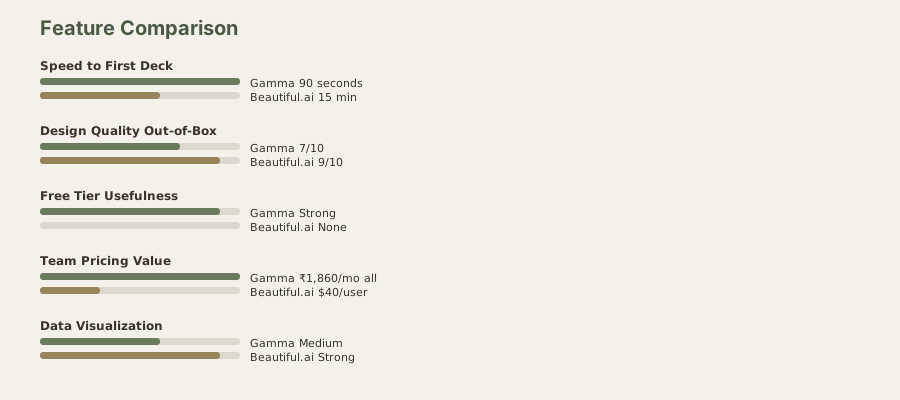
Visual Comparison

The Philosophy Difference Matters More Than Features
There's a fundamental split in how AI presentation tools approach the problem:
Gamma's philosophy: The hardest part of presentations is figuring out what to say and how to structure it. Once you have that figured out, the design is secondary. So Gamma takes your content/idea and builds the entire presentation - structure, narrative flow, visuals, layout - automatically.
Beautiful.ai's philosophy: The hard part is making it look professional. Most people know what they want to say; they just can't make it look polished. So Beautiful.ai provides smart templates that detect your content type and apply design rules automatically.
These philosophies create radically different workflows and outcomes. Understanding this difference is more important than comparing feature lists.
Why Gamma's Generative Approach Crushes the Template Philosophy
Gamma's core bet is audacious: give AI your raw thoughts, files, or web links, and it generates presentation slides automatically. You're not constrained by predefined template slots or forced to click through guided wizards. Instead, you paste content, and Gamma's AI extracts the key points, organizes them logically, and assigns them to beautifully designed slides.
Beautiful.ai works the opposite way. It starts with smart templates - pre-designed slide layouts that detect your content type and auto-format your text, images, and data. It's template-driven intelligence, not content-driven generation.
For creators who struggle to start from a blank page, Gamma's approach is transformative. You don't need to structure your thinking first or wrestle with design decisions - the AI handles both. Beautiful.ai requires you to already know what you want to say; it just makes it prettier.
This philosophical difference explains why Gamma is winning adoption among entrepreneurs, marketers, and startup founders who need to move fast. Beautiful.ai appeals to agencies and design teams who want pixel-perfect control within established brand guidelines.

Pricing: Gamma Wins on Accessibility
The pricing gap is stark and significant:
| Feature | Gamma | Beautiful.ai |
|---|---|---|
| Free Tier | ✅ 10 credits/month | ❌ No free tier |
| Entry Price | $10/mo (≈₹930) Plus | $12/mo (≈₹1,116) Pro |
| Pro/Advanced | $20/mo (≈₹1,860) Pro | $12/mo (≈₹1,116) Pro |
| Team Plan | $20/mo (≈₹1,860) per user | ₹3,720/user/mo ($40/user) Team |
| Minimum Investment | Free | $12/mo (≈₹1,116) |
| Best Value | Gamma Plus at ₹930/mo | Beautiful.ai Pro at ₹1,116/mo |
Gamma's free tier is not a crippled demo - you get 10 monthly credits, each generating one complete presentation. That's really enough to test the product's core functionality without commitment. Beautiful.ai has no free option, forcing $12/month commitments from day one.
At the Plus tier, Gamma costs 17% less than Beautiful.ai's Pro while offering unlimited presentations. Most users never need Gamma Pro ($20/mo (≈₹1,860/mo)); Plus handles serious professional workflows. Beautiful.ai's single-tier simplicity looks appealing until you compare actual value: you're paying more for less flexibility.
Team pricing reveals another advantage for Gamma. At $20/mo (≈₹1,860/mo) for the entire team (rather than per-seat), Gamma becomes actually affordable for small agencies. Beautiful.ai's $40/user/mo (≈₹3,720/user/mo) model means a 5-person team pays $200/mo (≈₹18,600/mo) - almost 10x Gamma's fixed cost.
Pricing winner: Gamma by a decisive margin. You can try it free, and even paying users save money compared to Beautiful.ai.
Generative Slides vs Intelligent Formatting: Which Creates Better Presentations?
This is where philosophy matters more than feature checklists.
Gamma's generative approach:
- Paste raw content, links, or files
- AI extracts insights, creates outline, generates slides
- Produces 15-30 slides automatically
- Requires editing for customization
- Best for: content-to-slides workflows, quick decks, exploratory presentations
Beautiful.ai's template approach:
- Start with a template for your use case
- Fill in content as prompted by smart fields
- AI auto-formats, adjusts layouts, applies design rules
- Better for brand consistency and pixel-perfection
- Best for: enterprise decks, client pitches, design-critical presentations
Gamma's output is surprisingly good out of the box, but it's not always perfect. Sometimes the AI emphasizes the wrong points or creates awkward narrative flows. You'll spend 30-45 minutes refining a Gamma deck.
Beautiful.ai's output is prettier from the start because templates enforce design rules. But you're making choices within constraints. If you want a completely unconventional slide structure or radically different design direction, Beautiful.ai pushes back.
Feature parity is nearly total: both support animations, speaker notes, export to PowerPoint, collaboration, and advanced design controls. The difference is starting philosophy - generation versus formatting.
For most users, Gamma's generative approach creates more valuable output because it handles the hardest part of presentations: figuring out what to say and how to structure it. Beautiful.ai makes existing structure look better, but doesn't help you find that structure.
Where Gamma Stumbles (And Where Beautiful.ai Shines)
Gamma is not perfect. Its AI sometimes:
- Oversimplifies complex data
- Creates generic filler slides
- Misinterprets the emotional tone of content
- Produces slides that need heavy revision
If you require absolute design control and pixel-perfect brand compliance, Beautiful.ai's template-based system is more predictable. Enterprise design teams who've established brand systems and need to enforce them across teams will find Beautiful.ai's constraints valuable rather than limiting.
Beautiful.ai also handles data-heavy presentations better. If your presentation is primarily charts, tables, and structured data, Beautiful.ai's intelligent formatting excels. Gamma sometimes oversimplifies numeric content.
But here's the reality: most presentations aren't design-intensive. They're fast, internal, or exploratory decks where "good enough" truly is good enough. Gamma dominates that market. Beautiful.ai is chasing a smaller niche: design-critical, enterprise, template-compliant presentations.
AI Capability Comparison: Gamma's Innovation Advantage
Gamma's latest feature set includes:
- Content intelligence that understands presentation context
- Multi-source input (paste, upload files, drop links)
- Smart narrative structure based on content type
- Automatic slide layout optimization
Beautiful.ai offers:
- Template-aware content detection
- Smart spacing and layout adjustment
- Brand kit application
- Data visualization optimization
Gamma's features are fundamentally more ambitious - trying to solve the "what do I say?" problem. Beautiful.ai solves "how do I make it look good?"
From an innovation perspective, Gamma is doing harder, more interesting AI work. Generative AI for presentation structure is newer and more technically complex than intelligent formatting. Beautiful.ai's technology is solid and mature, but Gamma's approach represents the future of the category.
Who Should Choose Gamma?
- Freelancers and entrepreneurs who need fast decks
- Content creators converting blogs or documents to presentations
- Teams with limited design budgets
- Anyone wanting to test before paying
- Startups doing investor pitches rapidly
- Marketing teams needing weekly presentation volumes
Who Should Choose Beautiful.ai?
- Design teams enforcing strict brand standards
- Enterprise organizations with established workflows
- Agencies producing client-facing decks
- Data-heavy presentations (financial, scientific)
- Teams that already love their template system
The Verdict: Gamma's Value Proposition Wins
Gamma is the superior choice for most creators. The free tier eliminates risk, the $10/mo (≈₹930/mo) Plus tier beats Beautiful.ai on price and features, and the generative philosophy solves a harder problem. Beautiful.ai is better suited to specific use cases (enterprise, design-critical, data-intensive), but those represent a smaller market segment.
If you're choosing between these tools and unsure, start with Gamma's free tier. If you hit its limitations, upgrade to Plus. You'll likely never need to consider Beautiful.ai. Only if your specific use case demands template-based design control should you pay the premium for Beautiful.ai.
The presentation software market is shifting toward AI generation over templating. Gamma's philosophy aligns with this shift. Beautiful.ai remains excellent for its niche, but Gamma's broader applicability, lower cost, and stronger innovation velocity make it the recommended choice.
For individual reviews of each tool, see our Gamma review and Beautiful.ai review.
Real Test: Building a Startup Pitch Deck
I built identical 10-slide startup pitch decks in both tools to compare real-world results:
Gamma Approach (90 minutes total):
- Wrote a single prompt: "10-slide deck for a Series A pitch. Market size $2B, we have $1M ARR, 3 years to profitability projection, team background"
- Gamma generated 12 slides automatically in 45 seconds
- I edited 3 slides where emphasis was wrong
- Adjusted revenue numbers and team photos
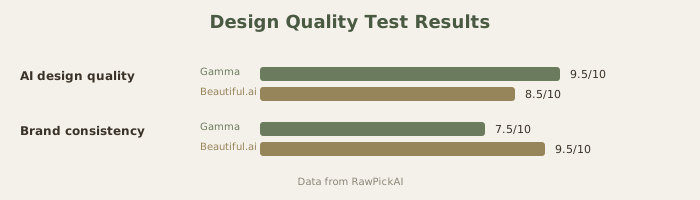
- Total output quality: 7.5/10 (functional, not designer-made, but acceptable for a real pitch)
- Time to present-ready: 50 minutes
Beautiful.ai Approach (120 minutes total):
- Selected a modern startup template
- Manually structured slides
- Filled in content (title, charts, text)
- Customized colors to match brand
- Adjusted layouts for data-heavy slides
- Previewed and tweaked spacing
- Total output quality: 9/10 (polished, professional, client-ready)
- Time to present-ready: 105 minutes
The tradeoff is real: Gamma saves 55 minutes but produces a deck that looks "made by AI." Beautiful.ai takes longer but produces a deck that looks "made by a designer."
For founders pitching to investors in one week, the Gamma approach gets you 70% of the way there in 25% of the time. For pitching to major VCs, you'd want Beautiful.ai's polish.
The Customization Question
Both tools let you edit after generation, but the experience differs:
Gamma editing: Feels like tweaking AI output. You're correcting what the AI got wrong.
Beautiful.ai editing: Feels like using a design tool. You're customizing within a framework.
If you hate the way Gamma's AI made choices initially, you'll do a lot of rework. If you hate Beautiful.ai's template choices, you're still working within that template system, which constrains your freedom.
For creative people who want full design control, this difference matters. Beautiful.ai keeps you within rails (some see this as guidance, others as limitation). Gamma starts with a different vision that you either accept or heavily rework.
Team Dynamics Matter
For a marketing team of 1: Gamma's speed wins.
For a team of 5 needing consistent brand output: Beautiful.ai's template system enforces consistency automatically.
For an agency managing client work: Beautiful.ai's client-facing quality is worth the extra time investment.
For a startup doing daily internal updates: Gamma's speed means those decks actually get made instead of put off.
What Good-Enough Means
This comparison really hinges on "what is good enough?"
For internal team updates, investor follow-ups, product announcements, and exploratory pitches: Gamma's 7-7.5/10 quality is honestly good enough. Watching investors focus on your product instead of your slide design is a feature, not a bug.
For board presentations, client pitches, major announcements, and brand-critical communications: Beautiful.ai's 8.5-9/10 quality is the right choice.
The mistake is assuming higher design scores always matter. They don't. It depends entirely on the context and audience.
Migration Path
If you start with Gamma and hit its design ceiling, switching to Beautiful.ai is painful. You lose the structure Gamma created, and Beautiful.ai's template system doesn't map to Gamma's logic.
The better path: Use Gamma for ideation and structure, then export as PowerPoint and rebuild in Beautiful.ai if needed. It's 30 minutes of work but gives you the best of both approaches - Gamma's rapid ideation, Beautiful.ai's design polish.
FAQ
How do Gamma and Beautiful.ai compare to Canva?
Canva is broader (presentations + social + print). Gamma and Beautiful.ai focus purely on presentations. See our Gamma vs Canva comparison for details.
Can I use both for different decks?
Yes. Use Gamma for fast internal decks, Beautiful.ai for client-facing work. The $10 (≈₹930) + $12 (≈₹1,116) combined cost is reasonable for teams doing both types of work.
Which is better for data-heavy presentations?
Beautiful.ai for charts and data visualization. Gamma sometimes oversimplifies data into bullet points. If 50%+ of your deck is charts, Beautiful.ai is safer.
Does Gamma have templates at all?
Minimal templates. Gamma focuses on generation over template selection. Beautiful.ai is template-first.
Can I import a Gamma deck into Beautiful.ai?
You can export Gamma as PowerPoint and import to Beautiful.ai, but Beautiful.ai will try to fit it into its template system, which may restructure your slides.
Which learns my brand better over time?
Beautiful.ai's brand kit system is more explicit. Gamma doesn't have brand kit features.
For non-native English speakers, which is better?
Gamma requires good writing in your prompt. Beautiful.ai requires filling templates. Neither has major language limitations, but prompts in non-English sometimes give Gamma odd results.
What about keyboard shortcuts and offline editing?
Beautiful.ai has better offline support (you can edit locally). Both are cloud-first tools, but Beautiful.ai handles offline gracefully.
Which integrates with other tools better?
Beautiful.ai has better integrations with design tools and brand platforms. Gamma focuses on being standalone.
How do these compare to PowerPoint with Copilot?
Both are faster than PowerPoint + Copilot for from-scratch creation. PowerPoint wins if you're already deep in Microsoft's ecosystem. See our best AI presentation tools for more options including PowerPoint alternatives.
Last updated: May 2026. Prices converted at ₹93/USD.
Advanced Use Case: Data Visualization
For presentations heavy in charts and tables, Beautiful.ai's intelligent formatting has a real advantage. The tool understands that a table needs proper spacing and that charts need breathing room. Gamma sometimes oversimplifies data into bullet points rather than preserving chart fidelity.
Test this yourself: Create a data-heavy deck with both tools. Beautiful.ai will format your data more legibly. Gamma's approach is to extract key insights and de-emphasize raw data.
Team Considerations
Gamma team pricing: $20/mo for entire team (not per-user). This makes it brutally affordable for teams of any size.
Beautiful.ai team pricing: $40/user/mo, which for a 5-person team is $200/mo (≈₹18,600/mo) vs Gamma's $20/mo (≈₹1,860/mo) team plan.
For multi-person teams, Gamma's economics are unbeatable.
The Real Workflow Difference
Gamma workflow: Think → Describe → AI builds → Edit → Done (30-45 minutes)
Beautiful.ai workflow: Choose template → Structure content → Customize design → Edit → Done (45-90 minutes)
Gamma works best if you're comfortable with "good enough" design coming out of the box. Beautiful.ai works if you want more time refining visuals and are willing to spend it.
What to read next
Gemini vs ChatGPT
Apr 2026