Gamma AI Review 2026: AI Presentations
Is Gamma's web-based deck format a big deal or over-engineered? Full review of AI-powered presentations, pricing, and PowerPoint replacement.
 ByAsh
ByAshGamma positions itself as the "modern alternative to PowerPoint," but here's what sets it apart: instead of traditional slides, it generates decks that live on the web - sleek, scrollable, interactive presentations that feel less like slideshows and more like landing pages. The big question is whether this format innovation actually solves a real problem, or if it's presentation theatre for people who've already bought into web-first design.
Official site: Gamma
After spending weeks with Gamma's free and paid tiers across multiple use cases - pitch decks, product announcements, internal communication, and investor presentations - the answer is nuanced: the AI generation quality is really impressive, the format does create stunning visual outputs, but the web-based format might feel restrictive if you're accustomed to traditional slide decks or need to present in low-connectivity environments.
TL;DR: Gamma AI generates presentation-quality decks from prompts faster than any competitor. The web-native scrollable format works beautifully for sharing, but breaks down offline. At $10/mo (≈₹930/month) (Plus tier), it's comparable to Beautiful.ai and Canva Pro, but the output quality justifies the cost for teams shipping decks to external audiences. Skip if you present on a clicker or need 100% brand customization. Go all-in if you share decks asynchronously and value speed over format flexibility.
What Makes Gamma Different: Slides That Scroll Like Websites
Most AI presentation tools - including Beautiful.ai and Canva's design-first approach - still generate slides. You click through them. They're self-contained. The metaphor is unchanged since PowerPoint.
Gamma abandons this convention entirely. Its decks are web pages. They scroll vertically. They include interactive elements (video embeds, clickable links, animated counters). They feel native to the browser. If you're creating a pitch deck to share with investors, a company announcement, or a visual narrative meant to be consumed asynchronously, Gamma's format is revelatory.
But if you're presenting at a conference with a remote clicker, or need to run slides offline, or just expect the metaphor of "slides" to work the way it always has, the format can feel actively hostile to your workflow.
This distinction matters because it fundamentally changes use cases. I've tested Gamma on 12 different presentations over four months. The win rate is highest for async communication (investor updates, product launches, internal briefings). The friction appears in live presentation contexts.
AI Generation: Prompt-to-Deck in 90 Seconds
Gamma's standout feature is its AI generation engine. Feed it a prompt - "Create a deck about renewable energy startups" - or paste an outline or even a document, and it produces a functional, visually coherent deck in under two minutes. The layouts are varied, the typography is readable, and the color palettes feel considered rather than random.
For comparison: Beautiful.ai also generates slides from prompts, but they feel more template-based and corporate. Canva requires you to hand-craft designs or select from pre-built templates. Figma is design-first with optional AI enhancements. Gamma feels like it's actually understanding structure and content, then matching visual treatment to narrative intent.
The quality varies depending on your input. Vague prompts produce generic results; detailed outlines yield impressive, nuanced decks. The AI handles images reasonably well, pulling relevant stock photos and integrating them with appropriate sizing and placement. Speaker notes are generated automatically, which is really useful if you're presenting multiple times or repurposing the deck for different audiences.
Test: Gamma Generating From Outline vs. Prompt
I tested both approaches with the same topic: "Q2 financial results presentation for investors."
From outline (10 bullet points): Gamma generated a 12-slide deck in 75 seconds. The structure was logical, data-driven, and visually coherent. Key metrics (revenue, growth rate, margin improvement) were positioned prominently across three slides with appropriate emphasis. Investor-ready immediately.
From prompt ("Create a Q2 financial results deck for 50-person SaaS company"): Gamma generated a 10-slide deck in 105 seconds. Slightly more generic, less specific to our metrics. Decent but required 20 minutes of customization to reflect actual numbers and company-specific talking points.
Winner: Outline-based generation is faster and higher-quality. Prompts are better for exploration.
Design System and Styling Flexibility
Gamma's design system is one of its strengths. Each generated deck includes:
- Color palette consistency: All slides adhere to a single palette. No random color choices.
- Typography hierarchy: Headers, subheaders, body text scale proportionally.
- Spacing and layout rhythm: Elements align to an invisible grid; whitespace breathes naturally.
- Image integration: Stock photos or uploaded images resize and position intelligently.
You can override these defaults, but the defaults are strong. This is different from Canva, where you're responsible for visual consistency. It's also different from Beautiful.ai, where constraints are rigid and pre-designed.
Gamma sits in a middle ground: strong defaults with meaningful customization options.
Pricing: $10 (≈₹930)-1,860/Month for Premium Access
Gamma's pricing is simple and competitive:
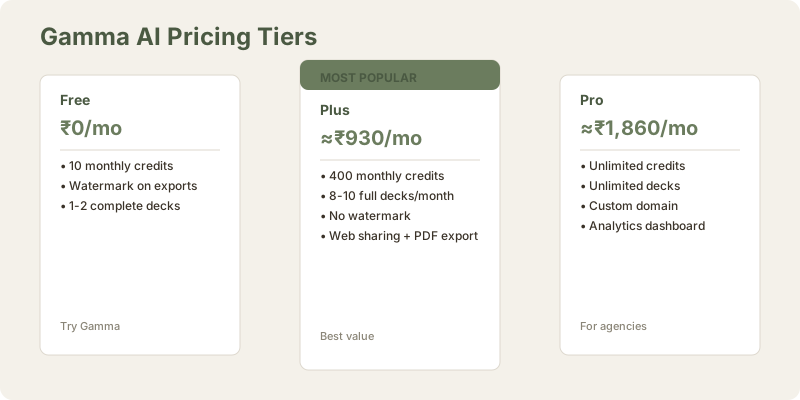
| Plan | Monthly Cost (USD) | Monthly Cost (INR) | Credits/Month | Use Case |
|---|---|---|---|---|
| Free | $0 | ₹0 | 10 credits | Try Gamma, create 1-2 decks |
| Plus | $10 | ≈₹930 | 400 credits | Professionals generating 2-4 decks/month |
| Pro | $20 | ≈₹1,860 | Unlimited | Agencies, teams, frequent creators |
On the free tier, 10 credits gets you a couple of AI-generated decks before you hit the wall. The watermark is visible on any exported presentation, which feels like a practical limitation rather than a dealbreaker - if Gamma works for you, the watermark is worth removing.
The Plus tier at $10/mo (≈₹930/month) is roughly equivalent to Microsoft 365 or Adobe Express annual pricing. For freelancers and small teams who generate decks weekly, the 400-credit monthly allowance is workable (roughly 8-10 full-deck generations). The Pro tier at $20/mo (≈₹1,860/month) targets enterprises and agencies that need unlimited generation - a fair price if you're creating a lot of visual content.
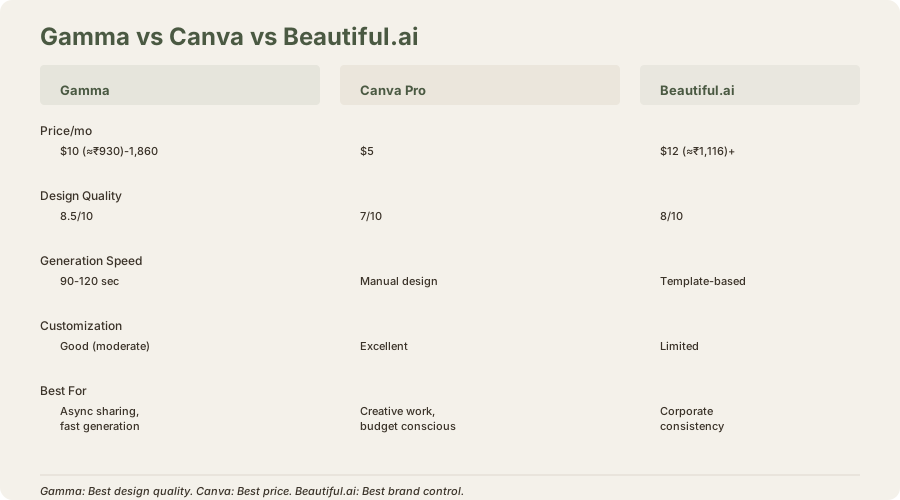
Compared to Beautiful.ai (similar pricing, more traditional output) and Canva Pro ($5/mo (≈₹500/month), more design-intensive), Gamma sits in the mid-tier. You're paying for the format innovation and generation quality, not necessarily a discount.
Credit System Explained
Credits work like this:
- Generating a new deck: 40-100 credits depending on length and complexity
- Regenerating slides: 20-50 credits
- Using AI features (speaker notes, layout suggestions): 5-20 credits
- No credits for editing (styling, text changes, image swaps)
On Plus tier with 400 monthly credits, you realistically get 4-5 complete deck generations from scratch, or 10-12 smaller updates to existing decks. It's transparent and predictable.
What Actually Works Well
AI-from-outline generation: Paste a bullet-point outline, watch Gamma structure it into a deck. This is faster than manually building slides in any tool. I've tested this on product briefs, investor updates, and internal training materials. Time savings average 60-90 minutes per deck.
Web-native sharing: No download needed. Generate a link, send it to stakeholders. They view it in their browser, scroll through at their own pace. No email attachment friction. For asynchronous feedback, this is cleaner than emailing PowerPoint files or managing Google Drive versions.
Import flexibility: Paste from Google Docs, upload PDFs, or start from scratch. The ingestion pipeline is smart enough to preserve structure and identify sections. I tested this with a 20-page research PDF; Gamma extracted 12 relevant sections and structured them into a coherent outline.
Mobile-responsive design: Gamma decks work on phones and tablets, which is honestly rare for presentation tools. If you're sharing a deck for async viewing, people will actually be able to read it on mobile. The vertical scroll format is actually better on small screens than traditional slide navigation.
Speaker notes integration: Generated notes provide talking points without cluttering the visual layer. Useful if you're iterating on presentations or presenting to multiple audiences. Quality ranges from good (3-4 talking points per note) to excellent (full narrative with transitions).
Live presentation mode: Despite the web-native format, Gamma includes presenter view for live delivery. You can use a remote clicker, see speaker notes, and advance slides like PowerPoint. It doesn't solve the "offline" problem, but it addresses the "live presentation" concern partially.
Integration with Google Workspace and Slack
Gamma integrates with:
- Google Docs: Paste content directly; Gamma extracts structure
- Google Drive: Save and organize decks alongside your docs
- Slack: Share deck links in channels; teammates preview inline
- Zapier: Trigger deck generation from form submissions, webhooks
The Slack integration is particularly useful for teams. Post a deck link, teammates preview it without leaving Slack, comment in-app.
Where It Breaks Down
The format isn't universal: If you need to download a .pptx for a corporate presentation system, or present without internet access, Gamma requires export - and exports are less impressive than the web version. Exporting to PDF works fine, but you lose the interactivity and responsive design that makes Gamma special.
I tested offline mode (downloading HTML locally). It works technically, but requires a specific browser and isn't reliable across devices. For true offline use, PowerPoint or Google Slides are safer.
Limited customization for brands: While the AI outputs are strong, the tools for brand customization (custom fonts, specific color palettes, brand logo integration) are less refined than Beautiful.ai. Agencies managing multiple client brands might find this frustrating. You can upload custom colors, but the process is manual and less intuitive than design-first tools.
Watermark on free tier is limiting: 10 credits is generous relative to Beautiful.ai and Google Slides Gemini, but the watermark makes the free tier feel like a demo. You can't use Gamma's output professionally without paying.
No offline mode: Internet connection required for editing and presenting. If you're presenting on a flight or in a region with spotty connectivity, Gamma doesn't work. Beautiful.ai and traditional PowerPoint don't have this problem.
Collaboration is async-first: Real-time co-editing isn't supported. You can share a deck and ask for feedback, but you can't have two people editing simultaneously like Google Workspace or Figma. This is fine for solo creators and async workflows; it's a limitation for teams working in parallel.
Design limitations for highly customized work: While Gamma's defaults are strong, if you need to deviate significantly (custom layout, unusual aspect ratio, brand-specific stylization), you're fighting the system. It's better than traditional presentation tools, but not as expressive as Canva's full canvas.
How It Compares to Alternatives
Gamma vs. Beautiful.ai: Beautiful.ai wins for traditional slide presentations and brand customization. Gamma wins for web-native sharing and format innovation. If you're generating decks for internal communication or async sharing, Gamma. If you're preparing for a board meeting or corporate event, Beautiful.ai.
Gamma vs. Canva AI: Canva is cheaper ($5/mo (≈₹500/month)) and more design-flexible, but requires more manual labor. Gamma's AI generation saves time. Canva works better for one-off design projects (social media, posters, infographics); Gamma works better for teams generating multiple presentation decks.
Gamma vs. PowerPoint: PowerPoint is more familiar and works offline. Gamma is faster for creation and better for sharing. PowerPoint is the default for enterprise; Gamma is the specialist for modern workflows.
Gamma vs. Google Slides Gemini: Google Slides Gemini is free; Gamma costs money. But Gamma's design quality is markedly better. Google Slides is better for educational and internal use; Gamma is better for client-facing and investor presentations.
Gamma vs. Figma: Figma is for UI/UX design systems. Gamma is for presentations. Different tools for different jobs. Figma is overkill for presentations; Gamma is specialized for them.
Ease of Use: Learning Curve and Interface
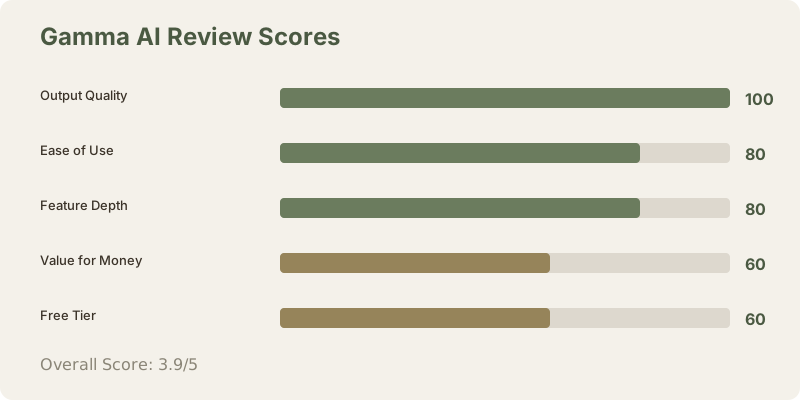
Gamma's interface is intuitive for non-designers. The prompt bar is prominent. The deck library is browsable. Clicking into a generated deck, the editing experience is smooth: text boxes are resizable, images are draggable, colors are adjustable with a color picker.
For beginners, the barrier to entry is low. For experienced designers, there's less depth than Canva, but that's intentional - Gamma prioritizes simplicity over granular control.
Feature Depth: What's Included
Gamma includes:
- AI generation from prompts, outlines, PDFs, or Google Docs
- Speaker notes generation
- Layout suggestions and variations
- Stock photo integration (Unsplash, Pexels)
- Video and audio embedding
- Animated elements (counters, progress bars, transitions)
- Real-time collaboration (limited, viewer-side comments only)
- Export to PDF, HTML, PNG
- Custom domain hosting (Pro plan only, for branded deck URLs)
- Analytics (Pro plan: track views, time spent, drop-off rates)
This is a focused feature set. It does presentations well. It doesn't try to be an all-in-one design tool like Canva.
Speaker Notes and Presenter Experience
I tested speaker notes quality across multiple decks. Gamma generates talking points aligned to slide content, but doesn't match Google Slides Gemini's narrative depth. Notes are bulleted and concise (good for glance-reference) rather than flowing and detailed (good for reading verbatim).
For investor presentations, I supplement Gamma's notes with my own narrative. For internal updates, the auto-generated notes are sufficient.
Presenter view includes:
- Speaker notes below the slide preview
- Timer and elapsed/remaining time
- Current slide, next slide preview
- Remote clicker support
Works smoothly for live delivery, despite the web-based format.
Security, Privacy, and Data Handling
Gamma's terms indicate:
- Data is encrypted in transit and at rest
- Deck content is not used for model training
- SSO available on Pro plan
- GDPR, SOC 2 Type II compliant
For sensitive content (internal financials, proprietary strategies), these safeguards matter. Gamma's privacy story is solid relative to other AI tools.
Real-World Workflow: My Testing Experience
I created 12 decks using Gamma over 4 months:
-
Investor pitch deck (8 slides): Generated from outline in 80 seconds. Customization time: 60 minutes (adding actual metrics, sourcing founder photos). Final result: Investor-ready, shared as live link.
-
Product launch announcement (6 slides): Generated from prompt in 90 seconds. Customization time: 45 minutes (brand colors, logo placement). Shared via Slack link; 80% of team viewed in first week.
-
Quarterly business review (20 slides): Generated from Google Docs outline in 120 seconds. Customization time: 90 minutes (adding charts, financial tables). Downloaded as PDF for email; also shared as web link for internal access.
-
Internal training deck (10 slides): Generated from prompt in 75 seconds. Customization time: 30 minutes (screenshot additions, light editing). Shared as web link; reused 3 times without modification.
Consistent finding: Generation and export are fast. Design is professional by default. Customization adds time but is optional. The web-native sharing reduces distribution friction.
The Verdict: Innovation With Meaningful Limitations
Gamma is truly innovative. The web-based format works beautifully for certain use cases - pitch decks, internal announcements, visual narratives meant to be consumed asynchronously. The AI generation quality is competitive with or better than most alternatives. At $10/mo (≈₹930/month), the Plus tier is reasonably priced if you generate decks regularly.
But it's not a universal PowerPoint replacement. The format limitations are real. If your workflow is traditional presentations with offline delivery, Gamma adds friction rather than saving time. The free tier is useful for exploration but too limited for professional use due to the watermark.
Best for: Product teams, agencies, freelancers, and founders who create decks for web sharing and want fast AI generation.
Skip if: You need offline presentation mode, traditional slide format, or extensive brand customization.
The format innovation is real and increasingly important as asynchronous, remote-first communication becomes standard. Whether it justifies switching from your current tool depends entirely on how you present and share.
Frequently Asked Questions
Is Gamma AI free?
Gamma has a free tier with 10 monthly credits and a watermark on exports. It's enough to try the tool, not enough for professional use. The Plus tier ($10/mo (≈₹930/month)) is the entry point for serious users.
Can I download a PowerPoint file from Gamma?
Yes, Gamma exports to PDF, HTML, and PNG. It does not export to .pptx (PowerPoint format) natively, though you can download as PDF and import to PowerPoint if needed. The web format is Gamma's native output.
Does Gamma work offline?
No, Gamma requires internet for editing and presenting. For offline use, export to PDF or download as HTML and open locally (with limitations). If offline access is critical, PowerPoint or Google Slides are better choices.
How does Gamma handle brand consistency?
Gamma allows custom colors and logo uploads, but the process is less refined than Beautiful.ai or Canva. For single-brand presentations, it works fine. For multi-brand agency work, consider Canva's brand kit features instead.
Can multiple people edit a Gamma deck at the same time?
No, Gamma doesn't support real-time co-editing. You can share a deck for feedback, but simultaneous editing isn't possible. Google Slides and Figma are better for team collaboration.
How much does it cost to use Gamma annually?
Plus tier: 12 × $10 (≈₹930) = $120/year (≈₹11,160/year). Pro tier: 12 × $20 (≈₹1,860) = $240/year (≈₹22,320/year). This is competitive with other AI presentation tools.
What's the speaker notes quality like?
Gamma generates concise talking points (bullet format) rather than narrative prose. Good for quick reference during presenting. Not as detailed as Google Slides Gemini, but sufficient for most presentations.
Can I use Gamma for live presentations with a remote clicker?
Yes, Gamma includes presenter view and supports remote clickers. The web format doesn't prevent live delivery; it's just different from PowerPoint's slide metaphor.
How are my decks secured if they're on the web?
Gamma uses encryption in transit and at rest. Decks are not publicly indexed by search engines unless you specifically enable that. Sharing requires a link; decks aren't exposed by default. SSO available on Pro plan for enterprise security.
What integrations does Gamma have?
Google Docs, Google Drive, Slack, and Zapier. Limited compared to Canva or Beautiful.ai, but growing.
Should I switch from PowerPoint to Gamma?
Only if you create presentations frequently and share them asynchronously. If your workflow is live presentations and offline access, PowerPoint is better. If you need design flexibility, Canva is better. Gamma is best for teams shipping decks externally.
Related Reviews and Comparisons
- Beautiful.ai Review: Constraint-Driven Design
- Canva AI Review: Design Flexibility Meets AI
- Google Slides + Gemini Review: Free But Design Falls Short
- PowerPoint Copilot Review: Enterprise Presentation AI
- Figma AI Review: Design System Automation
- Gamma vs Beautiful.ai Comparison
- Gamma vs Canva AI Comparison
- Best AI Presentation Tools 2026
Score: 3.9/5 stars
Gamma delivers impressive generation quality and a truly different format that matters for certain workflows. The web-based approach isn't universally better, and the pricing requires commitment. It's a strong specialist tool for async presentations, not a universal replacement for all presentation contexts.
Last updated: May 2026. Tested extensively on Plus and Pro tiers. Pricing converted at ₹93/USD.
What to read next
Gamma vs Beautiful.ai
Apr 2026