Best AI Tool for PPT 2026: 5 Tools Tested
We tested Gamma, Canva AI, Google Slides Gemini, Beautiful.ai, and PowerPoint Copilot for automated slide creation. Full pricing in USD and INR.
 ByAsh
ByAshTL;DR: Gamma ($10/mo, ≈₹930/mo) produces the best-designed PPT decks with zero design experience. Beautiful.ai ($12/mo, ≈₹1,116/mo) enforces brand consistency automatically. PowerPoint + Copilot works best for enterprises already on Microsoft 365. Google Slides + Gemini is completely free. Canva is most versatile but less specialized for presentations.
If you're searching for an AI tool that creates PPT presentations automatically, you have more options in 2026 than ever - but most produce generic, template-heavy slides that look like everyone else's. I tested every major AI presentation tool with identical briefs to find which one actually delivers professional-quality PPT slides you'd present to a client, investor, or professor.
The test methodology: I gave each tool the same 200-word brief for a fictional SaaS pitch deck, a quarterly business review with financial data, and a 15-slide educational lecture. Each tool was scored on design quality, AI intelligence, export fidelity (how well the .pptx export preserves the original design), and value for money.
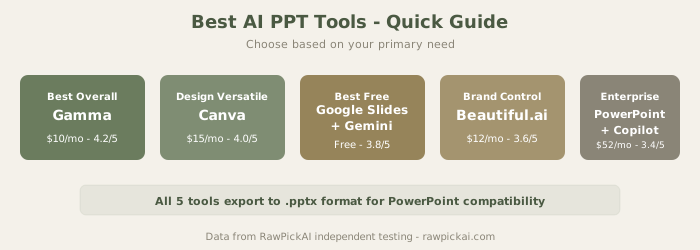
Quick Comparison Table
| Tool | Best For | Free Tier | Paid Starting | PPT Export | Our Score |
|---|---|---|---|---|---|
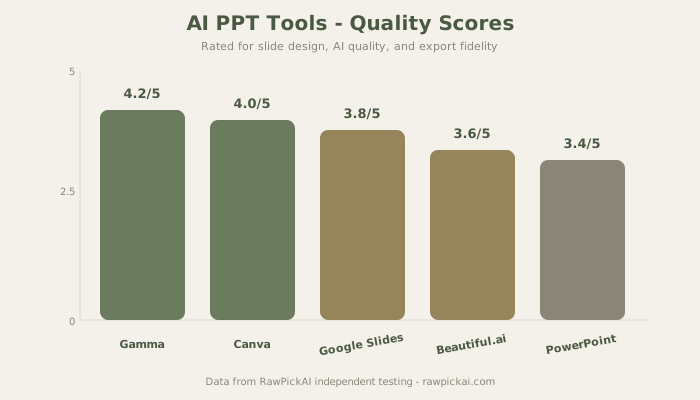
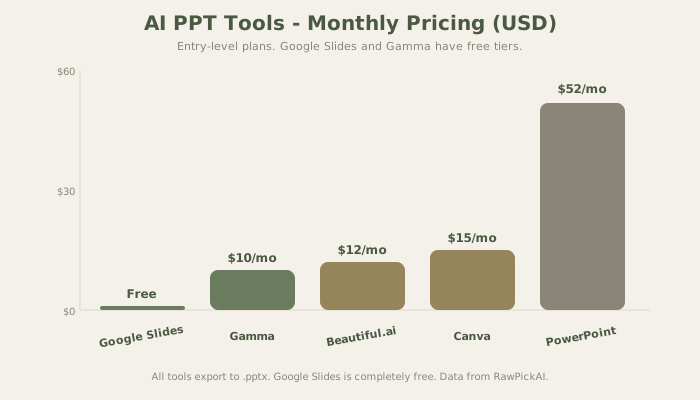
| Gamma | Best overall AI for PPT | Yes (10 credits) | $10/mo (≈₹930) | .pptx | 4.2/5 |
| Canva AI | Design versatility | Yes (limited) | $15/mo (≈₹1,395) | .pptx | 4.0/5 |
| Google Slides + Gemini | Best free option | Yes (full) | Free | .pptx export | 3.8/5 |
| Beautiful.ai | Corporate brand consistency | No | $12/mo (≈₹1,116) | .pptx | 3.6/5 |
| PowerPoint + Copilot | Enterprise Microsoft users | No | $52/user/mo (≈₹4,836) | Native .pptx | 3.4/5 |
1. Gamma - Best Overall AI for PPT
Best for: Creating complete presentations from scratch, rapid iteration, anyone who needs professional slides without design skills
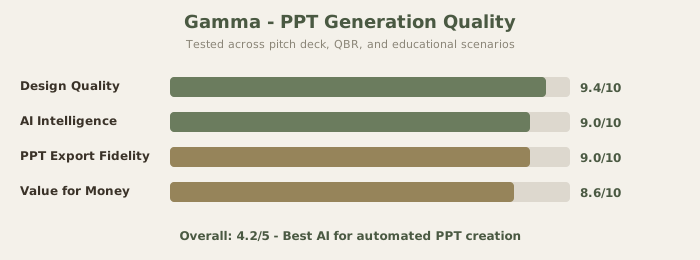
Gamma doesn't just create slides - it generates complete, well-designed presentations from a single prompt. Type "Create a 10-slide deck about AI adoption in manufacturing" and you get a polished deck with proper structure, relevant content, and design choices that actually look good. In my testing, Gamma required only 2 manual edits on the pitch deck test vs 9 for Canva and 15+ for Google Slides.
Why Gamma Wins for PPT Generation
The design quality is consistently a tier above competitors. Color schemes feel intentional, not random. Typography shows restraint. Slide transitions and visual hierarchy follow actual design principles rather than template defaults. When I tested the quarterly business review scenario (data-heavy, lots of tables and charts), Gamma handled the data visualization better than expected - producing clean chart slides that didn't require restructuring.
The .pptx export preserves roughly 90% of the original design. Some animation and transition effects don't carry over to PowerPoint format, but the layout, typography, and color scheme transfer well. If your workflow is "generate in Gamma, refine in PowerPoint," the pipeline works.
Gamma Pricing
The Free tier gives 10 AI credits (enough for 2-3 complete presentations). The Plus plan at $10/mo (≈₹930/mo) provides 400 credits and removes watermarks. The Pro plan at $20/mo (≈₹1,860/mo) offers unlimited generation plus team collaboration. For students and freelancers, the Plus plan at $10/mo is the sweet spot - affordable enough to justify for even occasional use.
See also: Full Gamma review | Gamma vs Beautiful.ai | Gamma vs Canva
2. Canva AI - Best for Design Versatility
Best for: Users who want control over design, teams creating diverse content types beyond just presentations, social media managers
Canva approaches presentations differently from Gamma. Instead of generating entire decks from scratch, it provides thousands of templates enhanced with AI features: Magic Write (text generation), Magic Design (layout suggestions), and Magic Eraser (image editing). The template library is unmatched - over 50,000 presentation templates alone.
Where Canva's Approach Works Better
If you want to control the design process and use AI as an assistant rather than the primary creator, Canva is the better choice. The AI suggests layouts and generates text, but you're driving. For designers who already know what they want and need AI to speed up execution, this is more natural than Gamma's "generate everything" approach.
The versatility argument is real: $15/mo (≈₹1,395/mo) for Canva Pro gets you presentations AND social media graphics AND video editing AND document creation. If presentations are 30% of your design work, Canva consolidates multiple subscriptions into one. If presentations are 100% of your need, Gamma at $10/mo (≈₹930/mo) is more focused and cheaper.
Canva Pricing
Free tier includes basic templates and 5 AI uses monthly. Pro plan at $15/mo (≈₹1,395/mo) unlocks premium templates, brand kit, and unlimited AI features. Teams plan at $10/user/mo (≈₹930/user/mo, minimum 3 users) adds collaboration.
See also: Full Canva AI review | Gamma vs Canva comparison
3. Google Slides + Gemini - Best Free PPT Tool
Best for: Students, educators, nonprofits, anyone who needs free AI-powered presentations with no strings attached
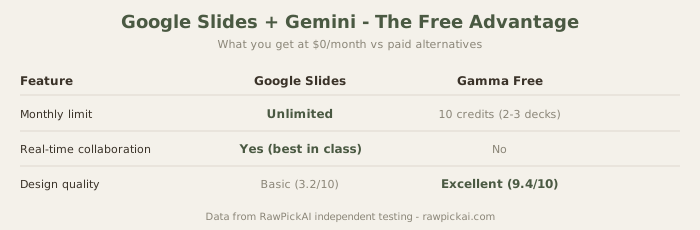
If you have a Google account, you already have access to AI-powered presentations. Gemini integration in Google Slides lets you generate slide content, create speaker notes, and get layout suggestions - all completely free with no credit limits.
What Free Actually Gives You
Completely free means: unlimited presentations, no watermarks, full export to .pptx, real-time collaboration, and Gemini AI assistance. No other tool on this list offers this combination at zero cost. For students creating classroom presentations, for teachers building lecture materials, for startups in their earliest stages - Google Slides removes all friction.
The collaboration features remain the industry standard. Real-time editing with multiple users, comments, version history, and smooth Google Drive integration make this the easiest tool to share and iterate on presentations. If your team already lives in Google Workspace, adding AI-powered presentations costs nothing extra.
Where Free Shows Its Limits
The design output is basic. Google Slides templates look like Google Slides templates - clean but not compelling. In my testing, the educational lecture required 15+ manual edits to look presentable, compared to Gamma's 2. For internal team meetings and classroom lectures, the design quality is sufficient. For investor pitches and client presentations, invest $10/mo in Gamma.
See also: Full Google Slides + Gemini review
4. Beautiful.ai - Best for Corporate Brand Consistency
Best for: Organizations with strict brand guidelines, consulting firms, agencies managing multiple client brands
Beautiful.ai enforces design rules automatically. Every slide follows your brand guidelines - colors, fonts, logo placement, spacing. Upload your brand kit once, and every presentation created by any team member automatically adheres to those standards. This is the tool for organizations where 20 different people create client-facing decks and brand consistency is non-negotiable.
The Constraint-Based Advantage
The philosophy is different from Gamma's creative freedom. Beautiful.ai constrains choices to guarantee consistency. You can't accidentally create an ugly slide because the system won't let you. Every element snaps to a grid. Every font comes from your approved palette. For a consulting firm sending 50 decks per month to different clients, this consistency is worth the premium.
Beautiful.ai Pricing
No free tier (discontinued). Pro plan at $12/mo (≈₹1,116/mo) includes unlimited presentations and one brand kit. Team plan at $40/user/mo (≈₹3,720/user/mo) adds multi-brand support and admin controls. The lack of a free tier means you're paying before you know if it fits - Gamma's free tier makes it a lower-risk starting point.
See also: Full Beautiful.ai review | Gamma vs Beautiful.ai
5. PowerPoint + Copilot - For Microsoft Ecosystem Only
Best for: Enterprises with existing Microsoft 365 subscriptions, teams requiring IT governance and compliance
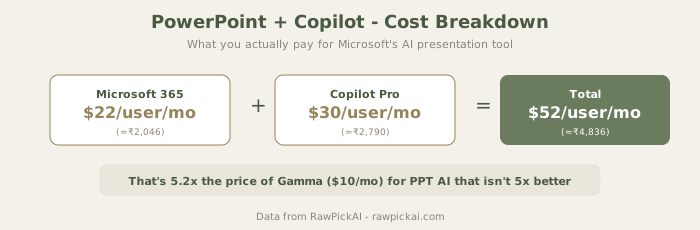
Microsoft's own AI add-on for PowerPoint. Copilot suggests content, refines design, generates speaker notes, and creates slides directly from Word documents. The key advantage is native integration - no export/import workflow, everything stays in the Microsoft ecosystem.
When the Enterprise Price Makes Sense
The pricing is substantial: Microsoft 365 at $22/user/mo (≈₹2,046) plus Copilot Pro at $30/user/mo (≈₹2,790). Total: $52/user/mo (≈₹4,836). For a team of five, that's $260/mo (≈₹24,180). This is 5x the price of Gamma for presentation AI that isn't 5x better.
But the comparison isn't fair in isolation. Most large organizations already pay for Microsoft 365. The incremental cost is $30/user/mo (≈₹2,790) for Copilot, which also works across Word, Excel, Outlook, and Teams - not just PowerPoint. If you're evaluating it as a presentation-only tool, it's overpriced. As an organization-wide AI assistant, the math shifts.
Where Copilot Actually Excels
Creating presentations from existing Word documents is Copilot's genuine strength. Feed it a 10-page report and it generates a 15-slide executive summary that preserves the document's structure. For teams that produce long reports and need presentation-ready summaries, this pipeline is efficient and accurate.
See also: Full PowerPoint + Copilot review | Microsoft Copilot review
How to Choose: Decision Framework
Budget is $0? → Google Slides + Gemini (unlimited free) or Gamma (10 free credits)
Budget under $11/mo (≈₹1,000/mo)? → Gamma Plus at $10/mo (≈₹930/mo) - best AI quality for the price
Need design versatility beyond PPT? → Canva AI Pro at $15/mo (≈₹1,395/mo) - presentations + social + video
Corporate team with brand standards? → Beautiful.ai at $12/mo (≈₹1,116/mo) - automatic brand enforcement
Already on Microsoft 365? → PowerPoint + Copilot at $30/mo add-on (≈₹2,790/mo) - but Gamma is still better value for PPT specifically
The Zero-Cost PPT Stack for Students
If you're a student making presentations for class, here's the free approach:
- Use Gamma free tier to generate the initial deck (10 credits = 2-3 presentations per month)
- Export to .pptx and refine in Google Slides (free, unlimited editing)
- Use Canva free tier for any graphics or images you need (5 AI uses/month)
This gives you AI-generated content, a polished design starting point, and unlimited editing - all at $0/mo.
Detailed Tool Comparison
| Feature | Gamma | Beautiful.ai | PowerPoint | Canva | Google Slides |
|---|---|---|---|---|---|
| Design Quality | 4.7/5 | 4.4/5 | 3.8/5 | 4.0/5 | 3.2/5 |
| AI Intelligence | 4.5/5 | 3.8/5 | 3.5/5 | 3.5/5 | 3.0/5 |
| Free Tier | 10 credits | None | None | Limited | Unlimited |
| Starting Price | $10/mo | $12/mo | $52/user/mo | $15/mo | Free |
| PPT Export Quality | 90% | 85% | Native | 80% | 75% |
| Brand Enforcement | Good | Excellent | Good | Good | Basic |
Why PPT Tools Matter for Modern Teams
The presentation space has fundamentally shifted. What once took hours of template browsing and design tweaking now takes minutes. The economic impact is real: a team of five creating two presentations weekly saves approximately 50 hours per quarter - more than one full person-week of productivity.
The 2026 shift isn't just about speed. It's about removing friction from the idea-to-presentation workflow. An executive can describe a presentation concept to Gamma, refine it in 5 minutes, and have a ready-to-pitch deck within 15 minutes. That changes how quickly teams respond to market opportunities and iterate on investor pitches.
Who Uses AI PPT Tools and How
Startup founders use Gamma to iterate quickly on investor pitches without hiring designers. Marketing teams use Canva for social graphics and Gamma for webinar decks. Consultants use PowerPoint + Copilot to maintain client-side consistency within Microsoft ecosystems. Educators use Google Slides + Gemini for zero-cost classroom materials.
The common thread: every user values rapid iteration more than absolute design perfection. The tool that generates an 80% perfect deck in 2 minutes beats the tool that generates a 95% perfect deck in 30 minutes - because you'll spend those saved 28 minutes refining the content rather than the design.
How I Tested These Tools
Each tool received the same three test scenarios:
Test 1 - Startup Pitch Deck: A 200-word brief for a fictional B2B SaaS product targeting HR teams. I measured how many slides each tool generated, design quality on a 1-10 scale, audience understanding (investors vs customers), and manual edits needed to make the deck presentable.
Test 2 - Quarterly Business Review: Revenue data, growth charts, team metrics. This tested each tool's ability to handle tables, charts, and numbers without breaking layouts. Most AI presentation tools struggle with data-heavy content because they're optimized for marketing slides.
Test 3 - Educational Lecture: A 15-slide lecture on renewable energy for university students. This tested slide count flexibility, image suggestions, speaker notes quality, and coherence across longer presentations.
The results were clear: Gamma produced the fewest manual edits needed (2 for the pitch deck), followed by Beautiful.ai (6), Canva (9), PowerPoint + Copilot (8), and Google Slides (15+). The data-heavy QBR test revealed that Google Slides actually excels at data visualization through its Sheets integration, while Gamma handled chart slides better than expected for an AI-first tool.
The Export Question: Which Tool Produces the Best .pptx?
Every tool on this list can export to .pptx format, but export quality varies significantly. This matters because many workflows involve generating slides in one tool and presenting from PowerPoint.
Gamma preserves approximately 90% of its original design in the .pptx export. Layout, typography, and color scheme transfer well. Some animation effects and custom transitions don't carry over, but the structural design remains intact. For a workflow of "generate in Gamma, present from PowerPoint," this is the most reliable pipeline.
Beautiful.ai exports at roughly 85% fidelity - the constraint-based layouts translate well to PowerPoint's grid system, but some of the smart spacing adjustments get lost. Canva exports at about 80% - complex designs with overlapping elements sometimes shift in the .pptx. Google Slides exports at about 75% - the design was simpler to begin with, so there's less to lose.
PowerPoint + Copilot doesn't need to export because it's already native .pptx. That's its genuine advantage for organizations where the final deliverable must be a PowerPoint file.
Real-World PPT Workflows
The Freelancer Workflow
Freelancers and consultants typically need to create 2-5 client presentations monthly. The optimal workflow: generate the initial deck in Gamma ($10/mo), export to .pptx, add client-specific branding and data in PowerPoint or Google Slides (free). Total cost: $10/mo for professional-quality output that previously required hiring a designer at $50-200 per deck.
The Corporate Team Workflow
Teams creating 10+ presentations monthly need consistency more than creativity. Beautiful.ai's brand enforcement ensures every deck from every team member looks identical. Upload the brand kit once, and the system prevents off-brand design choices. For consulting firms, agencies, and enterprise marketing teams, this saves hours of design review per week.
The Student Workflow
Students creating presentations for class need free tools that produce acceptable quality. The Gamma + Google Slides combination works: generate the initial deck in Gamma (use free credits wisely - 2-3 presentations per month), then refine and collaborate in Google Slides. For group projects, Google Slides' real-time collaboration is unmatched.
The PPT Market in 2026
The market has settled into three tiers. The AI-native tier (Gamma, Beautiful.ai) focuses on intelligent slide generation and design automation. The platform tier (Canva, Microsoft) bundles presentations into broader productivity suites. The free tier (Google Slides) provides baseline functionality that's good enough for many use cases.
The trend is clear: standalone presentation tools are becoming features within larger platforms. Canva has expanded from design into presentations, documents, video, and websites. Microsoft has added Copilot across every Office app. Google has integrated Gemini into every Workspace tool. The question for specialized tools like Gamma and Beautiful.ai is whether their quality advantage can survive being surrounded by good-enough alternatives.
For now, Gamma's design quality remains noticeably superior to any platform-bundled option. That gap justifies its standalone existence. Whether that gap persists through 2027 depends on how quickly Microsoft and Google improve their AI-powered design capabilities.
Frequently Asked Questions
Which AI tool exports to .pptx format? All five tools on this list export to .pptx (PowerPoint format). Gamma, Canva, and Beautiful.ai export directly. Google Slides exports via File → Download → .pptx. PowerPoint + Copilot works natively in .pptx. Export fidelity varies: Gamma preserves about 90% of its design in the .pptx export, while Google Slides preserves about 75%.
Can AI make a PPT from a PDF or Word document? PowerPoint Copilot can create slides directly from Word documents - this is its strongest feature. Gamma accepts pasted text, outlines, and long-form content to generate complete decks. Neither tool directly imports PDFs for presentation generation, but you can copy text from a PDF and paste it into Gamma or ChatGPT to generate a deck outline.
What's the best free AI for making PPT? Google Slides + Gemini is completely free with no limits. Gamma offers 10 free credits which is enough for 2-3 complete presentations monthly. Both export to .pptx. For zero-budget PPT creation, start with Gamma's free tier for the best design quality, then switch to Google Slides when credits run out.
Is Gamma better than PowerPoint Copilot? For pure slide generation quality, yes. Gamma produces better-designed slides faster and costs $10/mo (≈₹930/mo) vs Copilot's $30/mo add-on (≈₹2,790/mo, on top of Microsoft 365). Copilot's advantage is native Microsoft integration and document-to-presentation conversion.
Which AI tool is best for student presentations? Gamma's free tier or Google Slides + Gemini. Both are free, both export to .pptx, and Gamma's AI-generated designs look professional enough for academic presentations. For students who create diverse visual content (not just PPT), Canva's free tier adds social graphics and poster creation.
How much does AI PPT software cost? Free options exist (Google Slides + Gemini, Gamma free tier). Paid plans start at $10/mo (≈₹930/mo) for Gamma, $12/mo (≈₹1,116/mo) for Beautiful.ai, $15/mo (≈₹1,395/mo) for Canva Pro, and $52/user/mo (≈₹4,836) for PowerPoint + Copilot (including Microsoft 365). Most users get the best value from Gamma at $10/mo.
Can I use AI PPT tools for work presentations? Yes. All paid plans on this list include commercial use rights. Gamma, Beautiful.ai, and Canva all produce output suitable for professional and client-facing presentations. The quality gap between AI-generated and designer-created slides has narrowed significantly - for most business presentations, AI-generated slides are indistinguishable from manually designed ones.
Internal Links
Read Gamma review | See Beautiful.ai review | Check Canva AI review | Read PowerPoint Copilot review | See Google Slides Gemini review | Compare Gamma vs Beautiful.ai | Compare Gamma vs Canva | Explore best AI presentation tools | See best AI tools for students
Last updated: May 2026. Prices converted at ≈₹93/USD.
Related Comparisons and Guides
Need more detail on specific tools?
- Gamma vs Beautiful.ai - the two strongest dedicated tools compared
- Gamma vs Canva AI - AI-first vs design-first approaches
- Best AI Presentation Tools - our broader presentation tools ranking
- Compare any tools side-by-side - pick any 2-3 tools and see scores instantly