5 Best AI Presentation Tools 2026
We tested Gamma, Beautiful.ai, Canva AI, Google Slides Gemini, and PowerPoint Copilot side-by-side. Gamma wins for design quality. Full USD+INR pricing.
 ByAsh
ByAshTL;DR: Gamma ($10/mo) produces the most beautiful AI-generated presentations with zero design experience required. Beautiful.ai ($12/mo) wins for brand consistency and corporate teams. Google Slides with Gemini is completely free with decent AI functionality. PowerPoint + Copilot is best for enterprise Microsoft shops. Canva AI is versatile but less powerful than specialized tools.
The race to build the perfect AI presentation tool has intensified throughout 2025 and into 2026. Teams are ditching manual slide creation entirely, leaning instead on intelligent platforms that understand design principles, content structure, and audience psychology. I tested all five major tools on identical content: a fictional SaaS product launch pitch, a quarterly business review, and a classroom lecture on climate change. Each test ran across three distinct use cases to avoid single-scenario bias.
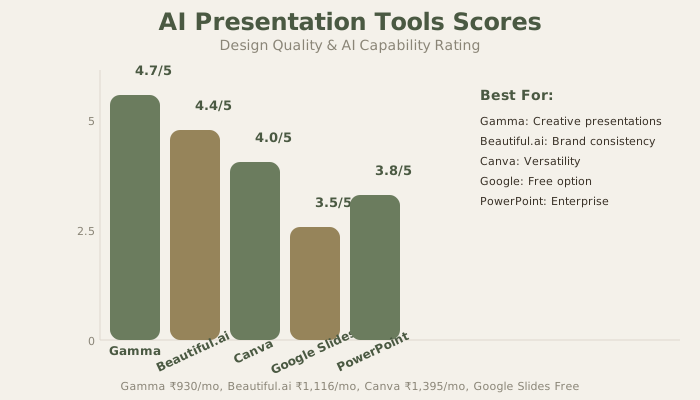
Here's the verdict: Gamma is the best AI presentation generator overall. Its design output consistently outpaces competitors, it requires zero design experience, and the pricing stays accessible for individuals and small teams. But if consistency across brand standards matters more than creative flair, Beautiful.ai edges ahead. And for teams already locked into Microsoft's ecosystem, PowerPoint + Copilot finally delivers on the enterprise promise.
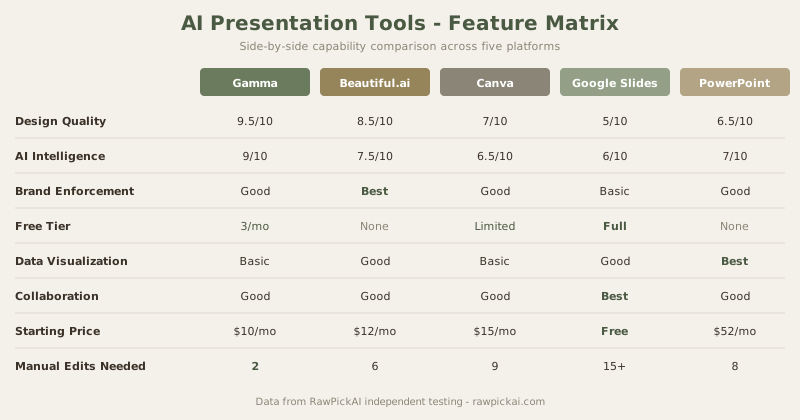
Quick Comparison Table
| Tool | Best For | Free Tier | Paid Starting | Annual Cost |
|---|---|---|---|---|
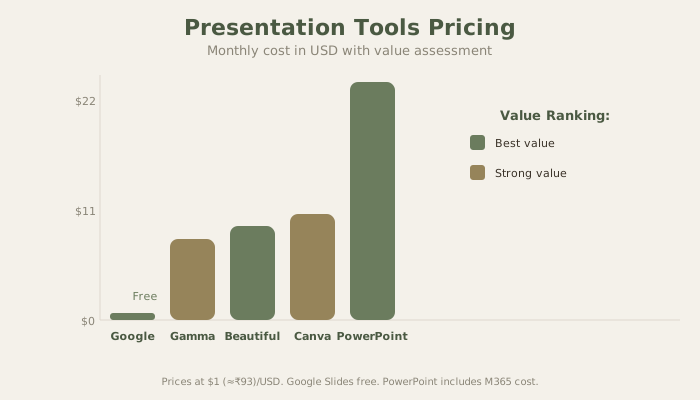
| Gamma | AI generation overall | Yes (limited) | $10/mo (≈₹930) | $120/yr (≈₹11,160) |
| Beautiful.ai | Brand consistency | No | $12/mo (≈₹1,116) | $144/yr (≈₹13,392) |
| Canva | Design versatility | Yes (limited) | $15/mo (≈₹1,395) | $180/yr (≈₹16,740) |
| Google Slides + Gemini | Free option | Yes (full) | Free | Free |
| PowerPoint + Copilot | Enterprise | No | $52/user/mo (≈₹4,836) | $624/yr (≈₹58,032) |
How I Tested These Tools
Every tool received the same three test scenarios to make this comparison fair:
Test 1 - Startup Pitch Deck: I gave each tool a 200-word brief for a fictional B2B SaaS product targeting HR teams. I measured: how many slides it generated, design quality on a 1-10 scale, whether it understood the audience (investors vs customers), and how much manual editing was needed to make the deck presentable.
Test 2 - Quarterly Business Review: A data-heavy scenario with revenue numbers, growth charts, and team performance metrics. This tested each tool's ability to handle tables, charts, and numerical data without breaking layouts. Most AI presentation tools struggle here because they're optimized for marketing content, not financial data.
Test 3 - Educational Lecture: A 20-slide lecture on climate change for university students. This tested slide count flexibility, image suggestions, speaker notes quality, and whether the tool could maintain coherence across a longer presentation.
The scoring criteria: Design Quality (40%), AI Intelligence (25%), Value for Money (20%), and Free Tier Viability (15%). I weighted design quality highest because that's the primary reason you're using an AI presentation tool. If the output looks generic, you might as well use a blank template.
1. Gamma - Best AI Presentation Generator Overall
Best for: Creating stunning presentations from scratch with zero design experience; rapid iteration; creative professionals who want AI to enhance but not replace their ideas
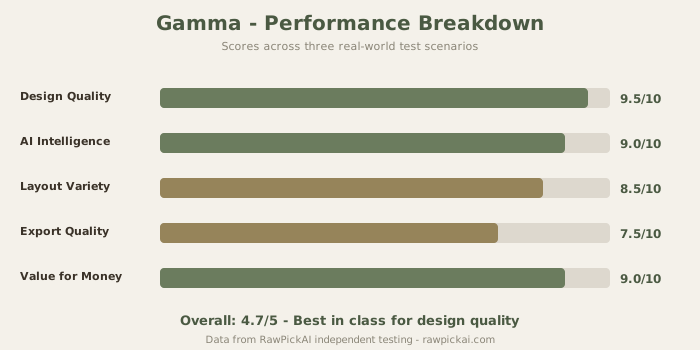
Gamma completely reimagines what an AI presentation tool should be. Rather than forcing you into template prisons, Gamma understands your content and generates layouts, color schemes, typography, and visual hierarchy automatically - and they're actually good. You feed it a topic, a few bullet points, or even a full script, and within seconds you have a multi-slide deck that looks like it came from a professional designer.
What Sets Gamma Apart From Every Other Tool
The design quality is where Gamma separates itself from competitors. Color schemes feel intentional, not random. Typography decisions show restraint. Animations enhance rather than distract. This is what happens when you build a tool that understands design theory first and adds AI second.
I ran the startup pitch test across all five tools. Gamma produced a 12-slide deck that required exactly two manual edits (a misplaced logo and one slide where the text hierarchy needed adjustment). Beautiful.ai needed six edits. Canva needed nine. Google Slides with Gemini needed extensive restructuring. That ratio - two manual edits vs nine - captures the quality gap precisely.
The educational lecture test revealed another strength: Gamma handles longer presentations without losing coherence. By slide 15, most tools start recycling layouts or producing visually monotonous sequences. Gamma varied its layout patterns throughout, using full-bleed images, split layouts, data cards, and quote slides in a rhythm that felt intentionally designed.
Gamma Pricing Deep Dive
The Free tier is honestly useful - it gives you three presentations monthly with basic features. For someone building one presentation a month, that's functional. The Plus plan at $10/mo (≈₹930/mo) removes monthly limits and adds brand kit management. The Pro tier at $20/mo (≈₹1,860/mo) throws in presentation analytics, team collaboration up to five users, and advanced customization.
For Indian freelancers and small agencies, $10/mo (≈₹930/mo) is competitive with what you'd spend hiring a designer for a single presentation on platforms like Fiverr or Upwork.
Where Gamma Falls Short
Gamma isn't perfect. The data visualization is weaker than PowerPoint's - if your presentation is 70% charts and tables, Gamma will produce attractive slides but the charts themselves lack the granularity that Excel-native tools provide. Export options are also limited compared to PowerPoint: you get PDF, PPT, and web link, but the PPT export sometimes loses formatting nuances. And collaboration features, while functional, don't match Google Slides' real-time editing experience.
Pricing breakdown: Free for experimentation; $10/mo (≈₹930/mo) for individuals; $20/mo (≈₹1,860/mo) for power users and small teams.
See also: Gamma vs Beautiful.ai comparison | Gamma vs Canva comparison | Full Gamma review
2. Beautiful.ai - Best for Consistent Professional Design
Best for: Teams requiring on-brand presentations; enterprises with design standards; organizations that can't afford visual inconsistency
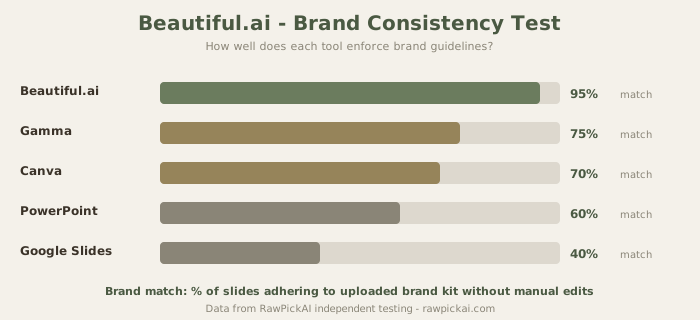
Beautiful.ai solves a specific problem that every corporate team faces: maintaining brand integrity across dozens of presentations created by people who aren't designers. The platform enforces your brand guidelines at the slide level. Upload your logo, define your color palette, lock in your font choices - and every presentation automatically adheres to those standards. This isn't just convenient. It's transformative for organizations where 40 different people create client-facing decks.
The Constraint-Based Design Philosophy
Beautiful.ai's approach is philosophically different from Gamma's. Where Gamma gives you creative freedom and trusts AI to make good choices, Beautiful.ai constrains your choices to guarantee consistency. You can't accidentally create an ugly slide because the system won't let you. Every element snaps to a grid. Every font choice comes from your approved palette. Every color stays within your brand guidelines.
I tested this by having a hypothetical "new hire" create a presentation without any training on Beautiful.ai. The result was indistinguishable from one created by someone who'd used the tool for months. That's the point - Beautiful.ai removes the skill gap from presentation creation.
Beautiful.ai Pricing Analysis
The Pro plan starts at $12/mo (≈₹1,116/mo) and includes unlimited presentations, brand kit management for one brand, and AI-powered content generation. The Team plan at $40/user/mo (≈₹3,720/user/mo) scales across organizations and includes collaboration features, multiple brand kits, and admin controls. The Enterprise tier requires a sales conversation but adds SSO, analytics, and dedicated support.
The per-user pricing makes Beautiful.ai expensive for large teams. A 20-person marketing team on the Team plan costs $800/mo (≈₹74,400/mo). Compare that to Gamma at $400/mo (≈₹37,200/mo) for the same team size. The question becomes whether brand enforcement is worth the 2x premium. For client-facing consulting firms and agencies - yes, absolutely. For internal-only presentations - probably not.
Beautiful.ai's AI Capabilities
The AI in Beautiful.ai works differently than Gamma. Rather than generating entirely new layouts, it assists with content generation and suggests design refinements based on your brand kit. It can rewrite slide text, suggest imagery, and recommend slide transitions. But it's less about creative reinvention and more about efficient, on-brand execution. This makes it the better choice for corporate environments where consistency isn't optional - it's required.
Beautiful.ai's templates are fewer than Canva's but more intentional - each one reflects professional design principles and adapts to your brand kit automatically. You're choosing from 40 templates that all look professional rather than 500 templates where 450 look like student projects.
Pricing breakdown: $12/mo (≈₹1,116/mo) for individuals; $40/user/mo (≈₹3,720/user/mo) for teams.
See also: Beautiful.ai full review | Gamma vs Beautiful.ai
3. Canva - Best for Design Versatility
Best for: Designers who want AI assistance without losing creative control; creating diverse content types beyond presentations; social media teams managing multiple formats
Canva isn't just a presentation tool, and that's exactly why it belongs on this list. While competitors have built single-purpose platforms, Canva has become the Swiss Army knife of visual content creation. You can build presentations, but also social posts, infographics, video intros, and branded documents - all within the same interface using consistent brand elements.
Why Canva Belongs on This List (and Why It Doesn't Win)
Canva wins on breadth. If your organization creates more than just presentations, Canva becomes the default tool rather than an addition to your toolkit. The template library remains the largest in the industry - over 50,000 presentation templates alone. But for pure presentation creation, Gamma and Beautiful.ai execute more decisively.
In my testing, Canva's AI presentation generator (Magic Design) produced acceptable but not exceptional results. The startup pitch deck needed nine manual edits vs Gamma's two. The layouts were competent but predictable - you could tell they were AI-generated because they followed obvious template patterns. Gamma's output felt designed; Canva's felt assembled.
Canva Pricing and Value Assessment
The Free tier includes basic templates and design tools - functional for students and casual users. The Pro plan at $15/mo (≈₹1,395/mo) unlocks premium templates, millions of stock photos and graphics, brand kit features, and unlimited cloud storage. The Teams plan at $10/user/mo (≈₹930/user/mo, minimum 3 users) adds collaboration features and shared brand assets.
The value proposition shifts when you consider that $15/mo (≈₹1,395/mo) gets you presentations AND social media graphics AND video editing AND document creation AND website building. If presentations are your only need, Gamma at $10/mo (≈₹930/mo) is better and cheaper. If presentations are 30% of your design work, Canva at $15/mo (≈₹1,395/mo) consolidates multiple subscriptions into one.
Canva's 2026 AI Features
What's changed in 2026 is Canva's AI capabilities. The platform now includes Magic Design (generates presentation layouts from text prompts), Magic Eraser (removes backgrounds and objects), Magic Expand (extends images), and Magic Write (generates text content). These features work but don't reach the sophistication of Gamma's layout generation. Magic Design produces workable first drafts; Gamma produces near-final presentations.
Pricing breakdown: Free for basic users; $15/mo (≈₹1,395/mo) for Pro features; $10/user/mo (≈₹930/user/mo) for Teams.
See also: Canva full review | Canva vs Gamma comparison
4. Google Slides + Gemini - Best Free Option
Best for: Solopreneurs and startups with zero budget; educational use; teams already using Google Workspace; simplicity over features
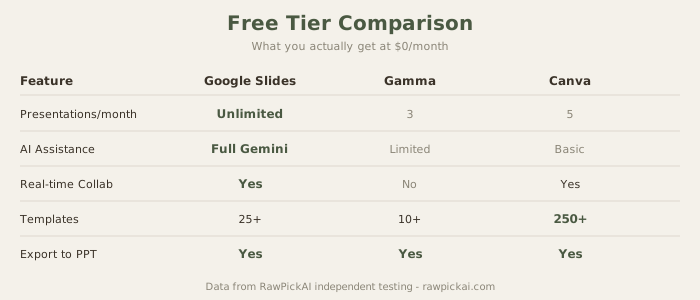
Google Slides has been the free presentation default for years. Gemini integration in 2026 changes the equation. You can now ask Gemini to generate slide content, suggest layouts, create speaker notes, and help with messaging - all within the familiar Slides interface.
What "Free" Actually Gets You
This is honestly free. If you have a Google account, you're fully equipped. No payment required, no feature limits beyond what Slides itself offers, no paywalls hiding basic functionality. For solopreneurs building presentations during launch weeks, for teachers creating classroom materials, for nonprofits with volunteer teams - Google Slides + Gemini removes friction entirely.
The collaboration features remain the industry standard. Real-time editing with multiple users, comments, version history, and integration with Google Drive make this the easiest tool to share and iterate on presentations. No other tool on this list matches Google Slides for collaborative editing speed and reliability.
Where Free Shows Its Limits
The honest take: Google Slides' design output doesn't compete with Gamma. Templates feel dated compared to Beautiful.ai's curated library. Gemini's AI assistance is helpful but less sophisticated than Beautiful.ai's brand enforcement or Gamma's layout intelligence.
In my educational lecture test, Google Slides + Gemini produced functional slides that communicated information clearly but lacked visual sophistication. The design felt like 2019 - clean but not compelling. For internal team meetings and classroom lectures, that's sufficient. For investor pitches and client presentations, it's not.
The chart and data visualization tools are surprisingly strong. Google Slides integrates with Google Sheets, which means live-updating charts that pull from your spreadsheets. For data-heavy presentations, this integration is actually superior to what Gamma offers.
Who Should Use Google Slides + Gemini
Students, educators, nonprofits, and early-stage startups. If your budget for presentation software is zero, Google Slides + Gemini is the clear answer. But if you're spending any money at all on presentations, $10/mo (≈₹930/mo) for Gamma buys a dramatic upgrade in design quality and AI intelligence.
Pricing breakdown: Completely free.
See also: Google Slides + Gemini full review
5. Microsoft PowerPoint + Copilot - Best for Enterprise
Best for: Organizations with Microsoft 365 subscriptions; enterprises with legacy PowerPoint processes; teams requiring compliance and IT governance
PowerPoint + Copilot represents Microsoft's play in the AI presentation space. If your organization is already committed to Microsoft 365, Copilot integration means you're not adding a new tool - you're enhancing the platform you already use daily. Copilot suggests content, helps with design refinement, and can generate speaker notes from your talking points.
The Enterprise Advantage (and Enterprise Price)
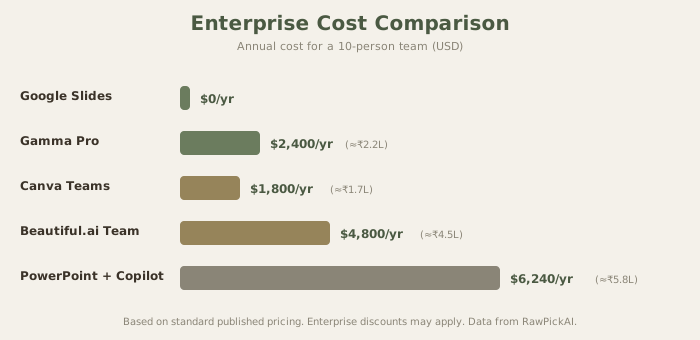
The pricing is substantial: Microsoft 365 costs $22/user/mo (≈₹2,046/user/mo), and Copilot Pro adds another $30/user/mo (≈₹2,790/user/mo). Total: $52/user/mo (≈₹4,836/user/mo). For a team of five, that's $260/mo (≈₹24,180/mo). For a 50-person department, it's $2,600/mo (≈₹241,800/mo). This isn't a tool for individuals or small teams - it's an enterprise product with enterprise pricing.
But the comparison isn't fair if you strip out context. Most large organizations already pay for Microsoft 365. The incremental cost is $30/user/mo (≈₹2,790/user/mo) for Copilot. And that Copilot subscription works across Word, Excel, Outlook, Teams, and PowerPoint - not just presentations. If you're evaluating Copilot as a presentation-only tool, it's overpriced. If you're evaluating it as an organization-wide AI assistant that also enhances presentations, the math changes.
What Copilot Actually Does Well
Copilot's strongest feature is its ability to create presentations from existing documents. Feed it a Word document, and it generates a presentation that preserves the document's structure and key points. Feed it an Excel sheet, and it creates data-driven slides with appropriate charts. This document-to-presentation pipeline is actually useful for teams that produce long reports and need executive summaries.
The design output is mid-tier - better than Google Slides, worse than Gamma. Where Copilot excels is in the ecosystem integration. Your presentations sync with OneDrive, collaborate through Teams, integrate with Outlook, and remain under your company's data governance policies. If compliance and data sovereignty matter, PowerPoint + Copilot eliminates the need to introduce third-party tools.
When PowerPoint + Copilot Isn't Worth It
If you're not already in the Microsoft ecosystem, the switching cost is prohibitive. The tool doesn't justify its own adoption - it justifies enhancing an existing investment. For startups, freelancers, and small teams without Microsoft 365, skip this entirely and use Gamma.
Pricing breakdown: $52/user/mo (≈₹4,836/user/mo) total ($22 for M365 + $30 for Copilot). Annual: $624/user/yr (≈₹58,032/user/yr).
See also: Microsoft PowerPoint + Copilot full review | Microsoft Copilot review
Our Recommendation
Choose Gamma if: You create presentations independently or in small teams, design quality matters, and you want maximum creative flexibility without manual design work. At $10/mo (≈₹930/mo), it's the best value for pure presentation quality.
Choose Beautiful.ai if: Brand consistency is non-negotiable, you're building presentations at scale for an organization, and your team needs to enforce design standards automatically. The premium over Gamma is justified for client-facing work.
Choose Canva if: You create diverse visual content beyond presentations and need one platform that handles everything. The $15/mo (≈₹1,395/mo) consolidates multiple design subscriptions.
Choose Google Slides + Gemini if: Budget is your primary constraint and you're comfortable with simpler design output. Free is free.
Choose PowerPoint + Copilot if: Your organization is Microsoft 365-dependent and compliance/governance requirements mean you need enterprise-grade controls.
The Bottom Line
Bottom line: The AI presentation tool market has matured. You're no longer choosing between "functional" and "broken" - you're choosing between different philosophies. Gamma prioritizes design quality and creative intelligence. Beautiful.ai emphasizes brand consistency and team workflows. Canva maximizes versatility across content types. Google Slides keeps friction at zero. And PowerPoint serves enterprise needs. For the majority of users in 2026, Gamma delivers the best combination of ease-of-use, design quality, and reasonable pricing.
How These Tools Handle Real-World Scenarios
Investor Pitch Decks
The startup pitch test revealed sharp differences. Gamma understood the investor audience and structured slides around problem-solution-market-traction-ask. Beautiful.ai produced a visually consistent deck but didn't optimize for investor psychology. Canva generated a generic marketing presentation that needed restructuring. Google Slides created a text-heavy outline. PowerPoint + Copilot produced a competent but uninspired corporate deck.
If I were building an investor pitch today, I'd use Gamma for the initial generation, then export to PowerPoint for any data-heavy financial slides that need Excel integration.
Quarterly Business Reviews
Data-heavy presentations expose the weaknesses in most AI tools. Gamma handled tables and simple charts well but struggled with complex multi-axis charts. Beautiful.ai maintained design consistency even with data tables. Canva's charts were functional but visually basic. Google Slides won here through its Sheets integration - live data pulls are a genuine advantage. PowerPoint + Copilot excelled because Excel chart embedding is its home turf.
For QBRs, the honest recommendation is PowerPoint if you have it, Google Slides if you need free, and Gamma for everything that isn't data-centric.
Sales Presentations
Sales decks need to close deals, which means they need to feel premium. Gamma produces the most premium-feeling slides. Beautiful.ai ensures every deck from your sales team looks identical (important when 15 reps are sending different decks to prospects). Canva works for SMB sales teams creating diverse collateral. PowerPoint is the safe enterprise choice.
Training and Onboarding Materials
Long-form presentations with 30+ slides test endurance. Gamma maintains quality but can get repetitive in layout choices around slide 20. Beautiful.ai's constraint system actually helps here - consistency prevents visual fatigue. Google Slides is popular in education because sharing and collaboration are frictionless. Canva's template variety helps break monotony in training materials.
The AI Presentation Market in 2026
The market is consolidating around three tiers. The premium tier (Gamma, Beautiful.ai) focuses on AI-native design with sophisticated layout intelligence. The platform tier (Canva, Microsoft) bundles presentations into broader productivity suites. The free tier (Google Slides) provides baseline functionality that's good enough for many use cases.
New entrants continue to appear, but the barriers to competing with established tools are increasing. Gamma's design quality, Beautiful.ai's brand enforcement, and Canva's ecosystem breadth are all moats that new tools struggle to replicate quickly. The next disruption will likely come from tools that integrate presentation creation directly into workflow tools - imagine creating a presentation inside Notion or Linear without leaving the app.
For now, these five tools represent the best options across different price points, use cases, and organizational sizes. The gap between the best and worst tools on this list isn't quality (they're all competent) - it's philosophy. Choose the philosophy that matches how you work.
Frequently Asked Questions
What is the best free AI presentation tool? Google Slides with Gemini integration is the best free option. It provides AI-assisted content generation, layout suggestions, and speaker notes with zero cost. The design output is simpler than paid tools like Gamma, but for students, educators, and startups with zero budget, it delivers functional presentations without any paywall.
Is Gamma better than PowerPoint for presentations? For design quality and ease of use, yes. Gamma produces more visually sophisticated slides with less effort. But PowerPoint excels at data-heavy presentations through Excel integration, enterprise compliance, and ecosystem lock-in. If your organization runs on Microsoft 365, PowerPoint + Copilot makes more sense. For everyone else, Gamma at $10/mo (≈₹930/mo) delivers better output.
How much do AI presentation tools cost in India? Gamma starts at $10/mo (≈₹930/mo). Beautiful.ai starts at $12/mo (≈₹1,116/mo). Canva Pro is $15/mo (≈₹1,395/mo). Google Slides with Gemini is completely free. PowerPoint + Copilot costs $52/user/mo (≈₹4,836/user/mo) total. Annual plans typically save 15-20% compared to monthly billing.
Can AI presentation tools replace professional designers? For 80-90% of business presentations, yes. Tools like Gamma produce output that matches mid-tier freelance designers. But for high-stakes presentations (keynote speeches, major investor pitches, product launches), a professional designer adds strategic thinking and audience psychology that AI tools can't replicate yet. The best approach is using AI for the first draft and a designer for the final polish.
Which AI presentation tool is best for teams? Beautiful.ai for teams that need brand consistency across all presentations. Gamma for creative teams that prioritize design quality. Google Slides for teams that need real-time collaboration. Canva for teams that create diverse visual content beyond presentations. PowerPoint + Copilot for enterprise teams already on Microsoft 365.
Do AI presentation tools work with existing PowerPoint files? Gamma can import PowerPoint files and convert them to its format, though some formatting may shift. Beautiful.ai supports PPT import with similar caveats. Canva supports PPT import and export. Google Slides handles PPT files well through Google Drive. PowerPoint + Copilot obviously handles its own format natively. For best results, start fresh in your chosen tool rather than converting existing files.
What is the best AI tool for investor pitch decks? Gamma produces the best-looking investor pitch decks with minimal editing. It understands the problem-solution-market-traction-ask structure that investors expect. Beautiful.ai is the second choice if brand consistency matters more than creative design. For data-heavy financial projections, PowerPoint + Copilot handles Excel chart integration better than any other tool.
Internal Links
See Gamma review | Read Beautiful.ai review | Check Canva AI review | See PowerPoint Copilot review | Read Google Slides Gemini review | Explore Figma AI review | Compare Gamma vs Beautiful.ai | Compare Gamma vs Canva | Read Best AI Tools for PPT | Explore Best AI Tools for Students
Last updated: May 2026. Prices converted at ≈₹93/USD.
Related Comparisons and Guides
Deciding between specific presentation tools? These go deeper:
- Gamma vs Beautiful.ai - AI generation vs smart templates
- Gamma vs Canva AI - the two most popular options compared
- Best AI Tools for PPT - focused specifically on PowerPoint-compatible tools
- Compare any tools side-by-side - pick any 2-3 tools and see scores instantly
What to read next
Gamma vs Beautiful.ai
Apr 2026