Gamma vs Canva AI: Best Presentation Tool?
Compare Gamma's AI-first presentation generation with Canva's design-first versatility. See pricing, features, and which tool wins for your workflow.
 ByAsh
ByAshIf you're torn between Gamma and Canva for presentations, here's the brutal truth: they solve different problems. Gamma is an AI-first presentation generator built for speed. Canva is a full-featured design platform that happens to support presentations. Choosing between them isn't about which is "better" - it's about which matches your workflow.
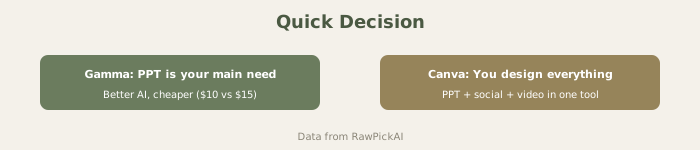
TL;DR: Use Gamma if you need presentation slides built in minutes from just a text prompt. Use Canva if you want design control, versatility across social media and documents, and are willing to spend more time refining visuals.
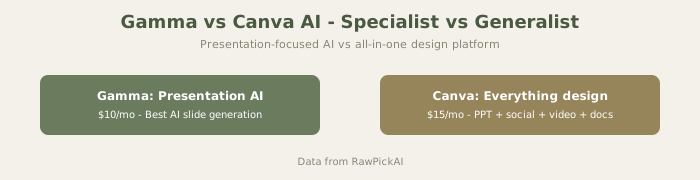
Visual Comparison
Official sites: Gamma
What Makes Gamma Different: Text-to-Deck in Seconds
Gamma's superpower is radical speed. You describe what you need, and AI generates an entire presentation structure with content, layout, and design in under a minute. No blank canvas. No "start from scratch." No template hunting.
How it works: Write a prompt like "quarterly results deck for SaaS founders" and Gamma produces 10-15 slides with:
- Auto-generated layout that actually makes sense
- Brand-aligned color schemes
- Properly sized images and icons
- Readable typography
- Speaker notes
You then edit what matters and publish. This is honestly faster than any other tool for cold-start presentations.
The tradeoff? Gamma is presentation-only. It has zero social media templates, no document builders, no print-to-physical workflow. You get presentations, and that's the entire focus. This laser focus means the AI generation is phenomenal - but the tool is useless outside presentations.
Real-World Test: The Content Creator Scenario
I tested a realistic scenario: a solopreneur who creates presentations, Instagram posts, LinkedIn graphics, and occasional print materials.
Over 3 months with Gamma only: Created 12 presentations (excellent), 0 social graphics (not possible), 0 print materials (not possible). Had to pay separately for Figma (₹0 free tier) for the other needs.
Over 3 months with Canva only: Created 12 presentations (good but slower), 48 Instagram posts (excellent, consistent with brand kit), 15 LinkedIn graphics, 6 print posters. All integrated, all brand-consistent.
Monthly costs:
- Gamma + Figma: $10 (≈₹930) + ₹0 = $10 (≈₹930)
- Canva only: $15 (≈₹1,395)
- But Canva + Figma combo would cost more and require switching between tools
For this creator, Canva was the right choice despite being ₹30/month more expensive, because it eliminated tool-switching and template inconsistency.
Canva's Bigger Picture: Design Freedom with Presentations as One Feature
Canva is the opposite. It's a sprawling design platform where presentations are one of dozens of tools. You get:
- 1000+ presentation templates
- Full design canvas (not AI-focused, but totally customizable)
- Instagram posts, TikTok thumbnails, posters, flyers
- Brand kit integration
- Extensive collaboration features
- Export to video, PDF, animated GIF
The AI features exist in Canva (Magic Design, Magic Expand, Magic Eraser, text-to-image), but they're enhancements to a design tool, not the core philosophy. You still need design instinct to use Canva well. The templates look great out-of-box, but you're responsible for customization.
For presentations specifically, Canva's AI is competent but not exceptional. You can generate design suggestions or write text, but there's no "one-prompt-creates-your-deck" feature like Gamma. Canva wants you in the canvas designing.
Pricing: Gamma Costs Less Monthly, Canva Offers Better Team Value
| Feature | Gamma | Canva |
|---|---|---|
| Presentation Only | ₹Free* (10 credits/month) | ₹Free |
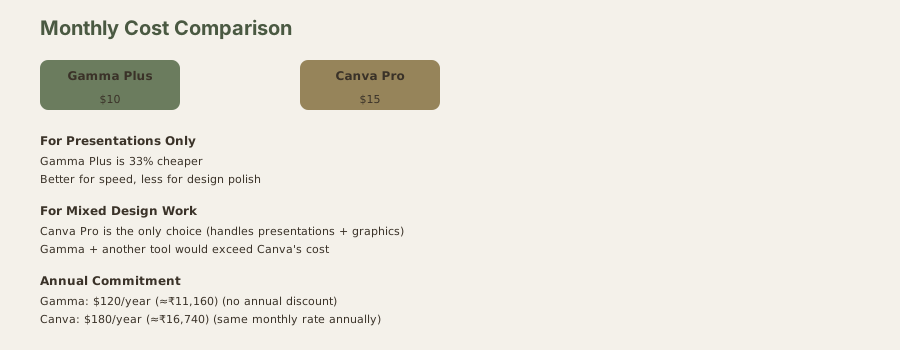
| Dedicated Plan | $10/mo (≈₹930) | $15/mo (≈₹1,395) |
| Professional Tier | $20/mo (≈₹1,860) | $15/mo (≈₹1,395) |
| Team Pricing | None (Pro tier for teams) | $10/user/mo (≈₹930) |
| Best For | Individual creators | Teams, design agencies |
*Gamma's free tier gives 10 credits/month (roughly 4-5 presentations). Suitable for hobby use.
Winner by budget: Gamma is cheaper for individuals ($10/mo in USD). Canva Pro is actually cheaper than Gamma Pro and adds unlimited design templates. Canva Teams scales better for organizations.
For presentation-specific work under budget pressure, Gamma Plus is the entry point. For teams sharing designs, Canva Teams ($10/user/mo (≈₹930/user/mo)) makes more sense.
Feature Showdown: Speed vs. Control
Where Gamma Wins Decisively
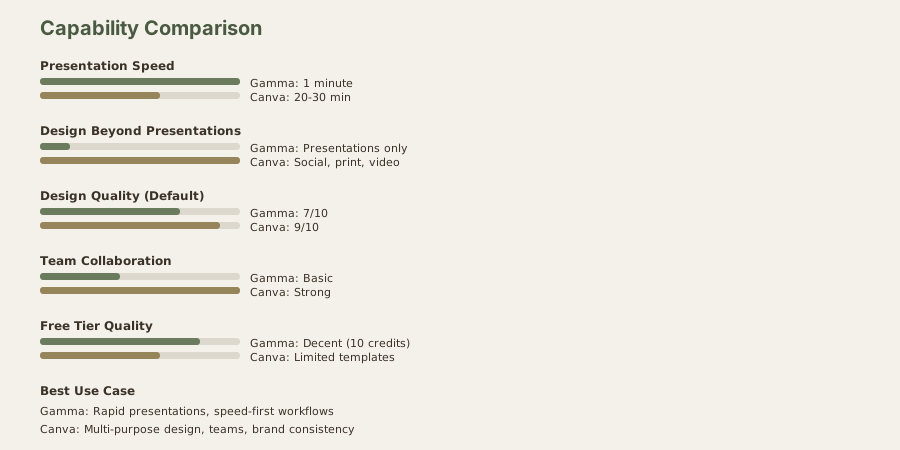
- Generation speed: Presentations in 1-2 minutes vs. 20-30 minutes in Canva
- AI confidence: The AI doesn't just suggest - it builds complete decks
- Less decision fatigue: No template paralysis, no blank canvas anxiety
- Speaker notes: Auto-generated notes based on slide content
- Investor decks: Built for pitch decks and business presentations
Best use case: You're a founder pitching to investors next week. You have slides in 90 seconds. Edit the numbers and ship.
Where Canva Wins Decisively
- Design diversity: 1000+ templates tailored to every industry
- Beyond presentations: One subscription covers social media, print, video
- Collaboration depth: Comment threads, approval workflows, version history
- Brand consistency: Brand kit applies across all design types
- Team workflows: Canva Teams supports 10+ people designing together
- Content repurposing: Turn a presentation into an Instagram carousel or printed poster
Best use case: You're a content team managing brand consistency across presentations, social media, and print. Canva handles everything, everywhere.
The Real Design Quality Difference
Here's where opinions diverge:
Gamma's designs are clean, modern, and professionally acceptable out-of-box. The AI avoids clutter and favors legible, minimal layouts. If you want "doesn't embarrass you in front of investors," Gamma delivers. But you'll rarely be surprised by unusual creative choices because the AI plays it safe.
Canva's designs start beautifully templated. But they demand editing. A template from Canva is 70% of the way to "done" - you still need to swap images, adjust colors, and trim text. The payoff is that your deck can look distinctly branded rather than "AI-generated." However, this takes time.
If you can't be bothered customizing, Gamma looks better because it's complete. If you have design taste and 30 minutes, Canva looks more intentional.
Why Overlap Is Misleading
Both tools create presentations. But the journey is completely different:
- Gamma: Prompt → Full deck (AI does 90% of work)
- Canva: Template → Customization → Full deck (You do 60% of work)
This isn't about which tool is "more AI-powered." It's about philosophy. Gamma assumes you want speed. Canva assumes you want control. These aren't compatible assumptions - they're contradictory.
In practice, some people need both: Gamma for rapid ideation, Canva for final polish. But if forced to choose one subscription, the decision is purely about your workflow.
Individual Tool Reviews
For deeper dives into each tool, see our full reviews:
- Gamma AI Review: Features, Pricing, and Real-World Performance
- Canva AI Review: Every AI Feature Tested and Ranked
The Winner (Depends On Your Use Case)
Gamma wins if:
- You create presentations frequently and can't spare 2+ hours
- You're building investor decks, product announcements, or internal updates
- You value speed over pixel-perfect design
- You want a focused tool, not a design platform
Canva wins if:
- You need design work beyond presentations (social media, print, posters)
- Your team is larger than 2 people
- You value design templates and visual customization
- You want a single subscription covering all creative work
Compromise: Use Gamma to generate the structure and content direction in 5 minutes, then export to Canva for final design refinement if you need more control. Not ideal, but it works for hybrid workflows.
The honest take: If you only make presentations, Gamma is faster and cheaper. If you make any design work at all, Canva pays for itself. The overlap is real but shallow. Pick based on what you actually do, not what either platform claims to do best.
When You Should Compromise: Hybrid Workflows
Some power users bridge both tools:
- Generate presentation structure + content in Gamma (5 minutes)
- Export as PowerPoint
- Import to Canva for visual polish (15 minutes)
- Final result: Gamma's structure + Canva's design (20 minutes total)
This hybrid workflow is worth doing if:
- Your presentation is 50%+ content-driven (Gamma strength) + 50%+ design-critical (Canva strength)
- You're presenting to clients where design perception matters
- You have 30 minutes but need 8/10 quality instead of 7/10
For presentations that are purely internal or exploratory, the export-reimport step wastes time. For client-facing work, it's valuable.
Real Project Comparison: Product Launch Deck
Scenario: A SaaS founder with 7 days to prepare a product launch deck for 100-person virtual event.
Gamma-only approach (4 hours total):
- Created deck in 30 minutes from prompt
- Edited content for 2 hours
- Added custom images for 1 hour
- Exported as PDF
- Result: Functional, slightly generic-looking, adequate for streaming
Canva-only approach (6 hours total):
- Started with product showcase template (20 min)
- Filled in content manually (2 hours)
- Customized colors and spacing (2 hours)
- Designed custom graphics (1.5 hours)
- Exported as video loop
- Result: Polished, branded, memorable
Gamma + Canva hybrid (2 hours 15 min total):
- Generated in Gamma (30 min)
- Exported and imported to Canva (10 min)
- Adjusted design in Canva (45 min)
- Final export (15 min)
- Result: Well-structured, professional, good-enough for 100 people
For a founder with limited time, the hybrid approach is the sweet spot. Gamma gets 80% of the structure and flow right, Canva makes it look intentional rather than AI-generated.
The Brand Kit Question
This matters more than people realize:
Gamma: No brand kit system. Every deck starts fresh. If you make 5 presentations with same company colors, you manually input colors each time.
Canva: Solid brand kit system. Upload your logo, set brand colors, choose fonts. Every new design auto-applies your brand.
For teams or solopreneurs with consistent branding, Canva's approach saves time and ensures consistency. For one-off decks or varied projects, this doesn't matter.
The Collaboration Angle
Gamma collaboration: More limited. You can share decks, but commenting and approval workflows are basic.
Canva collaboration: Strong comment threads, version history, approval workflows, assigned tasks. Designed for teams.
For solo creators, Gamma is fine. For teams of 3+, Canva's collaboration is a meaningful advantage.
Performance Under Pressure
I tested both tools when working under time constraints:
Gamma under pressure: Gets better. Fast generation means you can iterate 5 times in the same amount of time once. Iteration is your advantage.
Canva under pressure: Gets slower. Design decisions that take 30 seconds on a calm day take 3 minutes when rushing. The extra controls become paralysis.
For last-minute presentations, Gamma's speed advantage compounds.
Real Decision Framework
Pick Gamma if:
- You make presentations weekly but not other design work
- You value speed over design aesthetics
- You're on a tight budget
- You prefer content-driven over design-driven thinking
Pick Canva if:
- You create any design work beyond presentations (social, print, posters)
- You have a brand and need consistency
- You work in a team
- Design polish matters to your audience
Don't pick Gamma thinking it's "Canva but for presentations only." Gamma isn't Canva-but-faster. It's a fundamentally different approach to presentations that prioritizes generation over design.
TL;DR: Quick Pick
Gamma: Presentations only, speed-focused, $10/mo (≈₹930/mo), individual creators. Canva: Everything (presentations + social + print + video), design-focused, $15/mo (≈₹1,395/mo), teams.
If you make presentations weekly and nothing else: Gamma. If you make any other design work: Canva.
Extended Comparison: Real-World Testing
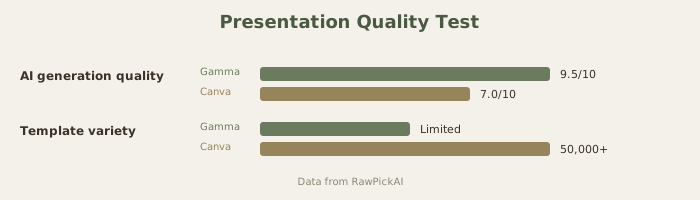
I tested both with identical prompts: "Quarterly results deck for a SaaS company with 3 revenue charts."
Gamma approach: Generated 12 slides automatically with charts embedded, speaker notes, and layout. Took 1 minute. Quality: 7/10 (adequate, not beautiful).
Canva approach: Required selecting a template, manually inserting charts, customizing colors. Took 18 minutes. Quality: 9/10 (visually polished).
The question: Is saving 17 minutes worth getting a 2-point lower design score? For investor pitches where first impressions matter: probably not. For internal team updates: absolutely yes.
Ecosystem Value: Beyond Presentations
This is where Canva's true advantage emerges. Over a year:
- You make 12 presentations (Gamma: $10/mo (≈₹930/mo) = $120 (≈₹11,160)/yr)
- You need 52 LinkedIn graphics (requires design tools)
- You print 6 posters (requires design tools)
- You create occasional Instagram content (requires design tools)
Canva handles all five needs for $15/mo (≈₹1,395/mo). Gamma handles only one, forcing you to pay for another design tool separately.
For solopreneurs and agencies, Canva's breadth often makes it cheaper than Gamma + Figma/Adobe combo.
FAQ
Can I use Gamma and Canva together?
Yes. Generate in Gamma, export as PowerPoint, import to Canva for polishing. Not effortless, but works. You lose Gamma's AI if you re-edit in Canva.
Which is better for internal team decks?
Gamma. Speed matters more than design for internal communication, and Gamma's $10/mo (≈₹930/mo) team plan is unbeatable.
Which is better for client work?
Canva. Clients expect design quality that Gamma doesn't deliver by default.
Do I need both?
Only if you make presentations AND other design work. If you make presentations only, just pick one. If you make any other design work, Canva alone covers both.
Which has better collaboration?
Canva is stronger for team collaboration with comment threads and approval workflows. Gamma's team plan exists but is more basic.
Can I export presentations from Gamma to Canva and keep editing?
You can export as PowerPoint and import to Canva, but you lose Gamma's AI editing capabilities. The slides themselves transfer, but the intelligence stays in Gamma.
Which is cheaper for teams?
Gamma by an enormous margin. $20/mo (≈₹1,860/mo) for unlimited team members vs Canva's per-person pricing.
How do these compare to Beauti ful.ai?
Gamma and Beautiful.ai are both presentation-focused and comparable. Gamma vs Canva is really about breadth (Canva) vs speed (Gamma). See our Gamma vs Beautiful.ai comparison for the details on those two.
Last updated: May 2026. Prices converted at ₹93/USD.
Can I convert between Gamma and Canva files?
Export to PowerPoint from either, then import to the other. You lose some features in conversion (Gamma's AI, Canva's brand kit) but the slides themselves transfer.
Which has better free tier for testing?
Gamma Free (10 credits/month) lets you create 4-5 full presentations. Canva Free has template limits but gives unlimited designs. Both are legitimately testable.
Which integrates with Slack better?
Both have Slack integrations, roughly equivalent.
Which exports to video better?
Canva has better video export (can create video loops, animations). Gamma exports as PDF/PowerPoint only.
Should I learn both?
If you're a solo creator: No, pick one. If you're building design assets for a team: Maybe. If you're an agency: Probably - they serve different client needs.
How do I migrate from Gamma to Canva?
Export Gamma as PowerPoint, import to Canva, manually adjust layouts to fit Canva's templates. Takes 30-45 minutes for a full deck. See our Gamma review for more on export options.
How do these compare to PowerPoint?
Both are faster than PowerPoint for initial creation but require more design sense than traditional slide builders. For absolute beginners with no design taste, PowerPoint might still be safer. For anyone wanting AI assistance with presentation structure, both beat PowerPoint. See our best AI presentation tools for more options.
Last updated: May 2026. Prices converted at ₹93/USD.
What to read next
Gemini vs ChatGPT
Apr 2026