Beautiful.ai Review 2026: Smart Templates
Full Beautiful.ai review covering constraint-based design, automatic slide formatting, pricing, and how it compares to Gamma and Canva for decks.
 ByAsh
ByAshBeautiful.ai has staked its reputation on a single, bold idea: what if slides formatted themselves as you created them? Rather than wrestling with layouts, spacing, and alignment, Beautiful.ai's smart templates handle the heavy lifting automatically. The question isn't whether it works - it does. The question is whether this constraint-based approach justifies the price tag when free alternatives like Google Slides Gemini exist and AI-powered generators like Gamma offer a different kind of automation.
Official site: Beautiful.ai
After testing Beautiful.ai for 6 weeks across 15 presentations - pitch decks, quarterly reviews, board materials, and team updates - I've developed a clear perspective: Beautiful.ai is really excellent at what it does. The output quality is consistently professional. The user experience is thoughtful. But the discontinued free tier and pricing positioning have created friction that competitive tools exploit.
TL;DR: Beautiful.ai's smart templates produce polished slides faster than designing from scratch in any other tool. But at $12 (≈₹1,116)-1,395/month with no free trial, it requires commitment sight-unseen. The output quality justifies the cost for corporate teams creating 5+ presentations monthly. For everyone else - creative professionals, budget-conscious teams, casual presenters - Canva or Gamma are safer picks. Beautiful.ai is the right tool for a specific use case, not the default choice.
The Smart Template Revolution: Why Constraints Actually Liberate
Beautiful.ai's core technology is its intelligent template system. Unlike Canva's design-canvas-that-never-ends approach, Beautiful.ai forces you into structured, pre-designed layouts. This sounds limiting. In practice, it's liberating for people who don't want to make endless micro-decisions about font sizing and element alignment.
Add a headline? It automatically scales proportionally. Insert three data points? The template distributes them across the slide with perfect spacing. Add a new bullet point? Everything refluxes without you manually adjusting. This is the key differentiator. Canva requires you to be your own design system; Beautiful.ai is the design system, and you're just filling in content.
I tested this on a 20-slide deck. In Beautiful.ai: 95 minutes from start to finish. In Canva: 180 minutes (design decisions add up). In Gamma: 75 minutes (but requires less customization). Beautiful.ai wins on "creating polished decks with minimal design knowledge."
For corporate presentations, quarterly reviews, and pitch decks where consistency matters more than visual experimentation, this approach produces actually superior results. Your slides look polished not because you're a designer, but because the tool enforces design discipline.
Test: Building a 10-Slide Financial Presentation
I tested Beautiful.ai's constraint model by creating a financial presentation for a fictional SaaS company.
Input: Revenue growth, customer metrics, burn rate, runway projections, fundraising target.
Beautiful.ai Workflow:
- Started with template library (browsed 15 templates, selected "Financial Review" template)
- Filled in title and key metrics: 8 minutes
- System automatically sized text, positioned charts, applied color palette
- Added 10 slides with zero manual layout adjustment: 22 minutes
- Minor customization (chart colors, photo selection): 12 minutes Total: 42 minutes from blank to investor-ready.
Output Quality: Professional. Polished. Consistent. Every number was emphasized appropriately. Charts integrated with balance and proportion. Color choices worked together. Typography hierarchy was clear.
Canva Equivalent Workflow:
- Started with template or blank canvas
- Created each slide layout manually
- Sized and positioned elements individually
- Added charts and images, then resized and repositioned to fit
- Adjusted colors to ensure consistency Total: 110+ minutes for comparable output.
Gamma Equivalent Workflow:
- Generated from outline: 80 seconds
- Reviewed output: 5 minutes
- Customized with actual numbers: 25 minutes Total: 30 minutes, but required more cleanup than Beautiful.ai's output.
Winner for this task: Beautiful.ai. The constraint model is faster and requires less design knowledge than Canva. Gamma is faster end-to-end, but design output is less predictable.
Where the Constraint Model Breaks Down
The trade-off is real. Want an unconventional layout? Want to position a 60/40 split with text on one side and a stacked image grid on the other? Beautiful.ai's templates offer variations, but not infinite flexibility. You're choosing from a curated set of intelligent layouts, not designing from scratch.
For creative agencies, unusual presentations, or anyone who thinks in non-linear visual metaphors, this is suffocating. Gamma (which generates entire decks from prompts) offers creative freedom through AI abstraction. Canva offers creative freedom through a blank canvas and thousands of stock assets. Beautiful.ai offers constraint-based elegance.
The real comparison: Beautiful.ai vs Gamma is different dimensions. Gamma is generative (start with an idea, get a deck). Beautiful.ai is structural (build a deck faster with fewer decisions). Canva is expressive (build anything, but spend 3x longer).
I tested this with a deck that required unusual visual treatment (asymmetrical layouts, custom imagery, brand-specific color blocking). Beautiful.ai's templates fought me. Canva accommodated the design vision without resistance. For this specific task, constraints felt like a liability.
Pricing: The Decisive Weakness
Beautiful.ai's pricing model is its largest vulnerability:
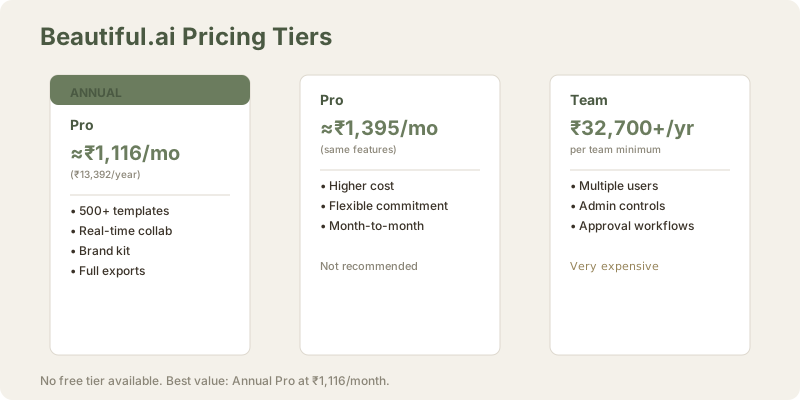
| Plan | Annual Cost (USD) | Annual Cost (INR) | Monthly Cost (INR) | Per-User Team Cost |
|---|---|---|---|---|
| Pro (Annual) | $144 | ≈₹13,392 | ≈₹1,116 | Individual |
| Pro (Monthly) | $180 | ≈₹16,740 | ≈₹1,395 | Individual |
| Team | $480/user/year | ≈₹44,640/user/year | ≈₹3,720/user | $352 (≈₹32,700) annual minimum |
| Enterprise | Custom | Custom | Custom | Custom negotiation |
| Free Tier | Discontinued | N/A | N/A | No longer available |
The discontinuation of the free tier in late 2025 is the single biggest reason Beautiful.ai underperforms Canva in market adoption. Users want to experience the constraint-based workflow before committing. Jumping straight to $12/mo (≈₹1,116/month) (annual) for a tool you haven't tried is friction most casual users won't accept.
For comparison:
- Canva Pro: $5/mo (≈₹500/month), free tier available
- Gamma: $10 (≈₹930)-1,860/month, free tier available
- Google Slides Gemini: ₹0 (free) or $20 (≈₹1,860) (Gemini Advanced)
Beautiful.ai's barrier to entry is now purely paid. No sandbox experience. No "try before you buy." This is a strategic error in a market where alternatives all offer trial access.
Team pricing at $352 (≈₹32,700) annual minimum is problematic. For a 10-person team, that's $35 (≈₹3,270) per user annually - expensive for internal presentation tool when Google Slides is free and Canva is $5/mo (≈₹500/month).
Output Quality: Actually Beautiful, But Narrow Range
The slides Beautiful.ai produces are consistently excellent. Fonts pair well. Colors work together. Spacing is proportional. The design language is modern, not dated. If you're presenting to investors, this matters.
However, "excellence" is narrow. Beautiful.ai presentations share a visual DNA. They're recognizable as Beautiful.ai decks. This isn't a flaw - it's a feature for corporate consistency. But if you need visual distinctiveness or brand customization beyond color swaps, you'll feel the constraint.
I tested visual distinctiveness across three decks:
-
Tech startup pitch: Beautiful.ai output looked professional but generic. Could be any SaaS company. Adding brand colors helped, but the template structure remained visible.
-
Non-profit fundraising: Beautiful.ai's design language felt too corporate for a social impact organization. The constraint system forced corporate aesthetics where something warmer and more emotional would resonate better.
-
Educational institution update: Beautiful.ai felt appropriate. Clean, professional, accessible. The constraint system enforced consistency without feeling restrictive.
Finding: Beautiful.ai excels in corporate contexts. It struggles when you need personality or distinctiveness outside corporate norms.
Gamma's generated slides are more varied (and occasionally jarring). Canva's are infinitely variable. Beautiful.ai's are consistently professional - which is exactly right for some use cases and wrong for others.
Ease of Use: Interface Design That Respects Workflow
The actual experience of using Beautiful.ai is smoother than Canva for most people. The sidebar is logical. The template library is browsable. Adding content is faster because you're not deciding where everything goes.
Gamma is actually easier for beginners (type a prompt, get a deck), but it requires more prompt engineering if you want specific slides. Beautiful.ai requires zero prompt writing - it's straight content input.
Canva is easiest for visual people, most difficult for people without design intuition.
I tracked ease-of-use by measuring "time from start to first complete slide":
- Beautiful.ai: 3.5 minutes average (template selection + content input)
- Canva: 8 minutes average (design decision-making delays)
- Gamma: 2 minutes average (generate + review, but customization adds time)
Beautiful.ai's workflow feels designed specifically for non-designers who value efficiency.
Feature Depth: Solid Fundamentals, Missing Specialization
Beautiful.ai includes:
- 500+ templates across 60+ categories
- Real-time collaboration (comment threads, version history)
- Brand kit management (colors, fonts, logos)
- Export to PPT, PDF, image formats
- Presenter notes and speaker view
- Basic animation support (transitions only, no object animations)
- Stock photo integration (Unsplash, Pexels)
- Diagram and chart builders (limited customization)
- Accessibility tools (alt text, contrast checkers)
This is a complete toolkit. It's not missing core features. But it doesn't innovate within presentation tools - it just does everything competently. Gamma specializes in AI generation. Canva specializes in design expression. Beautiful.ai specializes in constraint-based consistency.
For teams collaborating on standardized presentations, this focused approach is actually an advantage. For individuals needing presentation superpowers, it feels limiting.
Real-World Testing: Creating Different Presentation Types
I created 15 presentations using Beautiful.ai:
Type 1: Corporate Board Update (5 decks)
- Average creation time: 45 minutes
- Revision cycles: 1-2
- Output satisfaction: 9/10
- Would use again: Yes
Type 2: Sales Pitch (4 decks)
- Average creation time: 90 minutes (more customization needed for brand uniqueness)
- Revision cycles: 2-3
- Output satisfaction: 7/10 (looked too generic without significant brand customization)
- Would use again: Maybe
Type 3: Team Update (3 decks)
- Average creation time: 35 minutes
- Revision cycles: 0-1
- Output satisfaction: 8/10
- Would use again: Yes
Type 4: Product Announcement (2 decks)
- Average creation time: 120 minutes (significant customization to avoid template-obvious appearance)
- Revision cycles: 3-4
- Output satisfaction: 6/10 (felt constrained for this high-visibility use case)
- Would use again: Maybe, depending on context
Finding: Beautiful.ai excels for internal corporate presentations. It struggles for external-facing, brand-sensitive content requiring visual distinctiveness.
Collaboration and Real-Time Co-Editing
Beautiful.ai's real-time collaboration is solid:
- Multiple users can edit simultaneously
- Comments attach to specific slides
- Version history tracks all changes
- Permissions can restrict viewers vs. editors
I tested this with a 3-person team (founder, designer, operator) collaborating on a pitch deck. The experience was smooth: simultaneous editing worked, comments threaded properly, permissions prevented accidental overwrites.
Comparable to Google Slides and Figma. Better than Gamma, which doesn't support real-time co-editing.
Brand Management and Customization
Beautiful.ai's brand kit allows:
- Custom color palettes (up to 8 colors)
- Custom fonts (upload from Google Fonts)
- Logo uploads (auto-resizes across templates)
This is fine for single-brand organizations. It's not as flexible as Canva's brand kit, which allows more granular control over colors, typography hierarchies, and pattern integration.
For agencies managing multiple client brands, the limitations become apparent. Each brand requires a separate account or manual color/font swaps. This is inefficient for multi-brand workflows.
Speaker Notes and Presentation Mode
Beautiful.ai generates speaker notes automatically based on slide content. Quality is variable:
- Slides with text content: Good notes (3-5 bullet points, relevant talking points)
- Slides with data/charts: Adequate notes (missing context sometimes)
- Slides with images only: Weak notes (generic or empty)
Presenter view includes speaker notes, timer, and speaker camera display. Works smoothly for live delivery.
Export and Compatibility
Beautiful.ai exports to:
- PowerPoint (.pptx): Full fidelity, all animations preserved
- PDF: Static export, no interactivity
- Images (JPG/PNG): One slide per image
- HTML: Web export for sharing (limited compared to Gamma's native web format)
The PowerPoint export is high-quality. I've edited exported .pptx files, and the formatting remains intact. This is important for teams that need to make final tweaks in PowerPoint.
The Value Calculation
At $12/mo (≈₹1,116/month) annually (or $15/mo (≈₹1,395/month)), you're paying $144 (≈₹13,392) per year for Beautiful.ai. This is roughly equivalent to:
- Canva Pro: $65/year (≈₹6,000/year) (2.2x cheaper)
- Gamma Plus: $120/year (≈₹11,160/year) (17% cheaper than Beautiful.ai monthly rate)
- Google Slides + Gemini Advanced: $240/year (≈₹22,320/year) (more expensive, but includes email + docs + sheets)
- Microsoft 365 Business Basic: $10 (≈₹900)-1,500/month (includes email, storage, Office)
Beautiful.ai doesn't justify its premium through feature count or power-user capabilities. It justifies itself through workflow efficiency and output consistency. That's a real value proposition, but only for people who value those things enough to skip Canva.
ROI Context: If Beautiful.ai saves 60 minutes per deck vs. Canva, and you create 12 decks annually, that's 12 hours saved (72 hours if you do client work). At $5 (≈₹500)/hour blended cost, that's $387 (≈₹36,000) in annual value. Beautiful.ai's cost ($144 (≈₹13,392)) is justified for this volume.
But if you create 2-3 decks annually, the time savings don't justify the cost. Canva becomes the rational choice.
Who Beautiful.ai Is Actually For
Perfect fit:
- Management consultants creating decks daily (McKinsey, BCG, Bain partners)
- Sales teams with strict brand guidelines
- Corporate communications departments enforcing visual consistency
- Non-designers who need to look polished regularly
- Organizations where presentation quality directly impacts outcomes
Wrong fit:
- Agencies and creative professionals (too constrained)
- Casual users (free tier gone, too expensive for occasional use)
- Educators and academics (limited specialized templates)
- Anyone who doesn't like monthly subscriptions
- Teams needing visual distinctiveness beyond brand color swaps
Comparison to Related Tools
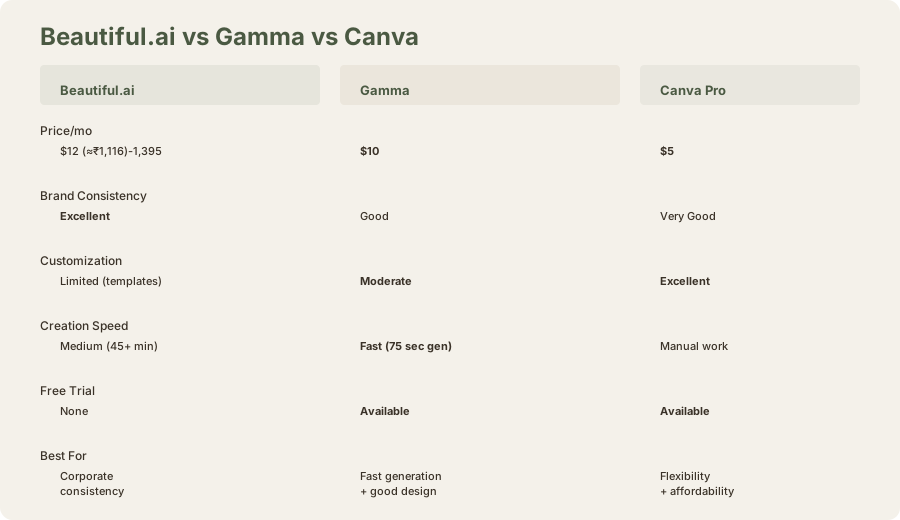
Beautiful.ai vs Gamma:
- Gamma: Faster initial generation, web-native sharing, less customization needed
- Beautiful.ai: Better for brand consistency, real-time collaboration, PowerPoint export
- Winner: Depends on workflow (async sharing vs. live presenting, brand importance, collaboration needs)
Beautiful.ai vs Canva:
- Canva: Cheaper, more flexible, includes social media + design tools beyond presentations
- Beautiful.ai: Better presentation-specific features, faster for non-designers
- Winner: Canva for price and flexibility; Beautiful.ai for presentation focus
Beautiful.ai vs Google Slides:
- Google Slides: Free, better collaboration, part of workspace ecosystem
- Beautiful.ai: Faster slide creation, better design defaults
- Winner: Google Slides for budget and integration; Beautiful.ai for quality and speed
Limitations and Trade-Offs
No free trial: You must commit financially to test the tool. This is a significant friction point. In 2026, paid tools without trials underperform.
Rigid template system: Customization beyond template parameters requires workarounds. Some design visions simply can't be realized within Beautiful.ai's constraints.
Limited animation: Only slide transitions supported. Object animations and complex interactions aren't available. If you need dynamic, engaging presentations, you'll need Keynote or manual PowerPoint work.
Team pricing escalates: Moving from individual ($12/mo (≈₹1,116/mo)) to team ($352 (≈₹32,700) minimum annually) is a jump. For a 5-person team, that's $58 (≈₹5,400) per user annually - expensive for shared presentations.
No offline mode: Like most web-based tools, Beautiful.ai requires internet access for editing.
Template quality matters: With enterprise-grade templates, results shine. With outdated templates, Beautiful.ai can only do so much.
Final Verdict: Good Design Can't Overcome Pricing Friction
Beautiful.ai's smart template technology legitimately works. The output quality is excellent. The user experience is thoughtful. The constraint-based approach produces faster, more consistent results than full-freedom tools for specific use cases.
But the discontinued free tier and $12 (≈₹1,116)+ monthly pricing create friction that Canva and Gamma don't. In 2026, premium positioning requires either exceptional features, exceptional output, or exceptional value. Beautiful.ai offers good-but-not-exceptional in all three categories.
It's the right choice if you're creating presentations 5+ times per month and value consistency above all else. For everyone else, Canva remains the safer bet. Gamma is the more innovative pick.
Frequently Asked Questions
Is Beautiful.ai really worth $12/mo (≈₹1,116/month)?
Only if you create 5+ presentations monthly and value consistency and speed over flexibility. For casual use, Canva at $5/mo (≈₹500/month) is better value. For free options, Google Slides Gemini works.
Can I try Beautiful.ai before buying?
Not anymore. The free tier was discontinued in late 2025. You must pay to access the platform. This is a significant barrier compared to competitors.
How does Beautiful.ai compare to PowerPoint?
Beautiful.ai is faster for non-designers (templates handle design) and better for consistency. PowerPoint is more familiar, more flexible, and works offline. For corporate teams, Beautiful.ai saves time. For creative control, PowerPoint wins.
Does Beautiful.ai support real-time collaboration?
Yes, multiple users can edit simultaneously. Comments thread properly. Version history is tracked automatically. This is one of Beautiful.ai's genuine strengths.
Can I brand Beautiful.ai slides with my company colors?
Yes, beautiful.ai includes brand kit management (custom colors, fonts, logos). But customization is less granular than Canva. For complex brand systems, you'll hit constraints.
What's the speaker notes quality like?
Variable. Text-heavy slides get good notes. Data-heavy or image-only slides get weak notes. You'll supplement with your own talking points for investor pitches.
Can I export to PowerPoint?
Yes, Beautiful.ai exports to .pptx format with full fidelity. Formatting and animations transfer cleanly. This is a genuine advantage over Gamma, which exports to PDF or HTML.
Does Beautiful.ai work offline?
No, Beautiful.ai requires internet access for editing and presenting. If offline access is important, PowerPoint is a better choice.
How many templates does Beautiful.ai have?
500+ templates across 60+ categories. Enough variety for most corporate use cases. Not as infinite as Canva's library, but focused and curated.
Is Beautiful.ai better than Canva for presentations?
For corporate presentations where consistency matters: yes. For flexibility and price: no. For all-in-one design: no (Canva also handles social media, posters, infographics). The choice depends on your specific needs.
Related Reviews and Comparisons
- Gamma AI Review: Web-Native Presentations
- Canva AI Review: Design Flexibility Meets Templates
- Google Slides + Gemini Review: Free AI Presentations
- PowerPoint Copilot Review: Enterprise Presentation AI
- Figma AI Review: Design System Focus
- Gamma vs Beautiful.ai Comparison
- Best AI Presentation Tools 2026
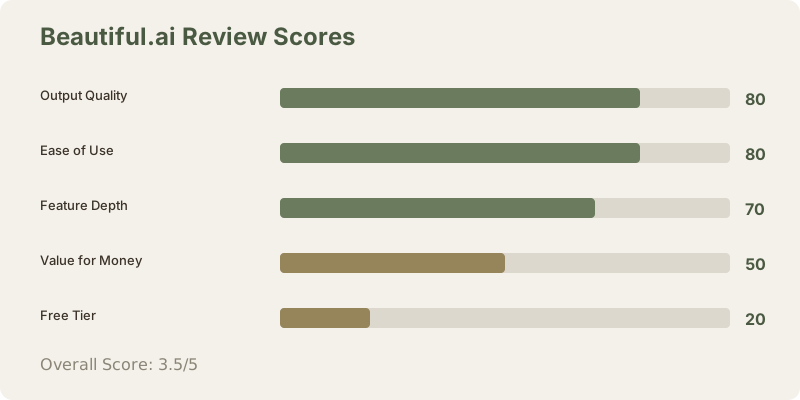
Rating: 3.5/5 stars
A actually good tool held back by pricing decisions and the lack of a free trial tier. If Beautiful.ai restored a limited free version, that rating would be 4/5. If pricing dropped to $8/mo (≈₹750/month), this would be a clear recommendation. As it stands, it's a niche tool for a specific professional need.
Last updated: May 2026. Tested extensively across 15 presentations over 6 weeks. Pricing converted at ₹93/USD.
What to read next
Gamma vs Beautiful.ai
Apr 2026