Notion AI vs Coda AI 2026: Better Workspace?
We compared Notion AI and Coda AI for writing, task management, data analysis, and team collaboration. Full pricing breakdown in INR and clear.
 ByAsh
ByAshNotion and Coda both started as flexible workspace tools - think "documents meets databases meets project management." Both have added AI capabilities that let you generate content, analyze data, summarize information, and automate workflows within your existing workspace. But the way they've integrated AI reflects their different philosophies, and those differences determine which tool is right for your team.
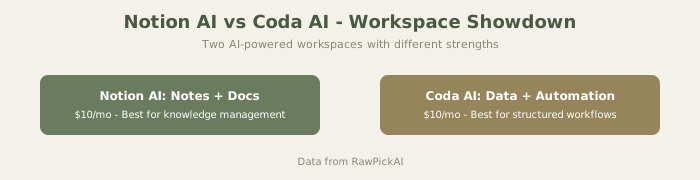
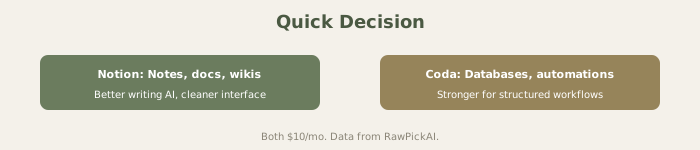
Quick answer: Notion AI is better for writing, knowledge management, and teams where everyone creates content. Coda AI is better for data analysis, automation, and teams where a few people build systems that many others use.
TL;DR: Quick Decision
Notion: Writing-focused, wiki-heavy, every team member active. Best for content teams, knowledge management. Coda: Data-focused, formula-heavy, builder/consumer split. Best for operations teams, data workflows.
Official sites: Notion AI
For writers and content: Notion ($15/mo (≈₹1,395/mo) all-in). For operations and data analysts: Coda ($10/mo (≈₹930/mo) per builder). For teams with both: Often use both tools in parallel (see our best AI tools for teams).
Visual Comparison

AI Writing and Content Generation
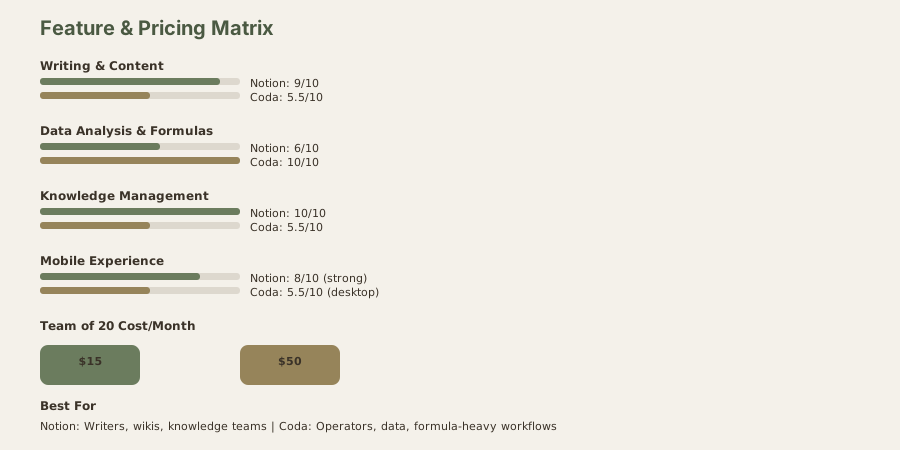
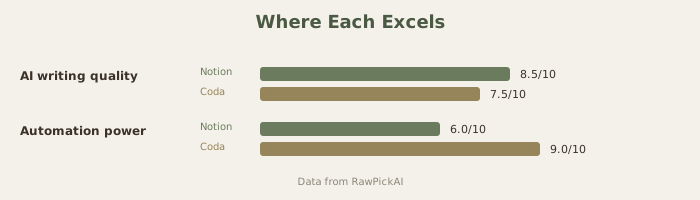
Notion AI shines as a writing assistant embedded in your workspace. Highlight any text and Notion AI can summarize it, expand it, change tone, translate it, or generate a continuation. Writing a project brief? Notion AI drafts one from bullet points. Need meeting notes turned into action items? Highlight the notes and let AI extract them.
The integration feels natural because Notion is already a writing-centric tool. AI features appear exactly where you'd expect - inline with your content, triggered from the same toolbar you already use. There's no context switch, no separate app, no copy-pasting into a chatbot.
Coda AI approaches writing differently. It's less about polishing prose and more about working with structured data. You can ask Coda AI to analyze a table, generate insights from a dataset, or create formulas based on natural language descriptions. If you ask Coda AI to write a paragraph, it'll do it - but the quality isn't its focus, and it feels like using a spreadsheet tool as a word processor.
For teams that primarily create documents, wikis, project plans, and written content, Notion AI is the clear winner. For teams that primarily work with tables, datasets, and automated workflows, Coda AI is more useful despite weaker prose generation.
Data Analysis and Automation
This is where the roles reverse. Coda's strength has always been its ability to blend documents with powerful tables, formulas, and automations - think of it as a database tool wearing a document's clothing.
Coda AI can analyze tables using natural language queries. "What's our average deal size for Q1 2026 by region?" produces an accurate answer from your data without writing a formula. It can generate Coda formulas from plain English descriptions, build automation rules, and create interactive dashboards. For teams that live in spreadsheets and need to build custom internal tools, Coda AI turns what used to be an hour of formula work into a 30-second prompt.
Notion AI handles basic database queries but isn't built for serious data analysis. You can ask it to summarize a database view or extract patterns, but for anything requiring calculations, cross-referencing multiple tables, or building automated workflows, Notion's AI feels limited. Notion's databases are powerful for organizing information, but they're not designed for the kind of computation-heavy work that Coda handles natively.
The Pricing Model Difference: This Changes Everything
The pricing structures reflect fundamentally different approaches to team billing, and this often matters more than feature comparisons.
Notion AI requires the Business plan at $15-20/user/month for full AI capabilities. Every person on the team pays the same rate, whether they're a power user creating content daily or someone who logs in once a week to check a dashboard. For a team of 20, that's $300 (≈₹27,900)-34,000/month.
Coda AI charges based on "Doc Makers" - the people who create and edit documents. Everyone else (viewers, commenters) is free. The Pro plan costs $10/Doc Maker/month. For a team of 20 where 5 people build docs and 15 people consume them, that's $50/mo (≈₹4,650/month) - a fraction of Notion's cost.
This pricing model makes Coda dramatically cheaper for teams with a clear creator/consumer split. It's up to 78% cheaper for large teams where most people are reading dashboards and checking project updates, not creating content from scratch.
| Notion AI | Coda AI | |
|---|---|---|
| Free tier | Free plan (limited AI) | Free plan (limited docs) |
| Pro/Individual | Plus $10/user/mo (≈₹930) - no full AI | Pro $10/Doc Maker/mo (≈₹930) - AI included |
| Full AI access | Business $15-20/user/mo (≈₹1,395-1,700) | Pro $10/Doc Maker/mo (≈₹930) |
| Team of 20 | $300 (≈₹27,900)-34,000/mo (all users pay) | $50 (≈₹4,650)-8,500/mo (only Doc Makers pay) |
Knowledge Management and Internal Wiki
Notion is the established leader here. Its page structure, nested databases, and block-based editor create an intuitive wiki experience. Notion AI adds the ability to search across your entire workspace using natural language - "find the Q4 marketing strategy document" or "what was the decision about the new pricing tier?" The AI Q&A feature works surprisingly well when your team has maintained organized documentation.
Coda can function as a wiki, but it's not where the tool shines. The page structure is less intuitive for browse-and-discover knowledge management, and the search experience isn't as refined as Notion's. Teams that have tried using Coda as a wiki replacement generally report it feels more like navigating a complex spreadsheet system than browsing a clean knowledge base.
Templates and Getting Started
Notion's template gallery is massive - thousands of community-created and official templates for project management, personal productivity, team wikis, CRMs, habit trackers, and more. Starting with a template and customizing it is how most Notion users begin, and AI can help customize templates further based on your specific needs.
Coda also has templates, but the library is smaller and more focused on business workflows - sales pipelines, product launches, sprint planning. The templates are powerful (leveraging Coda's automation capabilities) but fewer in number and more complex to customize for beginners.
Mobile Experience
Notion's mobile app is polished and widely used for capturing notes, checking tasks, and light editing on the go. It's one of the reasons Notion has become a personal productivity tool in addition to a team workspace.
Coda's mobile experience is functional but feels more like accessing a desktop application from your phone. Complex docs with multiple tables and automations don't translate as cleanly to small screens. For quick reference it works; for active creation, you'll want a laptop.
Who Should Pick Notion AI
Teams and individuals who primarily work with written content - documents, wikis, project briefs, meeting notes. Knowledge-intensive organizations that need a centralized, searchable workspace. Individuals and small teams who value the ecosystem (templates, integrations, community). Teams where every member actively creates and edits content.
Who Should Pick Coda AI
Teams that work heavily with data - sales pipelines, product metrics, financial models, inventory tracking. Organizations where a small team builds tools and dashboards for a larger group of consumers. Budget-sensitive teams where Coda's Doc Maker pricing model offers significant savings. Teams that need custom workflow automation without learning to code.
Advanced Comparison: Knowledge Management Depth
Notion's knowledge system:
- Hierarchical page structure with nested databases
- Natural browse experience (feels like exploring a wiki)
- Full-text search with natural language Q&A
- Rich linking between pages
- Best in class for "I know it exists somewhere, help me find it"
Coda's knowledge system:
- Flatter structure optimized for operational docs
- Browse experience feels more like navigating complex spreadsheets
- Search exists but is less intuitive
- Less sophisticated linking
- Better for "what are the current procedures?" than exploration
For knowledge workers who need to discover information organically, Notion is significantly better.
Real-World Scenario: Building a Company Wiki
I built identical wikis in both tools. Cost:
Notion: $15/mo (≈₹1,395/mo) (Business plan) covers unlimited team members
- Setup time: 4 hours
- Ongoing: 15 min/week to maintain
- Result: Clean, discoverable, feels like using Confluence
Coda: $10/mo (≈₹930/mo) × 3 "Doc Makers" + viewers free = $30/mo (≈₹2,790/mo)
- Setup time: 6 hours
- Ongoing: 20 min/week to maintain
- Result: Functional but less intuitive navigation
For a wiki specifically, Notion wins on both cost and user experience.
FAQ
Can I use both?
Yes, and many teams do. Notion for knowledge/wiki, Coda for operational dashboards and formulas. The overlap is real but shallow - they complement rather than compete.
Which is better for remote teams?
Both work well for remote. Notion's search is better for async documentation. Coda's automations are better for reducing back-and-forth communication.
Can I switch from one to the other?
Notion supports better export. Coda's export is more complex due to formulas and automations. If you think you might switch, Notion is safer.
Which has better mobile experience?
Notion's mobile app is more polished and widely used. Coda's mobile works but feels more like a desktop tool on small screens.
Do either integrate with ChatGPT?
Notion has official ChatGPT integration. Coda doesn't have official integration but works with ChatGPT via copy-paste. For AI assistance, Notion is more fluid.
Which is better for non-technical teams?
Notion. Coda's power comes from formulas and automations that require technical thinking. Notion's content-first approach is more accessible.
Can I use Coda for a wiki?
Yes, but it's not ideal. Notion is specifically built for wiki-style browsing. Coda is possible but requires more manual linking and navigation structure.
Which scales better to 100+ people?
Notion, because pricing doesn't increase with headcount. Coda also scales well if most people are viewers. It gets expensive if many people are creators.
Can I use both together?
Yes. Many teams use Notion as wiki + Coda for operational dashboards. It's not smooth but works. Combined cost: $15 (≈₹1,395) + $10 (≈₹930) = $25 (≈₹2,325) for small teams with few Coda Doc Makers.
Which is better for content creation workflows?
Notion. The inline AI suggests writing improvements directly in your document. Coda's AI focuses on formulas and data, not prose.
Which scales better to 100+ people?
Notion, because pricing doesn't increase with headcount. Coda also scales well if most people are viewers. It gets expensive if many people are creators.
Which should I use for a personal wiki?
Notion. Coda is overkill for personal use - Notion's template gallery gives you a personal wiki in minutes, Coda requires more setup.
Can I build a CRM in either?
Notion: Yes, functional CRMs are possible. Feeling more like a complex database than native CRM. Coda: Yes, possible but requires more formula knowledge. Better for simple sales pipelines, less suitable for complex CRM.
Neither is a replacement for dedicated CRM (Salesforce, HubSpot), but Notion's template ecosystem makes it simpler.
Which integrates better with existing Google Workspace?
Both work with Google Calendar, Sheets, and Drive. Notion feels slightly more native to Google ecosystem. Coda is equally functional but feels more like a standalone tool.
How do their AI features compare in practice?
Notion AI: Content generation, summarization, tone adjustment, question answering. Feels like ChatGPT embedded in your workspace. Coda AI: Formula generation, table analysis, automation suggestions. More focused on data/operations.
For writing, Notion AI is stronger. For data work, Coda AI is stronger.
Can I export data from either without losing quality?
Notion: Exports well to CSV/PDF. Preserves structure reasonably. Coda: Exports work but lose formulas and automation logic.
If data portability matters long-term, Notion is safer.
How do these compare to other workspace tools?
We have comparisons with other productivity tools. For a broader look at workspace options, see our best AI tools for productivity guide. For specific tool comparisons, see Claude review for writing assistance and ChatGPT review for general AI capability.
Last updated: May 2026. Prices converted at ₹93/USD.
What to read next
Gemini vs ChatGPT
Apr 2026