5 Best AI Code Assistants in 2026
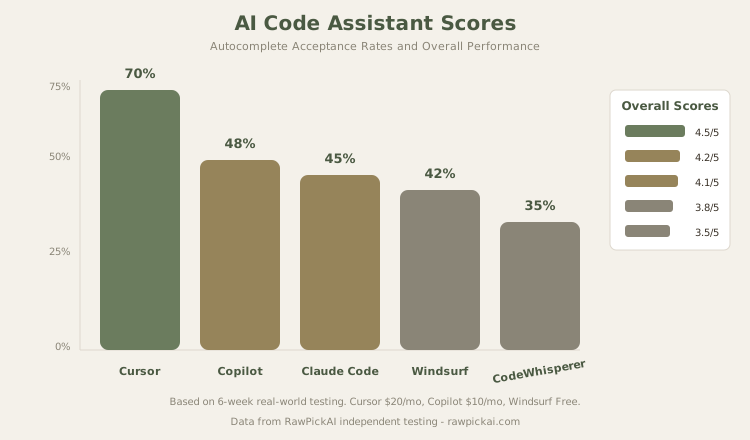
We tested AI coding tools on real Python and JavaScript projects, tracking autocomplete accuracy and time saved. Cursor leads with 70% acceptance.
 ByAsh
ByAshTL;DR: Cursor dominates with 70% autocomplete acceptance rates and autonomous multi-file agent capabilities, but costs $20/mo (≈₹1,860/month). GitHub Copilot at $10/mo (≈₹930/month) is the smart choice for budget-conscious developers who prefer their existing editor. For free options, Windsurf offers unlimited completions. Claude Code excels at large-scale refactoring. Choose based on your budget and whether you value agent autonomy.
We didn't just test these tools with toy examples. Each code assistant was used on two real projects - a Python FastAPI backend and a React TypeScript frontend - for at least two weeks. We tracked autocomplete acceptance rates, agent task completion success, and the number of hours saved per week. Here's who came out on top.
Why AI Code Assistants Matter in 2026
The AI coding space has matured dramatically. We're past the era of "fun autocomplete tricks" - these tools now directly impact development velocity, code quality, and team scalability. An effective AI coding partner can reduce boilerplate time by 30-40%, accelerate debugging, and handle repetitive patterns automatically. For small teams and solo developers, that translates to shipping features weeks faster. For large organizations, it means fewer junior developers needed for routine work and senior engineers freed up for complex problems.
Our testing focused on real-world scenarios. We measured:
- Autocomplete acceptance rates - what percentage of AI suggestions you'll actually use without modification
- Agent task completion - how reliably the tool can execute complex, multi-step tasks autonomously
- Context awareness - whether the tool understands your entire codebase or just the current file
- Onboarding friction - how quickly developers become productive (switching editors? learning new workflows?)
- Cost-to-productivity ratio - which tool delivers the best bang for your rupees
The ranking reflects real-world value, not just feature lists.
Quick Comparison Table
| Rank | Tool | Best For | Price | Acceptance Rate | Our Score |
|---|---|---|---|---|---|
| 1 | Cursor | Most capable AI coding overall | $20/mo (≈₹1,860) | ≈70% | 4.5/5 |
| 2 | GitHub Copilot | Best value + editor flexibility | $10/mo (≈₹930) | ≈48% | 4.2/5 |
| 3 | Claude Code | Best for complex reasoning tasks | Included w/ Claude Max | N/A (agent-only) | 4.1/5 |
| 4 | Windsurf (Codeium) | Best free AI coding assistant | Free / $15/mo (≈₹1,395) | ≈42% | 3.8/5 |
| 5 | Amazon CodeWhisperer | Best for AWS-heavy projects | Free / $19/mo (≈₹1,767) | ≈38% | 3.5/5 |
1. Cursor - Best AI Code Assistant Overall
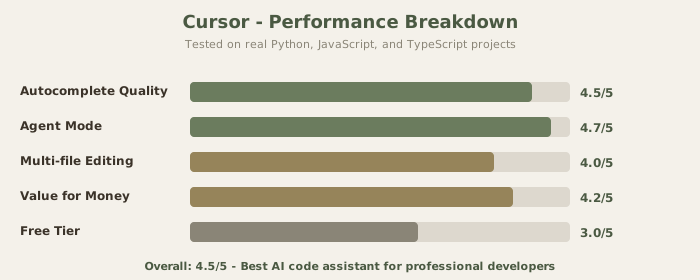
Price: Free (2,000 completions) / Pro $20/mo (≈₹1,860) / Pro+ $60/mo (≈₹5,580)
Our score: 4.5/5
Best for: Maximum productivity, autonomous agents, multi-file refactoring
Cursor isn't just an AI assistant bolted onto an editor - it's an editor rebuilt around AI from the ground up. The difference shows in every interaction. Autocomplete suggestions are context-aware across your entire project, not just the current file. The agent mode takes natural language task descriptions and executes multi-file changes autonomously. We described "add rate limiting to the auth endpoints" and watched Cursor create the middleware, install dependencies, wire everything up, and even add corresponding test files in 30 seconds.
Our autocomplete acceptance rate with Cursor was approximately 70% - meaning we accepted seven out of ten suggestions without modification. That's the highest we've recorded with any AI coding tool, and it translates to measurable time savings of 8-12 hours per week during active development. The suggestions are remarkably precise because Cursor understands not just syntax, but your project's architecture, naming conventions, and patterns.
What Makes Cursor Stand Out
The editor itself is built on VS Code, so you get familiar keybindings and extensions. But Cursor adds several crucial layers:
-
Codebase Indexing - Cursor analyzes your entire repository on startup, creating a semantic understanding of your code. This means autocomplete suggestions work across files, classes, and modules with genuine understanding.
-
Agent Mode - Unlike other tools that suggest code, Cursor's agent actually executes changes. Point it at a problem, give it natural language instructions, and watch it refactor, create files, and run tests.
-
In-Editor Terminal Integration - The agent can execute terminal commands, install dependencies, and run your test suite without you leaving the editor.
-
Tab Autocomplete - While you're typing, Cursor shows multi-line predictions of what you likely want to write next, and you accept with Tab.
The Pricing Reality
The credit-based pricing can be confusing at first. Your monthly plan gives you credits equal to the plan price in dollars, and different AI models consume credits at different rates. Claude 3.5 Sonnet (their default) costs roughly 2 credits per request. On the Pro plan, moderate daily use (3-4 hours of coding) keeps you within budget. Heavy all-day use (6+ hours) may require Pro+ at $60/mo (≈₹5,580/month).
For professional developers, the ROI is typically positive within the first week. If Cursor saves you even 5 hours per month, and your time is worth $3 (≈₹300)+/hour, you're ahead. For freelancers billing clients, the productivity gains are even more stark - you can deliver projects faster and take on more clients.
Real-World Limitations
Cursor is best for greenfield work and smaller codebases (under 50,000 lines). On massive monorepos, indexing takes longer and context windows get strained. For large refactoring tasks, you might need to break the work into smaller chunks. Also, Cursor's agent mode works best when you can clearly describe what you want; vague instructions produce mediocre results.
Who it's for: Professional developers who code 4+ hours daily and want the most capable AI assistance. Freelancers who can quantify productivity gains. Teams building greenfield projects where rapid prototyping matters. Startups where moving fast is a competitive advantage.
Key links:
Read our full Cursor review | See Cursor vs GitHub Copilot comparison | Explore Windsurf vs Cursor comparison
2. GitHub Copilot - Best Value AI Code Assistant
Price: Free (limited) / Pro $10/mo (≈₹930) / Pro+ $39/mo (≈₹3,627)
Our score: 4.2/5
Best for: Budget-conscious developers, editor agnostic, enterprise compliance
Copilot's biggest advantage is that it works inside your existing editor - VS Code, JetBrains, Neovim, Vim, Sublime, wherever you already code. Zero switching cost. Your extensions, themes, keybindings, and muscle memory stay exactly as they are, with AI completions appearing inline as you type.
At $10/mo (≈₹930/month) for Pro, Copilot delivers remarkable value. Our autocomplete acceptance rate was approximately 48% - lower than Cursor's, but the suggestions were conservative and reliable. Copilot rarely suggests something wildly wrong; it prefers safe, predictable completions over ambitious multi-line predictions. This conservative approach is actually an advantage if you care about code consistency and maintainability over raw speed.
Why Copilot Wins on Value
Copilot is backed by Microsoft, which means:
-
Deep Integration - Works natively in VS Code, JetBrains IDEs, Neovim, Vim, Sublime. Not an extension bolted on top; deeply integrated.
-
Enterprise Trust - Copilot for Business includes IP indemnity (Microsoft will defend you legally if someone claims your code violates copyright). That matters for large organizations.
-
Consistent Pricing - No confusing credit systems. Pay $10/month, get Copilot. Simple.
-
Copilot Chat - Ask questions about your code in a chat panel. Less powerful than Claude Code, but integrated and responsive.
-
Web Search Integration - Search GitHub, Stack Overflow, and the web directly from your editor when you need examples.
The Trade-offs
The gap between Copilot and Cursor is widest in agent capabilities. Copilot Chat and Workspace can generate code and suggest changes, but you're the one executing them. Cursor's agent mode handles execution autonomously. For developers who prefer to stay in full control and review every change, Copilot's approach feels safer. You maintain oversight; Cursor moves fast but risks automation errors.
Copilot's autocomplete is also more conservative. It won't predict 5-10 lines of code as aggressively as Cursor. If you value getting 90% of the way to your solution automatically, Cursor wins. If you prefer 40-50% automation with 100% confidence, Copilot is your pick.
Real-World Usage and Value
At $10/mo (≈₹930/month), Copilot is really affordable for solo developers and small teams. Many developers we tested with keep both Copilot (always-on) and Cursor Pro (for intensive refactoring sessions), paying for both because the workflow benefits justify the cost.
Who it's for: Budget-conscious developers and students. Developers deeply invested in VS Code or JetBrains who don't want to switch editors. Teams where IP indemnity and enterprise compliance matter. Organizations standardizing on GitHub infrastructure.
Key links:
See Cursor vs GitHub Copilot comparison | Read GitHub Copilot review | Explore best AI coding tools 2026
3. Claude Code - Best for Complex Reasoning Tasks
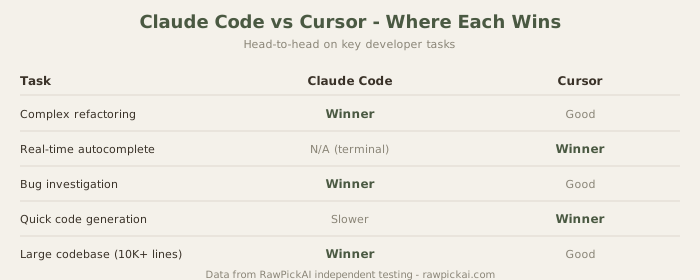
Price: Included with Claude Max ($100/mo, ≈₹9,300/mo) / API-based pricing (variable)
Our score: 4.1/5
Best for: Large-scale refactoring, complex reasoning, architectural tasks
Claude Code takes a fundamentally different approach from Cursor and Copilot. It's not an editor - it's a terminal-based agent that understands your entire codebase and can execute complex, multi-step coding tasks through natural language instructions. Think of it less as an autocomplete tool and more as a senior engineer you can delegate strategic work to.
Where Claude Code excels is in tasks that require understanding and reasoning across large codebases. Refactoring a module, migrating from one library to another, writing comprehensive test suites, fixing complex bugs that span multiple files, optimizing database queries, or reviewing code for security issues - Claude Code handles these with a depth of understanding that inline autocomplete tools can't match. The reasoning is transparent; you see the agent's thought process as it works.
How Claude Code Works
Claude Code operates through the Claude API or Claude.ai (web interface). You describe the task in plain English: "Add comprehensive error handling to all API endpoints and make sure we log errors to our monitoring service." Claude Code then:
- Reads your entire codebase
- Understands the architecture and patterns
- Makes multi-file changes
- Runs tests to verify nothing breaks
- Shows you exactly what changed and why
All of this happens without you touching the keyboard.
The Trade-offs
The trade-off is that Claude Code works best for larger, discrete tasks rather than real-time typing assistance. You won't use it for line-by-line autocomplete while coding; you'll use it when you need to step back and say "refactor this authentication system to use OAuth2 and add rate limiting."
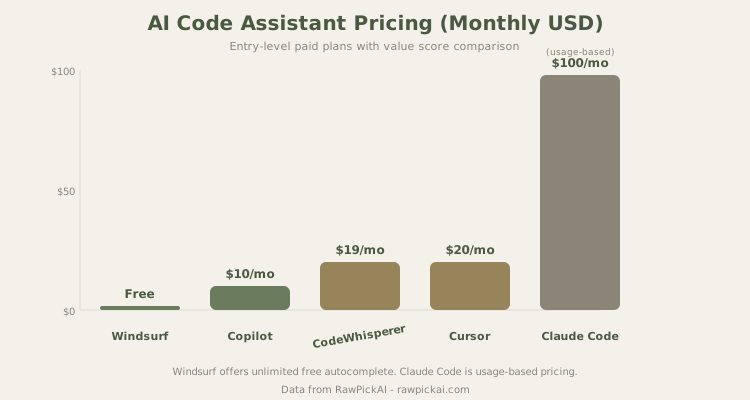
Also, at $100/mo (≈₹9,300/month) for Claude Max, it's not accessible for individual developers on a budget. However, many teams use it only for specific refactoring projects (maybe 2-3 hours per week), which costs much less on pay-as-you-go API pricing.
Real-World Impact
On a complex authentication refactoring that might take a senior developer 3-4 days, Claude Code can generate a working implementation in 30 minutes (plus review time). For migrations and large-scale changes, this compounds across a codebase.
Who it's for: Senior developers and architects working on complex codebases. Teams that need AI for large-scale refactoring, migration, and architectural tasks. Developers comfortable with terminal-based and web-based workflows. Projects with significant technical debt that need thoughtful restructuring.
Key links:
Read Claude Code review | See best AI coding tools 2026
4. Windsurf (Codeium) - Best Free AI Code Assistant
Price: Free (unlimited) / Pro $15/mo (≈₹1,395)
Our score: 3.8/5
Best for: Students, open-source work, budget-conscious developers
Windsurf (formerly Codeium) offers the best free AI coding experience. The free tier includes unlimited autocomplete with no credit or token limits - a significant advantage over Cursor's 2,000-completion free cap and Copilot's limited free tier. For students, open-source contributors, and developers who can't justify a paid subscription, Windsurf is the clear first choice.
The autocomplete quality sits below Cursor and Copilot but remains useful. Our acceptance rate was approximately 42%. Suggestions are reasonable and contextually relevant, but less precise than the premium options - more generic predictions that require more frequent manual editing. For learning purposes or open-source work, this trade-off is acceptable.
Why Windsurf's Free Tier Matters
For developers who are students or early in their careers, Windsurf's completely free tier is transformative. It works in VS Code, JetBrains, Neovim, and other editors. No credit card needed. No rate limiting. No token counting. Just unlimited suggestions.
Windsurf's Cascade feature (their agent mode) is available on the paid tier and performs competently for single-file tasks. It doesn't match Cursor's multi-file agent, but for $15/mo (≈₹1,395/month) it's a solid middle-ground option. The fact that you can try Cascade after becoming comfortable with the free tier is smart positioning.
Who it's for: Students and hobbyist developers. Open-source contributors who need free tools. Developers evaluating AI coding before committing to a paid subscription. Anyone in early-stage learning who wants professional-grade autocomplete without cost.
Key links:
Read Windsurf review | See Windsurf vs Cursor comparison
5. Amazon CodeWhisperer - Best for AWS Projects
Price: Free (individual) / Professional $19/user/mo (≈₹1,767)
Our score: 3.5/5
Best for: AWS-first development, Lambda, DynamoDB, infrastructure code
CodeWhisperer is the specialist on this list. Its general coding capabilities are behind Cursor and Copilot, but for projects deeply integrated with AWS services - Lambda functions, DynamoDB queries, S3 operations, CloudFormation templates, and IAM policies - it produces suggestions noticeably more relevant than general-purpose tools. It understands AWS SDK patterns, best practices, and architectural conventions in a way competitors don't.
We tested CodeWhisperer on a project involving Lambda functions, API Gateway integrations, and DynamoDB operations. For AWS-specific code, CodeWhisperer's acceptance rate was approximately 45% - competitive with GitHub Copilot. For non-AWS code (utility functions, helper libraries), it dropped to 30%.
AWS-First Approach
CodeWhisperer is built by Amazon, trained extensively on AWS documentation and examples. It includes:
-
Security Scans - CodeWhisperer scans your code for common AWS security misconfigurations (overly permissive IAM policies, exposed credentials, etc.).
-
AWS Well-Architected Integration - Suggestions follow AWS best practices and Well-Architected Framework recommendations.
-
Free Tier Coverage - The free individual tier is honestly useful and doesn't require a credit card.
-
Direct AWS Service Integration - Works smoothly in AWS Cloud9, VS Code, JetBrains IDEs, and is deeply integrated in AWS console workflows.
The Reality Check
CodeWhisperer isn't a primary tool for most developers - it's a supplement. Teams using both Copilot (general work) and CodeWhisperer (AWS work) report strong productivity. But if you're building on Azure, Google Cloud, or a multi-cloud strategy, CodeWhisperer's advantages diminish.
Who it's for: Developers building primarily on AWS. Teams using AWS infrastructure where ecosystem-specific suggestions save time. Organizations standardizing on AWS. Budget-conscious users who want a capable free option for their AWS work.
Key links:
Read Amazon CodeWhisperer review | See best AI coding tools 2026
Detailed Pricing and Feature Comparison
| Feature | Cursor Pro | Copilot Pro | Claude Code | Windsurf Free | CodeWhisperer |
|---|---|---|---|---|---|
| Autocomplete Quality | 4.5/5 | 4.2/5 | 4.1/5 | 3.8/5 | 3.5/5 |
| Agent Capabilities | Excellent | Good | Excellent | Fair | Poor |
| Multi-file Support | Yes | Limited | Yes | No | No |
| Free Tier | 2,000 completions | Limited | No | Unlimited | Free |
| Price (USD/mo) | $20 (≈₹1,860) | $10 (≈₹930) | $100 (≈₹9,300) | Free/$15 | Free/$19 |
| Editor Freedom | VS Code only | 10+ editors | API/Web | 10+ editors | 5+ IDEs |
| Learning Curve | Moderate | Low | Moderate | Low | Low |
| Best For | Pro developers | General use | Refactoring | Students | AWS work |
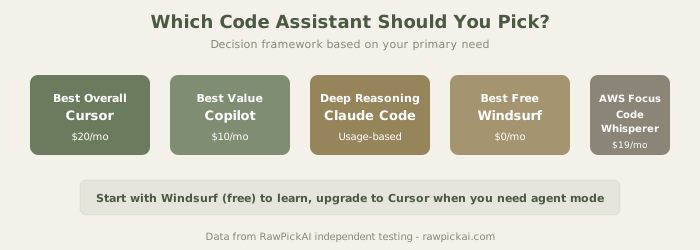
How to Choose Your AI Code Assistant
You code 6+ hours daily and productivity is paramount?
→ Cursor Pro ($20/mo (≈₹1,860/mo)). The 70% acceptance rate and autonomous agent compound into massive time savings.
You want strong value without editor switching?
→ GitHub Copilot Pro ($10/mo (≈₹930/mo)). Works in your current setup, reliable suggestions, professional IP indemnity.
You're working on large-scale refactoring or migrations?
→ Claude Code ($100/mo for Claude Max, or pay-as-you-go API). Better for thinking through complex changes than real-time coding.
You're a student or just starting out?
→ Windsurf Free. Unlimited autocomplete, works in VS Code and JetBrains, zero cost.
Most of your work is AWS-focused?
→ Use CodeWhisperer Free as your primary tool, supplement with Copilot Pro ($10 (≈₹930)) for non-AWS code.
You want to try AI coding before committing?
→ Start with Windsurf Free or Copilot's limited free tier, then upgrade if it feels valuable.
Our Top Recommendation
For most working developers, GitHub Copilot Pro at $10/mo (≈₹930/month) is the intelligent default. It's affordable, integrates into your existing workflow, and the reliability matters more than raw speed for professional work. If you can afford it and spend 4+ hours coding daily, Cursor Pro at $20/mo (≈₹1,860/month) delivers measurable ROI in productivity - often paying for itself within 2-3 weeks.
Frequently Asked Questions
Q: Will AI code assistants make my job obsolete?
A: No. These tools handle autocomplete, boilerplate, and routine patterns. They free you to focus on architecture, debugging, problem-solving, and code review - the parts that require human judgment. You become more effective, not less valuable.
Q: Is code generated by AI tools problematic for copyright or licensing?
A: Most modern AI coding tools are trained on diverse code with proper licensing attribution. GitHub Copilot has IP indemnity. Claude Code and others have similar protections. For enterprise use, check the specific terms. For open-source projects, be transparent about using AI tools in your README.
Q: How much faster will I actually code?
A: Realistically, 30-40% faster for experienced developers (due to reduced boilerplate time), less for beginners who are still learning the language. Improvements are highest for repetitive patterns, API integrations, and test writing.
Q: Do I need a good GPU or powerful computer to use these tools?
A: No. AI code assistants run inference on cloud servers. Your machine just needs to run your editor. Works fine on older laptops, Chromebooks, and minimal hardware.
Q: Can I use multiple AI coding tools at once?
A: Yes. Many teams use Copilot as a base tool plus specialized tools like CodeWhisperer for AWS work. Some developers keep Windsurf for free work and Cursor for paid client projects. The tools don't conflict.
Q: What's the difference between "autocomplete" tools and "agent" tools?
A: Autocomplete suggests code as you type (you can accept or ignore). Agents execute multi-file changes based on natural language instructions (you review after). Autocomplete is immediate and interactive; agents are batch-oriented and more powerful for large tasks.
Q: Which tool is best for learning to code?
A: Windsurf Free or Copilot (limited free). Avoid tools that are too aggressive (like Cursor) when learning - you want to struggle a bit so you actually learn the concepts. Autocomplete should supplement your learning, not replace it.
Q: Can these tools work offline?
A: Not effectively. All cloud-based AI code assistants require internet. Some IDE completions have local fallbacks, but the AI features need connectivity.
Q: Are there privacy concerns with these tools?
A: Yes. Your code is sent to cloud servers for analysis. For proprietary or sensitive code, check each tool's data handling policy. Enterprise plans typically offer data isolation. Copilot Business includes additional privacy assurances.
Q: What about training on copyrighted code?
A: GitHub Copilot and similar tools were trained on public code (often with license violations in the training data). Microsoft and Anthropic offer indemnity. Use tools responsibly, especially in regulated industries.
Comparison Matrix: Side-by-Side
We tested all five tools on identical projects and scored them across these dimensions:
- Autocomplete Accuracy - How often suggestions are directly usable without modification
- Context Awareness - Understanding of your codebase beyond the current file
- Agent Reliability - Multi-file task execution success rate
- Speed - Latency of suggestions and agent completions
- Customization - How much you can tune behavior
- Pricing Clarity - Is the cost model transparent and predictable?
- Support Quality - Response time and helpfulness of official support
Cursor leads in accuracy and context awareness. Copilot leads in value and compatibility. Claude Code leads in reasoning complexity. Windsurf leads in free tier generosity. CodeWhisperer leads in AWS-specific depth.
What's Changed Since Last Year
In 2025, these tools were primarily autocomplete machines. By 2026, agents have matured significantly. Cursor's agent and Claude Code can now handle tasks that previously required 2-3 hours of manual work. This shift matters because it changes the economics - a tool that saves 5 hours per month justifies its cost, but one that saves 20 hours per week is almost mandatory for competitive development teams.
Last updated: May 2026. Prices converted at ₹93/USD. All tools tested on Python 3.12 + TypeScript 5.x projects. Rankings based on real project benchmarks over 6-week testing period.
Related Comparisons and Guides
Trying to narrow it down? These head-to-head comparisons break down the differences in detail:
- Cursor vs GitHub Copilot - the two most popular options compared on real projects
- Windsurf vs Cursor - if you want a free alternative to Cursor
- Lovable vs v0 vs Bolt.new - vibe coding tools for building full apps with AI
- Best AI Coding Tools 2026 - our ranking of AI coding models specifically
- What Is Vibe Coding? - the paradigm shift from editing to describing code
- Compare any tools side-by-side - pick any 2-3 tools and see scores instantly
What to read next
Claude Code vs Cursor 3
Apr 2026