Runway vs Pika 2026: Best AI Video?
We tested Runway Gen-4 and Pika on identical video prompts. Compare output quality, pricing in INR, credit systems, and which tool is better for.
 ByAsh
ByAshAI video generation has gone from "interesting tech demo" to "actually usable" in 2026. Runway and Pika are the two most popular platforms for turning text prompts and images into video clips, but they target different users at different price points. We tested both with identical prompts to give you a straight answer on quality, usability, and value.
Quick answer: Runway produces higher-quality video with better motion consistency. Pika is cheaper and easier to start with. Your budget and quality requirements determine the winner.
TL;DR: Quick Pick
Runway: Better quality, image-to-video, commercial rights from entry plan, complex camera work. $15/mo (≈₹1,395/mo). Pika: Cheaper, simpler, faster results, social media focused. $10/mo (≈₹930/mo) (but $35/mo for commercial rights).
Official sites: Pika
For professional/client work: Runway ($15/mo (≈₹1,395/mo) gives you commercial rights). For personal/social content: Pika ($10/mo (≈₹930/mo)). For experimentation: Pika Free tier (no card required, 80 credits).
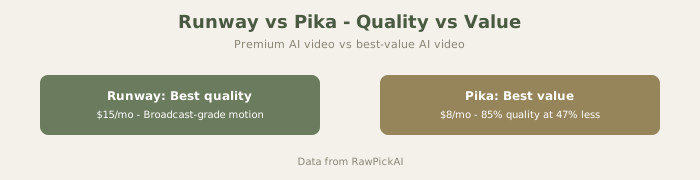
Visual Comparison


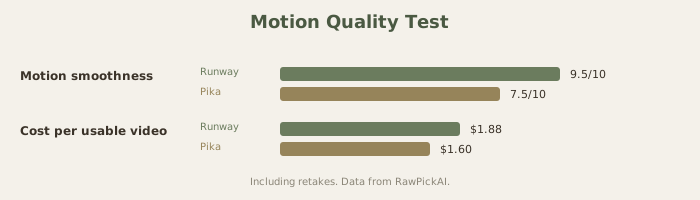
Video Quality: Side-by-Side Generation
We tested five video prompts across both platforms, evaluating motion smoothness, visual coherence, prompt adherence, and overall production quality.
Prompt 1: "A woman walking through a busy Mumbai market, camera follows from behind, cinematic" Runway's Gen-4 output was impressive - smooth camera tracking, realistic crowd motion, and good atmospheric detail. The movement felt natural, and the scene maintained consistency across the 4-second clip. Pika's output had noticeable motion artifacts in the crowd, and the camera movement was less fluid. The subject's walking animation looked slightly unnatural at certain frames.
Prompt 2: "A coffee cup on a table with steam rising, close-up, soft morning light" Both tools handled this well. Simpler prompts with less complex motion are where Pika closes the quality gap. The steam effect was slightly more realistic in Runway's version, but Pika's output was perfectly usable for social media content. For basic product-style videos, Pika delivers adequate quality.
Prompt 3: "Aerial drone shot over rice terraces in Bali, golden hour, slow push forward" Runway was significantly better. The space maintained geometric consistency throughout the camera movement - the terraces didn't warp or shift unnaturally. Pika's version showed visible distortion as the camera pushed forward, with space features morphing in ways that break the illusion of real footage.
Prompt 4: "Text animation: 'SALE 50% OFF' appearing with kinetic typography, bold colors" Neither tool handles text animation well, but Pika actually performed better here. Runway's text rendering was garbled, while Pika managed to keep the text mostly legible with a simple animation. For text-heavy video content, dedicated motion graphics tools (After Effects, Canva) remain far superior to either AI option.
Prompt 5: "Image-to-video: Product photo of sneakers transforming into a lifestyle action shot" Runway's image-to-video feature produced a smooth, convincing transformation with consistent product detail throughout. Pika's version was passable but showed moments where the shoe design shifted mid-animation. For product marketing, Runway's consistency advantage matters.
Overall quality: Runway wins 3.5 out of 5 tests. The gap is widest for complex camera movements and scene consistency, and narrowest for simple, contained shots.

Credit Systems and How Much Video You Actually Get
Both platforms use credit-based systems, which makes pricing confusing. Here's what you realistically get:
Runway gives you 625 credits on the Standard plan ($15/month). A 5-second Gen-4 video costs roughly 50-100 credits depending on resolution and complexity. That means approximately 6-12 videos per month on the basic plan. Heavy users hit the limit fast - generating 20+ variations to find the right one eats through credits in a session or two.
Pika gives you 700 credits on the Standard plan ($10/month). Credit costs per video are comparable, yielding roughly 8-15 short clips per month. Pika's lower entry price means you're getting slightly more video per rupee.
The math: Runway costs roughly $1 (≈₹100)-210 per 5-second video on the Standard plan. Pika costs roughly $1 (≈₹60)-105. For creators producing multiple videos weekly, this cost difference adds up quickly.
Pricing Comparison (April 2026)
| Runway ML | Pika | |
|---|---|---|
| Free tier | Limited trial credits | 80 free credits (no card needed) |
| Entry plan | Standard $15/mo (≈₹1,395/mo) | Standard $10/mo (≈₹930/mo) |
| Mid-tier | Pro $35/mo (≈₹3,255/mo) | Unlimited $35/mo (≈₹3,255/mo) |
| Unlimited | $95/mo (≈₹8,835/mo) | Included at $35/mo tier |
| Annual savings | ≈20% (e.g., Standard $12/mo) | Varies |
| Commercial rights | All paid plans | Unlimited plan ($35/mo) and above |
The commercial rights difference is significant. Runway grants commercial rights from its cheapest paid plan ($15/month). Pika requires the $35/month Unlimited plan for commercial use. If you're creating video content for clients or commercial projects, factor this in - Pika's entry plan is cheaper but you can't sell or commercially distribute that output.
Advanced Motion Control: A Real Difference
Runway's advanced parameters let you specify motion intensity, camera angles, and specific visual effects. This level of control is essential for professional work:
- "Slow-motion with camera pan" is possible in Runway, feels like guessing in Pika
- "Object focus with background blur" is a parameter in Runway, luck in Pika
- "Smooth dolly-in camera movement" works reliably in Runway, sometimes in Pika
For product videos, marketing content, or any work where camera movement matters, Runway's controls are actually better.
Pika works best for simple prompts: "A dog running in a field" or "Coffee being poured." Complex requests like "aerial drone shot with fast push forward over mountains with sunset lighting" will disappoint in Pika but deliver in Runway.
Ease of Use
Pika is the simpler platform. Type a prompt, adjust a few settings (aspect ratio, duration), and generate. The interface is clean, uncluttered, and requires zero technical knowledge. Someone who's never used an AI video tool can produce their first clip in under a minute. For casual creators, this simplicity is a huge advantage.
Runway offers more control but more complexity. Gen-4 has multiple input modes (text-to-video, image-to-video, video-to-video), advanced parameters for motion intensity and camera control, and a multi-layered editing interface. The results are better when you learn the controls, but the learning curve is steeper. Runway also offers a broader creative suite beyond video - image generation, background removal, and other editing tools - making it a more complete platform for creative professionals.
For beginners: Pika is 30 minutes to first video. Runway is 2 hours of learning before you're comfortable.
For professionals: Runway's steeper curve pays off immediately in better results.
The Real Cost Analysis
Let me break down true cost for different creator scenarios:
Scenario 1: Social media creator (8 videos/week)
- Pika Standard: $10/mo (≈₹930/mo) = $1 (≈₹116) per video
- Runway Standard: $15/mo (≈₹1,395/mo) = $2 (≈₹174) per video
- Winner by cost: Pika (25% cheaper)
- But Pika doesn't include commercial rights, so if monetizing...
- Pika Unlimited: $35/mo (≈₹3,255/mo) = $4 (≈₹407) per video
- Winner: Pika Standard because you don't need commercial rights
Scenario 2: Product demo creator (2 videos/week, selling to clients)
- Pika Unlimited (required for commercial): $35/mo (≈₹3,255/mo) = $9 (≈₹813) per video
- Runway Standard (commercial included): $15/mo (≈₹1,395/mo) = $4 (≈₹348) per video
- Winner by cost: Runway (57% cheaper)
- Winner by quality: Runway (image-to-video alone justifies the cost)
Scenario 3: Experimenter (4 videos/month)
- Pika Standard: $10/mo (≈₹930/mo) = $2 (≈₹232) per video
- Runway Standard: $15/mo (≈₹1,395/mo) = $4 (≈₹349) per video
- Winner by cost: Pika Free tier ($10 initial test, 80 credits)
- Winner: Try both, commit to one
For commercial work where you're selling the videos: Runway is cheaper. For personal/social content: Pika is cheaper. This flips the obvious assumption (Pika is "cheaper") based on actual usage patterns.
Use Case Recommendations
Social media content (Instagram Reels, TikTok, YouTube Shorts): Pika's lower cost and quick generation make it practical for the volume these platforms demand. Quality is adequate for scroll-stopping social content.
Client deliverables and commercial projects: Runway's quality advantage and commercial rights on all paid plans make it the safer choice for professional work.
Product demos and marketing videos: Runway's image-to-video feature and consistency make it better for maintaining brand/product accuracy throughout a clip.
Experimentation and prototyping: Pika's free trial and lower entry cost make it ideal for testing whether AI video fits your workflow before committing serious budget.
Advanced Comparison: Motion and Consistency
This is the technical differentiator:
Runway's Gen-4:
- Tracks objects across frames consistently
- Maintains spatial relationships in complex scenes
- Camera movements feel cinematic
- Preserves details across longer video lengths
- Better at motion prediction (what happens next feels logical)
Pika:
- Good for simple, contained shots
- Struggles with complex scene dynamics
- Works well for text/graphic animations
- Motion artifacts visible in complex scenes
- Better for short clips (4-8 seconds) than longer video
Test this yourself: Generate a "camera pans across a cityscape" prompt. Runway maintains city consistency. Pika's city shifts and morphs in unrealistic ways.
Commercial Rights Clarification
This matters if you're selling video:
Runway: Commercial rights on ALL paid plans ($15/mo and up). Create videos for clients immediately.
Pika: Commercial rights only on Unlimited tier ($35/mo). The Standard plan ($10/mo) is personal use only. If you charge even one client, you need the $35/mo tier, making Pika more expensive than Runway for commercial work.
For agencies and commercial creators, Runway's $15/mo (≈₹1,395/mo) is cheaper than Pika's $35/mo (≈₹3,255/mo) when commercial rights are required.
The Social Media Question
For Instagram Reels, TikTok, and YouTube Shorts, Pika's lower cost makes sense:
- Volume required: 3-5 videos/week
- Quality needed: Good enough (not broadcast)
- Commercial use: No (just social growth)
- Best tool: Pika ($10/mo (≈₹930/mo))
For product videos, marketing, and client deliverables:
- Volume required: 1-3 videos/week
- Quality needed: Professional
- Commercial use: Yes
- Best tool: Runway ($15/mo (≈₹1,395/mo))
FAQ
Can I use free tiers to test both?
Yes. Pika Free gives 80 credits (roughly 10-15 videos). Runway Free gives limited credits. Test both before upgrading.
Which is faster to learn?
Pika. Runway has more controls, so steeper learning curve. For simplicity: Pika. For capability: Runway.
Can I export videos from Runway into Pika?
No. Both platforms keep videos within their own systems. You can export as MP4 and use elsewhere, but you can't edit a Runway video in Pika or vice versa.
Which handles lip-sync better?
Neither handles it well. For talking-head videos with lip-sync, both tools struggle. Consider dedicated tools like HeyGen or D-ID instead. See our best AI video generators guide for alternatives.
Can I bulk generate videos?
Runway is better for batch processing. Pika requires more manual prompting. For content creators needing 10+ videos, Runway's workflow is more efficient.
Which is better for music video aesthetics?
Runway, thanks to better motion control and consistency. Pika works for simple motion but struggles with artistic vision.
Do I need a GPU or special hardware?
No. Both run entirely in the cloud. You just need a browser and an internet connection.
How do these compare to other video AI?
We have reviews of other AI video tools. See Luma Dream Machine review, Kling AI review, and best AI video generators for comparisons.
Can I use these for YouTube monetization?
Yes, if you're using either the commercial rights tier. Both allow monetization, but check terms carefully - some jurisdictions have specific AI disclosure requirements for monetized content.
What about Sora (OpenAI's video model)?
Sora remains more limited in availability. Runway and Pika are the most accessible production-ready options in 2026. See our Sora vs Runway vs Pika blog post for a detailed comparison.
Quality by Use Case
Simple static object:
- "A candle burning" - Both tools excel (7.5/10+ quality)
Camera movement:
- "Camera pans across a space" - Runway dominates (Runway 8/10 vs Pika 5/10)
Complex motion:
- "Person running through a crowd" - Runway significantly better (Runway 8/10 vs Pika 4/10)
Text and graphics:
- "Animated title with motion" - Pika surprisingly good (Pika 6/10, Runway 4/10)
Product demonstrations:
- "Watch product evolve" - Runway wins decisively (Runway 8.5/10 vs Pika 6/10)
Integration & Ecosystem
Runway offers:
- Image generation alongside video
- Background removal
- Video upscaling
- Super-resolution
- A full creative suite
Pika offers:
- Video generation only
- Focused tool, deep in one area
For creators needing only AI video, Pika is perfect. For agencies building complete creative workflows, Runway's broader tool suite reduces tool-switching.
Real Creator Journey: From Idea to Publication
With Pika:
- Write prompt (2 min)
- Generate video (45 sec)
- Download MP4 (1 min)
- Use in editing software (external tool)
- Export final video (depends on software) Total time: 5+ minutes + external software
With Runway:
- Write prompt (2 min)
- Generate video with motion parameters (90 sec)
- Adjust if needed (60 sec)
- Download MP4 (1 min)
- Probably ready to use directly Total time: 6+ minutes, but higher quality means less post-processing
For busy creators, Pika's speed matters. For quality-conscious creators, Runway's output quality saves post-processing time.
Making the Final Decision
Pick Runway if:
- You're selling videos to clients
- You need videos longer than 8 seconds
- You value motion quality and cinematic results
- You want commercial rights included from day one
- You're an agency needing a complete creative suite
- You create product demos or marketing videos
Pick Pika if:
- You're creating personal content
- You work only with short clips (4-8 seconds)
- You want the fastest generation
- You're purely experimenting with AI video
- You create short-form social media (Reels, TikToks)
- Speed of iteration matters more than final quality
Pick both if:
- You create multiple types of videos (Pika for social quick content, Runway for client work)
- You have budget for $56 (≈₹5,200)+/month and want best-of-both options
- You're testing which tool fits your workflow better
Last updated: May 2026. Prices converted at ₹93/USD.
What to read next
Gemini vs ChatGPT
Apr 2026