6 Best AI Video Generators 2026 (Ranked)
We tested Runway, Pika, Kling, Luma, DeeVid AI, and Stable Video Diffusion on identical prompts. Motion quality, pricing in USD and INR inside.
 ByAsh
ByAshTL;DR: Runway Gen-4 ($15/mo, ≈₹1,395/mo) produces the highest quality video with the most consistent motion. Pika ($8/mo, ≈₹744/mo) offers the best value at 40% less cost for 70-80% of the quality. Kling AI excels at longer clips. Luma Dream Machine handles 3D spatial content uniquely. DeeVid AI ($10/mo, ≈₹930/mo) is the best all-in-one platform for creators who want video, image generation, music, and voiceover in one subscription. Stable Video Diffusion is free but requires technical setup and a decent GPU.
AI video has crossed the threshold from "impressive tech demo" to "actually usable in production" in 2026. I tested six video generators with identical prompts - tracking motion smoothness, visual coherence, prompt adherence, and how many credits it takes to get a usable result. This last point matters more than most reviews admit: the advertised cost-per-video assumes you nail it on the first try, but realistically you'll generate 3-5 attempts before getting something publishable.
The cost math changes everything when you factor in retakes. A tool that costs $15/mo but produces usable output on the second try is cheaper per usable video than a tool that costs $8/mo but needs five attempts.
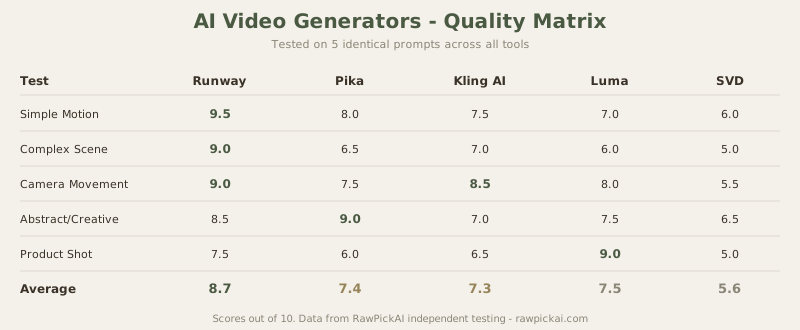
Quick Comparison Table
| Tool | Best For | Free Tier | Paid Starting | Our Score |
|---|---|---|---|---|
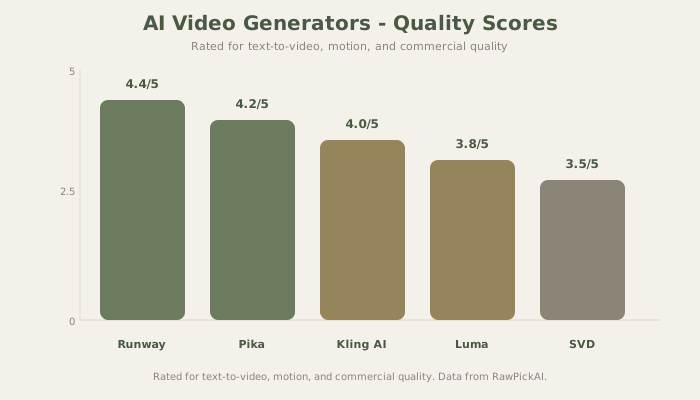
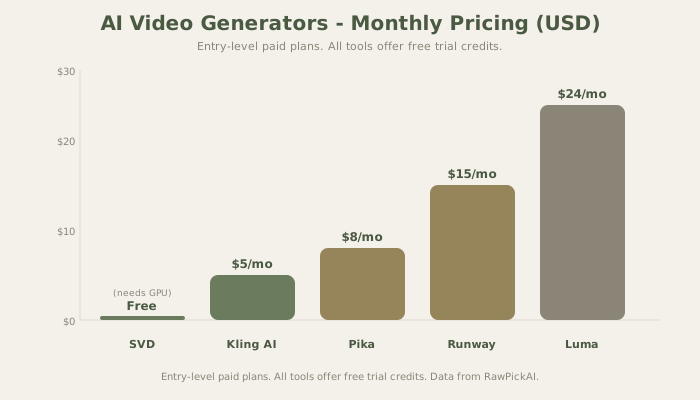
| Runway Gen-4 | Highest quality video | 125 credits free | $15/mo (≈₹1,395/mo) | 4.4/5 |
| Pika | Best value | 250 credits free | $8/mo (≈₹744/mo) | 4.2/5 |
| Kling AI | Longer clips (10s+) | 66 credits free | $5/mo (≈₹465/mo) | 4.0/5 |
| Luma Dream Machine | 3D spatial video | 30 credits free | $24/mo (≈₹2,232/mo) | 3.8/5 |
| DeeVid AI | All-in-one creators | Trial credits | $10/mo (≈₹930/mo) | 3.6/5 |
| Stable Video Diffusion | Open-source/free | Unlimited (self-hosted) | Free (GPU required) | 3.5/5 |
How I Tested These Tools
Every tool received the same five test prompts to make this comparison fair:
Prompt 1 - Simple motion: "A golden retriever running across a sunlit meadow, slow motion, cinematic." This tests basic motion coherence and visual quality on an easy subject.
Prompt 2 - Complex scene: "A bustling Tokyo intersection at night with neon reflections on wet pavement, multiple people crossing." This tests multi-subject handling, lighting complexity, and scene consistency.
Prompt 3 - Camera movement: "Slow dolly shot forward through an ancient library, warm amber lighting, dust particles visible." This tests whether the tool can simulate actual camera movements vs just animating a static image.
Prompt 4 - Abstract/creative: "Abstract fluid shapes morphing between liquid gold and deep blue, organic movement." This tests creative interpretation and motion smoothness on non-realistic subjects.
Prompt 5 - Product shot: "A sleek smartphone rotating 360 degrees on a white surface, studio lighting, product photography style." This tests commercial viability - can you actually use this in a real ad?
Scoring: Motion Quality (35%), Visual Coherence (25%), Prompt Adherence (20%), Value per Usable Output (20%).
1. Runway Gen-4 - Best AI Video Quality
Best for: Professional content creators, commercial video production, anyone who needs broadcast-quality AI video
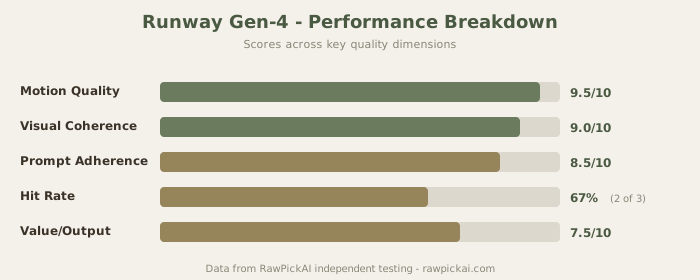
Runway Gen-4 produces the most visually impressive AI video available in 2026. The motion quality is noticeably superior to every competitor - characters move naturally, camera movements feel intentional rather than artificial, and there's a smoothness to the animation that other tools haven't matched.
What Makes Runway's Quality Superior
In the golden retriever test, Runway produced natural quadruped motion with accurate leg coordination, fur physics that responded to movement, and a depth-of-field effect that felt truly cinematic. Pika's version had a slight "sliding" quality where the dog appeared to glide rather than run. Kling AI's motion was accurate but slightly mechanical. The gap isn't massive - if you showed all three to a non-expert, they might not notice. But for professional use where quality scrutiny is higher, Runway's output is the one you'd actually publish.
The Tokyo intersection test is where Runway truly separates itself. Multiple people moving independently with different speeds and directions, neon reflections that shift accurately on wet surfaces, and cars in the background that maintain consistent proportions throughout the clip. Other tools struggled with multi-subject scenes - Pika had two pedestrians merge into each other, and Kling produced visible artifacts around the neon signs.
Runway Pricing and Credit Math
The Standard plan starts at $15/mo (≈₹1,395/mo) with 625 credits monthly. A 5-second Gen-4 video costs roughly 50 credits, which means about 12 videos per month on the Standard plan. That sounds limited until you factor in Runway's hit rate - I got usable output on 2 out of 3 attempts, meaning effectively 8 publishable videos per month.
The Pro plan at $35/mo (≈₹3,255/mo) bumps to 2,250 credits. The Unlimited plan at $95/mo (≈₹8,835/mo) removes credit limits entirely. For professional video producers creating daily content, the Unlimited plan is the only practical option.
Where Runway Falls Short
The 10-second maximum clip duration is the main limitation. You can stitch clips together, but there's no guarantee of visual continuity between segments. For anything longer than 10 seconds, you're doing post-production work. The product shot test also revealed that Runway handles realistic subjects better than stylized ones - the smartphone rotation had slight warping that would be visible in a real ad.
See also: Full Runway review | Runway vs Pika comparison
2. Pika - Best Value AI Video Generator
Best for: Content creators on a budget, social media video, YouTube thumbnails-to-video, anyone who wants good-enough quality at 40% less cost
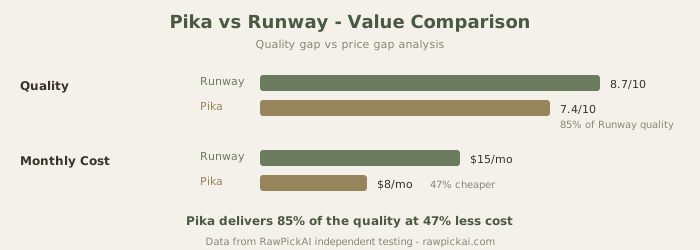
Pika's value proposition is simple: 70-80% of Runway's quality at roughly half the price. For most social media and web content, that quality gap is invisible to audiences. A TikTok or Instagram Reel doesn't need broadcast-quality motion - it needs to be good enough to stop the scroll, and Pika consistently delivers that.
Pika's Sweet Spot
The abstract fluid test is where Pika actually matched Runway. For creative, non-realistic content, Pika's generation engine produces beautiful results. The liquid gold morphing was smooth, the color transitions were natural, and the motion felt organic. This suggests Pika's model is particularly well-tuned for creative/abstract content, even if it falls slightly behind on photorealistic scenes.
Pika also handles text-to-video prompts more intuitively than Runway. Where Runway sometimes requires precise prompt engineering to get the right camera angle or movement, Pika interprets casual descriptions more forgivingly. "Make this look cinematic" actually produces cinematic results in Pika, while Runway needs more specific direction.
Pika Pricing
The Starter plan at $8/mo (≈₹744/mo) includes 250 credits. The Standard plan at $20/mo (≈₹1,860/mo) adds 600 credits and removes watermarks. The Pro plan at $58/mo (≈₹5,394/mo) is for high-volume creators. My hit rate on Pika was lower than Runway - roughly 2 usable outputs out of 5 attempts. So while the per-credit cost is lower, the effective cost per publishable video is closer to Runway's than the sticker price suggests.
The Starter plan is the entry point I'd recommend. At $8/mo (≈₹744/mo), you can experiment, learn what prompts work, and decide whether to scale up. The free tier gives 250 credits to start - enough for 10-15 test videos.
When to Choose Pika Over Runway
Choose Pika if: your videos are for social media (not broadcast), you create abstract/creative content, you're learning AI video and want an affordable playground, or you need to produce volume over perfection. Choose Runway if: quality is non-negotiable, you're producing commercial content, or you need consistent results with minimal retakes.
See also: Full Pika review | Runway vs Pika comparison
3. Kling AI - Best for Longer Clips
Best for: Creating extended AI video clips (10+ seconds), content that needs sustained motion, narrative video sequences
Kling AI's differentiator is clip duration. While Runway and Pika cap at 5-10 seconds per generation, Kling can produce clips up to 30 seconds in a single generation. For creators who need sustained motion - a product demo, a scene transition, or a narrative sequence - this eliminates the post-production headache of stitching multiple short clips together.
Why Longer Clips Matter
The library dolly shot test showed Kling's advantage clearly. A slow forward camera movement through a library needs to maintain visual consistency for 10+ seconds. Runway and Pika both produced excellent 5-second clips, but extending to 10 seconds required generating a second clip with no guarantee of visual continuity. Kling produced a single 15-second clip that maintained consistent lighting, perspective, and object positions throughout.
The trade-off: Kling's per-frame quality doesn't match Runway's. The motion is slightly less fluid, and fine details (like individual book titles on shelves) can blur or shift during longer generations. But for many use cases, a continuous 15-second clip at 85% quality beats two discontinuous 5-second clips at 100% quality.
Kling Pricing
The Starter plan at $5/mo (≈₹465/mo) is the cheapest entry point on this list. Standard at $28/mo (≈₹2,604/mo) adds priority processing and higher resolution. Pro at $58/mo (≈₹5,394/mo) is for professional use. The credit consumption increases significantly with longer clips - a 15-second generation costs 3x more credits than a 5-second one.
See also: Full Kling AI review
4. Luma Dream Machine - Best for 3D and Spatial Video
Best for: 3D spatial content, architectural visualization, product 3D rotations, VR/AR content creators
Luma Dream Machine approaches video generation differently from every other tool on this list. While Runway and Pika focus on 2D video generation, Luma generates 3D spatial video - content that understands depth, perspective, and physical space. The smartphone rotation test showed this advantage clearly: Luma produced a clean 360-degree rotation that maintained consistent proportions throughout, while other tools introduced visible warping at the 180-degree mark.
Where Luma Excels
The technology is built on Neural Radiance Fields (NeRF), which means Luma's model has a genuine understanding of 3D geometry. For architectural walkthroughs, product visualizations, and any content where spatial accuracy matters, Luma produces results that other tools can't match. An interior designer showing a room layout, a product company rotating a prototype, or a real estate agent creating a virtual tour - these are Luma's ideal use cases.
Luma Pricing
The Dreamer plan at $24/mo (≈₹2,232/mo) is relatively expensive but includes features that no other tool offers. The free tier gives 30 credits - enough for 3-5 test generations. For most users who don't specifically need 3D spatial video, Runway or Pika are better values. But for the niche where Luma excels, there's no real alternative at any price.
See also: Full Luma Dream Machine review
5. DeeVid AI - Best All-in-One Creator Platform
Best for: Solo creators who need video, image generation, music, and voiceover in one subscription without managing multiple tools
DeeVid AI is the only tool on this list that bundles AI video with image generation (Nano Banana, powered by Google Gemini 2.5 Flash), text-to-speech, AI music, and AI avatars. For creators who want one platform instead of four separate subscriptions, DeeVid's bundled approach offers real value.
What Makes DeeVid Different
DeeVid offers four models: Fast V2.0, Master V2.0, Sora2, and Master V4.0. I tested all three text-to-video models on the same prompt ("A developer typing code at a desk, cinematic lighting, 4K") and ran a separate image-to-video test with Master V4.0.
Master V2.0 outperformed Sora2 on human subjects - clearer face detail and more natural hand positioning on keyboard keys. Sora2 handles longer clips and storyboarding better but falls behind on close-up human realism. Master V4.0 on image-to-video produced the strongest result in the session - subject stayed coherent throughout with no warping artifacts, which is harder than it sounds at this price point.
DeeVid Pricing
The Lite plan at $10/mo (≈₹930/mo) gives 200 credits monthly, but limits output to 720P and locks you out of 1080P. Master V2.0 costs 20 credits per video, meaning Lite gives you 10 quality videos per month. Pro at $25/mo (≈₹2,325/mo) unlocks 1080P and 600 credits (30 Master V2.0 videos). Trial credits: 20 on signup.
The credit-to-video math is less generous than competitors at the entry tier. But the bundled tools - image generation, music, TTS, avatar - change the value equation if you use them.
Where DeeVid Falls Short
No AI video tool on this list has a permanent free tier - that is a category-wide reality. DeeVid gives 20 trial credits on signup versus Runway's 125 and Pika's 80, so you get less runway to evaluate before committing. The bigger limitation is the 720P ceiling on Lite - in 2026 that is below what most platforms display, and unlocking 1080P requires the $25/mo Pro plan.
See also: Full DeeVid AI review
6. Stable Video Diffusion - Best Open-Source Option
Best for: Technical users, researchers, developers who want full control, anyone who wants free video generation with their own hardware
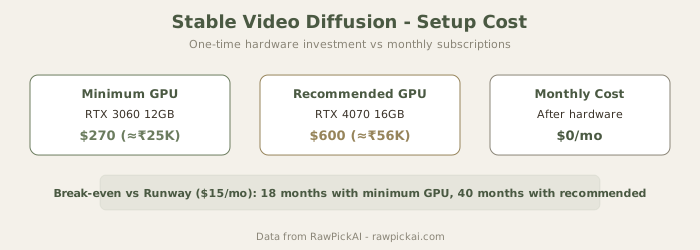
Stable Video Diffusion is free and open-source, which makes it the only tool on this list with zero ongoing cost. But "free" comes with significant caveats: you need a capable GPU (RTX 3060 minimum, ≈$270/≈₹25K), you need technical comfort with ComfyUI or Automatic1111, and the generation quality is a step below Runway and Pika without extensive prompt engineering and model fine-tuning.
The Real Cost of "Free"
The hardware requirement is the hidden cost. An RTX 3060 at ≈$270 (≈₹25K) is the entry point, but an RTX 4070 at ≈$600 (≈₹56K) produces noticeably faster and higher-quality results. Add electricity costs for running GPU-intensive workloads, and the "free" tool costs $300-600 upfront plus ongoing power. If you already have a gaming PC with a decent GPU, the marginal cost is close to zero. If you'd need to buy hardware specifically for this, the break-even vs Runway takes 6-12 months.
Who Should Use SVD
Researchers and developers who want to understand how video generation works at a technical level. Creators who produce high volumes and want to avoid subscription costs long-term. Privacy-conscious users who want all processing to happen locally. Students in CS or ML programs who want hands-on experience with diffusion models.
For everyone else - if you don't know what ComfyUI is and don't want to learn - skip SVD and use Runway or Pika.
See also: Full Stable Video Diffusion review
The Realistic Cost of AI Video
Published pricing doesn't tell the full story. Here's what AI video actually costs when you factor in retakes, failed generations, and the learning curve:
| Tool | Published Cost | Usable Videos/mo | Effective Cost/Video |
|---|---|---|---|
| Runway Standard | $15/mo (≈₹1,395/mo) | 8 | $1.88/video |
| Pika Starter | $8/mo (≈₹744/mo) | 5 | $1.60/video |
| Kling Starter | $5/mo (≈₹465/mo) | 4 | $1.25/video |
| Luma Dreamer | $24/mo (≈₹2,232/mo) | 6 | $4.00/video |
| DeeVid Lite | $10/mo (≈₹930/mo) | 10 (Master V2.0) | $1.00/video |
| SVD (self-hosted) | $0/mo (after hardware) | Unlimited | approx $0.10/video (electricity) |
The effective cost per usable video is remarkably similar across tools because cheaper tools have lower hit rates. The exception is SVD, which is dramatically cheaper per video if you have the hardware and skills.
Quality vs Budget Decision Framework
The decision between these five tools comes down to two variables: how much visual quality matters for your specific use case, and how much you're willing to spend per usable video.
Quality-critical use cases (commercial ads, product launches, portfolio pieces): Runway is the only option where the quality consistently meets professional standards. The $15/mo cost is easily justified if a single video saves you from hiring a videographer for a simple product shot or B-roll clip. The ROI calculation is simple - one Runway video that replaces a $200 stock footage purchase pays for 13 months of subscription.
Good-enough use cases (social media, YouTube B-roll, internal presentations): Pika at $8/mo delivers content that audiences consume and engage with at the same rate as higher-quality alternatives. Social media platforms compress video quality anyway, so Runway's quality advantage is literally invisible on TikTok or Instagram. Save the budget difference for other tools in your stack.
Volume use cases (daily social posting, content agencies, batch production): Kling AI's $5/mo entry point and Pika's $8/mo tier make economic sense when you need dozens of clips monthly. The lower per-clip quality is acceptable when each video has a short shelf life and gets replaced by tomorrow's content.
Technical/experimental use cases (ML research, custom models, privacy-critical): Stable Video Diffusion is the only option that gives you full control over the model, runs locally, and costs nothing after initial hardware investment. The quality trade-off is significant but acceptable for experimentation and research purposes.
One-off premium use cases (client pitches, keynote visuals, event videos): Don't subscribe monthly. Use Runway's or Pika's free credits for your one project, then cancel. Both tools offer enough free credits to produce 5-10 test generations - enough for a single project if your prompts are well-crafted.
Our Recommendation
Choose Runway if: Quality is non-negotiable and you're producing professional or commercial content. The $15/mo (≈₹1,395/mo) Standard plan is the sweet spot for most creators. Worth the premium for the consistency and motion quality.
Choose Pika if: You need good-enough quality for social media at a lower price point. The $8/mo (≈₹744/mo) Starter plan is the best entry point for creators exploring AI video. Abstract and creative content is Pika's particular strength.
Choose Kling AI if: You need clips longer than 10 seconds without stitching. The $5/mo (≈₹465/mo) Starter is the cheapest way to experiment with AI video generation.
Choose Luma if: You specifically need 3D spatial video, product rotations, or architectural visualization. No other tool does what Luma does in this niche.
Choose DeeVid AI if: You want video, image generation, music, and voiceover in one subscription without managing four separate tools. Pro at $25/mo (≈₹2,325/mo) is the minimum for 1080P output. Best for solo creators and short-form content.
Choose SVD if: You have technical skills, a capable GPU, and want unlimited free generation with full local control.
How Creators Actually Use AI Video
Social Media Content
For TikTok, Instagram Reels, and YouTube Shorts, Pika is the most practical choice. The 5-second clips fit the format perfectly, the creative style works well for scroll-stopping content, and the $8/mo (≈₹744/mo) entry price is manageable for individual creators. Runway is overkill for platforms where videos auto-play at reduced quality anyway.
Product Marketing
Product videos need visual precision. Runway's motion quality makes it the right choice for hero product shots that appear on websites and in ads. For 3D product rotations specifically, Luma Dream Machine outperforms everything else. The cost per video is higher, but for marketing content that represents your brand, quality matters.
YouTube Content
YouTube creators need longer-form content with consistent quality. Kling AI's ability to generate longer clips makes it the most practical tool for B-roll, transitions, and visual accompaniment in YouTube videos. The lower per-frame quality is acceptable for supplementary footage that supports talking-head or screencast content.
Music Videos and Creative Projects
For artistic and experimental content, Pika and Runway both excel. Pika's strength with abstract/creative prompts makes it the first choice for music videos and artistic projects where photorealism isn't the goal. Runway's higher quality justifies the cost for creative projects where output quality needs to impress.
The AI Video Market in 2026
The market is maturing fast. In 2024, AI video was a novelty. By mid-2025, it became a tool. In 2026, it's a commodity - the question isn't whether AI can generate good video, but which tool generates the best video for your specific use case at the right price point.
The next frontier is real-time AI video generation and interactive video. Several tools are experimenting with live generation that responds to user input - imagine a video game where every cutscene is generated in real-time based on your choices. That's 2027-2028 territory, but the foundations are being laid now.
For creators today, the practical advice is: start with Pika's free tier, learn what works, then upgrade to Runway if you need quality or Kling if you need duration. Don't overthink the tool choice - the quality gap between the top three is smaller than the gap between a good prompt and a bad one.
Frequently Asked Questions
What is the best free AI video generator? Stable Video Diffusion is completely free but requires a GPU and technical setup. For a free tier that works in a browser, Pika offers 250 free credits (enough for 10-15 test videos) and Runway offers 125 free credits. Google's Veo is another option with limited free access. For most people, Pika's free tier is the easiest starting point.
How much does AI video generation cost? Entry plans range from $5/mo (≈₹465/mo) for Kling AI to $24/mo (≈₹2,232/mo) for Luma Dream Machine. The most popular options are Runway at $15/mo (≈₹1,395/mo) and Pika at $8/mo (≈₹744/mo). The real cost per usable video is $1.25-$4.00 when you factor in retakes and failed generations.
Is Runway or Pika better for AI video? Runway produces higher quality video with more consistent motion. Pika costs less and produces good-enough quality for social media. For professional and commercial work, Runway is worth the premium. For social media content and creative projects, Pika offers better value. We recommend starting with Pika's free tier and upgrading to Runway if quality limitations become apparent.
Can AI video generators replace real video production? For certain use cases, yes. B-roll footage, product visualizations, social media content, and creative/abstract video can be generated with AI at a fraction of traditional production costs. For interviews, live events, and content requiring real human performance, AI video isn't a replacement. The practical approach is using AI video alongside traditional production for maximum efficiency.
Which AI video tool is best for YouTube? Kling AI for B-roll and transitions (longer clips without stitching). Runway for high-quality hero shots and thumbnails-to-video. Pika for creative intros and abstract visual content. Most YouTube creators benefit from using 2-3 tools depending on the specific need rather than committing to just one.
Do AI video generators have commercial use rights? Runway, Pika, and Kling all grant commercial rights on paid plans. Luma Dream Machine includes commercial rights on the Dreamer plan and above. Stable Video Diffusion is open-source with permissive licensing. Free tier content typically has restrictions - check each tool's terms before using generated video commercially.
What hardware do I need for Stable Video Diffusion? Minimum: NVIDIA RTX 3060 with 12GB VRAM (≈$270/≈₹25K). Recommended: RTX 4070 or higher (≈$600/≈₹56K). You'll also need 16GB+ system RAM and a Linux or Windows system with Python installed. macOS with Apple Silicon (M2+) can run SVD but at significantly slower speeds.
Internal Links
Read Runway review | See Pika review | Check Kling AI review | Read Luma Dream Machine review | See Stable Video Diffusion review | Explore HeyGen review | Check Descript review | Compare Runway vs Pika | Read best AI presentation tools | Explore best free AI tools | See best AI image generators
Last updated: May 2026. Prices converted at ≈₹93/USD.
Related Comparisons and Guides
Narrowing your options? These go deeper:
- Runway vs Pika - the two strongest video generators compared
- Sora vs Runway vs Pika - what happened to Sora and who actually ships
- Compare any tools side-by-side - pick any 2-3 tools and see scores instantly
What to read next
Runway vs Pika
Apr 2026