HomeReviewsDeeVid AI
AI Video GeneratorsUpdated 2026-05-30

DeeVid AI Review 2026: Tested, Scored, Verdict

DeeVid AI tested with 200 credits. Master V4.0 wins on humans. No free tier, 720P on Lite, credits drain fast. All scores inside.

AshByAsh
3.6
out of 5
Ease of use80
Output quality72
Value58
Features74
Free tier35
Our verdict

DeeVid AI is the best all-in-one AI video platform under $25/mo for solo creators who need video, image generation, music, and voiceover in one subscription.

Price
$10–$119/mo (no free plan)
Free tier
None (free credits)

DeeVid AI at a Glance

TL;DR: DeeVid AI produces solid AI video at a competitive starting price, with Master V4.0 delivering cinematic human scenes that rival tools costing twice as much. The bundled tools - AI image generation via Nano Banana (Google Gemini 2.5 Flash), AI Music, and Text to Speech - make it the most complete all-in-one AI video platform at this price point. But the credit system burns faster than the pricing page implies, Lite locks you to 720P, and there is no permanent free tier. For occasional creators who want one subscription for everything, Pro at $25/mo (≈₹2,325/mo) is viable. For daily posting schedules or pure output quality, Runway and Pika remain stronger choices.

I tested DeeVid AI with 200 credits provided by their team after I reached out for an independent review.

I ran four tests across three models, tested image-to-video on a separate session, explored the Nano Banana image generator, and tracked credit consumption throughout. Here is everything I found.

What Is DeeVid AI

DeeVid AI is an all-in-one AI video creation platform built for content creators who want video, images, voiceover, and music without managing multiple subscriptions.

It is not just text-to-video. The sidebar reveals the full scope of what the platform offers.

Creation Tools include Image to Video, Text to Video, Reference to Video, AI Image (Nano Banana), AI Image Editor, AI Video Editor, AI Avatar, AI Music, and Text to Speech.

Workflow tools include AI Ad and Viral Clone, both targeting social media creators specifically.

That breadth is DeeVid's primary differentiator. Runway and Pika focus narrowly on video generation. DeeVid is positioned as the platform where a solo creator can produce a complete video from concept to final cut, including the background music and voiceover narration, without leaving the browser.

Whether that positioning delivers depends on your workflow volume and how you distribute credit usage across the available models.

Testing Setup and What I Used

Testing Setup

I started with 220 credits from the DeeVid AI team and ran four generation tests across three different models.

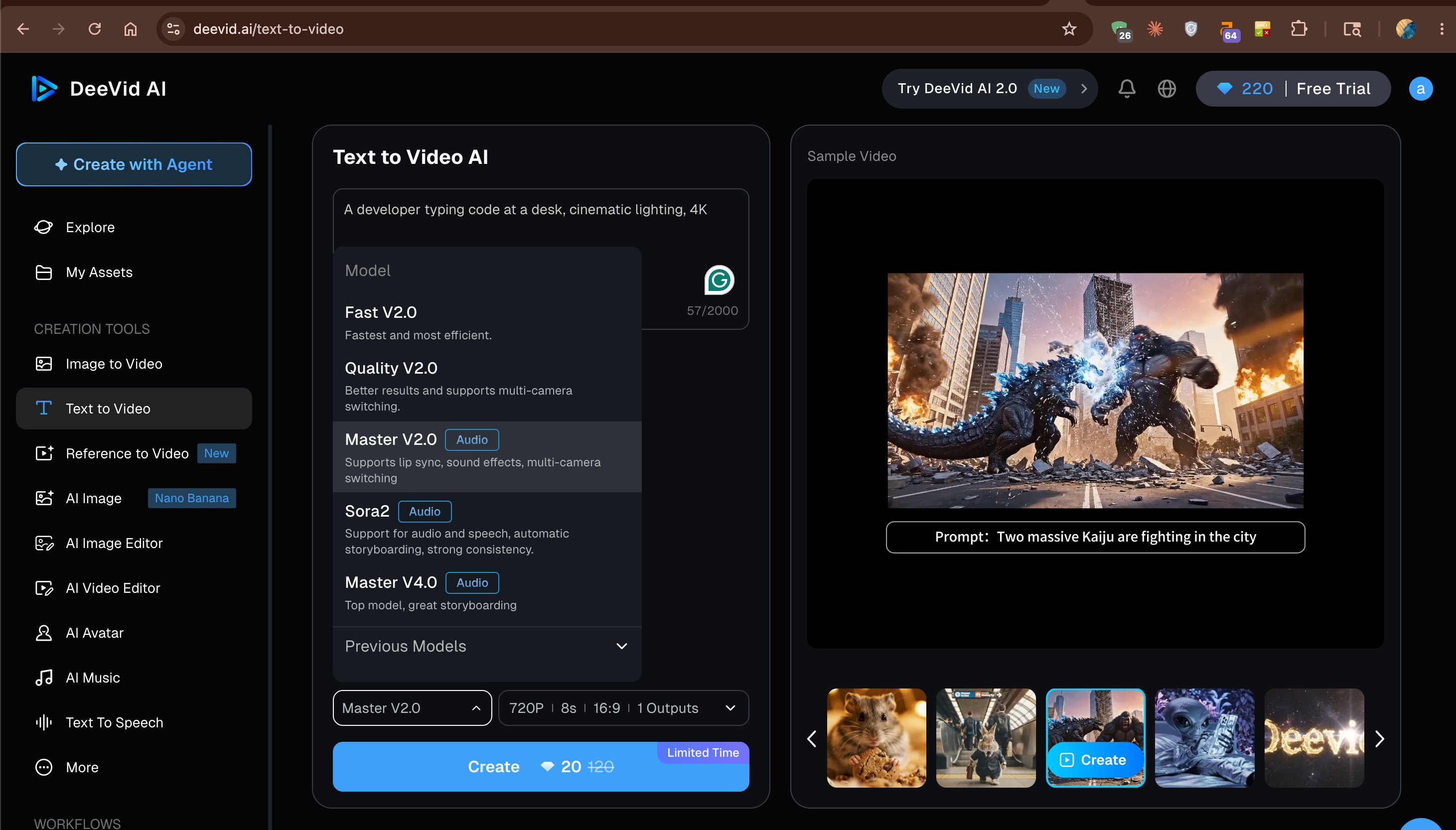
The primary test prompt across text-to-video tests: "A developer typing code at a desk, cinematic lighting, 4K." I used the same prompt on Sora2 and Master V2.0 to compare model outputs directly.

After four generations, I ended at 158 credits remaining. That is 62 credits consumed across four videos, which works out to roughly 15-16 credits per video averaged across the models I tested.

The generation speed was consistently under 15 seconds for text-to-video at 720P. Image-to-video took slightly longer due to the upload and processing step.

Testing the Models: Three Runs, Three Verdicts

DeeVid AI Model Comparison

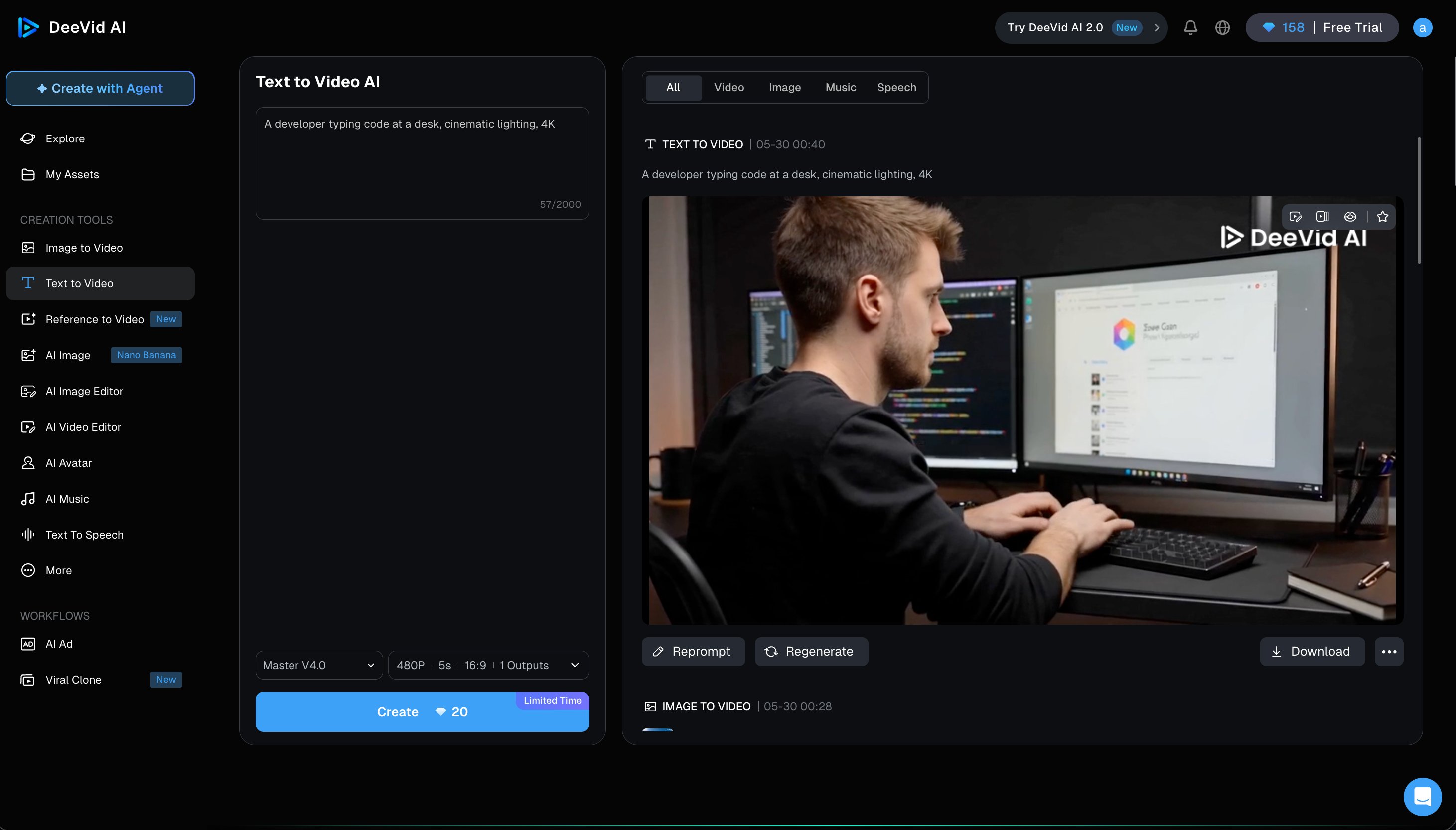
Sora2 (text-to-video): The cinematic lighting prompt registered correctly.

The desk environment was recognizable and coherent, with realistic monitor glow and desk clutter. The human figure showed slightly soft facial features around the eyes and chin.

Sora2's strength is consistency across longer clips and automatic storyboarding, not close-up human face realism.

Sora2 output: developer at desk, cinematic lighting — tested May 30, 2026

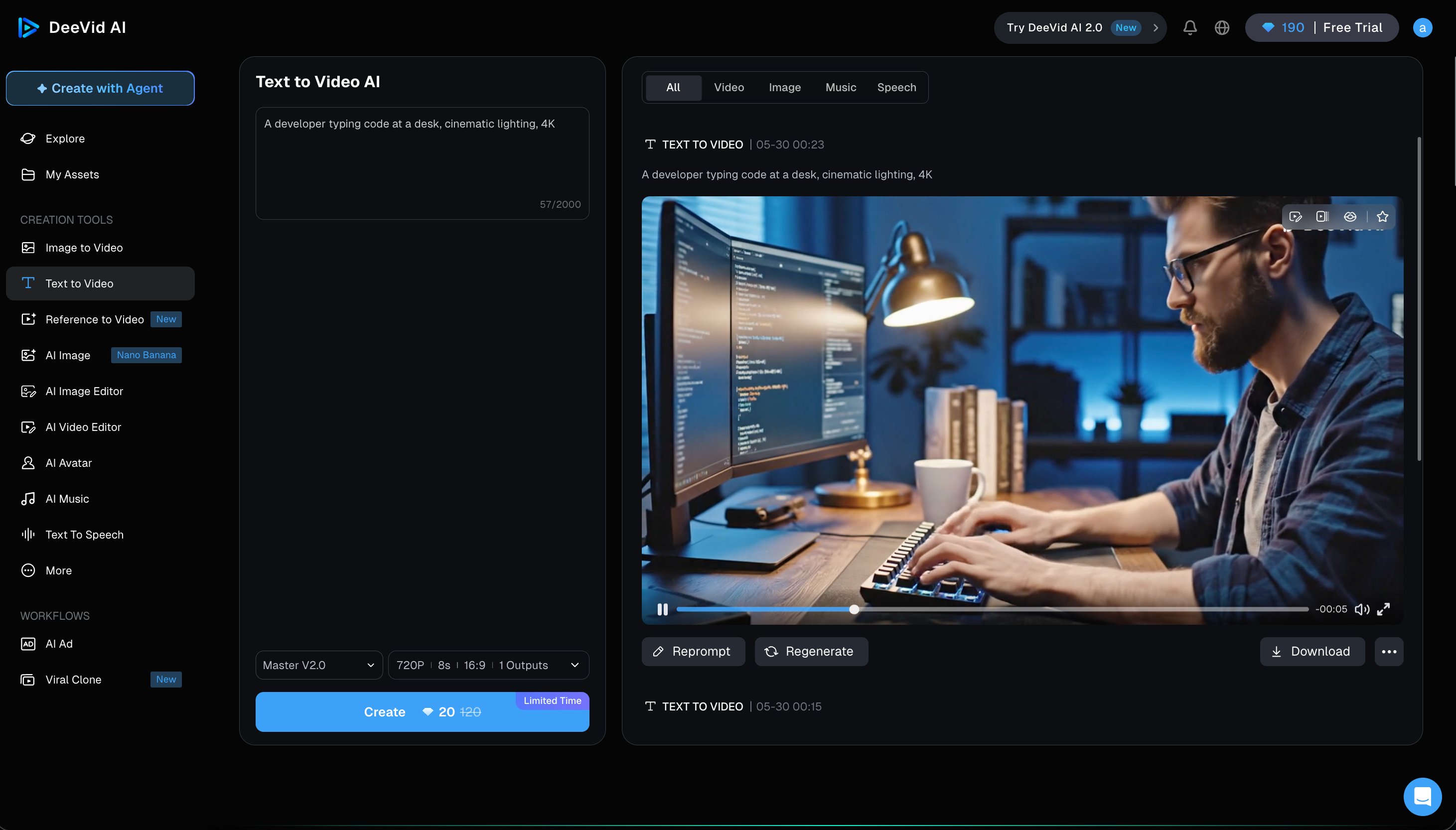
Master V2.0 (same prompt): The result was noticeably stronger. A male developer with clear facial features, natural hand positioning on keyboard keys, and well-executed blue ambient lighting.

The scene felt believable for the first few seconds. The hands were 90% correct, which is above average for AI video.

I would use Master V2.0 as the default model whenever a human appears in frame.

Master V2.0 output: developer at desk — noticeably better face and hands than Sora2

Master V4.0 (image-to-video): The strongest output of my testing session. DeeVid describes this as "top model, great storyboarding" and the image-to-video result supported that.

The subject stayed coherent throughout, motion felt natural, and there were no visible warping artifacts even at the edges of the frame.

This is the model to use when output quality matters most. The credit cost is higher, but the quality step up is clear.

Master V4.0 output: strongest result in testing — subject coherent, no warping artifacts

Where I was wrong before testing: I expected text-to-video to be DeeVid's headline feature since that is what the interface leads with. After testing, image-to-video with Master V4.0 is clearly where the platform's quality ceiling sits.

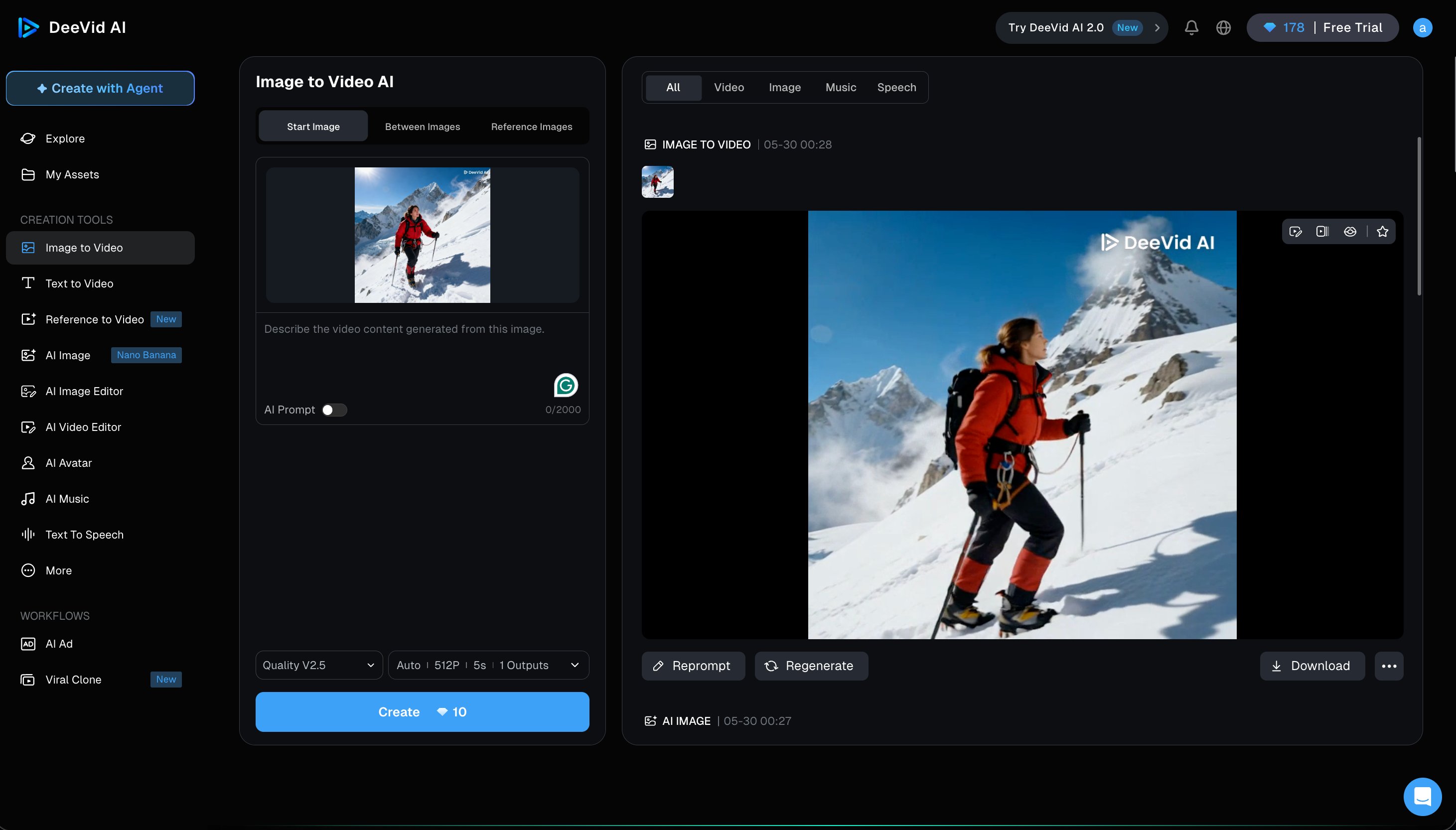
Image-to-video test: mountain climber still photo animated cleanly with Quality V2.5

The Nano Banana Surprise

Nano Banana Image Generation

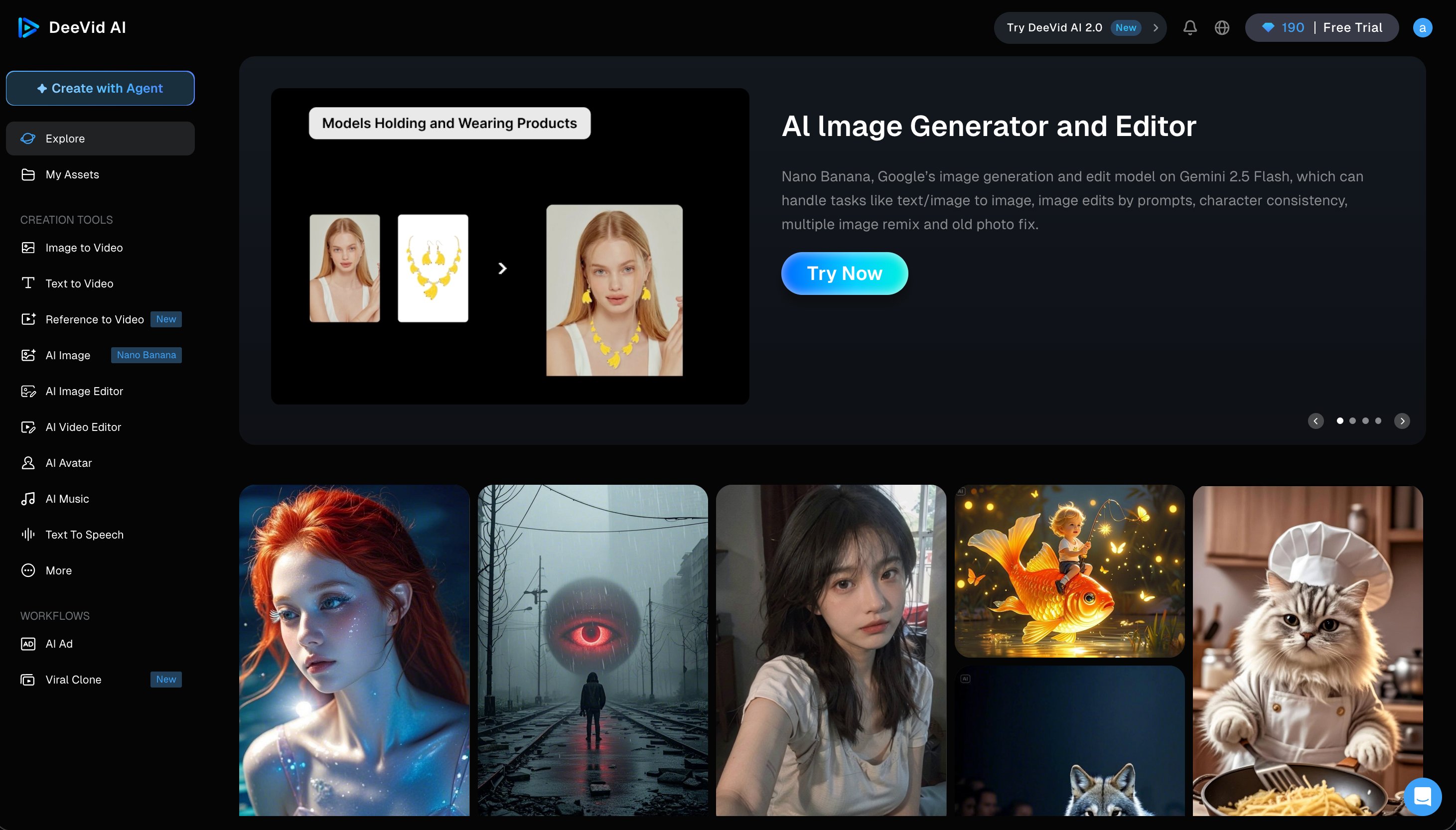
The Explore gallery revealed a feature I did not expect to be this strong.

DeeVid's AI Image tool uses Nano Banana, powered by Google Gemini 2.5 Flash. This is a licensing decision rather than a proprietary model. Instead of building their own image generator from scratch (which requires enormous compute and training data), DeeVid integrated one of the best available foundation models.

The gallery results reflect that quality. A fantasy portrait with dramatic side lighting that you would not be embarrassed to use in professional work. A photorealistic animal scene with accurate fur texture. A stylized sci-fi environment with coherent architecture.

Nano Banana gallery — powered by Google Gemini 2.5 Flash, high-quality image results These are not demo outputs that do not reflect actual tool capability.

For video creators, Nano Banana matters because it changes the workflow. Runway does not generate source images. Pika does not generate source images. With DeeVid, you can generate a character or product image with Nano Banana and animate it in the same session. The Image Editor and Reference to Video tools extend this further.

Reference to Video (marked New in the interface) uses a reference image to guide character consistency across multiple clips. This targets the core production problem with AI video at scale: characters look different from clip to clip.

I did not test this directly within my credit budget, but it addresses the right problem. For creators building brand content, consistency matters more than raw output quality on any single clip.

A brand mascot or product shot that stays visually coherent across ten clips is more valuable than one stunning clip followed by nine that look different. DeeVid's investment in Reference to Video suggests they understand where creator frustration is actually concentrated.

The Nano Banana integration also reduces the number of subscriptions a creator manages. Every separate tool means another login, another billing date, another support email. Consolidating image generation under the same platform removes that overhead, even if the image quality does not match a dedicated tool like Midjourney at equivalent prompting depth.

Pricing: The Real Issue

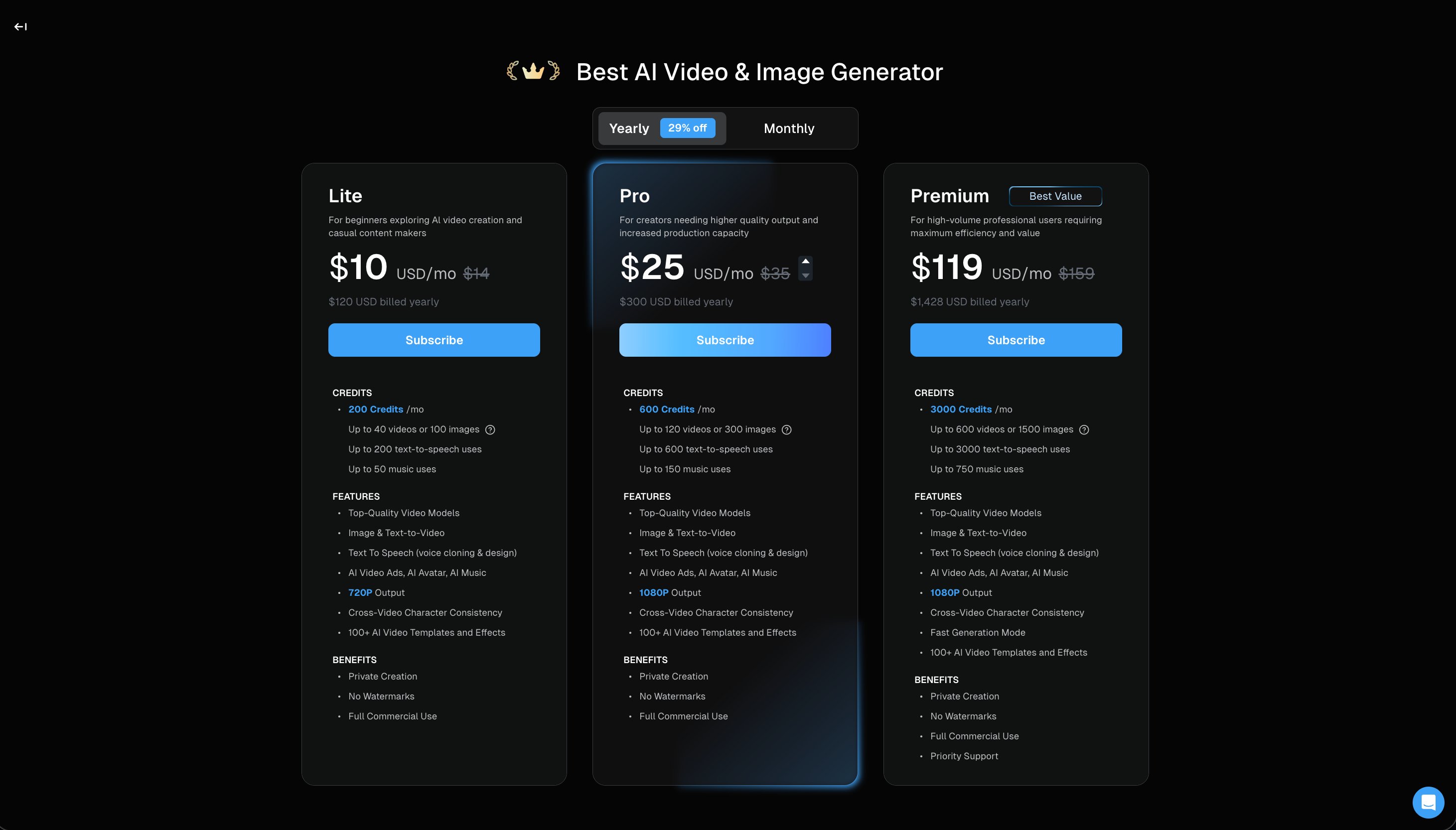
DeeVid AI Pricing Table

DeeVid AI operates on three paid tiers. There is no permanent free plan anywhere in the pricing structure.

The Lite plan costs $10/mo (≈₹930/mo) on annual billing, or $14/mo (≈₹1,302/mo) monthly. It provides 200 credits per month.

That covers up to 40 videos or 100 images, 200 text-to-speech uses, and 50 music uses. Output is limited to 720P. Full commercial use rights are included.

The Pro plan costs $25/mo (≈₹2,325/mo) annual or $35/mo (≈₹3,255/mo) monthly. Credits jump to 600 per month.

Pro unlocks 1080P output, 120 videos or 300 images, 600 text-to-speech uses, and 150 music uses. This is the minimum viable tier for any professional use case.

The Premium plan at $119/mo (≈₹11,067/mo) annual or $159/mo (≈₹14,787/mo) monthly gives 3,000 credits, 1080P output, Fast Generation Mode, and priority support.

The 720P ceiling on Lite is the pricing decision I would reconsider if I were DeeVid. In 2026, 720P looks noticeably soft on any modern display. Publishing 720P video to YouTube or Instagram in 2026 signals low production value before the viewer has formed an opinion about the content.

DeeVid AI pricing page — Lite $10, Pro $25, Premium $119 on annual billing

AI Avatar, AI Music, and Text to Speech

DeeVid Bundled Tools

Three features that no other AI video platform at this price includes.

AI Avatar creates an on-screen virtual presenter for your videos. For businesses producing explainer content, product walkthroughs, or training materials, this removes the need to appear on camera. Dedicated AI avatar tools like HeyGen charge $29/mo (≈₹2,697/mo) as a starting price. On DeeVid Lite, it is included.

AI Music generates original background tracks. The Lite plan gives 50 music uses per month.

That is 50 custom background tracks without any licensing cost. Replacing a Suno or Udio subscription with DeeVid's bundled music generation is a real workflow simplification for solo creators.

Text to Speech generates voiceover at up to 200 uses per month on Lite and 3,000 uses on Premium. For creators building complete videos with narration, this removes the need for a separate ElevenLabs subscription for basic voiceover work.

The bundled approach changes the value calculation significantly. A creator on DeeVid Pro at $25/mo (≈₹2,325/mo) is potentially replacing separate subscriptions to an AI video tool, an image generator, a music tool, and a text-to-speech service. If you use all four regularly, the math works in DeeVid's favor.

The Credit Economy Problem

Credit Economy Breakdown

Here is the math DeeVid does not surface prominently at signup.

The Lite plan headline is 200 credits per month. The pricing page shows this number in large text. What it does not show upfront is the per-model credit cost, which determines how many actually usable videos you can create.

Fast V2.0: 5 credits per video, giving you 40 videos per month from 200 credits. At one per day, you have 10 days of buffer.

Sora2: 10 credits per video. That is 20 videos per month, or one every 1.5 days.

Master V2.0: 20 credits per video. The Lite plan gives you 10 Master-quality videos per month - one every three days.

Master V4.0: Approximately 30-40 credits per video based on my usage data. From Lite's 200 credits, you get 5-6 Master V4.0 videos per month.

I confirmed the drain rate through my own testing. Starting at 220 credits, four generation tests brought me to 158. That is 62 credits for four videos, which tracks with the per-model pricing.

For any creator posting daily or near-daily, the Lite plan does not work with quality models. Pro at $25/mo (≈₹2,325/mo) and 600 credits gives you 30 Master V2.0 videos per month, which covers daily posting.

The credit system is not dishonest. But checking the per-model cost before subscribing, rather than trusting the 200-credit headline, is essential to avoid disappointment.

DeeVid vs Runway vs Pika

DeeVid vs Competitors

Three tools at similar price points. Each wins at something specific.

DeeVid vs Runway: Runway's Gen-3 Alpha model produces higher quality output on complex cinematic scenes. Multi-subject shots, effects-heavy prompts, and long-form video consistency all go to Runway. DeeVid's Master V4.0 is competitive on simple human scenes but falls behind on anything requiring nuanced motion or lighting across a longer clip.

Runway starts at $15/mo (≈₹1,395/mo) with 625 monthly credits on their Standard plan. DeeVid starts at $10/mo (≈₹930/mo) with 20 trial credits. For pure output quality, Runway wins. For bundled creative tools and volume, DeeVid wins clearly.

DeeVid vs Pika: This is the closer comparison at the $10/mo (≈₹930/mo) entry tier.

Pika has a free tier with 80 one-time credits (watermarked, 480P only, no commercial use). DeeVid gives 20 trial credits. Neither is a working free tool — both are evaluation tiers. The difference is Pika's 80 credits go further than DeeVid's 20 for initial testing.

The decision is clear: if you need motion effects (zoom, morphing, explosions), use Pika. If you need one platform for images, video, music, and voiceover, use DeeVid.

On 1080P price comparison: Runway at $15/mo gives 1080P on their standard plan. Pika at $10/mo gives 1080P on their basic plan. DeeVid requires $25/mo for 1080P. On this metric, DeeVid is the most expensive path to 1080P despite the lower starting price.

The nuance worth understanding: DeeVid's $25/mo Pro includes image generation, music creation, and text-to-speech that neither Runway nor Pika include. If you are currently paying for any of those separately, the combined cost comparison changes significantly.

A creator paying $10/mo for Pika, $5/mo for ElevenLabs Starter, and $5/mo for a music tool is spending $20/mo for three separate subscriptions that DeeVid Pro consolidates at $25/mo. The $5 premium buys you 1080P video output instead of Pika's free-tier output, and you eliminate two login portals from your workflow.

This is the calculation DeeVid is banking on. The standalone video quality is not the argument. The all-in-one value case is.

Whether that value case holds depends on how often you use each bundled tool. Paying $25/mo for video and never using the music or voice features means you are overpaying for video versus using Pika directly. Using all three tools regularly means you are consolidating intelligently.

The Catch Nobody Talks About

DeeVid AI Catches

Credits drain faster than the pricing page implies.

The 200-credit Lite headline translates to 10 Master V2.0 videos per month. Most creators who sign up expecting generous allowances discover this within the first session.

720P in 2026 is a publishing problem.

Social platforms render at 1080P. YouTube flags 720P as standard definition. Publishing 720P content as a creator signals low production value before the viewer has finished watching. The $10/mo Lite tier is effectively a trial with monthly billing for anyone who cares about output quality.

The watermark stays on all trial outputs.

Every video generated on trial credits shows a visible DeeVid AI watermark in the top right corner. This is standard practice across AI video tools, but it means your ability to evaluate DeeVid's quality for professional use does not start until after you have paid.

No refund policy is prominently displayed.

DeeVid's website does not surface a clear refund or cancellation policy on the pricing page. If you subscribe and find the credit allocation insufficient, the path to resolution is not immediately clear.

The platform is mid-transition.

DeeVid 2.0 is in active development. The interface you subscribe to today may look substantially different within months. For new users, this creates some uncertainty about the product you are committing to.

Not sure which AI tool fits your workflow?
Answer 5 quick questions — we'll recommend the AI that matches how you actually work.
Take quiz →

DeeVid AI 2.0: What Is Changing

DeeVid 2.0 Roadmap

The "Try DeeVid AI 2.0" button in the top navigation and the "Create with Agent" primary CTA both signal an active platform transition that is already partially visible.

DeeVid 2.0 is moving toward agentic video creation. The current interface asks you to manually select a model, set resolution, choose duration, and configure outputs. DeeVid 2.0 appears to replace this with a prompt-first workflow where you describe what you want to create and the system orchestrates tools automatically.

This mirrors the direction Runway is heading with Act One and Act Two, and reflects where the broader AI video market is going after the release of tools like Claude Code's Dynamic Workflows and Perplexity Computer.

For users evaluating DeeVid now: the agentic 2.0 workflow could eliminate most of the current friction around model selection and credit management. If it delivers, the platform becomes significantly easier to use. If DeeVid 2.0 also introduces new pricing tiers, current subscribers may face upgrade decisions.

Signing up during a platform transition is a calculated risk. The upside is potentially getting in before pricing increases that often accompany major product relaunches.

Who Should Use DeeVid AI

DeeVid Right Fit

DeeVid AI works best for solo creators who need video, image generation, voiceover, and background music from a single subscription.

Social media creators producing YouTube Shorts, TikToks, or Instagram Reels who want an all-in-one creative suite will find DeeVid's bundled tools a meaningful simplification. The AI Ad and Viral Clone workflow tools confirm this is the intended audience.

Small business owners creating occasional product videos or marketing assets can get real value from Lite at $10/mo (≈₹930/mo) if they plan credit usage carefully and accept 720P output.

Agencies or freelancers who need to show clients polished video work should start at Pro ($25/mo, ≈₹2,325/mo) for 1080P and sufficient monthly credits.

Who Should Look Elsewhere

When to Choose a Competitor

Quality-first video creators should use Runway at $15/mo (≈₹1,395/mo). Complex cinematic scenes, multi-subject shots, and effects-heavy work all produce better results on Runway's Gen-3 Alpha.

Creators who want more trial credits before committing should check Pika (80 one-time credits) or Runway (125 one-time credits), both of which give more runway to evaluate quality than DeeVid's 20 trial credits.

Developers building API-powered applications should look elsewhere entirely. DeeVid does not publish public API documentation, which makes it unsuitable for programmatic use.

Anyone posting daily who wants Master V2.0 or V4.0 quality needs to budget for Pro ($25/mo, ≈₹2,325/mo) before subscribing. Ten Master V2.0 videos per month from the Lite plan does not support a daily content schedule.

DeeVid for Specific Creator Workflows

DeeVid by Creator Type

The platform's feature set maps differently depending on what kind of creator you are.

YouTube Shorts and TikTok creators: DeeVid's strongest use case. Short-form video, typically 15-60 seconds, does not expose DeeVid's limitations on longer clip consistency. AI Music removes the need to find royalty-free tracks manually. Text to Speech handles voiceover without expensive narration tools. The Viral Clone workflow tool suggests DeeVid has studied what short-form content patterns perform well and built creation shortcuts around them.

For this use case, Pro at $25/mo (≈₹2,325/mo) gives you 30 Master V2.0 videos per month at 1080P. That covers daily posting with some room for revision.

Product demo creators: Image to Video is the strongest feature for this workflow. A product photo can become an animated demo without a video shoot. Master V4.0's consistency on the input subject means the product stays recognizable throughout the clip. For e-commerce sellers, cosmetic brands, or anyone selling physical products online, this is a workflow that used to require a videographer. DeeVid handles it at $25/mo (≈₹2,325/mo).

Training and explainer video creators: AI Avatar removes the need to appear on camera. Text to Speech provides natural narration. AI Music handles background audio. For an HR professional, a startup founder, or an educator creating internal training content, DeeVid bundles everything needed for a complete explainer video at Lite pricing.

Brand content agencies: The monthly credit cap is where agency use breaks down. An agency serving multiple clients needs reliable monthly output volume. At Pro's 600 credits and 30 Master V2.0 videos, one client campaign can exhaust a month's credits. Premium at $119/mo (≈₹11,067/mo) with 3,000 credits is more realistic for agency volume, but that price point competes with professional video production tools that agencies already use.

The India Angle: What DeeVid Costs a Creator Here

DeeVid INR Pricing

INR pricing matters because $10/mo looks different to someone earning in USD versus INR.

Lite at $10/mo is ≈₹930/mo on annual billing. Pro at $25/mo is ≈₹2,325/mo. Premium at $119/mo is ≈₹11,067/mo.

For context: a mid-range Indian content creator earning ₹30,000-50,000 per month from social platforms is looking at Lite consuming 1.9-3.1% of gross monthly income. That is a defensible spend if DeeVid actually replaces multiple tool subscriptions.

At Pro (≈₹2,325/mo), the question is whether the bundled tools actually replace separate subscriptions. If a creator is currently paying for a video tool, a voice tool, and a music tool separately, those three alone might total ₹3,000-5,000/mo depending on which tools they use. DeeVid Pro consolidating that to ≈₹2,325/mo is a saving.

The catch is quality trade-offs at each bundled category. ElevenLabs Starter at $5/mo (≈₹465/mo) produces noticeably more natural voice than most built-in TTS systems. If voice quality matters for your content, DeeVid's included TTS may not be a true replacement.

The calculation works best for creators who prioritize convenience and cost minimization over best-in-class quality at every category. For a solo creator in India building a content business from scratch, DeeVid Pro at ≈₹2,325/mo is a reasonable starting platform.

One consideration specific to India: credit purchases (if DeeVid offers them separately from subscriptions) would be subject to GST at 18%, adding to the effective cost. Subscription pricing typically includes applicable taxes in the displayed price, but additional credit packs may vary. Checking the invoice before committing to a subscription is worth the two minutes.

The annual billing discount of 29% is significant at Indian income levels. Paying ₹11,160/year upfront for Lite versus ₹14,400/year on monthly billing is a ₹3,240 difference. For a creator who has tested DeeVid on trial credits and decided it fits their workflow, locking in annual pricing makes financial sense.

DeeVid's platform is available without VPN in India. Generation speeds were acceptable during my testing - under 15 seconds for text-to-video at 720P. Latency from Indian connections to DeeVid's servers did not affect usability noticeably during my testing session.

What I Tested That Surprised Me

Where I Was Wrong

Coming into this review, I expected DeeVid to be a commodity AI video tool - similar output quality to Pika at a similar price with minor interface differences.

Three things surprised me.

First, Master V4.0's image-to-video quality was stronger than I expected for a platform at this price point. The mountain climber test produced motion that held up the subject coherently across a 5-second clip, which is harder than it sounds. Many tools at this price warp the subject or introduce artifacts by the second second.

Second, the Nano Banana image integration is a useful workflow addition with real impact. Not because the images are better than dedicated tools like Midjourney, but because generating an image and animating it in the same session removes a friction point that slows down solo creators.

Third, the credit pricing is more limiting than I expected after reading the pricing page. 200 credits sounds like a meaningful monthly allowance until you learn that Master V2.0 costs 20 credits per video. Discovering this during a testing session rather than at signup felt like information that should be more visible upfront.

Where I was wrong: I assumed text-to-video would be DeeVid's headline strength because it is listed first in the interface. After testing, image-to-video is where the quality ceiling is actually higher. The interface order does not reflect the quality hierarchy.

A fourth thing that surprised me: the generation speed. At under 15 seconds for a 720P, 10-second video, DeeVid is faster than I expected. Runway Gen-3 Alpha can take 30-60 seconds for similar output. Speed matters when you are iterating on a prompt and running six generations to find the right output. DeeVid's generation loop is fast enough that prompt experimentation feels efficient rather than painful.

The fifth surprise was the interface cleanliness. Many AI creative tools at this price point feel like MVPs: buttons that do not quite align, settings that reset unexpectedly, outputs that take too long to appear. DeeVid's interface is polished. The sidebar navigation is clear, the generation settings are predictable, and the output history is organized by type (Video, Image, Music, Speech tabs across the top). For a non-technical creator, this is the daily experience of the tool, and it is better than the price suggests.

A sixth thing worth noting: DeeVid's customer support reached out proactively after I signed up for testing. Florian from their team credited 200 additional credits within 24 hours of my initial contact. For a small company competing with Runway and Pika, this level of responsiveness is a meaningful differentiator. Tools you can actually get support from are worth more than tools that have better benchmarks and no human on the other side.

Final Scores

DeeVid AI Final Scores

The 35/100 free tier score reflects the category reality: AI video tools do not offer meaningful free tiers the way text AI tools like ChatGPT do. DeeVid's 20 trial credits cover 1-2 videos. Pika, Runway, and Kling all offer trial or limited credit allowances. None offer unlimited free generation. DeeVid sits at the lower end of the category on this metric.

The 72/100 output quality reflects Master V4.0's ceiling on human scenes, discounted for Fast V2.0's lower quality that most trial users see first, and for the 720P ceiling on the entry plan.

The 58/100 value score reflects the credit math. At Pro ($25/mo, ≈₹2,325/mo), DeeVid is more expensive than Pika for fewer 1080P videos. The bundled tools offset this only for creators who actively use image generation, music, and voice features.

The 80/100 ease of use reflects a clean, well-organized interface with no unnecessary complexity. Model selection is clear, the generation flow is simple, and the sidebar navigation makes tool discovery easy for new users.

Bottom line: DeeVid AI is the best all-in-one AI video platform under $25/mo for solo creators who need video, image generation, music, and voiceover in one subscription. The credit system needs more transparency and Lite's 720P ceiling is a real limitation, but image-to-video quality and bundled tools make it worth considering for occasional creators.

FAQ

Does DeeVid AI have a free plan?

No permanent free plan. DeeVid gives 20 trial credits on signup. Pika gives 80 one-time trial credits. Runway gives 125 one-time lifetime credits. All three are evaluation tiers, not working free tools. This is a category-wide limitation for AI video generators.

Which DeeVid model should I use?

Master V4.0 for best quality, especially on image-to-video. Master V2.0 for text-to-video scenes with humans. Sora2 for multi-clip consistency. Fast V2.0 for quick drafts and abstract scenes only.

How many videos can I make on the Lite plan?

With Master V2.0 at 20 credits each and 200 credits per month, you get 10 quality videos. With Fast V2.0 at 5 credits you get 40 lower-quality videos. The pricing page shows credit counts prominently but does not surface per-model costs upfront.

Is DeeVid AI watermarked?

Yes, on trial credits. All paid plans (Lite, Pro, Premium) remove the watermark and include full commercial use rights.

How does DeeVid compare to Runway?

Runway produces higher output quality on complex scenes. DeeVid is cheaper at entry level and bundles image generation, music, and voice tools that Runway does not include. For pure video quality, Runway wins. For feature breadth at a similar price, DeeVid wins.

Can DeeVid AI generate images?

Yes. The AI Image feature uses Nano Banana, powered by Google Gemini 2.5 Flash. The Explore gallery shows strong results across portrait, landscape, and stylized content. This is a meaningful differentiator versus video-only tools.

What is the minimum plan for 1080P output?

Pro at $25/mo (≈₹2,325/mo). Lite restricts all output to 720P regardless of model or resolution settings attempted.

Is DeeVid AI good for YouTube content?

Decent at Pro tier for 1080P output. The AI Ad and Viral Clone workflow tools target social content specifically. Bundled music and voiceover make it a viable one-stop platform for YouTube Shorts creators who post a few times per week.

Does DeeVid AI offer an affiliate program?

Yes. DeeVid AI has both an affiliate program and an ambassador program offering commissions on referrals. Contact their team via deevid.ai for current commission rates and program details.


Last updated: May 2026. Prices converted at ₹93/USD.

Related Reading: Runway Review | Pika Review | ElevenLabs Review | HeyGen Review | Best AI Video Generators 2026 | Sora vs Runway vs Pika

What to read next

Best Of

Best AI Video Generators

Apr 2026

Read →
Compare tools →Find your tool →
Was this review helpful?
How does DeeVid AI compare?
Pick another tool and see scores side-by-side
Compare →
← All reviews
Tested and reviewed by Ash · Last updated: 2026-05-30Pricing verified at ≈₹93/USD · Scores based on hands-on testing