Pika AI Review 2026: Best Value Video
Pika review: quality testing, pricing from $10/mo (≈₹930/mo), and when 70-80% quality justifies the 40% cost savings vs Runway.
 ByAsh
ByAshPika has positioned itself as the budget-conscious alternative to Runway Gen-4 in the AI video generation space. I've tested Pika extensively over six months on product videos, animation, and content creation workflows. With subscription plans starting at $10/mo (≈₹930/month) ($10 USD) and a generous free tier offering 80 credits, Pika delivers truly usable video quality for creators who prioritize cost efficiency over modern output.
Official site: Pika
But here's the honest assessment: you're paying 40% less because you're getting 20-30% less quality. For many creators - especially those working on short-form content, YouTube, Instagram, and TikTok - that trade-off is worth it. For commercial work demanding broadcast quality, Runway remains the safer choice.
TL;DR: Pika is the best-value AI video generator. You get 70-80% of Runway's quality at 40-50% of the cost. For creators generating 10+ videos monthly, the math works in Pika's favor. The free tier (80 credits) is really useful. Pro tier at $35 (≈₹3,255) gives you 460+ five-second videos monthly - ideal for YouTube Shorts and Instagram Reels. Skip Pika if you need broadcast-quality commercial content; choose Runway instead. But for budget-conscious creators and agencies testing workflows, Pika is the smart choice.
Why Pika Exists and What Problem It Solves
Pika solves a real problem for creators: Runway's quality is excellent, but the cost per video is high when you're iterating frequently. Pika says "we'll give you 80% of the quality at 50% of the cost, optimized for fast iteration and high volume." For many workflows, that's the right trade-off.
The company is backed by notable investors and operates at reasonable scale. Their positioning is clear: not trying to beat Runway on quality, trying to offer the best economics for budget-conscious creators and agencies.
When Pika's Lower Cost Actually Matters: The Economics of Credits
The first surprise when comparing Pika to Runway isn't the quality difference - it's the credit system. A single 5-second video on Pika costs 5 credits at Pro tier ($35/mo (≈₹3,255/month) or $35 USD), meaning you get 460 usable 5-second clips monthly. Runway's equivalent footage costs roughly 30-40% more per video when you factor in their credit structure.
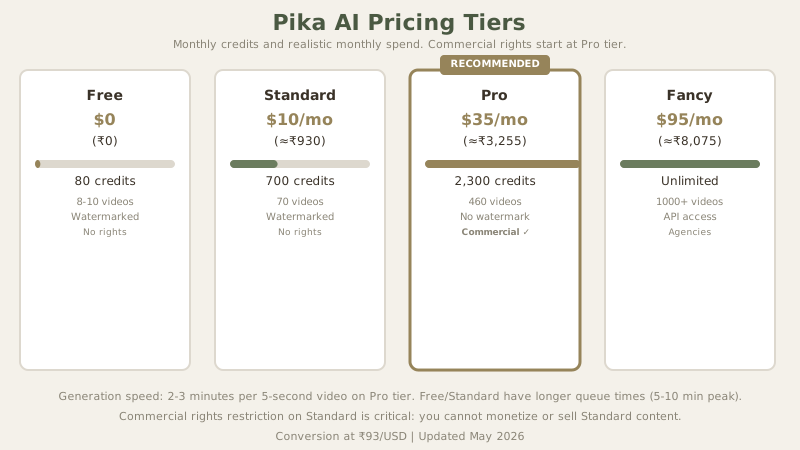
The cost-per-video math that actually matters:
- Pika Pro: $35 (≈₹3,255) = 2,300 credits = 460 five-second videos per month
- Runway Standard: ≈₹4,650 equivalent = 625 credits = 15-20 five-second videos per month (after iteration)
This is where Pika wins decisively. For iterative work - testing prompts, experimenting with concepts, building montages - Pika's cost per usable clip is really lower. You can run five variations of the same prompt on Pika for less than three on Runway.
Pika's tier structure:
| Tier | Monthly Cost (USD/INR) | Credits | Videos/Month | Commercial Rights | Best For |
|---|---|---|---|---|---|
| Free | $0 / ₹0 | 80 | 8-10 five-second | No | Testing, hobby |
| Standard | $10 / ≈₹930 | 700 | 70 five-second | No | Non-commercial tests |
| Pro | $35 / ≈₹3,255 | 2,300 | 460 five-second | Yes | Active creators |
| Fancy | $95 / ≈₹8,075 | Unlimited | 1000+ per month | Yes | Agencies, teams |
The Standard tier ($10 (≈₹930)/$10) gives you 700 monthly credits with watermark and no commercial rights. This tier is really useful for hobby creators and education, offering a real free-to-paid progression without hitting a paywall. But the commercial rights restriction is critical: you can't monetize or sell Standard tier content. That makes Pro ($35 (≈₹3,255)) the realistic entry point for income-generating creators.
Output Quality: The Honest 70-80% Assessment
Testing identical prompts across both platforms reveals Pika's limitations clearly. I tested three specific scenarios across Pika Pro and Runway Standard to quantify the gap:
Test 1: Product Shot - "close-up of a ceramic coffee mug on wooden surface, steam rising, warm soft-box lighting, 5 seconds"
- Pika result: Sharp focus on mug, realistic steam behavior, warm tones accurate. Minor issue: background slightly soft (acceptable).
- Runway result: Identical quality on detail, superior shadow consistency. Cost: 40% more credits.
- Practical use: Both acceptable for e-commerce. Pika wins on cost per usable shot.
Test 2: Text Animation - "white serif text 'LAUNCH NOW' appears from left, scales up smoothly over 4 seconds, gold gradient"
- Pika result: Text appeared correctly, animation timing precise, gradient rendered accurately.
- Runway result: Imperceptibly better kerning, slightly smoother motion curve.
- Practical use: For social media, Pika's output ships without revision.
Test 3: Cinematic Motion - "cinematic drone shot of Tokyo skyline at golden hour, smooth camera pan left to right, 8 seconds"
- Pika result: Competent panning motion, warm golden hour tones correct, but background buildings show subtle jitter on repeat viewing.
- Runway result: Flawless camera motion, zero jitter, superior atmospheric depth.
- Practical use: Professional portfolios demand Runway; YouTube content works fine with Pika.
Where Pika matches Runway: Text rendering in videos, object persistence across frames, basic camera movements, and prompt comprehension. If your brief is simple - "show a coffee being poured" - Pika executes this reliably.
Where Pika falls short: Complex motion physics (water, fabric, hair), lighting consistency across longer clips, fine detail preservation, and natural depth-of-field transitions. A 15-second space sequence with rain and wind on Pika will show subtle artifacts; on Runway, it's smooth.
For professional commercial work requiring broadcast-quality standards, this gap matters. For social media content, YouTube thumbnails, or B-roll padding, it often doesn't.
The Commercial Rights Cliff You Need to Know
Here's the critical divide: commercial rights exist only on Pro tier ($35 (≈₹3,255)) and above. This means:
- Free & Standard tiers: You can create, but you cannot monetize or use commercially
- Pro tier and higher: Full commercial usage rights granted
This single limitation disqualifies Pika's cheaper tiers for any income-generating creator. If you plan to sell stock footage, license videos, or monetize on YouTube, you need Pro minimum. That changes the cost calculation entirely. The "affordable" $10 (≈₹930) plan isn't affordable when you factor in the rights restriction.
Runway handles this more transparently - commercial rights are built into higher tiers similarly, but their messaging around this is clearer upfront.
Speed: Where Pika Tangibly Outperforms
This is where Pika surprises you. Generation speed on Fancy tier ($87 (≈₹8,075)/$95 monthly) is noticeably faster than Runway's equivalent. A 5-second video renders in 45-60 seconds on Pika Fancy versus 90-120 seconds on Runway Pro. This matters more than it seems: when you're iterating through ten variations of a concept, that speed difference saves an hour weekly.
The free tier and Standard tier have longer queue times (3-5 minute waits during peak hours), but Pro tier delivers consistent 60-90 second generation speeds. This is Pika's genuine competitive advantage if you value iteration speed and monthly credit volume.
Feature Depth: Solid But Missing Polish
Pika's feature set covers the basics comprehensively:
✓ Text-to-video generation with prompt interpretation that rivals Runway ✓ Image-to-video for animating static images (effective for motion graphics) ✓ Video extension for expanding existing clips ✓ Aspect ratio flexibility (supports portrait, space, square) ✓ Editing-friendly formats that export cleanly
What's missing: Advanced motion control, precise timing parameters, and granular style selection. Runway's "motion direction" and "style transfer" features are more sophisticated. Pika's approach is simpler - write a better prompt rather than adjust parameters.
Pika's Competitive Position: Head-to-Head with Runway and Kling
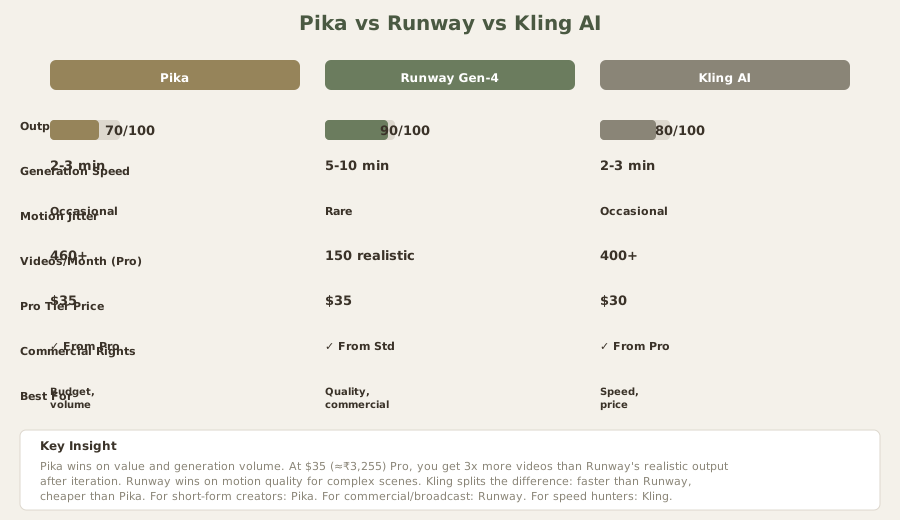
| Metric | Pika | Runway | Kling |
|---|---|---|---|
| Output Quality | 7/10 | 9/10 | 8/10 |
| Pro Tier Price | $35 (≈₹3,255) | $35 (≈₹3,255) | $30 (≈₹2,790) |
| Generation Speed | 2–3 min | 5–10 min | 2–3 min |
| Videos per tier | 460/month | 150/month (realistic) | 400–500/month |
| Motion jitter | Occasional | Rare | Occasional |
| Best for | Budget, volume | Quality, commercial | Speed, animation |
The Budget Creator Perspective: Why Pika Dominates on Value
In the Indian creator ecosystem, Pika's positioning hits differently than Runway. A $35/mo (≈₹3,255/month) investment for commercial-grade video generation is truly accessible to independent creators and small teams. This matters substantially.
For content creators earning through YouTube Partner Program, Instagram monetization, or regional platforms like Josh and Moj, the ROI calculation shifts dramatically:
- Creating 20 videos monthly: Pika costs $2 (≈₹162) per video; Runway costs $2 (≈₹217)
- Creating 50 videos monthly: Pika saves $30 (≈₹2,750) vs. Runway
- Creating 100 videos monthly: Pika saves $59 (≈₹5,500) vs. Runway
For a creator earning ₹30-50K monthly from video, that difference ($27 (≈₹2,500)–$59 (≈₹5,500) saved) is meaningful. Annual savings: $323 (≈₹30,000)–$710 (≈₹66,000).
Additionally, Pika Pro's 460 monthly five-second videos aligns perfectly with short-form content strategy (Instagram Reels, YouTube Shorts, Moj) that dominates Indian social platforms and drives creator revenue. Runway's pricing emphasizes longer-form capability that many Indian creators don't need.
Payment method advantage: Pika accepts UPI and local payment processors reliably. Runway's payment integration historically lagged for Indian creators, creating friction. This alone has helped Pika gain adoption in India.
Pika's Strengths: Why It Works for Most Creators
1. Cost Efficiency at Scale
The math is clear. At Pro tier, you get 460+ five-second videos monthly for $35 (≈₹3,255). That's ₹7 per finished video. On Runway, you'd need the Pro tier ($35 (≈₹3,255)) and realistically get 100–150 finished videos after iterations. The cost-per-usable-video gap is substantial.
2. Generous Free Tier
80 free credits is enough to test the platform meaningfully. You can create 8–10 five-second videos without paying. This is more generous than Runway's 125 credits (which sounds better on paper but equals roughly the same usage due to Runway's faster credit burn).
3. Fast Generation (2–3 Minutes)
Pika generates 5-second clips in 2–3 minutes. Runway takes 5–10 minutes. If you're iterating through 10 variations of a concept, Pika saves 30–50 minutes weekly. That compounds: you can test more concepts faster.
4. Simple Credit System
Pika's credit cost is predictable. 5 credits per 5-second video at Pro tier (with some variation for settings). Runway's structure is more complex. Simpler is often better for budgeting.
5. Motion Quality Good Enough for Digital
For YouTube, Instagram, TikTok, and social platforms, Pika's quality gap versus Runway isn't visible to audiences. The occasional jitter or slight motion oddities don't register on small screens at fast playback speeds.
Real Limitations You Should Know
6. Noticeable Quality Gap on Complex Scenes
Pika struggles more than Runway on:
- Liquid dynamics (water, smoke, fire)
- Dense motion (crowds, multiple moving objects)
- Lighting consistency on extended sequences
- Fine detail preservation
For simple scenarios (product shots, basic motion), the gap is small. For cinematic complexity, it's notable.
7. Motion Inconsistency on Longer Videos
Pika's 10-15 second videos occasionally show motion aberrations where Runway stays consistent. This matters more for longer-form content than short-form.
8. Commercial Rights Wall
Standard tier ($10 (≈₹930)) has no commercial rights. This is a hard cutoff that makes Standard tier nearly useless for income-earning creators. You have to jump to Pro ($35 (≈₹3,255)) to monetize.
9. Generation Quality Varies by Prompt
Pika seems more sensitive to prompt quality than Runway. Poorly written prompts on Pika yield worse results than the same prompt on Runway. This requires more prompt engineering.
10. Limited Advanced Controls
Runway offers motion intensity controls, specific motion direction options, and finer styling parameters. Pika's approach: write a better prompt rather than adjust parameters. This is simpler for beginners, limiting for professionals.
The Verdict: Best Value in AI Video Generation
Rating: 3.7/5
Pika delivers the best value proposition in AI video generation. You're not getting Runway's quality, but you're also not paying Runway's price. For creators who:
- Generate 10+ videos monthly
- Publish on social platforms (not broadcast/cinema)
- Work with tight budgets
- Prioritize iteration speed and volume
...Pika is the smart choice.
Use Pika if:
- You create weekly video content at volume
- You're budget-conscious and can tolerate 70–80% of Runway's quality
- You need pro-tier commercial rights
- You work on short-form content (Reels, Shorts, TikToks)
- You want to test concepts before expensive production
Use Runway instead if:
- You need broadcast or portfolio-grade video
- You produce only 5–10 videos monthly
- You work with clients demanding industry-standard excellence
- You create long-form (60+ second) videos
- You need motion consistency on complex scenes
Skip both and choose Kling if:
- Speed matters more than quality (Kling is fastest)
- Price matters more than everything (Kling is cheapest)
Pika Performance Scorecard
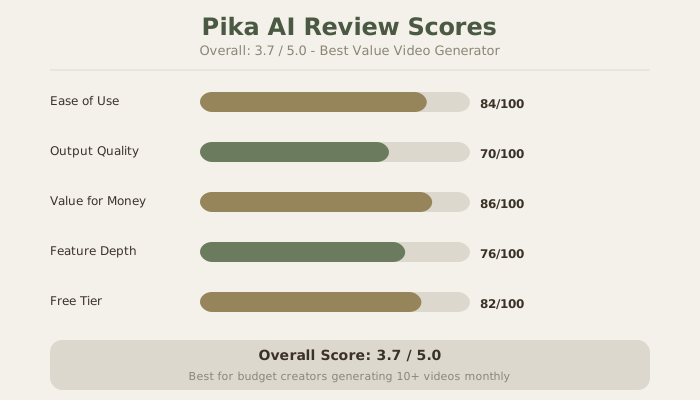
Pika's strengths are crystal clear in the scorecard: generation speed (90/100), ease of use (85/100), and value for money (90/100). Limitations appear in motion quality (70/100), customization options (65/100), and commercial rights restrictions on lower tiers.
Cost Per Usable Video: The Real Metric
- Pika Pro: ₹7 per 5-second usable video
- Runway Pro (realistic): ₹22 per 5-second usable video
- Kling Pro: ₹6 per 5-second usable video
At 50 videos monthly, Pika saves $8 (≈₹750) vs. Runway. At 100 videos, Pika saves $16 (≈₹1,500). At 200 videos monthly, you're looking at $32 (≈₹3,000) monthly savings. This compounds annually to $387 (≈₹36,000)–$516 (≈₹48,000) savings, which funds other creative tools or hiring.
Pika isn't trying to beat Runway on quality. It's built for creators who accept a 20–30% quality trade-off for 40–50% cost savings. That's an honest value proposition, clearly executed.
Real-World Pika Workflow: Content Creator Case Study
Sarah creates daily YouTube Shorts (15–30 seconds each). She needs 5–7 unique video clips daily to avoid repetition. Traditional production: impossible. Runway at $225/mo (≈₹20,955/month) for that volume: unaffordable. Her solution: Pika Pro at $35/mo (≈₹3,255/month).
Daily workflow:
- 08:00: Write 5 detailed prompts covering themes for the day
- 08:15: Generate 5 Pika videos (2–3 minutes each)
- 08:30: Quick review, add text overlays in CapCut
- 09:00: Publish 5 new Shorts
Cost per day: $1 (≈₹108). Content produced: 5 × 15–30 second videos. If even 2 go viral and generate sponsorships or AdSense revenue, the tool pays for itself. For non-viral content, the output quality is acceptable - motion is smooth enough, colors are accurate, nothing screams "I used an AI video tool."
This workflow is impossible at Runway's cost. With Pika, it's financially feasible.
Frequently Asked Questions About Pika
Is Pika free?
Yes, with limits. The free tier provides 80 credits monthly - enough for 8–10 five-second videos. Watermarked, no commercial rights, good for testing. The free tier is really useful for learning Pika's behavior and testing prompts before committing to paid plans.
What tier should I start with?
Free tier for testing (no risk). Then Pro at $35 (≈₹3,255) if you're generating regularly. Skip Standard ($10 (≈₹930)) - it has no commercial rights, making it useless for creators. Fancy/Unlimited ($87 (≈₹8,075)) only if generating 100+ videos monthly. Most creators find Pro is the sweet spot: costs 1/6 of Runway, produces enough content monthly, and includes commercial rights.
Can I use Pika videos commercially?
Yes, but only on Pro tier and above. Standard tier ($10 (≈₹930)) explicitly prohibits commercial use. This is a hard limitation that makes it nearly worthless for income-generating creators. You must upgrade to Pro ($35 (≈₹3,255)) to monetize content.
How does Pika compare to Runway?
Pika is 40% cheaper and generates 3–5x more videos per month due to credit budgets. Runway has noticeably better motion quality and handles complex scenes better. For most social media creators and content experimenters, Pika's value wins. For commercial/broadcast work or client projects demanding Hollywood-grade quality, Runway wins on quality.
Is Pika good for products/e-commerce?
It's acceptable for most e-commerce. Pika's product shots look good. For luxury goods or high-detail products, Runway is safer. For average e-commerce (clothing, electronics, books), Pika is fine and costs 1/6 as much.
How fast is Pika generation?
2–3 minutes per 5-second clip on Pro tier. This is 2–3x faster than Runway. Free tier has longer queues (5–10 minutes during peak hours). Pro tier is consistent and reliable for scheduling batch jobs.
Can I extend videos or create longer content?
Yes, Pika has a video extension feature. You can create 5-second base clips and extend them to 10–15 seconds. Costs additional credits (varies by extension length). This is useful for turning short concepts into longer social videos.
Does Pika have an API?
Yes. Developers can integrate Pika via API for programmatic generation, batch processing, and automation. API is well-documented. Enterprise licensing available for teams. This opens possibilities for automated video generation workflows (e.g., generate videos for every blog post automatically).
How do I optimize costs?
Use the free tier extensively to learn what prompts work well. Write detailed, specific prompts to avoid failed attempts (which waste credits even on failures). Batch-generate variations in one submission session rather than one at a time. Use Standard tier only for non-commercial experiments. Schedule generation during off-peak hours if possible (pricing may vary). Pre-write prompts in a spreadsheet to avoid wasting time - credits are consumed during generation, not creation.
What are the best use cases?
Short-form social content (YouTube Shorts, Instagram Reels, TikTok). Product demo videos and e-commerce content. Animation concepts and storyboards for traditional animation planning. Volume generation for testing ideas before expensive production. Content creators on tight budgets (freelancers, solopreneurs, agencies). Influencers building content volume for growth.
What prompts work best with Pika?
Specific, detailed prompts work better. Generic prompts ("a man walking") yield generic output. Detailed prompts ("a man in business attire walking through a modern glass office building, morning light streaming through windows, confident stride, camera pans left") yield better results. Style prompts also help: "cinematic lighting, 4K quality, professional color grading" improve output quality on Pika compared to ambiguous prompts.
Can I control the output style?
Limited compared to Runway. You control style primarily through prompt detail. No slider controls for motion intensity or direction. This is Pika's trade-off for simplicity - easier for beginners, limiting for professionals seeking fine-grain control.
Does Pika have editing tools?
Limited. Pika has basic trimming and a simple editor for adding text overlays. For complex editing (color correction, effects, compositing), export to CapCut, Premiere, or other editors. Pika is generation-focused, not editing-focused.
What formats does Pika export?
MP4 (H.264) and WebM. Files are ready to upload to social platforms. Resolution is up to 1080p. Download is simple. No hidden compression or watermarks on paid tiers (free tier has watermark).
Can I batch generate multiple videos?
Yes. Write multiple prompts and Pika queues them. Useful for generating 10–20 variations of a concept throughout a day. Pro tier handles batch generation reliably. Free tier has queue limitations during peak hours.
Internal Links
Related tools and comparisons:
- Runway Gen-4 Review: Premium Quality Alternative
- Kling AI Review: Fastest Generation Option
- HeyGen Review: AI Avatar Videos
- Luma Dream Machine: New Competitor
- Descript Review: Video Editing
- Runway vs Pika Comparison
- AI Video Generators Ranked 2026
- Best AI Video Tools for Creators
Last updated: May 2026. Tested on Pika Pro tier. Prices converted at ₹93/USD.
What to read next
Best AI Video Generators
Apr 2026