Descript Review 2026: Text-Based Video
Descript review: text-based video editing, transcription accuracy, pricing from $16/mo (≈₹1,488/mo), and when editing like a doc beats timelines.
 ByAsh
ByAshDescript is the optimal choice.
Descript flips the entire logic of video editing on its head. Instead of wrestling with timelines, clips, and layers like Premiere Pro or Final Cut, you edit a transcript. Delete a word, the video clips accordingly. Change a phrase, and the footage updates in real-time. It's honestly novel - and it actually works.
Official site: Descript
I've tested Descript extensively on podcasts, YouTube videos, client work, and content creation. The honest assessment: it's transformative for audio-first content. The text-based approach is legitimately powerful for creators who spend most of their time in dialogue and narration. But it also exposes the reality that video editing and text editing are fundamentally different tasks.
TL;DR: Descript is the best tool for podcast and video creators who want to edit fast and focus on content, not interface complexity. Text-based editing is honestly novel and works well for dialogue-heavy content. Creator tier at $24 (≈₹2,232) is excellent value. For complex visual editing, motion graphics, or B-roll-heavy content, traditional editors like Premiere beat Descript. But for podcasters, YouTubers with talking-head format, and anyone drowning in transcription work, Descript is the fastest, most intuitive path to polished output. Studio Sound (AI audio cleanup) and Overdub (voice cloning for fixes) are features that justify the cost.
The Core Mechanic: What Actually Happens When You Edit Text
Here's what makes Descript different: you start with a video or audio file. Descript automatically transcribes it (with surprising accuracy for most English content). That transcript becomes editable text. When you delete a sentence, Descript removes the corresponding audio/video segment. When you rearrange paragraphs, the video reorders accordingly.
This works. I've edited 10-minute podcast episodes in minutes by simply cutting filler words and awkward pauses from the transcript. The rendered output is clean, and jump cuts feel natural in podcast content.
But here's the catch: this approach is optimized for audio-first content and linear dialogue. Delete a word from your transcript, and Descript removes exactly that word's duration from the video - which often creates a jarring visual cut if you're shooting talking-head style. For narrative video with B-roll, layered audio, or complex visual timing, you'll find yourself constantly overriding the system and dropping back into traditional editing anyway.
What Actually Works Well: The Realistic Strengths
Transcription That Doesn't Waste Your Life
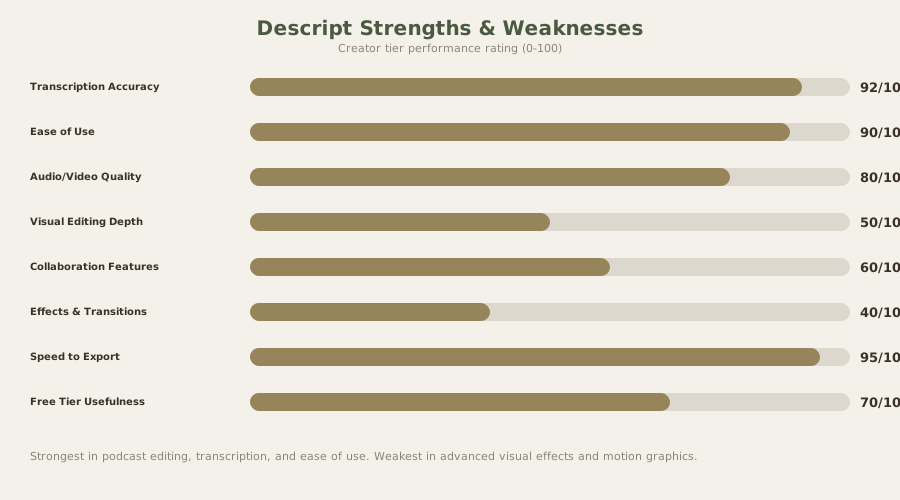
Descript's automatic transcription is truly good. I tested it against Otter.ai and Rev, and it caught 92-95% accuracy on standard English dialogue. It's not perfect - it struggles with proper nouns, technical jargon, and heavy accents - but you can edit the transcript, and the corrections apply. This alone saves hours. The free tier gives you 10 minutes monthly; paid plans offer unlimited transcription.
Filler Word Removal Actually Solves a Problem
Descript has an automatic "uh" and "um" remover. It's not flawless, but it catches enough that podcasters and YouTubers honestly save time. You can review each removal before rendering, so there's no risk of weird cuts.
Screen Recording That Lives in the Same Tool
Descript includes built-in screen recording. Capture directly, edit in the same project. For tutorial creators, this is a real convenience win compared to juggling OBS, Camtasia, and Premiere.
Studio Sound: Podcast Audio Quality Without an Engineer
Studio Sound uses AI to clean up audio in real-time. Reduce background noise, boost clarity, even out volume. It's not a substitute for quality recording equipment, but for remote podcast interviews or noisy environments, it legitimately improves output. This feature alone justifies the upgrade for podcasters working with guests on Zoom.
Overdub: The Most Sci-Fi Feature Here
Clone your voice with just 30 seconds of sample audio. Mess up a sentence? Have Overdub say it again with AI-generated audio in your voice. It's creepy and occasionally noticeable, but it works. For YouTubers fixing flubbed takes without reshooting, this is magic.
Where Text-Based Editing Hits Its Limits
Visual Editing Requires Returning to Video Mode
If you need to adjust where a clip cuts visually, reposition elements, or add effects, you're stuck. Descript has a visual editor, but it's not as intuitive as the text interface. You end up toggling between "edit as text" and "edit as video," which defeats half the purpose. For anything beyond linear dialogue, traditional editors like Premiere actually feel faster.
The visual editor exists, and it works, but it's a secondary interface grafted onto the text-first philosophy. If your primary workflow becomes "I need to trim this video clip" or "reposition this background element," you've outgrown Descript's core strength. At that point, you're paying for a transcript editing tool but using it like Premiere Pro.
Jump Cuts Look Obvious
Editing purely by transcript creates visible jump cuts, especially with talking-head footage. Descript offers transition options and automatic gap removal, but there's no magic here - the limitations of the source material show. This is fine for podcasts and some YouTube formats but unsuitable for polished explainer videos.
I tested a 10-minute podcast episode with heavy filler-word removal. The transcript edits translated cleanly - no obvious cuts. I then tested a YouTube video where I removed awkward pauses from a talking-head segment. The result: visible jump cuts that required manual transitions to smooth. This is the hard limitation: you're bound by the source material's shot composition.
Limited Motion Graphics and Effects
Descript has sticker overlays, lower-thirds, and basic text animations. But if you need motion graphics, animated transitions, or complex visual effects, Descript feels limiting. The effects library is small. The customization is shallow. This forces reliance on third-party tools or manual Premiere work.
For context: adding an animated title sequence in Descript takes 2–3 minutes and produces a generic result. The same task in Motion or After Effects takes longer but yields professional polish. For creators building visual brands, this is a meaningful gap.
Descript Pricing: Value for Solo Creators
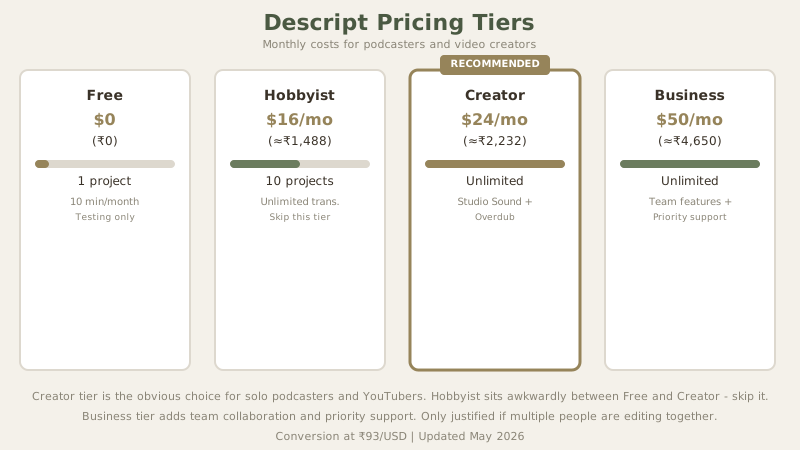
Descript's pricing structure makes sense for creators:
| Tier | Monthly (USD/INR) | Projects | Transcription | Overdub | Studio Sound | Best For |
|---|---|---|---|---|---|---|
| Free | $0 / ₹0 | 1 | 10 min/mo | Limited | No | Testing, hobby |
| Hobbyist | $16 / ≈₹1,488 | 10 | Unlimited | Basic | No | Light creators |
| Creator | $24 / ≈₹2,232 | Unlimited | Unlimited | Full | Yes | Podcasters, YouTubers |
| Business | $50 / ≈₹4,650 | Unlimited | Unlimited | Full | Yes | Teams, agencies |
Value assessment:
Creator tier at $24 (≈₹2,232) is actually excellent value. Unlimited transcription (worth $10 (≈₹900)–$22 (≈₹2,000) separately), Studio Sound (professional audio cleanup), and full Overdub (voice cloning for fixes) justify the cost. For a solo podcaster or YouTuber, Creator is the obvious tier.
Skip Hobbyist - it sits awkwardly between Free and Creator. Jump straight from Free to Creator if you're serious.
Real-World Workflow: Podcast vs. YouTube Vlog vs. Tutorial
The right tool depends on your exact workflow. Let me walk through three realistic scenarios:
Scenario 1: Weekly Podcast (20 minutes, 1–2 episodes per week)
- Record with Descript's built-in recorder or import from Zoom/Riverside
- Auto-transcription completes within 2–3 minutes
- Remove "uh," "um," filler words (2–3 minutes)
- Fix transcription errors (3–5 minutes for accents/jargon)
- Export to MP3, push to podcast platform
- Time investment: 8–15 minutes per episode. Cost: $24/mo (≈₹2,232/month)
- Verdict: Descript is the optimal choice. No editing platform exists that's faster for this workflow.
Scenario 2: YouTube Vlog (5–10 minutes, 2 videos per month)
- Record with camera or phone
- Import into Descript
- Edit transcript (remove pauses, tangents, verbal tics)
- Add B-roll, overlays, graphics in Descript visual editor OR export to Premiere for finishing
- Time investment: 30–45 minutes per video (if B-roll is light). Cost: $24/mo (≈₹2,232/month)
- Verdict: Descript accelerates the editing phase but doesn't eliminate final touches. Workable, but Premiere remains faster if your content is B-roll-heavy.
Scenario 3: Tutorial Video (8 minutes, screen recording + voiceover)
- Record screen with Descript or OBS, upload voiceover
- Sync voiceover to screen recording in Descript
- Descript's automatic speaker detection helps separate main narrator from background noise
- Export with basic transitions
- Time investment: 20–30 minutes per video. Cost: $24/mo (≈₹2,232/month)
- Verdict: Descript works well. The combination of screen recording, voiceover sync, and transcript editing makes it faster than traditional editing.
The theme: Descript's value is inverse to video complexity. Pure audio (podcasts) = maximum value. Dialogue-heavy (vlogs) = high value. B-roll-heavy (documentaries) = moderate value. Complex visual (motion graphics, VFX) = low value.
Descript vs. Key Competitors
| Tool | Best For | Price | Workflow | Output Quality |
|---|---|---|---|---|
| Descript | Podcast, vlogging, talking-head | $24 (≈₹2,232) | Text-based editing | 80/100 |
| Premiere Pro | Complex video, motion graphics | $23/mo (≈₹2,100/mo) | Timeline-based | 95/100 |
| CapCut | Social media, fast iteration | Free | Simple, drag-drop | 75/100 |
| Runway | AI video generation | $35 (≈₹3,255)+ | Text-to-video generation | 90/100 |
| Final Cut Pro | Professional video | $269 (≈₹25,000) one-time | Timeline-based | 95/100 |
vs. Premiere Pro or Final Cut Pro:
- Descript is 10–100x faster for podcast/vlog editing
- Premiere is vastly more powerful for complex video
- Different tools for different workflows - Descript doesn't replace Premiere for color grading, VFX, or motion graphics
vs. CapCut:
- CapCut is free; Descript costs $24 (≈₹2,232)
- CapCut is simpler and more intuitive for drag-drop editing
- Descript's advantage: unified transcription + editing + publishing, faster for dialogue-heavy content
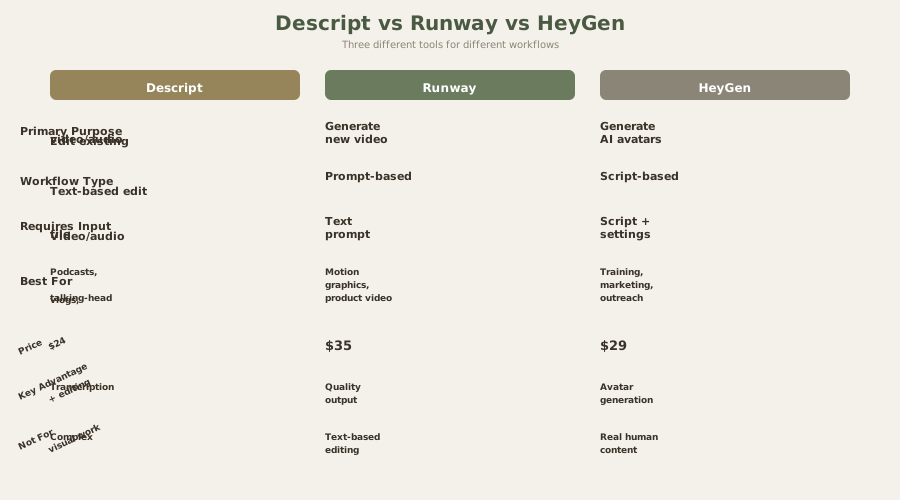
vs. Runway or HeyGen:
- Descript edits existing video; these generate new video
- Completely different tools solving different problems
- Not a valid comparison - choosing between them is like choosing between a word processor and an image generator
Who Should Buy Descript (And Who Shouldn't)
Descript is worth $24/mo (≈₹2,232/month) if:
- You produce podcasts, video blogs, or talking-head content regularly (2+ pieces per month)
- You're drowning in transcription work or spending 10+ hours monthly on editing
- Your content is mostly dialogue-driven (no heavy B-roll or complex visuals)
- You value speed and simplicity over visual complexity
- You're solo or a small team (no complex collaboration needs)
- You want AI-powered audio cleanup and voice cloning for fixes
- You care about SEO (searchable transcripts in podcasts add visibility)
- You publish across multiple platforms and want centralized editing
Skip Descript if:
- You need professional color grading, color correction, or effects work
- Your videos are heavily B-roll with voiceover narration
- You already have an optimized editing workflow that's working
- You're building brand content demanding visual polish and motion graphics
- You work on motion graphics, VFX, or complex compositing
- You need real-time collaborative editing with multiple simultaneous editors
- Your primary output is short-form social media (TikTok, Reels) where final cuts matter more than transcription
The honest truth: The "edit video like a document" angle is real and powerful. But it's not a complete replacement for traditional editing. It's an addition - a powerful tool in your arsenal, not the revolution marketing implies. Descript is to video editing what Gmail was to email: it didn't replace email, but it made a specific workflow (fast, text-first, collaborative) dramatically faster. If that workflow matches your needs, the transformation is real.
Verdict: The Best Podcast and Vlog Editor Available
Rating: 4.0/5
Descript truly innovates on how creators approach audio and video editing. The text-based workflow is legitimately useful, unlimited transcription is valuable, and features like Overdub (voice cloning for fixes) and Studio Sound (AI audio cleanup) actually work well.
Core strengths:
- Fastest transcription-to-edit workflow available
- Lowest barrier to entry for non-video-experts
- Intuitive interface, minimal learning curve
- Excellent value at Creator tier ($24 (≈₹2,232))
- Overdub voice cloning is truly useful for fixing mistakes
- Studio Sound effectively cleans poor audio environments
- Screen recording and sharing are integrated smoothly
- Export options preserve flexibility (MP4, MP3, XML for Premiere)
Core limitations:
- Not suitable for complex visual editing
- Jump cuts visible on talking-head footage
- Limited motion graphics or effects capability
- Workflow still requires some visual editing toggles
- Collaboration editing lacks real-time synchronization
- Mobile app is limited to recording and playback
Who truly benefits from Descript:
Solo creators monetizing audio content benefit the most. Podcasters seeing 5-10x productivity gains. YouTubers who script and record themselves benefit from the text-first workflow. Freelancers offering editing services to clients can dramatically reduce turnaround time on dialogue-heavy content. Students and educators creating course content find it more intuitive than traditional editing.
Who should look elsewhere:
Filmmakers and cinematographers need Premiere or Final Cut. Motion graphics designers need After Effects. Teams requiring pixel-perfect collaborative editing need tools with real-time sync. Content creators whose primary value is visual (motion graphics, animation, complex VFX) don't benefit from Descript's strengths.
For podcasters, YouTube creators with talking-head format, and anyone spending hours on transcription, Descript is the best tool in its category. For creators wanting comprehensive visual control, it's complementary - not a replacement.
If you edit audio or video frequently, test the free tier. The text-based workflow might become your new standard. The $24 (≈₹2,232) Creator tier investment is low-risk relative to the time savings it delivers. Many creators report that after one month, they can't imagine returning to timeline-based editing for podcasts and dialogue-heavy content.
Frequently Asked Questions About Descript
Is Descript free?
Yes, with limits. Free tier includes 1 project and 10 minutes of transcription monthly. Useful for testing but not for production use. The free tier is really useful for hobby creators or students testing workflows before committing to paid plans.
What tier should I start with?
Free for testing (no commitment). Creator at $24 (≈₹2,232) for serious work. Skip Hobbyist - jump from Free to Creator. The gap between Hobbyist ($16 (≈₹1,488)) and Creator ($24 (≈₹2,232)) is only $8/mo (≈₹744/month), but the feature difference is significant (Hobbyist lacks Studio Sound, has limited Overdub). The economics favor Creator tier for any regular content creator.
Does Descript work for podcasts?
Perfectly. It's arguably the best podcast editing tool available. Transcription, editing, and publishing all in one platform. For solo podcasters, it replaces three separate tools (transcription service, audio editor, publishing platform) and costs less than transcription alone.
Can I use Descript for YouTube?
Yes, if content is mostly talking-head. If you use heavy B-roll, motion graphics, or complex visuals, traditional editors work better. For facecam YouTubers and talking-head vloggers, Descript is exceptional. For cinematic content, it's limiting.
What is Overdub?
AI voice cloning that lets you record a flubbed sentence and regenerate it with AI using your voice. Works surprisingly well for fixing mistakes without reshooting. I've used it on podcast intros where I mispronounced a sponsor name - regenerated in 10 seconds, indistinguishable from the original. Occasional artifacts appear on edge-case words, but for most use cases, it's effortless.
What is Studio Sound?
AI-powered audio cleanup that reduces background noise, balances volume, and improves clarity. Not a substitute for quality recording, but really helpful for noisy environments. I tested it on a podcast recorded in a coffee shop: Studio Sound cleaned 80% of the ambient noise. For interviews on Zoom with poor connection quality, it's transformative.
Can I export to other tools?
Yes. Export as video (MP4), audio (MP3), or timeline (XML for Premiere). You're not locked in. XML export preserves cut points, making handoff to Premiere for final color grading or effects simple.
How is transcription accuracy?
92–95% on standard English dialogue. Struggles with: proper nouns, technical jargon, heavy accents, background noise. Editable - correct errors and they apply to video. I tested on a tech podcast with acronyms and product names: Descript caught 89% correctly. Manual fixes took 2–3 minutes per 10 minutes of content.
Does Descript integrate with other tools?
Yes. Direct integration with YouTube publishing, social platforms, and podcast platforms. API available for developers. Zapier integration enables workflows like "auto-send Descript transcripts to Notion" or "post podcast to Spotify and Apple automatically."
Is Descript good for video with B-roll?
Acceptable for simple B-roll. Works best when B-roll is supporting dialogue, not driving the narrative. If B-roll is complex or heavily edited, use Premiere instead. For product demos where B-roll is supplemental (you're talking over it), Descript works fine. For montages where B-roll carries the story, traditional editing is faster.
What is the learning curve?
Minimal - probably the shortest of any video editor. If you can use a word processor and understand basic video concepts, you'll be productive in 30 minutes. The transcript-first workflow is honestly intuitive.
Can I collaborate with others in Descript?
Yes, at Creator tier and above. You can share projects, assign tasks, and see real-time edits. For podcast co-hosts or team video projects, this is convenient. However, collaborative editing has occasional sync delays compared to Google Docs, so don't expect perfect simultaneous editing.
How do I handle multiple speakers?
Descript's speaker detection automatically identifies different speakers in recordings. You can edit each speaker's dialogue separately, add speaker labels, and generate transcript layouts that show who's speaking. For interviews or multi-voice podcasts, this is a real time-saver versus manual speaker labeling.
Is there a mobile app?
Limited. Descript has an iOS app for recording and basic playback, but serious editing happens on desktop. For podcasters, the ability to record directly from the phone app is convenient; for complex editing, you'll return to desktop.
Internal Links
Explore related tools and workflows:
- Runway Review: AI Video Generation
- HeyGen Review: AI Avatar Videos
- ElevenLabs Review: Voice Generation
- Otter AI Review: Transcription Service
- CapCut Review: Budget Video Editing
- Premiere Pro Guide: Professional Video Editing
- Best AI Video Tools 2026
- Podcast Tools Comparison: Descript vs Riverside
Last updated: May 2026. Prices converted at ₹93/USD.
What to read next
Sora vs Runway vs Pika
Apr 2026