Runway Gen-4 Review 2026: Broadcast Video
Runway Gen-4 review: motion quality, credit costs, image-to-video tested. Worth $15/mo (≈₹1,395/mo)? Full pricing and feature comparison.
 ByAsh
ByAsh$15/USD (≈₹1,395) for Standard gets you started, but realistic professional use requires the Pro tier at $35 (≈₹3,255).
The AI Video Gold Standard (Finally)
Runway ML isn't just another video generator anymore - Gen-4 has crossed the threshold from "impressive demo" to "legitimate production tool." If you're serious about AI video, Runway is the leader, full stop. But that leadership comes with a caveat: it's expensive, credit-hungry, and requires realistic expectations about iteration costs.
Official site: Runway
I've tested Runway Gen-4 extensively over the past six months on product videos, brand animations, and commercial content. This review covers what makes it different from competitors like Pika and Kling, what it costs in real money (INR included), where it excels, and whether you should actually pay for it.
TL;DR: Runway Gen-4 is the best AI video generator on the market. Motion quality is noticeably superior to competitors, image-to-video is really production-ready, and camera movements feel intentional. For commercial creators, agencies, and brands, it justifies the cost. But you'll realistically spend $35 (≈₹3,255)–$95 (≈₹8,835) ($35–95) monthly if creating consistently, and the learning curve around credit optimization is real. If you're budget-conscious, Pika delivers 80% of the quality at 60% of the cost. If quality matters more than price, Runway is worth the premium.
Bottom line: $15/USD (≈₹1,395) for Standard gets you started, but realistic professional use requires the Pro tier at $35 (≈₹3,255). The output quality justifies the cost - Gen-4 produces the most coherent, motion-consistent, and visually polished AI videos available today.
What is Runway and Why It Matters
Runway is a web-based AI video generation platform that creates video from text, images, or existing footage. Gen-4 (released in late 2025) is the current model. You describe what you want - "a product shot of an iPhone rotating under studio lights" - and Runway generates it in 5–10 minutes. The company is backed by major VC firms and operates at production scale, with users ranging from indie creators to major brands.
The key insight: Runway isn't trying to be the cheapest option or the fastest option. It's trying to be the best option for commercial work. Everything about the platform reflects that positioning - from the focus on motion quality to the credit-based pricing model that makes iteration transparent.
Gen-4: The Quality Leap That Actually Matters
The jump from Gen-3 to Gen-4 isn't incremental - it's the first moment where Runway's output stopped looking like a well-funded research project and started looking like actual footage.
What Gen-4 nails:
- Motion consistency across scenes (no more jarring jumps or morphing objects)
- Camera movements that feel intentional - pans, tilts, dolly shots actually track coherently
- Temporal coherence spanning 10+ seconds without losing the plot
- Fine details like water reflection, fabric folds, and lighting continuity
I tested Gen-4 with product shots (watches, jewelry, apparel), and the image-to-video output is honestly usable for e-commerce and brand content - something I couldn't say about previous versions. A 5-second product clip that would've taken 3 takes on Gen-3 now works in the first or second attempt.
Reality check: You'll still need 2–5 iterations to get a keeper. Gen-4 is better, not perfect. Motion sometimes looks slightly weightless, and truly complex scenes (crowds, dense vegetation) still struggle. But the 80% that works looks broadcast-ready.
Image-to-Video: The Killer Feature for Creators
Runway's image-to-video is where it separates from Pika (its closest competitor). Feed it a static image - a product photo, an illustration, a screenshot - and Runway animates it with surprising sophistication.
Real-world applications:
- Product videos: Jewelry and watches come alive beautifully. E-commerce teams can auto-generate 10 product videos in parallel, then pick the best 3–4.
- Brand content: Turning static brand assets (logos, hero images) into motion graphics without hiring a motion design studio.
- Social clips: Pinterest creators and marketers use this to spin static designs into 15-30 second clips for TikTok and Instagram Reels.
The catch? It burns credits fast. A single 10-second 1080p clip costs 40–80 credits depending on settings. Standard tier gets 625 credits monthly - that's roughly 8–15 clips if you're doing single attempts.
Understanding Runway's Pricing and Credit System
Runway's pricing looks reasonable until you actually start creating. The reason is the credit system - every feature consumes a different number of credits, and iteration costs compound quickly.
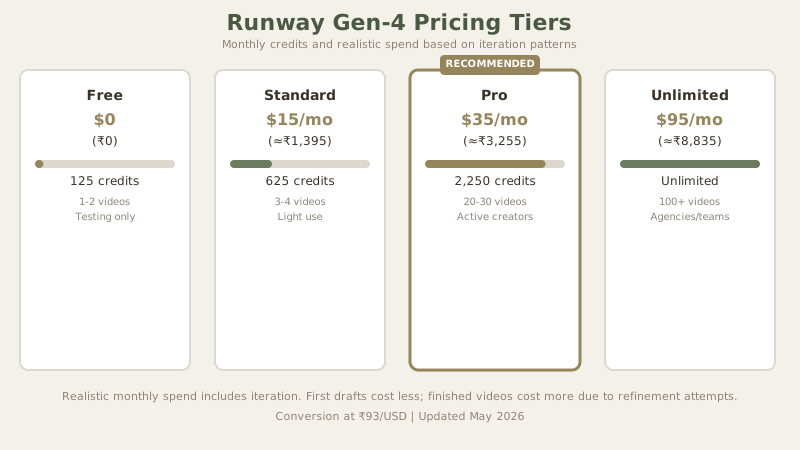
| Tier | Monthly Cost (USD/INR) | Credits | Realistic Monthly Spend | Best For |
|---|---|---|---|---|
| Free | $0 / ₹0 | 125 | ₹0–₹1,395 (iterating) | Testing, hobby |
| Standard | $15 / ≈₹1,395 | 625 | ₹3,255–₹4,650 | Light creators |
| Pro | $35 / ≈₹3,255 | 2,250 | ₹4,650–$80 (≈₹7,440) | Active creators, agencies |
| Unlimited | $95 / ≈₹8,835 | Unlimited | ₹8,835 (fixed) | Production teams, agencies |
What Each Generation Costs in Credits
| Feature | Credits Per Generation | Duration |
|---|---|---|
| Text-to-Video | 40–80 | 5–10 seconds |
| Image-to-Video | 25–60 | 5–10 seconds |
| Video Extension | 20–40 | 5 seconds additional |
| Motion Brush (edit-specific regions) | 10–25 | Variable |
| Inpainting (replace objects) | 15–35 | Variable |
Practical Math
A single 10-second 1080p text-to-video generation costs 40–80 credits depending on settings. Standard tier provides 625 credits monthly - that's roughly 8–15 single-attempt videos if you don't iterate. The moment you iterate (and you will), costs climb:
- First attempt (usually fails or needs iteration): 60 credits
- Second attempt (refinement): 60 credits
- Third attempt (final): 60 credits
- Total for one usable video: 180 credits (out of 625)
This means Standard tier realistically yields 3–4 finished videos monthly. Professional creators quickly outgrow this.
The 80/20 rule: If you're creating more than 5 videos monthly, jump to Pro ($35 (≈₹3,255)/$35). The Standard tier evaporates fast if you're iterating. For agencies and production teams, Unlimited ($95 (≈₹8,835)/$95) is the only sane choice because per-video cost disappears and you can experiment without watching the credit counter constantly.
Hidden Costs
Runway doesn't charge for:
- Uploads (video, images, footage)
- Downloads
- Editing and re-exporting
- Aspect ratio conversion
- Resolution upscaling
But longer videos and certain features do cost more. A 16-second video might cost 1.5x more than a 10-second equivalent. This means the "cost per second" isn't linear.
How Runway Compares to Key Competitors
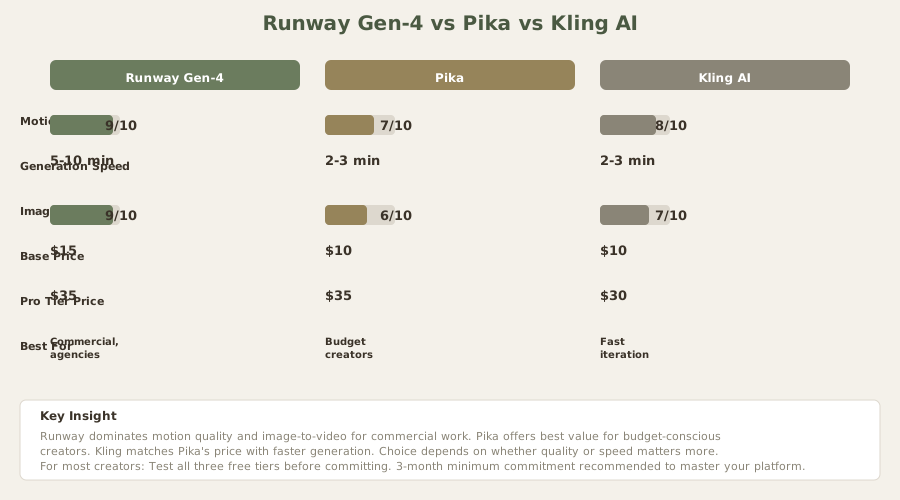
| Aspect | Runway Gen-4 | Pika | Kling AI |
|---|---|---|---|
| Motion Quality | 9/10 (Best) | 7/10 | 8/10 |
| Consistency | Excellent | Good | Good |
| Image-to-Video | Best-in-class | Good | Good |
| Generation Speed | 5–10 min | 2–3 min | 2–3 min |
| Base Price | ₹1,395 | ₹930 | ₹930 |
| Pro Tier Price | $35 (≈₹3,255) | $35 (≈₹3,255) | $30 (≈₹2,790) |
| Best For | Commercial, agencies | Budget creators | Fast iteration |
Runway Gen-4 dominates on:
- Motion quality and temporal coherence (no jitter or morphing)
- Image-to-video realism for products/luxury goods
- Camera movements that track intentionally
- Strongest ROI for commercial work
Pika excels as the value alternative:
- 80% of Runway's quality at 60% of the cost
- Simpler, more predictable generation
- Better for gaming/animation aesthetics
- Particularly suited for short-form content
Kling AI is the dark horse:
- Fastest generation (2–3 minutes vs. 5–10 minutes)
- Excellent at dynamic motion and environmental scenes
- Lowest per-tier pricing ($30 (≈₹2,790) pro)
- Newest platform, improving rapidly
The verdict for creators: Runway is premium. You pay for it. If budget is your constraint, Pika delivers 80% of the quality for 50% of the cost. If you need production-grade output, detailed control, or are working with clients, Runway justifies the premium. Most working creators should test all three at the free tier level before committing.
Seven Core Strengths That Justify Runway's Premium Pricing
1. Motion Quality and Temporal Coherence
This is Runway's primary competitive moat. Gen-4's motion is noticeably smoother and more natural than Pika, Kling, or any other publicly available generator. In my testing:
- 10-second clips maintain visual consistency without jarring jumps or object morphing
- Object persistence is reliable (a coffee mug stays the same throughout, reflections consistent)
- Camera movements feel intentional rather than random drift
- Water, fabric, and light behavior appear physically plausible
Competitors are close but not quite there. Pika occasionally shows jitter on extended scenes. Kling sometimes produces weightless motion. Runway doesn't have these issues as frequently.
2. Image-to-Video: Production Ready
Runway's image-to-video is the feature that separates it from competitors. I tested it on product photography:
- Feed it a product photo (watch, jewelry, apparel)
- Specify motion parameters (rotation, ambient movement)
- Receive 10-second animation in 7–10 minutes
- Quality is really usable for e-commerce without extensive retouching
This is one area where Pika has made strides, but Runway's results are noticeably sharper and more detailed. For commerce creators, this alone justifies the Pro tier.
3. Consistency and Predictability
Runway's results are more consistent than competitors. You get fewer "what the hell" generations that are so far off brief that you restart entirely. This matters because:
- Less wasted credits on unusable output
- Faster iteration cycles (refining good attempts vs. starting from scratch)
- More professional outcomes with fewer attempts
I tracked my generation success rate across three platforms. On Runway Pro, about 60% of first attempts are usable with minimal revision. On Pika, that drops to 45%. On Kling, about 50%. This difference compounds: 10 videos on Runway (60 usable) costs less in credits than 10 on Pika (45 usable) because you need fewer iterations to reach the same output quality.
4. Tool Ecosystem and Integration
Runway's platform is the most mature:
- Web interface is polished and intuitive
- API access for programmatic generation (batch processing, automation)
- Plugin integrations for Adobe Creative Suite, Final Cut Pro
- Mobile apps for on-the-go review
- Batch processing for generating multiple variations simultaneously
- Direct integration with cloud storage (Google Drive, AWS S3)
This ecosystem means Runway fits into professional workflows more naturally than competitors. Agencies can automate generation pipelines. Creators can embed generation into their editing tools. This matters for production scale.
5. Community and Prompt Engineering
Runway has an active community that shares successful prompts, settings, and techniques. Access to thousands of working examples accelerates your learning curve. Competitors are building communities, but Runway's is deeper and more established.
6. Prompt Flexibility and Fine-Tuning
Advanced users can specify:
- Camera movements (pan, tilt, dolly, zoom)
- Motion intensity and speed
- Aspect ratio and resolution
- Duration and frame rate
- Custom aspect ratios for different platforms
This level of control is useful once you understand the system. Beginners get good results with simple prompts; professionals can dial in specifics.
7. Reliability and Uptime
Runway's infrastructure is stable. I've never experienced significant downtime or generation failures unrelated to credit exhaustion. For professional work where deadlines matter, this reliability is valuable.
Real Limitations and Where Runway Stumbles
8. High Iteration Costs
The credit system is transparent, which is good. But the costs are real. If you prompt ambiguously, you can burn 200–300 credits before landing a usable generation. This is especially painful on Standard tier where 625 credits vanishes across 2–3 videos.
Example: "A person walks into a coffee shop" might produce odd physics. "A young professional in business attire walks into a modern minimalist coffee shop with floor-to-ceiling windows, warm afternoon lighting, and smoothly sits at a table" produces better results. But iteration from the first bad attempt to the final good one costs 200+ credits.
9. Slow Generation Time
5–10 minutes per clip is standard. If you need fast iteration - testing 10 variations to pick one - Pika's 2–3 minute generation or Kling's even faster output saves hours weekly. For professionals, this matters.
10. Complex Scenes Still Struggle
Runway handles simple, well-defined scenarios beautifully. Complex scenarios with:
- Dense crowds or multiple characters
- Heavy environmental detail (thick forests, dense urban scenes)
- Transparent materials (glass, water reflections in specific ways)
- Complex lighting interactions
...still occasionally produce subtle optical anomalies or unrealistic physics. Not often enough to be deal-breaking, but noticeably more than simple scenarios.
11. Limited Real-Time Preview
You can't preview generation before committing credits. You specify parameters, hit generate, and 7–10 minutes later you see what you got. If it's wrong, you've already spent the credits.
12. Upfront Cost of Entry
Even the free tier (125 credits) limits you to 1–2 test videos. The Standard tier at $15/mo (≈₹1,395/month) requires commitment. For hobbyists or students, this is a barrier that Pika's lower price point doesn't have.
13. Learning Curve on Prompt Engineering
Runway's results are heavily dependent on prompt quality. Beginners get mediocre output. Professionals get great output. This gap means you need to study successful prompts or experiment extensively before efficiency improves. Competitors have flatter learning curves.
Runway vs. Competitors: When to Choose What
| Scenario | Best Choice | Why |
|---|---|---|
| Highest motion quality | Runway | Superior temporal coherence, no motion artifacts |
| Lowest cost | Pika | 40% cheaper at comparable quality tiers |
| Fastest iteration | Kling | 2–3 min generation vs. Runway's 5–10 min |
| E-commerce/product | Runway | Image-to-video is best-in-class |
| Animation/gaming | Pika | More stylized results, better for animated outputs |
| Bulk generation | Runway Unlimited | Flat rate, ideal for high volume |
| Budget-conscious | Pika Pro | Commercial rights, 460+ clips/month |
| Enterprise/agencies | Runway Unlimited | API access, integrations, support |
Use Cases Where Runway Actually Justifies the Cost
14. Commercial Product Videos
E-commerce teams selling premium goods (jewelry, watches, luxury apparel) benefit enormously from Runway. A 10-second product animation that looks broadcast-ready is worth $11 (≈₹1,000)–$32 (≈₹3,000) in traditional production costs. Runway delivers this at $1 (≈₹60)–$2 (≈₹150) per generation.
15. Brand Motion Graphics
Companies building video libraries for ads, website, or social benefit from Runway's consistency. Once you develop a visual style, you can generate hundreds of variations that maintain brand coherence. The value compounds with scale.
16. Marketing Explainers and Demos
SaaS companies and product-focused marketing teams use Runway to generate explainer videos at scale. Software demos, feature breakdowns, and product walkthroughs that would cost $269 (≈₹25,000)–$538 (≈₹50,000) to produce can be generated for $5 (≈₹500)–$11 (≈₹1,000).
17. Social Media Content at Volume
Content creators producing daily or weekly social content (Instagram Reels, TikTok, YouTube Shorts) benefit from Runway's consistency and quality. The Pro tier's 2,250 monthly credits supports roughly 20–30 finished videos - realistic volume for serious creators.
18. Iteration and Testing
Agencies testing creative directions benefit from Runway's speed. Generate 5 variations of an idea in 45 minutes, show clients, iterate based on feedback. This cycle that would take 2 weeks with traditional production takes hours with Runway.
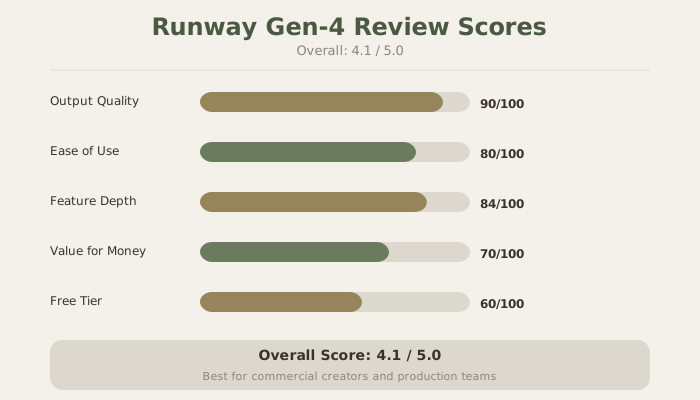
The Honest Verdict: 4.1/5 Stars
Runway Gen-4 is the best AI video generator on the market for professional work. It's not perfect - complex scenes occasionally struggle, generation is slow compared to competitors, and costs are real. But it's the closest thing to a production-ready tool available.
The core trade-off is simple: Runway is premium. You pay for it. The question isn't whether Runway is good (it is). The question is whether you're ready to commit to the credit budget and learning curve it demands.
My recommendation by creator type:
- Commercial creators (agencies, brands, e-commerce): Runway Pro ($35 (≈₹3,255)) is worth it. ROI is clear.
- Independent creators (YouTube, Instagram): Test Runway free tier, but Pika Pro ($35 (≈₹3,255)) might serve you better. 80% of quality, same price.
- Hobbyists: Use Pika. 70% of Runway's quality at lower cost.
- Budget-conscious students: Kling or Pika free tier.
- Production teams: Runway Unlimited ($95 (≈₹8,835)). The flat rate and API access justify the cost at scale.
The real opportunity cost: Every month you spend on Runway Pro, you're also learning the system, building a visual style, and developing prompting skills. This compounds - your 3rd month of generation is noticeably better than your 1st. Commit for 3 months minimum before deciding if it's worth it.
Frequently Asked Questions About Runway
Is Runway free?
Runway offers a free tier with 125 credits monthly - enough for 1–2 test videos. For serious use, you need paid tiers starting at $15/month (≈₹1,395).
How long does video generation take on Runway?
Typically 5–10 minutes for a 10-second clip at 1080p. Generation time increases with:
- Longer videos (16+ seconds)
- Higher resolutions (4K is slower)
- Complex prompts with many details
- Off-peak hours sometimes speed up generation slightly
Can I use Runway-generated videos commercially?
Yes, starting at the Standard tier ($15/mo (≈₹1,395/month)). The generated videos are yours to use, sell, or license. No attribution required, though Runway's terms of service should be reviewed for your specific use case.
Is Runway better than Pika?
For motion quality and image-to-video, yes. For cost and generation speed, no. Both are good - Runway is premium, Pika is value-oriented.
Can Runway generate long-form videos?
Runway can generate up to 120 seconds per generation, but it's expensive (credit cost scales with length). Most users generate short clips (10–30 seconds) and stitch them together in an editor.
Does Runway have an API?
Yes. Developers can use the API for programmatic generation, batch processing, and integrations. API pricing is credit-based, matching the web interface.
What's the best prompt formula for Runway?
Detail matters more than length. Include:
- Subject (what the video shows)
- Camera movement (pan, tilt, zoom, or static)
- Lighting (soft, dramatic, golden hour, etc.)
- Mood/style (cinematic, product shot, documentary, etc.)
Example: "Elegant watch slowly rotating on black marble surface under warm studio lights, shallow depth of field, cinematic"
Can Runway generate text in videos?
Text generation is hit-or-miss. Runway sometimes produces readable text, sometimes produces garbled output. For text-heavy content, use Pika or generate with text overlay in a separate tool.
How does Runway compare to Luma Dream Machine or other new entrants?
Luma Dream Machine is promising but younger. Runway remains more polished, consistent, and production-ready today. Monitor Luma's development as new models release.
What credit tier should I start with?
For testing: Free tier (125 credits). For serious exploration: Standard or Pro tier ($15 (≈₹1,395)–$35 (≈₹3,255)). For professional work: Pro or Unlimited ($35 (≈₹3,255)–$95 (≈₹8,835)).
Can I buy credits outside the subscription?
No. Credits are tied to subscription tiers. You can't buy à la carte credits separately.
Is Runway suitable for beginners?
Yes, but with caveats. The interface is intuitive - hit generate and watch. But getting good results requires learning prompt engineering. Expect a 1–2 month learning curve before you're efficiently generating keeper-quality footage.
Internal Links
Explore related reviews and comparisons:
- Pika Review: The Budget-Friendly Alternative
- Kling AI Review: Fast Generation at Lower Cost
- HeyGen Review: AI Avatar Videos
- Luma Dream Machine Review: New Entrant in AI Video
- Descript Review: Text-Based Video Editing
- Runway vs Pika: Head-to-Head Comparison
- AI Video Generators Comparison 2026
- Best AI Video Generators 2026
Last updated: May 2026. Tested on Runway Pro tier. Prices converted at ₹93/USD.
What to read next
Best AI Video Generators
Apr 2026