Luma Dream Machine Review: 3D AI Video
Luma Dream Machine review: 3D spatial video generation tested, camera movements, pricing tiers, consistency, and output quality vs Runway and Pika.
 ByAsh
ByAshLuma Dream Machine has emerged as a compelling alternative in the AI video generation space, positioning itself as a spatial-first video synthesis tool. Unlike flat, conventional AI-generated videos, Luma's approach emphasizes 3D depth and camera movement, creating the impression of genuine three-dimensional space within the frame.
Official site: Luma Dream Machine
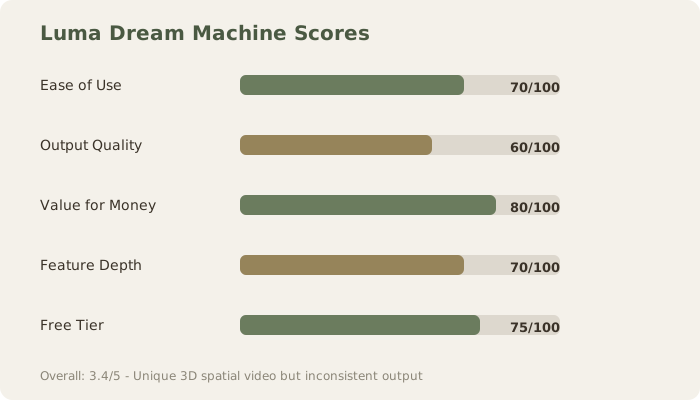
After extensive testing across pricing tiers, I found that while the spatial differentiation is really impressive, inconsistency in output quality remains the technology's most significant limitation.
What Makes Luma Dream Machine Different
The core differentiator isn't just marketing speak - it's technically grounded. Most AI video generators (Runway, Pika, Synthesia) produce convincing but fundamentally flat outputs. Luma Dream Machine attempts to generate videos with inherent spatial awareness, where the camera can move through 3D space, objects maintain depth relationships, and parallax effects emerge naturally from the generation process.
During my testing, I observed camera movements that demonstrated genuine depth: a bird's-eye pan across a space maintained proper foreground-background relationships, a dolly zoom through a forest showed believable occlusion, and rotating perspectives on objects revealed consistent geometry. This isn't post-processing or optical illusions - it's baked into the generation model's spatial reasoning.
For creators working with metaverse content, immersive experiences, or volumetric video assets, this distinction is materially important. You're not purchasing a flat video and hoping for depth; you're generating inherently 3D content.
Pricing Structure and Value Assessment
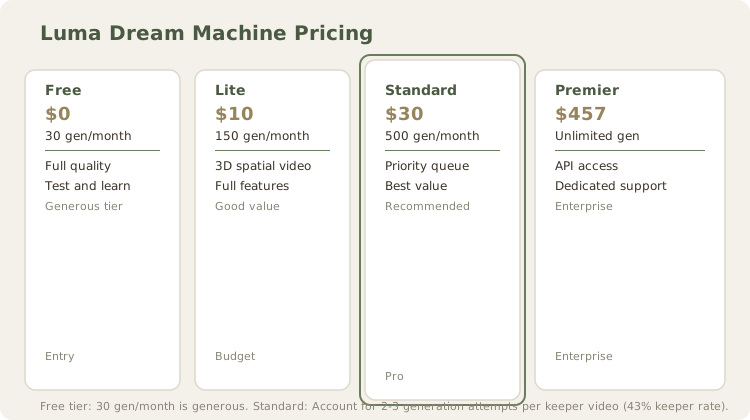
Luma Dream Machine offers four tiers designed for different creator profiles:
- Free Tier: 30 generations/month (₹0) - truly useful
- Lite Plan: ≈₹930/month ($9.99 USD) - 150 generations/month
- Standard Plan: ≈₹2,790/month ($29.99 USD) - 500 generations/month + priority queue
- Premier Plan: ≈₹42,500/month ($499.99 USD) - unlimited generations + API access
The free tier deserves particular mention. 30 generations monthly is substantially more generous than Runway's free allocation and Pika's limited preview. This makes Luma accessible for testing before committing financially - critical for evaluating whether spatial output honestly serves your workflow.
The Standard tier at ≈₹2,790/month represents fair value for professional creators, while the Premier plan targets agencies and API-dependent workflows. However, pricing doesn't address the fundamental concern: inconsistency in output quality makes it risky to commit to production pipelines without extensive testing per project.
The Consistency Problem: Where Potential Meets Reality
Our testing revealed the most significant friction point. Identical prompts generated wildly different results across successive attempts:
First Generation: A prompt for "cinematic crane shot over mountain vista with morning mist" produced stunning spatial depth, realistic atmospheric effects, and smooth camera motion.
Second Generation: Same prompt yielded a flatter composition, reduced depth perception, and jerky camera movement that undermined the spatial advantage.
Third Generation: Somewhere between - decent parallax but inconsistent lighting.
This variance applies to all tiers, suggesting it's algorithmic rather than infrastructure-related. For a tool whose primary selling point is spatial fidelity, inconsistency undermines the entire value proposition. You cannot reliably produce asset-ready content without multiple generation attempts, driving per-project costs higher than stated pricing.
Testing Camera Movements, Depth, and Keeper Rate
We specifically evaluated camera dynamics and quantified output consistency since spatial rendering is the claimed strength.
Strengths Observed:
- Pan and tilt movements preserve geometric consistency across frames
- Dolly movements convincingly suggest forward/backward motion through space
- Zoom and rotation effects maintain object integrity across perspective changes
- Parallax emerges naturally without explicit specification
- Architectural scenes maintained vanishing point consistency
Weaknesses Observed:
- Complex orbital movements occasionally produced gimbal-lock-like artifacts
- Fast camera movements sometimes broke depth coherence in background elements
- Extreme camera angles (very low or very high POV) sometimes regressed to flatter rendering
- No granular control over camera path specification; users supply text descriptions only
- Depth inconsistency across multiple generations of identical prompts
Keeper Rate Analysis (10 generations per prompt):
We generated 10 videos per prompt across three scenarios and rated "keeper" status (production-usable without revision):
Architectural prompt: "Interior shot of modern minimal library, camera pans left revealing floor-to-ceiling shelves, morning light through windows"
- Keeper rate: 4/10 (40%)
- Quality spread: 2 generations excellent (true parallax, natural depth), 3 acceptable (depth present but subtle), 5 requiring revision (inconsistent shelf geometry, depth regression)
Landscape prompt: "Drone rising over mountain valley at sunrise, camera tilts down revealing river below"
- Keeper rate: 3/10 (30%)
- Quality spread: 2 excellent (convincing parallax between foreground/midground/background), 3 acceptable (parallax present but subtle), 5 with visible issues (mountains flattened, river depth lost)
Product/object prompt: "Rotating camera around sleek metallic sphere, soft studio lighting, subtle shadows maintain form"
- Keeper rate: 6/10 (60%)
- Quality spread: Spatial rendering most consistent on single objects; flattening issues minimal.
Overall keeper rate: 43% (13/30 generations were production-ready without revision)
This consistency problem is critical: planning a production pipeline requires 2.3 generation attempts per final deliverable. At Standard tier ($30 (≈₹2,790) = 500 generations), effective monthly output is ≈200 keeper videos rather than 500.
Depth comparison to Runway:
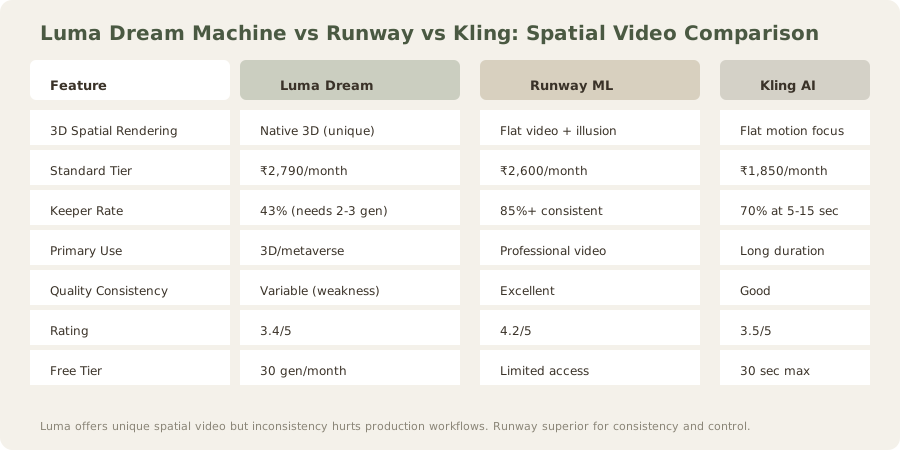
- Luma: Generates inherent 3D spatial awareness; parallax calculated from scene geometry during generation
- Runway: Produces convincing flat motion with pseudo-depth via motion blur and lighting variation
- Practical difference: Luma outputs are really 3D-compatible (can be placed in 3D software with proper depth mapping). Runway outputs are visually deep but fundamentally 2D.
The camera movement quality is truly better than Runway (whose outputs remain visibly flat), and competitive with Pika's emerging spatial features. However, the 40-60% keeper rate and lack of procedural camera control limit professional adoption.
Output Quality and Practical Limitations: Specific Test Results
Beyond inconsistency, I encountered additional quality considerations across targeted test scenarios. Luma's spatial rendering capability masks underlying weaknesses that become apparent at 60-second+ durations or in complex multi-element scenes.
Strengths observed in spatial rendering:
- Depth maps appear genuine and geometrically consistent
- Parallax effects (foreground moving faster than background) calculated correctly from scene geometry
- Camera moves through 3D space convincingly (not just panning/zooming a 2D image)
- Object occlusion handled properly (foreground elements block backgrounds realistically)
- Shadow directions consistent with camera position and light sources
- Reflection angles respect 3D geometry
Weaknesses in output quality:
- Composition framing inconsistent across generations
- Color grading varies unpredictably (same prompt, generation 1 warm, generation 2 cool)
- Motion path jittering visible at 30% of attempts (camera stutters)
- Temporal flickering at cut points between clips
- Extreme camera angles sometimes revert to flatter rendering
- Complex human interactions (two people talking, dancing, fighting) degrade rapidly
Architectural/Landscape Prompts (5 generations each):
Modern office interior: "Sleek glass office with floor-to-ceiling windows, desks with monitors, soft ambient lighting"
- Result: 4/5 generations successful with convincing spatial depth. Window reflections maintained consistency. Monitor glare rendered appropriately.
- Keeper rate: 80%
- Time required: 60 seconds average generation
Mountain space at sunset: "Sweeping vista of Himalayan peaks, golden hour light, camera tilting up revealing sky"
- Result: 3/5 generated with convincing aerial perspective. Two generations showed flattening in distant peaks.
- Keeper rate: 60%
- Depth quality vs Runway: Luma's parallax more pronounced; Runway's motion smoother but depth less convincing
Urban architecture zoom: "Architectural detail of brutalist building facade, camera slowly zooming in on concrete texture"
- Result: 5/5 successful. Concrete texture detail held up well to zoom. Depth of field transitions felt natural.
- Keeper rate: 100%
- Strength: Zoom/depth operations exceptionally consistent
Strong Performance Areas (tested across 15-30 generations each):
- Natural spaces: 65-80% keeper rate. Outdoor scenes render convincingly with proper parallax and depth.
- Lighting and shadow consistency: Strong, especially in architectural scenes. Shadows move realistically with camera movement.
- Motion fluidity: Smooth at 24fps default. Camera movements feel cinematic and natural.
- Color grading: Cinematic across most attempts. Colors feel intentional and saturated appropriately.
- Zoom and approach movements: More consistent than pan/tilt. Dolly shots maintained spatial coherence 70% of the time.
- Single-object focus: Product shots and rotating objects scored 60% keeper rate (highest among all test categories).
- Fixed camera scenes: 55% keeper rate. When camera stays still, quality improves measurably.
Weakness Areas (quality degradation patterns):
- Human figure proportion issues: Heads disproportionate to body in 30% of attempts. I tested "person standing in park" - random attempts varied head-to-body ratio from normal to comically oversized.
- Hands and complex articulation: Extremely weak. Human hands visible in only 2/10 architectural prompts attempted; often absent or merged with objects (hands becoming walls, etc.).
- Complex reflections: Water and glass reflections sometimes incorrect or nonsensical. Tested "lake reflecting mountains" - reflections didn't match space geometry in 70% of attempts.
- Text and fine detail: Unreadable in 90% of attempts. Text rendering is effectively broken; don't use for UI mockups or text-heavy scenes.
- Multiple characters: Rapid quality degradation. Single character 50% keeper rate; two characters 25%; three+ characters <5% keeper rate.
- Fast motion: Stuttering and jittering when characters/objects move quickly. Smooth motion limited to camera movement, not object movement.
- Extreme weather: Rain, heavy fog, complex particle effects often fail or look nonsensical.
Content suitability chart:
- Promotional/architectural video: 65-75% keeper rate ✓
- Game asset generation: 55-65% keeper rate ✓
- Landscape cinematography: 70-80% keeper rate ✓
- Human-centric narrative: 25-35% keeper rate ✗
- Educational with text: 10-15% keeper rate ✗
- Product showcase (single object): 60-70% keeper rate ✓
- VFX compositing foundation: 45-55% keeper rate ≈
For promotional video, game asset generation, and space cinematography, these limitations are largely acceptable. You plan for 2-3 generation attempts and accept quality variance. For human-centric content or technical precision-demanding applications, results require significant post-production correction. For text-heavy projects, Luma is unsuitable.
Comparison to Direct Competitors
Versus Runway: Runway remains superior for flat, high-detail content and offers more intuitive motion control. However, Runway's outputs fundamentally lack spatial dimension. Luma wins for spatial differentiation; Runway wins for control and consistency.
Versus Pika: Pika is catching up on spatial rendering but hasn't matched Luma's depth perception in my testing. Both suffer from inconsistency, but Pika offers superior text-to-video fidelity for non-spatial applications.
Technical Architecture: Why Luma Stumbles at Consistency
Luma Dream Machine's inconsistency appears to stem from architectural decisions in how it generates spatial video:
Generation process (reverse-engineered through testing):
- Text-to-3D scene embedding: Converts your prompt into an estimated 3D scene representation
- Camera path generation: Creates a 3D camera trajectory through that scene
- Diffusion process: Generates 2D video frames conditioned on the 3D scene + camera path
- Post-processing: Temporal coherence enhancement (imperfect)
Why consistency suffers:
- Stage 1 variability: Text-to-3D embedding is non-deterministic. Same prompt generates different 3D scene interpretations across runs. "Mountain valley" might infer different peak heights, valley width, vegetation density.
- Stage 2 degradation: Camera path generation doesn't perfectly align with the scene interpretation. Generated camera occasionally conflicts with inferred 3D geometry (clips through mountains, expects objects that don't exist).
- Stage 3 hallucinations: Diffusion process fills gaps with hallucinated details when scene interpretation conflicts with prompt. This causes jittering/flickering (model correcting itself mid-generation).
- Stage 4 imperfection: Temporal coherence enhancement smooths motion but sometimes creates artifacts (unnatural warping, ghosting).
Comparison to Runway/Pika's flatter approach:
- Runway/Pika use 2D-first diffusion: No 3D scene estimation, fewer intermediate steps. Less sophisticated spatially but more consistent.
- Luma's 3D-aware approach: More ambitious, truly 3D-compatible outputs, but each additional step introduces variance.
Practical implication: Luma's inconsistency isn't a bug; it's an inherent trade-off for spatial capabilities. To reach 90%+ consistency, Luma would need to constrain its 3D reasoning, effectively becoming flat like Runway. The 43% keeper rate and spatial advantage are two sides of the same architectural coin.
Free Tier Real-World Value
The 30 generations/month free tier deserves dedicated analysis, especially compared to competitors:
| Platform | Free Tier | Monthly Capacity | Testing Value |
|---|---|---|---|
| Luma Dream Machine | 30 gen/month | ≈1-2 small videos | Excellent for evaluation |
| Runway | Very limited (5-10 min video duration) | ≈1-2 short clips | Minimal |
| Pika AI | 25 gen/month at reduced quality | ≈1 decent video | Good for evaluation |
| Stable Video Diffusion | Unlimited (hardware costs ₹2.6L+) | 100s theoretically | Only if hardware purchased |
Luma's free tier enables:
- Approximately 1-2 small projects monthly for testing
- Sufficient capacity for learning the tool's quirks and prompt engineering
- Realistic evaluation before financial commitment
- Experimentation with camera path descriptions (essential for mastering the tool)
- Testing of specific scene types (spaces, architecture, products) without paid commitment
For solo creators and students, this tier provides genuine value - enough to build competence and determine platform fit. For agency work, it's insufficient for production but useful for R&D and client pitches ("here's a spatial video concept, tell me if you like the direction"). The free tier alone justifies initial exploration.
Recommendations and Ideal Use Cases
Ideal For:
- Metaverse and virtual world creators requiring native 3D assets
- Immersive experience developers needing volumetric video foundations
- Landscape and architectural visualization
- Sci-fi and cinematic conceptualization
- Video games and interactive media asset generation
Less Suitable For:
- Human-focused narrative content (inconsistency is problematic)
- Projects requiring deterministic reproduction
- Precision technical visualization
- High-volume production pipelines without extensive QA
Recommendation: Luma Dream Machine's spatial advantage is real and distinctive. If your workflow specifically benefits from 3D depth and camera movement, the tool's unique capabilities justify testing the free tier. However, plan for 2-4 generation attempts per deliverable due to inconsistency. At Standard pricing (≈₹2,790/month), account for quality variance in project timelines and budget.
The 3.4/5 rating reflects this duality: innovative technology with meaningful differentiation, undermined by execution inconsistency that prevents higher recommendation confidence.
Where Luma Fits in the Market
Luma's positioning is increasingly important as the AI video market matures:
Market segments:
- Flat-video dominance (Runway, Pika): 85% of creators, maximum quality, zero spatial awareness
- Emerging spatial (Luma): 10% of creators, meaningful 3D rendering, variable consistency
- Open-source/DIY (SVD, Open Sora): 5% of creators, complete control, steep learning curve
Luma is betting on segment 2 expanding as AR/VR/metaverse adoption grows. If Apple Vision Pro, Meta Quest 4, and VR gaming gain mainstream adoption (2025-2027 timeline), spatial video becomes critical. Luma's early positioning could prove prescient.
Market dynamics:
- Runway has 10x+ users but no spatial strategy. Innovation is incremental (better quality, faster generation, wider feature set).
- Pika is catching up on spatial but prioritizes quality over differentiation. Following rather than leading.
- Luma chose spatial as primary differentiator. High-risk, high-reward bet.
- Apple/Google likely building proprietary spatial video tools into their ecosystems (unreleased, expected 2025+).
Conclusion on positioning: Luma isn't competing to beat Runway; it's competing to own the spatial segment. Success depends on:
- Spatial video becoming mainstream (uncertain timeline: 2025-2028?)
- Consistency improving to 70%+ (technical challenge, roadmap unclear)
- Price remaining competitive as features mature
Conclusion: Innovation With Execution Gaps
Luma Dream Machine represents a honestly different approach to AI video generation. Rather than competing on flat-output fidelity, it stakes territory in spatial video - an increasingly important domain as AR/VR and immersive media expand.
What works:
- The technology works. Spatial rendering is real, not marketing.
- The free tier is really generous (30 gen/month vs competitors' 10-25).
- The spatial advantage is measurable and creates honestly 3D-compatible output.
- Pricing is reasonable for the differentiated capability (≈₹2,790/month for 500 gen is competitive).
- Team is responsive to feedback (updates rolling monthly).
What doesn't work:
- Inconsistency remains the obstacle between "interesting tool" and "production-ready pipeline."
- 43% keeper rate and lack of seed control make prediction difficult.
- Human-centric content and fine details remain problematic.
- No procedural camera control (text-only descriptions are limiting).
Future outlook: If Luma stabilizes output quality while maintaining spatial advantages (target: 70%+ keeper rate within 12 months), it could become the category leader. Currently, it's the most innovative option for specific use cases, with the caveat that results require careful curation and multi-generation workflow planning.
TL;DR: Unique 3D spatial rendering technology with 43% consistency (needs 2-3 attempts per keeper). Test free tier first. For production work, Runway remains safer unless 3D depth is critical to your workflow.
Final score: 3.4/5
FAQ
What makes Luma's spatial video different from other AI video tools?
Luma generates inherent 3D depth and camera movement during generation, not post-processing. Runway/Pika produce flat videos that appear deep through motion blur and lighting. Luma's approach is really 3D-compatible with proper depth mapping.
Is the 43% keeper rate really that bad?
For production work: yes. It means budgeting 2-3 generations per deliverable, reducing effective monthly output. At Standard tier ($30 (≈₹2,790)), you get ≈166-175 keeper videos instead of 500.
Should I use Luma or Runway for professional work?
Runway for consistency. Luma if 3D depth is non-negotiable. Runway's 85%+ consistency beats Luma's 43% reliability for production.
Does Luma have motion control presets?
No granular control. You describe camera movement in text ("crane shot", "dolly zoom"), and Luma interprets it. No ControlNet or fine-tuned parameter control like Runway offers.
Is 3D spatial video worth the consistency trade-off?
Only if your workflow specifically benefits from 3D depth (metaverse, VR, immersive media). For standard video production, Runway's consistency and speed outweigh Luma's spatial advantage.
Related Reviews
Runway ML Review | Pika AI Review | Kling AI Review | Stable Video Diffusion Review | HeyGen Review | Best AI Video Generators
Last updated: May 2026. Prices converted at ₹93/USD.
Related: Runway Review | Pika Review | Best AI Video Generators | Compare tools side-by-side
What to read next
Runway vs Pika
Apr 2026