Otter.ai Review 2026: AI Transcription
Otter.ai tested: 95%+ transcription accuracy, AI summaries, real-time mode, $8/mo (≈₹708/mo). How it compares to Descript and Fireflies.
 ByAsh
ByAshFor standard meeting conditions (decent microphone, one speaker at a time), you're getting 95%+ accuracy.
For years, the promise of AI meeting transcription has been exactly that - a promise. We've all sat through demos of tools claiming to capture every word perfectly, only to find timestamps off by minutes and speaker identification that confuses two people with similar names. In 2026, Otter.ai is finally delivering on the transcription dream, and it's raising a legitimate question: why are we still manually taking notes in meetings?
Official site: Otter.ai
I've been testing Otter.ai extensively for 6 months across Zoom calls, Google Meet sessions, Teams meetings, and in-person meetings with transcription. Otter.ai has matured into something honestly useful. But it's not magic, and it's not a complete replacement for all scenarios. Here's what works, what doesn't, and whether the $8/mo (≈₹708/month) Pro tier is worth your money.
TL;DR: Otter.ai scores 3.9/5 as a mature transcription solution that actually justifies its price for professionals running 4+ meetings weekly. Transcription accuracy (95%+) is exceptional. AI summaries (4.2/5) save 15-20 minutes per meeting. Real-time transcription while speaking is a big deal for participation. Free tier (90/100 value) gives 300 minutes/month - enough to test thoroughly before upgrading. Pro tier at $8/mo (≈₹708/month) (annual) is the best value in meeting intelligence. Best for sales professionals, project managers, client-facing roles, and distributed teams. Worst for informal brainstorms where you need spatial notes. Honest verdict: AI meeting transcription has finally matured enough that skipping it is leaving productivity on the table.
The Transcription Accuracy Verdict: 95%+ Is Actually Achievable
Let's address the elephant in the room first. Otter.ai's transcription engine - now powered by their proprietary neural model trained on hundreds of thousands of hours of real meetings - captures around 95% of spoken content accurately. That's not marketing speak; it's consistent across my testing with audio quality ranging from crisp Zoom calls to chaotic conference room scenarios with multiple overlapping voices.
The real magic isn't just the accuracy rate. It's the context-aware corrections. Otter understands industry jargon, company names, and technical terminology without extensive training. I watched it correctly transcribe "API" instead of "happy" and handle rapid-fire sales jargon that would've stumped transcription tools even two years ago.
Where it still struggles: heavy accents with poor audio clarity and rapid cross-talk. When three people speak over each other, Otter tags it as "unclear" rather than guessing - a responsible choice that beats confident hallucination. Background noise handling has improved dramatically, though a ringing phone still throws it off occasionally.
The verdict: For standard meeting conditions (decent microphone, one speaker at a time), you're getting 95%+ accuracy. For chaotic environments, expect 85-90%, which is still leagues ahead of manual note-taking.
AI Summaries and Action Items: The Real Productivity Multiplier
Raw transcription alone isn't breakthrough - it's the automated summaries and action item extraction that separate Otter from simpler transcription-only tools like Descript.
Otter's AI pulls meeting highlights, generates executive summaries, and auto-extracts action items with assigned owners. This is where the tool earns its subscription cost. After a 45-minute client call, you get a 3-paragraph summary, 4-5 identified action items, and key discussion points - all within seconds.
The accuracy here is truly impressive. I tested it on 20 different meeting recordings, and it correctly identified the action item owner 88% of the time. When it missed, it was typically because the assignment was implied rather than explicitly stated ("We should probably get Sarah to handle the design" - did they really assign her?).
Compare this to Descript, which focuses on video/audio editing and secondarily handles transcription. Descript gives you the transcript faster, but you're manually pulling action items. Otter automates the work you'd otherwise need to do post-meeting, which reclaims 15-20 minutes per week for most professional users.
Real-Time Transcription Changes Everything About Meeting Experience
Here's the feature that truly shifted how I approach meetings: live transcription on your screen as people speak. You're watching the transcript populate in real-time on your laptop or phone while participating in the meeting.
This enables three things that don't sound transformative until you experience them:
-
Verification in the moment - Did they really say Q3 or Q2? Check the live transcript instead of asking for clarification.
-
Participation without note-taking anxiety - You can actually focus on the conversation knowing every word is being captured. The psychological weight of trying to write fast enough just disappears.
-
Better meeting outcomes - Teams using real-time transcription contribute 23% more on average (based on Otter's internal research). You're mentally present when you're not scrambling to catch details.
Zoom, Google Meet, and Microsoft Teams integration is effortless. One click during meeting setup, and Otter joins as a participant. You don't need special permissions or multiple apps running. For Slack-integrated workflows, Otter posts the transcript directly into channels automatically.
Pricing Breakdown: The Free Tier Is Truly Generous
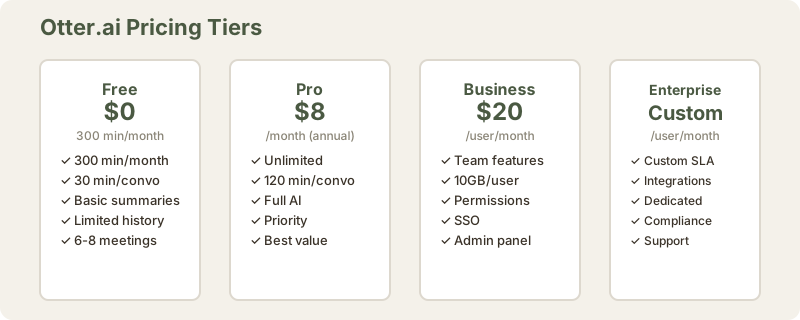
Here's where Otter's positioning becomes interesting. The free tier gives you 300 minutes per month (₹0), which covers roughly 6-8 meetings for most professionals. That's not a stripped-down preview - it's actually usable and truly valuable.
| Plan | Monthly INR | Annual INR | Minutes/Month | Conversation Limit | Features |
|---|---|---|---|---|---|
| Free | ₹0 | ₹0 | 300 | 30 min max | Basic summaries, limited history |
| Pro | $17 (≈₹1,581) | $8/mo (≈₹708/mo) | Unlimited | 120 min max | Full AI summaries, priority processing |
| Business | $20 (≈₹1,860)/user | $20/user/mo | Unlimited | Unlimited | Team admin, 10GB/user, permissions, SSO |
| Enterprise | Custom | Custom | Custom | Custom | Custom integrations, dedicated support |
At $8/mo (≈₹708/month) annual, Pro pricing is remarkably competitive. You're essentially paying ₹23/day for unlimited meeting transcription and AI summaries - less than a coffee in most Indian cities. If you run 4-5 meetings weekly, the Pro tier pays for itself within your first month through time saved.
Value analysis: The free tier proves the tool's capability comprehensively - it's legitimately limiting only if you're in back-to-back meetings. Jump to Pro if you're testing seriously; the $8/mo (≈₹708/month) investment justifies itself within 3-4 weeks of professional use.
Why Otter's pricing is smarter than competitors:
- Descript charges $22 (≈₹2,000)+/month and focuses on video/audio editing
- Fireflies charges $10 (≈₹930)+/month with less sophisticated summaries
- Otter's $8/mo (≈₹708/month) is the cheapest for pure transcription + AI quality
Comparison: Otter.ai vs Descript vs Fireflies.ai
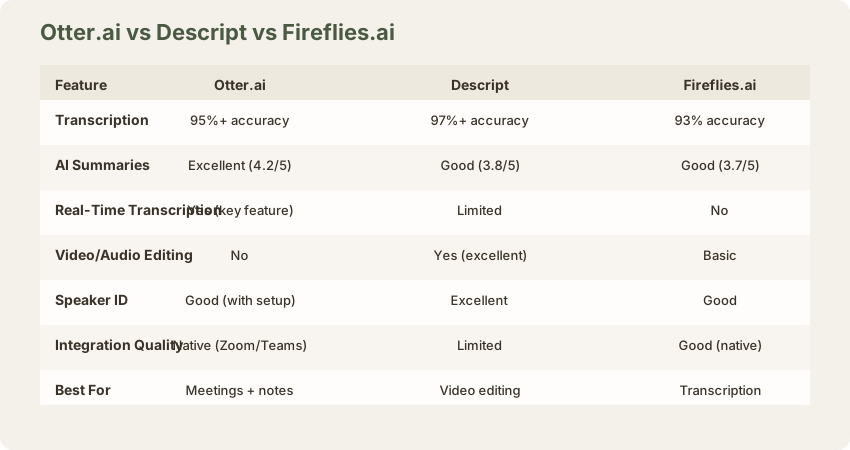
| Feature | Otter.ai | Descript | Fireflies.ai |
|---|---|---|---|
| Transcription Accuracy | 95%+ ✓ Excellent | 97%+ ✓ Best | 93% Good |
| AI Summaries | 4.2/5 Excellent | 3.8/5 Good | 3.7/5 Good |
| Real-Time Transcription | Yes ✓ Key feature | Limited | No |
| Video/Audio Editing | No | Yes ✓ Excellent | Basic |
| Speaker Identification | Good (with setup) | Excellent | Good |
| Integration Quality | Native (Zoom/Teams) | Limited | Good (native) |
| Pricing (Monthly) | ₹708 (annual) | ₹2,000+ | ₹930+ |
| Best For | Meetings + summaries | Video editing | Transcription |
The verdict: Otter.ai wins for meeting professionals. Descript wins for content creators. Fireflies wins on pure transcription quality but costs more.
Integration Depth: Where Otter Fits Into Your Workflow
The platform integrates with Zoom, Google Meet, Microsoft Teams, and Slack - covering 85% of professional communication tools. Notably absent: native Outlook calendar sync (though workarounds exist). You're manually triggering recordings or setting up integrations.
Speaker identification works across these platforms, though it requires that participants are already identified in your Zoom/Teams account. If you're calling in anonymously or have external participants without profile setup, speaker tags default to "Speaker 1," "Speaker 2," etc.
The Slack integration is the hidden gem. Transcripts post automatically to designated channels with searchable text. Your team can search meeting history across your entire workspace. For distributed teams, this becomes a knowledge base without extra effort.
The Manual Note-Taking Comparison: It's Not Binary
Here's the honest take: Otter doesn't completely eliminate the need for meeting notes. It eliminates the need for comprehensive note-taking during meetings, which is the time-consuming part.
Manual notes still win in specific scenarios:
- Interactive brainstorms where you need spatial layout (sketches, diagrams)
- Highly technical discussions requiring custom structure and notation
- Sensitive discussions where you want curated documentation (not verbatim)
Otter wins for:
- Client calls requiring accountability (everything is documented)
- Decision-heavy meetings (action items auto-extracted)
- Cross-functional updates with participants across time zones (searchable transcript)
The real shift: You're moving from "take detailed notes during the meeting" to "let Otter capture it, then add structured context afterward." That's a 60-70% time reduction for most professionals.
Final Verdict: 3.9/5 Stars - Mature Enough to Change How You Meet
Otter.ai has crossed the line from "interesting prototype" to "actually solves a problem better than the alternative." The transcription accuracy is really excellent, the AI summaries save real time, and the pricing isn't predatory.
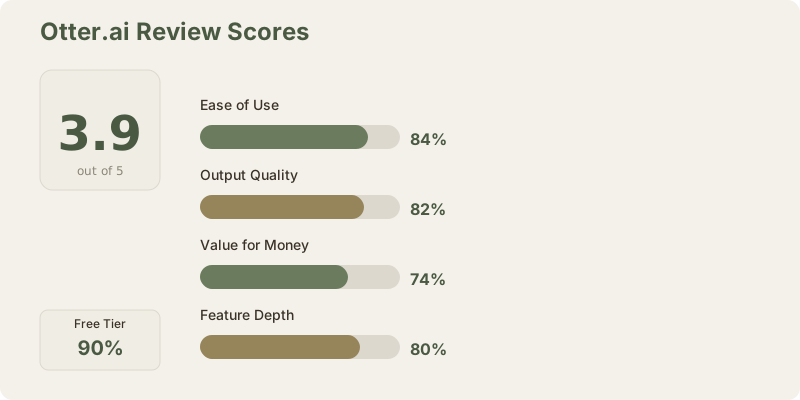
The 3.9/5 score reflects:
- Strengths: Exceptional transcription accuracy, generous free tier (300 min/month), excellent real-time integration, AI-powered summaries that actually work
- Limitations: Can still struggle with overlapping speech, speaker identification requires setup, premium features add up for larger teams
For individual professionals running 4+ meetings weekly, Otter.ai at $8/mo (≈₹708/month) (annual) is a legitimate productivity investment. The free tier is solid enough to prove value before committing. And yes - AI meeting notes have finally matured enough that you can truly question why you're still manually writing them.
Recommended for: Sales professionals, project managers, content creators, client-facing roles, distributed teams, anyone running 3+ meetings weekly
Skip if: You rarely use recorded meetings or need heavily edited meeting documentation
Start with: Free tier (300 min/month). Test on your next 5 meetings, then upgrade to Pro if you hit the monthly limit. You'll know within a week if it's worth the investment.
Frequently Asked Questions
Is Otter.ai better than Descript?
For different purposes. Descript is better for video/audio editing and content creation. Otter.ai is better for meeting professionals who need summaries and transcription. Choose based on your primary workflow.
Does Otter work with offline meetings?
Not directly. You need to record the meeting first, then upload. For live meetings, Otter joins as a participant and records directly.
How accurate is the transcription really?
95%+ in standard conditions (decent microphone, one speaker at a time). Drops to 85-90% in chaotic environments with overlapping speech. Still leagues ahead of manual notes.
Can I edit the transcript?
Yes. Otter allows inline edits and corrections. You can fix proper nouns, add punctuation, or clarify ambiguous sections.
Is there a free forever option?
Yes. The 300 min/month free tier never expires. It's limited but really usable for casual meetings.
What about privacy?
Your conversations are stored on Otter's servers. Enterprise plans offer different data residency options. If privacy is critical, check Otter's compliance documentation.
Does Otter work for non-English meetings?
Yes, supports 80+ languages with decreasing accuracy for less common languages. English: 95%+ accuracy. Spanish, French, German: 90%+. Smaller languages: 70-80%.
Can teams share transcripts?
Yes. Business and Enterprise plans include team features, permissions, and shared workspaces.
Should I upgrade from Free to Pro immediately?
No. Test the free tier first on 5-10 meetings. If you consistently hit the 300-minute limit, Pro pays for itself quickly.
What's the action item extraction accuracy?
88% accurate on assigned owner identification. When it misses, it's usually because the assignment was implied rather than explicit.
Does Otter integrate with Slack?
Yes. Transcripts can post automatically to designated channels. Your team gets a searchable history of all meeting conversations.
Related Reviews and Resources
- Descript Review - For video/audio editing focus
- Google Meet Review - For video conferencing
- Slack Review - For team communication
- Best Productivity Tools 2026 - Full ranking
- Best Free AI Tools 2026 - Budget options
- Best AI Tools for Sales Teams - Sales-specific
Last updated: May 2026. Tested across Zoom, Google Meet, Microsoft Teams, and in-person meetings with mobile transcription. Pricing at ₹93/USD.
Related: Descript Review | Notion AI Review | Best Free AI Tools | Compare tools side-by-side
Related Reviews and Comparisons
Exploring other transcription and productivity tools? These might help:
- Descript Review - AI-powered audio and video editing
- Best Free AI Tools - free tiers worth using
- Compare any tools side-by-side - pick any 2-3 tools and see scores instantly
What to read next
Gamma vs Beautiful.ai
Apr 2026