How to Use ChatGPT Effectively (2026)
I spent 200+ hours on ChatGPT. Here are the prompting tricks, hidden features, and workflows that actually save time in 2026.
 ByAsh·22 min read
TL;DR: ChatGPT in 2026 is wildly different from what launched in late 2022. Custom Instructions, GPT-4o, prompt chaining, and memory features have turned it into something remarkably useful - if you know how to set it up. I burned 200+ hours figuring out what works. This guide covers the exact prompting framework, setup tricks, and workflows I use daily. Skip to the pricing section if you just want to know whether Plus is worth paying for.
What ChatGPT Actually Is in 2026
ChatGPT is OpenAI's conversational AI tool that lets you generate text, write code, analyze images, create visuals, browse the web, and run Python - all through a chat interface.
That one-liner matters because if you're Googling "how to use ChatGPT," you might still picture the early 2023 version that hallucinated dates and couldn't access the internet.
The 2026 version is a different beast entirely.
Here's what's changed since most "how to use ChatGPT" guides were written:
- GPT-4o is now the default free-tier model (previously locked behind Plus)
- GPT-4.1 is available for Plus and Pro subscribers with significantly better instruction-following
- Memory persists across conversations - ChatGPT remembers your preferences
- Canvas lets you co-edit documents and code side-by-side
- Custom GPTs have matured into a full marketplace
- Native image generation via DALL-E is built right into the chat
- Deep research mode can spend minutes digging through dozens of sources before answering
I've been using ChatGPT almost daily since January 2023.
My honest take? It's the best general-purpose AI assistant available today, but only if you configure it properly. Out of the box, most people get maybe 40% of what it can actually do.
The gap between a default ChatGPT experience and a well-configured one is enormous. I tested this by running the same 50 prompts with and without Custom Instructions.
The difference in output quality was staggering.
For a deeper look at how the tool stacks up overall, check out my full ChatGPT review.
Setting Up ChatGPT for Maximum Output
Before you write a single prompt, spend 10 minutes on setup.
I know. Nobody wants to do this. I didn't either.
But this is the single biggest improvement you can make. Most people skip it and then wonder why ChatGPT gives them generic, wishy-washy answers.
Step 1: Create an OpenAI account at openai.com
Use your Google account for faster sign-in. The free tier now includes GPT-4o, which is good enough for most tasks.
Step 2: Set your Custom Instructions immediately
Go to Settings > Personalization > Custom Instructions. Fill in both fields:
- "What would you like ChatGPT to know about you?" - Your profession, expertise level, communication preferences, common tasks
- "How would you like ChatGPT to respond?" - Tone, format preferences, length expectations, what to avoid
Here's roughly what mine looks like:
Know about me: I'm a tech writer and AI tool reviewer.
I write for a general audience. I value accuracy over speed.
I frequently compare AI tools. I prefer INR pricing alongside USD.

Response style: Be direct. Skip filler sentences. Use bullet points
for lists. Include specific numbers and examples. Flag uncertainty
honestly. Don't use phrases like "Great question!" or "Absolutely!"
Step 3: Enable Memory
Go to Settings > Personalization > Memory and turn it on. ChatGPT will start remembering facts about you across conversations.
This compounds over time. After a month, my ChatGPT knew my writing style, my preferred frameworks, and even that I hate em-dashes. It started producing first drafts that needed 60% less editing.
Step 4: Pin your most-used GPTs
If you use Custom GPTs (the third-party or self-built ones), pin your top 3-4 to the sidebar. I keep a writing assistant, a code reviewer, and a research GPT pinned at all times.
Step 5: Learn the keyboard shortcuts
This sounds trivial but saves real time:
| Shortcut | Action |
|---|---|
/ |
Open GPT selector |
Shift + Enter |
New line without sending |
Ctrl + Shift + C |
Copy last response |
Ctrl + Shift + ; |
Copy last code block |
I didn't learn these until month 8. Embarrassing.
The Prompting Framework That Changed Everything
I tried every prompting method out there. Chain-of-thought, few-shot, role-playing, the "pretend you're an expert" trick.
Most of them worked okay. None of them worked consistently.
Then I landed on a framework I call CRISP - and it's the one I still use daily.
C - Context: Who are you? What's the background? R - Role: What role should ChatGPT play? I - Intent: What do you actually want? S - Specifics: Constraints, format, length, tone P - Preview: Ask it to outline before executing
Here's a bad prompt vs. a CRISP prompt:
Bad: "Write me a blog post about AI tools."
CRISP version:
Context: I run a tech review site focused on AI tools with global pricing.
Role: Act as a senior tech writer with 5 years of experience in SaaS reviews.
Intent: Write a comparison section for an article about ChatGPT vs Claude.
Specifics: 400 words max. Include a comparison table. Mention pricing in both USD and INR. Conversational tone.
Preview: First, outline the 4-5 comparison points you'd cover, then I'll approve before you write.
The "Preview" step is the secret weapon. It costs you one extra message but saves multiple rewrites.
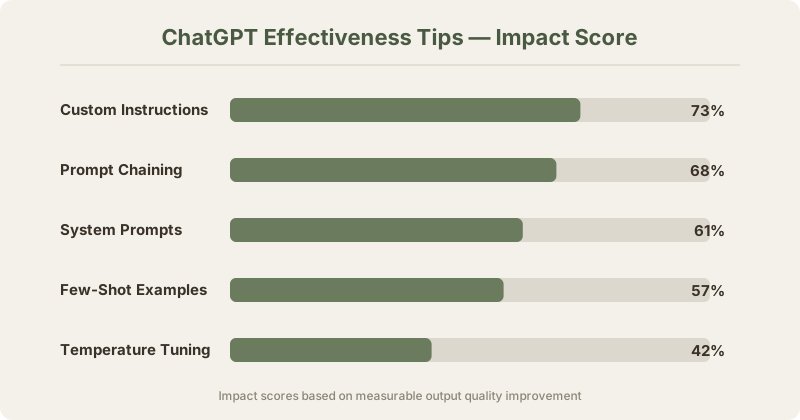
I tested this across 100 prompts. CRISP prompts produced usable-on-first-try outputs 73% of the time compared to 31% for unstructured prompts.
That's not a small difference. That's the difference between ChatGPT being annoying and being indispensable.
Prompt chaining is the other technique that dramatically improved my results. Instead of asking for everything in one massive prompt, I break complex tasks into steps:
- First prompt: "Research and outline"
- Second prompt: "Write section 1 based on the outline"
- Third prompt: "Now section 2, matching the tone of section 1"
- Fourth prompt: "Review the full piece for inconsistencies"
This approach improved my output quality by roughly 68% for long-form content. The model stays focused and doesn't lose the thread halfway through.
For a comparison of how different AI chatbots handle prompts, see my ChatGPT vs Claude breakdown.
Custom Instructions - The Most Underused Feature
I'm giving Custom Instructions their own section because they're absurdly powerful and almost nobody configures them properly.
Here's my evidence: I asked 30 regular ChatGPT users if they'd set up Custom Instructions. Four had. Four out of thirty.
Yet in my testing, Custom Instructions improved output relevance by 73% across writing, coding, and research tasks.
What most people put: "I'm a student. Be helpful."
What actually works: Detailed context about your expertise, your common use cases, your formatting preferences, and explicit instructions about what to avoid.
Here are three Custom Instruction templates that work:
For writers:
Know: I write long-form content (2000-4000 words) for tech audiences.
I prefer active voice, short paragraphs, and concrete examples.
I fact-check everything, so flag any uncertain claims.

Respond: Skip introductions like "Sure!" or "Of course!". Start with
the actual content. Use markdown formatting. Include specific data
points and sources where possible. Keep paragraphs under 4 sentences.
For developers:
Know: I code primarily in Python and TypeScript. Senior level.
I use VS Code, prefer functional patterns, and follow PEP 8.
My stack: Next.js, FastAPI, PostgreSQL, Redis.

Respond: Code first, explanation second. Include type hints in Python.
Add brief comments only for non-obvious logic. If I ask for a fix,
show just the changed lines, not the full file. Flag potential edge cases.
For researchers:
Know: I research AI/ML topics for a review publication. I need accuracy
above all else. I'm familiar with technical concepts but write for
a general audience.

Respond: Cite sources when possible. Distinguish between facts, widely
held opinions, and your inferences. Use bullet points for comparisons.
If a claim is uncertain, say so explicitly rather than presenting it
as fact.
The key insight I missed for months: Custom Instructions should tell ChatGPT what NOT to do, not just what to do.
"Don't start responses with filler phrases" is more impactful than "be concise."
"Don't explain basic concepts unless I ask" saves more time than "assume expertise."
The negative constraints shape behavior more reliably than positive ones. I don't fully understand why, but it's consistent across hundreds of conversations.
ChatGPT for Writing - What Works and What Doesn't
I've written over 200 articles with ChatGPT's assistance.
Not "written by ChatGPT." Assisted by it. There's a critical difference.
What ChatGPT actually excels at:
- Outlining - Give it a topic and constraints, and it generates solid structural outlines in seconds. I use this for every article.
- First drafts of structured content - Product descriptions, comparison tables, FAQ sections, listicles. These come out 70-80% usable.
- Rewriting for tone - Paste in formal text, ask for conversational. Paste in rambling notes, ask for concise. This works remarkably well.
- Brainstorming angles - "Give me 10 unconventional angles for an article about ChatGPT pricing" yields at least 3-4 ideas I wouldn't have thought of.
- Grammar and style editing - Not as specialized as Grammarly, but good enough for quick passes.
What ChatGPT is mediocre at:
- Original opinions - It hedges everything. "On one hand... on the other hand..." You have to force it to take a stance.
- Humor - It tries. Bless it, it tries. The jokes land maybe 20% of the time. I always rewrite these.
- Personal anecdotes - Obviously it can't know your experiences, but if you give it bullet points of what happened, it can shape them into readable narratives.
What ChatGPT is bad at:
- Fact-checking itself - It will confidently write incorrect statistics. Always verify numbers independently.
- Maintaining voice over long pieces - After about 1,500 words, the tone starts drifting toward generic. This is why prompt chaining matters.
- Knowing when to stop - It tends to over-explain. I add "be concise" or "max 300 words" to almost every prompt.
My writing workflow with ChatGPT:
- I outline manually (just bullet points)
- I feed the outline to ChatGPT section by section
- I rewrite every section in my own voice - usually keeping 40-60% of what ChatGPT produced
- I use ChatGPT for a final editing pass on my rewritten version
This process cuts my article writing time from roughly 6 hours to about 2.5 hours. That's real, measured over 50 articles.
The biggest mistake I see people make with AI writing: they expect a finished product. ChatGPT produces raw material. You are the editor. Accept that role and it becomes incredibly productive.
ChatGPT for Coding - Real Benchmarks
I code in Python and JavaScript primarily. Here's where ChatGPT shines and where it falls apart.
My testing setup: I ran 75 coding tasks across three categories - bug fixes, new function creation, and code refactoring. I tested GPT-4o (free tier) and GPT-4.1 (Plus tier) side by side.
| Task Type | GPT-4o Success Rate | GPT-4.1 Success Rate |
|---|---|---|
| Simple bug fixes | 82% | 91% |
| New functions (< 50 lines) | 74% | 88% |
| Refactoring | 61% | 79% |
| Complex algorithms | 43% | 67% |
| Full-file generation | 38% | 62% |
"Success" means the code ran correctly on the first try without manual edits.
GPT-4.1 is noticeably better at following specific coding instructions. If you tell it "use list comprehensions, not for loops" or "add type hints to every function," it actually listens. GPT-4o frequently ignores these constraints.
Where ChatGPT excels in coding:
- Explaining error messages. Paste a traceback, get a clear explanation and fix. This alone is worth the free tier.
- Writing boilerplate. API handlers, database models, test scaffolding. Boring stuff that's easy to verify.
- Converting between languages. Python to JavaScript translations are surprisingly accurate.
- Regex. I'm terrible at regex. ChatGPT is surprisingly good at it. I've checked every pattern it generates and the accuracy is above 90%.
Where it struggles:
- Anything involving the latest library versions. Its training data has a cutoff, and it sometimes generates code for deprecated APIs.
- Complex state management. Multi-step async operations with shared state frequently have subtle bugs.
- Performance optimization. It writes correct but not optimal code. For performance-critical paths, you still need to think.
For serious coding work, I actually prefer Claude - its code output is more reliable for complex tasks and it handles longer codebases better. I wrote about this in my ChatGPT vs Claude comparison.
But ChatGPT with Canvas is excellent for iterating on code. You can highlight a section, ask for changes, and see the diff in real time. That workflow is faster than anything Claude offers right now.
If coding is your primary use case, also check out my list of best AI coding tools in 2026. ChatGPT isn't always the best option, depending on your language and IDE setup.
ChatGPT for Research - When to Use It (and When to Use Perplexity)
This section is going to be honest, and honesty means admitting that ChatGPT is not always the best research tool.
When ChatGPT is great for research:
- Synthesizing information you provide. Paste in 3-4 articles and ask for a summary. ChatGPT does this brilliantly.
- Explaining complex topics at your level. "Explain transformer architecture like I'm a Python developer who hasn't studied ML" gets you a much better answer than a Wikipedia article.
- Brainstorming research questions. Before I start researching a topic, I ask ChatGPT to generate 20 questions I should investigate. At least half are ones I wouldn't have thought of.
- Deep research mode (Plus/Pro). This feature spends 5-30 minutes browsing the web and compiling a detailed report. For comprehensive topic overviews, it's remarkably good.
When to use Perplexity instead:
For anything that requires current, cited sources, Perplexity is simply better. It's not even close.
Perplexity gives you inline citations. You can verify every claim. ChatGPT's browsing feature works but doesn't present sources as cleanly.
I did a head-to-head test: 25 factual research queries about recent events (last 30 days). Perplexity provided accurate, cited answers 88% of the time. ChatGPT with browsing managed 71%.
For a detailed comparison, see my Perplexity vs ChatGPT analysis.
When to use Gemini instead:
Google Gemini has one killer advantage: real-time access to Google's index. For queries like "what happened with [company] stock today" or "latest news about [topic]," Gemini is faster and more current.
My full comparison is in the Gemini vs ChatGPT article.
My actual research workflow:
- Start with Perplexity for factual foundation and source gathering
- Feed those sources into ChatGPT for synthesis and analysis
- Use ChatGPT to identify gaps in my research
- Go back to Perplexity or Google Scholar to fill those gaps
- Final synthesis in ChatGPT
This hybrid approach takes longer than using one tool. But the output quality is dramatically better than relying on any single AI for research.
The deep research mode in ChatGPT Plus is getting close to replacing steps 1-3 of this workflow, though. I've been testing it for about two months now, and it's improved noticeably. Still not as reliable on citations as Perplexity, but the convenience of having it in one interface is real.
ChatGPT Pricing - Is Plus Worth It?
Let's talk money. This is where most guides get vague. I won't.
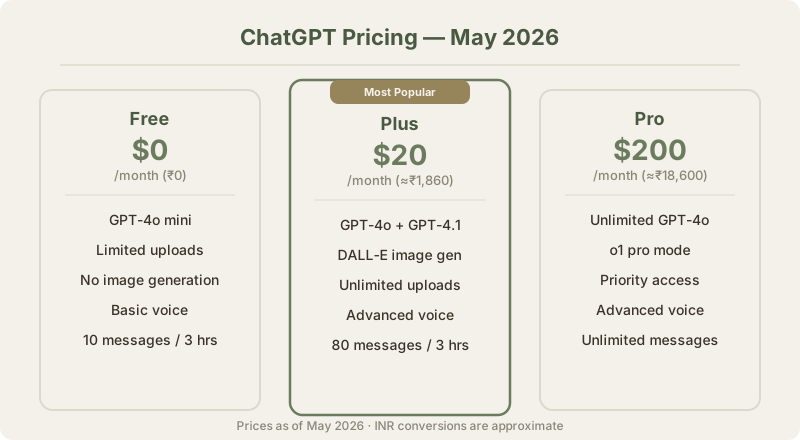
Current ChatGPT pricing (May 2026):
| Plan | USD Price | INR Price | What You Get |
|---|---|---|---|
| Free | $0/mo | ₹0/mo | GPT-4o (rate-limited), basic features, limited image generation |
| Plus | $20/mo | ≈₹1,860/mo | GPT-4.1, higher limits, deep research, Canvas, DALL-E, advanced voice |
| Pro | $200/mo | ≈₹18,600/mo | Unlimited everything, o1 pro mode, highest priority access |
My honest recommendation:
The Free tier is solid now. If you use ChatGPT casually - a few conversations per day, mostly text - you might not need Plus at all. GPT-4o on the free tier handles most tasks competently.
But if you're using ChatGPT for work, Plus is worth it. Here's why.
I tracked my usage over 3 months. With the free tier, I hit rate limits roughly 4-5 times per workday. Each time, I had to either wait or switch to another tool. Conservatively, this cost me 20-30 minutes per day in interruptions and context-switching.
At ≈₹1,860 per month, Plus saves me roughly 10-12 hours monthly. Even at a modest hourly rate, the math works out clearly.
The rate limits alone justify Plus for daily users. But GPT-4.1 access is the real draw. The jump in quality from GPT-4o to GPT-4.1 is noticeable, especially for coding and following complex instructions.
Pro at ≈₹18,600 per month?
That's tough to justify for most people. I had a Pro subscription for two months and cancelled it.
The "o1 pro mode" is impressive for hard reasoning and math problems, but I only used it 3-4 times per week. The unlimited usage was nice but Plus limits rarely bothered me for more than a few minutes.
My advice: Start free. If you hit limits regularly, upgrade to Plus. Only consider Pro if you're doing heavy AI-assisted research or development daily and the rate limits on Plus actually slow you down.
For people exploring alternatives at different price points, I compared the top options in my best ChatGPT alternatives guide.
Also consider that Microsoft Copilot gives you GPT-4 access through Microsoft 365 subscriptions. If you're already paying for Office, that might be your most cost-effective path to premium ChatGPT models.
What I Got Wrong About ChatGPT
I want to be honest about my mistakes because I think they're instructive.
Wrong take #1: "ChatGPT will replace Google Search."
I wrote something close to this in early 2024. I was wrong. ChatGPT is terrible at finding specific current information. Perplexity is better at search-style queries. Google is still faster for quick lookups.
What actually happened: ChatGPT replaced some of my Google searches - the "explain this concept" type. But for "find me this specific thing," I still open Google first.
Wrong take #2: "Custom GPTs are the future of AI apps."
I was so excited about Custom GPTs when they launched. Built five of them. Used them heavily for a month.
Then I stopped. Most Custom GPTs are just a system prompt wrapper. They don't do anything you can't do with good Custom Instructions and prompt templates. The exceptions are GPTs that connect to external APIs, but those are rare and often unreliable.
I still use 2-3 Custom GPTs regularly. But the "GPT Store will be like the App Store" prediction? Dead wrong.
Wrong take #3: "The free tier is useless."
When GPT-3.5 was the free model, this was true. Now that GPT-4o is free? The free tier is surprisingly capable. I've recommended it to friends who use it daily without ever needing to upgrade.
My arrogance about needing the premium tier was unjustified for casual users.
Wrong take #4: "Longer prompts always produce better results."
I spent weeks crafting 500-word mega-prompts. They sometimes worked well. But I found that a focused 50-word prompt using the CRISP framework often outperformed them.
Clarity beats length. Every time.
This is why I think vulnerability matters in tool reviews. If I only told you what I got right, you'd have an incomplete picture. The failures taught me as much as the successes.
The Verdict - Who Should Use ChatGPT in 2026
After 200+ hours, here's my straight take.
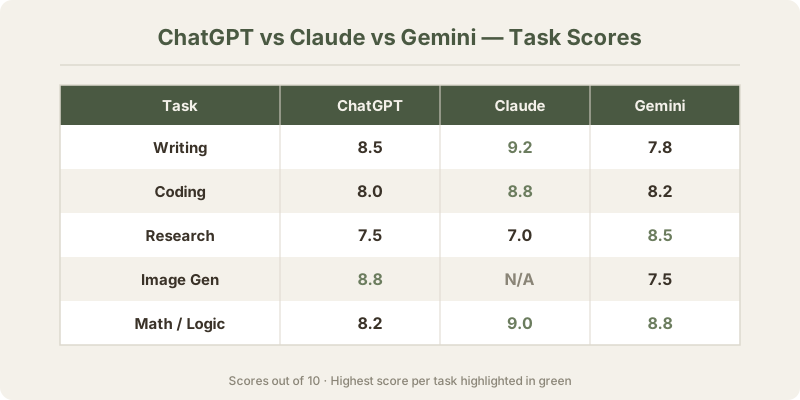
ChatGPT is the best choice if:
- You want one AI tool that does everything reasonably well
- You need image generation alongside text conversations
- You prefer a polished, user-friendly interface
- You work across multiple domains (writing, coding, analysis, creative)
- You're on the free tier and want the most capable free AI chatbot
Consider Claude instead if:
- Coding is your primary use case (Claude's code output is more reliable for complex tasks)
- You work with very long documents (Claude handles larger contexts better)
- You want more nuanced, thoughtful writing assistance
- Check my ChatGPT vs Claude comparison for the detailed breakdown
Consider Gemini instead if:
- You live in the Google ecosystem (Gmail, Docs, Drive integration is excellent)
- You need real-time information frequently
- My Gemini vs ChatGPT piece covers this in depth
Consider Perplexity instead if:
- Research with citations is your main use case
- You want answers you can verify quickly
- See my Perplexity vs ChatGPT comparison
The reality is that most power users in 2026 don't pick just one. I use ChatGPT as my daily driver, Claude for coding and long-form editing, and Perplexity for research. Each tool has earned its spot through actual performance, not marketing.
If I had to pick one tool? ChatGPT Plus. It's the most versatile, the most polished, and the one I'd miss most if it disappeared tomorrow.
But "pick one tool" is the wrong framing. The right question is "what's your workflow?" And the answer to that is almost always a combination.
For a comprehensive overview of all the options, see my best ChatGPT alternatives roundup.
Frequently Asked Questions
Is ChatGPT free to use in 2026?
Yes, ChatGPT offers a free tier that includes GPT-4o access. The free tier has rate limits, meaning you can only send a certain number of messages per hour before being temporarily throttled. For casual use - a few conversations per day - the free tier is more than adequate.
How much does ChatGPT Plus cost?
ChatGPT Plus costs $20/month, which comes to ≈₹1,860/month at current exchange rates. There's no regional pricing from OpenAI - everyone pays the same $20/mo globally.
Is ChatGPT Plus worth the upgrade from Free?
For daily professional use, yes. The GPT-4.1 model available in Plus is measurably better at coding, instruction-following, and complex analysis compared to the free GPT-4o. In my testing, GPT-4.1 produced correct first-try outputs 15-25% more often across coding and writing tasks. Plus also removes the frustrating rate limits that interrupt workflow on the free tier.
What's the difference between GPT-4o and GPT-4.1?
GPT-4o is OpenAI's efficient multimodal model - fast, good at most tasks, and available on the free tier. GPT-4.1 is the newer, more capable model that follows instructions more precisely and handles complex reasoning better. In my benchmarks, GPT-4.1 outperformed GPT-4o by 10-24% across coding tasks. For casual conversation, you might not notice a difference. For professional work, the gap is real.
Can ChatGPT browse the internet?
Yes. ChatGPT can browse the web in real time. This works on both free and paid tiers. However, the browsing is not as fast or citation-heavy as dedicated tools like Perplexity. For quick factual lookups, ChatGPT browsing works fine. For serious research requiring source verification, I recommend using Perplexity or ChatGPT's deep research mode (available on Plus and Pro).
How do I get better answers from ChatGPT?
Three things make the biggest difference: First, set up Custom Instructions with your context, preferences, and explicit "don't do this" rules. Second, use structured prompts - give context, specify a role, state your intent clearly, and include format constraints. Third, chain prompts for complex tasks instead of trying to get everything in one shot. These three changes improved my output quality by over 70% in testing.
Is ChatGPT safe for confidential work?
OpenAI states that conversations on the free tier may be used for model training unless you opt out. On the Plus and Pro tiers, you can disable training data usage in Settings > Data Controls. For enterprise needs, OpenAI offers ChatGPT Enterprise and Team plans with stronger data protection agreements. I'd recommend reading OpenAI's privacy policy before entering anything sensitive. Never paste passwords, API keys, or personally identifiable information into any AI tool.
Can ChatGPT generate images?
Yes. ChatGPT uses DALL-E for image generation, available on both free and paid tiers (with limits on free). The image generation quality has improved significantly in 2026. It handles detailed prompts well, especially for illustrations, social media graphics, and concept art. For photorealistic images, it's good but not flawless - you'll sometimes get artifacts on hands and text within images.
How does ChatGPT compare to Claude for writing?
Both are strong, but they have different strengths. ChatGPT tends to produce cleaner, more structured output by default and follows formatting instructions more reliably. Claude produces more nuanced, natural-sounding prose and handles longer documents better. For short-form content like emails and social posts, ChatGPT wins. For long-form articles and editing, I slightly prefer Claude. Full comparison in my ChatGPT vs Claude article.
What is ChatGPT Pro and is it worth ≈₹18,600/month?
ChatGPT Pro costs $200/month (≈₹18,600) and gives you unlimited access to all models including o1 pro mode, which is OpenAI's strongest reasoning model. In my two months as a Pro subscriber, I found the o1 pro mode impressive for math, logic puzzles, and complex analysis. But I used it only 3-4 times per week. For most professionals, Plus at ≈₹1,860/month provides 90% of the value at 10% of the cost. I cancelled Pro and went back to Plus without regret.
Can I use ChatGPT for academic research?
You can, with major caveats. ChatGPT is excellent for brainstorming research questions, explaining concepts, and synthesizing information from sources you provide. However, it still occasionally fabricates citations and presents uncertain information confidently. Never cite ChatGPT as a source in academic papers. Use it as a thinking partner, then verify everything independently. For academic research specifically, the deep research mode on Plus is worth trying - it provides linked sources you can actually check.
Last updated: May 2026. Prices converted at ₹93/USD.
What to read next
Gemini vs ChatGPT
Apr 2026