Gumloop Review 2026: AI Workflows, Tested and Scored
Gumloop tested: 7 AI providers, free 5k credits, non-AI steps free. Claude 4.8 Opus built-in. Better than Zapier for AI workflows. Honest verdict.
Gumloop is the right tool when AI is the core of your workflow, not an add-on.
TL;DR: Gumloop is the strongest AI-native automation platform available in 2026 for teams building workflows where AI is the core, not the add-on. Seven AI providers including Claude 4.8 Opus, GPT-5.4, Gemini 3.5 Flash, Perplexity, Meta, and DeepSeek. The key differentiator: non-AI steps (routing, logic, formatting) consume zero credits. This makes Gumloop significantly cheaper than Zapier for complex AI workflows with many logic steps. The free plan gives 5,000 credits per month with no credit card required. The $37/mo Pro plan (≈₹3,441/mo) is the single paid tier before Enterprise. The catches: fewer app integrations than Zapier, a steep jump from free to Pro with no middle tier, and credit costs that are hard to predict before running a workflow.
I tested Gumloop on their free plan. Here is what I found.
What Is Gumloop
Gumloop is an AI-native workflow automation platform built for teams who want to embed AI models directly into their business processes.
The distinction from Zapier and Make is fundamental. Zapier was built for app-to-app automation and added AI later. Gumloop was built for AI workflows from the start. Every design decision, from the visual canvas to the credit pricing model, reflects that origin.
The platform received a $50M Series B led by Benchmark, visible right on the pricing page. That funding signals both serious investor confidence and a platform in active development. Features and integrations are expanding rapidly.
Gumloop connects 7 AI providers - Anthropic, OpenAI, Google, Perplexity, Meta, and DeepSeek - in a single visual workflow builder. You pick the right model for each step rather than being locked into one vendor.
The target audience is operations, sales, and marketing teams who need intelligent automation rather than simple app connectors. Gumloop's example workflows (enrich leads with Apollo, generate AI research summaries before meetings, build Slackbots from call data) reflect a business team audience rather than individual solopreneurs.
Individual users will find Gumloop's free plan generous for testing. The $37/mo (≈₹3,441/mo) Pro plan is priced for teams where multiple people share the workflow infrastructure.
What makes Gumloop different from every other tool in this comparison: it treats the AI model as the most important part of the workflow, not one integration among thousands. The entire product is designed around that insight.
How Gumloop Works

The core concept is a visual canvas where you drag and drop nodes to build automation workflows. Each node performs one task: call an AI model, fetch a webpage, read a spreadsheet, send a Slack message, or route data based on a condition.
What makes Gumloop different from traditional automation is how nodes connect. In Zapier, every step costs a task. In Gumloop, only nodes that call AI models consume credits. Every routing step, conditional logic, data formatting, and output step runs free.
A 45-step workflow with 4 AI calls costs the same in credits as a 5-step workflow with 4 AI calls. This pricing model aligns cost with AI value rather than automation complexity.
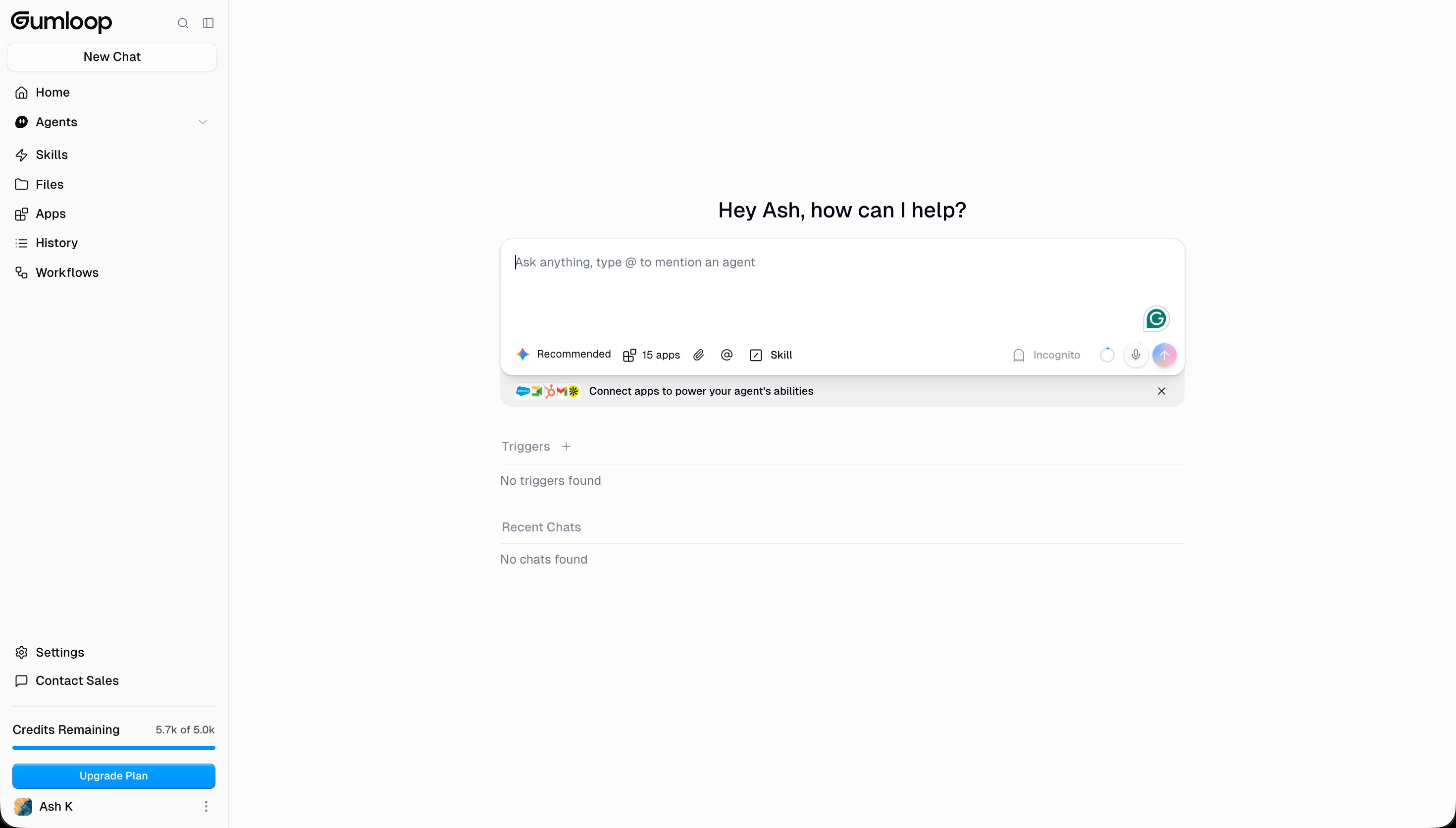
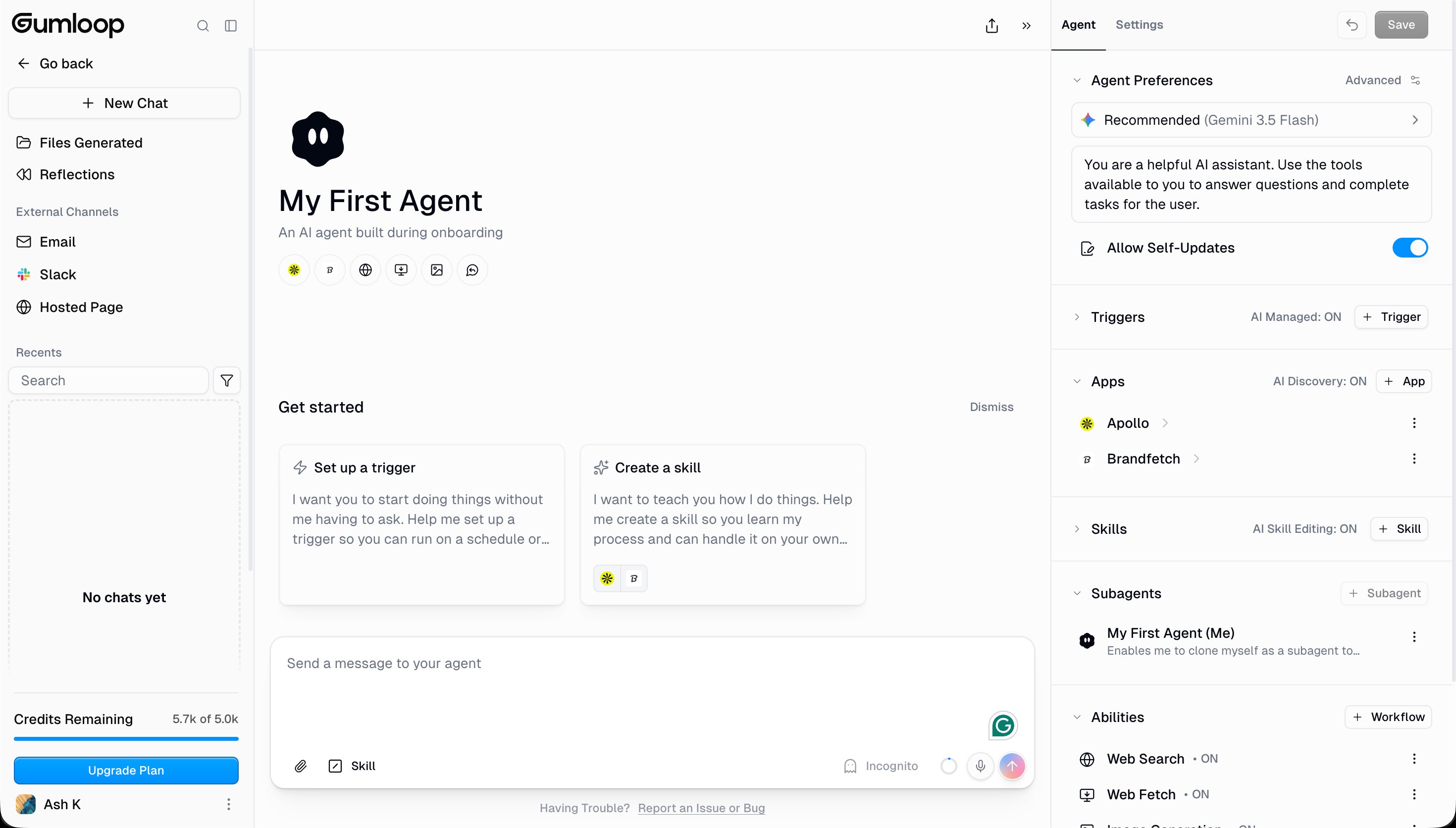
Workflows can be triggered manually, on a schedule, or via external events. Agents can run autonomously and interact with connected apps (Email, Slack, Hosted Page) without a human in the loop.
The visual interface uses a dot-grid canvas where nodes appear as cards. Data flows between nodes via connection lines. Each node shows its inputs on the left and outputs on the right. You connect them by dragging output tokens to input slots on the next node. The system is consistent once you understand it, but it requires more initial learning than Zapier's linear list builder.
One genuine strength: the "Ask AI for help" button lets you modify an existing workflow in natural language. When I tested typing "add a step that sends a Slack message if the result is positive," Gumloop added a conditional node and Slack output node in the correct position. This iterative AI-assisted building reduces the technical barrier for complex workflow edits.
The Free Plan: What 5,000 Credits Gets You

The free plan gives 5,000 credits per month with no credit card required. After signup, Gumloop credited an extra 700 credits as a welcome bonus, giving 5,700 credits to start.
The free plan limits you to 1 active trigger, 2 concurrent runs, and 5 concurrent agent interactions. Unlimited agents and unlimited workflows are available on the free plan, which is a notably generous allowance.
In practice, 5,000 credits supports meaningful testing. A typical Ask AI call to Claude 4.8 Opus (the smartest model) costs roughly 50-200 credits depending on the length of the prompt and response. At 100 credits per call average, 5,000 credits covers 50 AI workflow runs per month.
For solo users evaluating Gumloop, the free plan is sufficient for testing real workflows before committing to $37/mo Pro.
AI Model Selection: Seven Providers in One Node

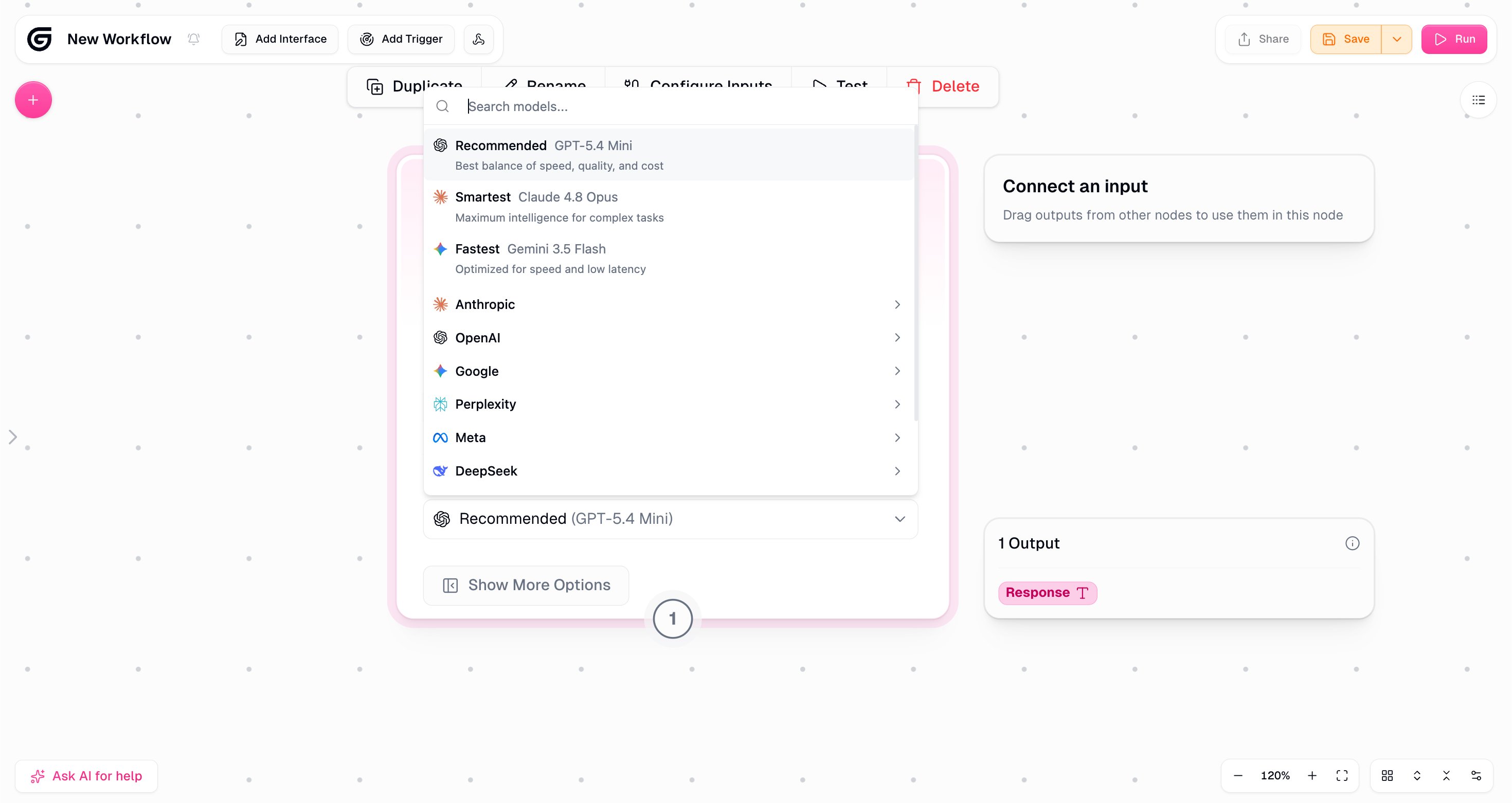
This screenshot is the clearest differentiator Gumloop has over competitors.
The Ask AI node offers three recommended options: GPT-5.4 Mini (balanced), Claude 4.8 Opus (smartest), and Gemini 3.5 Flash (fastest). Below that, full provider categories: Anthropic, OpenAI, Google, Perplexity, Meta, and DeepSeek.
Gumloop labels Claude 4.8 Opus as "Maximum intelligence for complex tasks" and Gemini 3.5 Flash as "Optimized for speed and low latency." These descriptions help non-technical users pick the right model without understanding the underlying benchmarks.
The practical value: you can use different models for different steps in the same workflow. Use Gemini 3.5 Flash for quick data extraction (fast, cheap), then route complex analysis to Claude 4.8 Opus (most accurate), then summarize with GPT-5.4 Mini (balanced). This multi-model approach is not possible in Zapier or Make in the same workflow.
The Workflow Builder: What Testing Revealed

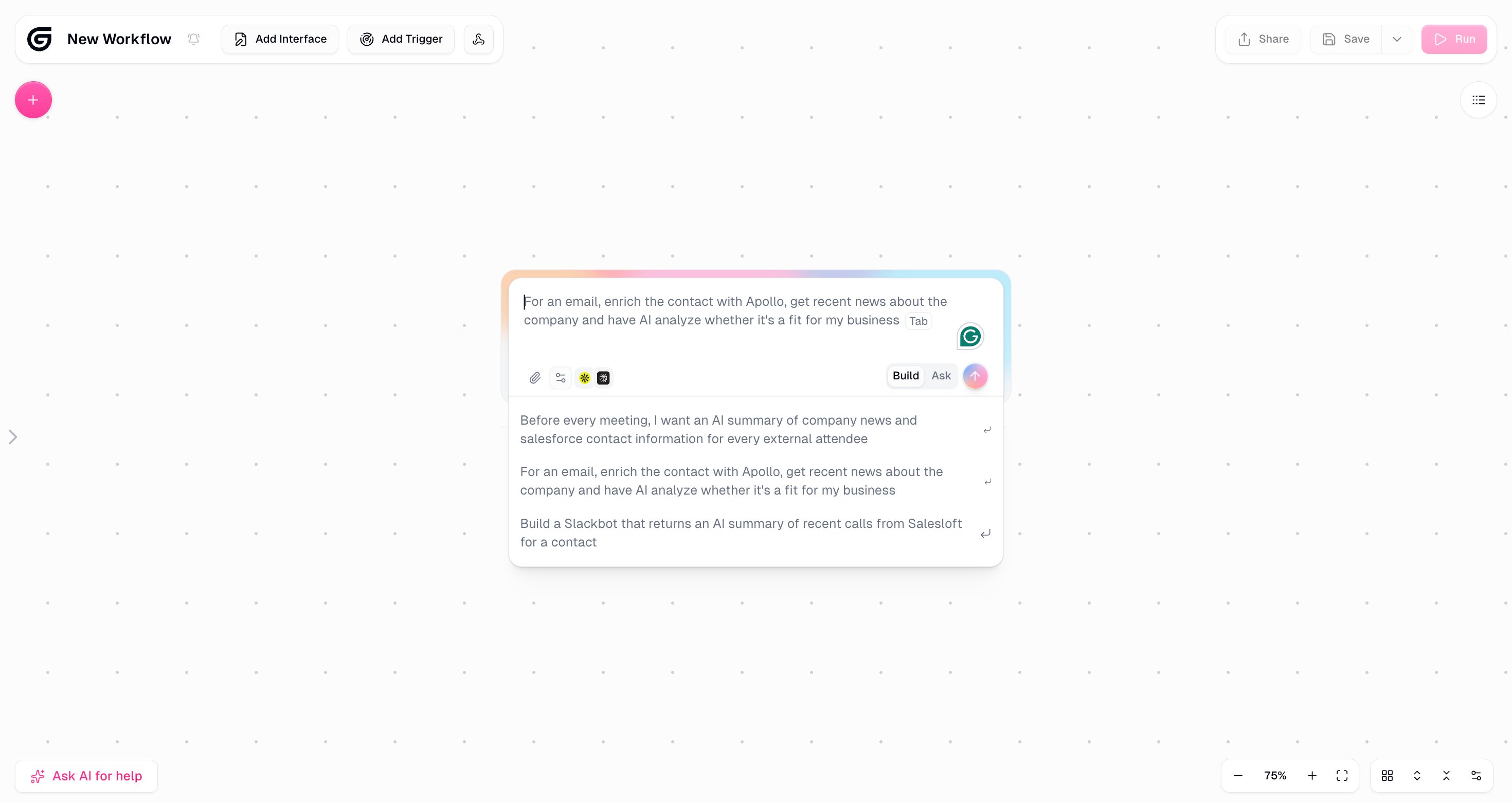
The workflow builder opens with an AI-powered prompt interface. Example prompts visible in testing:
"Before every meeting, I want an AI summary of company news and Salesforce contact information for every external attendee."
"For an email, enrich the contact with Apollo, get recent news about the company and have AI analyze whether it's a fit for my business."
"Build a Slackbot that returns an AI summary of recent calls from Salesloft for a contact."
These examples reveal Gumloop's target user: sales and operations teams building AI-powered research and outreach workflows. The platform is not primarily aimed at individual solopreneurs. It is built for business teams.
The canvas itself is clean. Nodes appear as cards on a dot-grid background. Connections between nodes are visible lines showing data flow. The "Ask AI for help" button bottom left means you can ask Gumloop to modify your workflow in natural language, similar to Zapier's Copilot.

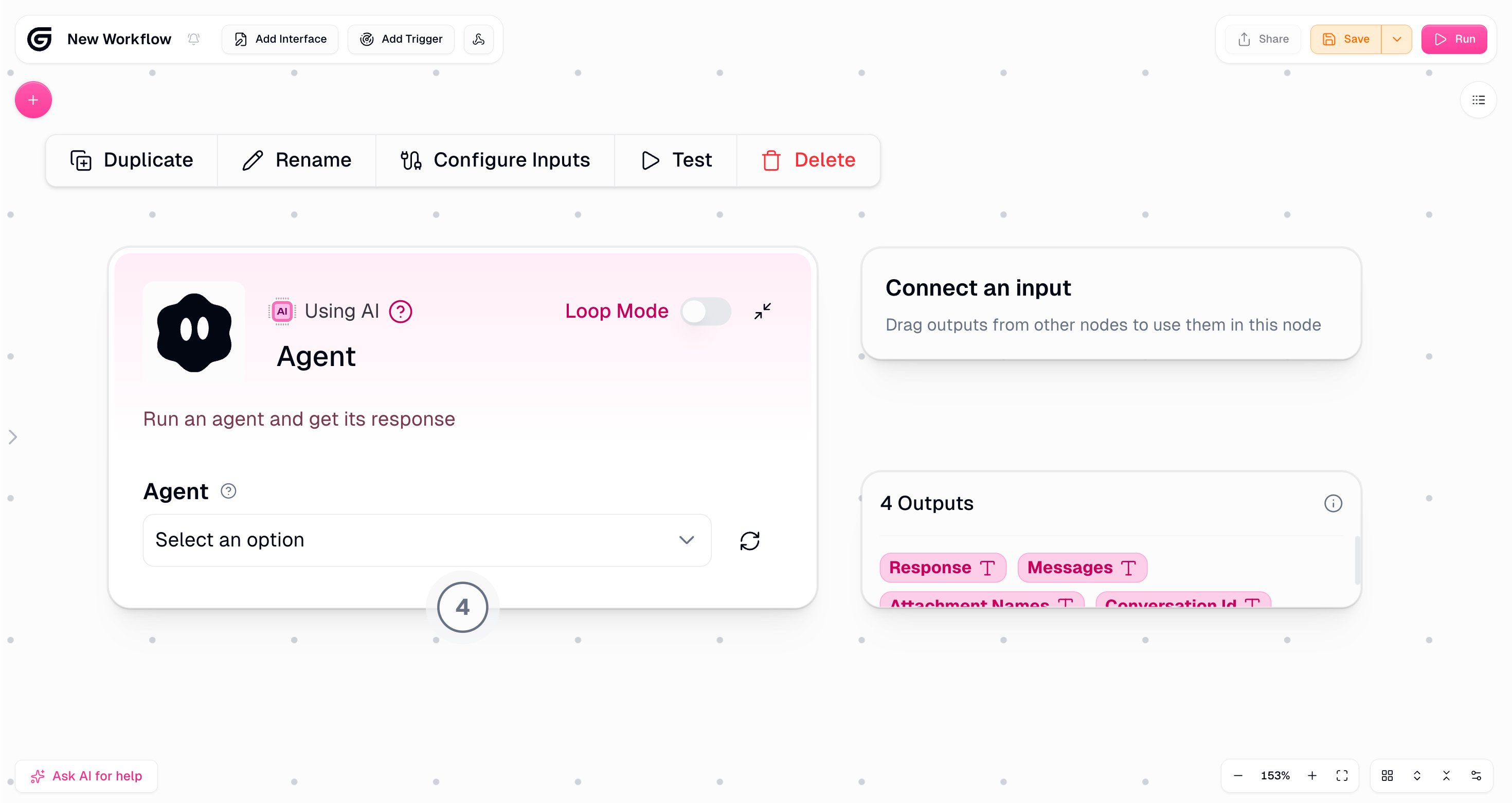
The Agent node is particularly powerful. Loop Mode lets an agent process a list of items one by one, which is essential for workflows like "process each lead from this spreadsheet." The 4 output types (Response, Messages, Attachment Names, Conversation Id) give fine-grained control over what data flows to the next step.
The Node Library: Built for AI


The AI node category shows what Gumloop was designed for. Beyond basic Ask AI and Agent nodes, the library includes Extract Data, Categorizer, Generate Image, AI Web Research, Analyze Image, Analyze Video, and AI List Sorter.
Each of these handles a specific AI task pattern that would require custom code in most tools. The Categorizer node takes a list of items and routes them into buckets using natural language descriptions. The Extract Data node pulls structured information from unstructured text. AI Web Research performs web research tasks with dynamic inputs.
The non-AI node library (integrations with Airtable, Gmail, Findmail, and others) is growing but smaller than Zapier's. Critically, these nodes can create custom integrations via MCP (Model Context Protocol) directly from the builder interface, which future-proofs the integration library as MCP adoption grows.
The node search function (search "AI" to filter all AI nodes, as shown in testing) makes the library navigable even as it grows. Power users will find the loop through list functionality particularly useful - the Loop Mode toggle on the Agent node processes lists of items automatically, which is essential for batch workflows like "process all leads from this spreadsheet."
Pricing: Simple but Steep Jump

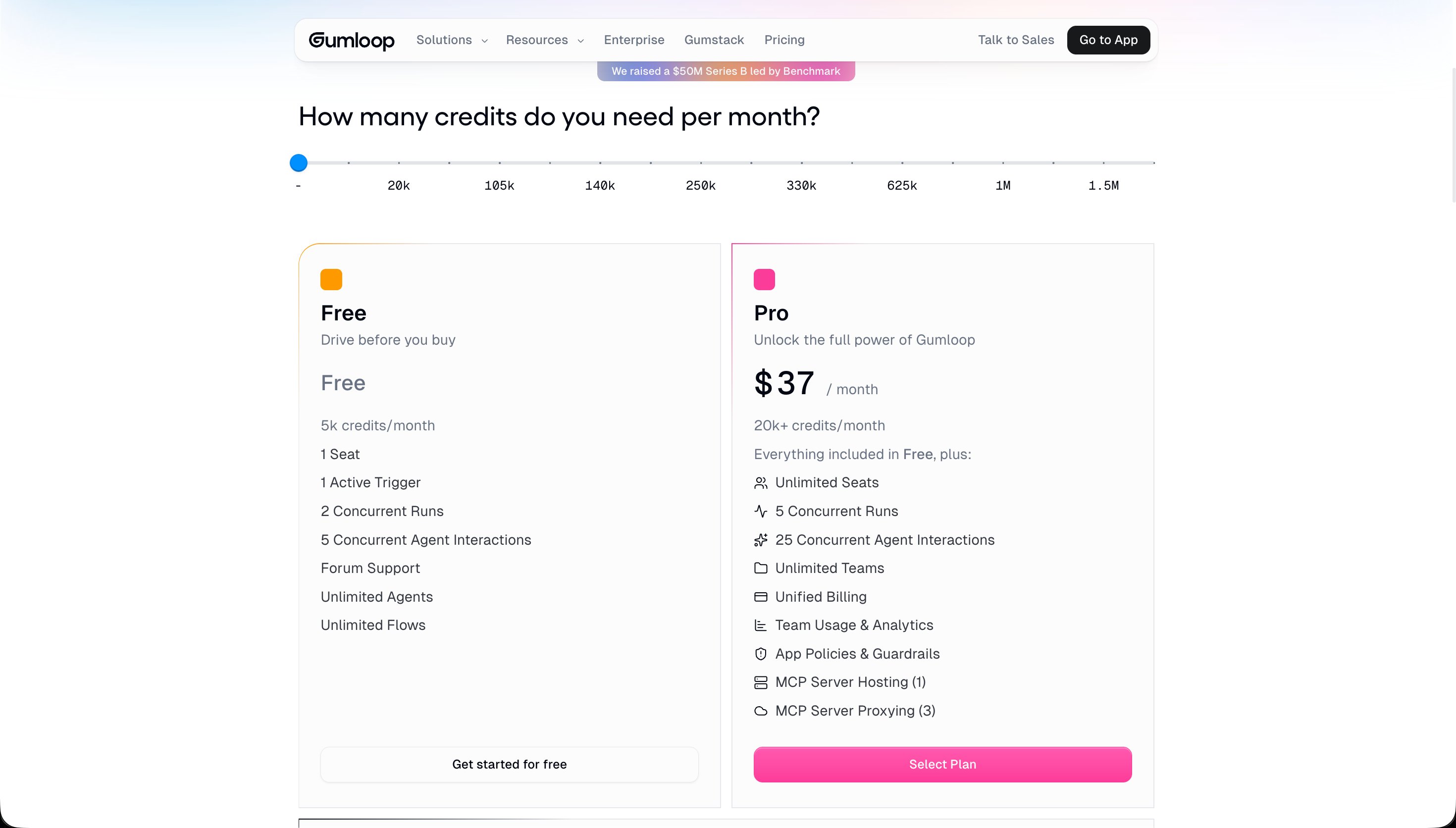
Gumloop uses a slider-based pricing model where you choose how many credits you need per month. The slider goes from 5k (free) to 1.5M credits.
The Free plan at 5,000 credits per month costs nothing. It works well for testing and light personal workflows.
The Pro plan at $37/mo (≈₹3,441/mo) starts at 20,000+ credits and adds unlimited seats, 5 concurrent runs, 25 concurrent agent interactions, unlimited teams, MCP server hosting, and team usage analytics.
Enterprise pricing is custom with SSO/SAML, audit logging, and Gumstack (their enterprise infrastructure layer).
The gap between free (5k credits) and Pro (20k+ credits) is where Gumloop's pricing creates friction. There is no $10-15/mo starter tier for users who have outgrown the free plan but are not ready for $37/mo. This means many users who love the product on the free plan face a significant commitment to continue.
At $37/mo (≈₹3,441/mo), Gumloop costs almost double Zapier's Professional ($19.99/mo, ≈₹1,859/mo). However, the credit comparison tells a different story for AI-heavy workflows.
The Credit System: Gumloop's Biggest Advantage
This is the feature that most reviews miss.
Non-AI steps in Gumloop consume zero credits. Routing, conditional logic, data formatting, looping, and output steps all run free. Only calls to AI models consume credits.
In Zapier, every step costs one task regardless of whether it uses AI. A 10-step Zapier workflow that runs 100 times per month = 1,000 tasks. The same workflow in Gumloop with 3 AI steps = 300 credit-consuming calls (plus 700 free non-AI steps).
For workflows with many logic steps and few AI calls, Gumloop is dramatically cheaper per automation run. For workflows that are pure AI (every step calls a model), the pricing is comparable.
The practical implication: build complex, multi-step AI workflows in Gumloop without worrying that adding another routing or formatting step will increase your monthly cost. This encourages building better workflows rather than trimming steps to save money.
To quantify this with a real example: a lead research workflow might have 20 steps total - fetch from Apollo (1), check if company size matches (1, logic, free), fetch company news (1), extract key points with AI (1, costs credits), check if news is relevant (1, logic, free), enrich LinkedIn data (1), score with AI (1, costs credits), format the output (1, free), check score threshold (1, logic, free), write to CRM (1), send Slack notification (1). That is 11 steps with only 2 AI calls. On Zapier, 11 tasks × 100 runs = 1,100 tasks/month. On Gumloop, 2 AI calls × 100 runs = 200 credits plus 9 free steps.
The math favors Gumloop significantly for any workflow with substantial logic between AI calls.
Gumloop vs Zapier vs Make
The comparison depends entirely on what you are automating.
If AI is the core of your workflow: Gumloop wins. Seven AI providers, free non-AI steps, multi-model workflows, and a builder designed for AI tasks. Zapier has Claude and GPT integrations but treats them as one node among 8,500 others. Gumloop treats AI as the primary function.
If you need 8,500+ app integrations: Zapier wins. Gumloop's integration library is growing but significantly smaller. If your workflow depends on a niche SaaS tool, check whether Gumloop supports it before committing.
If you need low-cost automation at scale: Make wins on raw per-operation cost. n8n wins if you are comfortable with self-hosting.
The sweet spot for Gumloop: Teams building sales research pipelines, content automation, support triage, and web scraping workflows where AI models are the primary value-add at each step.
Skills: Teaching Your Agent

Skills are reusable instruction sets that give agents specialized knowledge. You can encode domain-specific know-how - your company's writing style, your lead qualification criteria, your support escalation logic - and attach it to any agent instantly.
Skills can be generated with AI assistance or uploaded as files. This means a sales manager can upload their qualification playbook as a PDF and instantly deploy it as agent knowledge across the entire team's workflows.
This feature has no direct equivalent in Zapier. It represents a fundamentally different approach to automation: rather than just connecting apps, you are training agents on your specific business context.
For content publishers, Skills could contain your style guide, tone rules, and topic constraints. An AI that writes content with your specific voice rather than generic output. For support teams, Skills encode your escalation policies, refund rules, and product knowledge. The agent responds consistently even across hundreds of conversations.
The Skills library page shows three principles: Expert knowledge (encode domain-specific know-how), Reusable (attach to any agent instantly), and AI-assisted (generate skills with AI or upload files). The 3-minute onboarding video suggests Gumloop knows this is a differentiating concept that needs explanation before users understand why it matters.
The Catch Nobody Talks About
The free-to-Pro pricing gap is real. There is no middle tier between free (5,000 credits) and Pro ($37/mo, ≈₹3,441/mo, 20,000+ credits). For a solo user who needs 8,000 credits per month, the only option is the full Pro plan at $37/mo. This is a meaningful barrier for individual creators and indie founders.
Credit costs are hard to predict upfront. Unlike Zapier's clear "1 task = 1 action" model, Gumloop's credit consumption depends on which AI model you use, how long the prompt is, and how much output the model generates. Running a workflow once to test it does not reliably predict what it costs at scale. You need to run several test iterations and multiply to estimate monthly credit usage.
Fewer native integrations than Zapier. Gumloop's integration library is growing and MCP support adds extensibility, but if your specific apps are not natively supported, you may need workarounds. Always check the Apps section before building a workflow that depends on a specific tool.
It is newer and less proven at enterprise scale. Zapier has been running mission-critical business automations for 15 years. Gumloop is well-funded and growing, but its track record on reliability at high volume is shorter. For workflows where downtime has real business consequences, this matters.
Who Should Use Gumloop
Operations teams building lead research, enrichment, and qualification pipelines will find Gumloop's Apollo, Airtable, and CRM integrations combined with AI analysis nodes extremely powerful. The Sales research use case (enrich contact with Apollo, analyze AI fit, draft email) is where Gumloop most clearly exceeds what Zapier can do.
Marketing teams running content automation - research to draft to publish workflows - benefit from the multi-model approach. Use web scraping to gather research, Claude for writing, and a cheaper model for formatting and routing.
Individual solopreneurs who want to test AI automation without a credit card will find the free plan's 5,000 monthly credits sufficient for experimentation. The 1-trigger limitation on the free plan requires upgrading for anything beyond manual workflows. But for testing whether Gumloop fits your use case, the free plan is more than enough.
AI researchers and builders who want to experiment with multi-model workflows without writing code will find Gumloop's node-based approach far more accessible than building custom pipelines in Python. The ability to chain Claude, Gemini, and GPT in a single workflow for comparison or complementary processing is a significant capability for prompt engineering work.
Customer support managers who want to deploy AI response agents with consistent behavior across their support team will find Gumloop's Skills system particularly valuable. Encoding your support policies and product knowledge into Skills means every agent response draws from the same structured knowledge base.
Who Should Look Elsewhere
Traditional app-to-app automation users who primarily need tools to talk to each other without AI involvement should use Zapier. Gumloop's advantage disappears when AI is not the core of the workflow. If your automation is mostly "when X happens in app A, do Y in app B" without AI analysis or generation, Zapier's 8,500+ integration breadth and simpler interface serve you better.
High-volume users who need niche integrations should verify app support before committing. Gumloop's integration library is growing but not yet at Zapier's breadth. Before building a workflow that depends on a specific tool, check the Apps section to confirm it is supported natively. MCP support partially addresses this gap, but requires Pro plan access.
Individual users on tight budgets who need more than 5,000 credits per month face the $37/mo commitment with no middle option. At ≈₹3,441/mo, Pro is priced for teams, not individuals. If you are a solo creator who needs 8,000-12,000 credits per month, there is no Gumloop tier between free and $37/mo.
Developers who want self-hosting should evaluate n8n instead. Gumloop runs on their cloud infrastructure with no self-hosted option. For workflows involving sensitive business data or strict data residency requirements, n8n's open-source self-hosted option provides controls that Gumloop's cloud service cannot match. Gumloop's Pro plan includes audit logging and app policies, but the data still flows through their infrastructure.
Gumloop for the Indian Market
At $37/mo (≈₹3,441/mo), Gumloop Pro is priced for teams, not individuals. For an Indian freelancer earning ₹30,000-50,000 per month, that is 7-11% of gross income for a single automation tool.
The free plan is where Indian users should start. 5,000 credits per month with no credit card covers enough testing to decide whether the Pro plan is worth it. At roughly 100 credits per AI call, 5,000 credits supports 50 meaningful AI workflow runs per month.
For Indian startups and small businesses, the team pricing math changes. Zapier's Professional at $19.99/mo (≈₹1,859/mo) charges per task. If your team runs AI-heavy workflows, Gumloop Pro at $37/mo (≈₹3,441/mo) with free non-AI steps often costs less in practice for the same automation output.
Gumloop's platform is accessible in India without VPN. The platform is built on standard cloud infrastructure with no India-specific limitations.
GST implications: foreign SaaS subscriptions typically attract 18% IGST for Indian businesses registered under GST. The effective Pro plan cost for GST-registered businesses is approximately ₹4,060/mo. Non-registered individuals pay the standard price.
Building Your First Gumloop Workflow: A Step-by-Step Reality Check
The workflow builder opens with an AI-powered prompt interface rather than a blank canvas. This is the right design choice for a tool targeting non-technical users.
Type what you want to build and Gumloop generates the workflow structure. The example prompts visible during testing show the level of complexity the platform handles: Apollo enrichment plus AI analysis plus CRM update is a 10-step workflow that would take 30 minutes to build manually. With the AI builder, the skeleton appears in under a minute.
The reality check comes when you click into individual nodes. The Ask AI node requires you to write the actual prompt - Gumloop sets up the node and connects it to your data, but the prompt engineering is still your job. Poor prompts produce poor outputs regardless of which automation tool orchestrates them.
Field mapping in Gumloop works by dragging output tokens from one node to the input of another. A node that outputs "Company Name" produces a token you drag to the next node's input field. This is intuitive once you understand it, but the first session requires watching a tutorial to understand the token metaphor.
The "Ask AI for help" button at the bottom left lets you ask Gumloop to modify your workflow in natural language. I tested this with "add a step that sends a Slack message if the lead score is above 70." Gumloop added a conditional node and a Slack output node correctly. The modification took about 30 seconds.
Where you feel the learning curve: the first time you try to connect two nodes that produce and consume different data shapes. Gumloop surfaces an error but the error message assumes you understand what data shapes are. A short tutorial before your first build saves significant frustration.
Gumloop and Claude: The Integration Story
Claude 4.8 Opus is labeled "Smartest - Maximum intelligence for complex tasks" in the model selection dropdown. This is not a generic integration. Gumloop specifically positions Claude as the go-to model for complex reasoning and high-stakes analysis tasks.
For content creators using Claude for writing and analysis, Gumloop adds the automation layer that Claude lacks natively. Claude writes well but does not natively trigger on schedules, process lists of items, or output to databases. Gumloop provides all three.
A practical workflow combining both: a scheduled Gumloop workflow fetches the week's HARO queries from Gmail (free step), filters for relevant topics using conditional logic (free step), sends the relevant queries to Claude for drafting a response (credit-consuming step), then logs the draft to Notion (free step). The result: a semi-automated HARO response pipeline where Claude handles the writing and Gumloop handles the orchestration.
The MCP support on Pro means Claude Code users can trigger Gumloop workflows directly from Claude sessions. This creates a bidirectional relationship where Claude can both run inside Gumloop workflows and use Gumloop as a tool from within Claude.
Final Scores
Ease of use at 82/100 reflects a clean, well-designed canvas that is slightly more complex than Zapier for first-time users. The AI-powered workflow builder helps significantly, but the credit system and data-shape concepts require more upfront learning than simple trigger-action tools. After the first successful workflow, subsequent builds become faster.
Output quality at 88/100 reflects access to the best models available (Claude 4.8 Opus, GPT-5.4) and the ability to chain models in a single workflow. The multi-model approach consistently produces better results than single-model alternatives. The Smartest/Fastest/Balanced labeling in the model selection makes choosing the right model accessible to non-technical users.
Value at 78/100 reflects the free non-AI steps advantage, which materially reduces costs for complex workflows, offset by the steep free-to-Pro jump ($0 to $37/mo with no middle tier) and higher entry price versus Zapier. For teams running AI-heavy workflows, the effective cost per workflow run is often lower than Zapier despite the higher list price.
Feature depth at 85/100 reflects 7 AI providers, Skills, web scraping, MCP support, multi-model chaining, and the visual canvas. The growing but still limited integration library keeps this from scoring higher.
Free tier at 80/100 reflects a generous 5,000 credits per month with no credit card, unlimited agents, and unlimited workflows. The 1 active trigger limit is the main constraint. For tools in this category, 5,000 credits is one of the more generous free allocations available.
Bottom line: Gumloop is the right tool when AI is the core of your workflow, not an add-on. The multi-model flexibility, free non-AI steps, and Skills system stand out clearly from competitors. Start on the free plan with 5,000 credits, test your actual use case, and upgrade to Pro at $37/mo (≈₹3,441/mo) only after confirming the credit economics work for your volume.
FAQ
Is Gumloop free?
Yes. The free plan gives 5,000 credits per month with no credit card required. It includes unlimited agents, unlimited workflows, and 1 active trigger. Sufficient for testing and light personal use.
How does Gumloop pricing work?
Gumloop uses a credit system where only AI model calls consume credits. Non-AI steps (routing, logic, formatting) are free. Credits scale with which AI model you use and how much output it generates. Pro starts at $37/mo (≈₹3,441/mo) with 20,000+ credits.
Does Gumloop support Claude?
Yes. Claude 4.8 Opus is labeled the "Smartest" recommended model in the Ask AI node. Anthropic's full model range is available. Gumloop also supports GPT-5.4, Gemini 3.5 Flash, Perplexity, Meta, and DeepSeek in the same workflow.
How does Gumloop compare to Zapier?
Gumloop is better for AI-heavy workflows because non-AI steps are free, it supports 7 AI providers, and it was built for AI from the start. Zapier is better for traditional app integration breadth (8,500+ apps) and simpler workflows where AI is not the primary function.
What is the Gumloop credit system?
Credits are only consumed when a workflow calls an AI model. A workflow with 45 steps but only 4 AI calls costs the same as a 5-step workflow with 4 AI calls. This is Gumloop's core pricing differentiator versus Zapier's per-task model.
What is Gumloop Skills?
Skills are reusable instruction sets that give agents specialized domain knowledge. Upload a PDF, encode expertise in natural language, or generate skills with AI. Attach any skill to any agent instantly. No equivalent exists in Zapier.
Is Gumloop good for solopreneurs?
Good for testing on the free plan (5,000 credits). The jump to Pro at $37/mo (≈₹3,441/mo) is steep for individuals. Best suited to small teams where the Pro plan's unlimited seats justify the cost.
What happened with Gumloop's funding?
Gumloop raised a $50M Series B led by Benchmark, visible on their pricing page. This signals aggressive product development ahead. Integrations and features are expanding rapidly.
Does Gumloop have MCP support?
Yes. The Pro plan includes MCP Server Hosting (1) and MCP Server Proxying (3). This allows AI agents including Claude and Claude Code to call Gumloop workflows directly via the Model Context Protocol.
Last updated: May 2026. Prices converted at ₹93/USD.
Related Reading: Zapier Review | Claude Review | Claude Code Review | ChatGPT Review | Perplexity Review | Transparency Index
What to read next
Claude vs ChatGPT vs Gemini
Apr 2026