HomeReviewsZapier
AI AgentsUpdated 2026-05-30

Zapier Review 2026: AI Agents, Copilot, and Real Costs

Zapier tested: AI Agents, Copilot, MCP support. 8,500+ integrations, best free tier in automation. Pricing scales 10x at volume. Honest verdict inside.

AshByAsh
4.0
out of 5
Ease of use90
Output quality85
Value62
Features88
Free tier75
Our verdict

Zapier is the easiest way to connect your AI tools to your business apps in 2026.

Price
Free–$103.50/mo (AI Agents add-on: +$25/mo)
Free tier
Good

Zapier at a Glance

TL;DR: Zapier is the default choice for non-technical automation in 2026. The 8,500+ integrations remain the largest in the category, and the new AI features - Copilot, Agents, and MCP support - put it ahead of Make and n8n on AI-native capabilities. The free plan is the best in automation: 100 tasks/month, 400 agent activities, no credit card required. The problem is pricing at scale. At 10,000+ tasks per month, Zapier costs 3-10x more than n8n Cloud. AI Agents are a paid add-on on top of an already expensive base. And a Trustpilot score of 1.4/5 signals real billing frustrations. For solopreneurs and small teams running under 750 tasks per month, Zapier at $19.99/mo (≈₹1,859/mo) is the right choice. For developers or high-volume teams, n8n is more cost-effective.

Zapier connects Claude, ChatGPT, and Gemini to your entire app stack via a single platform. That changed the review I planned to write. Zapier is no longer just an automation tool. It is infrastructure for AI-powered workflows.

You can start for free at zapier.com - no credit card required.

What Is Zapier

Zapier Trigger and Action Diagram

Zapier is a no-code automation platform that connects 8,500+ apps without requiring any developer involvement.

Founded in 2011, Zapier pioneered the "if this, then that" workflow model for business software. In 2025, it rebranded as an AI Orchestration Platform, adding Copilot (natural language Zap builder), Zapier Agents (autonomous AI teammates), Tables (built-in database), Interfaces (forms and pages), and MCP support.

The core unit is a Zap: a trigger in one app that executes one or more actions in other apps. A new form submission triggers a Slack notification, creates a HubSpot contact, and logs to Google Sheets.

That is one Zap with three actions. Every action that executes counts as one task. Task consumption is the number that determines your monthly cost.

The platform has three distinct user groups, and understanding which one you are determines whether Zapier is the right tool.

The first group is non-technical users who need automation between popular SaaS apps. This is Zapier's home territory. If you use Gmail, Slack, HubSpot, Notion, and Google Sheets and want them to talk to each other, Zapier is the fastest and easiest way to make that happen. No code, no developer, no configuration files.

The second group is SMBs and growing teams who need reliable automation at moderate volume. Zapier's reliability and support at the Professional and Team tiers is worth the price premium over Make or n8n for teams that cannot afford downtime or debugging sessions.

The third group is technical users or high-volume operators who want power and cost efficiency. This group should evaluate n8n first. Zapier's value proposition weakens significantly when you are comfortable with configuration files and your volume makes the pricing difference meaningful.

How Zapier Tasks Work

Zapier Tasks Explainer

Understanding task consumption before signing up prevents the billing surprises that dominate Zapier's Trustpilot reviews.

A 3-step Zap that runs 10 times consumes 30 tasks. Three actions per run, ten runs, thirty tasks total.

On the free plan's 100-task monthly budget, that single Zap runs 3 times per day before hitting the cap. Overage charges apply at 1.25x your base rate.

Zaps do not stop running at the limit. They continue and charge you. A runaway loop (a Zap that accidentally triggers itself repeatedly) can exhaust hundreds of tasks in minutes.

The first thing to do after creating any Zap is to set task usage alerts in Zapier settings. This is not a theoretical concern. Trustpilot reviewers consistently report discovering overage charges weeks after a misconfigured Zap ran unchecked. Zapier's support responsiveness on billing disputes is the second most common complaint in those reviews.

AI Features: Copilot, Agents, and MCP

Zapier AI Features

Three AI features launched since 2025 change what Zapier can do fundamentally.

Zapier Copilot is a natural language Zap builder. Describe the workflow you want in plain English and Copilot generates the Zap structure. "When I get a new HubSpot lead, send a Slack notification to the sales channel and create a task in Asana" - Copilot builds the skeleton.

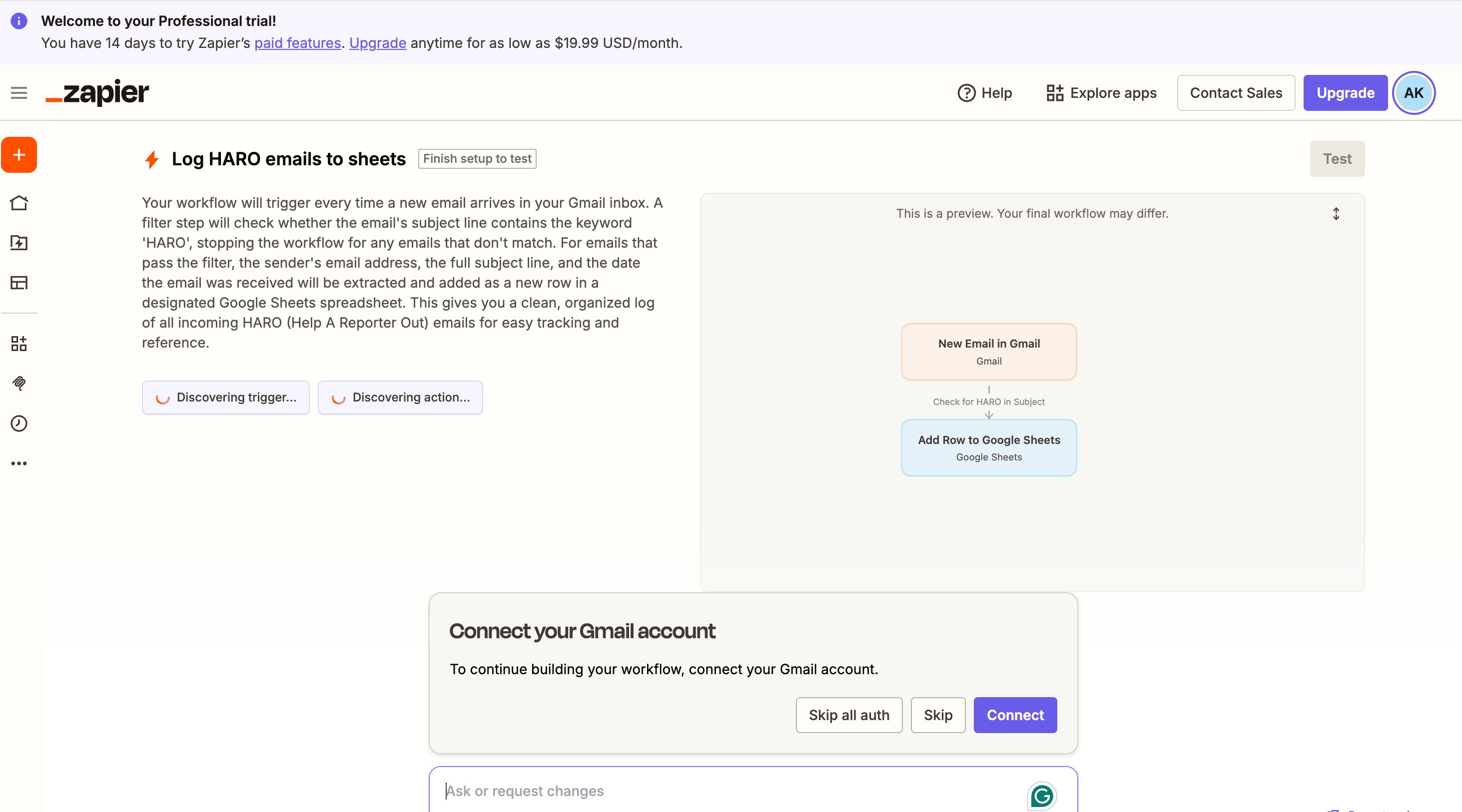
I tested this directly: "When a new email arrives in Gmail with HARO in the subject, add a row to Google Sheets with the sender, subject, and date." Copilot generated a full 3-step workflow with a filter, trigger, and action within seconds.

Zapier Copilot generating HARO email to Google Sheets workflow

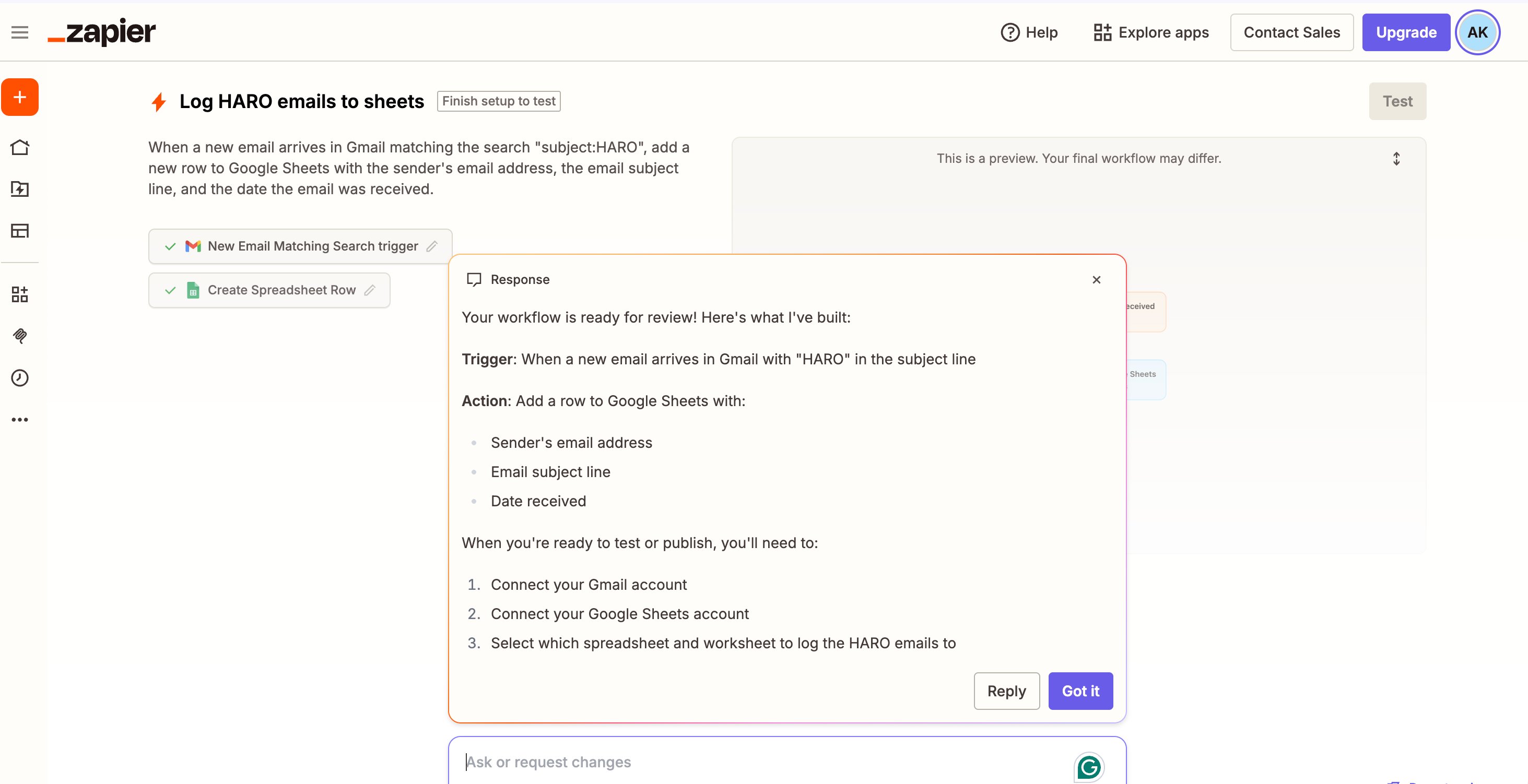
The important caveat: Copilot generates structure, not a finished Zap. You still need to map fields, configure authentication, and test the flow. It speeds up initial setup by 50-70% on complex multi-step Zaps. It does not remove the need to understand how Zapier works.

Zapier Copilot response - full workflow summary with trigger, action, and next steps

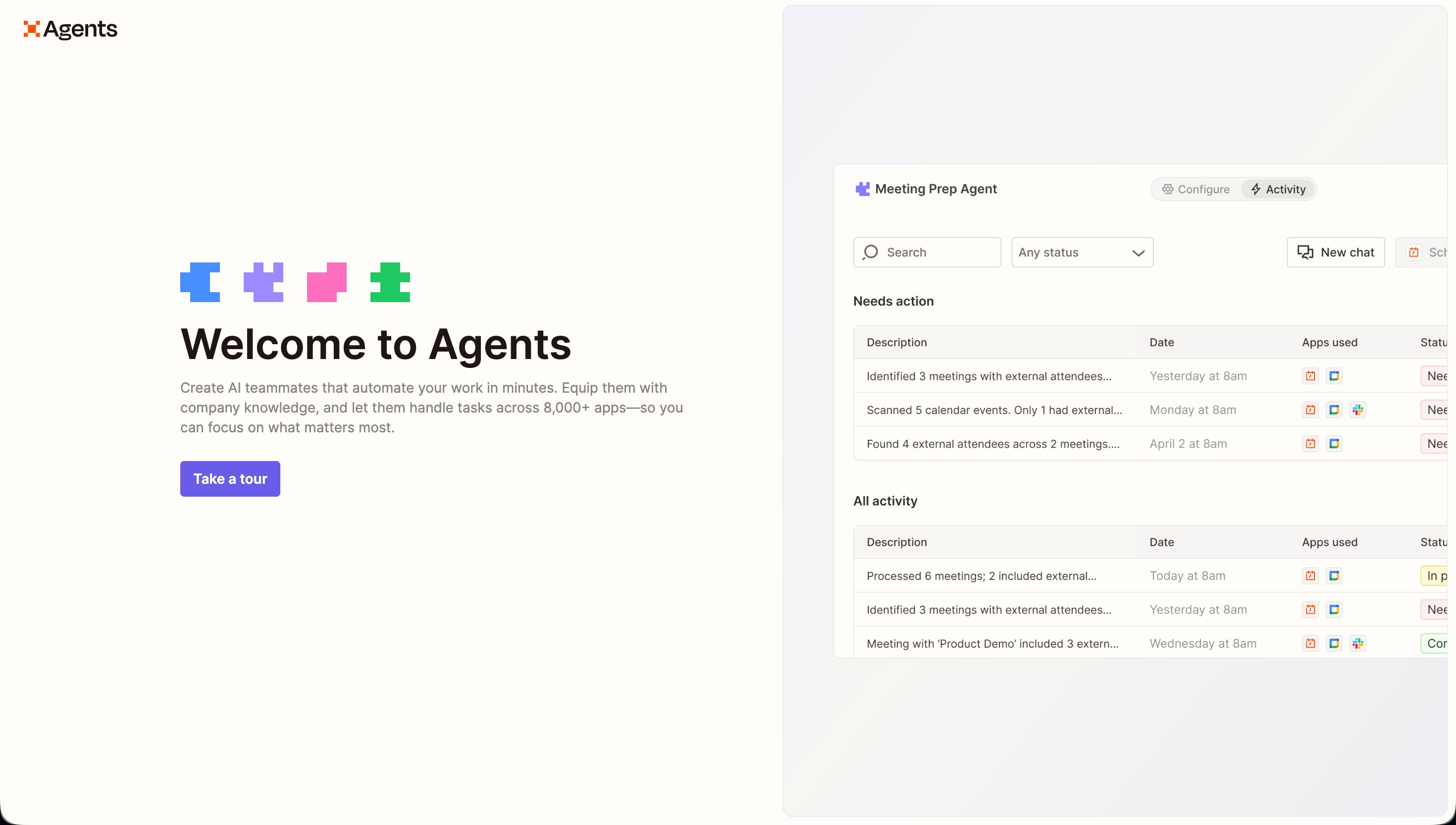
Zapier Agents are autonomous AI teammates that work across your connected apps. Tell an agent "when I get a support email, categorize it, draft a response, and escalate urgent ones to Slack" and it handles the decision-making without you specifying every step.

Agents make contextual decisions rather than following rigid if-then rules. The free plan includes 400 agent activities per month, which is a meaningful allowance for personal use. The Pro add-on at $25/mo (≈₹2,325/mo) bumps this to 1,500.

Zapier Agents welcome screen showing Meeting Prep Agent with real activity log

This is the feature that puts Zapier ahead of Make and n8n for AI-native workflows in 2026.

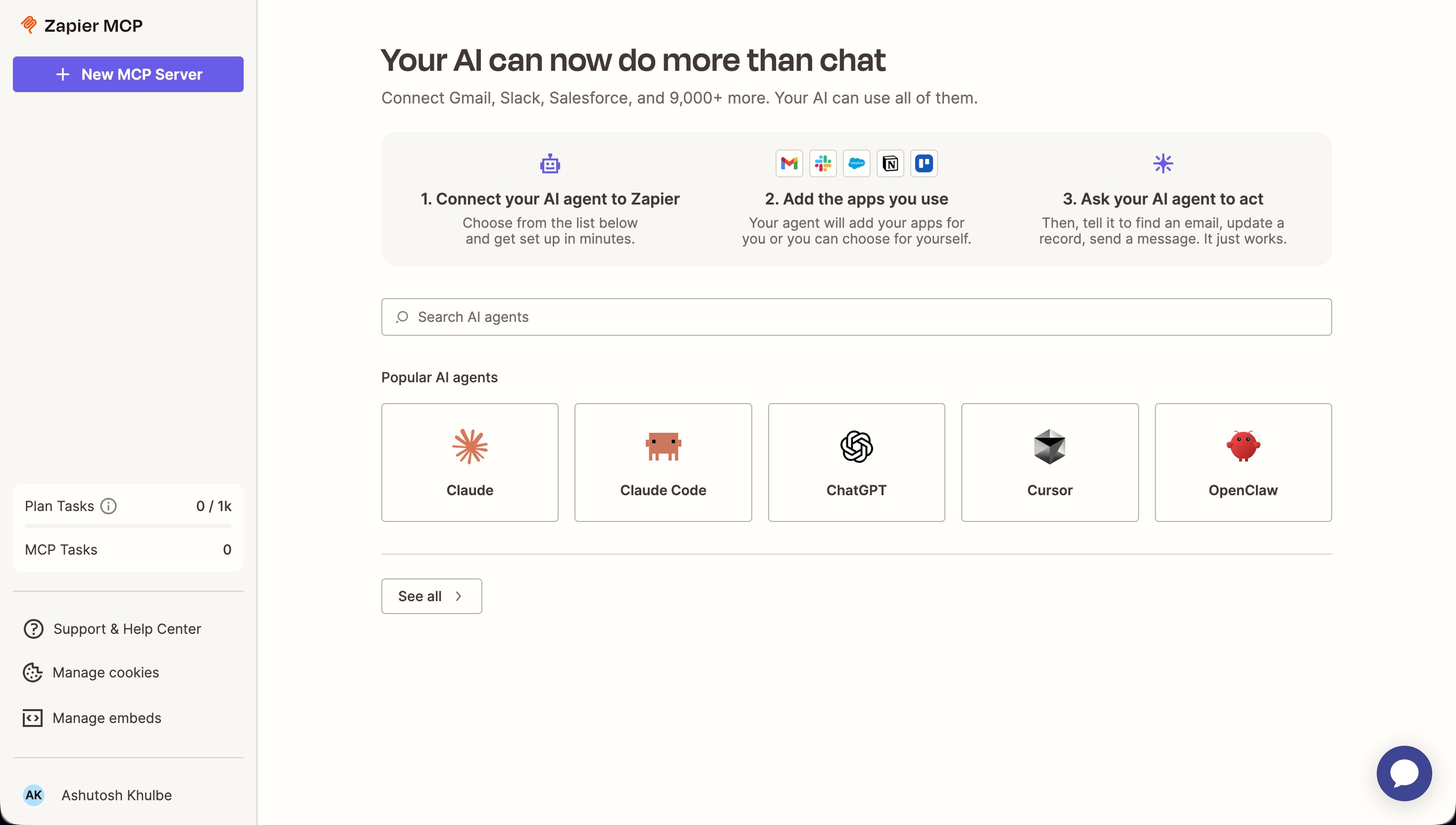
MCP (Model Context Protocol) support is the feature developers will care about most. Any MCP-compatible AI model - Claude, GPT, Gemini, or a custom model - can trigger Zapier actions natively.

Zapier MCP screen showing Claude, Claude Code, ChatGPT, and Cursor as top AI agents

This means your Claude Code workflows, or any custom Claude integration, can execute Zapier automations without additional glue code. For anyone building AI-powered products on top of Claude or ChatGPT, Zapier's MCP support is a significant time saver.

Pricing: Where It Gets Complicated

Zapier Pricing

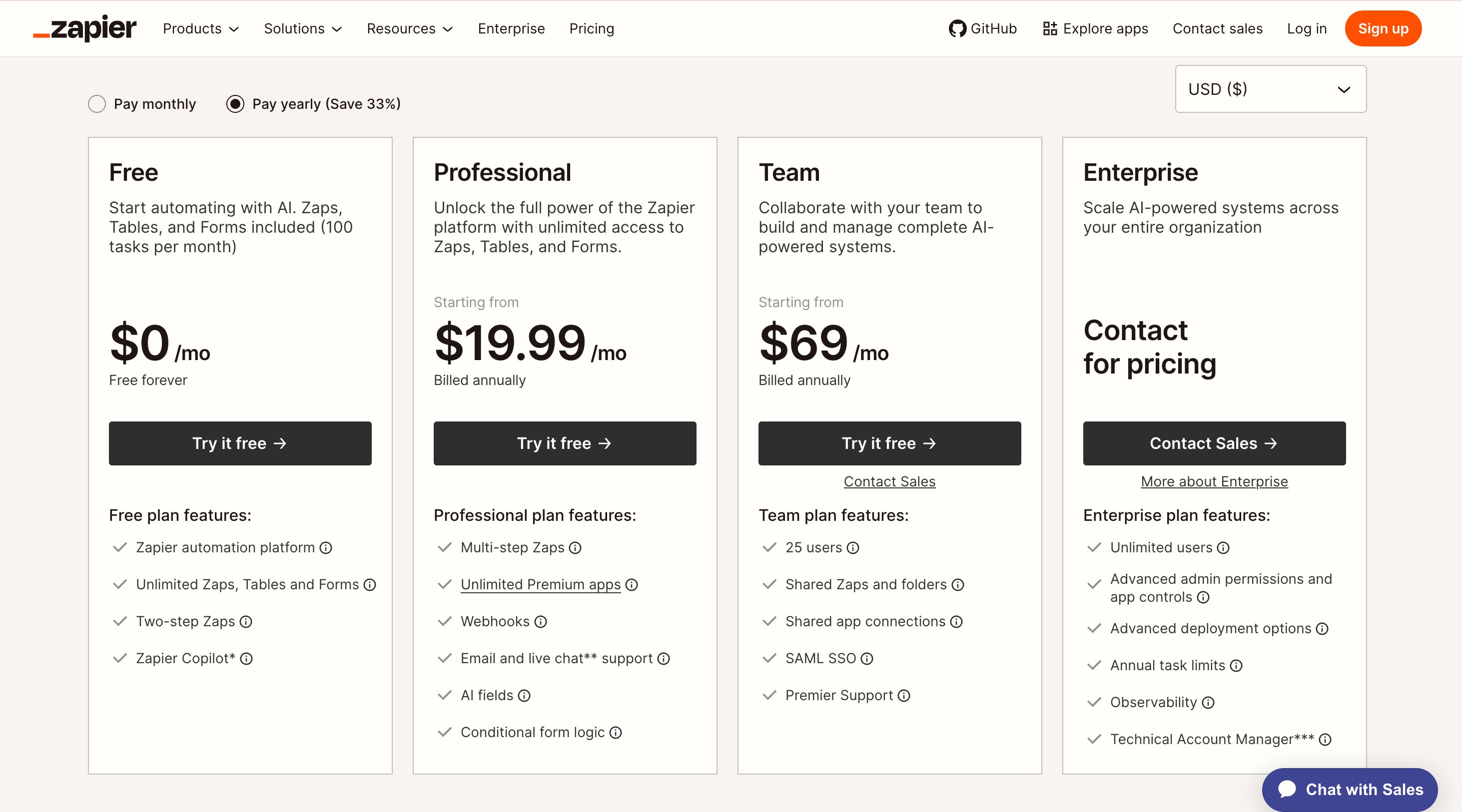
Zapier official pricing page — Free, Professional $19.99, Team $69, Enterprise

Zapier's pricing is clear at the entry level and complicated at scale.

The Free plan costs nothing. It includes 100 tasks per month, unlimited 2-step Zaps, and 400 agent activities. No credit card, no time limit, usable for personal workflows indefinitely.

The Professional plan at $19.99/mo (≈₹1,859/mo) on annual billing gives 750 tasks per month, unlimited multi-step Zaps, filters, formatters, and custom logic. This is the entry tier for any professional use case.

The Team plan at $103.50/mo (≈₹9,626/mo) gives 2,000 tasks, shared workspaces, and priority support.

AI Agents Pro is a separate add-on at $25/mo (≈₹2,325/mo) on top of your base plan. On Professional, that means $44.99/mo (≈₹4,182/mo) total for 750 tasks and 1,500 agent activities.

The scaling problem: At 10,000 tasks per month, Zapier costs roughly $300/mo (≈₹27,900/mo). At the same volume, Make costs around $50/mo (≈₹4,650/mo) and n8n Cloud Pro costs around $30/mo (≈₹2,790/mo).

That is a 6-10x price difference for the same number of automations. Plan for this before you build 50 Zaps on Zapier's infrastructure.

The Free Tier Is the Best in Automation

Zapier Free Tier

This deserves emphasis because it changes the risk profile of trying Zapier entirely.

The free plan is permanent, requires no credit card, and includes real functionality. 100 tasks per month covers basic personal automation indefinitely.

For a solopreneur or indie founder running simple workflows - new email to Notion task, new form submission to spreadsheet, weekly report to Slack - 100 tasks per month is often enough.

The 400 agent activities on the free plan is the part I did not expect. AI Agents work on the free tier without any payment.

For testing whether Agents can handle your specific use case before committing to the Pro add-on, the free allocation is sufficient.

The limitation worth knowing: the free plan only allows 2-step Zaps. Any workflow with more than one action requires a paid plan. Most useful automations are multi-step, so you will hit this ceiling quickly if your workflows have any real complexity.

Zapier vs Make vs n8n

Zapier vs Make vs n8n

Three tools compete for the same automation market with very different positioning.

Zapier vs Make: Make (formerly Integromat) offers more powerful workflow logic - branching, routers, iterators, and complex data transformations that Zapier cannot match. Make's pricing starts at $7.65/mo (≈₹711/mo) for comparable functionality. For non-technical users, Zapier's interface is significantly easier. For technical users who need complex logic, Make delivers better value.

Zapier vs n8n: n8n is open-source and self-hostable. At sufficient technical skill you can run it free with unlimited tasks. n8n Cloud Pro starts around $30/mo (≈₹2,790/mo) for high-volume use. The trade-off: n8n requires technical setup and has 400+ native integrations versus Zapier's 8,500+. For developers comfortable with self-hosting, n8n's value case is compelling at scale.

Where Zapier wins unambiguously: AI-native features. Copilot, Agents, and MCP support are all more developed on Zapier than on Make or n8n. If AI orchestration is your primary use case rather than pure automation volume, Zapier's feature set in 2026 justifies the premium.

The Catch Nobody Talks About

Zapier Catches

The billing system punishes mistakes. Zapier's overage model at 1.25x rate sounds reasonable until a misconfigured Zap creates a feedback loop. The platform does not halt Zaps at your task limit - it keeps running and charges you.

This is the core of Zapier's 1.4/5 Trustpilot score from hundreds of reviewers. Set task usage alerts in Settings immediately after signup, before creating any Zaps.

AI Agents are an add-on, not a feature. Copilot (the natural language builder) is included on all paid plans. AI Agents Pro at $25/mo (≈₹2,325/mo) is separate. When evaluating Zapier's pricing for AI workflows, stack both costs before comparing to alternatives.

No self-hosting, no data export. All your Zap configurations and automation history live in Zapier's cloud. There is no option to export your workflows in a portable format or run Zapier on your own infrastructure. If Zapier changes pricing significantly or shuts down a feature, migration is painful.

Copilot generates structure, not finished Zaps. New users sometimes expect Copilot to produce a working automation from a description. It produces a scaffold that still requires manual field mapping and testing. This misunderstanding leads to frustration in the first session.

Who Should Use Zapier

Zapier Use Cases by Plan

Solopreneurs and freelancers running under 750 tasks per month get strong value at $19.99/mo (≈₹1,859/mo). The 8,500+ integrations mean almost any tool you use is connected. Copilot makes setup fast. The free plan covers simple personal automation without any commitment.

SMBs and non-technical teams who need reliable automation across diverse SaaS stacks and cannot hire a developer will find Zapier's ease-of-use advantage over Make and n8n real and worth paying for at these volumes.

AI product builders using Claude, GPT, or Gemini as their primary tool who need those models to interact with business apps will benefit from MCP support. This makes AI-to-app connections native rather than requiring custom code.

Indian freelancers and small businesses running on tight budgets should start with the free plan. The 100 tasks per month and 400 agent activities cover most basic personal automation at zero cost. The Professional plan at $19.99/mo (≈₹1,859/mo) is accessible at Indian freelancer income levels for anyone who needs multi-step Zaps.

Who Should Look Elsewhere

Zapier Who For

High-volume operations running 10,000+ tasks per month should evaluate n8n first. The cost difference is 6-10x at scale and n8n's self-hosted option eliminates per-task pricing entirely.

Technical users who need complex workflow logic - conditional branching, data transformation, multi-path routing - will find Make more capable at lower cost.

Data-sovereign organizations with strict residency requirements cannot use Zapier. All data passes through Zapier's cloud. n8n's self-hosted option is the alternative for any team that cannot send business data through third-party infrastructure.

Not sure which AI tool fits your workflow?
Answer 5 quick questions — we'll recommend the AI that matches how you actually work.
Take quiz →

Zapier and AI Tools: The Integration Story

Zapier as AI Glue Layer

Zapier's MCP support connects directly to the tools we review. A Claude workflow can trigger Zapier actions. A ChatGPT completion can log to Google Sheets via Zapier. Perplexity research outputs can route to Notion or Airtable.

The practical application for content creators and solopreneurs is real. When a new HARO query arrives by email, a Zap can categorize it, check against existing content, and add relevant queries to a review queue in Notion without manual sorting.

The 400 free agent activities per month cover this kind of light admin automation on the free plan. No payment required to test whether Zapier's Agents can handle your specific workflow.

Zapier also integrates with every major AI tool as both a trigger and an action. Midjourney outputs can be saved to Google Drive automatically. ElevenLabs audio files can be routed to your CMS. Notion AI completions can create tasks in your project management tool.

The 8,500+ integrations are not a marketing number. They reflect Zapier's position as the glue layer for AI-powered workflows across the entire software stack.

The integration story also works in reverse. Zapier can feed data into AI tools. A new Google Analytics report can trigger a Claude analysis that summarizes the week's traffic into a Slack digest. A new customer support ticket can route through ChatGPT for draft response suggestions before landing in your support queue. These are 2-3 step Zaps that stay on the free plan for most small teams.

The limitation worth knowing: Zapier's AI integrations are asynchronous. There is a delay between the trigger and the AI response, typically 10-60 seconds depending on the model and the complexity of the prompt. For workflows where real-time response is critical, Zapier's async processing creates a lag that may not be acceptable. For background processing and daily workflows, the delay is irrelevant.

Building Your First Zap: What the Experience Is Actually Like

First Zap Time Comparison

The first time you build a Zap, the experience is noticeably better than Make or n8n. This matters more than it sounds.

You pick a trigger app from a search box. Zapier shows you the most common trigger events for that app. You authenticate your account via OAuth (one click on most major apps). You configure the trigger. Then you add an action app and repeat. The whole process for a 2-step Zap takes 5-10 minutes for a first-time user.

Make's interface is more powerful but significantly more visual and complex. It uses a canvas-based workflow editor that looks like a flowchart. For users who think in sequences rather than diagrams, Zapier's linear flow is easier to follow.

n8n requires self-hosting setup or an n8n Cloud account, then a similar canvas editor to Make. For non-technical users, the barrier to getting started is meaningfully higher.

I tested the Copilot feature specifically. I typed: "When a new row is added to my Google Sheet, send a Slack message to the #leads channel with the name and email from the row." Copilot generated a 2-step Zap with Google Sheets as trigger and Slack as action. The field mapping was pre-populated with reasonable guesses but required manual verification. Total time from prompt to working Zap: 8 minutes.

Zapier Zap editor canvas view - HARO email Zap with Copilot banner

Without Copilot, the same Zap takes 12-15 minutes. The time saving is real but not transformative. Where Copilot earns its place is on complex 4-5 step Zaps where the structure is the hard part, not the field mapping.

The field mapping step is where most new users get confused. When Zapier asks you to "map fields," it means telling it which data from the trigger to pass to the action. For the Google Sheets to Slack example: you map the "Name" column from Sheets to the name variable in your Slack message template. Zapier shows a dropdown of available fields from your trigger. You click to select them.

This is intuitive once you understand it. Before you understand it, the interface can feel cryptic. Spending 10 minutes watching a Zapier tutorial video before building your first Zap saves 30 minutes of confusion.

The test step is non-negotiable. Every Zap should be tested before activation. Zapier provides a test function that runs the Zap once with sample data and shows you the output. A Zap that looks correct in the builder can produce unexpected results when it runs against real data. Test it. Fix it. Then turn it on.

Zapier Tables and Interfaces: Beyond Automation

Zapier Tables and Interfaces

Zapier expanded beyond Zaps in 2024-2025. Two additions worth knowing about.

Zapier Tables is a built-in database that works as both a Zap trigger and destination. Instead of connecting to Airtable or Notion as your data store, you can keep everything inside Zapier. For simple use cases, this eliminates one integration from your stack.

For a solopreneur tracking leads manually in a spreadsheet, Tables provides a structured alternative that auto-triggers Zaps when new rows appear. This is the right tool for someone who has outgrown Google Sheets for automation purposes but does not need the full power of Airtable. For complex data structures with multiple linked tables and advanced views, Airtable or Notion are still better options. Zapier Tables covers the 80% case where you need a simple, Zap-connected data store.

Zapier Interfaces lets you build simple forms and pages that connect directly to your Zaps. A lead capture form that automatically triggers your CRM workflow, without needing a separate form tool or developer.

For solopreneurs who want a complete no-code stack without paying for Typeform, Webflow, and Airtable separately, Interfaces covers basic use cases. The forms are not as visually customizable as Typeform, and the pages are not as flexible as Webflow. But for internal tools, client intake forms, and simple data collection that feeds directly into automation workflows, Interfaces does the job at no additional cost on Professional and Team plans.

The combination of Tables and Interfaces means a small team can build a simple CRM, intake form, and automation pipeline entirely inside Zapier. For businesses that are not ready to invest in a dedicated CRM like HubSpot, this built-in stack is a meaningful option at no additional cost above the base plan.

The Zapier Canvas: AI-Powered Process Mapping

Zapier Canvas

Canvas is Zapier's newest addition. It uses AI to help you map and visualize business processes before you build automations.

You describe what you want to automate in natural language. Canvas generates a process diagram showing the steps, decision points, and data flows. From there, you can click to generate Zaps for specific steps.

I tested Canvas briefly on a client onboarding process with six steps. The process mapping was accurate for the linear parts. The conditional logic ("if client selects plan A, do X; if they select plan B, do Y") required significant manual editing to represent correctly. Canvas is most useful as a starting point for thinking through automation logic, not as a finished design tool.

Canvas is included on Professional and Team plans. It is the clearest signal that Zapier is positioning itself as a complete business automation platform rather than just an app connector. Whether that positioning pays off depends on whether Canvas becomes more capable in future updates.

How to Use Zapier with Claude Specifically

Zapier + Claude Workflow

The MCP integration between Zapier and Claude deserves its own section because the workflow pattern is practical and widely overlooked.

Claude Code users can configure Claude to use Zapier as an MCP server. This means Claude can execute Zapier actions directly from a conversation or code session. Ask Claude to "log this research summary to my Notion database" and Claude calls Zapier, which updates Notion. No manual steps, no copy-paste.

For Claude Pro users without code access, Zapier's Claude integration works as a standard action in any Zap. A Gmail trigger can route emails to Claude for summarization, then log the summary to a Google Doc. The setup is a 3-step Zap and works on the free plan if you stay under 100 tasks per month.

The most useful pattern I have found: using Zapier to connect Claude's outputs back into structured data. Claude writes well but does not natively integrate with databases or project management tools. Zapier closes that gap without requiring any code.

A practical example for content creators: set up a Zap where a new Airtable row (your content brief) triggers a Claude completion (write the draft), which saves to Notion (your CMS). This is a 3-step workflow that runs without you touching it after setup. The free plan's 100 tasks covers this for up to 33 pieces of content per month, which is realistic for weekly publishing.

Another pattern worth building: HARO query routing. When a new email arrives from HARO (the journalist query service), a Zap categorizes it by keyword, checks your topic areas, and routes relevant queries to your review queue. This is exactly the workflow that saves 20-30 minutes per week of manual email triage. The 400 free agent activities on Zapier's free plan cover this classification task without payment.

Zapier for the Indian Market: Practical Considerations

Zapier India Pricing

The free plan's 100 tasks per month covers most personal automation workflows indefinitely at zero cost. For a freelancer earning ₹30,000 per month, zero is the right price to start.

At the Professional tier, $19.99/mo (≈₹1,859/mo) on annual billing is accessible for freelancers earning ₹30,000+ per month. That is roughly 6% of income at the lower end, which is worth it only if the automation directly saves time or generates additional income.

The value calculation for Indian users: if Zapier saves 2 hours per month on manual data entry or task routing, and you value your time at ₹1,000 per hour, the $19.99/mo tier pays for itself in time savings. At ₹500 per hour, you need 4 hours of savings to break even. Most professionals who use Zapier seriously report saving 3-5 hours per month on administrative automation within the first month.

Zapier's GST treatment in India: subscriptions to foreign software are typically subject to 18% IGST for Indian businesses registered for GST. The effective cost of Professional on annual billing is $19.99 + 18% = approximately ₹2,195/mo for GST-registered businesses. Non-registered individuals pay the standard price without additional tax. Keep a copy of your Zapier invoice for GST input credit if applicable.

Zapier's platform is accessible in India without any VPN. Response times from Indian connections are normal for a cloud-based SaaS tool. There are no India-specific pricing tiers or INR billing options currently available.

The strongest use case for Indian freelancers is client onboarding automation. When a new client signs a contract (DocuSign trigger), a Zap can create a folder in Google Drive, add the client to your CRM, send a welcome email, and create a starter task in your project management tool. That sequence normally takes 15-20 minutes manually. As a Zap, it runs in 30 seconds while you focus on actual work. At 10 new clients per month, that is 2.5-3 hours saved on administrative tasks alone.

Final Scores

Zapier Final Scores

Ease of use at 90/100 reflects Zapier's genuine advantage: it is the most accessible automation platform available. Non-technical users build working multi-step workflows in under 30 minutes. No other tool in this category matches that onboarding speed.

Output quality at 85/100 reflects Zap reliability. Established integrations run without issues. Newer or less-used connectors occasionally have authentication problems or field-mapping inconsistencies. The 1.4/5 Trustpilot score reflects billing issues more than reliability issues - the platform runs reliably when configured correctly.

Feature depth at 88/100 reflects 8,500+ integrations, AI Agents, Copilot, MCP support, Tables, Interfaces, and Canvas. No other automation tool at this price point matches this feature set in 2026.

Value at 62/100 reflects the pricing structure against alternatives. At low volume, $19.99/mo (≈₹1,859/mo) is fair. At high volume, the cost trajectory is punishing compared to Make and n8n.

Free tier at 75/100 is the strongest in the automation category. 100 tasks per month, 400 agent activities, no credit card - usable for personal automation permanently.

Bottom line: Zapier is the easiest way to connect your AI tools to your business apps in 2026. Start free, upgrade to Professional at $19.99/mo (≈₹1,859/mo) when you need multi-step Zaps, and plan your migration to n8n before you hit 5,000 tasks per month. Set task usage alerts on day one - every Zapier user who has seen a surprise bill skipped this step.

FAQ

Is Zapier free?

Yes, permanently. The free plan includes 100 tasks/month, unlimited 2-step Zaps, and 400 AI Agent activities with no credit card required. It does not expire. For simple personal workflows, the free plan covers most needs indefinitely.

What is a Zapier task?

Each successful action in a Zap counts as one task. A 3-step Zap that runs 10 times consumes 30 tasks. Triggers do not count - only actions do.

What is Zapier Copilot?

Copilot is a natural language Zap builder. Describe your workflow in plain English and Copilot generates the structure. You still need to configure field mappings and test the flow manually.

What are Zapier AI Agents?

Autonomous AI teammates that make decisions across your connected apps. Tell an agent what outcome you want and it handles the workflow logic. The free plan includes 400 agent activities per month. Pro add-on ($25/mo, ≈₹2,325/mo) gives 1,500.

Does Zapier support Claude and ChatGPT?

Yes. Zapier supports MCP (Model Context Protocol), which means Claude, GPT, Gemini, and any MCP-compatible model can trigger Zapier workflows natively.

How does Zapier compare to Make?

Zapier is easier to use and has more integrations (8,500+ vs 1,800+). Make offers more powerful workflow logic at lower prices. Make Core starts at $7.65/mo (≈₹711/mo) versus Zapier Professional at $19.99/mo (≈₹1,859/mo). Choose Zapier for ease, Make for complex logic or budget.

How does Zapier compare to n8n?

n8n is open-source and self-hostable, making it free at scale for technical teams. Zapier costs 6-10x more at high volume. Zapier wins on ease of use, integration breadth, and AI-native features. n8n wins on cost at scale and data control.

Why does Zapier have a low Trustpilot score?

Trustpilot shows 1.4/5 with complaints centered on surprise billing from runaway Zaps and task overages. The billing model allows Zaps to continue running past task limits at 1.25x rate. Set task usage alerts in Settings immediately after signup.

Is Zapier worth it in India?

At $19.99/mo (≈₹1,859/mo) annual, Zapier Professional is accessible for Indian freelancers and small businesses. The free plan at 100 tasks/month covers basic personal automation at zero cost. For high-volume automation, n8n's self-hosted option is significantly more cost-effective.


Last updated: May 2026. Prices converted at ₹93/USD.

Related Reading: Claude Review | ChatGPT Review | Perplexity Review | Claude Code Review | Notion AI Review | ElevenLabs Review | Transparency Index

What to read next

Comparison

Claude vs ChatGPT vs Gemini

Apr 2026

Read →
Compare tools →Find your tool →
Was this review helpful?
How does Zapier compare?
Pick another tool and see scores side-by-side
Compare →
← All reviews
Tested and reviewed by Ash · Last updated: 2026-05-30Pricing verified at ≈₹93/USD · Scores based on hands-on testing