How to Cancel ChatGPT Subscription (2026)
Step-by-step guide to cancel ChatGPT Plus or Pro. Covers web, iOS, Android, refunds, and what you lose after cancelling.
 ByAsh·18 min read
TL;DR: To cancel ChatGPT Plus or Pro, go to Settings > Manage Subscription > Cancel Plan > Confirm. You keep access until the current billing cycle ends. No refunds for partial months. Works on web, iOS, and Android - but the steps differ slightly on each. Full walkthrough below.
To cancel a ChatGPT subscription, open Settings in ChatGPT, click Manage Subscription, and select Cancel Plan. Confirm your choice, and your paid features will remain active until the end of your current billing period.
Sounds simple. It mostly is.
But I cancelled my own ChatGPT Plus subscription last month to verify every step for this guide, and I hit a few surprises along the way. OpenAI has added retention screens, "pause" options, and the iOS/Android flows are completely different from the web version.
This is every method, every platform, every edge case. If you just want out, you're in the right place.
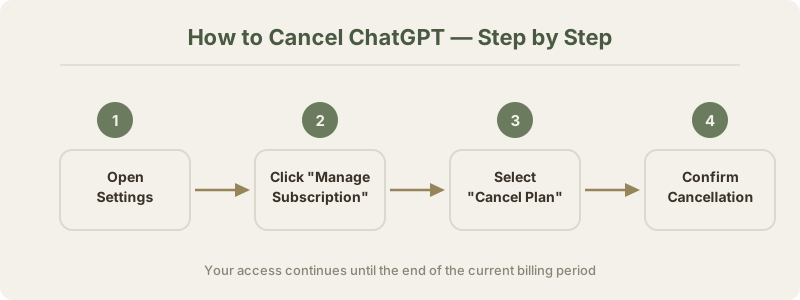
How to Cancel ChatGPT - Quick Steps
Here's the fastest path. Four clicks, done.
- Open chatgpt.com and log in
- Click your profile icon in the bottom-left corner
- Select Settings
- Click Manage Subscription
- Click Cancel Plan
- Confirm your cancellation
That's it. You'll get a confirmation email from OpenAI within a few minutes.
If you subscribed through Apple or Google Play, these steps won't work. You need to cancel through your phone's subscription settings instead. I cover both below.
One thing I got wrong initially - I expected the cancellation to be instant. It's not. ChatGPT lets you keep using Plus features until your billing cycle ends. So if you cancel on May 5th and your renewal date is May 20th, you still have Plus access for 15 more days.
That's actually pretty generous compared to some services I've dealt with.
Cancel ChatGPT Plus on Web (Desktop)
This is the most common method. Here's exactly what you'll see.
Step 1: Go to chatgpt.com and sign in with your account.
Step 2: Click the profile icon in the bottom-left corner of the sidebar. A menu pops up.
Step 3: Click Settings. This opens a settings panel.
Step 4: You'll see a "Subscription" section. Click Manage my subscription. This redirects you to OpenAI's billing portal, which is actually hosted on Stripe.
Step 5: On the Stripe billing page, find your active plan (ChatGPT Plus, Pro, or Teams). Click Cancel plan.
Step 6: OpenAI will show you a retention screen. They'll ask why you're leaving and offer alternatives like pausing your subscription. You can skip all of this. Just click through to confirm.
Step 7: You'll see a confirmation message. Done.
I want to be honest about one thing here. The retention flow felt a bit pushy when I tested it in April 2026. There were three screens between clicking "Cancel" and actually confirming it. Not the worst dark pattern I've seen, but not great either.
OpenAI also introduced a "pause subscription" option recently. If you're on the fence, this lets you freeze your plan for one month instead of cancelling outright. I actually think this is a decent option if you're just trying to save money temporarily.
For detailed cancellation support, OpenAI's help center has an official guide at help.openai.com.
Cancel ChatGPT on iPhone (iOS)
If you subscribed through the ChatGPT iOS app, you can't cancel through the web. Apple handles the billing, so you need to go through Apple's subscription management.
This tripped me up. I spent five minutes looking for a cancel button in the ChatGPT app before realizing it wasn't there.
Here's the correct method:
- Open the Settings app on your iPhone (not the ChatGPT app)
- Tap your Apple ID at the top of the screen
- Tap Subscriptions
- Find ChatGPT in your active subscriptions list
- Tap Cancel Subscription
- Confirm
Alternative method using the App Store:
- Open the App Store
- Tap your profile icon in the top-right
- Tap Subscriptions
- Find ChatGPT and tap it
- Tap Cancel Subscription
Both paths end up at the same Apple subscription management screen. Your Plus access continues until the billing period ends - same as the web method.
One catch: if you subscribed on the web but use the iOS app, you need to cancel on the web (not through Apple). The iOS subscription route only works if Apple is your payment processor. You can check this by looking at your email receipts - if they're from Apple, cancel through Apple. If they're from OpenAI, cancel on the web.
Pro tip that saved me some confusion: the ChatGPT iOS app used to charge slightly more than the web version because of Apple's 30% cut. As of early 2026, OpenAI absorbs that difference in most regions, but double-check your receipt to be sure.
Cancel ChatGPT on Android
Android cancellation follows the Google Play route. Very similar to iOS, just different menus.
- Open the Google Play Store app
- Tap your profile icon in the top-right
- Tap Payments & subscriptions
- Tap Subscriptions
- Find ChatGPT and tap it
- Tap Cancel subscription
- Select a reason (optional) and confirm
You can also manage this through your browser:
- Go to play.google.com/store/account/subscriptions
- Sign in with the Google account linked to your ChatGPT subscription
- Find ChatGPT, click Manage, then Cancel subscription
Same rule applies here - if you originally subscribed on the web, you need to cancel on the web. Google Play only handles subscriptions that were purchased through Google Play.
When I tested the Android flow, it was actually the smoothest of the three. Google shows one confirmation screen, you tap cancel, and it's done. No retention screens, no "are you sure" guilt trips. Refreshing.
Cancel ChatGPT Teams or Enterprise
ChatGPT Teams and Enterprise work differently from individual plans. You can't just click cancel and walk away.
ChatGPT Teams ($25/user/month, ≈₹2,325/user/month):
If you're the workspace admin:
- Go to chatgpt.com
- Click your workspace name in the sidebar
- Go to Settings > Billing
- Click Cancel subscription
- Choose whether to cancel immediately or at the end of the billing period
If you're a team member (not admin), you can't cancel the subscription. You can only leave the workspace. Ask your admin to handle cancellation.
ChatGPT Enterprise:
Enterprise contracts are annual. You can't cancel mid-contract through the UI. You need to contact OpenAI's sales team directly. There may be early termination fees depending on your agreement.
I've heard from a few folks in the RawPickAI community that Enterprise cancellations can take 2-4 weeks to process. Plan accordingly if you're switching providers.
For Teams workspaces, all data (shared conversations, custom GPTs, uploaded files) gets deleted 30 days after cancellation. Export anything important before you cancel. This is the kind of thing that catches people off guard.
What Happens After You Cancel
This is the part most people worry about. Here's exactly what changes.
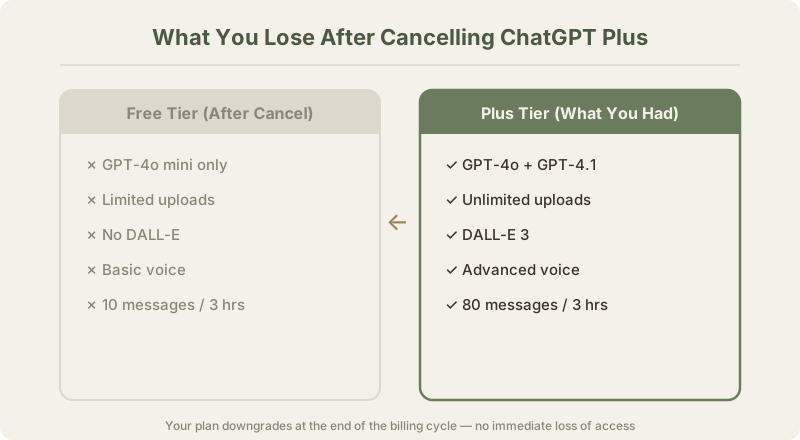
What you keep:
- Your account remains active (free tier)
- All your conversation history stays intact
- Custom instructions persist
- You can still use GPT-4o (with daily limits)
- Your account settings remain unchanged
What you lose:
- GPT-4o unlimited access (drops to limited daily messages)
- Access to GPT-4.5 and o3-pro (Pro plan features)
- DALL-E image generation (limited to a few per day)
- Advanced Data Analysis (Code Interpreter)
- Priority access during peak times
- Higher message limits
- File upload size limits decrease
- Voice mode reverts to standard
Here's what surprised me most: your custom GPTs don't disappear. They stay in your account. You can still use them, but they'll run on the free tier model with reduced capabilities. If you built GPTs that others use, those keep working for your users too.
The transition isn't jarring. You don't get kicked out at midnight. ChatGPT just quietly downgrades you to the free tier when your billing cycle ends.
Here's a quick comparison of what each tier costs and offers:
| Plan | Price (USD) | Price (INR) | Key Feature |
|---|---|---|---|
| Free | $0 | ₹0 | GPT-4o with daily limits |
| Plus | $20/mo | ≈₹1,860/mo | Unlimited GPT-4o, DALL-E, file uploads |
| Pro | $200/mo | ≈₹18,600/mo | Unlimited o3-pro, highest limits |
| Teams | $25/user/mo | ≈₹2,325/user/mo | Workspace, admin controls, no training |
The free tier is honestly quite capable now. When I cancelled Plus, I expected to feel the downgrade immediately. For the first week, I barely noticed. It wasn't until I hit the daily message cap on a busy workday that I felt the difference.
If you're a casual user - a few conversations per day, no heavy image generation - the free tier might be all you need. I wrote about this more in our ChatGPT review.
Can You Get a Refund?
Short answer: probably not. But there are exceptions.
OpenAI's refund policy is strict. They don't offer refunds for partial months or for "I forgot to cancel." If you cancel on day 3 of your billing cycle, you've paid for the full month and you get access for the full month. No prorated refunds.
However, there are some scenarios where refunds happen:
You might get a refund if:
- You were charged after already cancelling (billing error)
- You were double-charged
- You signed up accidentally and request a refund within 24 hours
- The service was significantly unavailable during your billing period
You probably won't get a refund if:
- You forgot to cancel before renewal
- You didn't use the service much
- You found a better alternative
- You're unhappy with a recent update
To request a refund, go to help.openai.com and submit a support ticket through the "Billing" category. Include your email, the charge date, and the amount. Response times vary, but I've seen people report getting answers within 3-5 business days.
If you subscribed through Apple or Google Play, you need to request refunds through them instead. Apple is generally stricter about refunds, while Google Play tends to be more lenient for first-time refund requests.
My honest take: set a calendar reminder 3 days before your renewal date if you're thinking about cancelling. That's way easier than trying to get a refund after the fact.
ChatGPT Alternatives Worth Trying After Cancelling
If you're leaving ChatGPT, you've got excellent free options. The AI market in 2026 is very different from 2024. Almost every major player has a capable free tier.
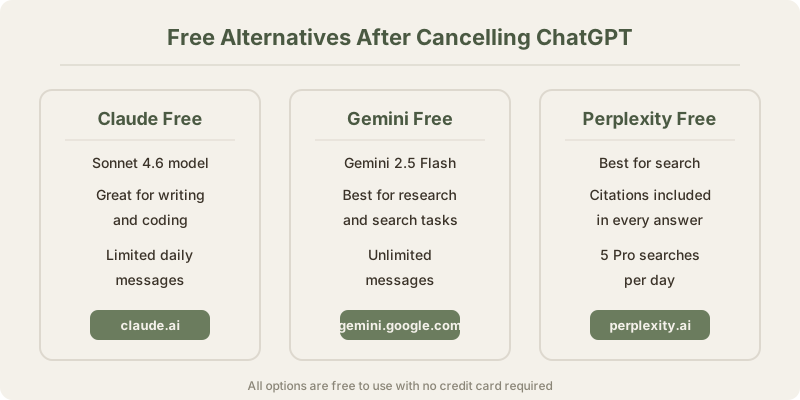
Here are the best alternatives I've personally used:
Claude by Anthropic
Claude is my daily driver now. The free tier gives you Claude Sonnet, which handles most tasks impressively well. Writing quality is noticeably better than ChatGPT's free tier for long-form content, analysis, and coding.
Where Claude wins: nuanced writing, following complex instructions, coding accuracy, handling long documents.
Where ChatGPT still wins: image generation (DALL-E), browsing the web, plugins/GPT ecosystem.
I did a detailed breakdown in our ChatGPT vs Claude comparison if you want the full picture.
Google Gemini
Gemini is the most generous free tier right now. You get Gemini 2.5 Pro access, image generation, Google Search integration, and tight integration with Google Workspace. If you're deep in the Google ecosystem, this is a natural fit.
I compared the two head-to-head in our Gemini vs ChatGPT comparison. Gemini wins on multimodal tasks and real-time information. ChatGPT wins on conversation quality and the GPT store.
Perplexity
Perplexity is something different entirely. It's an AI-powered search engine rather than a traditional chatbot. If you mainly used ChatGPT for research and finding information, Perplexity's free tier might actually serve you better. It cites sources and provides up-to-date information without hallucinating as much.
Check our Perplexity vs ChatGPT comparison for the full breakdown.
Microsoft Copilot
Microsoft Copilot gives you GPT-4-class responses for free. It's built into Windows, Edge, and Microsoft 365. If you're already paying for Microsoft 365, you're essentially getting a ChatGPT-level AI included.
More Free Options
We maintain a full list of the best free AI tools that's updated monthly. And if you want a broader comparison, check our guide to the best ChatGPT alternatives.
The point is: leaving ChatGPT doesn't mean leaving AI. You have real options now.
Should You Actually Cancel? An Honest Take
Alright, let me be real with you.
I cancelled my ChatGPT Plus subscription in April 2026 to write this guide. I expected to switch back within a week. It's been over a month now, and I haven't resubscribed.
That surprised me.
Here's why I stayed cancelled: the free tier of ChatGPT combined with Claude's free tier covers about 90% of what I used Plus for. I was paying $20/month (≈₹1,860) mostly for faster response times and DALL-E access. Once I realized I could get comparable quality elsewhere for free, the value proposition fell apart.
You should probably cancel if:
- You use ChatGPT fewer than 5 times per day
- You don't generate images with DALL-E regularly
- You haven't used Advanced Data Analysis in the last month
- You're subscribed to another AI tool that overlaps (Claude Pro, Gemini Advanced)
- You're just paying out of habit at this point
You should probably keep it if:
- You rely on custom GPTs that you've invested time building
- You use Advanced Data Analysis for work regularly
- You need the o3-pro model (Pro plan) for complex reasoning tasks
- You're on the Teams plan and your team actively uses the shared workspace
- The higher message limits are actually necessary for your workflow
The "pause" option is underrated. If you're on the fence, pause for a month instead of cancelling. You keep your account intact and save money while you decide. I wish I'd known about this before fully cancelling and having to re-subscribe to test features for reviews.
Here's my honest math. ChatGPT Plus at ≈₹1,860/month is about ₹62 per day. If you're using it meaningfully every day, that's solid value. If you're opening it twice a week, you're overpaying. Track your usage for a week before deciding.
Common Cancellation Problems and Fixes
Things go wrong sometimes. Here are the most common issues and how to solve them.
"I can't find the cancel button"
This usually means you subscribed through Apple or Google Play, not through the web. The cancel option only appears in the ChatGPT web settings if you subscribed directly. Check your email for the original purchase receipt to figure out which platform charged you.
"I cancelled but I'm still being charged"
First, check that you actually completed the cancellation. Go to Settings > Subscription and verify it says "Cancelled" or shows an end date. If it still shows active, try cancelling again.
If you actually cancelled and are still being charged, contact OpenAI support immediately at help.openai.com. Also contact your bank or card issuer to dispute the charge.
"The Manage Subscription button isn't working"
This happens occasionally when OpenAI's Stripe integration hiccups. Try these fixes in order:
- Clear your browser cache and cookies
- Try a different browser
- Try incognito/private mode
- Wait 30 minutes and try again
- If nothing works, contact OpenAI support
"I want to cancel but I'm worried about losing my data"
Your conversations and settings are tied to your account, not your subscription. Cancelling the paid plan doesn't delete your account. Everything stays. You just lose access to premium features.
If you want to export your data before cancelling (smart move), go to Settings > Data Controls > Export data. OpenAI will email you a ZIP file with all your conversations. This takes a few hours to prepare.
"I cancelled on iOS but ChatGPT still shows Plus"
Apple subscriptions don't cancel instantly on the app side. It can take up to 24 hours for the ChatGPT app to reflect the change. Don't panic. If it's been more than 48 hours, contact Apple Support.
"I'm on a family plan and want to cancel"
ChatGPT doesn't have a family plan as of May 2026. If multiple people in your household are using the same account, that's technically against OpenAI's terms of service. Each person needs their own account. If you're confusing this with Apple Family Sharing, you manage that through Apple, not OpenAI.
"I cancelled but want to come back"
You can resubscribe at any time. Just go to Settings > Upgrade and pick your plan. Your conversation history will still be there. Your custom GPTs will still be there. Nothing is lost from a cancellation - it's fully reversible.
Frequently Asked Questions
What happens to my custom GPTs if I cancel ChatGPT Plus?
Your custom GPTs remain in your account. They don't get deleted. However, they'll run on the free tier model with lower quality and slower responses. If other people use your published GPTs, those continue working for them regardless of your subscription status.
Can I cancel ChatGPT mid-month and get a partial refund?
No. OpenAI does not offer prorated refunds. When you cancel mid-cycle, you keep access to Plus or Pro features until the current billing period ends. After that, you drop to the free tier. Your money for the current month is non-refundable.
Will I lose my conversation history if I cancel?
No. All your conversations, saved chats, and shared links remain intact after cancellation. Your account stays active on the free tier. The only things you lose are premium features like unlimited GPT-4o, DALL-E, and higher message limits.
How do I cancel if I subscribed through the iPhone app?
You must cancel through Apple. Open Settings on your iPhone, tap your Apple ID, then Subscriptions, find ChatGPT, and tap Cancel Subscription. The ChatGPT app itself does not have a cancel button for App Store subscriptions.
Can I pause my ChatGPT subscription instead of cancelling?
Yes. OpenAI introduced a pause option in 2025. When you go to cancel, you'll see a "Pause subscription" option. This freezes your billing for one month. After the pause period ends, your subscription automatically resumes. It's a good middle ground if you're unsure.
Does cancelling ChatGPT affect my API access?
No. ChatGPT subscriptions and API access are completely separate billing systems. Your API credits and usage are unaffected by cancelling ChatGPT Plus or Pro. They run on different accounts and different payment methods.
How long does it take for cancellation to take effect?
Cancellation is processed immediately, but you retain paid features until the end of your billing cycle. So if your billing date is the 15th and you cancel on the 3rd, you have Plus access until the 15th. After that, you're on the free tier.
Can I cancel ChatGPT Enterprise on my own?
No. Enterprise plans are annual contracts managed by OpenAI's sales team. Individual users on an Enterprise workspace cannot cancel the organization's subscription. Contact your company admin, who then needs to coordinate with OpenAI's enterprise support team.
What's the best free alternative after cancelling ChatGPT?
It depends on what you used ChatGPT for. For writing and analysis, Claude offers the best free tier. For research with citations, Perplexity is excellent. For Google ecosystem integration, Gemini is the way to go. We compared all of them in our best ChatGPT alternatives guide.
Do I get charged if I forget to cancel before the renewal date?
Yes. ChatGPT auto-renews. If you forget to cancel before your billing date, you'll be charged for another month. OpenAI typically does not refund "forgot to cancel" charges. Set a reminder a few days before your renewal date to avoid this.
Can I switch from Plus to a cheaper plan instead of cancelling entirely?
There's no cheaper paid plan below Plus ($20/month). Your options are Plus, Pro ($200/month), or Free. If Plus feels too expensive, your only downgrade path is the free tier. However, the free tier in 2026 includes GPT-4o access with daily limits, which is far more capable than what "free" used to mean.
Last updated: May 2026. Prices converted at ₹93/USD.
What to read next
Gemini vs ChatGPT
Apr 2026