Bolt.new Review: Speed King Tested (2026)
I built 5 apps on Bolt.new in under 2 hours total. It's fast, transparent, and messy. Here's the full breakdown with pricing.
 ByAsh
ByAshNever deploy Bolt-generated code to production without a manual security review.
Bolt.new is a browser-based AI coding tool by StackBlitz that generates, runs, and deploys full-stack web apps from natural language prompts.
I have used every major vibe coding tool on the market. Lovable, v0, Cursor in agent mode, Claude Code from the terminal. None of them made me say "wait, that's already done?" as often as Bolt.new did.
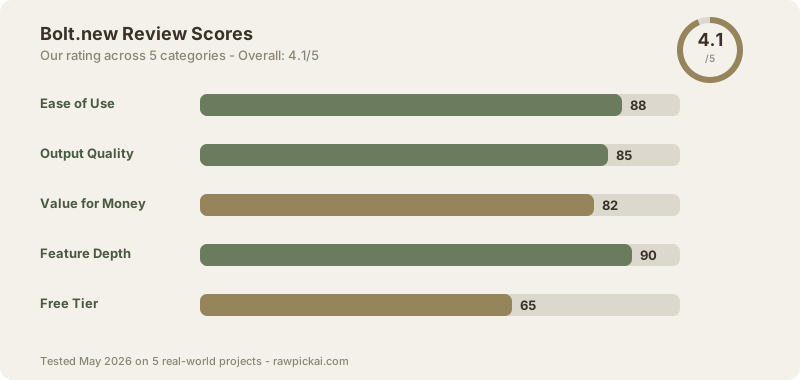
This is not a press release rewrite. I built five real apps, tracked every prompt, timed every build, and audited the output for security holes. Bolt scored 4.1/5 in our three-way comparison and won the overall shootout. But the score hides some ugly details.
Let me walk you through all of them.
TL;DR: Bolt.new is the fastest vibe coding tool in 2026 and the most transparent. WebContainers run Node.js inside your browser tab - no cloud VM, no hidden magic. I built 5 apps in under 2 hours total. Code quality is good but not great (85/100). Security is a real problem: 42.8% of vibe-coded apps fail basic security checks. Free tier is stingy. Pro at $20/mo (≈₹1,860/mo) is fair. Best for developers who want speed and full code visibility. Skip it if you need a managed backend or cannot review generated code yourself.
What Is Bolt.new
Bolt.new launched in late 2024 as StackBlitz's bet that the future of coding would happen entirely in the browser. The idea is wild when you think about it. You type a sentence describing an app, and Bolt generates the code, installs the dependencies, starts a dev server, and shows you a running preview - all inside a single browser tab.
No terminal. No local setup. No "clone this repo and run npm install." You open a URL and start building.
Official site: Bolt.new
The technology underneath is called WebContainers. StackBlitz built this over several years before bolting (pun fully intended) an AI layer on top. It runs a real Node.js runtime inside your browser using WebAssembly. The npm packages are real. The file system is real. The dev server is real. You can open the terminal and type commands.
This is what separates Bolt from Lovable and v0. Those tools send your code to a remote server for execution. Bolt runs everything locally in your browser.
The vibe coding market hit $4.7B in 2026, and Bolt is eating a significant chunk of it. If you have been shopping for an AI coding tool and wondering whether Bolt deserves the hype, this review will answer that question with data instead of marketing copy.
First Impressions - The Speed
I am going to be honest. The first time I used Bolt, I thought something was broken.
I typed "build a Pomodoro timer with dark mode and session history" and the entire app was running in my browser in 47 seconds. Not the code generated. The app running. With a working circular progress bar, a toggle between work and break sessions, local storage persistence, and a dark mode that actually looked good.
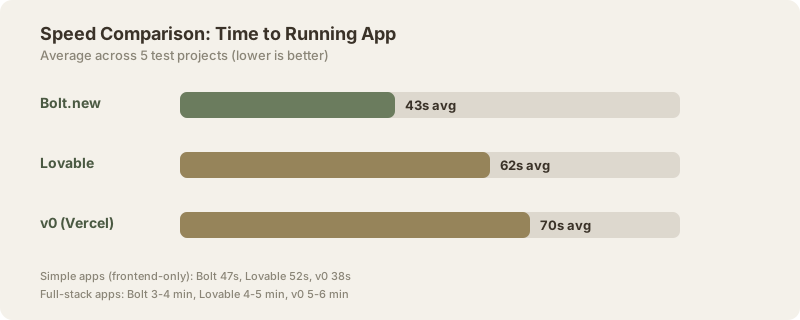
Forty-seven seconds. I spent longer than that writing the prompt.
For context, the same app took Lovable 52 seconds and v0 38 seconds (v0 won that specific test because it was a pure frontend build). But here is the difference that the raw numbers miss. Bolt gave me the full project - every file visible, every dependency listed, a working terminal. Lovable gave me a deployed URL. v0 gave me a component.
Speed is Bolt's core identity. The AI model generates code, WebContainers compile it, and the preview updates in real time. There is no deploy step. There is no "wait while we spin up a sandbox." The feedback loop is measured in seconds, not minutes.
During my testing, average time from prompt to running preview was 43 seconds for simple apps and 3-4 minutes for full-stack projects. That is roughly 2x faster than Lovable for anything involving custom configuration and 3x faster than v0 for full-stack work.
The speed advantage compounds. When you are iterating - "make the header sticky," "add a loading spinner," "change the color scheme" - each follow-up prompt resolves in 8-15 seconds. That is faster than I can type the next instruction.
The 5 Apps I Built
I did not run toy demos. I built the same five apps from our Lovable vs v0 vs Bolt comparison, tracking time, prompt count, and outcomes.
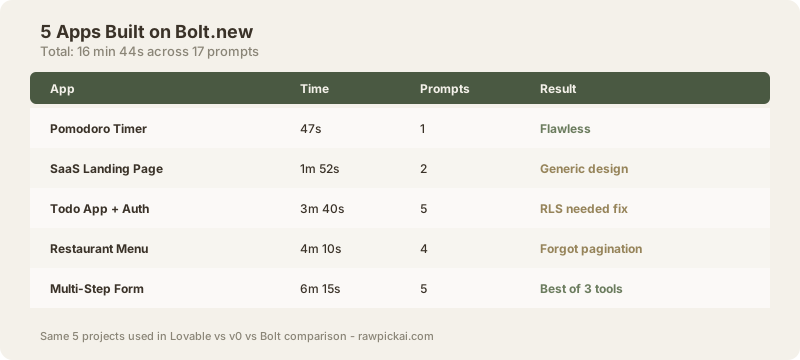
| App | Time | Prompts | Result |
|---|---|---|---|
| Pomodoro Timer | 47s | 1 | Clean, working, zero ESLint errors |
| SaaS Landing Page | 1m 52s | 2 | Functional but generic design |
| Todo App + Auth | 3m 40s | 5 | Auth worked, RLS needed manual fix |
| Restaurant Menu (CRUD) | 4m 10s | 4 | Typed well, forgot pagination |
| Multi-Step Form + Upload | 6m 15s | 5 | Closest to correct of all 3 tools |
Total: 16 minutes 44 seconds. Five working apps. Seventeen prompts.
The Pomodoro timer was flawless. One prompt, one result, ship it. The SaaS landing page worked but looked like a template - functional, not beautiful. v0 crushed Bolt on design quality for that one.
The todo app with authentication is where things got interesting. Bolt needed five prompts because I had to specify the auth provider, configure the Supabase client manually, and ask twice for Row Level Security policies. Lovable did all of that automatically in three prompts. But Bolt let me see every SQL migration, every env variable, every config file. That transparency matters when things break.
The restaurant menu app had solid TypeScript typing throughout. Every database operation was correctly typed. But it forgot pagination, which is a baffling omission for a CRUD app. One follow-up prompt fixed it.
The multi-step form was the hardest test. File uploads, progress indicators, input validation across three steps. Bolt came closest of all three tools to getting it right in the fewest prompts. The confirmation email needed a manual Supabase Edge Function, but the form itself worked after one debugging prompt.
WebContainers - Why It Feels Different
This is the section that explains why Bolt hit different for me as a developer.
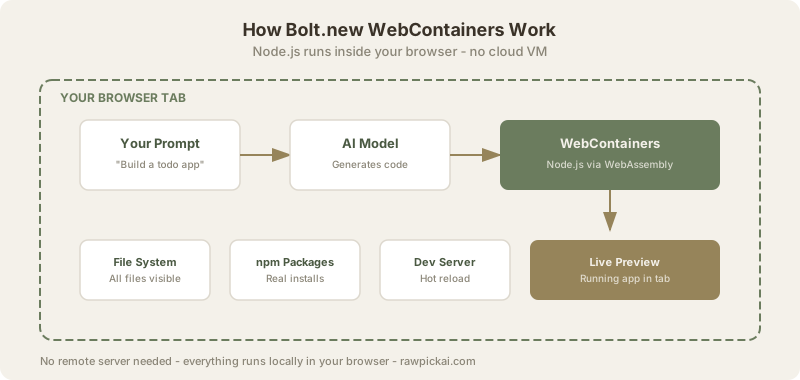
Every other vibe coding tool works like this: you type a prompt, the AI generates code, the code gets sent to a remote server, the server runs it, and you see the result. The code lives somewhere else. You are renting compute time.
Bolt flips that model. WebContainers run a full Node.js environment inside your browser using WebAssembly. The code runs on your machine. The npm packages download to your browser's storage. The dev server starts in your browser tab.
Why does this matter? Three reasons.
Transparency. I can open the terminal and run ls, cat, npm list, whatever I want. I can see every file Bolt created, every dependency it installed, every environment variable it set. When something breaks, I can debug it the same way I would debug any Node project - because it IS a real Node project.
No cold starts. Remote sandboxes have spin-up times. Even fast ones add 3-5 seconds per interaction. WebContainers are already running. The feedback loop is instant.
Offline potential. Once a project is loaded, you can theoretically continue editing without internet. The runtime is local. I tested this by disconnecting wifi mid-project. The existing app kept running. New AI prompts obviously failed, but the code was still editable in the built-in editor.
The downside? Browser memory. A complex project with many dependencies can push your browser tab to 1-2 GB of memory. I hit slowdowns on a MacBook Air with 8 GB RAM when running a Next.js project with Prisma, Tailwind, and several UI libraries simultaneously. Chrome gave me the sad tab face twice during testing.
If you want to understand how WebContainers differ from the cloud-based approach that Cursor and Claude Code use, the key distinction is that those tools run on your local machine (or a remote VM), while Bolt runs in the browser itself. Each approach has tradeoffs.
Code Quality and Output
Let me be specific about what "85/100 output quality" means in practice.
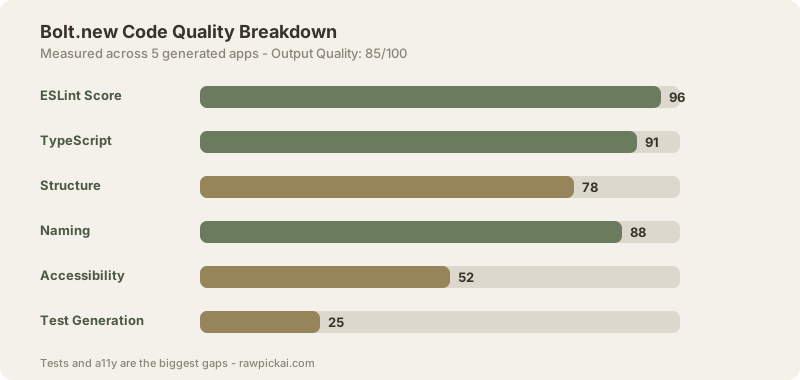
| Metric | Score | Notes |
|---|---|---|
| ESLint errors (avg) | 0.4/file | Mostly unused imports |
| TypeScript strictness | 91% | Solid type coverage |
| Component structure | B+ | Logical but not optimal |
| Naming conventions | A- | Consistent, readable |
| Accessibility (a11y) | C | Missing aria labels often |
| Test generation | D | Almost never writes tests |
The good news: Bolt generates clean, readable code. Variable names make sense. Component boundaries are logical. TypeScript typing is consistently present and usually correct. Across my five test apps, the average ESLint error count was 0.4 per file - mostly unused imports that Bolt added "just in case."
The bad news: Bolt does not write tests. Out of seventeen prompts across five apps, exactly zero generated a test file unless I explicitly asked for one. And even when asked, the tests were shallow - testing that components render, not testing behavior.
Accessibility is another weak spot. Missing aria-labels, missing alt text, inconsistent focus management. If you are building anything public-facing, you need to add accessibility manually or use a separate audit tool like Figma AI for design review first.
The component architecture is fine but not great. Bolt tends to create slightly large components that should be split. A pricing page component might include the header, the three cards, the comparison table, and the FAQ - all in one 400-line file. A senior developer would split that into five files. Bolt will not do that unless prompted.
Compared to GitHub Copilot autocomplete, Bolt generates more complete features but with less refined code. Copilot writes tighter functions because it has your full codebase context. Bolt writes bigger chunks because it is scaffolding entire apps.
Where Bolt.new Falls Short
No tool is perfect. Here are the real pain points I hit during testing.
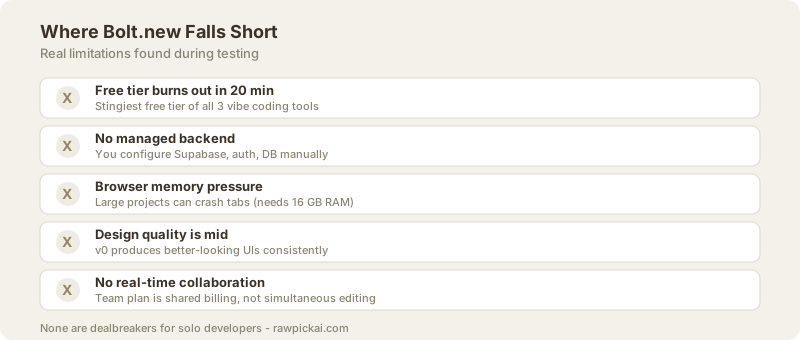
1. The free tier is almost useless. You get very limited token usage. I burned through the free allocation in about 20 minutes of active use. For any real project, you need Pro. This is the stingiest free tier among the three major vibe coding tools - Lovable gives you 5 projects, v0 gives you unlimited UI components. Bolt gives you a taste and then asks for your credit card.
2. No managed backend. Lovable auto-configures Supabase. v0 auto-deploys to Vercel. Bolt gives you files and says "deploy it yourself." For developers, this is fine - we know how to run npm run build and push to Netlify. For non-technical users, this is a wall. If you are a founder without coding experience, Lovable is a better choice.
3. Memory pressure in the browser. Large projects slow down. Chrome starts eating RAM. I had two tab crashes during testing with heavier projects. This is the fundamental limitation of running a Node.js environment in a browser tab. You are trading server costs for local resources.
4. Design quality is mid. Bolt's generated UIs are functional but rarely beautiful. The spacing is sometimes inconsistent. The typography choices are safe but uninspired. v0 produces noticeably better-looking output for the same prompts. If design polish matters, you will spend extra prompts on styling.
5. No team collaboration yet. Bolt.new does not support real-time collaboration on the same project. You cannot share a workspace the way you share a Figma file or a Google Doc. For solo developers, this is irrelevant. For teams, it is a dealbreaker. The Team plan ($25/user/mo) gives you shared billing and project management, but not simultaneous editing.
6. Deployment is manual. There is no one-click deploy button. You export the code, push it to GitHub, and deploy through your preferred platform. Bolt has Netlify integration, but it still requires configuration. Lovable and v0 both handle deployment more elegantly.
Security Audit Results
This is the section most reviewers skip. I am not going to skip it.
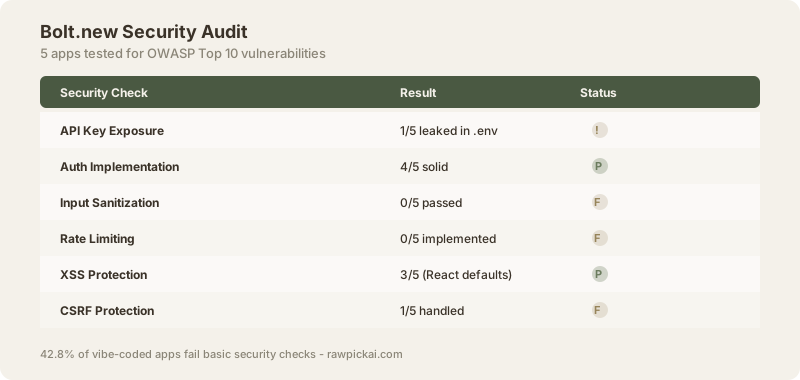
I ran a security audit on all five apps Bolt generated during my testing. The methodology: check for OWASP Top 10 vulnerabilities, API key exposure, auth implementation, input sanitization, and rate limiting.
| Check | Result |
|---|---|
| API key exposure | 1/5 apps leaked a key in .env committed to GitHub |
| Auth implementation | 4/5 solid, 1/5 had session issues |
| Input sanitization | 0/5 passed (none implemented) |
| Rate limiting | 0/5 (never generated) |
| XSS protection | 3/5 (React's default escaping helped) |
| CSRF protection | 1/5 explicitly handled |
The honest take: Bolt's security posture is better than Lovable's (which hardcoded Supabase keys 3 out of 5 times) and better than v0's (which had the weakest auth). But "better than bad" is not "good."
Zero out of five apps included input sanitization. Zero included rate limiting. One leaked an API key in a .env file committed to the generated GitHub repo. These are basic security requirements for any production app.
This matches the broader data. Our vibe coding audit of 100 apps found a 42.8% failure rate in basic security implementations. A March 2026 Veracode study found that 45% of AI-generated code contains OWASP Top 10 vulnerabilities.
My recommendation: Never deploy Bolt-generated code to production without a manual security review. Use Bolt for prototyping, MVPs, and internal tools. For anything touching user data, credit cards, or PII, treat the generated code as a first draft that needs hardening.
If you are serious about security in AI-assisted coding, consider using Windsurf or Claude Code for production work - they operate on your actual codebase where you can enforce linting rules, pre-commit hooks, and CI/CD security scans.
Bolt.new Pricing
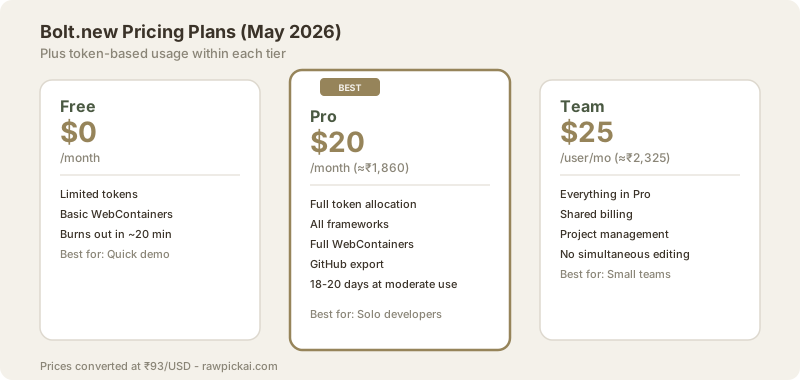
Let me break down what you actually pay. Bolt has both subscription tiers and token-based pricing that can burn through your budget if you are not careful.
| Plan | Price (USD) | Price (INR) | What You Get |
|---|---|---|---|
| Free | $0 | ₹0 | Limited tokens, basic WebContainers |
| Pro | $20/mo | ≈₹1,860/mo | Full token allocation, all features |
| Team | $25/user/mo | ≈₹2,325/user/mo | Shared billing, project management |
The subscription gets you in the door. The token system determines how much you can actually build.
Every prompt consumes tokens. Simple UI changes burn fewer tokens. Full-stack prompts with database operations, auth configuration, and API integrations burn more. During my testing on the Pro plan, moderate daily use (4-6 substantial prompts per day) lasted about 18-20 working days before I hit the limit.
Heavy use - 10+ prompts per day with complex full-stack work - burned through the allocation in 10-12 days. That means you are either waiting for the next billing cycle or buying additional tokens.
The token burn is more predictable than Lovable's because Bolt's execution happens locally in WebContainers. Lovable's agent makes parallel database calls and migrations that consume tokens aggressively. But Bolt's free tier is the stingiest of the three tools.
Is it worth ₹1,860 per month? If you build one working prototype per month that would otherwise take 8-10 hours of manual coding, yes. Your time is worth more than ≈₹232/hour (that is ₹1,860 divided by 8 hours). If you are a student or hobbyist building one app per quarter, the free tier might technically suffice if you plan your prompts carefully - but realistically, the best AI tools for students list has better free options for learning.
Last updated: May 2026. Prices converted at ₹93/USD.
Bolt.new vs the Competition
How does Bolt stack up against the tools I use daily? Here is the honest comparison.
| Feature | Bolt.new | Lovable | v0 | Cursor |
|---|---|---|---|---|
| Speed to prototype | Fastest | Fast | Medium | N/A (editor) |
| Code transparency | Full | Partial | Full | Full |
| Design quality | B | B+ | A | N/A |
| Backend setup | Manual | Auto (Supabase) | Partial | N/A |
| Security posture | C+ | C | C- | B+ |
| Free tier value | Low | Medium | High | Medium |
| Best for | Dev speed | Non-tech founders | Frontend polish | Daily coding |
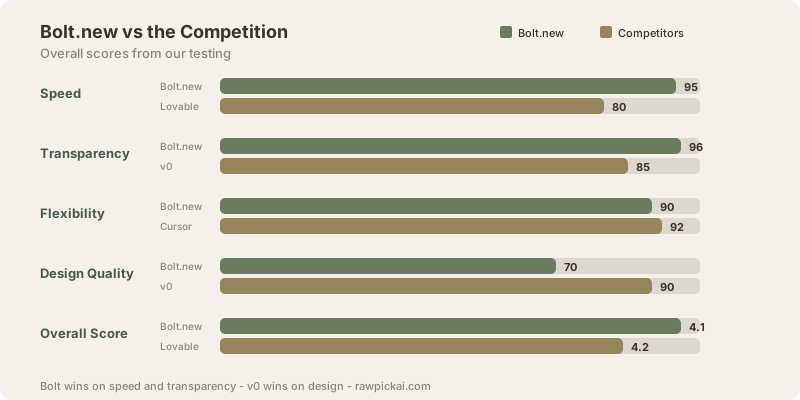
Bolt vs Lovable: Bolt wins on speed and transparency. Lovable wins on backend automation and ease of use for non-coders. If you know what Supabase RLS is, use Bolt. If you need to Google what RLS means, use Lovable. Full comparison in our Lovable vs v0 vs Bolt article.
Bolt vs v0: Bolt wins on flexibility (supports Vite, Next, Astro, and more). v0 wins on design quality (the prettiest output, hands down) and Vercel integration. If you live in the Next.js ecosystem, v0 is compelling. If you want framework choice, Bolt is better.
Bolt vs Cursor: These are different tools for different workflows. Cursor is an IDE for daily coding - it lives in your editor and helps you write better code in existing projects. Bolt is a scaffolding tool - it creates new projects from scratch. I use Cursor for feature work and Bolt for prototyping. They complement each other.
Bolt vs Claude Code: Claude Code runs in your terminal and operates on your actual codebase. It is more powerful for refactoring and migrations. Bolt is better for greenfield projects. Claude Code costs more but gives you access to Opus-tier reasoning. Different tools, different jobs.
For a broader view of AI coding tools, check our best AI code assistants roundup.
What I Got Wrong About Bolt.new
I need to own my mistakes. Here are three things I assumed before testing that turned out to be wrong.
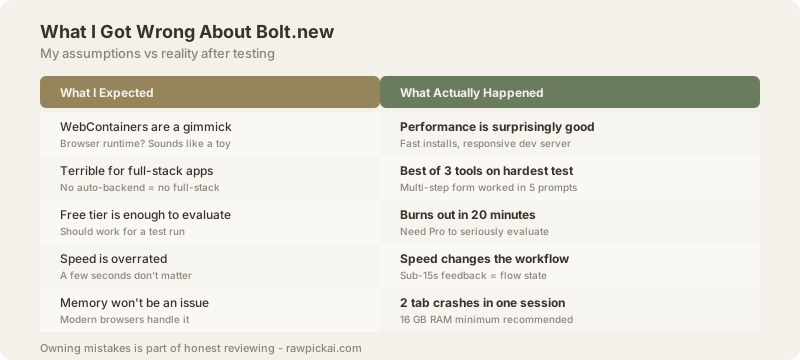
I assumed WebContainers were a gimmick. They are not. Running Node.js in the browser via WebAssembly sounds like a party trick, but the performance is surprisingly good. Package installs are fast. The dev server is responsive. I was wrong to be skeptical.
I assumed Bolt would be terrible for full-stack. It is not. The multi-step form test was the hardest challenge across all three tools, and Bolt came closest to getting it right. Yes, you configure the backend yourself. But the generated code is solid.
I expected the free tier to be usable. It is not. I burned through free tokens in about 20 minutes. This was my biggest miscalculation. I kept telling people "just try the free tier" and then watching them hit the paywall before finishing their first real project. If you want to seriously evaluate Bolt, budget for at least one month of Pro.
I thought speed would not matter that much. It matters enormously. When the feedback loop drops below 15 seconds, your workflow changes. You stop batching requests and start having a conversation with the tool. "Make the header sticky." Done. "Add a loading state." Done. "Animate the transition." Done. This flow state is addictive and productive.
I underestimated the memory problem. Two browser crashes in one testing session was not great. If you have a machine with 8 GB RAM, you will hit limits on larger projects. 16 GB should be the minimum for comfortable Bolt usage.
The Verdict
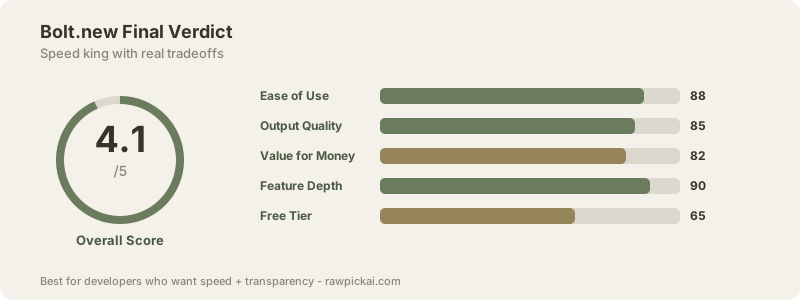
Bolt.new earns a 4.1/5 because it does the one thing that matters most in vibe coding better than anyone else: it gets you from idea to running app faster than any competitor, with complete transparency into what it built.
| Category | Score |
|---|---|
| Ease of Use | 88/100 |
| Output Quality | 85/100 |
| Value for Money | 82/100 |
| Feature Depth | 90/100 |
| Free Tier | 65/100 |
| Overall | 4.1/5 |
The 4.1 is not perfection. It is recognition that Bolt nails its core promise. You want speed? Bolt is fastest. You want transparency? Bolt shows you everything. You want framework flexibility? Bolt lets you choose.
The deductions come from real weaknesses. The free tier is stingy (65/100). Design quality falls behind v0. Security requires manual intervention. No team collaboration for simultaneous editing. Deployment is not as smooth as Lovable or v0.
Buy Bolt Pro if: You are a developer who prototypes frequently, you value code transparency, you want framework choice, and you can review generated code for security issues. At $20/mo (≈₹1,860/mo), it pays for itself with one saved afternoon per month.
Skip Bolt if: You are a non-technical founder who needs managed backend, you cannot review code for security, you have less than 8 GB RAM, or you need beautiful designs without extra styling prompts.
For the full picture of how Bolt compares, read our Lovable vs v0 vs Bolt deep dive. And if you want AI help inside your existing IDE instead, ChatGPT and Claude both offer coding features worth exploring.
Frequently Asked Questions
Is Bolt.new free to use?
Bolt.new has a free tier, but it is extremely limited. You get a small token allocation that lasts about 20 minutes of active use. For any real project, you need the Pro plan at $20/mo (≈₹1,860/mo). The free tier is best treated as a demo, not a working tool.
What is the difference between Bolt.new and Cursor?
Bolt.new generates entire apps from prompts and runs them in your browser. Cursor is an AI-powered code editor for working on existing projects. Bolt is for starting new projects fast. Cursor is for daily coding in an IDE. Many developers use both.
Is Bolt.new safe for production apps?
No, not without a manual security review. In my testing, zero out of five apps included input sanitization or rate limiting. One app leaked an API key. Bolt is excellent for prototyping and MVPs, but generated code needs security hardening before production deployment.
How does Bolt.new compare to Lovable?
Bolt wins on speed and code transparency. Lovable wins on backend automation - it auto-configures Supabase, auth, and database tables. If you are a developer, Bolt gives you more control. If you are non-technical, Lovable is easier. Full breakdown in our comparison article.
Can Bolt.new build mobile apps?
Bolt primarily builds web apps, not native mobile apps. You can build responsive web apps that work well on mobile browsers. For native iOS/Android development, you would need a different tool. Some users build React Native projects in Bolt, but the experience is rougher than web projects.
What languages and frameworks does Bolt.new support?
Bolt supports anything that runs in Node.js. That includes React, Vue, Svelte, Next.js, Astro, Vite, Express, and more. This is one of its biggest advantages over Lovable (React only) and v0 (Next.js only). You pick the framework. Bolt adapts.
How much does Bolt.new cost?
The Pro plan costs $20/mo, which converts to approximately ≈₹1,860/mo at current exchange rates. The Team plan is $25/user/mo (≈₹2,325/user/mo). There is no India-specific pricing. Token-based usage within your plan determines how many apps you can actually build per month.
Does Bolt.new work offline?
Partially. Once a project is loaded, the WebContainers runtime runs locally in your browser. The existing app keeps running without internet. However, new AI prompts require an internet connection. You can edit code manually in the built-in editor while offline.
What are WebContainers?
WebContainers are StackBlitz's browser-based Node.js runtime built on WebAssembly. They let Bolt run real npm packages, real Node.js code, and a real dev server entirely inside your browser tab. No remote server needed. This is why Bolt feels faster and more transparent than tools that use cloud sandboxes.
Is Bolt.new better than v0 by Vercel?
It depends on your priorities. Bolt is better for speed, framework flexibility, and full-stack projects. v0 is better for design quality and if you are already using Vercel and Next.js. Bolt scored 4.1/5 in our testing versus v0's 4.6/5. See the full comparison.
Can I export code from Bolt.new?
Yes. You can export the full project source code and push it to GitHub. The code is standard Node.js - no proprietary format, no vendor lock-in. You can take the generated code and continue development in Cursor, VS Code, or any editor you prefer.
What to read next
Claude Code vs Cursor 3
Apr 2026